- NewspaperAdding Multiple Authors to Your Articles
- NewspaperAuthor Card
- NewspaperMore articles box
- NewspaperIntroduction to CPT and ACF with Newspaper Theme
- NewspaperUser review system
- NewspaperCustom Fields Support
- NewspaperFlex Block Settings Guide
- NewspaperPosts Loop Element
- NewspaperSingle Post Shortcodes
- NewspaperCloud Library Templates
- NewspaperBig Grid Flex Settings
- NewspaperDesign your post pages using the Default Templates
- NewspapertagDiv Cloud Library Plugin
- NewspaperHow to Set the Image Avatar
- NewspaperThe Mobile Theme
- NewspaperReviews
- NewspaperTheme Colors Introduction
- NewspaperGlobal settings
- NewspaperMega Menu
- NewspaperChild Theme Support
 Vlad S
 Hello !
That is the author avatar. You can remove it using this code: .author-box-wrap .avatar {
display:none;
}
The code must be inserted in here: https://www.screencast.com/t/s61BcemS2eW
Thank you !
 Nagarig
 But it means I can not customize the sidebar or author box? Do I have to use the default post template only for posts?
Please, you can join our conversation with Plugin Author here> https://wordpress.org/support/topic/huge-review-box-on-top-problem/
If this problem is solved, then I can use newspaper without any worry.
 Calin
Calin Hi,
Yes, this will be display automatic in author box if the author have set the email -> https://i.imgur.com/sZPRPJZ.png -> https://i.imgur.com/pUBESAm.png -> https://forum.tagdiv.com/author-card/
Thank you!
Nagarig Update> Plugin author said it is definitely because of theme and to ask you if you have hooks to disable post content in the header and footer. Wherever the post shows, the review box will show.
 codeofarms
Hello,
Is it possible to show an email icon along with the other “social” icons in the author box?
Thank you!
 ttz
ttzHi,
On the mobile theme with AMP in the author box How can I reduce the space between the top frame line and the author name?
https://www.screencast.com/t/cVekQeABMx0
It’s possible that this space is for the avatars, but I do not use them. I tried to set to not show avatars at the settings/discussion/Avatar Display/Show Avatars, but the system dose not save it.
Is there any other settings that can reduce this space?
Thank you!
Nagarig I want to keep mobile theme for speed. But i just want to remove the Author box from post.
 samrfilter
Hello,
Please check this URL: https://bogo19.com/aamir-khan/
I dont want to show author name, date, author Social Media link, Author page. I dont required That author box. I have disable from Template POST SETTINGS >POST AND CUSTOM POST TYPES. Yet, Author Box showing in above URL. waiting for your suggestion.
Regards
SK Saurav
Calin Hi,
This -> https://i.imgur.com/2mBkQGJ.png is not a theme element is coming from a plugin -> https://i.imgur.com/gE111Lv.png you need to find that plugin and check the settings that is using, to make sure that is a plugin conflict, please deactivate ALL plugins except tagDiv plugins, also if you are using child theme or cache plugin, deactivate them, clear all cache and try again.
If you do not want to remove that plugin and you only want to hide the author from the category page, you can use a custom css -> https://i.imgur.com/sviuwGl.png
.category .saboxplugin-wrap{

  display: none;

}
The code need to be set in theme panel> custom code> custom css.
Hope this will help you!
 ludyma
 Hello, the problem with the author box is that it comes out in all the categories measured or personalized with the source of the cloud that is displayed, there is the category so that you can see that in the end the author box comes out and it should not, since it is not a Article.
tecnplogy

 Nagarig
How to edit Post Template for Mobile Theme? I want to remove the author box from Post template of Mobile Theme.
NagarigI have removed the author card/box from post template. But just in case I want to use it for the selective posts, how to edit it?
ludymaHi.
I have created categories from 0 and at the end of all I get my author box, as I do so that it does not appear in the created categories.
 newspaper-user
 Hi !
I have applied these settings with TagDiv composer but issue is still there. Author Box is not hidden in Mobile Theme and AMP even after choosing Hidden in CSS as it is can be seen in the image.
Suggest some other options to hide Author Box in Mobile Theme and AMP.
Thanks !
newspaper-userHey
I want to remove the author box from my website (infotonline.com) now. I got the option to remove Author Box from Desktop theme using Tagdiv Composer. But I haven’t got the option to remove author box from single posts.
You can open any posts of website, you’ll find a large author box after the article. So, how can I remove this box from my website in AMP theme as well as Mobile Theme without using TagDiv Standard Pack. We haven’t installed TagDiv Composer so suggest other way to remove this box.
I have attached the image of Mobile Author Box. https://ibb.co/mt3nyxT
Thanks !
ludyma Hello.
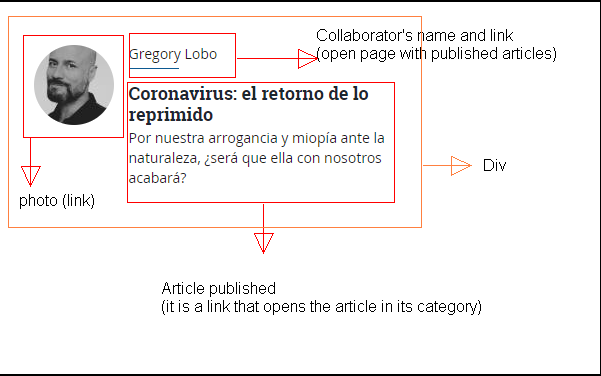
I want to create a page where the columnists who write only for them come out as in web 1 I sent you previously, they would only come out with their photo, name and summary of the entry on this page, if you click on the name of the colmnista you go to another page and not category, on the new page will be the columnist and his articles published by him. I am not a programmer, designer nor do I have knowledge in html nor in php, but I have managed to do it, the problem is that due to the mobile theme, the new changes do not appear, only load the old category, I leave you the link of what that I have made and you will see that it is not on the mobile theme.
columnist page
I also do not know why the theme does not adapt to mobile devices when I deactivate mobile theme and AMP, if you can help me improve that aspect. I previously commented on it.
The other problem is how I make the authors of the columns in their author box go to the page of their columns and not all their published articles, one option is that the author box will not be shown at the end of their columns. Take the test, go to a columnist and mark an entry at the end the author box will appear and if you hover the mouse over the photo you will see that it directs you to another site and not to your columns.
Vlad S Hello !
The author box content is picked up from wordpress, users setting.
Thank you !
Calin Hi,
Usually the website is boxed when you have set a background image or color in theme panel -> https://i.imgur.com/wsoK8Al.png -> https://i.imgur.com/Hl4egda.png
The simplest way to achieve a full width is to use a template from tagDiv Cloud Library. There is no one single button push. You have to import a post style and set it as the default post template in the theme panel post settings, then you need to import a category template that is full width and set that one as the default category template. The same for tags, author pages etc:
https://forum.tagdiv.com/tagdiv-cloud-library-plugin/ also for pages (stretch row and content ) https://www.screencast.com/t/i8SQ5eS4 .
Please read similar topics:
-> https://forum.tagdiv.com/topic/force-full-width-on-categories-post-grid/
-> https://forum.tagdiv.com/topic/homepage-full-width-content/
Thank you!
 DiegoBrands
As title states, how do I edit the writing in the author box on my posts?
 ants
antsHello,
1. We had a very odd problem, when use author box shortcode always show admin role’s info not the author’s who published. But other author related shortcodes are correct like ‘Single Post Author’.
2. “Single More From Author” shortcode is cuted out in 10.3.2 version? It shows in 10.3.1, can not be found in 10.3.2
 Josan
JosanHello, I suggest you to update your mobile theme. It has still same design since it was launched and seems quite outdated compare to many other websites.
Also please add more customization to mobile theme which allow us to show or hide features like Comment, author box, etc.
Thanks
EDIT: I forgot to update about my problem of mobile version showing on tablets. I deactivated and reactivated Tagdiv mobile theme plugin and now its working fine.
 SquallSFU
 Hi guys, is it normal that some settings in Theme Panel are not applied? For example:
– In Social Networks, I set mine, but in the site menu I see others;
– In Post Settings, I have disabled “Show date”, “Show author box” etc. but they continue to appear in the post pages;
– In Ads, I customized “Ad title” in all ads, but “- Advertisement -” continues to appear on the site.
Why? Am I leaving something out?
 Fabrice
Hello. Since I update to the new version, the single post page and author box pages no longer work correctly. I downloaded a template from the library cloud. it appears correctly in the builder but in production, the sidebar does not appear and the text is full screen. On single pages, the sidebar appears below the main text and that the layout is not respected. I have disabled unimportants plugins to testing but that doesn’t change anything. Can you help me please ?
My website : https://www.421chevaux.com/
 WhiteMoth8259
Hi there,
I want to edit the author box (about us picture) in my SIDEBAR but I can not edit it through TD Composer and I can not find the function to change or upload a picture in the widget neither. I use the Baby Blog template. Can you help me please?
ludyma Hello, how can I create a new block in the TD Composer?
The block that exists is this Authors box.
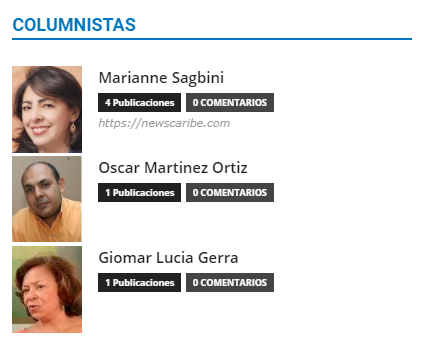
I want to create one like this.