- NewspaperFlex Block Builder and Flex Loop Builder
- NewspaperHow to use the Flex Blocks cache option
- NewspaperHow to edit modules for Flex Block X
- NewspaperHow to insert a block inside the content of a post
- NewspaperFlex Block Settings Guide
- NewspaperMeta Info on Modules and Blocks
- NewspaperTheme modules and blocks
- NewspaperThumbnails – Fix strange looking images on blocks
- NewspaperBlock settings tutorial
- NewspaperCategory Tag on Modules/blocks
- NewspaperWP Rocket and Newspaper Theme: Optimization Guide
- NewspaperSearch setup for custom post type
- NewspapertagDiv Opt-In Builder – Emails
- NewspaperBookmark – Save For Later
- NewspaperModules Builder in Newspaper Theme
- NewspaperFilters and sorting for taxonomies
- NewspaperUser review system
- NewspaperWooCommerce: Happy “Add to Favorites!”
- NewspaperLockers
- NewspaperLeads
 ianabroad
I am frustrated as I can’t seem to see how to edit the content inside the single post template default pro. It should be the simplest thing to do but it seems that there are only styling options available and nowhere where I can edit the pre-formatted content.
I have rolled back Newspaper to the previous version and disabled many plugins But still no where to see how to replace the content. I know that I can add fresh blocks but I want to edit the template that I have imported.Am I missing something obvious?
Ps see attached screenshot
https://app.screencast.com/TECKDo9LKAm9Z
 urbandigital
 Hey Bettina,
Block Header 2 works but I have the following problem with this way:
It would to much time to change everything on the site manually
I dont want the line below the title, so I need block header 12 for my design.
Why doesn’t it work with this update? Will you be able to make it work for the next update again? Then I would skip this update.
Thanks,
Dimitri
 Bettina
  Calin
Calin Hi,
“And I need another help with the category page section category header color change. How to do that. https://prnt.sc/aULGynP4Ihln”
For the category block titles you can try this custom css:
.category .td-category-header .entry-title span{

color: white;

background: green;

}
The tagDiv Composer can be used on Newsmag only on page = https://forum.tagdiv.com/tagdiv-composer-tutorial-2/ the rest of templates and options are in the theme panel – https://i.imgur.com/SaLqRwt.png
Thank you!
 mnasir129
 Hi,
I managed to block this page from Cloudflare. Some of the IPs are getting blocked which are trying to access this page. Surprisingly, few of them are passing for the same URI as I can see the hits.
https://hikinginsights.com/wp-json/tdw/save_css
80.82.78.133
/wp-json/tdw/save_css
2/20/24, 11:59 AM
226
 giuseppe39
hi,
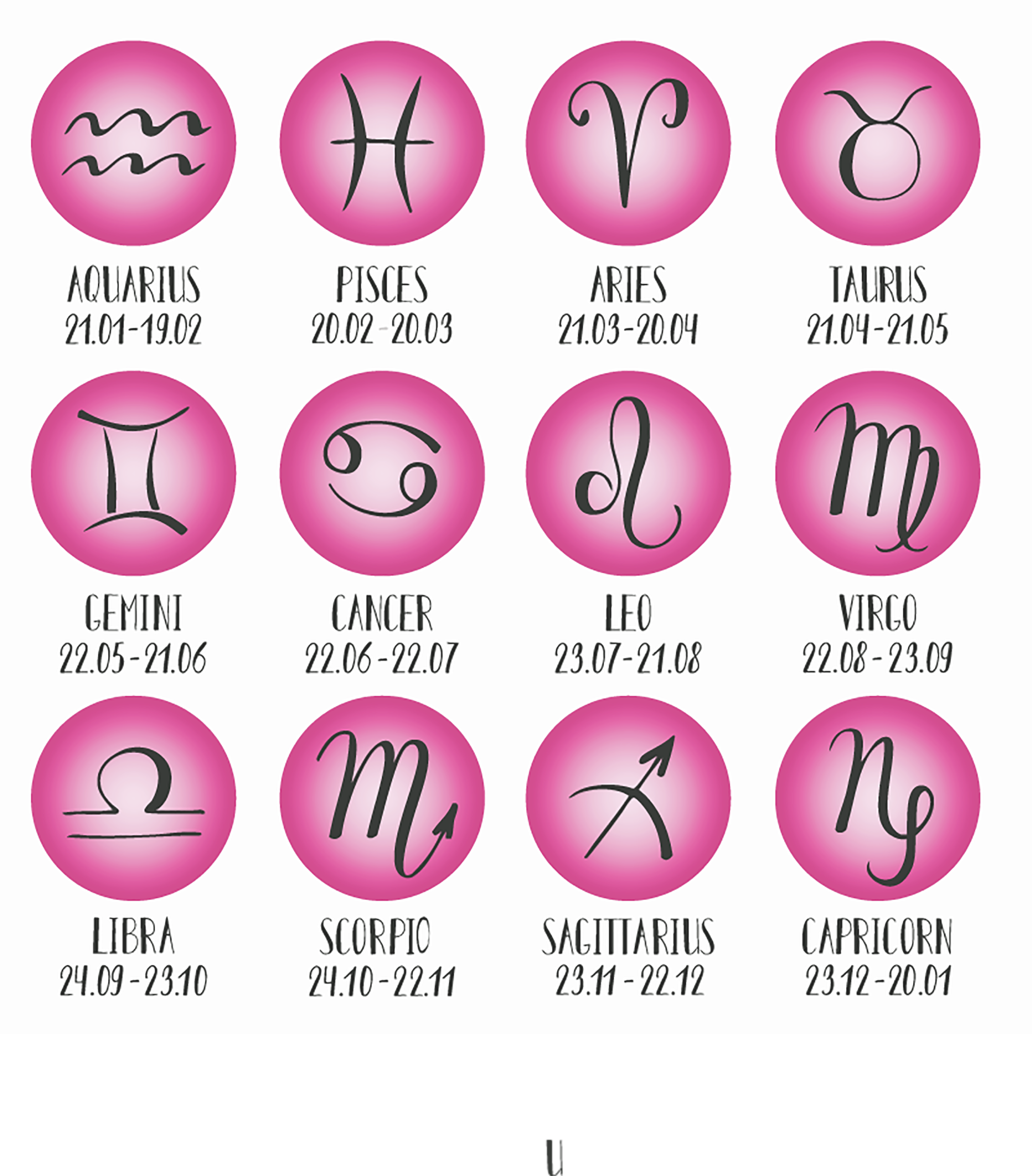
could you help me to create an astrology widget like this to put on the sidebar?
I cannot find plugins that do this.
Or maybe there are some tagdiv blocks that could be shaped to create something like that?
When I click on the single image it should go into the sub category,For example: horoscope->Aries where to find the last article page for this subcategory
thanks
 Anamaria
 Hi,
In order to make them to look the same size, you’ll need to set an excerpt on title and post content like this -> https://i.imgur.com/o8UQm5B.png
Also, you can set the excerpt on words or letters from theme panel -> https://i.imgur.com/c7Q8ckX.png
Here is a similar topic -> https://forum.tagdiv.com/topic/flex-block-1-and-same-blocks-height/
Thank you!
Bettina Hello!
If you use cloud templates, then edit the page with the TagDiv Composer, click on the module, and check the settings to see if the category is set to be shown or not.
Or else, if you use default templates, then please check in the theme panel -> Block Settings -> Category tag on Modules/Blocks if the option is enabled for the modules you’re using and want to display the category tag.
Thank you!
Bettina Hello!
We’ve discussed about Flex Loop filter element. So, you should add taxonomies there.
Check these guides for more information:
– https://forum.tagdiv.com/filters-sorting-taxonomies/
– https://forum.tagdiv.com/introduction-cpt-acf-newspaper-theme/
– https://forum.tagdiv.com/custom-post-type-support/
Check this guide: https://forum.tagdiv.com/flex-block-settings-guide/ and the special filter I mentioned above. Also, you can read more about post loop element: https://forum.tagdiv.com/posts-loop/ This is the normal way to display the posts in your categories.
Thank you!
Bettina Hello!
This could be possible if you have the CPTs with these taxonomies.
By default, you can filter the posts with the help of a flex block with the “Author Template: Author – Current author” filter; (you should place the shortcode in an author template). Or just add a post loop element in the author template.
Thank you!
Bettina Hello!
I’m sorry, but I’m confused because you wrote a comment saying that you can see the screens: https://app.screencast.com/YX6AEoNSnqvfQ
The option is called show terms count in the flex loop filter element.
You should write “category” on the taxonomies, check the multi option, and add a block that displays the results of the filter you chose, called “Flex Loop.”.
Thank you!
Calin Hi merson, that section is referring to the latest articles and is coming from the page template – https://i.imgur.com/SAHBYCu.png – https://forum.tagdiv.com/newsmag-page-templates/ therefore it can be edited only with css, you can try this one for the category:
.page-template-page-pagebuilder-latest .td-pb-article-list .td-post-category{

  color: black;

  background: red;

}
This one for block title
.page-template-page-pagebuilder-latest .td-pb-article-list .block-title{

  color: black;

  background: red;

}
And this one for the read more –
.page-template-page-pagebuilder-latest .td-pb-article-list .td-read-more a{

  color: black;

  background: red;

}
The code should be set in the theme panel > custom code> custom css – https://i.imgur.com/hTdVp8n.png
I hope this will help you!
Thank you!
mnasir129 Regarding wordfence, I don’t have that plugin license so I am not sure if that can help if i purchase it. Do you suggest any more changes like disabling more features/plugin etc please until IP blocking issue is resolved ?
mnasir129 Thanks for the update. I have been doing changes and checking the hits but unfortunately I am still getting the hits even though i blocked the URI (/wp-json/tdw/save_css
) from cloudflare as per the screenshot. I even tried different variation(like URI, URI path, full URI etc) to make sure i am not making any mistake but it did not help.
Also my hosting provider is still not able to figure it out why hackers IPs are not getting blocked. Surprisingly when I block my own IP, it works so its very strange.
I also made couple of more changes as per below blog post suggestion:
 waleed9
 I also didn’t understand the story of the colors
Is there no basic color for the theme?
I can change it and the whole site becomes one color, black
I find this method of changing the row and the colors of the blocks inside difficult
Then how do I restore the previous default colors? I find it dangerous
Then there are lines and shadows that change all this without knowing how to control it or make it dangerous
Anamaria Hi,
Have you tried blocking them with wordfence? Something like this would work – https://prnt.sc/1V-dHi7xTQXk But it may take some time until all the URLs are blocked, as they keep changing most likely. Eventually they will all be blocked however and the attack will stop.
I think it could be done from cloudflare as well, if you use cloudflare. That URL can be blocked like this for example – https://community.cloudflare.com/t/possible-to-block-specific-page-access/106765/3 In case you are using cloudflare, this would be a very good solution because cloudflare will block them before they reach the website. But in case it isn’t possible to set up cloudflare, the wordfence method will work as well. Please try it as soon as possible.
Thank you!
Calin Hi DJ Promotion, the mentioned situation are because the smallest thumb of image is 300×194 but the flex blocks you have are configurated on a place that provide under that width size per module, normally the thumb 300×194 should be used to display 2 modules side by side or 3 when the sidebar is not used.
For the logo the recommended size is 272×90 because this is the size that will display correctly on most of the theme header, but this will also be adjusted after the sticky menu width adjusted for logo.
Thank you!
 marcbaurier
The block editor frequently breaks when we edit posts. This happens especially when entering categories and images, but also with normal blocks
Bettina Hello!
Sure. Use multiple blocks and change the background color as you like in the tagdiv composer. Also, you can add a block to each row and change the background color of the row. Another way to achieve this is to use custom modules and customize them as you like (so they can be different). Read the useful documentation here:
– https://forum.tagdiv.com/flex-block-settings-guide/
– https://forum.tagdiv.com/offset-feature/
– https://forum.tagdiv.com/modules-builder-newspaper-theme/
Thank you!
mnasir129 Hi there,
Thanks for the update. Yes i have the latest theme version (Newspaper Version: 12.6.4). Also i have disabled the live css by commenting the highlighted code.
Blocking Ip is also not working surprisingly for those IPs where he is hitting that service and I am checking that part with my hosting provider.
But since hacker is still hitting that page, can he do some damage to the site or sniff on any critical information like credentials etc?
Anamaria Hello,
Can you please provide the link to your website?
I think that a plugin adds the newsletter, like the MailPoet plugin.
If you want to delete a row, you can delete a row with the empty column using the right-click on the row icon -> https://i.imgur.com/JodWvlW.png -> https://i.imgur.com/e6bb8U5.png or using the drag and drop or you can click on the row and press the delete button from your keyboard -> https://www.screencast.com/t/Mai7iyEG The same steps are to delete the elements.
I don’t recommend using an amp because it is deprecated. Also, use cloud templates and flex blocks instead of the templates from the theme panel and blocks 1-25 or big grid blocks.
We’ve analyzed the website and observed that you have many JavaScript scripts https://i.imgur.com/Z6xRj74.png, which should be minimized to achieve a good score. To achieve this, we recommend WP Rocket to minimize the resources.
Thank you!
 MonkeyByte
Hi Friends,
The latest update of the Newspaper theme has caused our post pages to render inside what looks like a frame and it is throwing these two errors:
Warning: require(/home/customer/www/thevalley.life/public_html/wp-content/plugins/td-standard-pack/Newspaper): failed to open stream: No such file or directory in /home/customer/www/thevalley.life/public_html/wp-includes/comment-template.php on line 1618
Fatal error: require(): Failed opening required ‘/home/customer/www/thevalley.life/public_html/wp-content/plugins/td-standard-pack/Newspaper/’ (include_path=’.:/usr/local/php74
Anyone have an idea about what happened or have dealt with this before?
Here is a link to one of our post pages:
https://thevalley.life/fire-doused-at-redwood-road-nail-salon-2/
Theme is not throwing errors for any other pages on the site. We have comments turned off throughout the site. The theme is a recent install. Updated to Version: 12.6.4. All plugins up to date and none that are ‘specialized’ beyond the theme standards.
 ICONS
ICONSHi,
I would like to add new blocks to an existing page on https://www.waterforum.net, but whatever I do, nothing happens. So I can ‘pick up’ a block, hover above the correct location but no success whatsoever. Already updated everything and deactivated all plugins except 3 Tagdiv modules but that didn’t help either.
Thanks
 newspatron
 I have installed both plugins required for the AMP mobile theme to work.
I am primarily concerned about the following –
how can tweak the mobile amp page of the home page that is auto-generated.
For example how can I remove the burger menu in the menu in the amp mobile version of the home page.
Page URL testing site
https://staging-5416-newspatron.wpcomstaging.com/?amp
Screenshot
here is a link to screenshot for mobile menu
https://drive.google.com/file/d/1VKaIacwfc69Fothmfb2pGs6ugpjwljKj/view?usp=sharing
Ideally for the mobile amp home page I would ideally prefer a menu similar to something that is similar to the home page menu(non amp) or webversion. OR menu that has blocks something that looks similar to the social menu at the footer. OR the menu below the social footer. please see screenshot.
https://drive.google.com/file/d/1uJDgiNNWYfIGow6-sWTsSEP4NYhxW50H/view?usp=sharing
To be precise I am considering replacing the burger menu as it looks clutter when clicked due to the large number of elements involved.
Please let me know about this so that I can proceed with the live changes.
Ameet
newspatron Thanks i was able to that and remove the undesired post block. Let me know from where the email block subscribe block could be removed for the home page or page[s].
I want to keep the email subscriber block to keep appearing as normal below the posts.
One more thing I want to learn is how to remove the unutilised blocks or empty blocks from the home page.
please let me know how to do that.
Also please advise me how to make the website load within 2 seconds. I am trying to place simple elements all around the website starting with the home page.
Only after the site loading speed is optimized the next goal could be achieved.