- NewspaperFlex Block Builder and Flex Loop Builder
- NewspaperHow to use the Flex Blocks cache option
- NewspaperHow to edit modules for Flex Block X
- NewspaperHow to insert a block inside the content of a post
- NewspaperFlex Block Settings Guide
- NewspaperMeta Info on Modules and Blocks
- NewspaperTheme modules and blocks
- NewspaperThumbnails – Fix strange looking images on blocks
- NewspaperBlock settings tutorial
- NewspaperCategory Tag on Modules/blocks
- NewspaperWP Rocket and Newspaper Theme: Optimization Guide
- NewspaperSearch setup for custom post type
- NewspapertagDiv Opt-In Builder – Emails
- NewspaperBookmark – Save For Later
- NewspaperModules Builder in Newspaper Theme
- NewspaperFilters and sorting for taxonomies
- NewspaperUser review system
- NewspaperWooCommerce: Happy “Add to Favorites!”
- NewspaperLockers
- NewspaperLeads
 ingriddurupt
Hi,
I imported a template.
I don’t see the bocks but only code :
[vc_row full_width="stretch_row_content_no_space td-stretch-content"][vc_column][td_block_big_grid_fl_3 td_grid_style=”td-grid-style-4″ tdc_css=””][/vc_column][/vc_row][vc_row][vc_column width="2/3"][td_block_18 custom_title=”SANTE” category_id=”17″ sort=”random_posts” limit=”” ajax_pagination=”next_prev”][/vc_column][vc_column width="1/3"][td_block_social_counter facebook="Bienvivrelamenopause " instagram="Bienvivrelamenopause " tdc_css=""][vc_column_text]
If I cick on convert to block I still get code text :
[vc_row][vc_column width="2/3"][td_block_18 custom_title=”SANTE” category_id=”17″ sort=”random_posts” limit=”” ajax_pagination=”next_prev”][/vc_column][vc_column width="1/3"][td_block_social_counter facebook="Bienvivrelamenopause " instagram="Bienvivrelamenopause " tdc_css=""][vc_column_text]
<div align=”center”>
[/vc_column_text][/vc_column][/vc_row]

 xBuby
xBubyHello, my category page have a block POST LOOK, and pagination look like not working, it ever load the first posts. I did try to change pagination type from NORMAL NUMBERED , to NEXT PREV AJAX and etc.. but have same results
xBuby The problem is that:
i add the block called : TEXT WITH TITLE
on left side pannel i push the button EDIT CONTENT
it open a popup with loading icon and keep going…
so i checked the dev. console and the error is reported on my first post
i did add the code on my .htaccess but had any effect .. still have the problem
 Anonymous
 Oh, believe me: it’s very normal for you guys to leave costumers websites with issues… I have two open topics that I asked for a fix and did not receive it (the “fix” proposed to me was to wait for the developers to fix it..)
For that reason I am not willing to fix the slide element bug for now, as I’ll wait for an upcoming update to try this element again… I am not in the mood to engage in a conversation trying to solve an issue, to, one week later, receive an answer like that: “I have passed this topic to our developers and they will take a look at improving the theme in the next updates.” or “I have checked and this seems to be on our developers to do list.“, as seen here: https://forum.tagdiv.com/topic/avoid-non-composited-animations/
And, trying to receive an answer for the question I asked, I’ll reformulate it:
I am willing to put a slider in my homepage, but I don’t know where to begin… What are my options to achieve that, either via TD Composer blocks, TD Cloud elements, or external plugins?
Thank you!
 greenbooks
Hi
How can I remove/reduce the space between the post blocks…
Please review: https://prnt.sc/xky84n
The white space between rows —
Regards
 rsaldua
I created a news article post and supposedly right after the MORE Articles Like This content block, I should be seeing the footer already. Instead I am seeing other articles from other categories displaying and fully readable. How can I disable or hide those other articles from a single post?
 shyam shukla
https://theglobaltimes.net/
header and footer gets deleted automatically  [
[
[tdm_block inlint_text description]
 RAJDEEP DAS
 this is the way that Newspaper Theme has been built
That’s why I brought this to your notice. So, that you can understand from this and bring this to the Newspaper theme.
ingriddurupt Hi,
I desactivated the classic editor to use gutemberg.
How can I modify the home page ? I don’t see the blocks like I would with WP Bakery.
 TAPA-GLOBAL
 Hi Bettina,
It seems that the issue occurs whenever i edit font sizes, line heights and add CSS margins in landscape and portrait viewport. So now i only edit desktop and mobile and it it is working well.
Currently, I am encountering another situation where my header and footer have gone missing and this is shown on the bottom of my page:
[tdm_block_inline_text description=”VEFQQSUyMEFzaWElMjBQYWNpZmljJTIwU2VjcmV0YXJpYXQlMjBPZmZpY2UlMEFjJTJGbyUyMEFMTFBTJTIwQ29uc3VsdGFuY3klMjBMTFA=” description_color=”#eaeaea” f_descr_font_size%
Could you advise what is the issue and how I can fix it?
Thank you,
Jasmine
 Bettina
 Hello @huynhlekien!
Please try to add this CSS code:
.wp-block-image .aligncenter>figcaption {

    display: block !important;

}
You should add this code in Newspaper -> Theme panel -> Mobile Theme -> Custom code.
Let me know about your results!
Thank you!
 Anamaria
 Hello,
You have a Pro Prebuilt Website, you can change the font on each block on your site with tagDiv Composer => https://www.screencast.com/t/iim0nbMu -> https://www.screencast.com/t/VkgK1ubFO
You can check this guide for more information -> https://www.screencast.com/t/jujN3kvF -> https://forum.tagdiv.com/font-customization/
Hope this helps you!
Thank you!
 Vlad S
 Hello !
Yes, you can do that with blocks. Add 4 blocks and set the filters independently as you can see here: https://www.screencast.com/t/Pst2VwkM On the flex block 3 the filter options will apply over the whole block.
Thank you !
Vlad S Hello !
Thank you for your suggestions ! This have been added on our suggestion list. For 4: Please use this code: .td-scroll-up-visible {
display:block;
}
The code must be inserted here: https://www.screencast.com/t/0bhIpr8R
Thank you !
Anamaria Hello,
For make inline the images from the table, you can use this custom code
.single .wp-block-table img {

    display: inline-block;
}
The code need to insert in Theme Panel -> Custom Code -> Custom CSS => https://www.screencast.com/t/FbLXZc7D6s
It will appear like this => https://www.screencast.com/t/KD0Dnsna
Hope this helps you!
Thank you!
 kuska
kuskaMy filters are set to a category or subcategory (never mind) and the sort order is set to -Latest- but it doesn’t show the latest posts. In fact it shows some post from the beginning of January. The date of modification doesn’t justify that as well. There’re already newer posts assigned correctly to a given category. Not sure what happened. It’s the problem with just two flex-blocks 2 on the site.
Vlad S Hello !
This feature is only for gutenberg. This can’t be coded in. As you can see here too: https://yoast.com/the-block-editor-gutenberg-why-you-should-be-using-it/ SEO Yoast suggests to use Gutenberg and that’s why their are focusing.
Thank you !
 Topfgartenwelt
Dear TagDiv-Team, I have a big problem with a plugin. Until now I was using the Newspaper Ad-Placeholders on desktop and mobile theme. But here is no option to block certain referrers for AdSense Ads which is always leading to deductions in the earnings because of invalid clicks. AdSense doesn’t want traffic from Social Media, but I run a blog and so I have traffic from Social Media too.
Because I’m using a server-side caching I should configure the plugin so that the dynamic blocks are inserted client-side. But if I use this function there is always a CLS measured although on desktop layout as on mobile layout. It’s the same thing if I want to use an wrapper for the desktop ad and put the wrapper into the ad slot of the TagDiv-Composer. Why this is happening? How can it be avoided?
Greetings Kathrin
Anamaria Hello,
If I understood correctly, you want to filter each module separately, this option is not possible.
The filter is applied to the block/grid. Therefore it will apply all modules from that block.
Thank you!
 pikirandotco
well i have 4 category and i want each grid/block display difference category, is it possible to do it ?
Bettina Hello!
Please, check this topic: https://forum.tagdiv.com/topic/flex-block-1-and-same-blocks-height/
Your element is called “Posts Loop”.
Hope that helps you!
Thank you!
xBubyHello i just install Newspaper theme (last version fo course) and when i try to add Contente in a text with title block i have this error:
wpeditor.php:310 Uncaught ReferenceError: tdConfirm is not defined

(anonymous) @ wpeditor.php?wp_path=/home/evosoftw/laltrariva.net/:310

wpeditor.php:1761 Uncaught ReferenceError: jQuery is not defined

(anonymous) @ wpeditor.php?wp_path=/home/evosoftw/laltrariva.net/:1761

wpeditor.php:1791 Uncaught ReferenceError: jQuery is not defined

(anonymous) @ wpeditor.php?wp_path=/home/evosoftw/laltrariva.net/:1791

(anonymous) @ wpeditor.php?wp_path=/home/evosoftw/laltrariva.net/:1897

mce-view.js:772 Uncaught TypeError: Cannot read property 'shortcode' of undefined

(anonymous) @ mce-view.js:772

plugin.min.js:1 Uncaught ReferenceError: getUserSetting is not defined

onPostRender @ plugin.min.js?wp-mce-49110-20201110:1

a @ plugin.min.js?ver=49110-20201110:1

c.fire @ tinymce.min.js?ver=49110-20201110:2

fire @ theme.min.js?wp-mce-49110-20201110:1

postRender @ theme.min.js?wp-mce-49110-20201110:1

postRender @ theme.min.js?wp-mce-49110-20201110:1

(anonymous) @ tinymce.min.js?ver=49110-20201110:2

(anonymous) @ theme.min.js?wp-mce-49110-20201110:1

jt @ tinymce.min.js?ver=49110-20201110:2

each @ theme.min.js?wp-mce-49110-20201110:1

exec @ theme.min.js?wp-mce-49110-20201110:1

postRender @ theme.min.js?wp-mce-49110-20201110:1

(anonymous) @ tinymce.min.js?ver=49110-20201110:2

(anonymous) @ theme.min.js?wp-mce-49110-20201110:1

jt @ tinymce.min.js?ver=49110-20201110:2

each @ theme.min.js?wp-mce-49110-20201110:1

exec @ theme.min.js?wp-mce-49110-20201110:1

postRender @ theme.min.js?wp-mce-49110-20201110:1

(anonymous) @ tinymce.min.js?ver=49110-20201110:2

postRender @ theme.min.js?wp-mce-49110-20201110:1

(anonymous) @ tinymce.min.js?ver=49110-20201110:2

(anonymous) @ theme.min.js?wp-mce-49110-20201110:1

jt @ tinymce.min.js?ver=49110-20201110:2

each @ theme.min.js?wp-mce-49110-20201110:1

exec @ theme.min.js?wp-mce-49110-20201110:1

postRender @ theme.min.js?wp-mce-49110-20201110:1

(anonymous) @ tinymce.min.js?ver=49110-20201110:2

(anonymous) @ theme.min.js?wp-mce-49110-20201110:1

jt @ tinymce.min.js?ver=49110-20201110:2

each @ theme.min.js?wp-mce-49110-20201110:1

exec @ theme.min.js?wp-mce-49110-20201110:1

postRender @ theme.min.js?wp-mce-49110-20201110:1

(anonymous) @ tinymce.min.js?ver=49110-20201110:2

(anonymous) @ theme.min.js?wp-mce-49110-20201110:1

jt @ tinymce.min.js?ver=49110-20201110:2

each @ theme.min.js?wp-mce-49110-20201110:1

exec @ theme.min.js?wp-mce-49110-20201110:1

postRender @ theme.min.js?wp-mce-49110-20201110:1

(anonymous) @ tinymce.min.js?ver=49110-20201110:2

renderBefore @ theme.min.js?wp-mce-49110-20201110:1

be @ theme.min.js?wp-mce-49110-20201110:1

Tt @ theme.min.js?wp-mce-49110-20201110:1

renderUI @ theme.min.js?wp-mce-49110-20201110:1

_w @ tinymce.min.js?ver=49110-20201110:2

Aw @ tinymce.min.js?ver=49110-20201110:2

(anonymous) @ tinymce.min.js?ver=49110-20201110:2

(anonymous) @ tinymce.min.js?ver=49110-20201110:2

jt @ tinymce.min.js?ver=49110-20201110:2

u @ tinymce.min.js?ver=49110-20201110:2

n @ tinymce.min.js?ver=49110-20201110:2

l.<computed>.l.<computed>.l.<computed>.o.onload @ tinymce.min.js?ver=49110-20201110:2

Show 21 more frames

wpeditor.php:124 Uncaught ReferenceError: jQuery is not defined

window.loadIframe @ wpeditor.php?wp_path=/home/evosoftw/laltrariva.net/:124

onload @ wpeditor.php?wp_path=/home/evosoftw/laltrariva.net/:293

js_files_for_wp_admin.min.js?ver=c784b8db3e66cd68082f3ff7aa2d70e6:33  tdcJobManager.addJob

js_files_for_wp_admin.min.js?ver=c784b8db3e66cd68082f3ff7aa2d70e6:31 i

js_files_for_wp_admin.min.js?ver=c784b8db3e66cd68082f3ff7aa2d70e6:31 Object

js_files_for_wp_admin.min.js?ver=c784b8db3e66cd68082f3ff7aa2d70e6:31 customRender - Rendering our model

wpeditor.php?wp_path=/home/evosoftw/laltrariva.net/:310 Uncaught ReferenceError: tdConfirm is not defined

    at wpeditor.php?wp_path=/home/evosoftw/laltrariva.net/:310

wpeditor.php?wp_path=/home/evosoftw/laltrariva.net/:1761 Uncaught ReferenceError: jQuery is not defined

    at wpeditor.php?wp_path=/home/evosoftw/laltrariva.net/:1761

wpeditor.php?wp_path=/home/evosoftw/laltrariva.net/:1791 Uncaught ReferenceError: jQuery is not defined

    at wpeditor.php?wp_path=/home/evosoftw/laltrariva.net/:1791

    at wpeditor.php?wp_path=/home/evosoftw/laltrariva.net/:1897

mce-view.js:772 Uncaught TypeError: Cannot read property 'shortcode' of undefined

    at mce-view.js:772

plugin.min.js?wp-mce-49110-20201110:1 Uncaught ReferenceError: getUserSetting is not defined

    at i.onPostRender (plugin.min.js?wp-mce-49110-20201110:1)

    at i.a (plugin.min.js?ver=49110-20201110:1)

    at vp.c.fire (tinymce.min.js?ver=49110-20201110:2)

    at i.fire (theme.min.js?wp-mce-49110-20201110:1)

    at i.postRender (theme.min.js?wp-mce-49110-20201110:1)

    at i.postRender (theme.min.js?wp-mce-49110-20201110:1)

    at i.postRender (tinymce.min.js?ver=49110-20201110:2)

    at i.<anonymous> (theme.min.js?wp-mce-49110-20201110:1)

    at Object.jt [as each] (tinymce.min.js?ver=49110-20201110:2)

    at i.each (theme.min.js?wp-mce-49110-20201110:1)

wpeditor.php?wp_path=/home/evosoftw/laltrariva.net/:124 Uncaught ReferenceError: jQuery is not defined

    at window.loadIframe (wpeditor.php?wp_path=/home/evosoftw/laltrariva.net/:124)

    at onload (wpeditor.php?wp_path=/home/evosoftw/laltrariva.net/:293)
Bettina Hello!
Please make sure that you activate the option you need for the thumbnails size(265 X 198) from Newspaper -> Theme panel -> Block settings -> Thumbs on Modules/Blocks.
After activating the thumbnail sizes you need to regenerate your thumbnails using a plugin. Check our guide from here: https://forum.tagdiv.com/using-the-theme-with-existing-content/
Hope that helps you!
Thank you!
Bettina Hello!
In the Grid Flex 6 element isn’t that option for the Load more button, only in Block 14 element.
If you use Block 14 element you can:
– add a hover color from here: https://www.screencast.com/t/V5q38AbJlq1G
– customize Load more button only from Style tab from the element
I recommend you to use Flex Block 4 to have more options to customize the design. With a few options then you can obtain the same design of Block 14 and it also has the settings you are looking for.
Hope that helps you!
Thank you!
 dmxsta
Hello All,
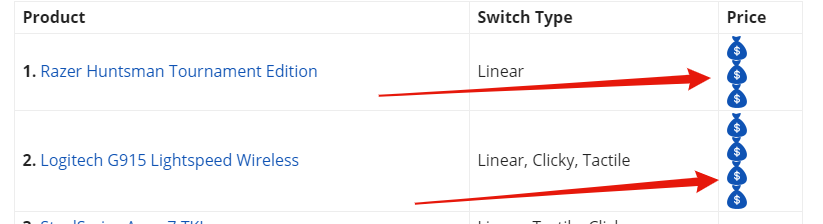
I’m looking for someone who can help me add inline images to a WordPress table.
As you can see at the moment, the images are stacked on top of each other: https://i.gyazo.com/c1a04ac5e89c040864e68cb265181d4a.png
I’m trying to set the images so they are inline as shown in the following picture: https://i.gyazo.com/55db732dbf4863f70ec12946b712c9f7.png
I achieved this by unchecking the box “display: block;” on inspect in chrome: https://i.gyazo.com/6b23c7ef5006cf42c3e3c5edc4c6faea.png
However, I assume this is for all the images and I don’t want to break any code within my theme, I’m also not sure how to make this change permanent.
It would be great if someone could help me with this.
Ps. It works fine on the mobile theme, the images do not stack.
URL: https://gadgetgang.com/the-best-tkl-mechanical-keyboard/
Thanks very much,
Regards,
Dan