
- NewspaperFlex Block Builder and Flex Loop Builder
- NewspaperHow to use the Flex Blocks cache option
- NewspaperHow to edit modules for Flex Block X
- NewspaperHow to insert a block inside the content of a post
- NewspaperFlex Block Settings Guide
- NewspaperMeta Info on Modules and Blocks
- NewspaperTheme modules and blocks
- NewspaperThumbnails – Fix strange looking images on blocks
- NewspaperBlock settings tutorial
- NewspaperCategory Tag on Modules/blocks
- NewspaperWP Rocket and Newspaper Theme: Optimization Guide
- NewspaperSearch setup for custom post type
- NewspapertagDiv Opt-In Builder – Emails
- NewspaperBookmark – Save For Later
- NewspaperModules Builder in Newspaper Theme
- NewspaperFilters and sorting for taxonomies
- NewspaperUser review system
- NewspaperWooCommerce: Happy “Add to Favorites!”
- NewspaperLockers
- NewspaperLeads
 BazooQa
Greetings,
How I can get next post in loop in “next-previous” block?

The problem is, the latest post doesn’t have “next post” and I get blank space there 🙁
Thanks in advance
 Simion C.
 Hi,
The original image will not be used, that would increase the page size very much. That is why the theme creates thumbnails and displays those instead of the original images
– https://forum.tagdiv.com/theme-thumbs/
Don’t disable all of the thumbnails, disable the ones that are not used anywhere. Analyze which elements you use and disable the others.
Here you can see what module each block or grid uses
– https://forum.tagdiv.com/theme-blocks-modules/
Displaying thumbnails instead of the full original images is a feature, it greatly reduces the total page size, and improving the loading speed significantly.
Simion C. Hi,
The background color of the top bar can be set here
– https://www.screencast.com/t/haeXIfNQoS
Most header colors can be changed in the theme colors header section. The footer background color can also be changed in the theme colors panel.
This underline here – http://www.screencast.com/t/XhWXLrnk3Ik that is affected by the theme accent color also set in the theme colors section. The theme accent color will apply to various elements for a more general feel
– https://www.screencast.com/t/aUEnJKSV8
For the colors used here – http://www.screencast.com/t/ItMdvyZ6
Edit the page with the tagDiv composer, click on the block then change the colors of the title and big title
– https://www.screencast.com/t/ZEpFmOczvc4K
For the font settings, there are settings for most elements, in the theme fonts section. In case of elements of the tagDiv composer, like modules used in blocks and grids the theme panel font settings are general. That means thjat for example if you change the font for module 1 title
– https://www.screencast.com/t/nteCZpkZXaS
All the modules 1 will load that font.
We introduced more specific settings for the font and font properties in the composer, so each elements can have it’s own font settings without affecting same type elements
– https://www.screencast.com/t/7BOhy2H3rm
You can ask any question you might have, or if I missed something or there are still things that are unclear.
Thanks
Simion C. Hi,
That is not possible. Big grids and blocks display posts, clicking on a module will lead to the respective post page, not to the category page in which the post is included.
What you are trying to do is not the intended functionality of the modules, they cannot be made to function like that.
Thanks
Simion C. Hi,
We separated those in two elements, there were quite many requests to do so previously. So for the moment using the cloud templates they are different things, no relation to each other. Only the predefined templates display them in the same block.
Maybe this will change in the future, I cannot say for sure.
Thanks
 alebasur
 Hi Simion, the block that you have modified is fine, that does not want to modify it, I just want to modify the box on the right that says LAST NEWS. And see if you can reduce where I put the red line. Thank you.
 Catalin
 Hello MacZil,
Do you are referring to the number of images which are cropped by the theme, according to blocks used by you? Check the Theme panel and turn off the thumbs which are not used by you in your project, from here -> https://www.screencast.com/t/cyEWXKnW2
Thanks for your understanding!
 tecky
tecky Thanks for your reply, if i disable the thumbnails then my site will show an image with instructions (enable thumb from theme panel -> block settings). I want to use the main image and not thumbnail image or default theme image (with instructions). It’s possible?
Simion C. Hi,
This should do it for the related block – https://www.screencast.com/t/nvJJt6uD
.td_module_related_posts .td-post-category {

top: 0;

left: 0;

bottom: auto;

background-color: #0072c8;

padding: 6px 8px 6px;

}
Thanks
 Webagent05
Dear M,
After enabling caching (WP supercache), I have issues with css not loading in the right order. Result I see first the Main theme color before the child theme style.css stylesheet.
Example: https://www.bitcoinmag.eu/bitcoin-social-media/
Any advise?
Kind regards,
Webagent05
 simchris
 JUST FYI, @Simion
noticed https error in forum update here just now
Mixed Content: The page at ‘https://forum.tagdiv.com/topic/adrotate-question-for-someone-who-is-using-it-with-newspaper-theme/’ was loaded over HTTPS, but requested an insecure favicon ‘https://forum.tagdiv.com/wp-content/uploads/2018/07/favicon.png’. This request has been blocked; the content must be served over HTTPS.
 Edward
 To make your website faster, you can control which thumbnail is generated. To do this go to Theme Panel > Block Settings > Thumbs on Modules/Blocks and disable the unused ones to save space on your server:
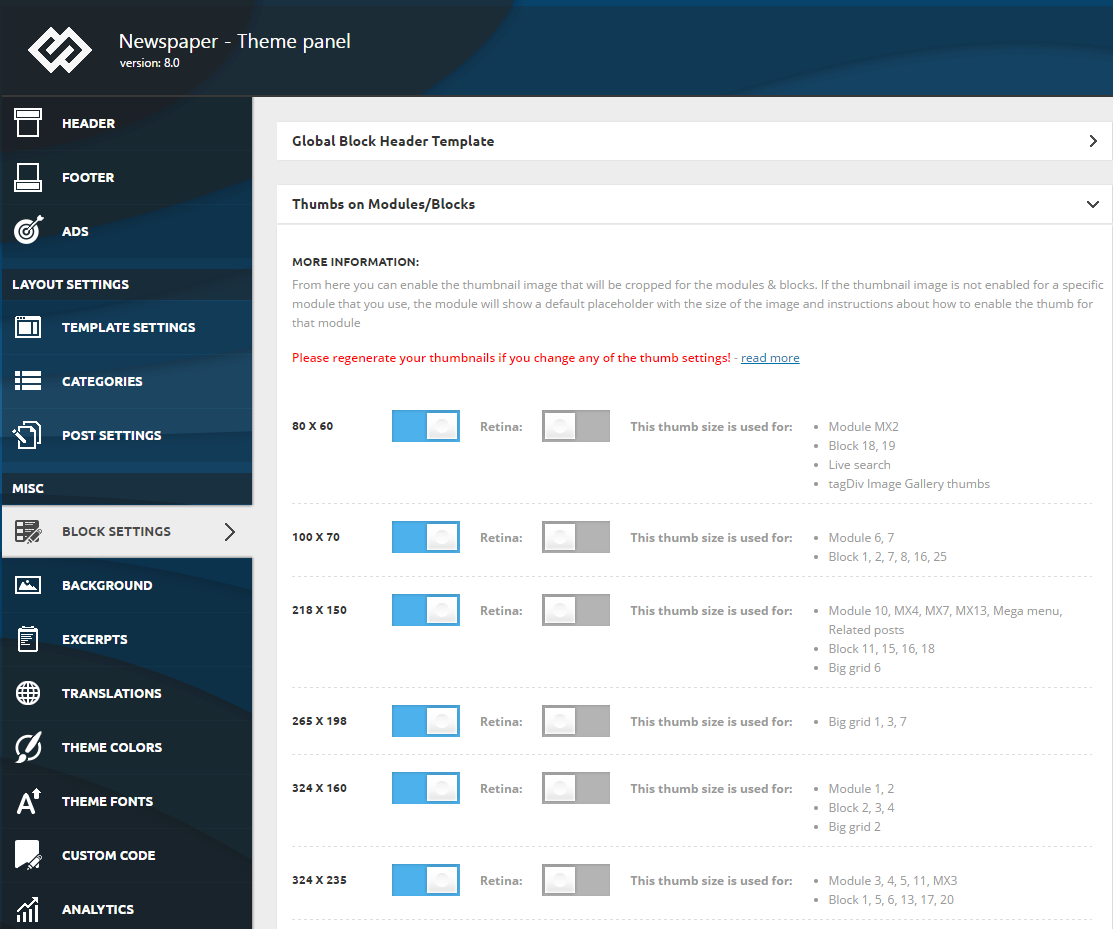
Simion C. Hi,
The support by forum and email is included in the purchase of the theme. Normally it would be limited to the period of 6 months, but currently there is no system to block or restrict users with expired support. This may be implemented in the future.
Simion C. Hi,
If a block using load more pagination is entered in each of the four columns, then there will be four load more buttons. Each block has it’s own pagination.
If you would use a single block in a full row, then there would be one load more button. That would be all there is to it.
Four different blocks can’t share the same pagination. I understand why you need four, to display different content in each, but what you are asking is not possible.
 mlindia
 Hi Simion and Tagdiv team,
We found the issue. It is “nginx” blocking the zip extension to be downloaded automatically or uploaded. It is AWS cloud server. You can make this one as case study and update your customers about the known issues.
Please close this thread as resolved.
Thanks for your time.
 Thomas
 Thanks but as you could see the button appear only on the hover.
THe idea is that old one have all the same look and hover than the new one like at the end the button “Découvre d’autres avis sur le DVD Mario LOPEZ sur le forum !” here https://www.virtualmagie.com/articles/tests/videomania/mario-lopez/ (the one on top of the orange newsletter block).
Here the code I actually insert in Custom CSS:
.td-post-content .vc_btn {
background-color: #f6600;
font-size: 18px;line-height: 1.33;
padding: 10px 16px;
border-radius: 6px;
}
Could you please complete to also have the button (not only on hover?
Thanks
Catalin Hello MacZil,
I have inspected your website and I saw that some posts have featured images set up and some of them does not have as you can see here -> https://www.screencast.com/t/MsXrACckW7tV Set up the featured images for your posts if you want to have thumbnails on your blocks.
Thanks for your understanding!
Simion C. Please check this documentation
– https://forum.tagdiv.com/theme-thumbs/
– https://forum.tagdiv.com/featured-image/
– https://forum.tagdiv.com/thumbnails-vs-featured-image-size/
So the thumbnails are predefined, each module will use it’s predefined thumbnail size.
You could experiment with flex blocks, these can be configured to display in many ways. For example all these blocks are created with flex block 1 and it’s settings
– https://demo.tagdiv.com/newspaper/flex-block/
Simion C. Hi,
Those are available only in the tagDiv composer, they will not appear in WPBakery anymore. That guide is quiet old and should have been removed. This is the current guide
– https://forum.tagdiv.com/block-settings-tutorial/
Most of the new theme features and options will be for the tagDiv composer mainly. Sorry for the inconvenience.
Thanks
Catalin Hello Yon,
You should not use the child theme, sorry! You have to create a Category Template from Cloud Template and add through it that block template. Please check here -> https://forum.tagdiv.com/tagdiv-cloud-library-plugin/
Thanks for your understanding!
Simion C. I installed the demo and found the problem. Seems to happen specifically with the flex blocks. I will add this on our issue list and it will be fixed. Sorry for the inconvenience.
Some of the demos were built when there were no flex blocks and now there could be minor design issues.
 Noob
NoobIn newspaper 8.8 or earlier version i’m able use vc_hidden-xs in extra class to hide rows/blocks/elements on mobile or vc_hidden-lg vc_hidden-md vc_hidden-sm to hide rows/blocks/elements on different screens but after newspaper 9.0 update vc_hidden-lg vc_hidden-md vc_hidden-sm vc_hidden-xs classes are no longer working and my whole website is messed up. So is there any other alternate because my whole website is in really bad state or could you please email me newspaper 8.8.2 version.
i seriously wants to switch back to 8.8.2 version.
 rox
roxPost template style 11 ad block currently shows on top of the featured image/video thumbnail on mobile view, can it be placed below the featured image/video thumbnail ? The user should see the header, header ad and the image/video instead of another ad. Let us know how to accomplish this. Thanks.
 Cedasie
Hello,
I have a problem with wpbakery. When I want to configure the block the Title background color and Title text color option don’t allow.
https://forum.tagdiv.com/block-settings-overview/
Option 11 & 12
Last version of wordpress and the theme NewsPaper 9.0.1
Thanks
 DanielSage96
Hi,
I have having terrible trouble with the speed booster it says
v4.9.3 – Disabled – incompatible plugin detected: td-api-plugin/td-api-plugin.php
but it’s one of the plugins that appeared when I installed the theme.
I’m also having trouble with the whole theme tbh it was working then it didn’t, and now for some reason my “Big Grid 3” has removed itself from the homepage – when I try to re-add it, it just doesn’t appear.


