- NewspaperFlex Block Builder and Flex Loop Builder
- NewspaperHow to use the Flex Blocks cache option
- NewspaperHow to edit modules for Flex Block X
- NewspaperHow to insert a block inside the content of a post
- NewspaperFlex Block Settings Guide
- NewspaperMeta Info on Modules and Blocks
- NewspaperTheme modules and blocks
- NewspaperThumbnails – Fix strange looking images on blocks
- NewspaperBlock settings tutorial
- NewspaperCategory Tag on Modules/blocks
- NewspaperWP Rocket and Newspaper Theme: Optimization Guide
- NewspaperSearch setup for custom post type
- NewspapertagDiv Opt-In Builder – Emails
- NewspaperBookmark – Save For Later
- NewspaperModules Builder in Newspaper Theme
- NewspaperFilters and sorting for taxonomies
- NewspaperUser review system
- NewspaperWooCommerce: Happy “Add to Favorites!”
- NewspaperLockers
- NewspaperLeads
 haqemcom
Hello team!
I already post a new article at my blog and this post https://haqem.my/20182451/anda-perlu-cuba-kopi-kaw-aunty-avelin-bila-bercuti-ke-pulau-pinang/ I choose category for ‘Semasa’ and my block at home page i set to category Semasa and why the block not showing the new post/article for Catergory Semasa ? refer this image i.is.cc/wartZFJ.jpg. Please Help me. i got same error to all my block
Link to my Blog is https://haqem.my/
 Simion C.
 Hi,
Module 10 uses this thumbnail size – https://www.screencast.com/t/wzCxMiIO
So all of the thumbnails should be of the same size. Please check the regeneration guide
– https://forum.tagdiv.com/thumbnails-fix-strange-looking-images-on-blocks/
Check the theme system status to see if the GD library is active on your server
– https://www.screencast.com/t/tKbwrzh6kx
If there is no problem in that regard and a regeneration does not solve the issue, you can send us an email at contact@tagdiv.com and provide admin login. We will take a look. Please also include a link to this topic in the email.
Thanks
Simion C. @Karsten Albrektsen Each block, grid, full grid displays the thumbnail/image differently. This depends on image aspect ration and module used
– https://forum.tagdiv.com/thumbnails-vs-featured-image-size/
Try different grids until you get the result you want and is best for the images you use as featured.
@Shawntaz Replied in your own topic.
Simion C. Hi,
For blocks/modules the setting is here – https://www.screencast.com/t/Ivw1uH1Qj3
For single post pages here – https://www.screencast.com/t/UBBqRZai
Thanks
Simion C. Hi,
Those are two different blocks, how they look is predefined
– https://demo.tagdiv.com/newspaper/block-9/
– https://demo.tagdiv.com/newspaper/block-11/
Block 9 does not display an excerpt if that is what you are referring to. The easiest way to achieve that layout would be to use the flex block
– https://www.screencast.com/t/j3uMPXyP9EW
Thanks
Simion C. Hi,
That is not a block, that is the header ad spot. More about that here
– https://forum.tagdiv.com/header-ads-adsense/
The header ad may display differently depending on header style used
– https://forum.tagdiv.com/header-styles/
You can see all the blocks, grids, full grids etc in the theme live demo. Check the Features menu item here
– https://demo.tagdiv.com/newspaper/
Please let us know if you have more questions.
Thanks
Simion C. Hi,
I don’t know what you actually did there with the future date for published posts. Maybe that is causing problems with the block sorting.
I have tested a block with an oldest sort and I can confirm that the sorting works properly
– https://www.screencast.com/t/fc8YsHy6O
– https://www.screencast.com/t/g6kqBBBvn
Same with a block widget – https://www.screencast.com/t/R9zPNLSksFol
– https://www.screencast.com/t/hCmQx29cVg
 njesus001
how can i remove author post name from block post?
njesus001I need block 9 like block 11 with text bellow the title without images how can i do it?
 Sergey1704
Can you help me please.
I dont understand. How this block is added to the header: http://prntscr.com/k77q9t
 Elevas32
For a long time I avoid that my posts are indexed with the date thanks to these two options of the newspaper theme.
1- Post setting—>Show Date—-> Disable.
2- Block Settings—>Meta info in module blocks—-> Show Date—> Disable.
In 99% of the cases, the date is not shown in snippet with those two options deactivated. The problem is that for the last 5 days the last 4 articles that I have published appear with a date in the snippet and I do not know the reason. I have not installed new plugins or anything.
For example:
https://ibb.co/bUNNPJ <——- picture of snippet
 ananas
Is it also possible to change the block used in a sidebar when using a mobile device? I would like to use block 7 on the desktop, but block 9 on mobile devices, because the sidebar is too similar to the content of the page and there is no longer sufficient visual delimitation. Is it possible to change the block or does the look of block 9 have to be imitated via CSS?
 decovca
 Hello, Bogdan B.
Thank you for the response. I can give you access to my site so you can take a look. I’m sure I changed the values in the correct block but nothing happens.
 Bogdan B.
 Hello,
Not all modules have excerpts included. The smaller ones usually do not have them because of layout issues. There was no space to squeeze a small excerpt and still have the block look good so it was not added to the module to begin with. If you want excerpts on all blocks, choose the ones that come with excerpts by default as there is no option to add excerpts to the modules that do not have them except by altering the php code.
Thank you!
 ris.world
 Thanks Simion,
I have the same problem whith my blocks when I change Apparence > Widgets > Block > Filter > Sort Order > Oldest post the widgets doesn’t change his order. It’s the same with alphabetical for example.
Do you know why ?
Thanks.
Adrien T.
 dhwitwer
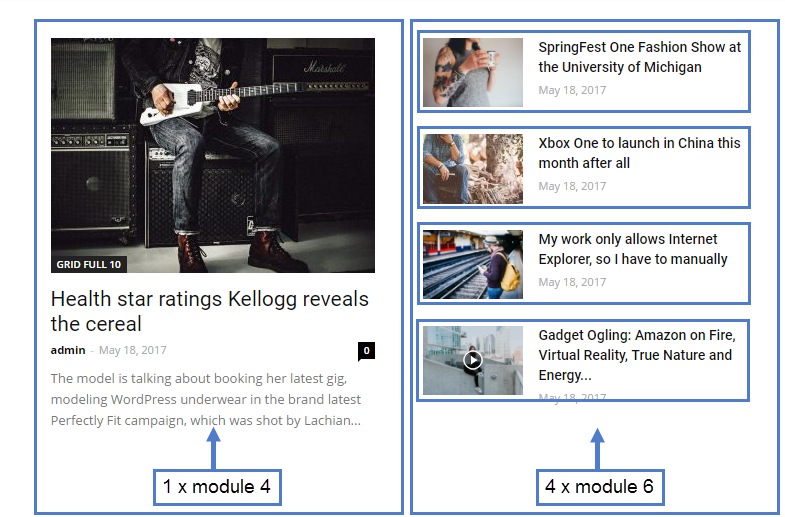
I want to show excerpt in various blocks, From block settings “excerpt length” is not working.
https://forum.tagdiv.com/wp-content/uploads/2017/05/block.png
refer above image, 1 X Module4 excerpt is showing but I want to add excerpt in 4 x module6
Simion C. Hi,
That was added in the theme update 8.8.2, so you would see only 2 flex blocks. If you decide to update this is a guide
– https://forum.tagdiv.com/how-to-update-the-theme-2/
Simion C. Hi,
@Hari That is all modules that can display excerpts in the first place, not all do. Check how the predefined blocks look here
– https://demo.tagdiv.com/newspaper/block-1/
Only the flex blocks (more will be added) have an option to enable/disable excerpts
– https://www.screencast.com/t/gWUaFWbNF
The other predefined blocks that are not supposed to display excerpts, will not display one unless some modifications. Similar topic here
– https://forum.tagdiv.com/topic/adding-tags-and-excerpt/
Thanks
Simion C. Hi,
Use the simple popular sorting – https://www.screencast.com/t/j8ixs2zguT
Posts with the most views will appear in the block. Be sure to activate this setting if you use caching
– https://forum.tagdiv.com/ajax-view-count/
Thanks
Bogdan B. Hello,
Sorry but the only block that can have a different layout for mobile devices is the flex block. You can set it up in the tagdiv composer separately for each device in particular: https://www.screencast.com/t/iCSSYePV5R4c
Thank you!
Simion C. Hi,
1. The default grid style (all grids) does have a darker gradient over the bottom part of the image, I believe this is to make the post title and meta more visible when lighter images are used
With gradient – https://www.screencast.com/t/EwFqfRyrbkbr
Without – https://www.screencast.com/t/DExdlH06x85
Anyway you could remove it with some CSS if not required, or maybe change the style of the grid
– https://demo.tagdiv.com/newspaper/full-big-grid-3/
Since you removed it, what would you like to do now with the grid exactly? I will try to help you.
You can use any of the grids, full grids and blocks in that page. Choose the ones you like. For the article title colors I could give you a code once you choose the elements you want to use.
I believe there are plans to add a color setting for the article titles in modules, in a future update.
2. You could embed the video in a text element
– https://www.screencast.com/t/2gByhWjv2o
Stretch the row containing it and you should have a full width video
– http://prntscr.com/k6ynr4
3. Maybe that look could be achieved with the flex blocks. Those blocks are not predefined, so they can be set to display in many ways. With their settings and maybe some additional CSS you could get that result or similar.
Thanks
Bogdan B. Sorry but there are no settings to alter the next prev pagination on blocks. It can only be done with custom css. if you provide more details to how you want them with screenshots, maybe we can offer a css code that can come close to the design you are after.
Thank you!
Bogdan B. Hello,
If your footer content comes from predefined data, you can only change the footer template and then use the 3 footer widgets to add content to the footer and have access to the block settings: https://forum.tagdiv.com/footer-templates/
Thank you!
Bogdan B. Hello,
If you mean the block titles, you will have to learn how to use the page builder: https://forum.tagdiv.com/tagdiv-composer-tutorial/
https://forum.tagdiv.com/block-settings-guide/.
By simply deleting the title text, the block title will be removed. https://www.screencast.com/t/2p2RUnfDC
Thank you!
 Hari
Hari I’m not having the Flex Block 3 option.I’m running V 8.8.1