
- NewspaperHow to use the Flex Blocks cache option
- NewspaperCache plugin – install and configure
- NewspaperWP Rocket and Newspaper Theme: Optimization Guide
- NewspaperFlex Block Settings Guide
- NewspaperGeneral Options that May Interfere with the Newspaper Theme
- NewspaperThe Newspaper Mobile Theme: Introduction
- NewspaperAutoptimize Plugin – install and configuration
- NewspaperHow to update a plugin
- NewspaperCloudflare (CDN)
- NewspaperFacebook Share
- NewsmagRequirements for Newsmag
- NewsmagHow to update the theme
- NewsmagtagDiv Social Counter tutorial
- NewsmagTop bar templates
- NewsmagAjax view count
- TutorialsWhat is Ajax preloading?
- NewspaperVideo Playlist
- Newspaper7 Days Post Sorting
- NewspaperAjax View Count
- NewspaperTop bar templates
 Calin
Calin Hi,
The WP Super Cache need to be set like in our guide -> https://forum.tagdiv.com/cache-plugin-install-and-configure/
Also this option “Mobile + AMP” means that the mobile theme layout will be used for mobile and amp version.
Also, for sucuri.com please check this guide -> https://docs.sucuri.net/website-firewall/troubleshooting/troubleshoot-cache-issues/ -> https://i.imgur.com/U1ZigLD.png
I hope this will help you!
Thank you!
 mgiannelis
 Also this happening and cannot fix it.
If user comes to the page for the first time (with no cache in thier browners) they cant click on my menu drop down arrow items. They have to go into an article first and then come back to front page, Only then once the front page is in thier broswer cache will the menu items work.
I havw been asking about this issue for months. No one here helps
All these problems are happening also with cloudfalre PAUSED. So please. Stop saying issue is cloudflare. The fact it is paused, the fact I have tried many caching plugins and soltions all say ” THEME ISSUE” Also even happens when I run the site on totally different server.
Theme issue. Ongoing, Many months.
Please finally have some solutons for me
You watch, visit my site with browser cache. You cannot click the front page menu. But once site is cached by going to another page. Then front page menu will work.
And, this constant issues of theme sidebars not being responsive and not dropping down corrrectly!
NOT CLOUDFLARE – AS ITS PAUSED
NO CACHING PLUGIN – ALL DO THE SAME THING
This is THEME BUG or Template Issue
-
This reply was modified 4 years by
mgiannelis.
-
This reply was modified 4 years by
 Jose
JoseHello team,
I have installed Newspaper on my test site, before using it on my real site.
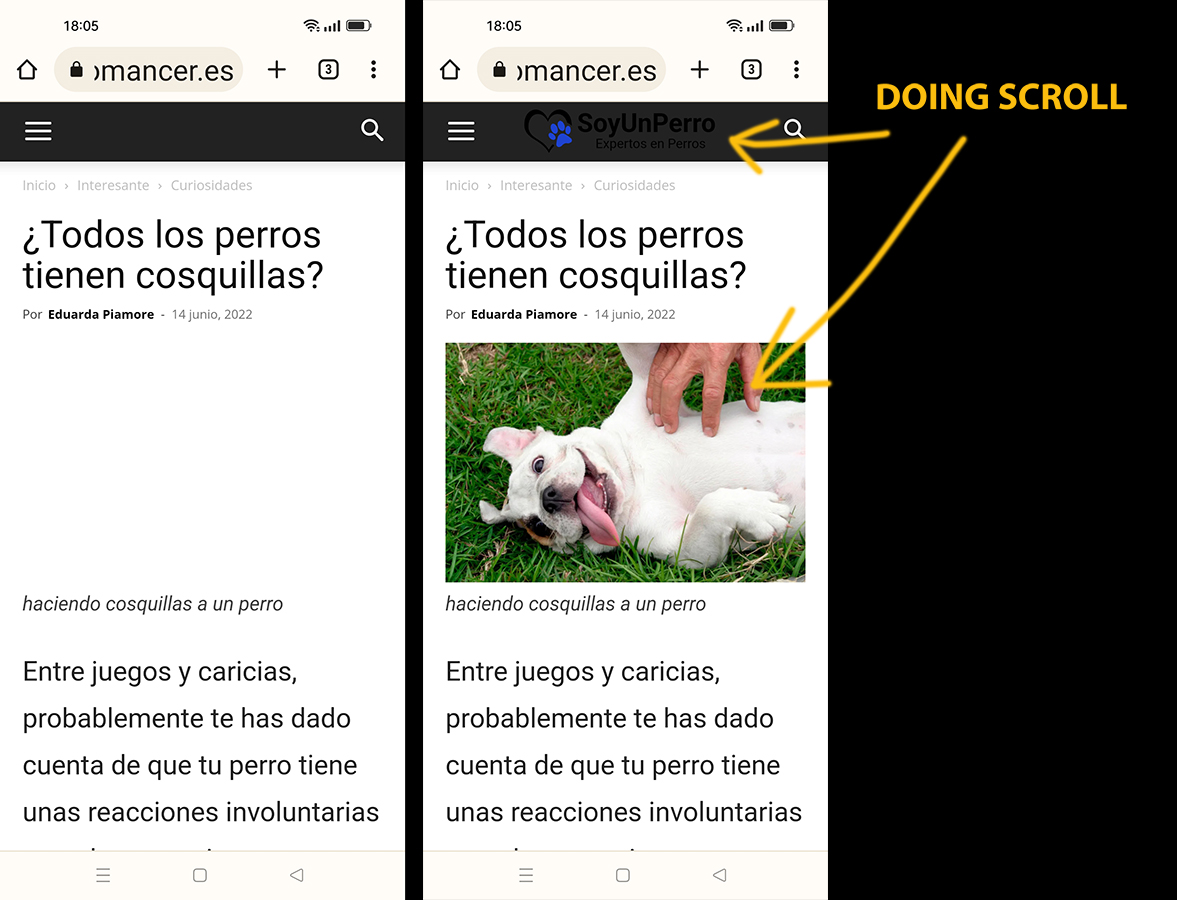
I have disabled Lazy Load in the theme (Newspaper options). Lazy Load is also disabled in the cache plugin (LiteSpeed). But the first image (featured image in articles) and the logo do not load automatically. They only load when I scroll on the mobile. This problem happens on mobile.
Example of the error (see in mobile): https://cutt.ly/IZhom04
I have tried disabling Wp’s native LazyLoad, but the problem persists.
mgiannelisHello
My issues with my theme comtinue to my frustration.
Many of my posts are not being responsive and making whole site look bad.
Many artciles are not being responsive such as the sidebars not sliding down correctly, I have tried everything, from changing caching plugin settings, disabling thing like server side litespeed caches, pausing cloudflare, rebuilding the single post template, and these things keep happening all the time
Here is an example of an article that is working
https://www.techbusinessnews.com.au/blog/the-benefits-of-autism-in-the-technology-industry/
Here is an example of one that does not. The side bar does not come down correctly and the social icons at the top of the post dont show up leaving a gap.
Then some days some will work, but the other ones that were working correctly before will stop working. The theme is being a nightmare to me and I hope someone from your team can solve all my problems once and for all.
 itgrcapitallink
 Hello Bettina,
I have enable the WP Super Cache but the site is caching especially on mobile view.
I have enable the AMP plugin and the tagDiv Mobile Theme plugin.
Also on theme settings is enable the Mobile + AMP.
The sucuri is enabled too. Many times we clean the cache from sucuri.com and the site is loaded as we wish on mobile.
How can we avoid to clean the cache from sucuri.com daily?
Thank you.
 Anamaria
 Hi,
Have you tried to see that this issue is not caused by a plugin conflict?
Usually, this issue is caused by a plugin conflict, please do a test using the theme plugins, clear all cache and see if the problem persists.
Thank you!
 bbadboy
 yes, it was object cache. Thx for the help
 Bettina
 Hello!
Check if there is an object cache applied on the backend. Here is a guide that will help you with this: https://forum.tagdiv.com/general-options-may-interfere-newspaper-theme/ after the object cache file is removed the theme will remain activated. If the issue is till there, then we need your cpanel url and credentials too.
Thank you!
Anamaria Hello,
Normally, the key will be automatically assigned to the first 2 websites where it was used. Then if needed you can unassign it and assign it to other websites. Please be aware that you can only change the key after one month.
Sometimes it can take a while, please clear all cache and see the results.
Thank you!
Anamaria Hi,
Yes, it’s possible that the cache plugin you’re using is the cause of this issue.
I’m glad that now it works as it should.
Have a great day!
 iancollins
 I checked this yesterday several times, just the element, not part of a group. I did incognito and refreshed pages and the added elements were just not showing in another page when it too was refreshed. This morning, it appears to be OK. I wonder whether there may be a cache issue, maybe with WP? Anyway, when I next create a page using the same elements I will record my work so I have a record and if need be report back. Thx
Ian
 Micha
Micha I honestly don’t see the point of the mobile theme. The only argument would be if it offered better pagespeed values, but when I look at my site, the values are significantly better without the mobile theme. Besides, it is easier to optimise Newspaper without the mobile plugin together with W3 Total Cache and a few lines of code. P.s. Cheers from Germany too 😉
iancollinsHi, it appears that when I save an element for later use it is not available for adding into another page. For example on this page https://gotomarket.global/us-federal-contracts-panel-348/ a saved module with the title Orr Vinegold is visible. On this page https://gotomarket.global/events/better-business-with-europe-349/ and others, Orr is not available.
I assumed that the purpose of this feature is to build a library of common objects. However, if their usage is restricted then this is of little value. Or maybe there is a bug or a cache issue etc.
Plse advise
Bettina Hello!
First of all, please make sure you have a backup done, deactivate all the non-tagdiv plugins or the cache plugins you use, and then you can update the theme and the TagDiv plugins also.
I would gladly recommend you to make a backup and update plugins and the theme via file transfer to the latest update: https://forum.tagdiv.com/how-to-update-the-theme-2/
Thank you!
Bettina Hello Enzo!
Which theme version do you use? Please make sure you use the latest update of the theme.
Make a test and deactivate ALL plugins except tagDiv ones. Also, if you are using a cache plugin, deactivate it, and try again.
Let me know the results!
Thank you!
mgiannelisHello
I have have been stuggling with this issue for many weeks. No one will give me the answers or solution and just keep pointing the finger at the other providers.
Cloudflare answer – its your theme provider
TagDiv – Is a caching issue – cloudflare problem
This is a theme issue!
When I turn on APO. The drop down items in my blue menu do not work. You can’t click on them to generate the drop down menus when clicking on the down arrow.
But very strange thing. This only effects the front page. All other pages the menu will work just fine.
ISSUE – With cloudflare APO turned on. Menu items (ON FRONT PAGE ONLY) don’t work when clicking the arrows for the drop down.
site here
FYI- At this moment I have APO tunred off because of this issue.
I have also tested this with local caching plugin CACHE OFF – litespeed – But still happens when turning on cloudflare APO
Please advise what the problem is here.
 SMG
SMGHello,
We have a page with a large section of text on it, and there is an intermittent problem (happening more often than not) where sometimes it is completely removing all spacing/formatting when choose to edit it. This happens after you click the button to Edit Content. I tried both column text as well as text with title elements and it happens with both.
Pretty useless if we can’t edit it without removing all of the formatting. Tried multiple browsers, cleared cache/cookies and running latest version of Newspaper theme.
Anybody else having this issue and know of a fix?
https://prnt.sc/-W8FXAuvQARu is a screenshot showing what I am referring to here.
Thanks!
 ialv
ialv I have located the problem.
It seems to be a Javascript problem in the menu.
How can I exclude the JS only from the menu in the cache so that this doesn’t happen (what is your url).
Thank you.
Anamaria Hello,
Seems you have some object cache https://i.imgur.com/ZXisVPr.png please purge the cache dor a few times https://kinsta.com/blog/w3-total-cache/#object-cache
Thank you!
Anamaria Please note: “This sorting option will pick posts that are popular in the last 7 days, ordered by page views.” This means it’s not sorted by the publish date, just by page views from the last 7 days, that is, those views can be counted before 7 days -> https://forum.tagdiv.com/7-days-post-sorting/
The real and unique value for your visitors is given by Google Analytics. Our post view counter will count any post-visualization, even if the post is visited twice by the same person.
Also if you are using a cache plugin you must have this option enable https://forum.tagdiv.com/ajax-view-count
Thank you!
Anamaria Hello,
If you use Lite Speed Cache, then please check if this plugin has the option for mobile version cache.
We recommend using only one cache plugin, the WP Super Cache plugin with this configuration: https://forum.tagdiv.com/cache-plugin-install-and-configure
Thank you!
Bettina Hello!
First of all, please make sure you have a backup done, deactivate all the non-tagdiv plugins or the cache plugins you use, and then you can update the theme and the TagDiv plugins also.
I would gladly recommend you to make a backup and update plugins and the theme via file transfer to the latest update: https://forum.tagdiv.com/how-to-update-the-theme-2/
Please update your WordPress and php version too.
Hope that helps you!
Thank you!
 MauricioLuque
Every day in the morning I receive this message from my server control panel regarding an error in updates.
Please let me know what I should do to fix it.
====================================
Updates were not installed for the following items:
1. Website “example.com” (https://www.example.com): Failed to reset cache for the instance #6: PHP Fatal error: Uncaught Error: Undefined constant “TD_THEME_NAME” in /var/www/vhosts/myserver.com/example.com/wp-content/plugins/td-subscription/includes/td_subscription.php:528
Stack trace:
#0 /var/www/vhosts/myserver.com/example.com/wp-includes/class-wp-hook.php(307): td_subscription->{closure}()
#1 /var/www/vhosts/myserver.com/example.com/wp-includes/class-wp-hook.php(331): WP_Hook->apply_filters()
#2 /var/www/vhosts/myserver.com/example.com/wp-includes/plugin.php(476): WP_Hook->do_action()
#3 /var/www/vhosts/myserver.com/example.com/wp-settings.php(576): do_action()
#4 /usr/local/psa/admin/plib/modules/wp-toolkit/vendor/wp-cli/vendor/wp-cli/wp-cli/php/WP_CLI/Runner.php(1291): require(‘…’)
#5 /usr/local/psa/admin/plib/modules/wp-toolkit/vendor/wp-cli/vendor/wp-cli/wp-cli/php/WP_CLI/Runner.php(1212): WP_CLI\Runner->load_wordpress()
#6 /usr/local/psa/admin/plib/modules/wp-toolkit/vendor/wp-cli/vendor/wp-cli/wp-cli/php/WP_CLI/Bootstrap/LaunchRunner.php(23): WP_CLI\Runner->start()
#7 /usr/local/psa/admin/plib/modules/wp-toolkit/vendor/wp-cli/vendor/wp-cli/wp-cli/php/bootstrap.php(77): WP_CLI\Bootstrap\LaunchRunner->process()
#8 /usr/local/psa/admin/plib/modules/wp-toolkit/vendor/wp-cli/vendor/wp-cli/wp-cli/php/wp-cli.php(27): WP_CLI\bootstrap()
#9 /usr/local/psa/admin/plib/modules/wp-toolkit/vendor/wp-cli/vendor/wp-cli/wp-cli/php/boot-fs.php(17): require_once(‘…’)
#10 /usr/local/psa/admin/plib/modules/wp-toolkit/vendor/wp-cli/wpt-wp-cli.php(31): require_once(‘…’)
#11 {main}
thrown in /var/www/vhosts/myserver.com/example.com/wp-content/plugins/td-subscription/includes/td_subscription.php on line 528
Fatal error: Uncaught Error: Undefined constant “TD_THEME_NAME” in /var/www/vhosts/myserver.com/example.com/wp-content/plugins/td-subscription/includes/td_subscription.php:528
Stack trace:
#0 /var/www/vhosts/myserver.com/example.com/wp-includes/class-wp-hook.php(307): td_subscription->{closure}()
#1 /var/www/vhosts/myserver.com/example.com/wp-includes/class-wp-hook.php(331): WP_Hook->apply_filters()
#2 /var/www/vhosts/myserver.com/example.com/wp-includes/plugin.php(476): WP_Hook->do_action()
#3 /var/www/vhosts/myserver.com/example.com/wp-settings.php(576): do_action()
#4 /usr/local/psa/admin/plib/modules/wp-toolkit/vendor/wp-cli/vendor/wp-cli/wp-cli/php/WP_CLI/Runner.php(1291): require(‘…’)
#5 /usr/local/psa/admin/plib/modules/wp-toolkit/vendor/wp-cli/vendor/wp-cli/wp-cli/php/WP_CLI/Runner.php(1212): WP_CLI\Runner->load_wordpress()
#6 /usr/local/psa/admin/plib/modules/wp-toolkit/vendor/wp-cli/vendor/wp-cli/wp-cli/php/WP_CLI/Bootstrap/LaunchRunner.php(23): WP_CLI\Runner->start()
#7 /usr/local/psa/admin/plib/modules/wp-toolkit/vendor/wp-cli/vendor/wp-cli/wp-cli/php/bootstrap.php(77): WP_CLI\Bootstrap\LaunchRunner->process()
#8 /usr/local/psa/admin/plib/modules/wp-toolkit/vendor/wp-cli/vendor/wp-cli/wp-cli/php/wp-cli.php(27): WP_CLI\bootstrap()
#9 /usr/local/psa/admin/plib/modules/wp-toolkit/vendor/wp-cli/vendor/wp-cli/wp-cli/php/boot-fs.php(17): require_once(‘…’)
#10 /usr/local/psa/admin/plib/modules/wp-toolkit/vendor/wp-cli/wpt-wp-cli.php(31): require_once(‘…’)
#11 {main}
thrown in /var/www/vhosts/myserver.com/example.com/wp-content/plugins/td-subscription/includes/td_subscription.php on line 528
Error: There has been a critical error on this website. Learn more about WordPress diagnostics. There has been a critical error on this website.
 fattkay
Hi there,
I am unable to activate the theme, I have been stuck at the page where I enter the purchase code and anytime I click the ACTIVATE button, it just keeps loading endlessly.
I have tried clearing cache, using different browsers, deactivating plugins and all that, nothing is working.

 ronv
ronv I sent contact@ an email with Admin credentials as you requested. I double-checked for caching plugins but the only one I’m using is from my host, but I know it’s not the problem. Still, to be certain, I deactivated it and it still doesn’t fix that menu. I use that plugin with 5 other websites and it has never given me a problem. In fact, that plugin helps dump the cache on the fly.
Thank you for taking the time to help me. I’m going to bed soon because it’s 5:30a and I haven’t gotten any sleep working on several websites. I’ll check in the morning to see if you have better luck figuring this out.


