- NewspaperHow to use the Flex Blocks cache option
- NewspaperCache plugin – install and configure
- NewspaperWP Rocket and Newspaper Theme: Optimization Guide
- NewspaperFlex Block Settings Guide
- NewspaperGeneral Options that May Interfere with the Newspaper Theme
- NewspaperThe Newspaper Mobile Theme: Introduction
- NewspaperAutoptimize Plugin – install and configuration
- NewspaperHow to update a plugin
- NewspaperCloudflare (CDN)
- NewspaperFacebook Share
- NewsmagRequirements for Newsmag
- NewsmagHow to update the theme
- NewsmagtagDiv Social Counter tutorial
- NewsmagTop bar templates
- NewsmagAjax view count
- TutorialsWhat is Ajax preloading?
- NewspaperVideo Playlist
- Newspaper7 Days Post Sorting
- NewspaperAjax View Count
- NewspaperTop bar templates
 Bogdan B.
 Hello,
This could be a plugin conflict so please disable all plugins except the page builder, clear cache and reset cdn files if you use it. Please also check any custom code you might have added to the theme panel or the theme files. If you use a child theme, please switch to the main theme to make sure it does not affect the proper functionality of the theme.
Thank you!
 Catalin
 Hello tecnogaming,
The featured image will open in a modal when clicked, by default. This could be removed here by removing the modal class
– https://www.screencast.com/t/Xq2zmW4dwOqr
That would cause the image to open like this
– https://www.screencast.com/t/tphH1GR84E
Next, remove the link set above
– https://www.screencast.com/t/J7cm0wfIrW3
That would result in the image being non-clickable. You can make this modification if that is what you want.
Try to clear all the caches and check the results.
Let us know how it goes!
Thanks.
Catalin Hello jmedina0107,
Ensure that you are using the latest version of the theme, installed via FTP way, remove all of the untested plugins, clear all the caches and check the results. If the problem is still there, try to make a new clean install from scratch to another subdomain via FTP way and check the results. Also, if the problem is still there, please provide your website URL so I can take a closer look at it.
Thanks for the message!
 Stefan
I inactivated mobile plugin but it still shows mobile version (not the usual responsive) on all three of my mobiles. Emtied cache and everything.
 casaldemochilao
Hi!
Our site is not updating a mobile version correctly. By the visual of the theme in TD Composer the whole site should be running well, but when we access by mobile, the pages HOME, ABOUT and CONTACT do not open correctly. No content is displayed on the Contact and About pages. We already cleaned cache and tested on several devices, but it is not working.
casaldemochilao.com.br
Tks!
 rafael-l
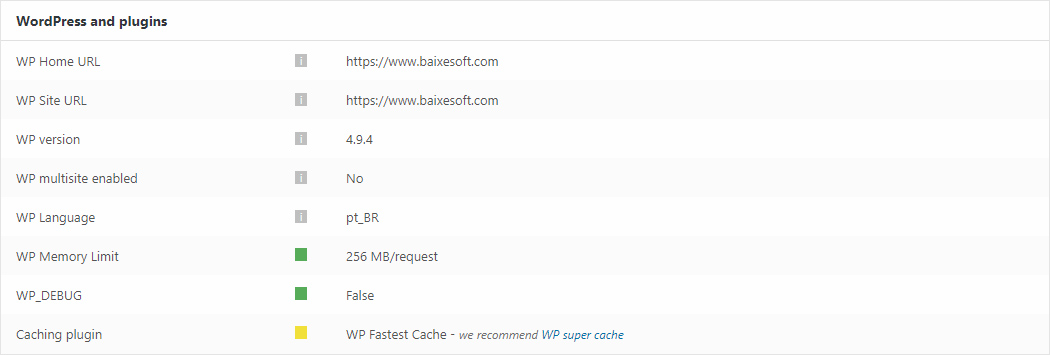
Hi there! Just two quick things about this screenshot form the system status:
https://www.baixesoft.com/wp-content/uploads/2018/02/Sem-Título-1.jpg
1) How much memory in wp memory limit will you recommend for a dedicaded server with a considerable number of access and with 4GB DDR3 RAM Memory at disposal only for this website?
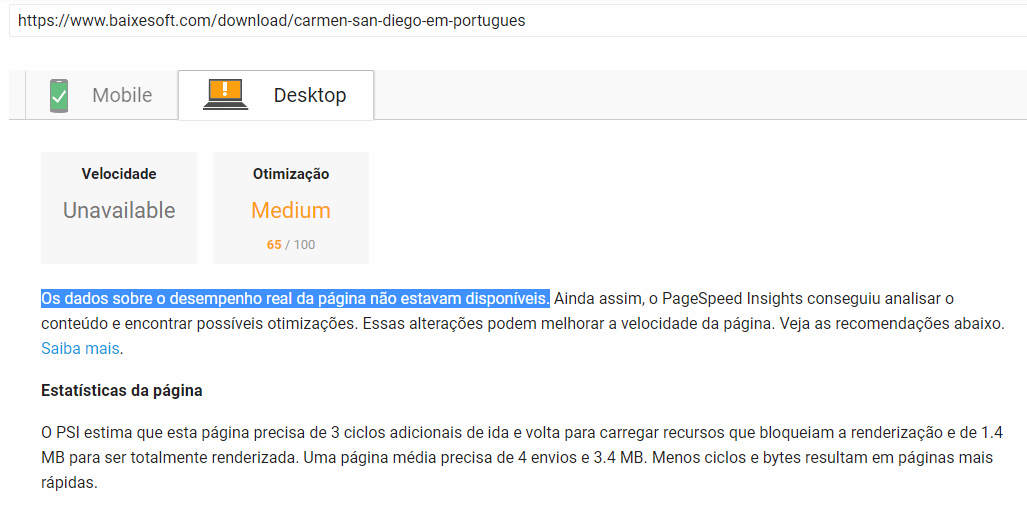
2) I have the premium version of WP Fastest Cache, cause it did way more effect than WP super cache in the previous theme, so there is any problem to use the fastest cache in newspapper? Cause i experienced this in PageSpeed Insights: “Data on actual page performance is not available” like the screenshot above (in portuguese language).
https://www.baixesoft.com/wp-content/uploads/2018/02/Page-speed.jpg
Thank’s for the support!
 irfan.id
Hi… I got problem, share button was missing https://prnt.sc/ihkowm, here is ex: https://irfan.id/mengenal-4-jenis-reksa-dana-mana-yang-paling-cocok-dengan-anda/ (actually not really missing, the link can be shered, but the button not showing up) and also smart sidebar not working.
I tried everything every, delete cache, deactive plugin.. but still no change. what should I do?
Thanks
 kredit
 I have a issue here : http://prntscr.com/ihjwpp
the dropdown menue does not open , it runs in a endless queue.
what I did: cleaned cache (history ,,anything) of my internet browsers , tried different browser, from different locations and different IO’s. still same issue .
theme is : business theme
version: 8.5.1
how can I fix this please ?
thank you
 jakobe75
 Same issue here, reinstalled template, cleared all caches, no cdn os used, disabled cache and the issue persists.
 reidostorrents
The Top Article Like (Facebook Button) is missing
Everything was functional normally yesterday, I did not install or update any plugins. I cleaned the cache (Wp-Super Cache and Cloudflare) without successfully solving the problem.
Obs: This option is enable on theme settings.
How can i fix it?
Thanks
 mark will
 Hello Catalin, I updated the theme to the latest version via FTP (rename the old theme and uploaded the new version), I deleted the cache but the problem persists
What happened?
Thank You again 🙂
Catalin Hello wibs,
Ensure that you are using the latest version of the theme, remove all of the untested plugins, clear all the caches and check the results. If the problems are still there, I suggest you make a new clean install from scratch to another subdomain for testing and check the results.
Thanks.
Catalin Hello pciza,
Make sure that you are using the latest version of the theme, remove all of the untested plugins if you are using something like this, clear all the caches and check the results. If the problem is still there, you should make a new install to another sub-domain for testing via FTP way and check the results.
Thanks for your understanding!
 Simion C.
 That is not caused by theme, it is caused by caching. Theme does not have caching. Please clear all caches installed (cache plugins, caches provided by hosting, CDN if used) and check the results.
Catalin Hello Sasinipa,
First of all, please make sure that you are using the latest version of the theme installed via FTP way and if we do not suggest installing it. Also, if you are using some untested plugins, please remove all of these because might occurs a lot of interferences in the theme between untested plugins and main theme, purge all CDN files if you are using the CDN system, clear all the caches and check the results. Please notice that if our theme has been right installed you should not have any kind of issues, sorry! until now, we do not have any bad records in this case, sorry!
Thanks for your understanding!
Catalin Hello,
Please note that I have checked on my side with General Modal Image On and the lightbox working as expected. Ensure that you have enabled this option for each image from here
-> https://www.screencast.com/t/T3PtzfiluTjU Clear all the caches and check the results.
Thanks for the message!
Simion C. Sunt tutoriale online, chair si pe forum pentru optimizare de website. Optimizarea in general presupune destul de multa munca si teste continue. DIn cate vad site-ul se incarca foarte bine in ciuda lipsei unor optimizari. Am vazut site-uri cu 100% score care se incarcau groaznic.
Plugin-ul tagDiv AMP se poate instala in locul celorlalte. Sau se poate continua cu ele, fara a instala tagDiv AMP. Meniul nu va fi afisat cu plugin-ul nostru, similar cu site-ul Yoast
– https://yoast.com/social-media-optimization-with-yoast-seo/amp/
Poate in viitor vom implementa si un meniu in AMP.
Din cate vad commentariile apar si pe mobil
– https://www.screencast.com/t/KXpQxMqw
Pe pagina de AMP vor aparea doar commenturile default din tema, asa
– https://www.screencast.com/t/8Fhb2Be6
Cand user-ul vrea sa lase un comment va fi redirectionat pe website pe pagina postului, nu va ramane in pagina de AMP. Pana la urma asta este scopul, sa ajunga pe website (nu in cache la Google).
Bogdan B. Hello,
Please update again as there is another version out now. Please also update the theme plugins. Then clear all caching including browser cache, cache plugin and cdn server.
Thank you!
 Cavemantraining
Hello, everything worked fine before upgrading to the latest theme, now I get an error
wp_booster error:
td_api_base::mark_used_on_page : a component with the ID: vc_column_text is not set.
/opt/bitnami/apps/wordpress/htdocs/wp-content/themes/Newspaper/includes/wp_booster/td_api.php
Display backtrace
dev . cavemantraining.com/ [this is the url the error is on, I don’t want it cached by search engines]
This is development where I run the updates first.
version: 8.7
Catalin Hello mark will,
Unfortunately, your footer section seems to be broken, sorry! I have inspected your website and I saw that you are using an old version of the theme with the latest version of WordPress and that’s why this problem might occur. -> https://www.screencast.com/t/YGycNuWZ7B Make a full backup to your database and make a new fresh install from scratch via FTP way because this is the surest method in this case. Clear all the caches and check the results.
Hope this helps and let us know how it goes!
Thanks for the message!
Catalin Hello,
The header menu colors can be changed from Theme panel. Try it again when you ensure that your system status parameters are correctly increased according to our documentation from here -> https://forum.tagdiv.com/system-status-parameters-guide/, clear all the caches, purge all CDN files and see the results.
Thanks for the message!
Catalin Hello dralim,
Unfortunately, your website URL does not work and also, I cannot check your Facebook sharing buttons, sorry! Try to make a full backup to your database, clear all the caches and make a new clean install from scratch via FTP way with the latest version of the theme.
Thanks for the message!
 Chandan Kumar Singh
 Hi Team,
I am not happy with support.
After activating WP Super Cache plugin its showing “$wpsc_save_headers = 0; $wpsc_save_headers = 0;”
Thanks
 rox
roxGot a theme update notice again today, updated theme after clearing cache along with standard process of backup/cleanup etc. As precaution, deleted and reinstalled Tagdiv plugins as was advised during the last update when we encountered issues after theme update.
Post today’s update, noticed a main block of content vanished from the home page. One of the settings “Random Post Today” in Block 3 of “Sort Order” filter was malfunctioning after the update (showing “no post” message in the row) while it worked just fine before today’s update, changed it to a different setting and it worked fine. Tested this multiple times to confirmed the issue.
For Tagdiv, please take a note, test this bug and release fix. Others with a similar config on their sites can take a note and switch to other settings until a stable fix is released.
 liberoarbitrio
 Hi, I have already added your indication in the hesscess including the one that suggested me but gtmetrix marks me those resources out of the cache … thanks, Marco.