
No search results were found in Documentation!
 Simion C.
 Hi,
We have not had any negative feedback regarding this. Please make sure that you use the latest version of the theme and the plugins bundled in the package.
The theme has these server requirements – https://forum.tagdiv.com/requirements-for-newspaper/ and requires modifications to be made to some parameters if needed – https://forum.tagdiv.com/system-status-parameters-guide/
It is recommended to use WP Super Cache – https://forum.tagdiv.com/cache-plugin-install-and-configure/ with the theme. There is also an available tutorial about improving website performance – https://forum.tagdiv.com/how-to-make-the-site-faster/
If you are saying that everything was fine before moving to the new host, maybe the problem is there since we have no complaints regarding this issue and everything is working as intended. Please let us know how it goes.
Thank you for understanding!
Simion C. Hi,
Please make sure you have the latest version of the social counter plugin, provided in the theme package. Enter just the Instagram user ID as shown in the previous reply – https://www.screencast.com/t/C1k7axsis2 disable all your plugins except Visual composer and the social counter, switch to the main theme if you are using a child theme, clear your cache again then check to see if it works properly. After you have done all these things, there should not be a reason for the social counter to not work properly, because it seems to work as intended on my end – https://www.screencast.com/t/gvmBGYzz
Thanks
 Bogdan B.
 Hello,
Thank you for your appreciation.
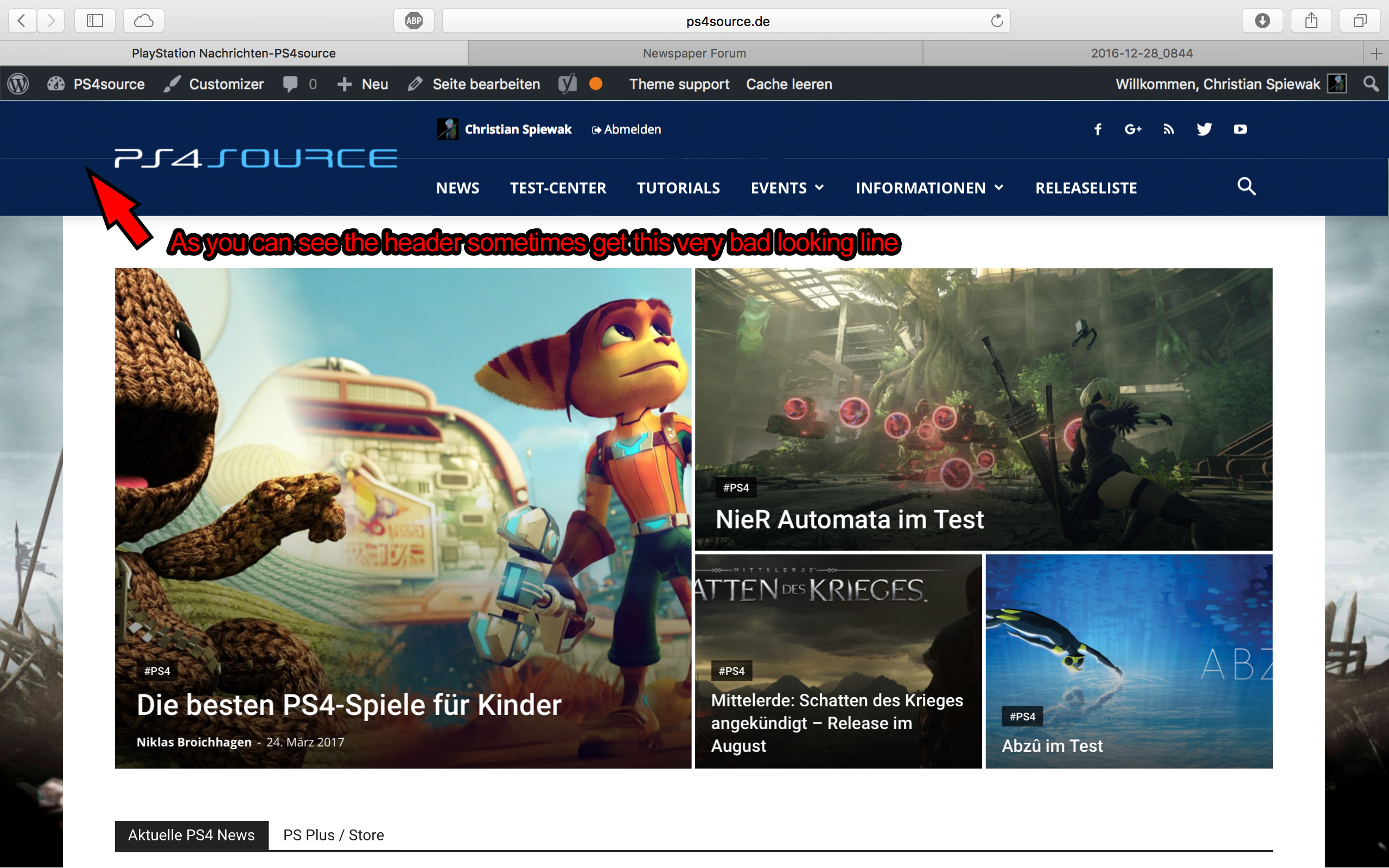
1) I have tested your site on mac but could not see the line you mention. https://www.screencast.com/t/kHdvVpdbcJUN
2) Our theme has a custom login already which can be accessed on the front-end: https://forum.tagdiv.com/login-how-to-enable-user-registration/ – https://www.screencast.com/t/D0BiMNXRTqyG
3) sorry but there is no gradient color section for the header and footer but you can add a footer background image: https://www.screencast.com/t/rKgVA4TL
For the header it can only be done with custom css.
4) Sorry but only by using the obile theme can you have a separate menu for mobile devices.
5) The quotes can be changed from the fonts option: https://www.screencast.com/t/tcwLRz4daHU
6) and 7) It is ok as there are no restrictions in this regard. It will load all of the elements, yes, but you should not experience drastic loading speed drops. It is recommended to increase your overall loading speed by using this guide: https://forum.tagdiv.com/how-to-make-the-site-faster/ and increase your system status parameters like so: https://forum.tagdiv.com/system-status-parameters-guide/
lease only use wp super cache and these settings: https://forum.tagdiv.com/cache-plugin-install-and-configure/ if you plan on using a cdn server: https://forum.tagdiv.com/cloudflare-cdn/
8) This topic explains how to use speedbooster together with other plugins: https://forum.tagdiv.com/topic/tinymce-advanced-and-other-various-disabling-speed-boster/
9) Please provide an example as the image is not working
10) The validator also provides errors for ALL of the well known sites including google, facebook, Amazon, Yahoo, etc. We have stopped trusting it 🙂
Thanks
Bogdan B. Hello,
This could be a plugin conflict so please disable all plugins except visual composer, clear cache and reset cdn files if you use it. Please also check any custom code you might have added to the theme panel or the theme files. If you use a child theme, please switch to the main theme to make sure it does not affect the proper functionality of the theme.
Also make sure you increase your system status parameters like so: https://forum.tagdiv.com/system-status-parameters-guide/
Thank you!
Bogdan B. Hi,
This could be a plugin conflict so please disable all plugins except visual composer, clear cache and reset cdn files if you use it. Please also check any custom code you might have added to the theme panel or the theme files. If you use a child theme, please switch to the main theme to make sure it does not affect the proper functionality of the theme.
Thank you!
 fenomeno0chris
Hello to the whole Newspaper/Newsmag team!
First I want to say, thank you very much for creating such great themes.
After 3 years I decided with my team to change the overall design of my homepage, by buying Newspaper7. The reaction of our readers and users are mostly positive. So thats a good sign.
Of course such a huge change is not that easy to handle and thats why I still have some problems and question, which should be solved.
All problems occur on the latest version of Newspaper 7.8
1) On my MacBook with the default Safari browser, I often get this annoying and bad looking line through the whole header section. How can I solve the problem?
2) Which register plugin should I use? I don’t want to let new users to set a new password on the bad looking interface of WordPress. Im sure you guys know what I mean and have a good recommendation for that. Beside that, what should I use to prevent registrations from bots?
3) Is it possible to have a gradient header and footer, instead of just one color? It looks a bit boring.
4) How can I change the menu just for the mobile page, without using td-mobile-plugin?
5) How can I change the the font style and size of quotes? At default settings it looks way too big (see here)
6) Is it ok too use the responsive options, to create one site with different blocks and grids for mobile and desktop? Im asking cause I don’t know if my site will load much longer, if it has to load information even though there are not displayed. (see details here)
7) My current page speed is a disaster (see here). Why is it so bad, since Im using kraken.io image optimizer and WP Super Cache? How can I improve the score?
8) How can I use td-speed-booster, without uninstalling my plugins? (Disqus Comment System, TablePress, TotalPoll…) I really need those plugins, but I still want to have a fast homepage!
9) If I set [Template Setting->Force Full width->Header Menu] to “No Stretch”, the logo of my site is not at the correct position.

10) validator.w3.org shows, that my page has 33 errors (see here). How can I fix them?
 HeTo25
 Hi
When I view the two galleries (links are in my first post) on smartphones the slider works fine until a certain picture is reached.
– tested with LG and Sony
– gallery –> normal view, not full size
– using the slider with my finger
In one case the problems start with picture 14 of 25. If picture 14 is reached, it suddenly goes very slow from right to left and this happens with most of the pictures which are following.
Screenshot: http://prnt.sc/epjuk9
In the second gallery the problems start with picture 26 of 48. If picture 26 is reached, it suddenly goes very slow from right to left and this happens with most of the pictures which are following.
http://prnt.sc/epjuwm
Active Plugins: – Contact Form 7
– Regenerate Thumbnails
– tagDiv Social Counter
– WP Super Cache
– WPBakery Visual Composer
– Yoast SEO
All of this 6 plugins are core or recommendend…
Thanks
 simchris
 No. The AMP plugin replaces the mobile theme with the AMP version, where portions of the content get cached on Google servers under high demand as a CDN structure.
If you plan on using AMP as your main mobile element, then the theme mobile support is only used for those instances where AMP is not used.
You can modify the AMP templates however you wish.
Desktop => theme template
Mobile => theme template/mobile (optional)
Mobile AMP => AMP template via plugin
AMP has very specific requirements outside the scope of the theme.
For example, WordPress allowed you to use the visual editor to add <p style="center"> which is bad HTML in modern usage. This will cause AMP validation to fail.
Theme authors cannot spend the time to support the ins/outs of AMP which change over time, and for which there would be unreasonable amount of support time provided to those who don’t understand how WP works, how AMP works, and can’t RTFM.
It ONLY makes sense to use an “agnostic” plugin like the one from Automattic (we have been using it since Nov 2015). This puts the brunt of development/compliance on the backs of WordPress devs and not theme devs, since it gets used for all the tier 1 “VIP” WordPress sites like TIME magazine, etc.
Really — anybody who wants to implement AMP should look into using the AMP plugin, then learn to tweak per the requirements as that is “best” way to go to save yourself major headaches, pain, suffering, and torment!
It’s neither economically feasible nor support-smart to build entire AMP support into the theme, which is already provided by the plugin.
(( I don’t work here. ))
 Web_Piri
 Dear tagdiv;
I have never install visual composer. İ use only super cache plugin.
I have sent mail to you about login now. You can check my settings. Thank you so much. See you
 hollymarie
 That’s strange. I tried deactivating the plugins and clearing the cache, and it had no effect.
I haven’t added any custom code, and don’t’ use a child theme. I did use the beauty blog settings during setup of the theme, so that shows up in “custom body classes” in the theme panel, but I haven’t edited any code, if only because I really wouldn’t know what I’m doing.
I don’t suppose there’s an easy way to fix this?
 Catalin
 Hello Web_Piri,
First of all, if you are using some untested plugins, please try to disable all of them, leave just Visual Composer to active, clear all your caches and install only the plugins that come bundled with the theme packet and rule any conflicting plugins.
If the problem is still there after this, please send us an email at contact@tagdiv.com with your log-in information (wp-admin) so we can further inspect it closer your setup page.
Thanks for your understanding!
 Stangerson
 Hello Simion.
I repost because I have tried all what you say. I replace the entire code on my big grid 5 PHP file and I have clear my caches… but I have the same problem.
Thanks in advance.
 Irreverent Gent
 Hi Simion,
When I go to the theme panel I see multiple options for the font weight, ranging from “100 – Thin” to “900 – Black (Heavy)”. The font I use for my headlines, Playfair Display SC, ranges from 400 to 900, as per Google:
https://fonts.google.com/specimen/Playfair+Display+SC
But when I change it from “700 – Bold” to “900 – Black (Heavy)” I don’t see the change reflected. As a test, I also tried setting the font to italic, but again I didn’t see the change reflected on the front end.
I’ve tried clearing my cache and I’ve checked the headlines across multiple browsers, with no luck.
Any further suggestions you have would be very much appreciated.
Dave
 The Irish Place
 Hi,
On clearing Cached Images and Files in Google Chrome the problem resolved itself.
Regards
Fergus Walsh
The Irish Place
The Irish Place Hi,
Thanks for the response. On further checking I have found that the issue was down to Google Chrome. On clearing Cache History and Files the issue was eliminated.
Regards
Fergus Walsh
The Irish Place
Simion C. Hi,
If you still are experiencing problems with the menu, maybe a plugin could be interfering with this process. Try disabling all your plugins except Visual composer, clear the cache and try to see if the issue is still present. If it is you can try as suggested a theme reinstall – https://forum.tagdiv.com/install-via-ftp/ – https://forum.tagdiv.com/install-via-wordpress/ with the latest version and also use only the plugins bundled with the theme package to test this. Also make sure you have the latest version of WordPress installed.
Thanks
Bogdan B. @ Sundial you can show the counter again as it shows the correct count now: https://www.screencast.com/t/c0uWltbm7W that is your likes number.
@ Marc_Ravaris this is where your counter takes users: https://www.screencast.com/t/J2zfyt2fO5hc. The facebook id is not valid
@Turtlechips The plugin works if you set it up properly. There is no issue with it. Please use this guide to set it up properly https://forum.tagdiv.com/tagdiv-social-counter-tutorial/ and then clear all caching as it is affected by cache
Thank you!
Bogdan B. Hello,
It seems the re is no top margin at all on posts. Did you remove any rules from the css file? The top margin is nowhere to be found in the code either. Please disable all plugins except visual composer, clear cache and reset cdn files if you use it. Please also check any custom code you might have added to the theme panel or the theme files. If you use a child theme, please switch to the main theme to make sure it does not affect the proper functionality of the theme.
Thank you!
Bogdan B. Hello,
This could be a plugin conflict so please disable all plugins except visual composer, clear cache and reset cdn files if you use it. Please also check any custom code you might have added to the theme panel or the theme files. If you use a child theme, please switch to the main theme to make sure it does not affect the proper functionality of the theme.
Thank you!
Catalin Hello arslankerim,
I have checked your source page and I saw that you are suing some untested plugins which can interact with the theme core files and cause a lot of unknown issues, like bwp-minify, sorry! You should disable all of them, leave just Visual Composer, clear all your caches and install only the plugins that come bundled with the theme core files and rule out any conflicting plugins.
Thanks for your understanding!
Catalin Hello zielkii,
Be more carefully when you load the image from your media library. Ensure that you have chosen the full size for your image, like this -> https://www.screencast.com/t/6fyH6lzYtpf Clear all your caches and check the results.
Thanks for your understating!
Bogdan B. Hello,
The requests depend on the number of visitors you have and on the number of complex elements on your site. If you have lots of blocks with pagination and ajax filters, the requests could go up. Please make sure you use a caching plugin : https://forum.tagdiv.com/cache-plugin-install-and-configure/ and a cdn server is also recommended: https://forum.tagdiv.com/cloudflare-cdn/
Thank you!
Bogdan B. Hello,
I cannot see any categories from the demo on your end though. You must also clear cache after you change settings for them to be seen on the front-end though. Sometimes the host provides a hosting side cache as well.
Thank you!
Catalin Hello Web_Piri,
I have inspected your website and I did not saw any problem/delay in your loading website on mobile devices. Everything seems to work as expected. If you will have encountered this problem, please try to provide some useful screenshots with it so I can take a closer look at it. Clear all your caches and check the results.
Thanks for your understanding!
Simion C. Hi,
Please provide more details about this and how you have come to this conclusion, or by what method of testing. Also provide a link to your website so we can inspect it.
Here are some guides to help you improve your page speed – https://forum.tagdiv.com/how-to-make-the-site-faster/ using the speed booster plugin, and WP Super Cache – https://forum.tagdiv.com/cache-plugin-install-and-configure/
Thanks
