
- NewspaperChild Theme Support
- NewspaperIntroduction to CPT and ACF with Newspaper Theme
- NewspaperHow to Update the Newspaper Theme
- NewspaperWhat’s Included in the Newspaper Theme Package
- NewspaperFlex Block Settings Guide
- NewspaperPrimary Category: Build a hierarchy for your website
- NewspaperBreadcrumbs
- NewspaperHow to Install Newspaper via FTP
- NewspaperHow to Install Newspaper via WordPress
 hmader
 Hi, as I can’t deactivate all plugins on the live system, I tried that on a parallel site on the same multisite network, installing the same plugins as on the original site. The Mobile viewport stayed visible there, no matter what I activated or deactivated – caching plugins etc. had no effects, and there is no child theme in use…
 Calin
Calin Hi,
Please make sure that you do not have a plugin conflict with untested plugins, please deactivate all non theme, also if you are using child theme, clear all cache and try again.
Please make sure that all the settings are like in our requirements, please follow the guide carefully
– https://forum.tagdiv.com/requirements-for-newspaper/
and please increase all requirements that are lower, and follow all steps.
Let me know the results!
Thank you!
 Vlad S
 Hello !
I’ve seen that it loads every time but it does take a time to load. Please make sure that you do not have a plugin conflict, please deactivate ALL non theme-related plugins, also if you are using child theme or cache plugin, deactivate them, clear all cache and try again.
Also, try updating your page speed: Here is a tutorial on how to increase it: https://tagdiv.com/how-to-increase-page-loading-speed/ as you can see here you need to improve some things in order to make your page better: https://gtmetrix.com/reports/portalacionista.com.br/v6qP33jK
Thank you !
Vlad S Hello !
Please make sure that you do not have a plugin conflict, please deactivate ALL non theme-related plugins, also if you are using child theme or cache plugin, deactivate them, clear all cache and try again.
Also make sure that you have updated the theme and plugins properly: https://forum.tagdiv.com/how-to-update-the-theme-2/
Thank you !
Calin Hi,
Also please make sure that you do not have a plugin conflict with untested plugins, please deactivate all non theme, also if you are using child theme, clear all cache and try again.
If there is still a problem, please provide some more details some screenshots and a link to your posts.
Thank you!
 Simion C.
 Hi,
There will be an update released this week most likely, child theme support will be further improved. I should note that files from the wp-booster aren’t currently supported to be modified in a child theme, this may change however.
The post template files can be used in the child theme, just be sure to copy both the loop-single and the single PHP files – http://prntscr.com/ojq81b
The issue with using templates from the root theme (not in the composer plugin) meaning single, search, 404 etc in the child theme, will be fixed in this next update. There are also plans as far as I know to allow it for the comments file as well, should be happening in the next update as well. Let me know if you have more questions.
Thanks
 lbaddhan
 Few more files that aren’t editable via child theme:
/comments.php
/404.php
/single.php
Calin Hi,
What I can recommend to you is to make a fresh install on a subdomain or localhost to check the AMP and if is work you can duplicate your live website and try on entertainment test to integrate the amp in the theme, we recommend the amp with mobile theme
Also please make sure that you do not have a plugin conflict with untested plugins, please deactivate all non theme, also if you are using child theme, clear all cache and try again.
If there is still a problem, you can send us an email at contact@tagdiv.com and provide admin login, as well as cPanel or FTP if possible. We will take a look. Include a link to this topic in the email.
Thank you for your understanding!
Calin Hi,
Please make sure that you do not have a plugin conflict with untested plugins, please deactivate all non theme, also if you are using child theme, clear all cache and try again.
You could try to request Google to recrawl and reindex your URL
– https://support.google.com/webmasters/answer/6065812
Hope this will help you!
lbaddhan Hello Simon,
Thanks for your reply !!
Yes we had customized the header-style-1.php as per your screenshot its working.
But there are other few theme core files we had customized via Child theme, they are no more working.
List of not working files:
/search.php
/parts/page-search-box.php
/parts/header/logo-h1.php
/includes/wp_booster/td_category_template.php
/includes/wp_booster/td_module_single_base.php
Can there be a new update to theme released so that all child theme file issues are solved. Also we are working on other files list that aren’t editable via child theme.
Thanks.
Vlad S Hello !
In order to have the benefits of a full Newspaper Theme you will have to activate the required plugins:
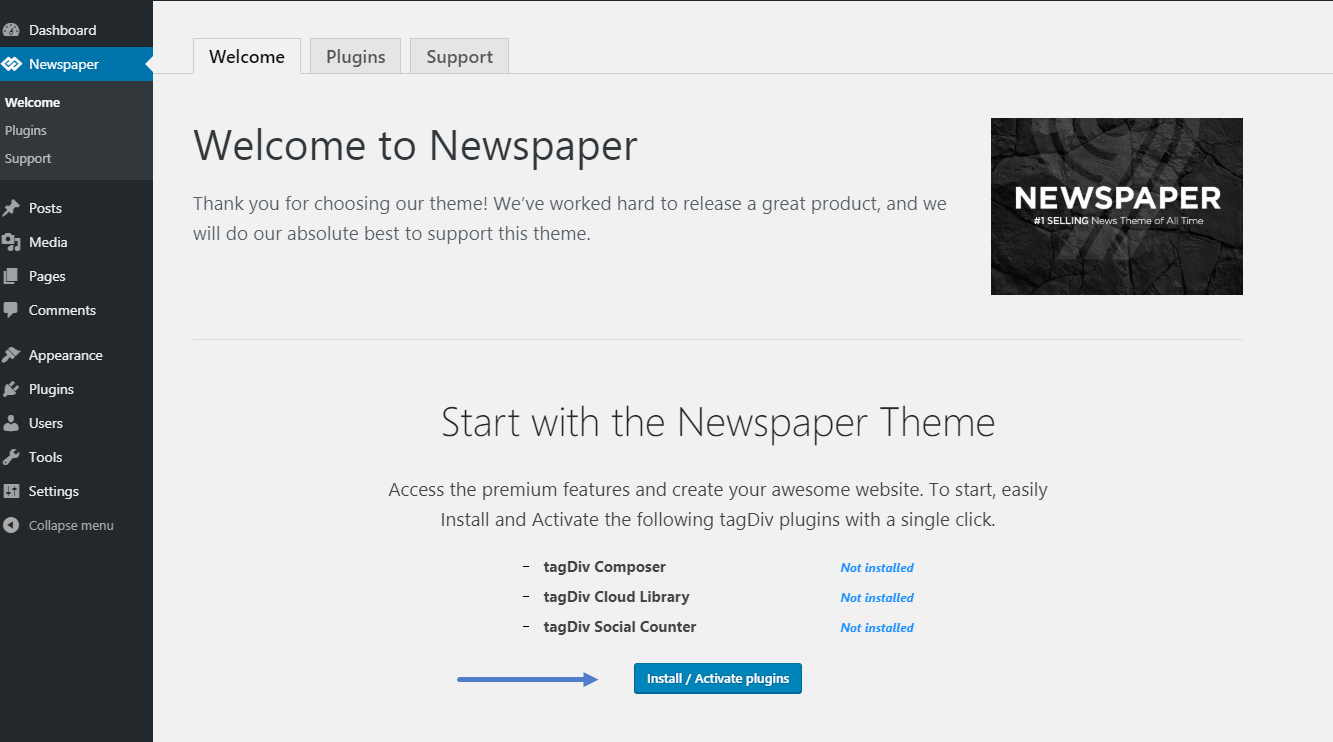
The child theme is in the Folder you have from Envato and requires manual instalation as you can see here: https://forum.tagdiv.com/install-via-wordpress/
I hope this was helpfull !
Thank you !
 marcos.jimenez@n-people.es
Good morning,
I just installed the theme “newspaper 9” bought in envato yesterday.
But i can not find the box in wordpres to insert the license code of my topic newspaper 9
I only have the welcome sections, plugins and support. The others are missing.
It is as if it were a demo theme, also the child theme does not appear.
What is the problem?
Thank you 🙂
Vlad S Hello !
This could be a plugin conflict so please disable all plugins except the page builder, clear cache and reset cdn files if you use it. Please also check any custom code you might have added to the theme panel or the theme files. If you use a child theme, please switch to the main theme to make sure it does not affect the proper functionality of the theme.
Thank you!
Vlad S Hello !
Please make sure that you do not have a plugin conflict, please deactivate ALL non theme-related plugins, also if you are using child theme or cache plugin, deactivate them, clear all cache and try again.
Thank you !
Calin Hi,
Please make sure that all the settings are like in our requirements, please follow the guide carefully
– https://forum.tagdiv.com/requirements-for-newspaper/
and please increase all requirements that are lower, and follow all steps.
Please make sure that you do not have a plugin conflict with untested plugins, please deactivate all non theme, also if you are using child theme, clear all cache and try again.
If there is still a problem, you can send us an email at contact@tagdiv.com and provide admin login, as well as cPanel or FTP if possible. We will take a look. Include a link to this topic in the email.
Hope this will help you!
Thanks.
Simion C. Hi,
I have inspected the posts on your website,for example – https://fanaripress.gr/ipeiros/4-5-ekat-antiplimmyrika-erga-stoys-dimoys-tis-ipeiroy/
Looks fine at the moment. I see the website uses 9.7.4 and a child theme is active. Does the issue happen on specific posts or in specific circumstances? Please let me know.
Thanks
Simion C. Hi,
Maybe something happened with the wordpress uploads/media folder, or the database. The theme shouldn’t affect the search functionality of wordpress or a plugin.
Does it work if you make a quick test and switch to a default theme? I found some similar topics about media library issues
– https://wordpress.org/support/topic/media-files-not-showing-up-in-media-library/
– https://wpengine.com/resources/troubleshooting-wordpress-media-library/
In the latest update there were mostly fixes, and some new additions, better child theme support, but nothing major that would cause such problems.
Thanks
Simion C. Hi,
The child theme was limited after the 9.7 update, but now in the 9.7.4 update it has been greatly improved in terms of functionality. Post templates, blocks, modules, header templates, category templates etc can now be modified in the child theme.
In the coming update we will fix some issues with the child theme, this should be released this week from what I know. Please let me know if you have questions.
Thanks
Vlad S Hello !
Please make sure that you do not have a plugin conflict, please deactivate ALL non theme-related plugins, also if you are using child theme or cache plugin, deactivate them, clear all cache and try again.
Thank you !
 ysintos
Hello i have the child theme installed and after 9.7.4 update from 9.7.3 the site posts look weird.
The sidebars are gone and the adsense ads are not showing.
 Ginake
 1. I don’t have any other plugins except for the ones that the theme requires.
2. I’m not using any child theme nor any cache plugins.
I just installed the theme on a clean WordPress instance, installed the demo content from the theme, and now I’m trying to change that image with an image that I uploaded in media library. When I try to change the image I get this error.
 garyjones
 Hi Simon
That is indeed great news and thanks for taking the suggestion on board. The proposed guide will absolutely blow open the creative possibilities, particularly for those who don’t have the coding skills to dig deep into the php and CSS to write new code from scratch.
Also, great news about the Child theme. I am running 9.7.2 so I presume the child theme will work with this, save the few quirks you mentioned.
Best
G
 suprim
 I fixed it. I changed one number on child theme from 1001 to 11 now is working fine.
Vlad S Hello !
Please make sure that you do not have a plugin conflict, please deactivate ALL non theme plugins, also if you are using child theme or cache plugin, deactivate them, clear all cache and try again.
Thank you !
Calin Hi,
First please make sure that the tagDiv Cloud Library is activate and you have the templates in your cloud templates.
-> https://i.imgur.com/sdRafCJ.png
-> https://i.imgur.com/9PECsQ1.png
or if the template is set, on post for example -> https://i.imgur.com/m4I0nNo.jpg
Please make sure that you do not have a plugin conflict with untested plugins, please deactivate all non theme, also if you are using child theme, clear all cache and try again.
If there is still a problem, please provide some more details and some screenshots.
Thank you!



