
- NewspaperHow to Use tagDiv Cloud Library
- NewspaperCloud Library Templates
- NewspaperCloud Library – Category Templates
- NewspaperDesign your Post Pages using the Cloud Library Templates
- NewspapertagDiv Cloud Library Plugin
- NewspaperFlex Block Builder and Flex Loop Builder
- NewspaperIntroduction to CPT and ACF with Newspaper Theme
- NewspaperFilters and sorting for taxonomies
- NewspaperHow to use the Google Maps API
- NewspaperHow to insert a block inside the content of a post
- NewspaperPosts Loop Element
- NewspaperSocial Sharing
- NewspaperInfinite Loading for Single Posts
- NewspaperHow to Add a Logo in Newspaper
- NewspapertagDiv Shop
- NewspaperCustom Post Type Support
- NewspaperHow to use the YouTube API
- NewspaperHeader Builder
- NewspaperMeta Info on Modules and Blocks
- NewspapertagDiv Composer Tutorial
 Calin
Calin Hi Golam Rabby,
That website is using this demo ->https://demo.tagdiv.com/newspaper_blog_fitness/ but has more changes made on it.
You can achieve that layout using tagDiv Composer, but for this you’ll need to lear how this is working and what you can do with it, the most easy and fats way is to install a demo, you can see here all demos that are available -> https://demo.tagdiv.com/select_demo/select_demo_newspaper/?utm_source=live_preview&utm_medium=click&utm_campaign=demos&utm_content=demos_button#demos
Also if you do not what to install demo you can import cloud templates and pages and blocks from tagDiv Cloud library after that you can edit theme using tagDiv Composer.
Let me know with what I can help you!
Calin Hi Ikbal, as I can see the ads that were set right are displaying now -> https://i.imgur.com/rL3d5SK.png but note that since you are using a pro demo you are using cloud templates, therefore the ads need to be set using tagDiv Composer and ab box elements, only setting ads in theme panel will not work, these are only for standard templates, not cloud templates.
You can check here how to use ad box element with tagDiv Composer ->https://forum.tagdiv.com/custom-ad-spots/ also for single post template ads you can check this video -> https://www.youtube.com/watch?v=biTpVVlr8j8
Hope this will help you!
Thank you!
Calin Hello jfox20, if you are using Video news , this is build using cloud templates and it can be edit using tagDiv Composer -> https://i.imgur.com/3hMjAy1.png -> https://i.imgur.com/TMJDazx.png you can use the right click to remove elements.
Hope this will help you!
 SportsNewsIRLAND
getting the following error when trying to use the tagDiv composer.
Internal Server Error
The server encountered an internal error or misconfiguration and was unable to complete your request.
I have reloaded the theme and plugins but still getting this error
we are also getting PHP errors as follows
[07-Aug-2020 10:26:14 UTC] PHP Notice: Trying to get property ‘post_content’ of non-object in /opt/bitnami/apps/wordpress/htdocs/wp-content/plugins/td-cloud-library/includes/tdb_functions.php on line 251
[07-Aug-2020 10:26:14 UTC] PHP Notice: Trying to get property ‘post_content’ of non-object in /opt/bitnami/apps/wordpress/htdocs/wp-content/plugins/td-cloud-library/includes/tdb_functions.php on line 252
[07-Aug-2020 10:28:44 UTC] PHP Notice: Trying to get property ‘post_content’ of non-object in /opt/bitnami/apps/wordpress/htdocs/wp-content/plugins/td-cloud-library/includes/tdb_functions.php on line 251
[07-Aug-2020 10:28:44 UTC] PHP Notice: Trying to get property ‘post_content’ of non-object in /opt/bitnami/apps/wordpress/htdocs/wp-content/plugins/td-cloud-library/includes/tdb_functions.php on line 252
Calin Hi,
The footer cloud template can be edited, but it must be set on a page or cloud template in order to be able to edit it, this was the way made by our developers, normal we all think that it should work as a normal template, but is look that the footer template has some elements that can be edited only when it is assigned on a page or cloud. This is the only way that it can be edited after you download it from cloud library.
Also now all cloud templates can be edited using tagDiv Composer and assigned using the frontend and using this method is more ease to use the method for editing the footer template.
-> https://i.imgur.com/gtfBbPR.png -> https://i.imgur.com/vrCr1Wg.png -> https://i.imgur.com/FlNSPI0.jpg
Hope this will help you!
Thank you!
Calin Hi,
1. So you are using a cloud header from tagDiv Cloud Library, this need to be edited using tagDiv Composer and you can see that the initial logo is a text -> https://i.imgur.com/dOaRK7l.png you need to remove it from there (your logo is an image).
2. What you can do to make it to look nice is to add a second logo under the main logo and set in it only the tagline ->https://i.imgur.com/U00g9tN.png
Hope this will help you!
Thank you!
Calin Hi Genkokov, actually I think that for you for fix i not working because you have two meta set in header for index/noindex, on if from our theme and second on is from an extra plugin or it can be also set custom.
How you can check this, you can inspect the source page using the right click -> https://i.imgur.com/1n9lFRH.png -> https://i.imgur.com/0ZdSVXq.png what you can do is to change the priority for the fix that we’ve made, go -> wp-content/plugins/td-cloud-library/includes/tdb_functions.php and change priority 1 in 11 or more -> https://i.imgur.com/NgvI6IR.png -> https://i.imgur.com/NPAaryJ.png after that clear all cache open again the page from your website and check if the meta from our theme is loading the last one or not (check again the source page), usually the last meta that is set should be use by Google.
Let me know if there are some improvements!
Thanks.
Calin Hi Jumich, yes, you can use the child theme if you made changes in theme files, is even recommended for that, what is not recommended is to use the child theme for something that now it can be ah\chive using tagDiv Cloud Library, that is way we usually recommend to users to try cloud templates and only if they can not achieve what they need to use the child theme.
Also for page speed you can check the suggestions from these topics -> https://forum.tagdiv.com/topic/i-want-to-speed-up-mine-website/
Hope these will help you!
Thank you!
Calin Hi AlbertoJR actualy I think that is no need to send the email, the video is not play inside the article because the single post template that you are using from tagDiv Cloud Library is using a Single Post Bg Featured Image and this can not run videos, you need to edit the single post template with tagDiv Composer -> https://i.imgur.com/WbdLRTO.png -> https://i.imgur.com/72a9TYt.png (use the right click to remove the element) and add/set the Single Post Featured Image -> https://i.imgur.com/N8XID7I.png -> https://i.imgur.com/8C9LNby.png after that save the template and the video will play inside the article page (inside the post).
Let me know the results!
 Dillip Guru
Dear Team While activating theme I am finding this error and not able to proceed further.
tagDiv Cloud Library -Ajax error
tagDiv Social Counter -Ajax error
tagDiv Standard Pack -Ajax error
On the Page This message is showing.
FYI: I have upgraded my PHP version to PHP 7.4 (ea-php74)
 Vlad S
 Hello !
That option is possible when using Cloud Library post templates: https://www.youtube.com/watch?v=I1R3j1QYod0 And you can activate or deactivate the infintie scroll from here: https://tagdiv.com/infinite-loading-for-single-posts/
Thank you !
Vlad S Hi,
If you want to use the “Time ago format” you need to use a single post template from tagDiv Cloud Library and edit it with tagDiv Composer click on single post date and enable the “Time ago format” -> https://www.screencast.com/t/2G5ogZnde0JZ
Thank you!
Calin Hi,
Maybe this is because you are using a pro demo, these are using cloud template and the settings from theme panel will no longer apply directly to the theme, these options are only for standard demos. For pro demos you’ll need to edit the page using tagDiv Composer -> https://i.imgur.com/Eb38wUm.png select the ad box from header and select the adspot -> https://i.imgur.com/QPbXbVx.png or you can set the code directly in ad box -> https://i.imgur.com/WIVb6oF.png
Hope this will help you!
Thank you!
Calin Hi andxtagdiv, the unique articles option is available only on pages. For example if you are using a single post template from tagDiv Cloud library and you edit it with tagDiv Composer, you’ll see that these blocks that are inside the article are using some filters -> https://i.imgur.com/G7pXL2x.jpg -> https://i.imgur.com/8QICpzQ.png now the thing is that more blocks you have more set, there are more changes to be display a duplicate post, a solution will be to display posts from different categories.
Thank you!
Calin Hi,
If you want to use the “Time ago format” you need to use a single post template from tagDiv Cloud Library and edit it with tagDiv Composer click on single post date and enable the “Time ago format” -> https://www.screencast.com/t/2G5ogZnde0JZ
Thank you!
Vlad S Hello !
You will have to install the required plugins from theme panel – plugins. Make sure that TagDiv Composer plugin is active.
Homepage can be edited from here on frontend: https://www.screencast.com/t/nMsrX9jxka49
And from here on the backend: https://www.screencast.com/t/S3M8DyYz
Cloud library templates can be edited from here: https://www.screencast.com/t/h3q6AT14
This will enable the drag and drop options from tagDiv Composer.
Thank you !
 mrdragon9
Hello!
The recent theme update prompted the following PHP error email from WordPress:
An error of type E_ERROR was caused in line 2753 of the file /home/gnndev/public_html/wp-content/plugins/td-composer/legacy/common/wp_booster/td_util.php. Error message: Uncaught Exception: DateTime::__construct(): Failed to parse time string (@) at position 0 (@): Unexpected character in /home/gnndev/public_html/wp-content/plugins/td-composer/legacy/common/wp_booster/td_util.php:2753
Stack trace:
#0 /home/gnndev/public_html/wp-content/plugins/td-composer/legacy/common/wp_booster/td_util.php(2753): DateTime->__construct(‘@’)
#1 /home/gnndev/public_html/wp-content/plugins/td-composer/legacy/common/wp_booster/wp-admin/panel/views/td_panel_social_networks.php(54): td_human_readable_ts(NULL)
#2 /home/gnndev/public_html/wp-content/plugins/td-composer/legacy/common/wp_booster/wp-admin/panel/panel_core/td_panel_core.php(143): require_once(‘/home/gnndev/pu…’)
#3 /home/gnndev/public_html/wp-content/plugins/td-composer/legacy/common/wp_booster/wp-admin/panel/td_view_panel.php(2): td_panel_core::render_panel(Array, ‘theme_panel’)
#4 /home/gnndev/public_html/wp-content/plugins/td-composer/legacy/common/wp_booster/wp-admin/panel/td_panel.php(72): include(‘/home/gnndev/pu…’)
#5 /home/g
Query monitor also prompts the following 3 PHP error locations:
wp-content/plugins/td-cloud-library/includes/tdb_functions.php:1964
wp-content/plugins/td-cloud-library/includes/tdb_functions.php:1965
wp-content/plugins/td-composer/css-live/css-live.php:30
The PHP errors are not allowing me to update the theme panel. The rest of the site works fine from what I’ve gathered but the theme panel is all greyed out and won’t let me make any updates. I’ve also tried deactivating all non-tagdiv plugins without any success. Also contacted my hosting and toggled the site’s PHP version but didn’t see any effect. Any advice on how to fix this is much appreciated.
 inqusitive-stha
 Ok, then I think I will update it once it is available on cloud library.
 HarrisonBands
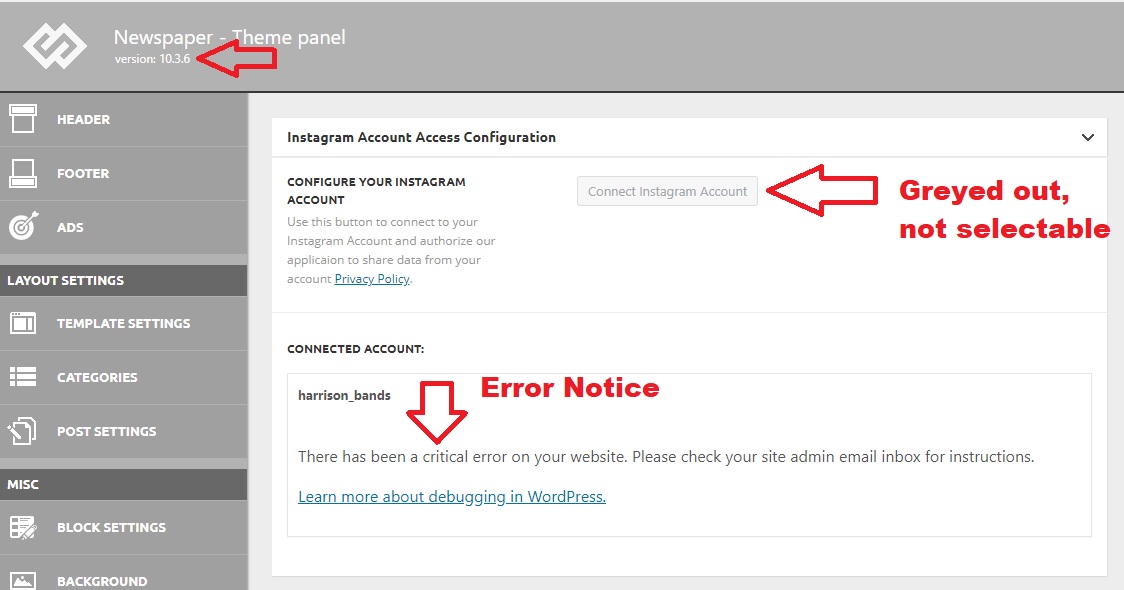
 I’ve tried setting a new Instagram ID, but I can’t select it from the theme panel. The button is “greyed out” and not selectable. I also received the following message from WordPress after the upgrade. Note this says I’m running 10.3.5, but my theme panel confirms 10.3.6
When seeking help with this issue, you may be asked for some of the following information:
WordPress version 5.4.2
Current theme: Newspaper (version 10.3.5)
Current plugin: tagDiv Cloud Library (version 1.5 | built on 06.05.2020 14:38)
PHP version 7.3.20
Error Details
=============
An error of type E_COMPILE_ERROR was caused in line 1358 of the file /home4/harritf2/public_html/wp-content/plugins/td-cloud-library/includes/tdb_functions.php. Error message: require_once(): Failed opening required ‘tdb_template_import.php’ (include_path=’.:/opt/cpanel/ea-php73/root/usr/share/pear’)
Calin Hi inqusitive-stha, the inline ads that Vlad suggested are on single post templates from tagDiv Cloud Library and can be edited with tagDiv Composer.
standard post templates -> https://i.imgur.com/1rfZZ6z.png
cloud templates -> https://i.imgur.com/bABB0WZ.png
Also for the moment only using cloud templates you can set more the 1 inline ad (you can set 3 inline ads).
Thank you!
Calin Hi,
This is disposable as a demo and we’ll add the cloud template in tagDiv Cloud Library as soon as possible.
When you use a demo the current settings for the one that you have will be lost -> https://i.imgur.com/vOcoYID.png, when you use only cloud templates then the settings will remain.
Thank you!
Calin Hi, if you want to make change for flex block 1 you need to check this file wp-content/plugins/td-composer/legacy/Newspaper/includes/shortcodes/td_flex_block_1.php also the files for post loop can be found this path -> wp-content/plugins/td-cloud-library/shortcodes/common/tdb_loop.php
Maybe you can integrate the pagination from posts loop on flex block.
Hope this will help you!
Calin Hi Genkokov, unfortunately I do not have the skills of developers therefore the only thing that I can do is to announce our developers about this situation and they will deal with it. I’m sorry for this inconvenience! but if the infinite loading is not improve the position/rank on google index, the only solution for the moment is to disable it until our developers will check the problem.
Also the problem with indexing the ?tdb_action=tdb_ajax was solved in last version -> wp-content/plugins/td-cloud-library/includes/tdb_functions.php -> https://i.imgur.com/Ft4mnaH.png
Thank you for your understanding and sorry for the inconvenience!
Calin Hi,
Usually the font family can be set in theme panel -> https://i.imgur.com/LvqPmJM.png -> https://i.imgur.com/HFj0KBm.png this will be apply on all elements that has set the font family on default, but if you are using a pro demo you need to check the cloud template with tagDiv Composer too -> https://i.imgur.com/GNqglDI.png -> https://i.imgur.com/aXURkxS.png -> https://i.imgur.com/03SBY1y.png
Hope this ill help you!
Calin Hi,
This tdb_action=tdb_ajax is related to the infinite loading functionality, the ?tdb_action=tdb_ajax can be found in wp-content/plugins/td-cloud-library/includes/tdb_ajax.php but once that is remove it will no longer work correctly the infinite loading.
I will make a note to our developers to check the infinite algorithm/code and to see if is not a better way to implement the code.
Thank you for your understanding!



