
- NewspaperHow to Use tagDiv Cloud Library
- NewspaperCloud Library Templates
- NewspaperCloud Library – Category Templates
- NewspaperDesign your Post Pages using the Cloud Library Templates
- NewspapertagDiv Cloud Library Plugin
- NewspaperFlex Block Builder and Flex Loop Builder
- NewspaperIntroduction to CPT and ACF with Newspaper Theme
- NewspaperFilters and sorting for taxonomies
- NewspaperHow to use the Google Maps API
- NewspaperHow to insert a block inside the content of a post
- NewspaperPosts Loop Element
- NewspaperSocial Sharing
- NewspaperInfinite Loading for Single Posts
- NewspaperHow to Add a Logo in Newspaper
- NewspapertagDiv Shop
- NewspaperCustom Post Type Support
- NewspaperHow to use the YouTube API
- NewspaperHeader Builder
- NewspaperMeta Info on Modules and Blocks
- NewspapertagDiv Composer Tutorial
 Vlad S
 Hi,
Unfortunately there is a problem with the new option add in theme panel for disable the schema article, this interfere with preview draft, in order to fix this problem you’ll need to make some changes in theme file or deactivate the schema articles from here: https://www.screencast.com/t/0E3IucACC You will have to check that in order to deactivate the schema, this issue will be fixed in the next update.
The file are wp-content/plugins/td-composer/legacy/common/wp_booster/td_module_single_base.php -> https://i.imgur.com/EMWC74l.png add “|| is_preview()” -> https://i.imgur.com/78beFgC.png
wp-content/plugins/td-cloud-library/state/single/tdb_state_single.php
-> https://i.imgur.com/WIIKHSU.png -> https://www.screencast.com/t/VbigQIINRB
or you can send us an email at contact@tagdiv.com and provide admin login, as well as cPanel or FTP if possible. We will take a look and make the proper changes for you. Include a link to this topic in the email.
Thank you for your understanding!
Vlad S Hi,
Unfortunately there is a problem with the new option add in theme panel for disable the schema article, this interfere with preview draft, in order to fix this problem you’ll need to make some changes in theme file or deactivate the schema articles from here: https://www.screencast.com/t/0E3IucACC You will have to check that in order to deactivate the schema, this issue will be fixed in the next update.
The file are wp-content/plugins/td-composer/legacy/common/wp_booster/td_module_single_base.php -> https://i.imgur.com/EMWC74l.png add “|| is_preview()” -> https://i.imgur.com/78beFgC.png
wp-content/plugins/td-cloud-library/state/single/tdb_state_single.php
-> https://i.imgur.com/WIIKHSU.png -> https://www.screencast.com/t/VbigQIINRB
or you can send us an email at contact@tagdiv.com and provide admin login, as well as cPanel or FTP if possible. We will take a look and make the proper changes for you. Include a link to this topic in the email.
Thank you for your understanding!
Vlad S Hello !
You will have to use a category template in order to have the ability. Find out more about it in our tutorials here: https://forum.tagdiv.com/cloud-library-category-templates/
I hope this was helpful !
Thank you !
 globalhunt
 Dear Sir,
We have found the problem. The problem is with this plugin “tagDiv Cloud Library”. When we deactivate this plugin then pagination is working fine. We have downloaded the theme from themeforest again and get the new plugin from there and uploaded on the website then we run the website then Fatal error is showing on our website, please give me solution.
 PeCould
Hello,
i have already upgraded to newspaper 10.2. Unfortunetely, when i want to see my Preview of draft posts. It show me these fatal erros:

in line 1667 is this:
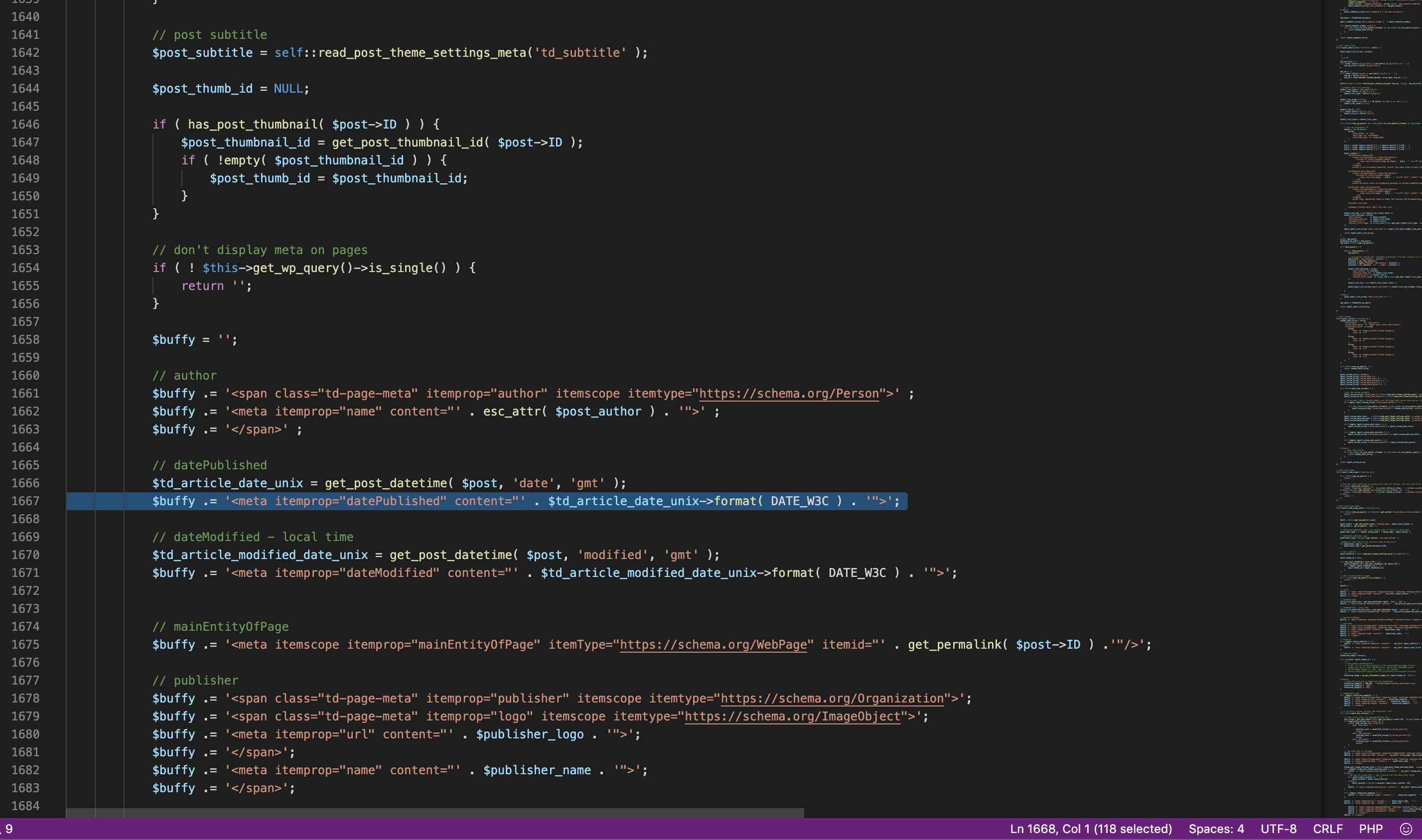
Can anyone help me?
Thank you a lot,
Petr
 jpnunes
Hi.
My Cloud Library was working fine until last week. I went for a download today and this message appears, “Invalid reply from server endpoint”.
I did some changes (I read here at the forum) as required at WP-Memory-Limit at config.php but still not working.
Vlad S Hello !
That can be achieved by either using a default template. Template 5 does not have featured image. Or to use a cloud library template for your posts ( which we recommend ) and set the layout without the featured image.
I hope this was helpful !
Thank you !
Vlad S Hi,
Unfortunately there is a problem with the new option add in theme panel for disable the schema article, this interfere with preview draft, in order to fix this problem you’ll need to make some changes in theme file or deactivate the schema articles from here: https://www.screencast.com/t/0E3IucACC You will have to check that in order to deactivate the schema, this issue will be fixed in the next update.
The file are wp-content/plugins/td-composer/legacy/common/wp_booster/td_module_single_base.php -> https://i.imgur.com/EMWC74l.png add “|| is_preview()” -> https://i.imgur.com/78beFgC.png
wp-content/plugins/td-cloud-library/state/single/tdb_state_single.php
-> https://i.imgur.com/WIIKHSU.png -> https://www.screencast.com/t/VbigQIINRB
or you can send us an email at contact@tagdiv.com and provide admin login, as well as cPanel or FTP if possible. We will take a look and make the proper changes for you. Include a link to this topic in the email.
Thank you for your understanding!
Vlad S Hello !
You can add the Tags into post template using the tagDiv Composer as you can see it here: https://www.screencast.com/t/QUjxjjjN
If you don’t use a post cloud template you can import one by following our tutorial here: https://forum.tagdiv.com/design-post-pages-using-cloud-library-templates/
Thank you !
 Calin
Calin Hi,
If you are using PRO demos, that are using cloud templates, then the settings from theme panel will not apply on those templates, only on standard style.
In order to make some changes, you’ll need to edit the pages and templates with tagDiv Composer -> https://i.imgur.com/SbatOH6.png -> https://i.imgur.com/jeFg9aP.png
Thank you!
Calin Hi,
We have a developer working on this option, but from what I know there are some difficulties to integrate and make it to work properly with tagDiv Cloud Library, therefore I can not say when this option it will be add in our theme. i think it will take some time, sorry!
Thank you for your understanding!
Calin Hi,
Unfortunately there is a problem with the new option add in theme panel for disable the schema article, this interfere with preview draft, in order to fix this problem you’ll need to make some changes in theme file or deactivate the schema articles from here: https://www.screencast.com/t/0E3IucACC You will have to check that in order to deactivate the schema, this issue will be fixed in the next update.
The file are wp-content/plugins/td-composer/legacy/common/wp_booster/td_module_single_base.php -> https://i.imgur.com/EMWC74l.png add “|| is_preview()” -> https://i.imgur.com/78beFgC.png
wp-content/plugins/td-cloud-library/state/single/tdb_state_single.php
-> https://i.imgur.com/WIIKHSU.png -> https://www.screencast.com/t/VbigQIINRB
or you can send us an email at contact@tagdiv.com and provide admin login, as well as cPanel or FTP if possible. We will take a look and make the proper changes for you. Include a link to this topic in the email.
Thank you for your understanding!
Vlad S Hi,
Unfortunately there is a problem with the new option add in theme panel for disable the schema article, this interfere with preview draft, in order to fix this problem you’ll need to make some changes in theme file or deactivate the schema articles from here: https://www.screencast.com/t/0E3IucACC You will have to check that in order to deactivate the schema, this issue will be fixed in the next update.
The file are wp-content/plugins/td-composer/legacy/common/wp_booster/td_module_single_base.php -> https://i.imgur.com/EMWC74l.png add “|| is_preview()” -> https://i.imgur.com/78beFgC.png
wp-content/plugins/td-cloud-library/state/single/tdb_state_single.php
-> https://i.imgur.com/WIIKHSU.png -> https://www.screencast.com/t/VbigQIINRB
or you can send us an email at contact@tagdiv.com and provide admin login, as well as cPanel or FTP if possible. We will take a look and make the proper changes for you. Include a link to this topic in the email.
Thank you for your understanding!
Calin Hi,
Unfortunately there is a problem with the new option add in theme panel for disable the schema article, this interfere with preview draft, in order to fix this problem you’ll need to make some changes in theme file or deactivate the schema articles from here: https://www.screencast.com/t/0E3IucACC You will have to check that in order to deactivate the schema, this issue will be fixed in the next update.
The file are wp-content/plugins/td-composer/legacy/common/wp_booster/td_module_single_base.php -> https://i.imgur.com/EMWC74l.png add “|| is_preview()” -> https://i.imgur.com/78beFgC.png
wp-content/plugins/td-cloud-library/state/single/tdb_state_single.php
-> https://i.imgur.com/WIIKHSU.png -> https://www.screencast.com/t/VbigQIINRB
or you can send us an email at contact@tagdiv.com and provide admin login, as well as cPanel or FTP if possible. We will take a look and make the proper changes for you. Include a link to this topic in the email.
Thank you for your understanding!
Calin Hi,
Unfortunately there is a problem with the new option add in theme panel for disable the schema article, this interfere with preview draft, in order to fix this problem you’ll need to make some changes in theme file or deactivate the schema articles from here: https://www.screencast.com/t/0E3IucACC You will have to check that in order to deactivate the schema, this issue will be fixed in the next update.
The file are wp-content/plugins/td-composer/legacy/common/wp_booster/td_module_single_base.php -> https://i.imgur.com/EMWC74l.png add “|| is_preview()” -> https://i.imgur.com/78beFgC.png
wp-content/plugins/td-cloud-library/state/single/tdb_state_single.php
-> https://i.imgur.com/WIIKHSU.png -> https://www.screencast.com/t/VbigQIINRB
or you can send us an email at contact@tagdiv.com and provide admin login, as well as cPanel or FTP if possible. We will take a look and make the proper changes for you. Include a link to this topic in the email.
Thank you for your understanding!
Calin Hi,
You have set a header from tagDiv Cloud Library , you need to edit that header template using header manager -> https://www.screencast.com/t/FkAe80JsuCo check the sticky menu, scroll until you see the sticky menu and click the menu, logo ( or element that you want to change ) -> https://www.screencast.com/t/o6Z8zoJoWbFY -> https://i.imgur.com/ldtDr4e.png -> https://i.imgur.com/E261RnO.png
Hope this will help!
Thank you!
Calin Hi,
From what I can see you are using a cloud header from tagDiv Cloud Library, so you’ll be able to edit it using with tagDiv Composer -> https://i.imgur.com/j2B8LNR.png click on edit template -> https://i.imgur.com/rMWCuMu.png after that use the drag and drop to move the elements ( search) -> https://i.imgur.com/CVdHszk.png also make sure that the search is set to align right -> https://i.imgur.com/gUvrIki.png and the menu not.
Also you can use a custom css here is an example -> https://i.imgur.com/W1JGZrW.png
.tdb_header_logo, .tdb_header_menu{

    float: left!important;

}
The code need to be set in theme panel> custom code> custom css.
Thank you!
Calin Hi,
This option already exist in our theme, in cloud templates.
The modified date on posts can be set using tagDiv Composer on single post template from tagDiv Cloud Library.
-> https://www.screencast.com/t/eYkeLqbCqV -> https://www.screencast.com/t/3qCSo9Nxtt
Also your requirement is for a custom work, this is not cover by the support policy -> https://forum.tagdiv.com/support-policy-2/
Thank you for your understanding!
 mindy
mindyAfter I use Cloud Library Templates on single post, my post became empty. Something goes wrong. Pleast help me.
 roydee
 I have uninstalled v10 and have now installed v9.8 and tried to activate the plug-ins from the Newspaper Welcome Screen
– tagDiv Composer SUCCESS
– tagDiv Cloud Manager Library AJAX ERROR
– TagDiv Social Counter AJAX ERROR
I do not have any other plug-ins installed and this is a fresh install of WordPress.
The site now hangs up and I need to remove the Plug-ins at my host for it to come back again.
“There has been a critical error on your website. Please check your site admin email inbox for instructions” The instructions do not help me at all.
Appreciate your assistance. I have spend countless hours on this. I may now need a refund for both licences if we cannot get this to work.
Vlad S Hello !
Please follow our header tutorial in order to properly choose and edit a Cloud Library Header Template: https://forum.tagdiv.com/header-manager/
Thank you !
Vlad S Hello !
Please follow our header tutorial in order to properly choose and edit a Cloud Library Header Template: https://forum.tagdiv.com/header-manager/
Thank you !
Vlad S Hello !
That you can be achieved by following our tutorial here: https://forum.tagdiv.com/design-post-pages-using-cloud-library-templates/
Thank you !
Calin Hi,
The posts design do not look the same because you have set on your post the standard post style 2, not the single post template from tagDiv Cloud Library that is add set for this demo -> https://i.imgur.com/nT0ZEbx.png -> https://i.imgur.com/smvZtsy.png
Hope this will help you!
Thank you for your understanding!
Calin Hi primariaroman,
That is because there were made some changes in the core of the tagDiv Themes for Envato WordPress Requirements, we wrote an article about this, you can check this here.
So in Newspaper X the theme plugins need to be activate manually after theme update, after you do that the website should look good again, also please notice that we do not recommend to use the WPBakery with tagDiv Cloud Templates, in the last version if you have these two plugin activated, the layout of your website will look broken, so please use only one of them.
If you want you can make the update on a staging website and only after that, make a full backup to your online website and make the update.
Thank you for your understanding!



