- NewspaperHow to Use tagDiv Cloud Library
- NewspaperCloud Library Templates
- NewspaperCloud Library – Category Templates
- NewspaperDesign your Post Pages using the Cloud Library Templates
- NewspapertagDiv Cloud Library Plugin
- NewspaperFlex Block Builder and Flex Loop Builder
- NewspaperIntroduction to CPT and ACF with Newspaper Theme
- NewspaperFilters and sorting for taxonomies
- NewspaperHow to use the Google Maps API
- NewspaperHow to insert a block inside the content of a post
- NewspaperPosts Loop Element
- NewspaperSocial Sharing
- NewspaperInfinite Loading for Single Posts
- NewspaperHow to Add a Logo in Newspaper
- NewspapertagDiv Shop
- NewspaperCustom Post Type Support
- NewspaperHow to use the YouTube API
- NewspaperHeader Builder
- NewspaperMeta Info on Modules and Blocks
- NewspapertagDiv Composer Tutorial
 Anamaria
 Hello,
Usually, this problem can appear when you are using the WPBakery if you have this plugin enables then please disable it and try again. There may be a conflict between WPBakery and the tagDiv cloud library.
Make sure there is not a plugin conflict or a cache issue. Please make a test, deactivate ALL plugins except tagDiv ones, also if you are using a cache plugin, deactivate it, clear all cache and try again.
Thank you!
 rickyfr
Hi there,
I have issue where TD Cloud Library plugin consumed high CPU. Im facing this issue after configuring Flyingpress plugin. This is my server spek:
1. Running on Cloudways with 2GB of RAM and 1 CPU Core
2. Flying press plugin with optimization activated including CSS and JS minify
The logs:
[0x00007f827e414e50] __construct() ../public_html/wp-content/plugins/td-cloud-library/includes/tdb_functions.php:287
[0x00007f827e414d60] {closure}() ../public_html/wp-includes/class-wp-hook.php:308
[0x00007f827e414c80] apply_filters() ../public_html/wp-includes/class-wp-hook.php:332
Thank you
 coinedition
 Hi @bettina,
Thank you for your reply.
Please let us know if you got a solution for the same. So we can update it with that before getting an update. We have a lot of visitors to our website and the issue in the TOC will be a problem for the user experience and post-content navigation and it will affect our website. So kindly check and find a solution ASAP. Please let us know the update ASAP even if the error is found or not. We think that’s a conflict between the tagDiv Composer andTagDiv Cloud Library plugin. We can see that the TOC is working if we deactivate any of the mentioned plugins and not working if both plugins are activated.
Please check and let us know your feedback ASAP.
Thank you
coinedition We have again crosschecked the website to find out the exact issue and we found the below things.
We have checked the website without using any tagDiv theme and plugin and the TOC is working fine. Then we activated the newspaper theme, and at that time also the TOC is working fine. After that, we activated the tagDiv Cloud Library plugin and found that the TOC is working but when we activated the tagDiv Composer it is not working at all. So the TOC is working only if either tagDiv Composer or tagDiv Cloud Library is deactivated. If both plugins are activated the TOC won’t work.
The JS and CSS that we have given to the TOC section are just for the better UI experience and it is working with the same if we deactivate any of the mentioned plugins( tagDiv Composer or tagDiv Cloud Library). So we think that there is no issue with the custom CSS or JS.
On the desktop, TOC is working fine even if we activated both plugins. The TOC is working fine on the desktop devices and until the responsive devices with a screen resolution of 1019px. If the resolution goes to a resolution like 1018px or lesser the TOC stops working. So the issue is starting from 1018px and lesser resolution and we don’t have any CSS or JS for that specific resolution. We couldn’t able to find from where the issue coming.
This is the current situation of our website.
Please let us know your feedback.
Thank you
coinedition Hi @bettina!
We have already contacted the Yoast SEO Team about this issue and they suggested we troubleshoot the website using the plugin I mentioned before. So we troubleshot the website and found the plugin(“tagDiv Cloud Library”) that caused the issue. We have already informed regarding this plugin to the Yoast team.
Please find a solution and help us to solve this issue ASAP.
Thank you
 Bettina
 Hello!
It means that they aren’t compatible. Can you please provide a video of this situation when you uninstall the cloud library plugin?
Thank you!
coinedition Hello @bettina,
We have troubleshot our website with Health Check & Troubleshooting plugin and we found the culprit plugin that causes this anchor tag issue. “tagDiv Cloud Library” is the plugin that causing this issue and when we disable this plugin the anchor tag works properly. What is the problem with this plugin? Do you have any idea? How can we solve this issue?
We are using tagDiv Cloud Library to use the theme Prebuilt Website called Pulses PRO, and when we disable the tagDiv Cloud Library plugin the anchor tag is working fine.
Please help us solve this issue ASAP.
Thank you
 Milk
MilkSee the message that pops up for me. How I solved it. I need to get the client’s website up and running.
LINK IMAGE – https://drive.google.com/file/d/1AW6vr1WnkzAcqonFLfFuDl-pI899MJY2/view?usp=sharing
Anamaria Hello,
1. Please activated the tagDiv Cloud Library plugin.
2. We will add an option for disabling the advertisements in the next theme update. There will be a setting added in the theme system status panel. The update will be released soon.
3. This can be done only with custom work -> https://tagdiv.com/web-development-services/
Thank you!
 pierpaolocorso
 I don’t use Cloud Library. I use your theme in the original version (and I’m happy with it) is there a css code to make this change?
 mcneillmedia
 I checked and permalinks are set to plain.
We are using the newspaper theme. Plugins are the ones that game with it:
Genesis Blocks, tagDiv Cloud Library, tagDiv Composer, tagDiv Counter. Authors were set up in the “Users” area. Only one author per post. The commas after the names are industry designations. So it is just one author set up as a user. https://imgur.com/65Ve3GW
Other articles with no designations like this: https://floriologydm.wpengine.com/?p=1014 are also going blank. When using Chrome we get a 403 error: Access to floriologydm.wpengine.com was denied. You don’t have authorization to view this page. HTTP ERROR 403
Bettina Hello Chris!
You can set a 404 template from Cloud templates.
More documentation about the cloud templates is here:
– https://forum.tagdiv.com/cloud-library-templates/
– https://forum.tagdiv.com/design-post-pages-using-cloud-library-templates/
– https://forum.tagdiv.com/cloud-library-category-templates/
Thank you!
Bettina Hello!
If the templates are not appearing there, then it means that you are using default templates.
Execute these steps and check why the cloud templates are not working: https://forum.tagdiv.com/topic/cloud-library-not-working-6/
We recommend using cloud/PRO templates in order to have the possibility to edit them with the TagDiv Composer, which contains a lot of functions and features, Please check our tutorial here: https://forum.tagdiv.com/tagdiv-composer-tutorial/
More documentation about the cloud templates is here:
– https://forum.tagdiv.com/cloud-library-templates/
– https://forum.tagdiv.com/design-post-pages-using-cloud-library-templates/
– https://forum.tagdiv.com/cloud-library-category-templates/
Thank you!
 mcdv01
Hi,
As of writing this – Nothing loads on the Cloud Library
I have:
1. Site hosted on AWS – not loading tagDiv Cloud Library
2. Site hosted on my local computer – not loading tagDiv Cloud Library
3. Site hosted on another internal server – not loading tagDiv Cloud Library
When I go to Newspaper -> My License – It says No domains associated with your license key
Error in the Dev tools console
Object
error
:
Array(1)
0
:
debug_data
:
error_data
:
[]
errors
:
{http_request_failed: Array(1)}
[[Prototype]]
:
Object
message
:
“Failed to contact the templates API server.”
type
:
“Proxy ERROR”
[[Prototype]]
:
Object
length
:
1
[[Prototype]]
:
Array(0)
[[Prototype]]
:
Object
It was loading this morning until now.
Can anyone check on this?
 myshanai
My client website is running a licensed Newspaper theme. And now they want to have a new look with new style, but without changing anything on the current setup.
So i am thinking of creating a staging website just to test out new pre-built template from tagdiv cloud library and create a new design. Then later apply the choosen setting manually on the live website.
I understand that a licensed can be use for live website and staging. Can the license/key be used on the staging/test site while the live site is still running? If yes, then how to do that?
Thanks
Anamaria Hello,
Please check this video -> https://www.screencast.com/t/1OjhFvX5
Also, please note the WP Bakery plugin is in conflict with tagDiv Composer, and tagDiv Cloud Library.
Thank you!
 diriras
Hello,
I had to change my VPS server so i thought to upgrade my php version from 7.4 to 8.1 also. After doing that i have a lot of errors both in my backend and frontend
2023-03-28 01:58:00.916978 [NOTICE] [1065] [172.70.243.46:63118:HTTP2-1#sportlive.gr] [STDERR] PHP Warning: Undefined array key 0 in /home/sportlive.gr/public_html/wp-content/plugins/td-cloud-library/includes/tdb_module.php on line 357
2023-03-28 01:58:00.917018 [NOTICE] [1065] [172.70.243.46:63118:HTTP2-1#sportlive.gr] [STDERR] PHP Warning: Trying to access array offset on value of type bool in /home/sportlive.gr/public_html/wp-content/plugins/td-cloud-library/includes/tdb_module.php on line 486
2023-03-28 01:58:01.021848 [NOTICE] [1065] [172.70.243.46:63118:HTTP2-1#sportlive.gr] [STDERR] PHP Warning: Undefined variable $data in /home/sportlive.gr/public_html/wp-content/plugins/featured-image-from-url/includes/attachment.php on line 316
2023-03-28 01:58:01.021869 [NOTICE] [1065] [172.70.243.46:63118:HTTP2-1#sportlive.gr] [STDERR] PHP Warning: Trying to access array offset on value of type null in /home/sportlive.gr/public_html/wp-content/plugins/featured-image-from-url/includes/attachment.php on line 316
2023-03-28 01:58:11.345318 [NOTICE] [1060] [172.70.242.109:35842:HTTP2-3#sportlive.gr] [STDERR] PHP Warning: Undefined array key 0 in /home/sportlive.gr/public_html/wp-content/plugins/td-cloud-library/includes/tdb_module.php on line 357
2023-03-28 01:58:11.345338 [NOTICE] [1060] [172.70.242.109:35842:HTTP2-3#sportlive.gr] [STDERR] PHP Warning: Trying to access array offset on value of type bool in /home/sportlive.gr/public_html/wp-content/plugins/td-cloud-library/includes/tdb_module.php on line 486
2023-03-28 01:58:11.349510 [NOTICE] [1060] [172.70.242.109:35842:HTTP2-3#sportlive.gr] [STDERR] PHP Warning: Undefined array key 0 in /home/sportlive.gr/public_html/wp-content/plugins/td-cloud-library/includes/tdb_module.php on line 357
2023-03-28 01:58:11.349522 [NOTICE] [1060] [172.70.242.109:35842:HTTP2-3#sportlive.gr] [STDERR] PHP Warning: Trying to access array offset on value of type bool in /home/sportlive.gr/public_html/wp-content/plugins/td-cloud-library/includes/tdb_module.php on line 486
2023-03-28 01:58:17.557406 [NOTICE] [1067] [172.70.242.157:39290:HTTP2-1#sportlive.gr] [STDERR] PHP Warning: Undefined array key 0 in /home/sportlive.gr/public_html/wp-content/plugins/td-cloud-library/includes/tdb_module.php on line 357
2023-03-28 01:58:17.557439 [NOTICE] [1067] [172.70.242.157:39290:HTTP2-1#sportlive.gr] [STDERR] PHP Warning: Trying to access array offset on value of type bool in /home/sportlive.gr/public_html/wp-content/plugins/td-cloud-library/includes/tdb_module.php on line 486
2023-03-28 01:58:18.363461 [NOTICE] [1067] [172.70.243.61:27082:HTTP2-1#sportlive.gr] [STDERR] PHP Warning: Undefined array key 0 in /home/sportlive.gr/public_html/wp-content/plugins/td-cloud-library/includes/tdb_module.php on line 357
2023-03-28 01:58:18.363492 [NOTICE] [1067] [172.70.243.61:27082:HTTP2-1#sportlive.gr] [STDERR] PHP Warning: Trying to access array offset on value of type bool in /home/sportlive.gr/public_html/wp-content/plugins/td-cloud-library/includes/tdb_module.php on line 486
2023-03-28 01:58:18.363837 [NOTICE] [1067] [172.70.243.61:27082:HTTP2-1#sportlive.gr] [STDERR] PHP Warning: Undefined array key 0 in /home/sportlive.gr/public_html/wp-content/plugins/td-cloud-library/includes/tdb_module.php on line 357
2023-03-28 01:58:18.363854 [NOTICE] [1067] [172.70.243.61:27082:HTTP2-1#sportlive.gr] [STDERR] PHP Warning: Trying to access array offset on value of type bool in /home/sportlive.gr/public_html/wp-content/plugins/td-cloud-library/includes/tdb_module.php on line 486
2023-03-28 01:58:18.364188 [NOTICE] [1067] [172.70.243.61:27082:HTTP2-1#sportlive.gr] [STDERR] PHP Warning: Undefined array key 0 in /home/sportlive.gr/public_html/wp-content/plugins/td-cloud-library/includes/tdb_module.php on line 357
2023-03-28 01:58:18.364203 [NOTICE] [1067] [172.70.243.61:27082:HTTP2-1#sportlive.gr] [STDERR] PHP Warning: Trying to access array offset on value of type bool in /home/sportlive.gr/public_html/wp-content/plugins/td-cloud-library/includes/tdb_module.php on line 486
2023-03-28 01:58:18.467499 [NOTICE] [1067] [172.70.243.61:27082:HTTP2-1#sportlive.gr] [STDERR] PHP Warning: Undefined variable $data in /home/sportlive.gr/public_html/wp-content/plugins/featured-image-from-url/includes/attachment.php on line 316
2023-03-28 01:58:18.467533 [NOTICE] [1067] [172.70.243.61:27082:HTTP2-1#sportlive.gr] [STDERR] PHP Warning: Trying to access array offset on value of type null in /home/sportlive.gr/public_html/wp-content/plugins/featured-image-from-url/includes/attachment.php on line 316
2023-03-28 01:58:18.467595 [NOTICE] [1067] [172.70.243.61:27082:HTTP2-1#sportlive.gr] [STDERR] PHP Warning: Undefined variable $data in /home/sportlive.gr/public_html/wp-content/plugins/featured-image-from-url/includes/attachment.php on line 316
2023-03-28 01:58:18.467604 [NOTICE] [1067] [172.70.243.61:27082:HTTP2-1#sportlive.gr] [STDERR] PHP Warning: Trying to access array offset on value of type null in /home/sportlive.gr/public_html/wp-content/plugins/featured-image-from-url/includes/attachment.php on line 316
2023-03-28 01:58:18.467638 [NOTICE] [1067] [172.70.243.61:27082:HTTP2-1#sportlive.gr] [STDERR] PHP Warning: Undefined variable $data in /home/sportlive.gr/public_html/wp-content/plugins/featured-image-from-url/includes/attachment.php on line 316
2023-03-28 01:58:18.467645 [NOTICE] [1067] [172.70.243.61:27082:HTTP2-1#sportlive.gr] [STDERR] PHP Warning: Trying to access array offset on value of type null in /home/sportlive.gr/public_html/wp-content/plugins/featured-image-from-url/includes/attachment.php on line 316
2023-03-28 01:58:23.586287 [NOTICE] [1062] [172.70.243.94:53690:HTTP2-1#sportlive.gr] [STDERR] PHP Warning: Undefined array key 0 in /home/sportlive.gr/public_html/wp-content/plugins/td-cloud-library/includes/tdb_module.php on line 357
2023-03-28 01:58:23.586325 [NOTICE] [1062] [172.70.243.94:53690:HTTP2-1#sportlive.gr] [STDERR] PHP Warning: Trying to access array offset on value of type bool in /home/sportlive.gr/public_html/wp-content/plugins/td-cloud-library/includes/tdb_module.php on line 486
2023-03-28 01:59:14.967458 [NOTICE] [1061] [172.70.243.52:18046:HTTP2-3#sportlive.gr] [STDERR] PHP Warning: Undefined array key 0 in /home/sportlive.gr/public_html/wp-content/plugins/td-cloud-library/includes/tdb_module.php on line 357
2023-03-28 01:59:14.967486 [NOTICE] [1061] [172.70.243.52:18046:HTTP2-3#sportlive.gr] [STDERR] PHP Warning: Trying to access array offset on value of type bool in /home/sportlive.gr/public_html/wp-content/plugins/td-cloud-library/includes/tdb_module.php on line 486
2023-03-28 01:59:18.156127 [NOTICE] [1063] [172.70.242.108:16306:HTTP2-1#sportlive.gr] [STDERR] PHP Warning: Undefined variable $data in /home/sportlive.gr/public_html/wp-content/plugins/featured-image-from-url/includes/attachment.php on line 316
2023-03-28 01:59:18.156143 [NOTICE] [1063] [172.70.242.108:16306:HTTP2-1#sportlive.gr] [STDERR] PHP Warning: Trying to access array offset on value of type null in /home/sportlive.gr/public_html/wp-content/plugins/featured-image-from-url/includes/attachment.php on line 316
2023-03-28 01:59:19.154430 [NOTICE] [1062] [172.70.242.228:12192:HTTP2-1#sportlive.gr] [STDERR] PHP Warning: Undefined variable $data in /home/sportlive.gr/public_html/wp-content/plugins/featured-image-from-url/includes/attachment.php on line 316
2023-03-28 01:59:19.154448 [NOTICE] [1062] [172.70.242.228:12192:HTTP2-1#sportlive.gr] [STDERR] PHP Warning: Trying to access array offset on value of type null in /home/sportlive.gr/public_html/wp-content/plugins/featured-image-from-url/includes/attachment.php on line 316
2023-03-28 01:59:54.454820 [NOTICE] [1061] [172.70.242.38:55912:HTTP2-3#sportlive.gr] [STDERR] PHP Warning: Undefined array key 0 in /home/sportlive.gr/public_html/wp-content/plugins/td-composer/legacy/common/wp_booster/td_module.php on line 391
2023-03-28 01:59:54.454879 [NOTICE] [1061] [172.70.242.38:55912:HTTP2-3#sportlive.gr] [STDERR] PHP Warning: Trying to access array offset on value of type bool in /home/sportlive.gr/public_html/wp-content/plugins/td-composer/legacy/common/wp_booster/td_module.php on line 572
2023-03-28 01:59:54.661073 [NOTICE] [1061] [172.70.242.38:55912:HTTP2-3#sportlive.gr] [STDERR] PHP Warning: Undefined array key 0 in /home/sportlive.gr/public_html/wp-content/plugins/td-composer/legacy/common/wp_booster/td_module.php on line 391
2023-03-28 01:59:54.661142 [NOTICE] [1061] [172.70.242.38:55912:HTTP2-3#sportlive.gr] [STDERR] PHP Warning: Trying to access array offset on value of type bool in /home/sportlive.gr/public_html/wp-content/plugins/td-composer/legacy/common/wp_booster/td_module.php on line 572
2023-03-28 02:00:16.775834 [NOTICE] [1068] [172.70.242.58:41026:HTTP2-1#sportlive.gr] [STDERR] PHP Warning: Undefined variable $data in /home/sportlive.gr/public_html/wp-content/plugins/featured-image-from-url/includes/attachment.php on line 316
2023-03-28 02:00:16.775866 [NOTICE] [1068] [172.70.242.58:41026:HTTP2-1#sportlive.gr] [STDERR] PHP Warning: Trying to access array offset on value of type null in /home/sportlive.gr/public_html/wp-content/plugins/featured-image-from-url/includes/attachment.php on line 316
2023-03-28 02:00:19.873368 [NOTICE] [1062] [172.70.242.38:55920:HTTP2-5#sportlive.gr] [STDERR] PHP Warning: Undefined variable $data in /home/sportlive.gr/public_html/wp-content/plugins/featured-image-from-url/includes/attachment.php on line 316
2023-03-28 02:00:19.873390 [NOTICE] [1062] [172.70.242.38:55920:HTTP2-5#sportlive.gr] [STDERR] PHP Warning: Trying to access array offset on value of type null in /home/sportlive.gr/public_html/wp-content/plugins/featured-image-from-url/includes/attachment.php on line 316
Anamaria Hi,
I recommend you use a Single Post Template from tagDiv Cloud Library, and you can design it with tagDiv Composer.
To display the related articles or more from the author, you can use Flex Block and filter it https://www.screencast.com/t/SEmxo13Fo2X -> https://i.imgur.com/YIg3nPP.png
Thank you!
Anamaria Hello,
I recommend you use a Single Post Template from tagDiv Cloud Library, and you can design it with tagDiv Composer.
To display the related articles or more from the author, you can use Flex Block and filter it https://www.screencast.com/t/SEmxo13Fo2X -> https://i.imgur.com/YIg3nPP.png
if you want to keep those templates the only way to remove the “more from author” tab is to use a custom CSS like this one:
.single .td-related-right{

display: none;

}
Set the code in Theme Panel ->Custom code -> Custom CSS
I hope this helps you!
Thank you!
Anamaria Hi,
This is are guides on how to import a template -> https://forum.tagdiv.com/cloud-library-templates/ -> https://forum.tagdiv.com/how-use-tagdiv-cloud-library-templates/ -> https://forum.tagdiv.com/tagdiv-cloud-library-plugin/
Thank you!
Anamaria Hello,
Maybe you have a header template from Cloud Library, you can edit the logo and header with tagDiv Composer => https://www.screencast.com/t/zuhG8uGZe, select the header and you can remove the logo image/text and add a new logo => https://www.screencast.com/t/WSquHPNqT https://www.youtube.com/watch?v=HXQQygkCCJo https://forum.tagdiv.com/add-logo-newspaper/
Please provide more details with screenshots to be able to help you.
Please note that support is Monday -> Friday -> 8:00 AM – 5:00 PM
Thank you!
 herbal
I imported the cloud single template, and I saw the template files with a green global icon display on the right. However, I don’t see an option to install the cloud template in WordPress. Also, I already have the TagDiv Cloud Library plugin installed in WordPress
 ginestrawatson
 It only appears when I have tagDiv Cloud Library plugin activated. Maybe it’s trying to pull a style from somewhere?
Another thing, it happens when I try to insert “Post Loop” into the page/templates
-
This reply was modified 3 years by
ginestrawatson.
Bettina Hello @ngotuannghia!
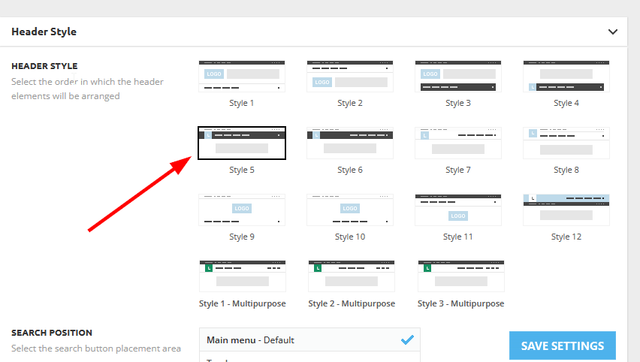
You should look up headers and see which ones you like; you can also build it from scratch if necessary. There you won’t find a default style number. They have names from the demos. Please check out this video about how to create a website from scratch: https://www.youtube.com/watch?v=SoGQ0d5kIBg
We recommend using cloud/PRO templates in order to have the possibility to edit them with the TagDiv Composer, which contains a lot of functions and features, Please check our tutorial here: https://forum.tagdiv.com/tagdiv-composer-tutorial/
More documentation about the cloud templates is here:
– https://forum.tagdiv.com/cloud-library-templates/
– https://forum.tagdiv.com/design-post-pages-using-cloud-library-templates/
– https://forum.tagdiv.com/cloud-library-category-templates/
Thank you!
 ngotuannghia
Dear Admin,
I very happy with your theme.
Currently, we are doing migrate to tagDiv Cloud Library to make website faster.
We are following this guide: https://tagdiv.com/newspaper-theme-update-standard-pack-or-tagdiv-cloud-templates/
But we still have confusions when removing dependencies.
As guide notice: ” Almost every template from the theme panel already exists in the tagDiv Cloud Library. …”
But I cannot find any same name block in tagdiv Cloud Library
Example:
Current Header: https://i.ibb.co/W63g421/current-header.png
Current Theme import: https://i.ibb.co/j5npD5w/current-import-theme.png
Tagdiv Cloud Template search: https://i.ibb.co/QfWS2yc/Header-tag-Div-Cloud-templates.png
Please kindly guide me or let me know document which help me migrate to Cloud Library smoothly from Standart Pack plugin
Thanks