- NewspaperHow to Use tagDiv Cloud Library
- NewspaperCloud Library Templates
- NewspaperCloud Library – Category Templates
- NewspaperDesign your Post Pages using the Cloud Library Templates
- NewspapertagDiv Cloud Library Plugin
- NewspaperCloudflare (CDN)
- NewspaperSingle External Shortcode and External Shortcode
- NewspaperSearch setup for custom post type
- NewspapertagDiv Composer – Website Manager
- NewspaperFlex Block Builder and Flex Loop Builder
- NewspaperModules Builder in Newspaper Theme
- NewspaperIntroduction to CPT and ACF with Newspaper Theme
- NewspaperCreate a frontend submission form
- NewspaperFilters and sorting for taxonomies
- NewspaperUser review system
- NewspaperHow to use the Google Maps API
- NewspaperWooCommerce: Happy “Add to Favorites!”
- NewspaperHow to insert a block inside the content of a post
- NewspaperHow to setup the Contact Page
- NewspaperPosts Loop Element
 sanjeev
Hi,
Is there a way to filter posts by tag in a Flex Block/ any other component for display in a Tag Page Cloud Template?
Or any way to to have a default Tag page template. Unable to identify a method. Kindly help.
Thanks
– Geet
 vdaatland
Hi!
Just wondering if you guys are working on adding library-function for pages and custom post types? It would be awesome with the same functionality for custom post types and pages as is possible for single posts, that is to customize a uniqe template and use it on selected posts/pages.
BTW, you are doing a fantastic job. I’m in awe 🙂
 bahlouda
I have a problem with the TagDiv composer plugin.
It’s been over 3 months since I can’t use it and now it doesn’t even show up when I open the page creation page.
I had enough difficulty with this feature, unable to import templates from the cloud, create page. Even when I create a page with this plugin, its content is not displayed when I leave the creation page.
Here is the list of plugins that I am using at the moment:
AMP
inline Related Posts
LWS affiliation
Kit by Google site
Slider revolution
TagDiv Composer
TagDiv Mobile
TagDiv Newsletter
TagdDiv Social Counter
TagDiv Standart Pack
UpdraftPlus Save / Restore
Wordfence
Yoast Seo
Wp backeery
Am really in need. My site doesn’t work.
Thank you for helping me.
 daehee.kim
 Hi Vlad,
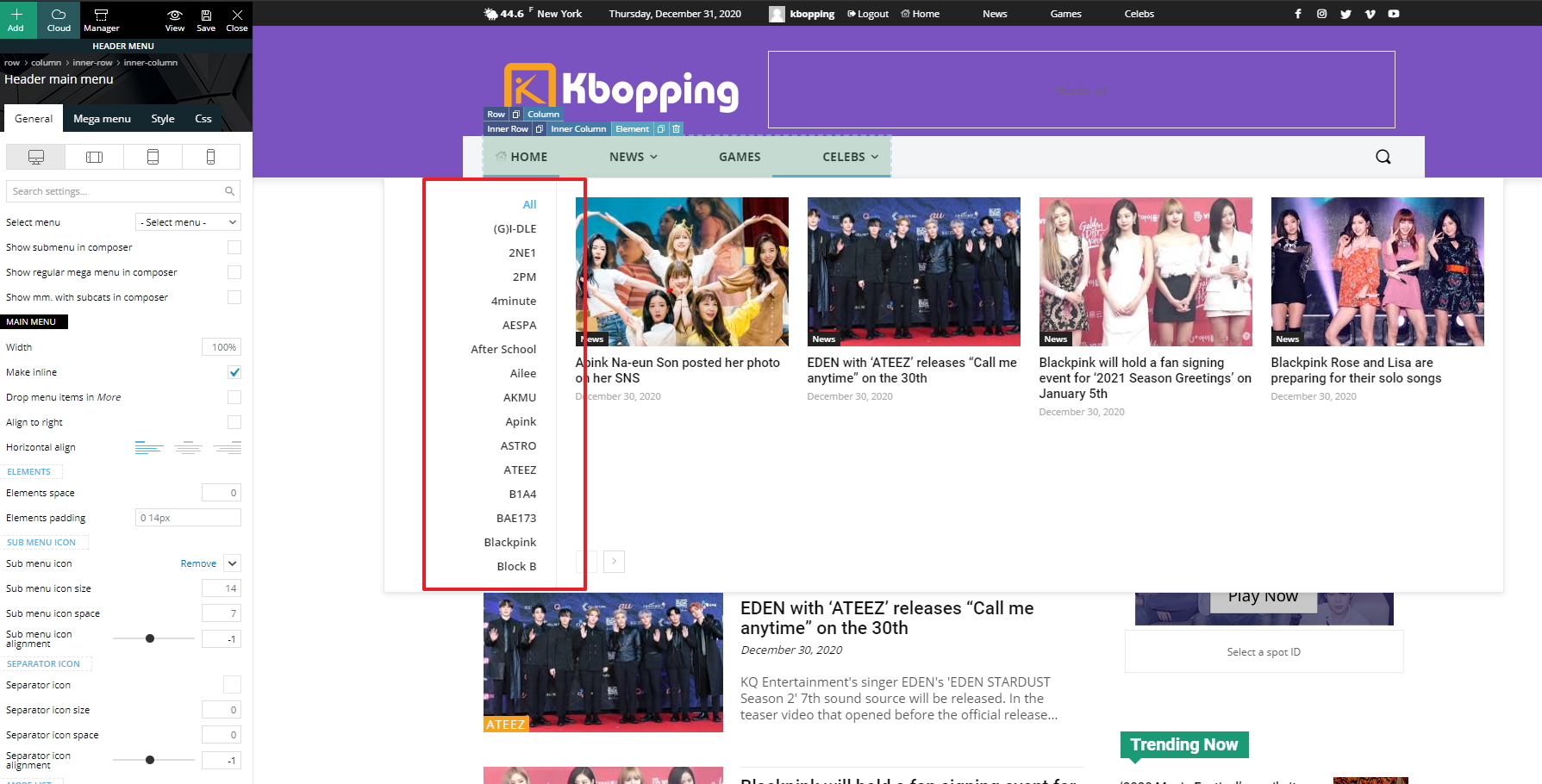
We applied a Cloud Library header and it looks good. However, I have a new issue. The left panel of submenus expands vertically and all menus are not displayed because there’s no scroll bar. How can we fix the height of the left panel and show a scroll bar?
https://kbopping.com/wp-content/imgs/kbopping.jpg
Thanks,
Jeannie
 Patrick93
I am missing the setting that I can edit my Cloud Footer in TagDiv Composer. >> https://nimb.ws/sFpU5W
 senkottaisriram
Hi, I am using Newspaper theme. I have created a cloud template and adding a sidebar widget in right side. But after that, post content is again displayed in the post bottom area. Pl have a look at this url https://dhinasari.com/latest-news/185752-nilgiri-mountain-rail-resume-operations-on-dec-31.html
 Vlad S
 Hello !
For this it is recommended to use a Cloud Library header in order to have full access in editing your menu and raising the limit as you can see here: https://www.screencast.com/t/cORqyewztd7 ; https://forum.tagdiv.com/header-manager/
Thank you !
 simchris
 Couple of options:
a) Are you getting this message?
Briefly unavailable for scheduled maintenance. Check back in a minute.
You might have stuck maintenance mode
b) “Service temporarily unavailable” may be issue with hosting provider, cloud provider. You may need to login via your FTP software or hosting panel, and rename plugin folder to something like pluginsx – then see if you can login to admin or not.
If you can login, then rename the plugins folder back to plugins.
 que
queHi,
I need to fix some CLS problems and I don’t know how to do it.
The main one I think is related to the Autoload articles function of the single post Cloud template ( function that I have disabled and do not use )
Can you please help me fix it?
Sample URL: https://www.moncloa.com/2020/11/24/pp-marlaska-comision-seguridad-vial/

 Anamaria
 Hello,
Please make sure that you do not have a plugin conflict, please deactivate ALL plugins except tagDiv plugins, also if you are using child theme or cache plugin, deactivate them, clear all cache and try again.
Make sure that all the settings are like in our requirements, please follow the guide carefully
– https://forum.tagdiv.com/requirements-for-newspaper/
and please increase all requirements that are lower, and follow all steps.
All the pro DEMOS use cloud library templates meaning that they are fully editable using tagDiv Composer and also the theme will be lighter because the queries will be made only for the elements that are in the templates.
If you don’t resolve the problem, please send us a link for your website and some screenshots with the problem.
Hope this helps you!
Thank you!
 femfem
Does the tag mobile template support cloudflare rail gun service??
will it make it faster??
Anamaria Hello,
The settings from Theme Color applies only for standard header style, if you have a header imported from Cloud Library Templates, you can edit the color with tagDiv Composer => https://www.screencast.com/t/Yokyw1IphTDD, there are several settings you can make.
With tagDiv Composer, you can edit everything on Pro Prebuilt Website.
Hope this helps you!
Thank you!
 bibendus
For a couple of hours I have been experiencing major problems on the Newspaper:
– the site no longer loads the header managed by Cloud Templates correctly and in the articles it releases me this error:
Warning: Invalid argument supplied for foreach () in /home/XXXX.XX/public_html/wp-content/plugins/td-composer/legacy/common/wp_booster/td_util.php on line 842
– On the other hand, the TagDivComposer no longer opens any page, not even an empty one, it remains waiting. From console I have this error:
js_files_for_wrapper.min.js? ver = c784b8db3e66cd68082f3ff7aa2d70e6: 13 Uncaught DOMException: Failed to execute ‘atob’ on ‘Window’: The string to be decoded is not correctly encoded.
at Object.b64DecodeUnicode (https: //XXX.XX/wp-content/plugins/td-composer/assets/js/js_files_for_wrapper.min.js? ver = c784b8db3e66cd68082f3ff7aa2d70e6: 13: 109)
at https: //XXX.XX/wp-content/plugins/td-composer/assets/js/js_files_for_wrapper.min.js? ver = c784b8db3e66cd68082f3ff7aa2d70e6: 40: 125
at https: //XXX.XX/wp-content/plugins/td-composer/assets/js/js_files_for_wrapper.min.js? ver = c784b8db3e66cd68082f3ff7aa2d70e6: 41: 96
I tried to insert the <IfModule mod_substitute.c> on htaccess
SubstituteMaxLineLength 10M
</IfModule>
but with poor results.
Has anyone been there? Do you know if it’s a hosting problem or a bug? I haven’t tried to reactivate a backup yet …
 max-4
max-4 Hello,
I think you are hoping for good results with false advertising when it is impossible to have a good score above 90 on mobile on the tagdiv newspaper, just by activating td-composer or the cloud already it is damn it, 90% of the default css and js is unused and it’s too big a job to delete, all the default css are in place it doesn’t install only the css or js we use but all of them , not to mention that even if you use only one font, google finds about ten when they are not activated, and I’m not even talking about the number of different css and js instead of grouping.
Today your tagdiv is unusable for seo and as I told you, there is no point in having a very nice site without visitors if google downgrades it because of your too heavy script.
Cordially.
 BruceInLouisville
Hello! I cannot figure out how to get the font color set to white for the author shortcode on one of the cloud templates. Since the shortcode creates a link, the color is a link color instead of white. The other links in the title block are white on red, as they should be.
Here is the post where I’m using this particular cloud template: https://forwardky.com/trumps-false-claims-of-stolen-election-evoke-a-dangerous-historical-precedent/
It’s not a huge deal, but I would like to figure it out. I’ve set everything I can think of to white, including the shortcode itself with a span tag, but no joy. Thanks!
Anamaria Hello,
If you want those ads/banners to display only for specific categories, you can use a cloud category template from tagDiv cloud library. This can be edited with tagDiv Composer add the element -> ad box, where you can add the URL and custom code ad => https://www.screencast.com/t/R0v2Hksqb -> https://www.screencast.com/t/2dBFd0NjWz3.
Hope this helps you!
Thank you!
Anamaria Hello,
I’m glad you found and manage our theme settings and how to work with our cloud templates. If you have some questions, please let us know!
Thank you!
 Bettina
 Hello!
You can edit the demo before activating the theme, but until you activate you will not be able to update the theme or to manually import cloud templates.
Thank you!
Anamaria Hello,
Unfortunately, the theme doesn’t have this option for the author box.
This can be done only using custom code. For this, you need to edit the file from this path => wp-content/plugins/td-cloud-library/shortcodes/single/tdb_single_author_box.php => https://i.imgur.com/l2PGKlc.png.
Hope this helps you!
Thank you!
 mjb
mjbThe desktop footer can apply the cloud footer template. This can be set at the theme panel.
But for the mobile footer, it seems there is no option to use the footer template.
May I know how to fix this?
The mobile page footer is using the default footer, which I can’t find the place to edit the template for mobile footer.
 questit
Hey again,
The header 22 template you have in cloud library has a blurring – loading effect that makes the main menu appear a second after the loading of the page.
https://cloud.tagdiv.com/header-template-22-business/
How can we remove that effect?
Anamaria Hi,
You can achieve the hours ago on blocks only with custom work.
If you want to use the “Time ago format” only for post, you need to use a single post template from tagDiv Cloud Library and edit it with tagDiv Composer click on single post date and enable the “Time ago format” -> https://www.screencast.com/t/HcjkFySnV.
Hope that helps you!
Thank you!
 andreawebarts
 you need to update the theme, it s been since the deprecation of wrordpress you never fixed it
https://madamefigaro.cy/wp-content/plugins/td-composer/legacy/Newspaper/js/td_wp_admin.min.js: jQuery.fn.resize() event shorthand is deprecated
https://madamefigaro.cy/wp-admin/js/common.min.js: jQuery.fn.delegate() is deprecated
https://madamefigaro.cy/wp-admin/js/media-upload.min.js: jQuery.fn.resize() event shorthand is deprecated
https://madamefigaro.cy/wp-content/plugins/wordpress-seo-premium/js/dist/api-client-1461.js: jQuery.isFunction() is deprecated
https://madamefigaro.cy/wp-content/plugins/td-cloud-library/assets/js/js_files_wp_admin.min.js: jQuery.fn.click() event shorthand is deprecated
https://madamefigaro.cy/wp-content/plugins/td-composer/legacy/Newspaper/js/td_wp_admin.min.js: jQuery.fn.mousedown() event shorthand is deprecated
https://madamefigaro.cy/wp-content/plugins/td-composer/legacy/Newspaper/js/td_wp_admin.min.js: jQuery.fn.click() event shorthand is deprecated
https://madamefigaro.cy/wp-content/plugins/td-composer/legacy/Newspaper/js/td_wp_admin.min.js: jQuery.fn.change() event shorthand is deprecated
https://madamefigaro.cy/wp-content/plugins/td-composer/legacy/Newspaper/js/td_wp_admin.min.js: jQuery.fn.scroll() event shorthand is deprecated
https://madamefigaro.cy/wp-content/plugins/td-composer/legacy/Newspaper/js/td_wp_admin.min.js: jQuery.fn.focusout() event shorthand is deprecated
https://madamefigaro.cy/wp-content/plugins/td-composer/legacy/Newspaper/js/td_wp_admin.min.js: jQuery.fn.keydown() event shorthand is deprecated
https://madamefigaro.cy/wp-content/plugins/td-cloud-library/assets/js/js_files_wp_admin.min.js: jQuery.fn.change() event shorthand is deprecated
https://madamefigaro.cy/wp-content/themes/Newspaper/includes/wp-booster/wp-admin/js/tagdiv-theme-plugins-setup.js: jQuery.fn.load() is deprecated
Anamaria Hello,
When this message appears “ Error at zones: 6(models) : 0(dom). The model does not match the content Current state has involved an issue. You could try an UNDO operation (CTRL+Z / CTRL+SHIFT+Z)” then indeed it is a problem, most of the time the problem is from a shortcode that is not compatible with our theme, therefore after you set it with tagDiv Composer and save the page/cloud template, the next time when you try to edit it, you’ll get that error.
We have a guide for how to investigate this problem and fix it -> https://forum.tagdiv.com/tagdiv-composer-not-working/ also after trying the steps from our guide you do not get any good results, you can contact us via email and we can investigate the problem on your website.
If there is still a problem, you can send us an email at contact@tagdiv.com and provide admin login, as well as cPanel. We will take a look. Include a link to this topic in the email.
Let us know about your results!
Thank you!
mjb You can find the section to do this at
[wordpress menu] > [cloud templates] > single post template > then find the button described in the article to disable the infinite loading.
This tutorial does the further explain: https://tagdiv.com/infinite-loading-for-single-posts/