- NewspaperHow to Use tagDiv Cloud Library
- NewspaperCloud Library Templates
- NewspaperCloud Library – Category Templates
- NewspaperDesign your Post Pages using the Cloud Library Templates
- NewspapertagDiv Cloud Library Plugin
- NewspaperCloudflare (CDN)
- NewspaperSingle External Shortcode and External Shortcode
- NewspaperSearch setup for custom post type
- NewspapertagDiv Composer – Website Manager
- NewspaperFlex Block Builder and Flex Loop Builder
- NewspaperModules Builder in Newspaper Theme
- NewspaperIntroduction to CPT and ACF with Newspaper Theme
- NewspaperCreate a frontend submission form
- NewspaperFilters and sorting for taxonomies
- NewspaperUser review system
- NewspaperHow to use the Google Maps API
- NewspaperWooCommerce: Happy “Add to Favorites!”
- NewspaperHow to insert a block inside the content of a post
- NewspaperHow to setup the Contact Page
- NewspaperPosts Loop Element
 theuncommonbox
Hello,
I follow the steps to add multiple author https://forum.tagdiv.com/adding-multiple-authors-articles/ but not succeed.
The Post template settings I have is “From Panel” , whereas in Theme Panel –> Post Settings –> Default Post Template is set as “Single Cloud Template – FastNews”.
Does the changes I do as mentioned above will work on these “Single Cloud Template – FastNews” or there is any other way to implement.
Please advice.
 vampireprincess
I succeeded to add co-author to the post page following your tutorial
but how can I add the same to flexbox, boxes and as well to the category page
How can I create accordion menu with TD composer
or which plugin can I add that can work together with TD composer
to achieve the accordion style
I need this desperately for archive, I wish to put in every
accordion block by 20 editions of our magazines
How can I save my own row elements (to have my own cloud element) that I created from different blocks and import them to another page
The video block is not working properly
https://i.postimg.cc/WNkL0CyD/12.jpg
How can I change the order of the posts on the category page
I wish that I can order or from newest or from oldest post
I tried in the Theme panel => Categories but I just couldn’t find
that option
 Calin
Calin Hi,
Yes, this can be achieve using a cloud header from tagDiv Cloud Library, this can be edited using tagDiv Composer, please check our video tutorial from here -> https://www.youtube.com/watch?v=HXQQygkCCJo
Thank you!
Calin Hi,
If you are using the Newspaper default, not default PRO then you can achieve this using the standard method -> https://forum.tagdiv.com/sidebars-tutorial/ if you are using cloud templates, then you need to edit them and set with tagDiv Composer the widget sidebar element and select the sidebar you want -> https://i.imgur.com/lfSfDyj.png
There is no need to fill all six categories, only if you want to have different sidebars.
If you made the theme update on WordPress ant not using FTP is possible to find your elements from sidebars here -> https://i.imgur.com/li1NcpA.png
Thank you!
Calin Hi,
So in order to display the ACF inside the post you need to set the code in the templates you are using (this option is for the standard post templates), for example if you are using post style 1 then you need to set the code in wp-content/plugins/td-standard-pack/Newspaper/parts/single/loop-single-1.php -> https://i.imgur.com/keAR6KV.png
If you are using a single post template from tagDiv Cloud Library, then you need to set the code in one of these shortcode https://i.imgur.com/gLoYC17.png -> wp-content/plugins/td-cloud-library/shortcodes/single
Hope this will help you!
Thank you!
 Vlad S
 Hello !
You can import a Homepage from the Cloud Library and set it up in Setting – Reading. Find out more about it here: https://www.screencast.com/t/wDMruWJSd ; https://www.screencast.com/t/pviHXqzixlJ
Thank you !
Calin Hi
Usually, that animation is from a plugin. If you are using a Cloudflare (CDN), please set the rocket loader to off like in our guide ->https://tagdiv.com/how-to-set-up-cloudflare-cdn/
If you are using the the rocket loader, please set it on off like in our guide -> https://tagdiv.com/how-to-set-up-cloudflare-cdn/
If the is still a problem, please deactivate all non theme plugins and try again.
Thank you
Calin Hi,
If you are using a single post template from tagDiv Cloud Library, then you need to edit it with tagDiv Composer click on the single post content -> https://i.imgur.com/lLMW3Ls.png and look in style tab https://i.imgur.com/PlXdukK.png -> https://i.imgur.com/4PKOLym.png
Thank you!
Calin Hi,
So if you have set a footer cloud like this -> https://i.imgur.com/e9lLIpG.png you need to open the homepage and edit it with tagDiv Composer -> https://i.imgur.com/URD07tP.jpg after the frontend editor is open scroll down to the footer and edit it how you want -> https://i.imgur.com/fNhc8k0.png
If there is still a problem with the footer, just let me know!
Thank you!
 rs_cwi
Hi,
When I attempt to click Cloud templates in my wordpress admin sidebar I get “You need a higher level of permission. You are not allowed to edit posts in this post type.” (also from Newspaper Themepanel when I click Cloud Library)
I got this after changing the site to SSL, but changing back doesnt seem to help. I have tried to change the files and folder permissions to 755/644.
I am lost! Anyone knows how to fix this?
Calin Hi,
If I understand correctly you want to make a new search template, for this you need to import it from tagDiv Cloud Library -> https://i.imgur.com/6qiJe5w.png and edit it using tagDiv Composer -> https://i.imgur.com/nDj20ZC.png after that set the template in theme panel -> https://i.imgur.com/mAgr3IA.png
Hope this will help you!
Thank you!
Calin Hi,
If you are referring to the single post author box, for these the files need to be change are in wp-content/plugins/td-cloud-library/shortcodes/single/tdb_single_author_box.php and tdb_single_author.php if you are referring to this element -> https://i.imgur.com/nCDtVe4.png the file is wp-content/plugins/td-composer/legacy/Newspaper/includes/shortcodes/td_block_author.php
Hope this will help you!
Thank you!
Calin Hi,
Please provide me a link where I can inspect the problem with the ads from the header.
In Newspaper 10.3 the file for author link is in this path -> wp-content/plugins/td-composer/legacy/common/wp_booster/td_module_single_base.php -> https://i.imgur.com/eVeksQq.png this is for the standard posts style, if you are using a single post template from tagDiv Cloud Library then you need to check the files from here -> wp-content/plugins/td-cloud-library/shortcodes/single/ tdb_single_author.php and tdb_single_author_box.php
Thank you!
Calin Hi,
The Default Sidebar is using widgets, so this will work only with the post style from standard pack (standard templates ) -> https://i.imgur.com/57rJEOR.png on single post template from tagDiv Cloud Library, the sidebar will not apply, for this you’ll need to use tagDiv Composer to edit the single post template .
Hope this will help you!
Thank you!
Calin Hi,
You can achieve this only using the subtitle from the post and a single post template from tagDiv Cloud Library, edit it with tagDiv Composer and set the subtitle where you want https://i.imgur.com/wmdMYCL.png -> https://i.imgur.com/tmUFxnr.png but please note that this one will be display only inside the article.
Thank you!
Vlad S Hello !
You can achieve that by editing the page, select the ROW and set the Row Layout and width: https://www.screencast.com/t/GV0dIm1r After that add inner rows in each one and set the inner rows layout as you can see here :https://www.screencast.com/t/ZWfWafiY4u, after that you can use single image element and add the image as you can see here: https://www.screencast.com/t/EYEXGiK6ucju
This can be done a new page or on a template from the cloud library.
I hope this was helpful !
Thank you !
 ralvira
Hi!
Trying to upload modules/theme sections through Tag Div Composer and the system says I’m not registered. Checked the documentation steps and the registration key is already in my profile. Any thoughts?
ralviraHi!
Trying to upload modules/theme sections through Tag Div Composer and the system says I’m not registered. Checked the documentation steps and the registration key is already in my profile. Any thoughts?
 jorgeaaabr
Hello, I don’t know if I am missing something, but I tried altering the pull quote size and it doesn’t reflect in the post (cloud template or not). Editing the cloud template I couldn’t find any option also.
I altered the size in Theme Panel > Theme Fonts > Post Content > Pull Quote (and Boxed Quote).
 citymagthess
Hello. I have installed the same footer template like 4-5 times now. Every time i save it its ok. If i need to edit anything, it kinda not recognises it as a template.
Meaning
In the Cloud templates page (wp-admin/edit.php?post_type=tdb_templates#/)
Every other template shows an edit template link. The footer template the specific link is missing.
I have created the plugin from template more than 4-5 times by now. If i press edit so i can edit it brings me to the normal editor and then by pressing the TagDiv composer i get
Error at zones: 6(models) : 0(dom). The model does not match the content Current state has involved an issue. You could try an UNDO operation (CTRL+Z / CTRL+SHIFT+Z)
 pavel_t
Hi, in my cloud template I use element Subcategories (list of subcategories) predefined in TagDiv Composer.
When I switch on option “Show image: Show”, it is not working. Only general “missing image” is shown (td-cloud-library/assets/images/medium_large.png) instead correct Category image even if there is set up image in WP Category edit page. Category title and description are shown correctly.
 renatols
Hi, I’m totally lost here. I tried to use the tagDiv Cloud Library to create a post page template from scratch, but what happens were that it open my main page (home). I want to create a new one and not edit an existing page.
For example I want to create post page (just like the default page) and use something like the ad box in the top right with questions, and this questons are anchor links for the (H1, H2,etc) in the same page.
Mainly I just to add this box (can be the widget) with questions, but only in the posts pages and do not in the home.
Can I do that?
Regards.
Calin Hi,
For this you’ll need to edit the single post template from tagDiv Cloud Library with tagDiv Composer -> https://i.imgur.com/obOSQWJ.png -> https://i.imgur.com/ZEJ5CoE.png
Hope this will help you!
Thank you!
 Sebastian Escobar
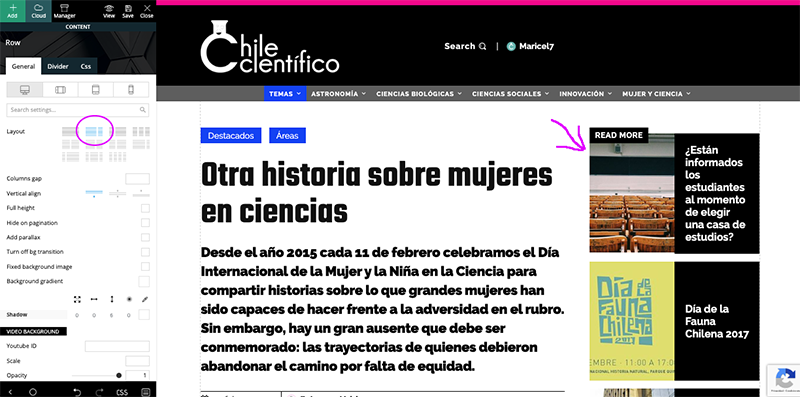
 Hi, my problem is with posts, no with pages, then I have to work with single cloud template with tagDiv Composer, but here the template looks good and I can see the side bar > http://compone.cl/wp-content/uploads/2020/02/sidebar-in-posts-historie.png
but in real view this don’t show > http://compone.cl/wp-content/uploads/2020/02/sidebar-don’t-show.png
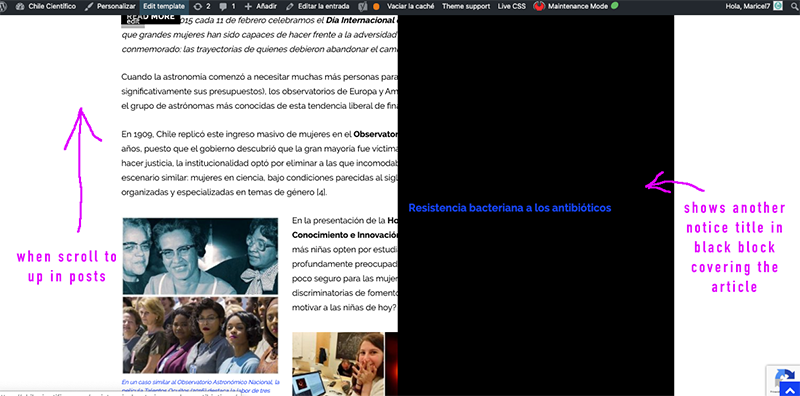
And the black box very similar to the main module of homepage in layout is shown when you scroll the post “up” on the screen > https://www.compone.cl/wp-content/uploads/2020/02/posts-black-block.png
(My site is unpublished because I am configuring these types of errors)
Calin Hi,
Please deactivate and uninstall/delete the tagDiv Cloud Library -> https://i.imgur.com/NQ2gKm8.png, after that reinstall it from here -> https://i.imgur.com/fnmF0XZ.png after that the preview should work just fine!
Let me know the results!
Thank you!