
- NewspapertagDiv Composer – Website Manager
- NewspaperWhen tagDiv Composer is Not Working
- NewsmagtagDiv Composer Tutorial
- TutorialsFrom WPBakery to tagDiv Composer
- NewspapertagDiv Composer Tutorial
- NewsmagHow to use the Visual Composer plugin
- NewspaperScroll Animation
- NewspaperSingle External Shortcode and External Shortcode
- NewspaperCredit System
- NewspaperBookmark – Save For Later
- NewspaperFlex Block Builder and Flex Loop Builder
- NewspaperModules Builder in Newspaper Theme
- NewspaperIntroduction to CPT and ACF with Newspaper Theme
- NewspaperCreate a frontend submission form
- NewspaperHow to Use the Tabbed Content shortcode
- NewspaperCreate a form contact page
- NewspaperFilters and sorting for taxonomies
- NewspaperUser review system
- NewspaperCustom Fields Support
- NewspaperWooCommerce: Happy “Add to Favorites!”
 boutiquepcland
 WordPress tagDiv Composer plugin
 Anamaria
 Hi,
If you want to make the layout full width, then to change the website width, you need to make sure that you don’t have set a background color/image in the Theme Panel because this makes your website boxed. Make sure this option is disabled => https://www.screencast.com/t/ejiNPCBF
To set a page to full width, you’ll need to edit it with tagDiv Composer like this -> https://i.imgur.com/i5IUJ9E.jpg add or select a row and stretch it after your needs -> https://i.imgur.com/WKYebPX.jpg -> https://i.imgur.com/TO1BZ3M.png -> https://i.imgur.com/Yq8UCv3.jpg
Unfortunately, using the options from Theme Panel will not help you as you want.
Thank you!
Anamaria Hello,
Please let me know what template you use for the posts. You need to edit the Single Post Template with tagdiv Composer and delete the Single Featured Image with right-click https://i.imgur.com/ZRO4Dju.jpg
Thank you!
Anamaria Hello,
You need to edit with tagdiv Composer, select the element and delete it with right-click -> https://i.imgur.com/3fLfzKd.png
You can disable the socials for sharing from the theme panel settings -> Social/Apis -> Social Share -> scroll till you see these options: https://app.screencast.com/Ogf0bD2oBciEG. Also, you can delete it with right-click.
Thank you!
 newspulpaper
 Hello again,
I’ve successfully managed to reinstall the TagDiv Composer plugin via the theme panel. However, after the reinstallation and reactivation, I’ve encountered a couple of issues. Firstly, the headers and footers appear to have been lost, and secondly, the failure to save the layout persists, as indicated by thebellow error screens.
I am now proceeding with the deactivation of the other plugins as initially advised, and will report back as soon as possible. I hope this step might help resolve the issues, but if not, I may need further assistance to address the persisting problems.


-
This reply was modified 2 years by
newspulpaper. Reason: Fix images
-
This reply was modified 2 years by
newspulpaper Hello,
I followed the steps to disable and delete the TagDiv Composer as advised. However, upon attempting to reinstall the TagDiv Composer, I noticed that I am unable to find it as a standalone plugin in the WordPress plugin repository for a direct installation.
I understand now that the TagDiv Composer might be an integral part of a TagDiv Newspaper theme, and therefore, not available separately. Could you please guide me on how to proceed with the reinstallation?
Tks
 Kirti
KirtiHii,
when I scroll down on single post page , a left panel appears from nowhere. I want to hide or delete that left panel but when I try to edit through Tagdiv composer that left panel settings doesn’t appear.
Please help.
Thankyou!
kinzine.com
 sparky263
 Could we please have an update on this issue pls? We recently discovered our websites were hacked. Trying to figure out what is causing it and narrowed it down to plugin vulnerabilities in TagDiv composer. I find nothing from tagDiv responding on this issue. Newspaper theme is the core of one of our websites. I would hate to have to switch to something else but if TagDiv does not get ahead of this issue, we may have to.
Please advise what’s happening.
-
This reply was modified 2 years by
sparky263.
 simchris
 if you read the old page you link to:
SOLUTION: Update the WordPress tagDiv Composer plugin to the latest available version (at least 4.4).
( I don’t work here. )
 GEORGI
hi on my category website NewsPoint.bg on the footer i have this error:
`wp_booster error:

td_api_base::get_default_component_id  : no component of type td_api_category_template . Wp booster tried to get

        the default component (the first registered component) but there are no components registered.

/home/newspoin/public_html/wp-content/plugins/td-composer/legacy/common/wp_booster/td_api.php
Array

(

    [0] => Array

        (

            [file] => /home/newspoin/public_html/wp-content/plugins/td-composer/legacy/common/wp_booster/td_api.php

            [line] => 117

            [function] => error

            [class] => td_util

            [type] => ::

            [args] => Array

                (

                    [0] => /home/newspoin/public_html/wp-content/plugins/td-composer/legacy/common/wp_booster/td_api.php

                    [1] => td_api_base::get_default_component_id  : no component of type td_api_category_template . Wp booster tried to get

        the default component (the first registered component) but there are no components registered.

                )
)
[1] => Array
(
[file] => /home/newspoin/public_html/wp-content/plugins/td-composer/legacy/common/wp_booster/td_api.php
[line] => 633
[function] => get_default_component_id
[class] => td_api_base
[type] => ::
[args] => Array
(
[0] => td_api_category_template
)
)
[2] => Array
(
[file] => /home/newspoin/public_html/wp-content/plugins/td-cloud-library/includes/tdb_functions.php
[line] => 2533
[function] => get_current_category_template
[class] => td_api_category_template
[type] => ::
[args] => Array
(
[0] => 1
[1] =>
[2] =>
)
)
[3] => Array
(
[file] => /home/newspoin/public_html/wp-content/plugins/td-cloud-library/includes/tdb_functions.php
[line] => 2502
[function] => td_show_category_template_menu
[args] => Array
(
)
)
[4] => Array
(
[file] => /home/newspoin/public_html/wp-includes/class-wp-hook.php
[line] => 324
[function] => tdb_on_before_admin_bar_render
[args] => Array
(
[0] =>
)
)
[5] => Array
(
[file] => /home/newspoin/public_html/wp-includes/class-wp-hook.php
[line] => 348
[function] => apply_filters
[class] => WP_Hook
[object] => WP_Hook Object
(
[callbacks] => Array
(
[10] => Array
(
[tdb_on_before_admin_bar_render] => Array
(
[function] => tdb_on_before_admin_bar_render
[accepted_args] => 1
)
[tdc_on_admin_bar_menu] => Array
(
[function] => tdc_on_admin_bar_menu
[accepted_args] => 1
)
[wp_customize_support_script] => Array
(
[function] => wp_customize_support_script
[accepted_args] => 1
)
)
)
[priorities:protected] => Array
(
[0] => 10
)
[iterations:WP_Hook:private] => Array
(
[0] => Array
(
[0] => 10
)
)
[current_priority:WP_Hook:private] => Array
(
[0] => 10
)
[nesting_level:WP_Hook:private] => 1
[doing_action:WP_Hook:private] => 1
)
[type] => ->
[args] => Array
(
[0] =>
[1] => Array
(
[0] =>
)
)
)
[6] => Array
(
[file] => /home/newspoin/public_html/wp-includes/plugin.php
[line] => 517
[function] => do_action
[class] => WP_Hook
[object] => WP_Hook Object
(
[callbacks] => Array
(
[10] => Array
(
[tdb_on_before_admin_bar_render] => Array
(
[function] => tdb_on_before_admin_bar_render
[accepted_args] => 1
)
[tdc_on_admin_bar_menu] => Array
(
[function] => tdc_on_admin_bar_menu
[accepted_args] => 1
)
[wp_customize_support_script] => Array
(
[function] => wp_customize_support_script
[accepted_args] => 1
)
)
)
[priorities:protected] => Array
(
[0] => 10
)
[iterations:WP_Hook:private] => Array
(
[0] => Array
(
[0] => 10
)
)
[current_priority:WP_Hook:private] => Array
(
[0] => 10
)
[nesting_level:WP_Hook:private] => 1
[doing_action:WP_Hook:private] => 1
)
[type] => ->
[args] => Array
(
[0] => Array
(
[0] =>
)
)
)
)
can you help me to solve this
best regards
GEORGI
boutiquepclandHello, for your information there is a Vulnerability in the tagDiv Composer plugin
CSRF to XSS vulnerability discovered by Truoc Phan (Patchstack Alliance) in WordPress Plugin tagDiv Compose

https://patchstack.com/database/vulnerability/td-composer/wordpress-tagdiv-composer-plugin-4-1-csrf-to-xss-vulnerability?_a_id=110
https://www.wordfence.com/threat-intel/vulnerabilities/wordpress-plugins/td-composer/tagdiv-composer-41-cross-site-request-forgery-to-cross-site-scripting
could you correct ?
Anamaria Hi,
You need to hide the image on that block, so please edit the page where is the block with tagdiv Composer and hide it -> https://i.imgur.com/tVhCbJk.png.
Thank you!
Anamaria Hello,
I did a check; if you search here, there are search results -> https://i.imgur.com/WliyyTg.png, but in the search template, those are not showing. Please edit with tagDiv Composer -> https://i.imgur.com/j8YvKks.png. Click on the block and remove the offset -> https://i.imgur.com/dJ0iFQu.png. Let that field empty.
Thank you!
 Roman
Roman Hi,
Thank you for answer!
After setting the value to 0, the gap is reduced in the preview of tagDiv Composer – https://monosnap.com/file/WZSeLGv7w2HikgqY5PtZPx7K54RjeE
But there are no changes to the site after saving – https://monosnap.com/file/v2xLS6o9DH6YnS4irT1ZPffjICn20X
Thank you!
 Bettina
 Hello @forcenews !
Please edit the search page with the tagdiv Composer, click on the results(Posts Loop element) and delete the value of the offset posts. Let it empty with no space no value: https://app.screencast.com/Gh9jDf6t0XtLS
If you use a flex block there, then please set the special filter there Search – Current search.
Save the changes and view the results.
I hope that helps you!
Thank you!
 mattemkadia
 Hi Anamaria, we’re adding the Flex Block 1 onto a Category Template.
The filter is set to ‘Current Category’ and the ID of the Custom Taxonomy ’11’ is added in the ‘Multiple terms filter’ field. Please see the attached screengrab for confirmation.

When we save those settings and return to the live site, no matter what category archive we view, the four articles are always from the ’11’ taxonomy and all categories, not just the ‘Current Category’.
Should this work or are the two filters not && ?
Thanks
Matt
Bettina Hello!
Please execute these steps:
1. disable TagDiv Composer
2. uninstall(delete) TagDiv Composer
3. install TagDiv Composer
4. activate TagDiv Composer
Make a test and deactivate ALL plugins except tagDiv ones, also if you are using a cache plugin, deactivate it, clear all cache and try again.
If the problem is still there, then contact us via email at contact@tagdiv.com and provide the following:
– admin url and credentials
– a link to this topic in order to identify you
We will check the issue and let you know what can be done there.
Thank you!
Anamaria Hello,
Please provide the link to your website. For mobile please edit with tagDiv Composer, select the viewport on phone, select the header logo and change it => https://i.imgur.com/cR7F0v4.png https://www.youtube.com/watch?v=HXQQygkCCJo -> https://forum.tagdiv.com/add-logo-newspaper/
Thank you!
Bettina Hello!
This situation appears when you are using the mobile theme plugin and the cache plugin that you have does not feature options for a separate mobile theme plugin therefore do not know when to deliver the mobile version and when to deliver the desktop version.
We have 3 options available for mobile versions that you can use:
1. Responsive version: A responsive version of your website looks similar to the desktop version. TagDiv Composer is used to edit the page.Click on the mobile viewport: https://www.screencast.com/t/XDQJedlggSB. There, you can see your mobile version and edit or adjust the elements to look better.
2. Mobile pages: https://tagdiv.com/newspaper-10-3-7-update-brings-customizable-and-fast-mobile-pages
3. Mobile theme plugin: The Mobile Theme is a performance-optimized theme included in the main Newspaper theme that only loads on mobile devices. It comes with its own templates and designs for pages, posts, categories, etc., so your current templates from the desktop theme will get converted to the mobile theme layout. Please see https://forum.tagdiv.com/the-mobile-theme/ and https://forum.tagdiv.com/mobile-theme-introduction/ for more information.
A full explanation is here: https://www.youtube.com/watch?v=SpGkOnJeNZY
If you need to use mobile version 1 or 2, then you need to uninstall the Mobile Theme plugin and AMP.
Thank you!
 LanguageMagazine
Hi,
I am getting nasty errors from td_api.php
You can see both errors here: https://www.languagemagazine.com/job/spanish-and-english-dual-immersion-classroom-teacher-kindergarten-through-8th-grade-spanish-language-classroom-teacher-high-school/#
PHP version is: PHP 8.1.27
Newspaper version is: 12.6.5
In case you can’t click the link above, this are the two errors:
wp_booster error:
td_api_base::mark_used_on_page : a component with the ID: tdb_template_143296 is not set.
/home/language/public_html/wp-content/plugins/td-composer/legacy/common/wp_booster/td_api.php
wp_booster error:
td_api_base::get_key : a component with the ID: tdb_template_143296 Key: exclude_ad_content_top is not set.
/home/language/public_html/wp-content/plugins/td-composer/legacy/common/wp_booster/td_api.php
newspulpaperHello TagDiv support team,
I’ve encountered an issue while editing any page layout on my WordPress site using the Newspaper theme with the “News Hub Pro” plugin. Every time I attempt to save changes on TagDiv Composer, the process fails, and through the browser’s DevTools, I observe a “Canceled” response from the server exactly 10 seconds after the request is made. This behavior is consistent and prevents me from making any further modifications to my site’s layout.
I have followed all the recommended steps outlined in the “Requirements for Newspaper” tutorial on your website, ensuring that my server and WordPress environment meet the necessary specifications. Despite these adjustments, the problem persists.
I am seeking guidance on how to resolve this issue as it’s crucial for me to be able to update and modify the layout of my website. Below is a screenshot from DevTools highlighting the error:
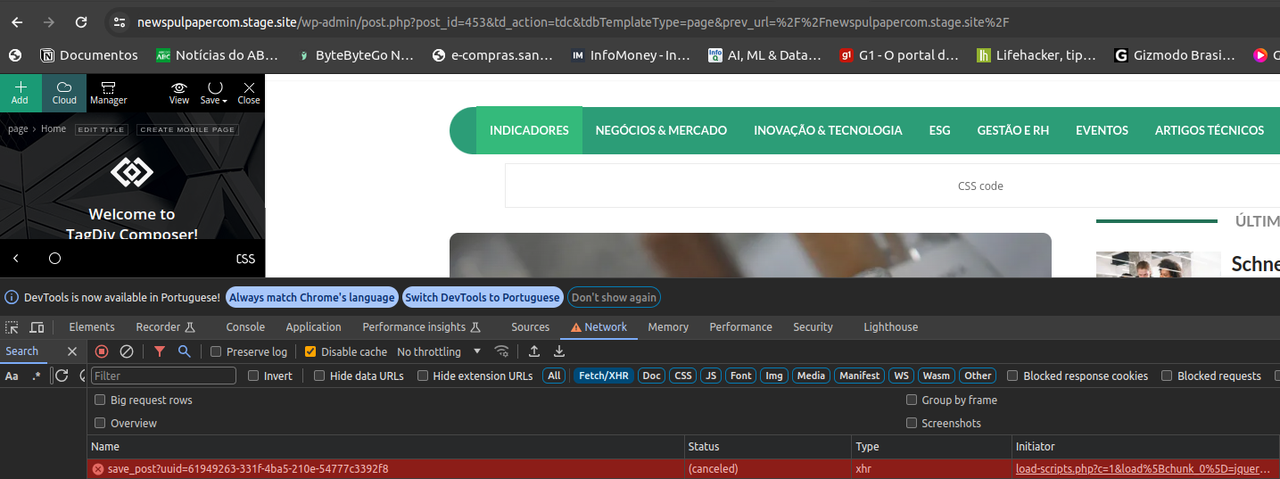
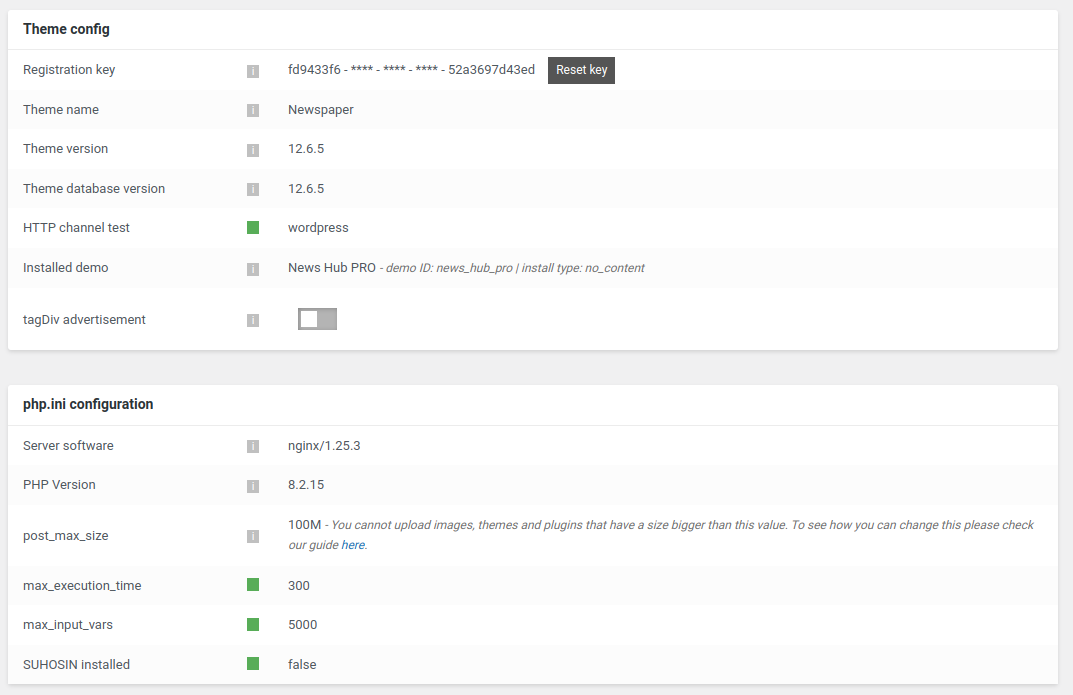
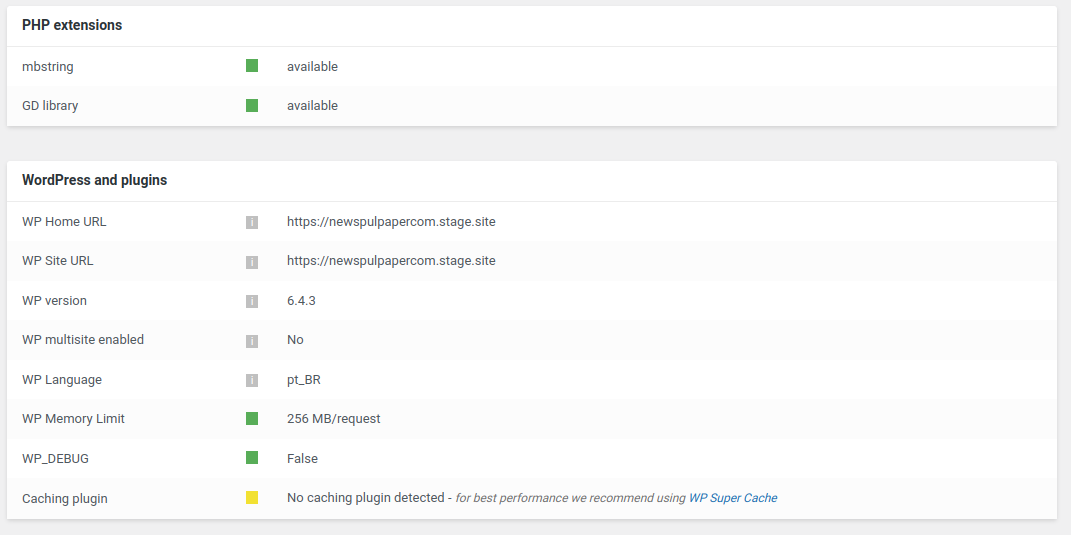
Could anyone provide insights or solutions to overcome this server response issue? Any help or suggestions would be greatly appreciated.
Thank you in advance for your assistance.
 pkvolattu
Hi,
I recently started using the single post template called ‘Today News Pro.’
After implementing this template, I wanted to ensure that the color of the ‘Site Identity Logo’ matched the theme color.
To achieve this, I uploaded a new logo sized 16 x 16 in ‘Theme Panel > Header > Logo & Favicon > Favicon’ and a larger version sized 512 x 512 in ‘Dashboard > Appearance > Customize > Site Identity.’
While I encountered no issues with the logo displaying correctly on the home page or post page, a problem arose when I clicked ‘Edit with TagDiv Composer’ on the single post page. It displayed my previous site identity in the browser.
Correct:
Incorrect:
I’ve cleared the cache multiple times, but the issue persists.
I suspect that this discrepancy might be the reason why Google has not replaced my old identity in search results.
Could you please advise on the changes I should make to address this issue?
Anamaria Hello,
Yes, you can create a sidebar -> https://forum.tagdiv.com/sidebars-tutorial/ and copy the block from the homepage and put it in the sidebar with right-click.
Thank you!
Bettina Hello @jayflyer!
Please edit the search page with the tagdiv Composer, click on the results(Posts Loop element) and delete the value of the offset posts. Let it empty with no space no value: https://app.screencast.com/Gh9jDf6t0XtLS
Save the changes and view the results.
I hope that helps you!
Thank you!
Anamaria Hi,
Please edit with tagDiv Composer -> https://i.imgur.com/j8YvKks.png click on the block and remove the offset -> https://i.imgur.com/dJ0iFQu.png let that field empty.
Thank you!



