
- TutorialsFrom WPBakery to tagDiv Composer
- TutorialsDefault Block Settings Guide
- TutorialsOffset Feature
- TutorialstagDiv Social Counter Tutorial
- TutorialsHow to Update the WPBakery Page Builder plugin
 Bettina
 Hello!
Unfortunately, you can not edit the page Blog made from WordPress or to assign a page for all the posts.
You have to create only a new page Home and set it like this: https://prnt.sc/b5bxSIJQum5V in the WordPress Settings.
We have cloud templates for articles, category, tag, etc. which you can assign directly to the category page.
We recommend to use cloud/PRO templates in order to have the possibility to edit them with the TagDiv Composer which contains a lot of functions and features, please check our tutorial here: https://forum.tagdiv.com/tagdiv-composer-tutorial/
Documentation here:
– https://forum.tagdiv.com/cloud-library-templates/
– https://forum.tagdiv.com/design-post-pages-using-cloud-library-templates/
– https://forum.tagdiv.com/cloud-library-category-templates/
Check also our video tutorials here: https://www.youtube.com/c/tagdivThemes/videos
Thank you!
 creativemamy
 Hi
thank you for reply.
– Ok but in the TagDiv Composer i didn’t find elements such as category header, i have to build it from scratch?
– In the TagDiv Composer when insert a grid i can setup a CPT in the post type field but can’t filter by it’s category (https://imgur.com/6NKsMqW) how to solve?
– Nope, this is the cpt category page (https://imgur.com/alSPEHc), by the way, the archive for this cpt is disabled (https://imgur.com/4xA1Sum)
THX
 ExtraSportz
I have created a news page for all the posts. I want to edit this page with tagDiv. But it says that TD composer is disabled on the posts page. What to do? I can make changes to other pages. But I have to customize this page.
I am attaching an image for your reference.
Please let me know what is the solution to it.
Whenever I try to edit it with tagdvi, it shows me this error:
https://imgur.com/5DvawV7
Bettina Hello!
Unfortunately, you can not use the category template for your CPT.
You can import a blank custom post type template and customize it in the TagDiv Composer.
Regarding to the screenshot, this is an archive 2022 page which has that template assigned, that’s why the template is displaying there.
Thank you!
 tenacemente
Salve, sto riscontrando questo problema sulla pagina Iscriviti https://tenacemente.com/iscriviti/
Cosa significa la scritta: “Warning: Undefined array key “widget_id” in /home/customer/www/tenacemente.com/public_html/wp-content/plugins/td-composer/legacy/common/wp_booster/td_wp_booster_functions.php on line 2946″
Cosa devo fare? Grazie
 Calin
Calin Hello,
There are a few elements that consume CPU, from the theme. Normally that would not be a problem, but for a larger website with high traffic, and depending on the elements used from the composer, that will affect the performance. To name one such element, that is the ajax pagination, I see you are using quite a lot of it, for all the blocks I believe – https://i.imgur.com/JfcYH6C.jpg
Ajax pagination, like the next/prev, load more button etc and also the infinite loading, will consume CPU. They are supposed to consume CPU, or they would not work otherwise.
I would suggest trying to reduce the usage of ajax pagination, clear the cache, and that should have a positive impact on the performance.
I wanted to suggest to try cleaning the database – https://www.wpbeginner.com/plugins/how-to-clean-up-your-wordpress-database-for-improved-performance/ Or look for a plugin that does this regularly automatically, there should be some that can do this.
I can say that I have seen high traffic websites using database cleaning/optimization plugins, whether they are used in an automatic way or manual, with great results. But that doesn’t quite mean that this will have the same result across all the websites. Each website is different. Maybe try the plugin you mention for a while, to see if it helps.
Thank you!
Calin Hi yoyo,
I believe that you have set a single post template from the tagDiv Cloud Library, those can be edited using the tagDiv Composer.
Now in case that the template it is not displayed on frontend like in tagDiv Composer, then it can be because of a plugin conflict. Most of the time it is related to WP Bakery plugin. This should not be used with tagDiv Cloud Library, only with tagDiv Standard Pack.
I hope this will help you!
Let us know the results!
 Autotrader – Cox Automotive
When we tried to copy the content and paste it into an empty column, it just show an loading icon forever.
We investigated and saw that it because the POST request to “/wp-json/td-composer/do_job?tmp_jobId=1…” was returned with 403 error.
We attached the link to the video then you can easier to understand the error.
Reproduce video: https://coxautoinc-my.sharepoint.com/:v:/p/long_nguyen/Ec0DGqq2DCpOu3qhcUBrXW4Ba1x11D03z0q6uSL682EBvA?e=8SKGsS
403 error: https://coxautoinc-my.sharepoint.com/:i:/p/long_nguyen/EQBlw6aUU9VEnsXF2rMFzbIBaeAOtDeVNfd1WPf41pFIlQ?e=DB1hSf
Note: password to access the link: Passw0rd@123
Thanks
 ilmetu
Hi there,
i setup the category page with tagdiv composer and i saw something really cool.
CATEGORIES 😀
in my website i take time to fill every aspect of a category, long description included and it’s nice to see the subcategory appears with the text in the webpage .
for example you can see it in action here : https://elettronauti.it/categoria/auto-elettriche/
BUT …
i would like to setup the corrispondent category image…
how can i do it?
at the moment the categories has just a placeholder image … can you tell me how to set it up correctly?
thanks
image for reference: https://freeimage.host/i/S4FSXs
 scohen
 Hello thank for responding. can i add you to my siteground so you can take a look?
on the home page search bar, type “harry potter” 3 stories will appear briefly and then the reader is automatically taken to the 404 page. google search console is also throwing a 404 error for these stories. but they are on my blog. this is happening with many of my stories. is it possible that when this gourmet pro template took over my website, that it is “hiding” the posts with the pro template? i don’t know how to explain it? thank you!!
also the tag div composer says up top that is is diplaying the week pro post template but it is not. the gourmet pro template is what is displayed in all of the posts. thank you!!
 Eighthats
 Jose
JoseHello team,
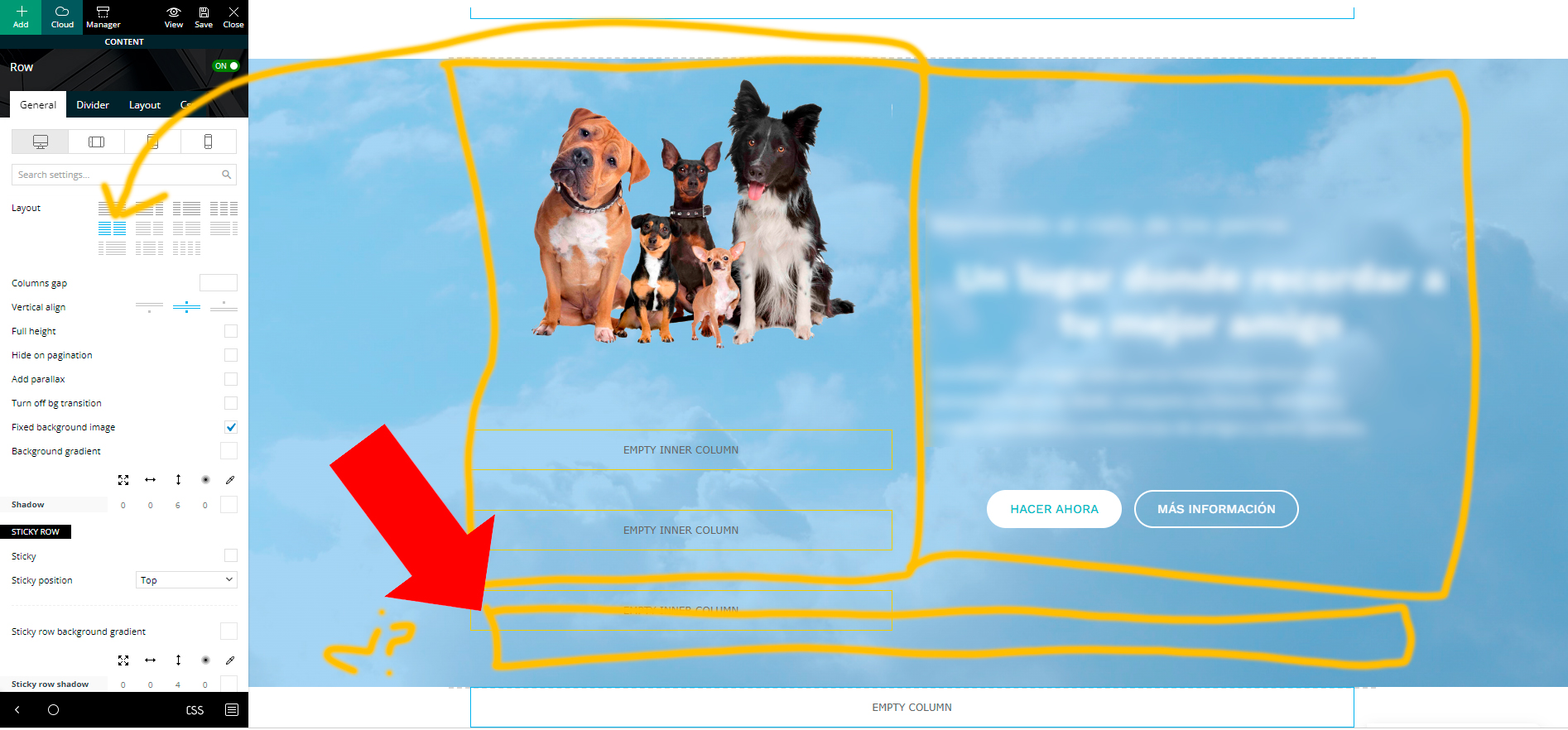
I am trying to create a custom layout with tagdiv composer.
I have used part of the design already made from (dental studio demo), and I am adjusting it to my idea.
The first part of the web, is a row column, divided in two sections with inner-rows. There is a background (background image) that moves when scrolling.
So far so good. Now I want to add another Inner-row column at the bottom (but inside the image as well) and make it full width. But I can’t do it hehe
All the inner row columns that I add, are only half the width (I imagine it is, because the main row is divided in two).
Is there any way to add a full width inner row in here?
ilmetuHi there,
following some gtmetrix howto’s i learn the magic content-visibility thing…
my website is really big and i get a really bad score in terms of loading time, so i try my best to solve the problem.
I manage to get from F to D and at the moment, the only thing i need (it seems) it’s to Avoid an excessive DOM size so i search in the web and the only thing i found it’s to paginate or reduce the things inside the page… ok … it’s not my case…
but i found also this CSS properties : https://web.dev/content-visibility/
how can i tag rows or flex blocks with this css rule?
thanks
Calin Hello,
For the moment using the mobile theme plugin you can set only one inline ad -> https://i.imgur.com/TNxveAZ.png -> https://i.imgur.com/yucehy6.png
Now if you choose the responsive eversion or a mobile page template there you can set with tagDiv Composer on the single post content shortcodes in ads tab up to 3 inline ads -> https://i.imgur.com/qwXErls.png
Thank you!
Calin HI,
Indeed for the mobile theme you need to do those changes in the mobile files, those are on this path -> wp-content/plugins/td-composer/mobile there you can edit the single.php file for the mobile page, unfortunately those changes need to be done after each theme update.
Thank you!
Calin Hi Rahul chauhan,
Normally there should bot be a problem if is a standard template or a cloud template, the auto ads should be set in one place (between the head tags). What I can suggest is to also place the code in the website header in ads place (if is a standard template need to be set in the theme panel, but for a cloud need to be set using tagDiv Composer).
Also, if you want we can investigate the situation, for this we’ll need temporary wp-admin access. This can be provide via email at contact@tagdiv.com
Thank you!
Bettina Hello!
I recommend you to set a homepage and do not let the blog page created by WordPress: https://i.imgur.com/mwjp18K.png
Any other page seems to be displayed well.
We have 3 options for mobile versions that you can use:
1. Responsive version: A responsive version of your website looks similar to the desktop version. Edit the page with TagDiv Composer. Click on the mobile viewport: https://www.screencast.com/t/XDQJedlggSB; there you can see your mobile version and edit or adjust the elements to look better.
2. Mobile pages: https://tagdiv.com/newspaper-10-3-7-update-brings-customizable-and-fast-mobile-pages
3. Mobile theme plugin: The Mobile Theme is a performance-optimized theme included in the main Newspaper theme that only loads on mobile devices. It comes with its own templates and design for pages, posts, categories, etc., so your current templates from the desktop theme will get converted to the mobile theme layout. Please see https://forum.tagdiv.com/the-mobile-theme/ and https://forum.tagdiv.com/mobile-theme-introduction/ for more information.
A full explanation you can find here: https://www.youtube.com/watch?v=SpGkOnJeNZY
You can choose to use whichever one is more affordable and useful for you.
For the option 1 and 2, you need to deactivate the Mobile Theme plugin.
Thank you!
Bettina Hello!
Unfortunately, all the settings needs to be done in the Revolution Slider plugin and not in the TagDiv Composer.
Also, please check you have no margins or paddings in the CSS tab of that row.
Thank you!
Bettina Hello!
Please check the steps from here: https://forum.tagdiv.com/topic/unable-to-edit-text-with-title/ and also other possible issue as here: https://forum.tagdiv.com/topic/403-error-on-tagdiv-composer-when-trying-to-use-wp-editor-wpedito-php/
Please check your .htaccess file also: https://www.screencast.com/t/MJ78SDZr4Gl -> https://forum.tagdiv.com/general-options-may-interfere-newspaper-theme/
Hope that helps you!
Thank you!
Bettina Hello!
Make sure you deactivated the non-tested plugins with the theme before installing the td composer. It could be from a plugin conflict or settings: https://forum.tagdiv.com/general-options-may-interfere-newspaper-theme/
Check the requirements here: https://forum.tagdiv.com/requirements-for-newspaper/
Thank you!
Calin Hi,
Thank you for your waiting. There has ben made an work around and the problem can be fixed now by simply disable the tagDiv Composer and tagDiv Cloud libraries, delete those plugins and reinstall them from Newspaper > plugins, after that in the theme panel a new option will be displayed under the Blocks settings -> https://i.imgur.com/k7jlJki.png
This method can be done by all users that have the Newspaper v11.5.1
Thank you for your time!
Calin Hi,
I’m not sure that I correctly understand the situation. Do you use the mobile theme plugin? In this case is no longer need to set for the mobile ads those tabs, just set the image in mobile ads -> https://i.imgur.com/QQvYa21.png -> https://forum.tagdiv.com/the-mobile-theme/
Nor if you are using the responsive version, then you can try this strategy on pages and cloud templates. Use the tagDiv Composer to edit theme and check those options -> https://i.imgur.com/lKXcpmn.jpg
Now for article ads indeed you need to use those codes -> https://i.imgur.com/vgSsTrZ.png
I hope this will help you!
 Anamaria
 Hello,
You can change the color with tagdiv composer, select the block and go in the tab Style -> https://i.imgur.com/9TBhkqR.jpg
Thank you!
Calin Hi,
To create anchor links on pages, you need to use the tagDiv Composer and set to a row an id, then set the link to that page plus the id like this ->
– https://www.screencast.com/t/dzsIlRQFx
– https://www.screencast.com/t/7yBu0LhdYDrO
Also there is another solution, instead of setting id you can set a class for row and set in the menu a code like this: https://pastebin.com/WFY1mBNy just replace your-class with the class you set.
I hope this will help you!
 doft
doft Hi Bettina
Thanks for the reply. After some additional inspection it seems that the plugin tag-div composer fails is not enabled and fails to activate. Even after reinstall , the behavior reproduces . Would this be a case for checking the actual hosts cpanel ( it’s an Azure web app)



