
- NewspapertagDiv Composer – Website Manager
- NewspaperWhen tagDiv Composer is Not Working
- NewsmagtagDiv Composer Tutorial
- TutorialsFrom WPBakery to tagDiv Composer
- NewspapertagDiv Composer Tutorial
- NewsmagHow to use the Visual Composer plugin
- NewspaperScroll Animation
- NewspaperSingle External Shortcode and External Shortcode
- NewspaperCredit System
- NewspaperBookmark – Save For Later
- NewspaperFlex Block Builder and Flex Loop Builder
- NewspaperModules Builder in Newspaper Theme
- NewspaperIntroduction to CPT and ACF with Newspaper Theme
- NewspaperCreate a frontend submission form
- NewspaperHow to Use the Tabbed Content shortcode
- NewspaperCreate a form contact page
- NewspaperFilters and sorting for taxonomies
- NewspaperUser review system
- NewspaperCustom Fields Support
- NewspaperWooCommerce: Happy “Add to Favorites!”
 Calin
Calin Hi,
You can do this by editing the page with tagDiv Composer and adding the ad box element in the place you want to be displayed, after that set the shortcode from Ad Inserter directly in ad box – https://i.imgur.com/88xYMg5.png – https://i.imgur.com/SGESZuY.png – https://i.imgur.com/ycabPos.png
Thank you!
 Atithya
Hi Previously, editors were able to create pages using tagdiv composer. But in the latest update they are unable to do. We have to give admin rights to editors to work on tagdiv composers. Is there any way were they can work without giving them admin rights?
 zaildaar
How to use Yoast SEO with TagDiv Composer for the Homepage. I created Homepage with tagdiv composer but i cant find yoast seo option with tagdiv. SO i have to use the normal edit page option ?
 Olof Strömbäck
Of course! Here’s your revised message with a question at the end:
—
Hi there!
I’ve created a page that displays the latest articles using the “Post loop” element from the tagDiv Composer. The most recent posts appear just as I intended, but when I click on any of them, instead of being taken to the individual post, I’m redirected to a post grid with no content. Here’s what it looks like:
https://imgur.com/GSwUYkp
Do you know what might be causing this, or how I can fix it so that the links go directly to the individual posts?
Thanks 🙂
 ggazette
When posting in a couple spots on two websites that have Newspaper Theme, I have been encountering the following error:
Uncaught Error: array_key_exists(): Argument #2 ($array) must be of type array, null given
in /home3/garretso/public_html/wp-content/plugins/td-subscription/includes/td_subscription.php on line 3276
Call stack:
td_subscription::td_post_theme_settings_mb_save_filter(NULL, ‘4880’)
wp-includes/class-wp-hook.php:324
WP_Hook::apply_filters(NULL, array)
wp-includes/plugin.php:205
apply_filters(‘wpalchemy_filter_td_post_theme_settings_save’, NULL, ‘4880’)
wp-content/plugins/td-composer/legacy/common/wp_booster/wp-admin/external/wpalchemy/MetaBox.php:880
WPAlchemy_MetaBox::apply_filters(‘save’, NULL, ‘4880’)
wp-content/plugins/td-composer/legacy/common/wp_booster/wp-admin/external/wpalchemy/MetaBox.php:2081
WPAlchemy_MetaBox::_save(4880)
wp-includes/class-wp-hook.php:326
WP_Hook::apply_filters(NULL, array)
wp-includes/class-wp-hook.php:348
WP_Hook::do_action(array)
wp-includes/plugin.php:517
do_action(‘save_post’, 4880, WP_Post, true)
wp-includes/post.php:5110
wp_insert_post(array, false, true)
wp-includes/post.php:5212
wp_update_post(array)
wp-admin/includes/post.php:453
edit_post()
wp-admin/post.php:227
Placing this into ChatGPT, it says there’s an error that needs to be fixed in the td-subscription plugin. “Uncaught Error: array_key_exists(): Argument #2 ($array) must be of type array, null given”
“What This Means:
PHP’s built-in function array_key_exists() expects the second argument to be an array, but it was given null instead.
In your case:
File: /home3/garretso/public_html/wp-content/plugins/td-subscription/includes/td_subscription.php
Line: 3276
Cause: The plugin tried to check if a key exists in an array, but that array was actually null.”
While I could possibly fix this manually, any suggestions otherwise?
 Carvibz
Hello,
Can you please assist me in solving the following 2 problems?
[Issue #1]
The images in my gallery can’t be displayed on all/any posts of my website, carvibz.com, as you can see here: https://imgur.com/a/FXPoinW
Example post: https://www.carvibz.com/muscle-cars/viper-powered-1969-dodge-charger-6-speed-has-lwb-secret/
I have no technical expertise, but had somebody look into the problem. This is what they said:
A Newspaper feature (General Modal Image ON, I believe) converts image links into modal galleries, and adds the A hrefs automatically. So, when it reads the code, it gets the incorrect link from the lazyloaded image. Instead of the link, it gets the placeholder image WP Rocket uses for Lazyload.
That feature converts image links into modal galleries, and adds the A hrefs automatically. So, when it reads the code, it gets the incorrect link from the lazyloaded image. Instead of the link, it gets the placeholder image WP Rocket uses for Lazyload
So, this feature is not compatible with Lazyloaded images.
This is the code WP Rocket Lazyload creates: https://i.imgur.com/YhQwmZR.png
And this is what happens after the conversion to modal gallery: https://i.imgur.com/m0rhXzo.png
So, the generated HTML is incorrect and causes the problem.
It happens here, at the Newspaper Javascript:
https://www.carvibz.com/wp-content/plugins/td-composer/legacy/Newspaper/js/tagdiv_theme.min.js?ver=12.3
[Issue #2]
When bypassing WP Rocket (https://www.carvibz.com/custom-cars/mid-engined-vw-caddy-pickup-with-audi-4-2l-v8-has-lm-race-car-wheels-and-rabbit-face/?nowprocket)
or disabling WP Rocket Lazyload altogether
(simply excluding these in WP Rocket Lazyload does not work: div class=”tdb-featured-image-bg”
.td-modal-image img
.td-modal-image)
the images in the gallery work. However, as opposded to in the past, when clicking the images, these show up at the medium resolution I selected to increase page speed, which results in poor user experience, as can be seen here: https://imgur.com/a/c6aShhr
Previously, my TagDiv Gallery gave me a “link to media file” option that still loaded medium-sized images (page speed), but showed large-sized images when clicking (positive user experience).
Is this part of the error at #1? I don’t believe so, given the disappearance of the “link to media file”. How can I change this? Editing each post manually for the gallery to show Large Size wouldn’t work, since I have 2,000 posts. Besides, I believe this would affect page speed.
PS: I checked outher posts on similar topics as my #1 (1, 2, 3), but couldn’t find a fix.
Thank you
 PetrosKif
 Hi Calin,
Thanks for looking into this.
There wasn’t any weird shortcode added, although trying again to open the TagDiv Composer and just saving the page (no changes made), seemed to fix the problem.
This is probably due to leftover rows from WP Bakery Builder.
I hope this helps anyone having this issue.
Calin Hi,
It will be need to use a cloud header and use tagDiv Composer to drag the news ticker in the place you want -https://i.imgur.com/8I8PeBg.png
Thank you!
Calin Hi,
This situation can be caused by more situations.
– it is possible to have an offset on the block were it should be display the article (it can be checked using tagDiv Composer)
– it can be related to a cache that is apply on blocks, it can be a cache from a plugin or the cache from the blocks – https://forum.tagdiv.com/use-flex-blocks-cache-option/
If you already checked those and the problem persist, please contact us via email at contact@tagdiv.com, provide a temporary wp-admin access and we’ll check it out.
Thank you!
Calin Hi,
This can be done using tagdiv composer, edit the homepage and select the menu and check in style tab the settings – https://i.imgur.com/t4sqRbJ.png – https://i.imgur.com/dIuZPxZ.png
Thank you!
Calin Hi,
The banner is set using tagDiv Composer in an ad box element and most possible to be linked to the theme panel ads.
The ad box has 3 sections for ads: using theme panel ads -> https://i.imgur.com/KFa9ibl.png, using images/banners -> https://i.imgur.com/MfAPTaE.png and custom code -> https://i.imgur.com/2rh8SuD.png save it and will appear on the post (you can set a shortcode like a shortcode from adrotate plugin or other plugins).
Thank you!
Calin Hi,
Most of the time the problem is from a shortcode that is not compatible with our theme or a plugin conflict, therefore after you set it with tagDiv Composer and save the page/cloud template, the next time when you try to edit it, you’ll get that error.
If is only for one page or a cloud template (it can be on the header or footer, you can change them for tests and see if the problem persists), this is from some settings/shortcodes set on it and it can be fixed using the page revision -https://wordpress.com/support/page-post-revisions/
I hope this will help you!
PetrosKifHi everyone,
We are faced with an usual issue, suddenly TagDiv Composer has stopped working and seems broken.
We are not able to create/edit/remove any blocks and they are not visible as they should.
We only get this error: “Error at rows: 13(models) : 14(dom). The model does not match the content Current state has involved an issue. You could try an UNDO operation (CTRL+Z / CTRL+SHIFT+Z)”.
Is this something anyone else has come up against?
Any help would be appreciated!
Thank you.
Calin Hi,
I think that here is a misunderstanding.
What I want to say is that if you use the free version of Elementor with the theme, there should be no problems, but this doesn’t mean that our theme contains elements from Elementor or elementor contains elements from our theme, each builder has it’s own elements, elementor has the elements coming with elementor and you can use it to create a page without problem and Newspaper theme has the tagDiv Composer that can create pages and cloud templates. Just do not use both builders on the same page.
Thank you!
 bahr
bahr I did that many times, same issue,
the posts only wokrs when i deactivate the tagDiv Composer plugin which we obviously can’t do.
 webperform
Dear Theme Provider,
I recently purchased your theme based on the information provided, which stated it was compatible with Elementor. However, after installation, I discovered that the theme only supports the TagDiv Composer and does not work with Elementor as expected.
This discrepancy is very disappointing, as my workflow heavily relies on Elementor, and the current setup does not meet my project requirements. Given this, I kindly request a refund or an appropriate solution that aligns with the advertised compatibility.
I appreciate your understanding and look forward to your prompt assistance.
Best regards,
WebPerform Team
bahrthe single post page don’t open,
but the every other pages open fine but not the single post,
we checked everything and the posts only works when we stop the tagDiv Composer plugin,
we need to fix this ASAP,
Calin Hi,
The tagDiv Composer is a builder and it can be used on pages and cloud templates only, not to create pots only templates for posts.
Thank you!
Calin Hello,
To set a page to full width (or a cloud template), you’ll need to edit it with tagDiv Composer like this -> https://i.imgur.com/i5IUJ9E.jpg add or select a row and stretch it after your needs -> https://i.imgur.com/WKYebPX.jpg -> https://i.imgur.com/TO1BZ3M.png -> https://i.imgur.com/Yq8UCv3.jpg
If you want to make the layout full width, then to change the website width, you need to make sure that you don’t have set a background color/image in the Theme Panel because this makes your website boxed. Make sure this option is disabled => https://www.screencast.com/t/ejiNPCBF
Thank you!
Calin Hi percezioni.
You need to make sure that the social network are set with the full link (https://www….), please check in the theme panel > social > social networks – https://i.imgur.com/YnsOKLz.png make sure that if you have a social there is the complete link to that social. Next step will be to check on pages and cloud templates, the social networks, those are set using tagDiv Composer and not the theme panel settings, but the link should also be the full – https://i.imgur.com/aajksb1.png (set the full link)
Thank you!
Calin Hi,
From the theme panel > social networks you need to remove the social networks and this will remove theme from standard headers and mobile menu. But in case that you are using a standard header template and not a cloud then this method will remove the socials from both (desktop and mobile) versions. So, if you are using a standard header and footer then you’ll need to use the above css.
The expanded subcategories on mobile menu can be achieve on cloud header were you can use a popup element as mobile menu and you can create the mobile menu in a page using tagDiv Composer and you can use the element list menu, that one can be configurate to display by default the menu expanded. This can be done only if you are using a cloud header.
If you are using the standard header then you can try this custom css:
.td-mobile-main-menu .sub-menu {

  max-height: max-content;

  opacity: 1;

}

.td-mobile-content .td_mobile_submenu > a .td-icon-menu-right {

    display: none;

}
Thank you!
Calin Hi,
I will do my best to try to explain it again. This solution will work only when you are on that page.
1. Using tagDiv Composer – https://i.imgur.com/zlZijIf.png select the element you want to scroll to and set a class – https://i.imgur.com/uPV1adq.png
2. Add a button and in section “scroll to class” set that class – https://i.imgur.com/mz1C0qU.png save the setting and the anchor will work.
There re also other ways to add anchor links using the editor on articles content – https://www.wpbeginner.com/beginners-guide/how-to-easily-add-anchor-links-in-wordpress-step-by-step/
Thank you!
 newspulpaper
Hello,
We are experiencing an issue when editing a page using tagDiv Composer. When we try to edit the text of a “Text Column” element, the editor window always opens empty, as shown in the attached screenshot (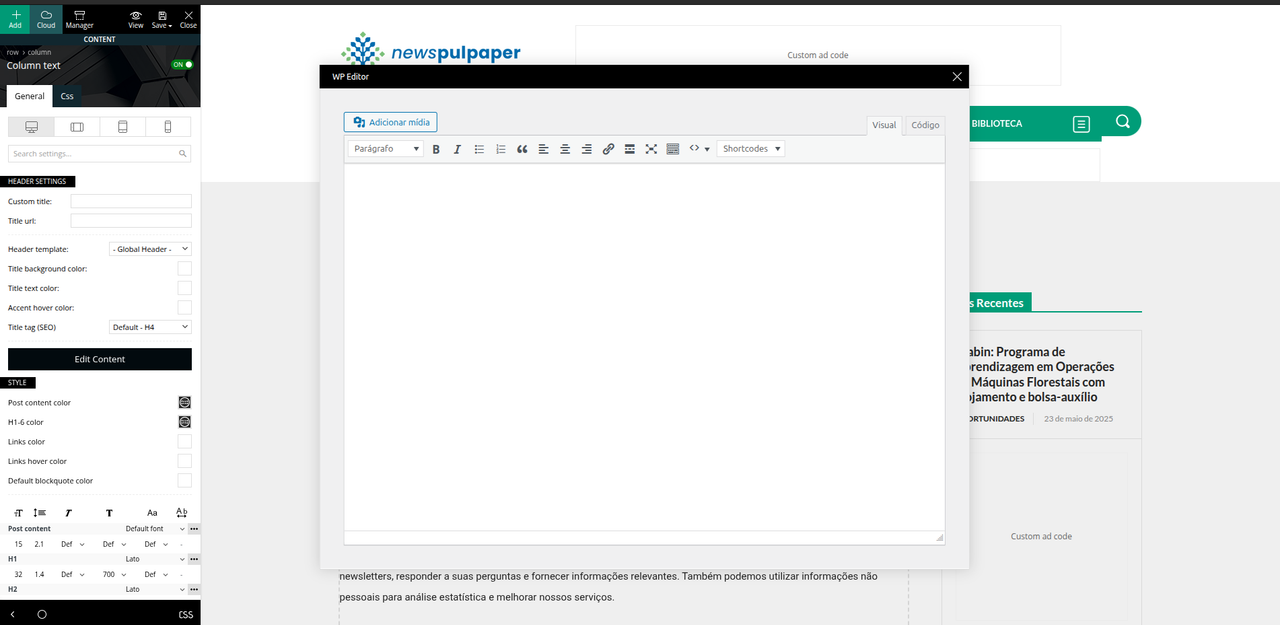 ). Any content we try to add in this editor window does not appear on the actual page after saving – it simply has no effect.
Could you please help us with this issue? Is there any fix or workaround?
Thank you in advance for your support!
 Antonio Ungaro
Hi
These resources block the first page rendering (my site is http://www.sport24h.it). I tried serving the embedded core JS/CSS resources and deferring all non-core JS/styles resources with LiteSpeedCache ((I have to use this plugin because my hosting is with LiteSpeed), but it doesn’t work and the server response times are too slow.
I only use a small percentage of these resources, is there a way to lighten these css?
td-standard-pack/Newspaper/assets/css/td_standard_pack_main.css?ver=8ae1459a1d876d507918f73cef68310e
td-composer/css-live/assets/external/ace/ace.js?ver=492e3cf54bd42df3b24a3de8e2307cafx
td-composer/legacy/Newspaper/assets/css/td_legacy_main.css?ver=492e3cf54bd42df3b24a3de8e2307cafx
td-composer/legacy/Newspaper/js/tagdiv_theme.min.js?ver=12.7.1
style.css?ver=12.7.1
Antonio UngaroHi
These resources block the first page rendering (my site is http://www.sport24h.it). I tried serving the embedded core JS/CSS resources and deferring all non-core JS/styles resources with LiteSpeedCache ((I have to use this plugin because my hosting is with LiteSpeed), but it doesn’t work and the server response times are too slow.
I only use a small percentage of these resources, is there a way to lighten these css?
https://www.sport24h.it/wp-content/plugins/td-standard-pack/Newspaper/assets/css/td_standard_pack_main.css?ver=8ae1459a1d876d507918f73cef68310e
https://www.sport24h.it/wp-content/plugins/td-composer/css-live/assets/external/ace/ace.js?ver=492e3cf54bd42df3b24a3de8e2307cafx
https://www.sport24h.it/wp-content/plugins/td-composer/legacy/Newspaper/assets/css/td_legacy_main.css?ver=492e3cf54bd42df3b24a3de8e2307cafx
https://www.sport24h.it/wp-content/plugins/td-composer/legacy/Newspaper/js/tagdiv_theme.min.js?ver=12.7.1
https://www.sport24h.it/wp-content/themes/Newspaper/style.css?ver=12.7.1



