
- NewspaperCreate Custom Code with the browser’s Inspector or the Live CSS Box
- NewspaperScroll Animation
- NewspaperWP Rocket and Newspaper Theme: Optimization Guide
- NewspaperHow to setup Twitch for Social Counter
- NewspaperModal Popup
- NewspaperFlex Block Settings Guide
- NewspaperAutoptimize Plugin – install and configuration
- NewspaperAdding Multiple Authors to Your Articles
- NewspaperDesign your Post Pages using the Cloud Library Templates
- NewspaperBig Grid Flex Settings
- NewspapertagDiv Composer Tutorial
- NewspaperTheme modules and blocks
- NewspaperThe Mobile Theme
- NewspaperCompare theme files – Winmerge tutorial
- NewspaperUsing Other Ads
- NewspaperBlock settings tutorial
- Using custom fonts
- Using typekit fonts
- NewspaperChild Theme Support
- NewspaperHow to Make the Site Faster
 Anamaria
 Hello,
For logo please edit with tagDiv Composer, select the viewport on phone, select the header logo and change it => https://i.imgur.com/cR7F0v4.png https://www.youtube.com/watch?v=HXQQygkCCJo -> https://forum.tagdiv.com/add-logo-newspaper/
To change the color you need to select the row and in the tab CSS change it -> https://i.imgur.com/APcW6zs.png
Thank you!
 Bettina
 Hello Amie!
Check in the CSS tab if you do not have any values for paddings or margins and delete them. Try to insert a “100%” value there.
Thank you!
 WordDom
Hi,
Does TagDiv CSS Analyzer tool can run for all pages of the website or do we have to do it manually on every page ?
 VNK
VNKHi,
I just bought the theme and while trying to install it to WP I get the following error:
Template is missing. Standalone themes need to have a templates/index.html or index.php template file. Child themes need to have a Template header in the style.css stylesheet.
Can you please help me to fix it?
Thank you,
 muktipolice
 Its writing comes in black. I can’t see the letters because the background is black. So I want to make the writing of this review part white. Please give me the css code instead. Stop wasting your time
Anamaria Hello,
If you want to display the line on all deceive all you need to do is to set this custom css in Theme panel > Custom code> Custom css
.td-social-line{

display: inline-block;

}
But please notice that the button for share for the line is showing only on mobile devices because was made only for mobile deceive, in order to work on desktops your visitor needs to have an app installed on their desktops.
Thank you!
 Calin
Calin Hi ismayilpoyraz, this is an old topic, do you have an old theme version?
If not, then is possible that the new structure to be different and that it is interfering with your css.
Also, if you can provide a link to your website and some details about what you want to achieve, I will try to help you!
Thank you!
 MikeVLC
REF. https://ugandasafariexperience.com
Hello dear Team, I did announce this earlier and followed your recommendation to try the CSS Analyzer in order to solve this issue. However this unfortunately did not help.
Well, looking at the HTML code of the start page there might be indeed some double coding etc. caused eventually from copying initially older content for post and pages of another wordpress theme. So I might need somebody to have a close look at the HTML coding of the website and recommend dedicated action what to do.
I tried also to replace the header, footer and using the basic post / pages application instead of a cloud template but this was obviously not successful.
I was also thinking about using a complete different theme from the cloud templates?
Thanks for some input or even a quote if someone of your team has to work on that seriously.
I never had this issue before using TAGDIV for some years and maybe its really the copying of content from another word press theme causing the trouble. With Google we are doing alright although there is still room for optimization 😉
Thanks and best regards Michael
Anamaria Hello,
For the footer sticky, you can use the option on the row and set it to the bottom -> https://i.imgur.com/gIX3LCA.png other option doesn’t exist.
You can try to use the Flex Block element inside the Single Post Template.
The Posts Loops settings are divided into 5 tabs: General, Layout, Style, ADS and CSS. The Posts loop is a special block and doesn’t have filtering options.
Also, one of the options for pagination of the Posts Loop has the option for normal numbered and the flex blocks do not have this option.
The Posts Loop is automatically filtering the posts depending on the cloud template you set (for example on the category page there will be posted posts from that category).
Thank you!
Calin Hi theheritagelab,
Unfortunately, the only way to be able to adjust it will be if you use only one size for all images from the gallery, for example 640×320, if each image has different dimensions then, then will be better to use the default settings for CSS that comes with tagDiv gallery.
Thank you for your understanding!
Calin Hi,
I hope css will be broken into pieces as soon as possible.
Unfortunately, I don’t know what to say about a wider template, Newsmag wasn’t designed for that, but you can try Newsmag, it’s much more flexible and fully editable with tagDiv Composer.
Thank you!
Anamaria Hello,
You are probably uploading the whole theme package. You have to upload only the theme zip file, not the whole package which contains other items
– https://help.market.envato.com/hc/en-us/articles/202821510-Theme-is-missing-the-style-css-stylesheet-error
Install via WordPress -> https://forum.tagdiv.com/install-via-wordpress/
Install via FTP -> https://forum.tagdiv.com/install-via-ftp/
Requirements for Newspaper => https://forum.tagdiv.com/requirements-for-newspaper/
After installing the theme and activating it you will find in the Prebuilt websites all the theme demos and you can import whatever demo you want => https://www.screencast.com/t/6rf5g0Dxc0K
Thank you!
 skycr
skycrI have purchased a pack of news12paper themes but when i try to install on wordpress it failed, sending to me this error message: The theme does not have the style.css stylesheet.
What can i do? This problem does not let me to install the themes.
Can someone help me or make me a refund of my money?
Thanks
 kbelimpassakis
 Thanks for replying, but i do not really understand what you mean.Maybe i did not explain well my point.
How i have to set up the child theme without loosing any data after an update?
I havent done any code modification to my child theme apart from adding the gtag code in functions.
I am asking about changes made to css, content and modicications to outlook through theme;s builder on templates that i added to cloud library.
Do i have to save these renamed templates (page,header,footer,author etc) in my child theme in order not be overwritten in a future update?Is this necessary?
Anamaria Hello,
Only with css, you can change it. You can import a Single Post Template that looks like the standard template -> https://forum.tagdiv.com/design-post-pages-using-cloud-library-templates/
Thank you!
Bettina Hello @tenacemente!
In the CSS tab of the row or element, it could be a top margin or a negative one bottom margin. Please check.
Thank you!
 damir78
 It would be good if you did that and also put the possibility of a wider template. When it’s this narrow, it looks outdated.
I have done more than wp rocket can do, and I have 4 web portals.
The emphasis should be on posts.
2 special files with css in the upper part and so that 1 is loaded for mobile and 1 for tablet and desktop.
The rest of the css can be loaded in the footer (there is a command in WP for that).
kbelimpassakishi there i made a fresh install about 2-3 weeks ago.
i installed a child theme from the first place.
a few days ago i saw that a new update was available.
i changed theme from child to newspaper theme and after i switched back the page layout stored in cloud library was set back to the original template used (i lost all the css and content hanges made).
i want to ask that it is a bit confusing for me the artcile relatively the child theme use if it is compulsory since using a child theme to copy the files (single templates etc) there in order not to loose changes made with editor to cloud library templates???
i m not sure after reading it in case somenones using child theme after an update the changes and the templates stored in cloud library will remain as they are, or they will change unless they are copied on achild theme files?
Can u please help me with that cause i do not want to loose all the work done in a future update or in case i revert to main.
finally, i am showing some deprecated api to the contact form i added, i do not know if it is noticed and u plan to fix it in future.
Calin Hello damir78,
Unfortunately, the css on Newsmag is most of it in the same file, which is why td_legacy_main.css is loading, but there is unnecessary CSS in it. Our developer has a task to break the code in that file into pieces, but I don’t know what stage they have reached.
What I can recommend is to use a dedicated plugin for page speed, maybe WP Rocket will help you:
– https://www.infophilic.com/get-almost-100-pagespeed-newspaper-theme/
– https://www.andraware.com/wp-rocket-for-newspaper-theme/
Thank you!
Anamaria Hello,
Please try to edit the page with tagdiv Composer, select the row where the background color is set and go into the tab CSS, and change the color.
Thank you!
damir78 this file is totally unnecessary.
td-composer/legacy/Newsmag/assets/css/td_legacy_main.css
It loads over 600Kb unnecessarily.
Most of that CSS is in the upper part of the site, which should be critical css.
The template knows a lot of problems for users who do not maintain pagespeed…
In the google search console, the website can get a rating of poor instead of good.
And then the ranking and the number of visits start to drop.
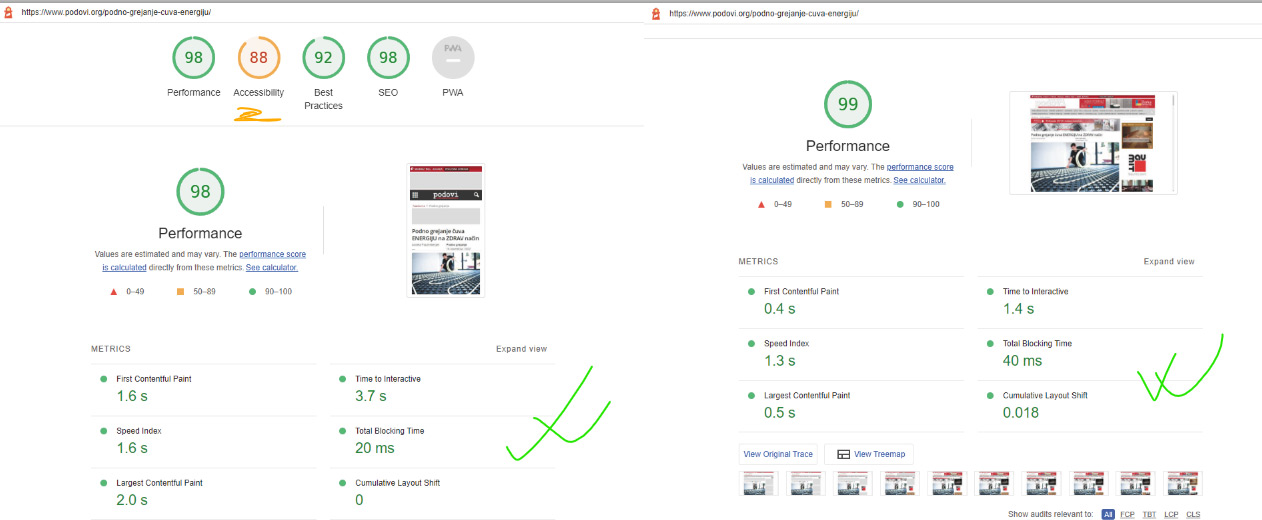
my new pagespeed result:

 davidgkimberley
I’ve tried changing the colours in Newspaper > Theme panel > General Theme colours. I want the main desktop nav bar background colour to be blue, but it is stuck on a hot pink colour (#ea2e2e).
I’ve tried changing the colour in the CSS, but due to the below code being present at root level, the nav bar keeps showing the hot pink colour on load, before changing to navy blue.
.tdi_43_rand_style{
background-color:#ea2e2e !important;
}
I’ve tried downloading and searching through the theme files for ‘background-color:#ea2e2e !important;’ but I can’t find anywhere in the code where this css is written.
 hadharm
I am trying to add a bubble background into a row in tagdiv. I have created this background using CSS and add homeb into the extra class field. Now the bubble takes the elements inside the row but I want the bubbles to only flow under the elements. This code works on a test with HTML document inside cpanel but I don’t know what part of the Newspaper theme is making it not to work. The live page is shown at https://hiideemedia.com/new-home/
The CSS is;
/* Home bubbles with background */

.homeb {

  height: 100%;

  width: 100%;

  background: linear-gradient(180deg, #ffffff, 5%, #119dff, 50%, #04fafd);

  position: static;

}
.homeb adam {
position: static;
}
.homeb div {
height: 60px;
width: 60px;
border: 2px solid rgba(90, 90, 255, 0.7);
border-radius: 50px;
position: static;
top: 10%;
left: 10%;
animation: 4s linear infinite;
}
.homeb div .dot {
height: 10px;
width: 10px;
border-radius: 50px;
background: rgba(255, 255, 255, 0.5);
position: static;
top: 20%;
right: 20%;
}
.homeb div:nth-child(1) {
top: 20%;
left: 20%;
animation: animate 8s linear infinite;
}
.homeb div:nth-child(2) {
top: 60%;
left: 80%;
animation: animate 10s linear infinite;
}
.homeb div:nth-child(3) {
top: 40%;
left: 40%;
animation: animate 3s linear infinite;
}
.homeb div:nth-child(4) {
top: 66%;
left: 30%;
animation: animate 7s linear infinite;
}
.homeb div:nth-child(5) {
top: 90%;
left: 10%;
animation: animate 9s linear infinite;
}
.homeb div:nth-child(6) {
top: 30%;
left: 60%;
animation: animate 5s linear infinite;
}
.homeb div:nth-child(7) {
top: 70%;
left: 20%;
animation: animate 8s linear infinite;
}
.homeb div:nth-child(8) {
top: 75%;
left: 60%;
animation: animate 10s linear infinite;
}
.homeb div:nth-child(9) {
top: 50%;
left: 50%;
animation: animate 6s linear infinite;
}
.homeb div:nth-child(10) {
top: 45%;
left: 20%;
animation: animate 10s linear infinite;
}
.homeb div:nth-child(11) {
top: 10%;
left: 90%;
animation: animate 9s linear infinite;
}
.homeb div:nth-child(12) {
top: 20%;
left: 70%;
animation: animate 7s linear infinite;
}
.homeb div:nth-child(13) {
top: 20%;
left: 20%;
animation: animate 8s linear infinite;
}
.homeb div:nth-child(14) {
top: 60%;
left: 5%;
animation: animate 6s linear infinite;
}
.homeb div:nth-child(15) {
top: 90%;
left: 80%;
animation: animate 9s linear infinite;
}
@keyframes animate {
0% {
transform: scale(0) translateY(0) rotate(70deg);
}
100% {
transform: scale(1.3) translateY(-100px) rotate(360deg);
}
}
The HTML I use on normal page to display it;
<div class=”homeb”>
<adam>Text on Animation</adam>
<div><span class=”dot”></span></div>
<div><span class=”dot”></span></div>
<div><span class=”dot”></span></div>
<div><span class=”dot”></span></div>
<div><span class=”dot”></span></div>
<div><span class=”dot”></span></div>
<div><span class=”dot”></span></div>
<div><span class=”dot”></span></div>
<div><span class=”dot”></span></div>
<div><span class=”dot”></span></div>
<div><span class=”dot”></span></div>
<div><span class=”dot”></span></div>
<div><span class=”dot”></span></div>
<div><span class=”dot”></span></div>
<div><span class=”dot”></span></div>
</div>
 saggel
 And if i don’t want to set full image, what css code needs?
Calin Hi,
Please try this custom css
.single .td-post-sharing-bottom {

    display: none;

}
Set this code in the theme panel> custom code> custom CSS.
I hope this will help you!



