- NewspaperCreate Custom Code with the browser’s Inspector or the Live CSS Box
- NewspaperScroll Animation
- NewspaperWP Rocket and Newspaper Theme: Optimization Guide
- NewspaperHow to setup Twitch for Social Counter
- NewspaperModal Popup
- NewspaperFlex Block Settings Guide
- NewspaperAutoptimize Plugin – install and configuration
- NewspaperAdding Multiple Authors to Your Articles
- NewspaperDesign your Post Pages using the Cloud Library Templates
- NewspaperBig Grid Flex Settings
- NewsmagtagDiv Composer Tutorial
- TutorialsFrom WPBakery to tagDiv Composer
- NewspapertagDiv Composer Tutorial
- NewspaperTheme modules and blocks
- TutorialsDefault Block Settings Guide
- NewspaperThe Mobile Theme
- NewspaperCompare theme files – Winmerge tutorial
- NewsmagBlock settings tutorial
- NewsmagLogo & Favicon
- NewsmagFooter templates
 Calin
Calin Hi,
For most of blocks this will not work, because, those do not have any stretch options.
Please let me know the places when is not working perfectly, some screenshots and a link, so I will try to provide a different css for that zone.
Thank you!
 dimitrix7
 I have the same issue.
On the mobile AMP the home page is working fine.
When i go to a category page the page is blank and i get the following error:
td_res_context->get_att(gap) Internal error: The atts are not set yet(AKA: the render template method was called without atts)
wp-content/plugins/td-composer/legacy/common/wp_booster/td_css_res_compiler.php
Any suggested solution for this?
 Calin
Calin Hi,
I can try to provide some css, but the element from this theme, like the blocks will not adjust correctly.
/* css for pages */

.td-header-container, .td-container, .td-pb-span12 {

width: 100%;

}

.td-pb-span12 {

width: 100%;

}

.td-pb-span8 {

width: 66.65%;

}

.td-pb-span4 {

width: 33.32%;

}

/* css for posts */

body .post {

width: 100%;

}
This code need to be set in the theme panel> custom code> custom css.
I hope it will help.
 jitendrachrysolite
 okay it worked, I just want to know how I can identify CSS class cuz I want to use it at multiple places.
for example you gave me this code .tdm_block_team_member .tdm-descr {
text-align: justify;}
how I can identify this class “.tdm_block_team_member .tdm-descr”
 Bettina
 Hello @trademodo!
If you have a cloud/PRO template, but you can’t edit the footer, then edit your homepage with the TagDiv Composer, scroll till footer, click on footer zone and you can edit/delete the elements there.
Select the row from footer and in the CSS tab you’ll find the background: https://i.imgur.com/Yq06HV5.png
Thank you!
Bettina Hello!
Replace the previous CSS code and set this one:
.author-box-wrap{display:none;}
Let me know the results!
Thank you!
Bettina Hello!
Please check some tips from this topic: https://forum.tagdiv.com/topic/td-composer-trying-to-access-a-pile-of-videos-when-not-needed-slowing-down-page/
Please note that page speed is not covered by the support team: https://forum.tagdiv.com/newspaper-theme-support/
You can use the CSS Analyzer, which is our automatic tool, very useful for the page speed and unused CSS.
Documentation here: https://tagdiv.com/whats-new-in-the-newspaper-theme-10-4-update/
Tutorial here: https://www.youtube.com/watch?v=tnkVapqhIHc
Thank you for understanding!
 c386
c386 Hi Bettina,
Thank you for the update. The revised CSS code is almost perfect, it correctly removes the post and comment count, however the box in which those stats would be displayed is still visible.
How can we remove the empty box: https://imgur.com/3B9HpnM
Thank you.
 johnsnow
Hi,
all testing resources show that my website with your template has issues with loading speed based on the weight of CSS in first. For example only one of .css files weight about 750KB.. bet here is planty of others.

The structure itself of the page has more than 6000 lines, where most of them is css files and other template things.
Is your template optimized for search engines? Or how to do it?
There is also a lot of unused CSS which is loading together with website:
https://googlechrome.github.io/lighthouse/treemap/?gzip=1#H4sIAAAAAAAAE61W24obORD9FdN
Do you have like a specialist, who can make a sweet from a raw template with tons of unnecessary css files and low-quality optimized mobile version of the website? at least for some price

website: https://beautypositive.org
 nockeeee
Hi,
I receive a blank window (see image) when I run the tagDiv CSS analyzer. Nothing happens if I press the buttons as well. What am I doing wrong? Or, how can I fix it? Thanks in advance.
Bettina Hello!
Delete the previous CSS code and set this one:
.td-author-counters{display:none;}
Let me know the results!
Thank you!
Bettina Hello!
Unfortunately, there is no special or individual file with CSS for every theme’s feature.
But, you can use the CSS Analyzer, which is our automatic tool, very useful for the page speed and unused CSS.
Documentation here: https://tagdiv.com/whats-new-in-the-newspaper-theme-10-4-update/
Tutorial here: https://www.youtube.com/watch?v=tnkVapqhIHc
Thank you!
Bettina Hello @Umut!
Please check if you have active and you use the tagdiv CSS Analyzer, click on “Remove generated CSS” and see the results.
Please check our step by step tutorial about the tagDiv CSS Analyzer here: https://www.youtube.com/watch?v=tnkVapqhIHc&t=1s
Hope that helps you!
Thank you!
Bettina Hello!
Please try to add this CSS code in the Live CSS:
.tdb_header_menu .tdb-menu-items-pulldown.tdb-menu-items-pulldown-inactive {

    opacity: 1!important;}
Let me know the results!
Thank you!
 Neuroplastic Mind
Hi there,
I want to know which css code is used for td login modal and td image light box feature, i need to exclude them from css optimization. Please help
 BandelMedia
Diving deeper, it looks like Google is not pulling the CSS file from our site.
Mobile page:
https://www.dropbox.com/s/h2k9kdjx83rd8nv/Screenshot%202021-11-23%20151536.png?dl=0
Mobile page that Google is pulling:
https://www.dropbox.com/s/x62ejxsnh8lzyxg/Screenshot%202021-11-23%20151614.png?dl=0
 Umut
Umut mauta
mauta The archive is set to display the random posts.
Another strange thing is that the css code appears only for an author, in posts from about 10 years ago, for the others all is normal. We have an emormous archive of 11.881 posts from 2003.
I initially thought it depended on copy and pasting from word documents, which generates weird html tags. But I checked and in text mode everything is normal.
I will try to do tests on plugins and clear the cache.
Thanks!
Bettina Hello!
Please try to add this CSS code in the Live CSS:
.tdm_block_team_member .tdm-descr {

    text-align: justify;}
Let me know the results!
Thank you!
jitendrachrysolite okay, but can you let me know which CSS code should I add to target only description not other title and job title
thank you.
Calin Hi,
This is quite a strange situation. What I suggest is to check the problem step by step.
The archive is set to display the latest posts in archive or random posts? If is on latest and are display old posts, then most possible to be a plugin conflict.
That code, like you said it is a css, that it is apply for that block so if the problem is solved after you update the page, it can be from some object cache or a plugin conflict.
The last problem seems that the response version is not apply correctly, now this also in most cases it is related to cache plugins.
What I can suggest is that first to make a test using only the theme plugins and see if the problem is still persist.
Please let us know the results!
Bettina Hello!
Unfortunately, there is no setting in our theme to achieve that. Only if you will write a custom CSS code in order to achieve what you want.
Thank you!
 g.demosthenous
Hello,
I’ve been trying to setup a same page menu with smooth scrolling at my website: https://mai4car.eu/
I achieved this by setting menu items to #id (e.g. https://mai4car.eu/#about) and enabling smooth scrolling on the page with custom CSS.
The issue is with the mobile menu. Unfortunately when I click on the menu option, the mobile menu does not close to allow for smooth scrolling to the page section.
Is there a way around this issue? Is there a better way to achieve one-page websites with scroll menu?
Thanks
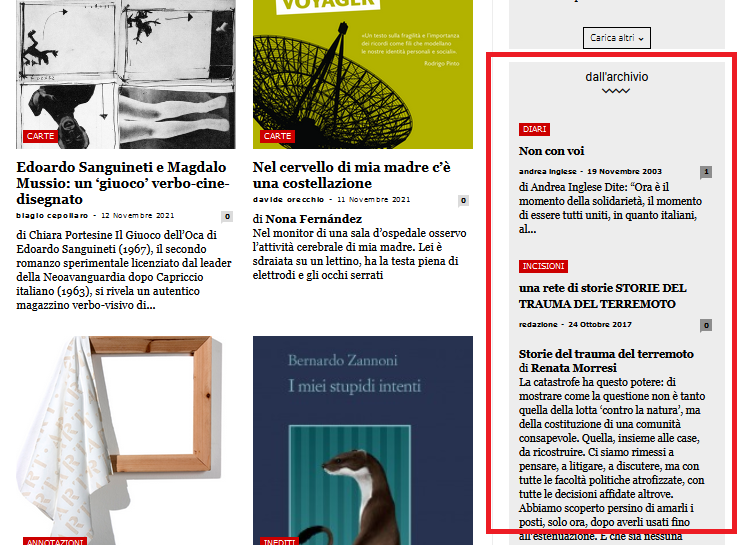
mautaHy, this is our homepage
https://www.nazioneindiana.com/
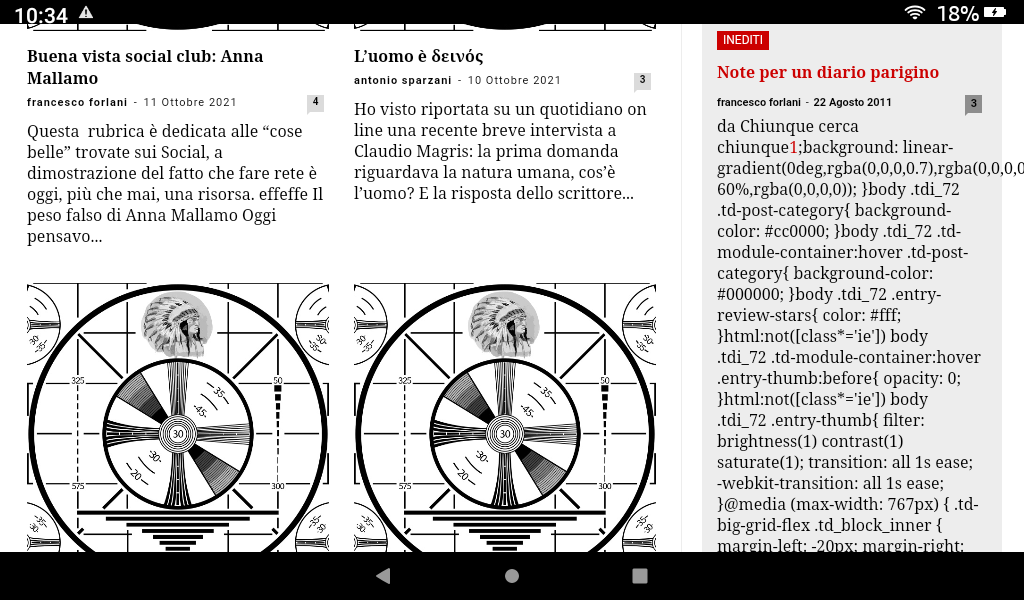
Sometimes when some old posts, not all, are displayed random in archive column on the right in “dall’archivio”
https://www.nazioneindiana.com/wp-content/2021/11/archive-posts.png
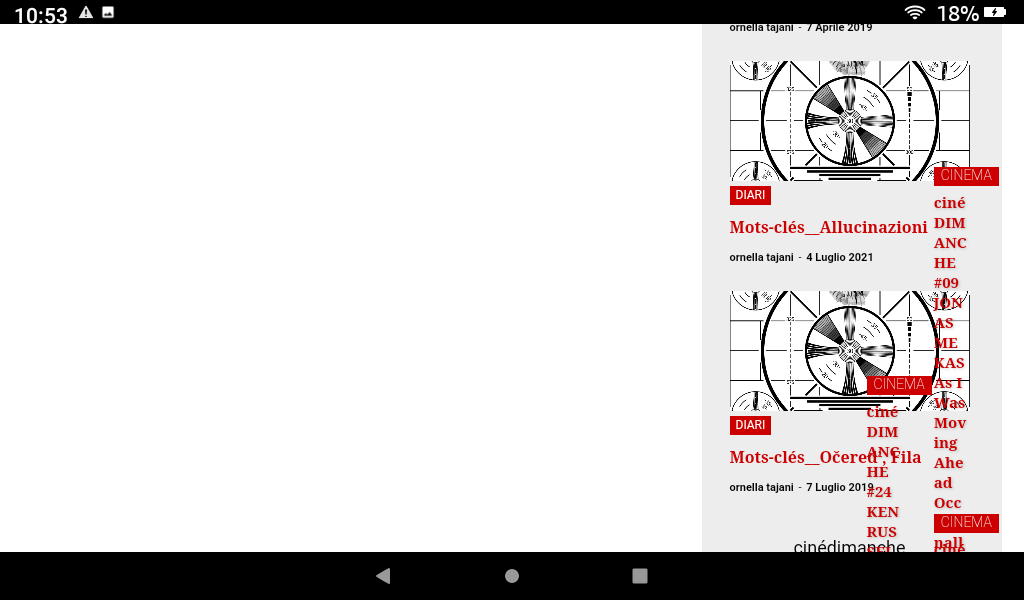
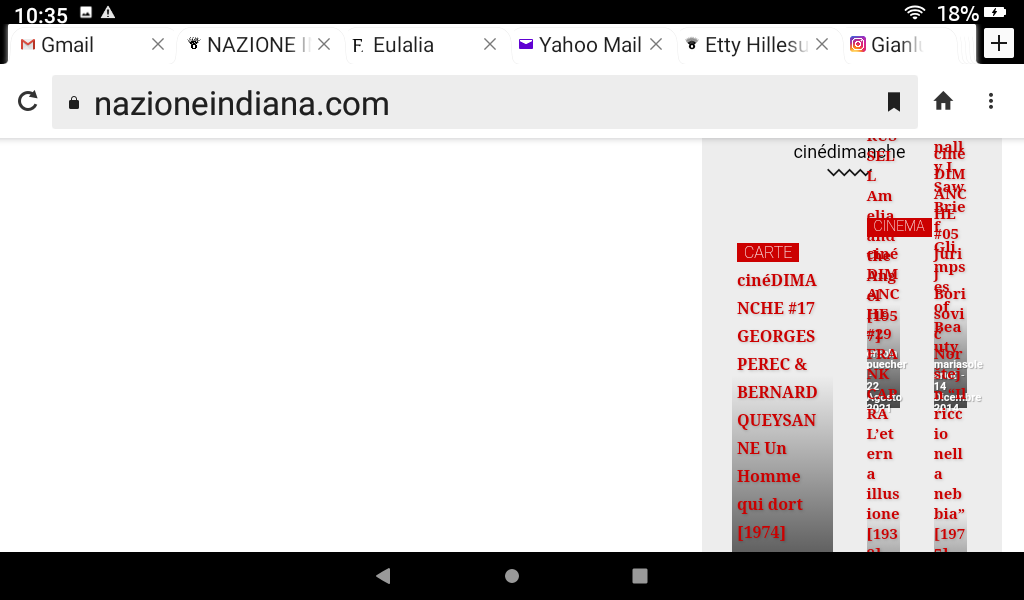
a strange phenomenon happens: parts of code appear in the post, I think of the css, instead the code of the post in “text mode” is normal
and from this post down the rest of the homepage turns white and appears on the right side and completely messy, without images.
Also it is impossible to access tagDiv Composer.
Everything goes back to normal by updating the page.
Why does this happen?
Thanks
Orsola
 Bill Fleak
 I added the block per your instructions. Thank you worked perfectly. I added an extra class to the block to get some CSS done on the new block. Would like it to match text formatted similar to the text below it that is displayed in the labeled Subtitle. Not able to get this to work. The extra class is “acfpostsubtitle”. Can you assist with this?
https://www.screencast.com/t/oSo7IdBNZf>
URL: https://dev.hrexecutive.com/talent-management/5-expert-takeaways-from-the-new-osha-vaccine-mandate/