- NewspaperCreate Custom Code with the browser’s Inspector or the Live CSS Box
- NewspaperScroll Animation
- NewspaperWP Rocket and Newspaper Theme: Optimization Guide
- NewspaperHow to setup Twitch for Social Counter
- NewspaperModal Popup
- NewspaperFlex Block Settings Guide
- NewspaperAutoptimize Plugin – install and configuration
- NewspaperAdding Multiple Authors to Your Articles
- NewspaperDesign your Post Pages using the Cloud Library Templates
- NewspaperBig Grid Flex Settings
- NewsmagtagDiv Composer Tutorial
- TutorialsFrom WPBakery to tagDiv Composer
- NewspapertagDiv Composer Tutorial
- NewspaperTheme modules and blocks
- TutorialsDefault Block Settings Guide
- NewspaperThe Mobile Theme
- NewspaperCompare theme files – Winmerge tutorial
- NewsmagBlock settings tutorial
- NewsmagLogo & Favicon
- NewsmagFooter templates
 cantonjester
 The CSS works as expected.
I spoke with WooCommerce’s support earlier this morning, and they mentioned that the product loop that gets added by default to the store’s front page is defined by the product-archive.php file in TagDiv’s file hierarchy.
I need to know what code to place in the child theme’s functions.php file so that the product loop does not appear at all on the shop’s main page.
 nermina
Hello,
I need help with several small issues I am currently facing with Newspaper, but I’ve decided to group topics because it’s easier for me to follow and I’ve also discovered a lot of helpful stuff with your search engine. No need to clutter.
I’ve made Newspaper main page with TD Composer and I am facing two problems.
1. How can I add sidebar to TD Composer created page?
2. I am using Big Grid Slide as a main slider.
a) Is there a possibility to only make biggest image slide and let other images be still?
b) I’ve made Big Grid Slide slide , but it changed position, moved from center and aligned to the left – it overwrites all CSS padding. How can I center it again?
c) Is there a way to change dimensions of Big Grid Slide and/or its elements?

Thank you kindly, more questions inbound when I’m done with this.
 savunmahatti
 Hi after try this css i don’t see any improvement.
Screenshot: https://cdn.pbrd.co/images/GQSbFTK.png
cantonjester Thank you. I’ll test that CSS later this morning.
What would I be searching for in regards to plugins that would address the issue of the products appearing on the ‘defined’ shop page?
‘Prevent archive products from appearing on shop home page?’
 Bogdan B.
 Hello,
In order to replicate the look of the gadgets demo please add this code in your custom css box:
.td_module_8 {

padding: 0 0 0 15px;

border-bottom: 1px solid #eaeaea;

margin-bottom: 6px;

}

.td_module_8 .entry-title a {

color: #888 !important;

}

.td_module_8 .entry-title a:hover {

color: #000 !important;

}

.td_module_8 .entry-title a:before {

content: '';

width: 5px;

height: 5px;

background-color: #f45511;

position: absolute;

left: 0;

top: 7px;

}

.td_module_8 .td-module-meta-info {

display: none;

}

.td_module_8 .td-module-comments {

display: none;

}
Thanks.
 Rafael Fernandez
 Hello,
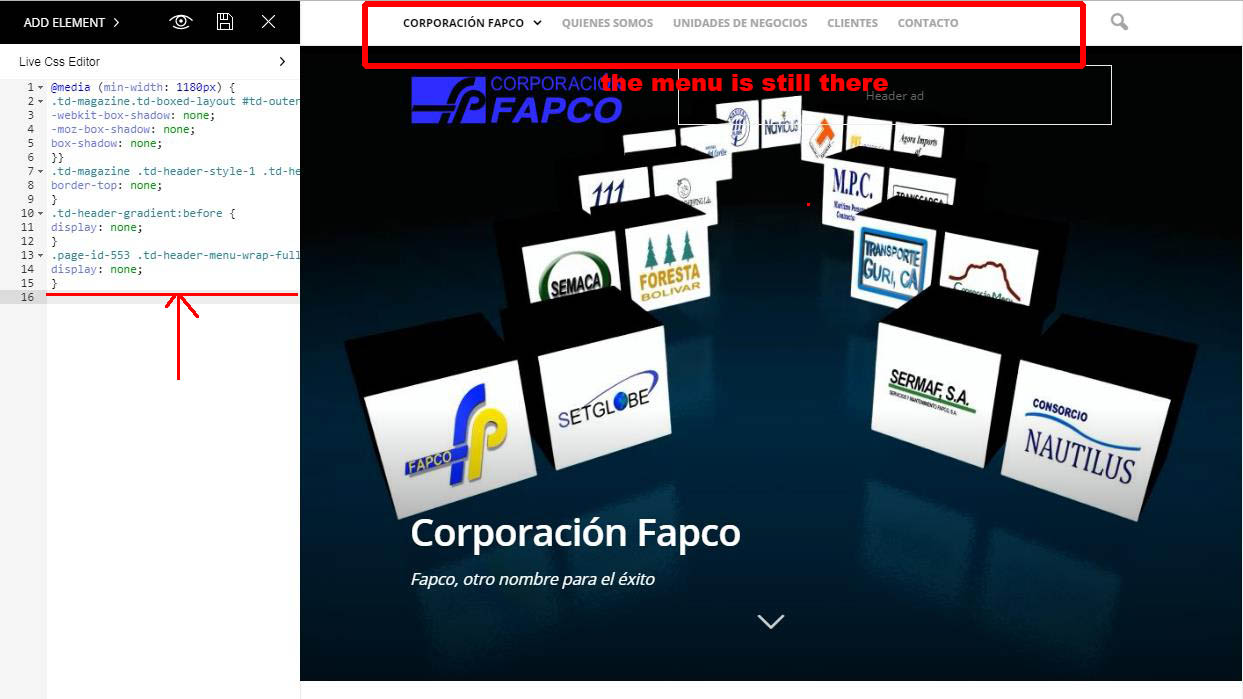
I include the code, but it does not work, I have noticed that I have a code already included before,
if I put it in the end it does not work either.
This is the code that already appears in the css:
@media (min-width: 1180px) {
.td-magazine.td-boxed-layout #td-outer-wrap {
-webkit-box-shadow: none;
-moz-box-shadow: none;
box-shadow: none;
}}
.td-magazine .td-header-style-1 .td-header-top-menu-full {
border-top: none;
}
.td-header-gradient:before {
display: none;
}
.page-id-553 .td-header-menu-wrap-full {
display: none;
}
http://corporacionfapco.com/wp-content/uploads/2017/10/Clip0004-1.jpg
although I put the new code alone does not work either,
thanks for your help
regards
 Simion C.
 Hi,
Try adding this to the CSS code provided – https://www.screencast.com/t/yP7YenXhHA
font-family: FontAwesome;
It should work properly after adding the font family.
Thanks
Simion C. Hi,
You could hide the breadcrumbs with some CSS, like this
– https://www.screencast.com/t/FGNz9dUNxb
Test this solution and see if it works properly
.woocommerce.single-product .entry-crumbs a:nth-child(3),

.woocommerce.single-product .entry-crumbs a:nth-child(5),

.woocommerce.single-product .entry-crumbs i:nth-child(2),

.woocommerce.single-product .entry-crumbs i:nth-child(4) {

display:none;

}
The section you mention will be displayed on the shop page, something has to be selected in the default shop page settings
– https://www.screencast.com/t/RaKPWSRbIQy
There could be plugins or code that you could use to remove it. Or maybe hide it with CSS.
Thanks
cantonjester Website is cet.robywebdev.com
I was able to build the logo into the background with an image editor to achieve a desired effect. Question: for the retina logo, would I just build that same logo with background, twice the size?
Also – if my client does not like the picture behind the logo, and instead wants to use a color background, that’s when I run into the problem of the logo reaching the top and the bottom of the background color. I’dneed to add margin-top and a margin-bottom to the logo in the custom CSS in that scenario.
Keith
Simion C. Hi,
Please enter this code in Theme panel->Custom CSS section, it will fix the issue with the article bottom ad
– https://www.screencast.com/t/67sPOYzd4p7t
.td-a-rec-id-content_bottom .td-all-devices {

display: block;

}
The header ad seems to be displaying properly from what I can see
– https://www.screencast.com/t/sapEeWxu
Thanks
 Catalin
 Hello fquiquet,
Yes! If you want to change this style you should add the above code which I gave you above directly in style.css and then you can customize each block header from the composer.
Thanks for your understanding!
Simion C. Hi,
If you mean this heading – https://www.screencast.com/t/Sk7fefcZJ
I believe that is added by Woocommerce here – https://www.screencast.com/t/fLAmDLaaGHY
You could edit the plugin and remove it in the files as shown. Or remove the heading with some CSS like this
– https://www.screencast.com/t/FV6xAUqEMRVk
.single-product .woocommerce-Tabs-panel h2 {

display: none;

}
Maybe add some margin as well to compensate for the removal of the heading, if you want to
– https://www.screencast.com/t/A9i5TB8GTZ
.single-product .product ul.tabs {

margin-bottom: 30px!important;

}
Thanks
Catalin Hello morebusiness,
Sorry but the theme does not allow you to make an infinite scroll for Woocommerce page products, sorry! Only available type pagination for this kind of page is numeric pagination, like this -> https://www.screencast.com/t/SKAc517MtnVN
The mega menu has not been designed to display the shop pages but only our posts and default pages.
If you want to hide the ads for the Woocommerce page you should use a bit of CSS code for this and target your page desired by page ID.
Notice that our theme has the own sign in/login functionality and does not use the Woocoemmerce’s functionality in this case. The Woocommerce log in should be applied only for Woocommerce elements. You should check the plugin’s documentation here -> https://docs.woocommerce.com/?s=login&post_type=documentation&search_in=3
If you do not like the design of it you should create your own style using a bit of CSS code but notice that it have to do by yourself because we cannot provide custom work at the moment, sorry!
Check the plugin’s settings to enable or disable all of the specific plugin’s elements, sorry!
Sorry but that question regarding on Google Translate is not theme related! If you want to know how this can be done, please google it. As a hint, you can take a closer look at this tutorial -> http://nationbuilder.com/google_translate_widget
Sorry but please notice that the standard position of social sharing networks cannot be changed very easy because the theme layout will be damaged, sorry!
.td-default-sharing .td-social-sharing-buttons {

border: 1px solid #ebebeb;

border-radius: 20px;

}
The result is here -> https://www.screencast.com/t/R5eWwNSa
I guess that you are using the Footer template style 1 which comes by default with these widgets. If you want to change the content of it notice that you can do this only by the code. So, if you want to create your own Footer template style, I recommend you to use the Footer template style 5 according to our documentation here -> https://forum.tagdiv.com/footer-templates/
Notice that the Editor Picks is just a simple block style 7 sorted by some default parameters as you can see here -> https://www.screencast.com/t/me51SX6Vj6h
Hope this helps!
Thanks for your understanding!
Simion C. Hi,
Then you could make sure the code applies only on desktop, if it is affecting smaller devices in a bad way. There is an Advanced CSS code section in the theme panel where you can enter the code you created, applying it only for desktop
– https://www.screencast.com/t/B0m997Ze0h
Thanks
 princeallex
Hello, i have installed WP super cache, but now the ads on the right side on homepage are not displayed to other users. I can see them but others can not. My site is https://goo.gl/a5jXTK
I have set also my .htaccess to this setting
# BEGIN WordPress

<IfModule mod_rewrite.c>

RewriteEngine On

RewriteBase /

RewriteRule ^index\.php$ - [L]

RewriteCond %{REQUEST_FILENAME} !-f

RewriteCond %{REQUEST_FILENAME} !-d

RewriteRule . /index.php [L]

</IfModule>
# END WordPress
# BEGIN cPanel-generated php ini directives, do not edit
# Manual editing of this file may result in unexpected behavior.
# To make changes to this file, use the cPanel MultiPHP INI Editor (Home >> Software >> MultiPHP INI Editor)
# For more information, read our documentation (https://go.cpanel.net/EA4ModifyINI)
<IfModule php5_module>
php_flag asp_tags Off
php_flag display_errors On
php_value max_execution_time 180
php_value max_input_time 60
php_value max_input_vars 1000
php_value memory_limit 256M
php_value post_max_size 64M
php_value session.gc_maxlifetime 1440
php_value session.save_path "/var/cpanel/php/sessions/ea3"
php_value upload_max_filesize 64M
php_flag zlib.output_compression Off
</IfModule>
# END cPanel-generated php ini directives, do not edit
# BEGIN Compress text files
<IfModule mod_deflate.c>
<filesMatch "\.(js|css|html|php)$">
SetOutputFilter DEFLATE
</filesMatch>
</IfModule>
# END Compress text files
# BEGIN Expire headers
<ifModule mod_expires.c>
ExpiresActive On
ExpiresDefault "access plus 5 seconds"
ExpiresByType image/x-icon "access plus 604800 seconds"
ExpiresByType image/jpeg "access plus 604800 seconds"
ExpiresByType image/png "access plus 604800 seconds"
ExpiresByType image/gif "access plus 604800 seconds"
ExpiresByType application/x-shockwave-flash "access plus 604800 seconds"
ExpiresByType text/css "access plus 604800 seconds"
ExpiresByType text/javascript "access plus 604800 seconds"
ExpiresByType application/javascript "access plus 604800 seconds"
ExpiresByType application/x-javascript "access plus 604800 seconds"
#ExpiresByType text/html "access plus 600 seconds"
#ExpiresByType application/xhtml+xml "access plus 600 seconds"
</ifModule>
# END Expire headers
Catalin Hello Prokhorov,
I suppose that you are referring to the appearance of a flash/time loading when you enter on your website, right? This behavior appears when you have additional customization through custom CSS code. Please notice that the CSS is working in cascade and the first time will take the code from style.css that is set it by default and then the theme will take the custom code that you have changed from Theme panel and practically this flash is generated by this cause. As a workaround, you have to check your style.css and try to add directly in this file your desired custom code. So, if your problem is still there, please try to revert the theme to the default settings, without any customizations and let us know how it goes. Also, you can try to make a new fresh install from scratch with the latest version of the theme and check the results. Also, please make sure every time you cleared caches. Noticed that the only files where you will have to edit are style.css.
If you are not aware of the steps which are needed to take in this regard, please consider hiring a freelancer/developer to help you because we cannot provide custom work at the moment, sorry!
Hope this helps!
Thanks for your understanding!
Catalin Hello Fabio Russo,
Please notice that the speed of your website depends on how well your site is optimized. Notice that is not a simple task and if you do not have any experience in this regard you will do not bring good results for the theme. Also, notice that we have a speed optimization tutorial but this is addressed only to advanced users. So, if you follow the steps which are presented in this tutorial here -> https://forum.tagdiv.com/how-to-make-the-site-faster/ you can increase the page speed loading and if you are not aware of the steps in this regard, please consider hiring a freelancer/developer to help you because the speed optimization services are not covered by our support policy, as you can read here -> https://forum.tagdiv.com/support-policy-2/ Check our documentation here -> https://forum.tagdiv.com/requirements-for-newspaper/ regarding on dedicated server to fit to our requirements.
Unfortunately, our theme does not have such an option to minify the style.css file and we cannot recommend any plugins with this functionality because is not tested with our theme. For minifying this file, we are using CloudFlare for our demo and works fine. If you want to read other views from our users, please check this topic -> https://forum.tagdiv.com/topic/tip-how-to-easily-minify-your-css-without-breaking-your-site/
One of our top members here on the forum wrote his own optimization tutorial here:
https://forum.tagdiv.com/topic/tutorial-chriss-custom-optimizations-for-functions-php-etc/ and here -> https://www.infophilic.com/get-almost-100-pagespeed-newspaper-theme/
Basically, these are the theme requirements
– https://forum.tagdiv.com/requirements-for-newspaper/
Thanks for your understanding!
Simion C. Hi,
The translation works as you can see here
– https://www.screencast.com/t/qX4pl4BjnT
– https://www.screencast.com/t/gTiuAEV1i0y4
The center alignment also works as it can be seen here, footer template 14 as well
– https://www.screencast.com/t/AO2QPgfh
If you have caching, clear your cache after making the modification in the translation settings, and entering the CSS code.
Thanks
 pstgibson
I need a css code to remove the white spaces from a page on my site. See image below:
https://www.screencast.com/t/g6aofKH4
Thanks
 lethow
 Go to this topic for the help
https://forum.tagdiv.com/topic/google-webmaster-hentry-missing-update/
or do the following:
Hi
The date is missing from hentry because is deactivated on your site. If you don’t want to display the date on posts it can be hidden with css. Enable the date from theme panel under post settings so google can find it and use below css to hide it:
.td-post-date, .td-author-line{
display: none!important;
}
Thanks!
 alexcfer
Hi there
I can’t find a child theme for NP 8. Now all changes to my style.css within the child theme for NP7 won’t affect the new theme.
Please advise.
Regards
 wuche
wucheHi,
I can’t figure out the author name meta-data won’t display on the big blocks on my front page. They also don’t display anywhere on the posts either.
wuche.gg
Can you point me in the right direction? If it’s not a default function, what sort of custom css do I need to implement?
Thanks!
 simchris
If you’re like me, some of Yoast’s bloat is now bordering on the point we may stop using it very soon.
Latest thing is adding new user roles for SEO editors, whether you want them or not (man, the Yoast people are clueless aren’t they .. everything is ‘on’ by default, polluting your dbase…)
Anyway — to disable the new Yoast ‘seo editor’ user types, add this to your functions.php or personal hack plugin or whatver
if ( get_role('wpseo_manager') ) {

	remove_role( 'wpseo_manager' );

}
if ( get_role('wpseo_editor') ) {
remove_role( 'wpseo_editor' );
}
as with all things make backups first ….
my old ‘dequeue yoast css’ — and remove one element we never use
function mytheme_admin_bar_render() {

  	global $wp_admin_bar;

  	$wp_admin_bar->remove_menu('wpseo-menu');

  }

 add_action( 'wp_before_admin_bar_render', 'mytheme_admin_bar_render' );

 add_filter( 'wpseo_use_page_analysis', '__return_false' );
function my_custom_css() {
echo '<style>
.misc-pub-section.yoast-seo-score.content-score { display: none; }
.misc-pub-section.yoast-seo-score.keyword-score { display: none; }
</style>';
}
add_action( 'admin_head', 'my_custom_css' );
function dequeue_yoast_css() {
wp_dequeue_style('yoast-seo-adminbar');
wp_deregister_style('yoast-seo-adminbar');
}
add_action('wp_enqueue_scripts','dequeue_yoast_css');
 fquiquet
 It doesn’t work because the custom CSS override all customisation. Right ?

Simion C. Hi,
A code like this will change the color of the links when hovered, for the elements present in the footer (same color as sub-footer)
– https://www.screencast.com/t/zFRXuabGD
Enter it in Theme panel->Custom CSS
.td-footer-wrapper .td_module_wrap:hover .entry-title a,

.td-footer-wrapper .widget a:hover {

color: #ffc20e;

}
If there is no change after the code is entered, clear the cache.
Thanks