
- NewspaperModules Builder in Newspaper Theme
- NewspaperIntroduction to CPT and ACF with Newspaper Theme
- NewspaperHow to edit modules for Flex Block X
- NewspaperStripe Setup
- NewspaperPayPal Setup
- NewspaperAdd Cryptocurrency Price Ticker Widget
- NewspapertagDiv Shop
- NewspaperDesign your post pages using the Default Templates
- NewspaperTheme modules and blocks
- NewspaperUsing the Theme Translations with WPML
- NewspaperHow to Set the Image Avatar
- NewspaperNewspaper theme documentation
- NewspaperSmart Sidebar
- NewspaperBreadcrumbs
- NewspaperFooter Builder
- NewspaperMain Menu
- NewspaperInstalling Pre-built Websites
- NewspaperPre-built Websites: Introduction
- NewspaperWhat’s Included in the Newspaper Theme Package
 Simion C.
 Hi,
The theme is compatible with the Woocommerce plugin, so you can set a shop. The default shop page created by the plugin will be domain.com/shop
– https://docs.woocommerce.com/document/woocommerce-pages/
A simple shop page can be seen here – https://demo.tagdiv.com/newspaper_tech/shop/
There are many topics here in the forum about Woocommerce, you could search the forum for more information. Let me know if you need help.
Thanks
 Lifelover
Greetings,
I really like the way your dark theme demo is structured and I tried to mimic some of its structures but to no avail.
Note: I tried importing the demo itself but since my page is not brand new and has contents, it didn’t work out.
What I am aiming for is ideally illustrated on the images below:
How do I bring out all sub-categories for a page like this example?
My next goal is to customize the navigation, so that it displays thumbnails and sub-categories from the dropdown menus like this:
Speaking of Ads, I tried to add one in the header, pasted the adsense code in the theme panel, however it only showed the placeholder and not the actual ad. I also tried to put one in a side bar but nothing really showed up, either.
I’ve specified a side column but I’m not sure if there is more prep work to do in order to make it work. What’s your suggestion?
I appreciate your time and work on this splendid theme!
 Calin
Calin Hi,
Please make sure that you have install the theme correctly
Install via FTP -> https://forum.tagdiv.com/install-via-ftp/
Install via WordPress -> https://forum.tagdiv.com/install-via-wordpress/
Installing demos -> https://forum.tagdiv.com/installing-demos/
Please make sure that the theme system status is configured as mentioned in the requirements guide. Please follow the guide carefully
– https://forum.tagdiv.com/requirements-for-newspaper/
and please increase all requirements that are lower, and follow all steps.
Also please deactivate all non theme plugins, clear all cache and try again.
Thanks.
Simion C. There are plans to make modifications in the theme for increased performance overall. For mobile speed you could use the mobile theme which is specifically made for mobiles. This demo has the mobile theme active
– https://developers.google.com/speed/pagespeed/insights/?url=https%3A%2F%2Fdemo.tagdiv.com%2Fnewspaper_local_news%2F&tab=mobile
 wilhard
Dear sirs, how can I create a contact form the same as here: https://demo.tagdiv.com/newspaper/contact/
Thank you in advance…
 monsur
 Sorry, correction: Is there any demo or live site with the shop section of this theme?
monsur Thank you. I mean posting video and text/blog post (Like youtube video description) together. Is it possible?
I did not mean to disable to disable the Related Articles section. I mean what is below in this block in the demo by saying ”For each video page on the demo the same default text is coming just below RELATED ARTICLES block. What is the reason of coming only a fixed post?”
 Honored1
Hello, when I go to the demo page & select my theme to install, the confirmation pop-up windon appears WITHOUT the YES OR NO buttons.
monsur Is there any demo or live chat with the shop section of this theme?
 reddisl
 Thank you so much for your help
I have one additional question, which I couldnt figure out the solution
take an example here :
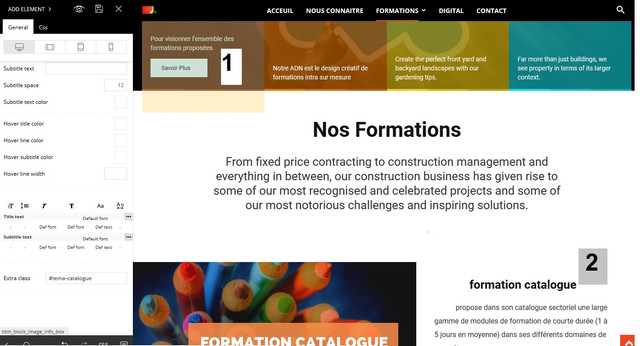
This is what I want :
When someone click on button (number1) …… the page scroll down to Title (Number2) = same as construction demo homepage when you click on something the page scroll down
I couldn’t make it function while I’m creating a page by my own.
Thank you again.
 grsgediminas
I’m new to NEWSPAPER and WordPress. I have installed Gaming Demo.
I have changed Language of the Whole Website to Lithuanian, also choosen Lithuanian translation in NEWSPAPER offered languages. I got a form of all titles to edit, but I can not find where to change Widget(I think it’s widgets) titles as “Popular reviews”, “Best deals”, “NEWSLETTER”, “CATEGORIES”. I have attached the screenshot here:
https://prnt.sc/mbkd9o
https://prnt.sc/mbkf0y
Where can I do this? Thanks!
 aliciaju
Hi,
I was trying to install the crypto widget ticker on the Crptonews demo
and have generate [ccpw id=”2380″].
But i was unable to enable it with td composer
i was trying to replace the text “Please install the Cryptocurrency Price Ticker Widget” with the shotcodes but it didn’t work out.
Could you please help?
thank you.
Alicia
wilhard Dear sirs, performance of the mobile version of your demo website is still not good:
When are you going to fix it?
-
This reply was modified 7 years by
wilhard.
 Patti Barnes
Hello there, I am using the Recipes demo and am trying to edit the home page. The “Latest Articles” module at the end of the page (with ten entries) cannot be deleted through the TD Composer as when you click on it there is no highlighting and the usual opens for editing it. When you click it just takes you to the article.
How can I delete this section?
Thank you
 David
David Hi Simion, Thanks for your reply! This works great. With a bit styling
.td_module_3 {

    padding: 10px!important;

    background-color: #fff;

    box-shadow: 0 0 5px 1px rgba(0,0,0,.1);

    overflow: hidden;

}
it looks exctly like at the demo.
 Catalin
 Hi,
If you want to have more speed on mobile, you need to install the Mobile Theme plugin for this. This plugin was fully optimized for mobile and you should achieve good results. You can check our demo on mobile to see how it works from here -> https://demo.tagdiv.com/newspaper_local_news/
Anyway, please understands that Google uses some weird algorithms that determine the speed of the site and is not always reliable, sorry!
Thanks for your understanding!
Simion C. Hi,
That looks like the default demo article bottom ad, it can be found in the theme panel ads section
– http://prntscr.com/mb1ncc
There you can enter ad codes for the desired ad spots. Let us know if you have more questions.
Thanks
DavidHi, How can I let a block with posts overlap the revolution slider like seen on the Travel Demo? (https://demo.tagdiv.com/newspaper_travel/)
Calin Hi,
I just investigate this problem, and is seams to be a demo customization and this has a strong css that is apply over tagDiv Composer style and in order to set that color you need to use a custom css, also please remove the category text color from the footer in this way that style will no more try to be set.
.td-spa .td-footer-wrapper .td-post-category {

    color: #e5ad25;

}
Please set the css in Newspaper>Theme panel>Custom code>Custom css
Thank you for your understanding!
Simion C. Hi,
I don’t quite understand the problem you are having with the scroll to top button which appears in the bottom right corner of the screen. It will appear as in the demo as you scroll down the page
– https://demo.tagdiv.com/newspaper/
What exactly requires fixing about this button? I will try to help you.
Thanks
Simion C. Hi,
The blocks in the sidebar look alright now, there is a block 1 and a block 2 there
– https://demo.tagdiv.com/newspaper/block-1/
– https://demo.tagdiv.com/newspaper/block-2/
If I misunderstand something please correct me.
Thanks
 lazdim
Hi,
I just installed the latest theme’s version and the “News Magazine” demo.
When the home page loads, the top menu, top bar and main menu colors show up differently and they switch to normal after a second or two.
Also, the main menu does not have the icons in the menu links.
Here is my demo.
I found this code in style.css file but I don’t want to change it because the change will be lost when I will update the theme:
a {
color: #4db2ec;
text-decoration: none;
}
Can you, please, help me with this?
 Mayank Bhatt
 Funny enough I am using a similar demo theme but am not quite sure what’s causing the errors. Could it be the robots.txt which was blocking resources? More importantly, could robots.txt also cause “clickable elements & content wider than screen” problems since I blocked the theme folder from being crawled?
I have used the same plugin and it was working absolutely fine until the 5xx server error cropped up. Also, the problems started only after I altered robots.txt file. Maybe that’s the issue. Might as well use the mobile plugin again though because of faster page load times.
But, could you please confirm my suspicion about robots.txt?
 trepcom
 Simon. Thanks for the response.
The page i wanto to edit is this demo homepage. https://demo.tagdiv.com/newspaper_gaming/
I want to delete one row. I edit with tagdiv composer and crashes. Do you have the same issue?
Thanks
Simion C. @Mayank Bhatt The mobile theme is specially designed for mobile, it will display a simplified version of the website on mobile. This demo has the mobile theme active if you want to check it out with a mobile
– https://demo.tagdiv.com/newspaper_local_news/
So there should be no problems in the matter if the mobile theme plugin is used. You could give it a try.
