- NewspaperFlex Block Builder and Flex Loop Builder
- NewspaperHow to use the Flex Blocks cache option
- NewspaperHow to edit modules for Flex Block X
- NewspaperFlex Block Settings Guide
- NewspaperBig Grid Flex Settings
- NewspaperSingle Post Excerpt
- NewspaperWP Rocket and Newspaper Theme: Optimization Guide
- NewspaperSearch setup for custom post type
- NewspaperBookmark – Save For Later
- NewspaperModules Builder in Newspaper Theme
- NewspaperFilters and sorting for taxonomies
- NewspaperHow to insert a block inside the content of a post
- NewspaperCustom Post Type Support
- NewspaperMeta Info on Modules and Blocks
- NewspapertagDiv Composer Tutorial
- NewspaperSocial Counter Styles on Newspaper
- NewspaperCloudflare (CDN)
- NewspaperPage templates
- NewspaperFeatured Posts
- NewspaperTheme Colors Introduction
 danna
dannaThe images in some blocks (here: https://raiffeisenzeitung.at/ressort/wirtschaft/ under “Personelles,” which is Block 11) are blurry. Is it possible to change the resolution of the images, or do you always need Flex Blocks for that? Some standard blocks have sharp images (such as Block 12).
All the best,
Daniel
 Anamaria
 Hello,
Please provide some screenshots with the posts in the backend and one from the frontend where you have set this flex block.
Thank you!
Anamaria Hello,
If you want, you can create new taxonomies or CPT depending on what you want https://forum.tagdiv.com/introduction-cpt-acf-newspaper-theme/ after you can create modules and use the flex block builder to show them https://forum.tagdiv.com/modules-builder-newspaper-theme/ -> https://forum.tagdiv.com/flex-block-builder-flex-loop-builder/
Thank you!
 sumitkumarsid@gmail.com
Hi,
I am using – Flex Block 1
Category filter: – All categories-
Sort order: – Latest –
But posts are not showing on website according to the published date.
Thanks in Advance.
Regards,
 FBM
FBMHey,
so we use the flexblock 1 in the bottom of our homepage.
Once you press the “load more” button its loading all 6 posts that have been there already again.
Is there a setting to prevent it from loading the same posts?
Limit Post number = 6
Offset is empty
https://www.dertreasurer.de/wp-content/uploads/2024/06/Screenshot-2024-06-04-153812.png
Thanks for your help!
Anamaria Hi,
I recommend using a flex block builder. The flex Loop is a custom block with different functionality.
Thank you!
 Michael Smart
 I want to use Flex Builder to display custom posts on the front page of my website that are sorted only by the authors who published them.
Michael SmartHow can I display only author’s content in Flex Loop? because all I’m seeing is Include custom field and Post Type. No option to display by Authors
 Bettina
 Hello @jayflyer!
No. But you can build a new page with the tagdiv Composer and display all your posts. For example: https://app.screencast.com/RqIz8X0juNsLU or using a flex block or a custom block: https://forum.tagdiv.com/modules-builder-newspaper-theme/
Thank you!
Bettina Hello!
I can’t access your links because it says 403 Forbidden.
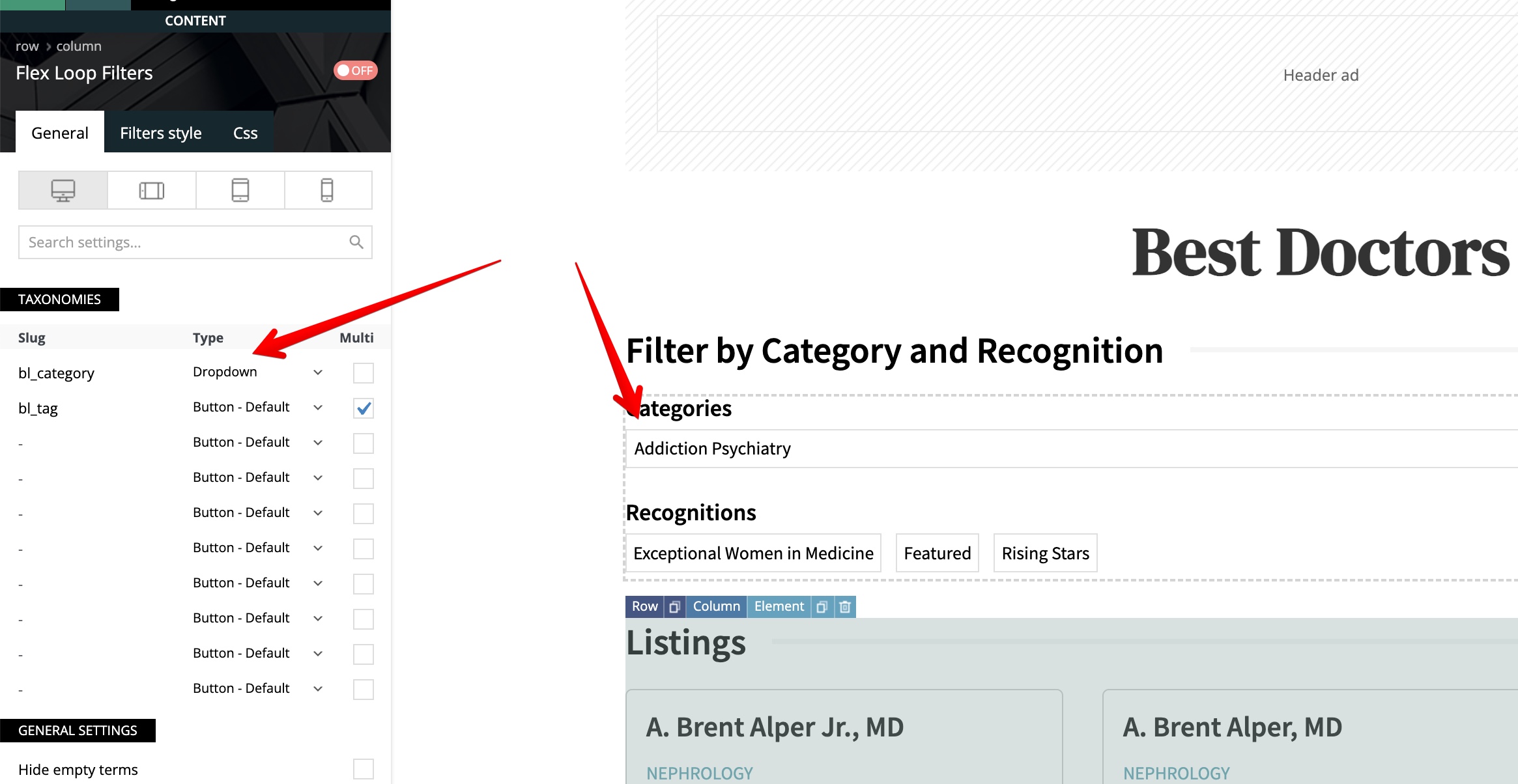
Please check the “Multi” option for the first item there in the tagdiv Composer settings and try again.
I’ve tested the flex loop filters with the flex loop shortcode too in the latest update of the theme, and it is working well.
1. The option “Hide empty terms” will hide the items or categories without posts.
2. It should work well. Try with the slug “category” and check if it is working too on your end.
3. It is working well on the latest update of the theme.
So, the issue is on your end. Please deactivate all plugins except tagDiv ones. Also, if you are using a cache plugin, deactivate it, clear all cache, and try again.
Let me know the results!
Thank you!
 nearview
We have implemented the Flex Loop Filters on https://www.myneworleans.com/business/ and it is working really well for the most part. The one item that we can not figure out, is when you go into a subcategory the dropdown defaults to the first subcategory rather than –Select Category–
You can see for yourself by going to https://www.myneworleans.com/business/ and then select the category Dentists. That takes you to https://www.myneworleans.com/businesses/dentists/ where you will see by default the first subcategory is active but it is not actually filtering the results.
It makes it so a user that was actually looking for that first subcategory can not view the results without selecting a different category and then switching back to their initial category.
The settings for the widget is https://s3.amazonaws.com/pramadillo/pramadillo-2024-05-30-11-51-05.jpg
We are running all latest versions of theme and plugins 12.6.6
Things we have tried:
1.) Hide Empty Terms… When we enable this, all listings disappear, so that doesn’t work.
2.) Switched to Multi on Dropdown… That produces the output we want in the dropdown but it doesn’t actually filter the listings, so that doesn’t work
3.) Switched to Dropdown with Search… That doesn’t show the categories by default so that doesn’t help
The end goal one would expect would be if you goto https://www.myneworleans.com/businesses/dentists/ that the Category Dropdown would display –All Categories– and not Endodontics, as then a user can not browse just Endodontics without switching to different category and switching back.
Thank you in advance.
Anamaria Hello,
You need to select the block and, in the tab filter, choose a category that you want to filter the block -> https://i.imgur.com/KKUZXqv.png -> https://forum.tagdiv.com/flex-block-settings-guide/
The tagDiv Composer is our page builder. It can be used to create pages and cloud templates, but not posts. For this, you’ll need to use Gutenberg or a classic editor.
Using tagDiv Composer, you can build/edit the single post template (the layout of the posts).
Here is a video that will show you how to use the builder to create a website from scratch https://www.youtube.com/watch?v=SoGQ0d5kIBg to do this you’ll need to have the posts already.
Also, on our channel, https://www.youtube.com/channel/UCOT1RiNysIPCTPSnVZskwtQ, you can find more videos that can help you, as well as documentation: https://forum.tagdiv.com/newspaper-theme-documentation/. If you have any questions, you can ask us here on the forum or by email.
Thank you!
Anamaria Hello,
Please let me know how you have created the pages. If you have added the content text and image with tagdiv Composer, then the option to change the color is set on each element https://i.imgur.com/c9DoQqV.jpeg; if you made in the Gutenberg editor, then only with custom code CSS can be changed.
Also, since I see that you are just starting with your website, I recommend not using standard templates (header, footer, single, category, tag, author, search, 404) and also avoiding blocks 1 to 25 or big grid blocks, as these can be replaced. I recommend using cloud templates and flex blocks, which have more options and are more flexible.
Thank you!
Anamaria Hello Stefan,
Since I see you are just starting with your website, I recommend not using standard templates (header, footer, single, category, tag, author, search, 404) and avoiding blocks 1 to 25, or big grid blocks, as these can be replaced. I recommend using cloud templates and flex blocks, which have more options and are more flexible. Using a flex block, you can set the image width and height, ensuring the images will be the same size. Also, after replacing these templates and blocks, make sure to disable the tagDiv Standard pack plugin
Thank you!
 omroepspakenburg
 Hello,
No, currently out site is build on the standard pack plugin.
I read about the change that is is now recommended to disable that plugin and use the flex blocks.
So to test I disabled the plugin and then tried to create a new page. pages -> new page from there I click on the composer and then I get what is in the screenshot.
Regards,
Sjaak
omroepspakenburg Thanks, but I know what causes it.
I disabled the standard pack plugin on purpose, but when I create a new page after that then I get what is shown in the screenshot.
So how do I get a new page template which only has flex blocks or even a blank page template?
Anamaria Hello,
Please activate the tagdiv standard pack plugin. Also, if you want to disable it the tagdiv Standard pack plugin, then please replace the blocks 1 – 25 with flex blocks and big grid with big grid flex.
Thank you!
 Calin
Calin Hi Alex,
Yes, the option has been fixed -https://i.imgur.com/OGfcnc3.png – https://tagdiv.com/newspaper/?utm_source=forum&utm_medium=menu&utm_campaign=forum_loggedin&utm_content=52878 – https://i.imgur.com/4kBJjnv.png
As for the new suggestion, a similar option for the featured images for blocks modules is on our list (unfortunately is not yet assigned, so I d not know if will be add in the coming update or not), I believe that this will be add on each flex block, also I added your suggestion with the theme panel option and I hope this option will be add in the coming updates.
Thank you!
Anamaria Hello,
Please use the special filter for the category – current category. You can find more information about it here: https://forum.tagdiv.com/flex-block-settings-guide/
For each category, there is a special filter for the current category, which dynamically displays the posts from that category within each category.
If there is an offset set, please check the block with “No posts” and delete it. Leave it empty with no space or value: https://app.screencast.com/Gh9jDf6t0XtLS
You can find the documentation here: https://forum.tagdiv.com/offset-feature/
Thank you!
 Alex
AlexHi Calin,
In the theme version: 12.6.6, your dev fixed the reported issue CPT Featured Image Preload not working, thank you.
– For further Pages optimization, can you please check with the dev, if there is a way to Preload an image of a Flex Block 1 (for example).
To have <link rel=”preload” fetchpriority=”high” as=”image”…> included in the header.
Would be good if the dev can add a Check box under the “General” settings tab, below the “Cache-Cache block results” section, for example.
So if the user checks the box, the first image of this block element gets preload (or he can create a dropdown in a similar manner as caching time selection, how many images to preload).
Does this make sesne?
(!) As previously discussed, this post is only for Calin.
Other TD team members, please do not respond.
AlexHi Calin,
In addition to the previously reported bug with the Webp option in theme panel, I have found another bug.
Environment:
1. Theme version: 12.6.6
2. Webp format is generated by Ewww Image Optimizer as per your guide. – All images become Webp and all are lazyloaded.
4. For CWV / speed, we must disable lazyload for the first image (in the first flex or any block / logo is text). For this we use define( ‘EIO_LAZY_FOLD’, 1 ); in wp-config as per Ewww’s guide – under Exclude Images header.
5. The result is that the first image on the page converts to Web but is not lazyload – so this is correct. The Theme’s option Use Webp Format is meant to show this first image in Webp, because it exists on the server.
Issue:
The theme stops using the webp file for the first image when any caching system is on. This includes the “Cache block results” option on the block, WP super cache as per your guide.
How to test:
1. Make sure you have caching enabled – WP super cache as per your guide. Also can enable “Cache block results” on the actual block.
2. If you are logged-in, you will see a webp. If you are logged out – the theme will also be showing webp for some time, but a little later – once the cache is generated – the theme will start showing jpg (despite having webp on the server).
– I have tested this on various websites and demo sites. On the dev sites that do not have caching, there is no problems.
(!) As previously discussed, this post is only for Calin.
Other TD team members, please do not respond.
Thank you.
 jayflyer
Is it possible to place a block on different section on desktop and mobile ?
on desktop i have the email opt-in form right below flex block.
but on mobile, it’s pushed down all the way down below a category block: https://imgur.com/a/fhNvsUh
is there a way for me to place this email opt-in block right below first flex block on mobile as well?
 rozemarijn
 I would like to provide an additional update regarding the issues I am facing with the Flex Loop elements and filtering in tagDiv Composer.
Custom Post Types vs. Standard Post Types
I have discovered that the filters behave better when using the standard post type instead of a custom post type. Specifically, when using the standard post type:
• With the “Hide empty terms” option enabled, empty terms remain hidden after selecting the first filter, which is the expected behavior.
• However, when attempting to adjust the selection in the second filter, all terms become visible again, each displaying a count of 1, even though they should be 0.
The issue where filters redirect to an archive page when the ‘multiple’ setting is disabled still persists as described earlier.
I hope this additional information helps in diagnosing the problem. Your assistance in resolving these issues would be greatly appreciated.
rozemarijnDear Tagdiv Support Team,
I am currently experiencing a few issues with the Flex Loop elements in the tagDiv Composer. Below are the details of the problems I am encountering:
Issue 1: Filters Redirect to Archive Page
When selecting a filter on a page using Flex Loop elements in tagDiv Composer, it redirects to an archive page instead of updating the content dynamically on the same page. This issue occurs when the ‘multiple’ setting is disabled. We need the filters to work without redirecting, updating the results dynamically on the same page.
Issue 2: Show Terms Count Displays Zero After Filter Selection
With the “Show terms count” option enabled, the correct number of terms is initially displayed. However, after selecting a filter, the term counts for other filters are incorrectly updated to zero, even though there are still relevant posts available. This misleads users into thinking there are no posts under the remaining filters.
Issue 3: Hide Empty Terms Causes Filters to Disappear
When the “Hide empty terms” option is enabled, selecting a filter causes the other filters to disappear because they are incorrectly updated to show zero posts. This results in an incomplete filter set, as all non-relevant terms are hidden, causing confusion for users.
I have noticed these issues also occur in your Cloud Template (jobhunt_pro Jobs) that I have imported. I have already consulted the documentation, but the problems persist.
I would greatly appreciate any guidance or solutions you can provide to resolve these issues. Thank you for your time and support.
Best regards,
Rozemarijn
 kckwebmaster
Hello, usually I can get a page to do this for short content, anyone else have any luck?
Here’ my css code
html, body {
display: flex;
flex-direction: column;
min-height: 100vh;
}
.td-footer-wrapper {
flex: 0 0 50px;
margin-top: auto;
}