No search results were found in Documentation!
 Simion C.
 Hi,
For such an old version you most likely used Visual composer. Please deactivate the tagDiv composer after you update, this will be activated automatically when the theme is updated or installed (since it’s introduction in 8.0).
When both are active there could be layout problems.
Also it is important to check the available resources in the system status panel
– https://forum.tagdiv.com/requirements-for-newspaper/
Update by FTP, this is the most reliable method
– https://forum.tagdiv.com/how-to-update-the-theme-2/
If you have code in the theme panel, or you use a child theme, deactivate them because the code could be outdated. After the update do not make any modifications to the theme files. Clear caching, clear CDN if used, clear your browser cache as well.
You can use the manual activation if asked again
– https://www.screencast.com/t/NXhtb0Vtn
Thanks
 Catalin
 Hello Dylan,
First of all, ensure that you are using the latest version of the theme installed via FTP way, the version of TD Composer, please enable GD Library and
mbstring
for PHP on the server and also, try to set up the below code in .htaccess!
<IfModule mod_substitute.c>
SubstituteMaxLineLength 10M
</IfModule>
Hope this helps and let us know how it goes!
Thanks for your understanding!
Catalin Hello Liz Painter,
I suggest you make a new clean install to another subdomain for testing via FTP way, remove all of the untested plugins if you are using something like this, clear all the caches and check the results. Also, you can provide your website URL for further investigations.
Thanks for the message!
Catalin Hello morebusiness,
I suggest you make a new fresh install to another subdomain for testing via FTP way with the latest version of the theme, remove all of the untested plugins, clear all the caches and check the results. Notice that the TD Composer should work as expected, without any problems if the theme was correctly installed. Also, if the problem is still there, please provide some useful screenshots of the issue so I will be able to identify it because I cannot recreate it to my end.
Thanks for the message!
Catalin Hello deanysus,
I suggest you make a new fresh install to another subdomain for testing via FTP way, remove all of the untested plugins, clear all the caches and check the results. The mobile mode of the theme was fully tested and should works as expected if the theme has been correctly installed.
Thanks for your understanding!
 jmedina0107
 This I fixed after removing and reinstalling the theme ftp.
Catalin Hello therealshaunproulx,
I suggest you make a new clean install to another subdomain for testing via FTP way, remove all of the untested plugins, clear all the caches and check the results. If you have some additional customizations which can break the theme layout you should disable all of them and check the results. By default, the theme works fine and the menu mobile returns good results.
Thanks for your understanding!
Catalin Hello marijnvdgruiter,
Ensure that you are using the latest version of the theme installed via FTP way, remove all of the untested plugins, clear all the caches and check the results. If the problem is still there, please provide your website URL so I can take a closer look at your mobile menu and some useful screenshots.
Thanks for the message!
 haendler55
 Hello,
After extracting and uploading via FTP the social widget is completely gone 🙁
Simion C. Hi,
So the categories you created in WordPress are removed after you update the theme, now that is unusual. Categories, posts, pages these should not be affected by a theme update or changing themes.
The categories are all saved in the website database. Maybe there are problems with the database, you could check that or contact the hosting to check for you. It is always recommended to make a full backup before updating, there could always be unexpected results. Try to update by FTP, it is the most reliable method
– https://forum.tagdiv.com/how-to-update-the-theme-2/

 arvidbux
Hi there,
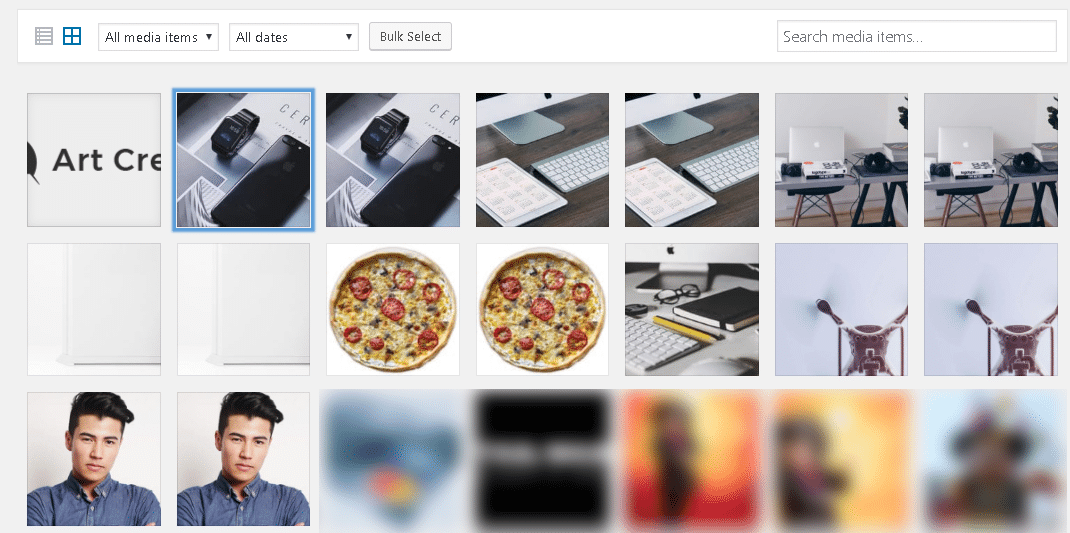
for some strange reason since the most recent update, Art Creek Demo image files keep on showing up in the gallery. I deleted them from within WordPress and using FTP, but each time they return.
You can see the images here: https://www.traveltothemagic.net/wp-content/uploads/2018/05/2018-05-26_8-59-25.png
I was able to relate it back to the Newspaper Theme and Demo.
Why are these files being (re)loaded? Not using the demo.
Thanks,
Arvid
 Edward
 Via FTP it’s almost impossible
Why? What hosting do you use? Did you install WordPress by yourself?
 Rohit Sharma
 Via FTP it’s almost impossible for me and with WordPress again “Not found, error 404”.
I’m frustrated. : (
 Satwik
 Install via WordPress – https://forum.tagdiv.com/install-via-wordpress/
Install via FTP – https://forum.tagdiv.com/install-via-ftp/
Installing the theme via FTP is the recommended method.
 Bogdan B.
 Hello,
Please use ftp to remove the theme and plugins from your install to get access back to your site. What are the errors you are receiving?
Thanks.
Simion C. Hi,
Please check the theme system status panel
– https://forum.tagdiv.com/newsmag-requirements-for-newsmag/
In some cases the 500 errors were caused by insufficient WP memory, try increasing the value if needed. You can increase it more then in the guide if possible. Then install the theme again by FTP
– https://forum.tagdiv.com/newsmag-how-to-update-the-theme/
Update the theme plugins as well. Let us know the results.
Thanks
Simion C. Try to re-install the latest theme by FTP
– https://forum.tagdiv.com/how-to-update-the-theme-2/
Remove and delete the composer, install it again from the theme plugins panel
– https://www.screencast.com/t/MAtStP1KDdH1
Increase the memory more if possible, that could be insufficient. Clear the cache and purge CDN files if you use it. Let us know.
Catalin Hello urza07,
I suggest you make a new fresh install to another sub-domain for testing via FTP way, use only the required plugins which can come bundled with the theme core files and check the results. If the theme will be correctly installed, all of these errors should disappear.
Thanks for your understanding!
Simion C. Hi,
The theme is not missing the CSS file. The missing stylesheet issue appears when the whole theme package is uploaded, not the actual theme file. Please check the theme install guides
– https://forum.tagdiv.com/install-via-wordpress/
– https://forum.tagdiv.com/install-via-ftp/
Thanks
Simion C. Hi,
If you cannot access the backend, only with cPanel or FTP would you be able to deactivate plugins. Then you should be able to access WP-admin
– http://www.wpbeginner.com/plugins/how-to-deactivate-all-plugins-when-not-able-to-access-wp-admin/
The HTTP 500 error was fixed in some cases by increasing the WP memory according to the theme requirements or higher if possible
– https://forum.tagdiv.com/requirements-for-newspaper/
Check the theme system status panel, see if there are enough resources. Contact your hosting if required, ask them to increase them if needed. Also maybe they can check the error logs, to see what has caused this problem. Let us know as soon as possible.
Simion C. The most recommended update method is by FTP, please try to reinstall the theme
– https://forum.tagdiv.com/how-to-update-the-theme-2/
Then please deactivate the tagDiv composer and install it again from here
– https://www.screencast.com/t/r2n8DZ94
The multi-purpose plugin is no longer required, it is included in the tagDiv composer.
That error is displayed when the page you are editing is not created with the tagDiv composer or in which you entered a custom code. Try the composer on a new page and see if the same error is displayed.
It could also be displayed when the super cache is installed and not configured as mentioned here
– https://forum.tagdiv.com/cache-plugin-install-and-configure/
Let us know the results.
Catalin Hello bpzoodesign,
Make sure that you are using the latest version of the theme installed via FTP way, update the plugins, check the system status parameters to be increased according to our documentation from here -> https://forum.tagdiv.com/system-status-parameters-guide/ and check the results.
Thanks.
Catalin Hello Ashton J.,
Do you have updated your theme via FTP way, and updated all of your plugins? If the problem is still there, please send us an email at contact@tagdiv.com with your log-in information (wp-admin) and FTP access so we can further investigate it closer your backend page.
Thanks for the message!
Catalin Hello obeyone,
Please use the FTP way for your theme installing because this is the surest method in this case. Please check here -> https://forum.tagdiv.com/newsmag-install-via-ftp/
Thanks.