- NewspaperHeader Builder
- NewspaperHeader ads
- NewspaperHeader styles
- NewspaperSearch setup for custom post type
- NewspapertagDiv Composer – Website Manager
- NewspaperBookmark – Save For Later
- NewspaperWooCommerce: Happy “Add to Favorites!”
- NewspaperModal Popup
- NewspaperFlex Block Settings Guide
- NewspaperPosts Loop Element
- NewspaperHow to Add a Logo in Newspaper
- NewspaperDefault Category Settings
- NewspaperWhen tagDiv Composer is Not Working
- NewspapertagDiv Cloud Library Plugin
- NewspapertagDiv Composer Tutorial
- NewspaperUsing the Theme Translations with WPML
- NewspaperInstagram in Newspaper WordPress Theme
- NewspaperWeather Shortcode
- NewspaperThe Mobile Theme
- NewspaperLogin – How to Enable User Registration
 Sociality
Hello
I can’t login from the login form that pops when i click the login/signup on header although my credentials work on wp-login
Thanks in advance
 Emintexno
 Hi
I have uploaded only 2 plugins – Duplicate Page and Font Awesome. I have deactivated them and checked but the problem still remains. Also, another problem has emerged, the logo disappears from the header. I mean I can see the logo but the owner of the website can’t. We have checked it from different browsers, cleared the cache but the problems are persisting.
 MarijaZT
 I have inserted the code in the following sections: header ad, sidebar ad, article top ad, article inline ad, and article bottom ad… but still ads are not showed as ordered… It might be because Google AdSense is set on the automatic mode…
 Vlad S
 Hello !
As my colleague mentioned above the Theme panel changes will not work. The template you are using is fully editable using tagDiv Composer. For the header logo follow our video guide here: https://www.youtube.com/watch?v=HXQQygkCCJo
Thank you !
 noorshahid_othman
When I view my website on mobile device, the menu button on header is not working (unclickable) but I can click search button. The prolem only on homepage that show first, not in a post page.
my website using newspaper theme : https://seputartki.info/
 Bettina
 Hello!
First, you need to add the element called “Header logo” with TagDiv Composer, then you can do these settings.
Thank you!
Bettina Hello!
Please try to change the color with this css code:
.td-business .td-header-style-1 .td-header-main-menu {

    background: #6e0033 !important;

}
Copy and paste in Newspaper -> Theme panel -> Custom code -> Custom CSS and change the color code with the color you need in your menu.
Thank you!
 tald2629
Hello, how can I edit the mobile header menu?
I want to change colors and add social media urls
Thank you.
 matthew-wolskimwwlegal-com
Hello. How do I add another widget area below the header and above the post and page? I only see four widget areas, the default widget area and the three footer widget areas.
 azurik
Hello,
I copied and pasted Google Adsense’s header ad javascript code to the Newspaper Theme Panel under “Header Ads”. In that section, I changed mobile ad size to 350×50.
However, checking on different mobile devices, ads being shown in the header are still much bigger than the defined value. Why is that?
The site is question is TheMoneyNinja.com
 yonish3
Have tested woocommerce products on separate mobiles.
Here is how it’s supposed to look like:
https://prnt.sc/we8m8z
https://prnt.sc/we8lp5
Here is how it looks like on some mobiles:
https://prnt.sc/we8mv2
https://prnt.sc/we8n49
There are no menus, headers, and design I set by hardcoding.
Here is a link to the page:
https://happybarefoot.com/product/hfs-lightweight-road-running-shoe-women/
 daehee.kim
 Hi Vlad,
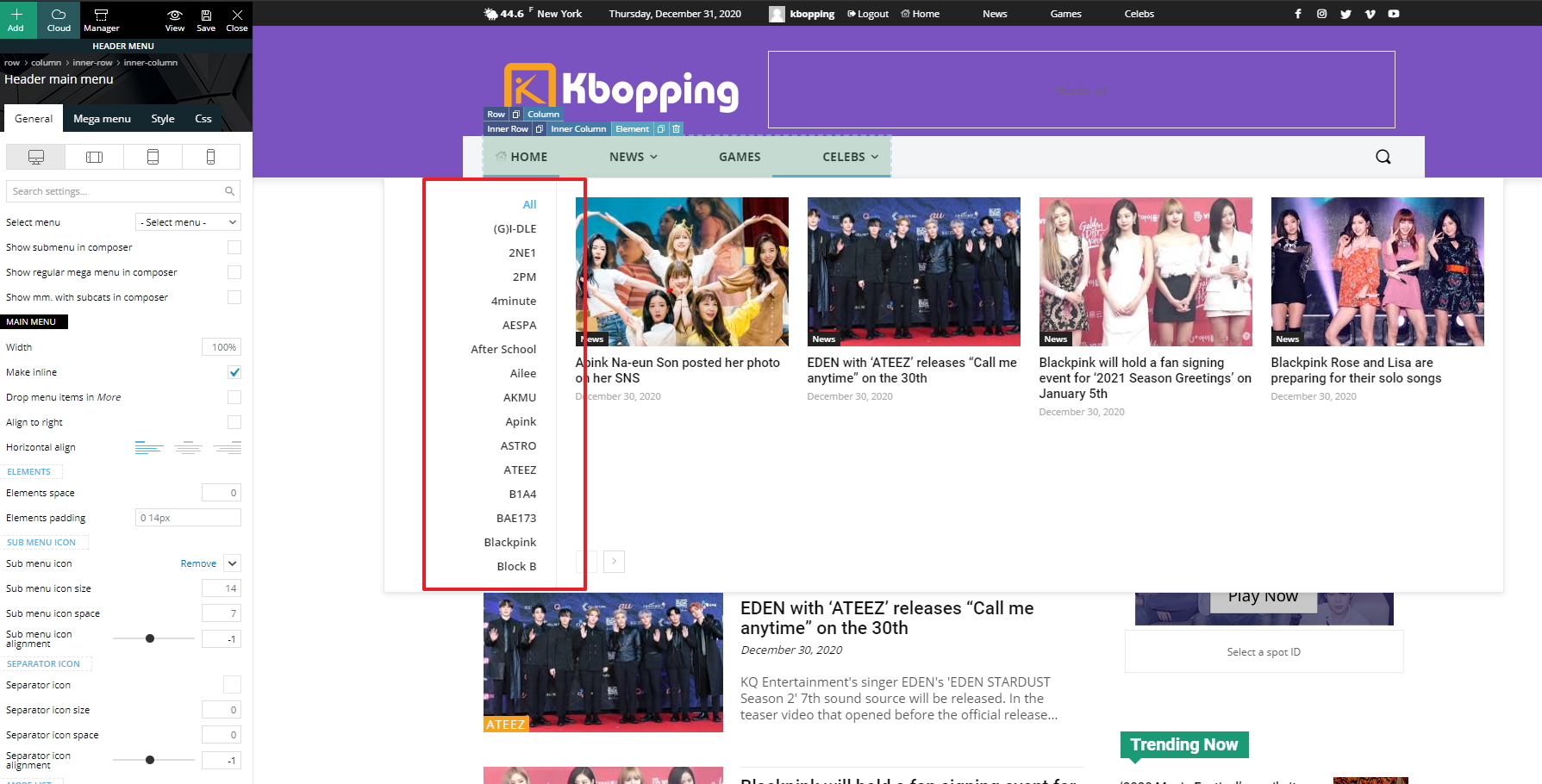
We applied a Cloud Library header and it looks good. However, I have a new issue. The left panel of submenus expands vertically and all menus are not displayed because there’s no scroll bar. How can we fix the height of the left panel and show a scroll bar?
https://kbopping.com/wp-content/imgs/kbopping.jpg
Thanks,
Jeannie
 kasadote
 any change in the theme panel doesn’t affect the website. example: header layout, logo text, top bar enabled
 Rovshan
 Dear Calin,
I have cleaned the cache several times but it doesn’t work. Were dates and time on posts and pages created autamically upon creation the page or post? I meant the time on top header.
Vlad S Hello !
For this it is recommended to use a Cloud Library header in order to have full access in editing your menu and raising the limit as you can see here: https://www.screencast.com/t/cORqyewztd7 ; https://forum.tagdiv.com/header-manager/
Thank you !
 sanjuavi
Hi ,
i have perchaded new theme but not able to uploat at my website, please please help
Broken Themes
The following themes are installed but incomplete.
Name Description
Newspaper Template is missing. Standalone themes need to have a index.php template file. Child themes need to have a Template header in the style.css stylesheet.
sanjuaviDear Team,
just now i purchased theme but showing error
Broken Themes
The following themes are installed but incomplete.
Name Description
Newspaper Template is missing. Standalone themes need to have a index.php template file. Child themes need to have a Template header in the style.css stylesheet.
Bettina Hi @gmc!
Yes, that is possible for all viewports. Just add the mobile menu element above the header main menu, after that you need to hide the mobile menu element on all viewports except tablets and hide the header main menu on the tablet viewport.
Thank you!
MarijaZT Hi Vlad,
Ads are available again, but only showing between the article lines and not on header, footer, sidebar… misstoma.com
TIA
EmintexnoHi
I have one problem with my website. Hour on the top of the page is not working. Date is ok, but the hour doesn’t show the local time despite I arranged it from Settings. Local time is +4 UTC or Baku time. I set the time but after few hours it started to show the wrong time.
The link to the website is http://www.texnopolis.az
If you need access to the dashboard I can give it.
Regards
Bettina Hello!
You can change the font size of the menu if you edit with TagDiv Composer, select the header main menu element, go to the Style tab and there you will find the option called elements text. Also, make sure you select the desired viewport for your device size.
Hope that helps you!
Thank you!
 Anamaria
 Hello,
You can set the main menu to be a sticky menu from Theme Panel-> Header -> Main Menu => https://www.screencast.com/t/ShRFfKhm81,
or if you have a Pro Prebuilt Website you can set with tagDiv Composer in Manager, you can enable the sticky menu on desktop and mobile = > https://www.screencast.com/t/YTp5YZqel.
Hope this helps you!
Thank you!
Anamaria Hello,
The settings from Theme Color applies only for standard header style, if you have a header imported from Cloud Library Templates, you can edit the color with tagDiv Composer => https://www.screencast.com/t/Yokyw1IphTDD, there are several settings you can make.
With tagDiv Composer, you can edit everything on Pro Prebuilt Website.
Hope this helps you!
Thank you!
Vlad S Hello !
Please try this css code: .td-main-menu-logo img {
max-width: 200px;
width: 200px;
}
#td-top-mobile-toggle i {
font-size: 30px;
}
.header-search-wrap .td-icon-search {
font-size: 26px;
}
Let us know the results !
Thank you !
 gregkinne
Hi,
I recently updated to a different template. My header is now duplicating on the post page and I don’t know how to get it to remain solely on the homepage. Any help will be appreciated.