
- NewsmagHomepage – How to build and set it
- NewspaperHomepage – How to build and set it
- NewspaperHow to edit modules for Flex Block X
- NewspaperGeneral Options that May Interfere with the Newspaper Theme
- NewspaperThe Newspaper Mobile Theme: Introduction
- NewspaperHow to Add a Logo in Newspaper
- NewspapertagDiv Shop
- NewspaperHow to Use tagDiv Cloud Library
- NewspaperDesign your Post Pages using the Cloud Library Templates
- NewspaperHeader Builder
- NewspapertagDiv Cloud Library Plugin
- NewsmagtagDiv Composer Tutorial
- TutorialsFrom WPBakery to tagDiv Composer
- NewspapertagDiv Composer Tutorial
- NewspaperNewspaper theme documentation
- NewspaperThe Mobile Theme
- NewsmagNewsmag documentation
- NewsmagMain menu
- NewsmagLogo & Favicon
- NewsmagPage templates
 frullino2
Hi I have a problem: if I visit the site with chrome everything is fine but if I open it with firefox the homepage (only the homepage) is that of the mobile theme. What can I do? Thanks so much.
 forevermogulmag
 If you go to the website ForeverMogul.com you will see the first advertising section in the homepage is not displaying the ad. All you’ll see is the word advertisement.
The add code is displayed here https://prnt.sc/16oc3w6.
Media.net confirm that they can see the code on the website. https://prnt.sc/16qmokj
 iamkingsleyf
Hi,
How do we build a portfolio site like the tagDiv homepage and also display our sites with their own pages?
forevermogulmagI am trying to add a code from Media.net advertising into the custom code section for my homepage using the td composer but the add is not displaying and media.net cannot see the code which they say should be placed in the body of where I want the add to appear. I assume by pasting the code in the custom ad field it will add it to the body. See screenshot link here https://prnt.sc/16oc3w6. Let me know how to get this to work.
 officialmanish12
I m Successfully Install Newspaper 11, and all plugin successfully install, but when i edit a homepage with tagdiv composer this site can’t reach error showing
how to solve this error i will php verison, memory limit etc but this error is not solve
 amassio
 My website is https://www.bellezze.tv/.
I’m already uginsg WP Super Cache (last version).
The problem with Google auto ads is that also Google in itsp preview shows the AMP version of the homepage for the destkop one.
Best Regards,
Andrea
 samdyz
I recently updated my website to the latest version.
https://bikeadvice.in/
Here are the issues
1) At my homepage the ‘Latest News’ Articles are now displayed completely (full articles). How can I change back to the
normal view of the small featured image at the left, followed by the headline (and optional excerpts), like it was since the beginning. I follow the Pagebuilder + latest articles + pagination template.
2) Category pages have also reverted to a different Module. I don’t understand why?
3) Mobile homepage header is not showing my website’s image logo (I will try to manually revert this back).
From the theme panel the different module displays have also been taken away?
Please help.
 dtechted
Hi, I want to remove the canonical tag on the newspaper theme homepage. Please tell me how to do it. URL: https://dtechted.com/
 dharmendra11
 Hi,
I am trying to select a template on the homepage for a block(19) but it is only applying one row instead of two
https://imgur.com/a/Y44O7Ss
This is for reference
kindly solve the issue
 Calin
Calin Hi @gweston2021, what @simchris say it can help, but also there can be other cases, as I can see you are using the mobile theme plugin and this has pagination -> https://i.imgur.com/qX5w4ut.png therefore this can be another situation why the /page/2 page/3 are indexed. For desktop you do not have a pagination, therefore all the results will be to homepage, but on mobile this will be different.
Thank you!
 Balmain Computers PTY LTD
Error at zones: 6(models) : 7(dom). The model does not match the content Current state has involved an issue. You could try an UNDO operation (CTRL+Z / CTRL+SHIFT+Z)
 Bettina
 Hello!
Unfortunately, there is no way to bring the full post on homepage.
Thank you for understanding!
 adminsensei
 Same, the homepage is down for 2 days already. But the article pages not that down, but quite messy 🙁
 hekimimyanimda
 Hi!
This is wrong: “Only the administrator and editor can do changes with tagDiv Composer and can save it. The other users can open it, but the changes made are not saved.” I can change as a author all templates in cloud templates or special pages (in pages) which one created tagdiv composer…
So, someone can change my homepage or special page with tagdiv composer. You have to update that. For example: https://hekimimyanimda.com/gebelik/ (special page for pregnancy)
You didn’t that: “We will try in the future to implement the option to hide cloud templates for the rest of the users who do not have access to edit.” There is no update software for this important weakness in version 11.0
Their Tagdiv! I like this theme. I can create great health website in Turkey with you. But I want to see you as a perfect theme. These are only suggest from me.
We will be able to better.
See you
-
This reply was modified 5 years by
hekimimyanimda.
 iqiqi
iqiqi I found it’s so wired.
My website homepage seemed to become Mobile version by default even on desktop.
And when I look through post, go back to homepage, it will become desktop version.
How can I solve this problem?
iqiqiHi,
Recently, I enabled AMP for my website, and I have done it according to Newspaper step-by-step tutorials.
But I find a new problem, why my website homepage became AMP version even I visited my website from my desktop.
Thanks,
Bettina Hello!
Edit the homepage with TagDiv Composer, access Website Manager click on Header -> Mobile Menu(you should be able to see your mobile version in Composer now), and set your correct header as Global template, hit the button save.
If the problem is still there, then check in the theme panel settings if you have set up the logo from your mobile version and remove it (Newspaper -> Theme panel -> Header -> Logo and favicon).
Thank you!
 damau
damau Thanks Bettina!
Unfortunately, it seems that “Homepage post” is not the answer.
What we would like to have is a completely full post as if by “Single Post Content” in a block.
Bettina Hello!
Edit the homepage with TagDiv Composer, click on the mobile viewport: https://www.screencast.com/t/XDQJedlggSB ; there you can see your mobile version and you can edit the elements there.
Hope that helps you!
Thank you!
Bettina Hello!
If you have a cloud/PRO template, but you can’t edit the footer, then edit your homepage with TagDiv Composer, scroll till footer, click on footer zone and you can edit/delete the elements there.
Thank you!
Bettina Hello!
Please try to use the element called “Homepage post” when you edit your homepage with TagDiv Composer.
Hope that helps you!
Thank you!
 Alex
AlexHi, I have a problem with the H1 of the Homepage. I have a logo and if I do a check it says “H1 duplicate”. If I go with “composer” to click on “disable H1” with a check it tells me “H1 is missing”. How can I manage a unique H1 on my homepage? I would like the logo not to be an H1 and set an H1 by deciding the content of the words. I would therefore like a single H1. How do I set my handwritten H1 on the Home page?
This I am asking you is very important because we are investing a lot on SEO and having a missing or duplicated H1 has devastating effects on SEO and consequently on Authority and site traffic in the eyes of Google.
Thanks in advance for your response and support.
my site is: https://www.moviemag.it
 cc.mark
 Yes I’ve also updated to 11 and lost my entire site. Newspaper basically looks like a clean install. All Custom CSS – gone. All client ads – gone. All thumbnails – gone. Homepage – gone. Logos – gone.
Only thing left are the post pages themselves.
Thankfully I have daily backups but as of now they aren’t any different. This happened about a week-2 weeks after the update.
 lyon
lyonHello, We are using Newspaper Theme version 10.4 on our multisite network, with WordPress 5.7.2. Ever since updating to 10.4, we’ve had an issue that affects just two of our sites on the network, one of which is the main site. All the other sites have no issue.
What happens is when we build a page with a sidebar in TD Composer, and leave the page template set to default, we are seeing a strange overlapping sidebar:
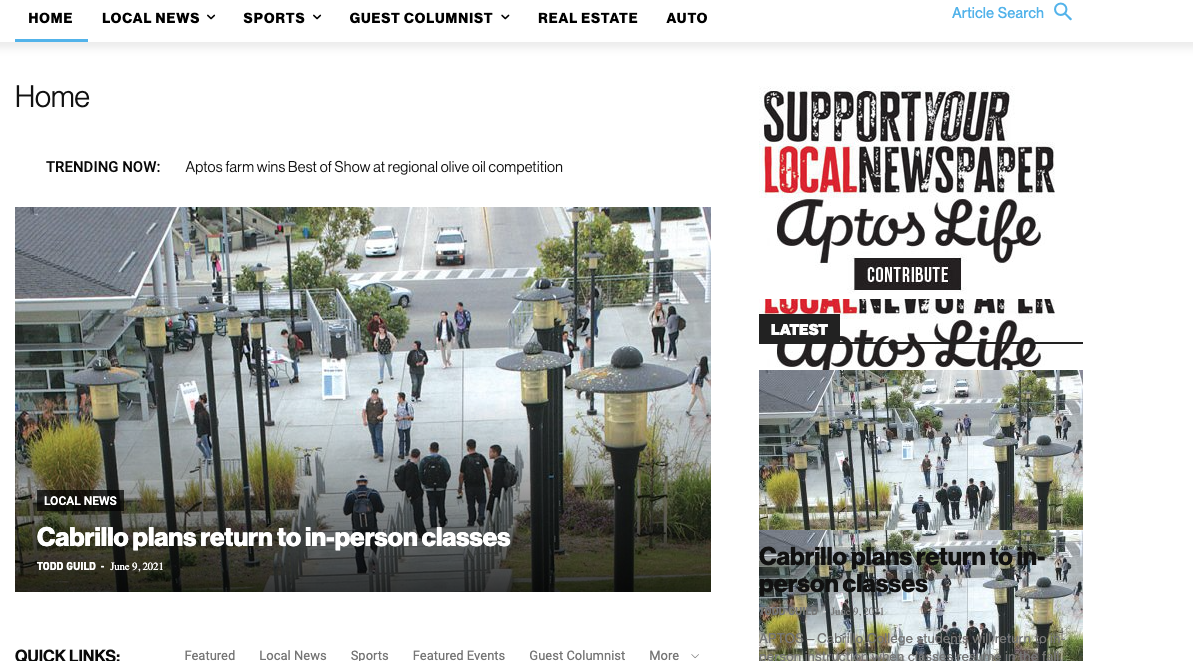
This is how we have the sidebar set in TD Composer:
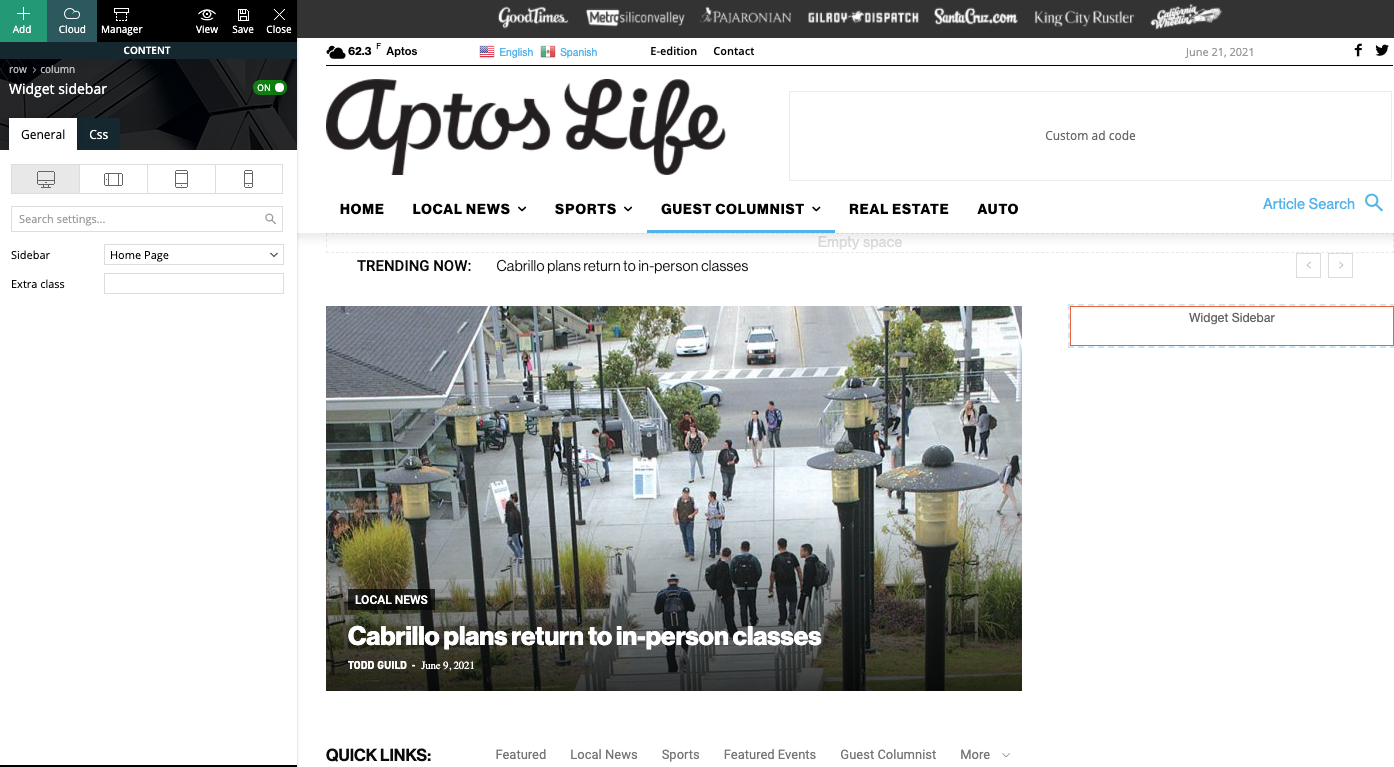
As a temporary workaround we can set the page template to Pagebuilder + latest articles + pagination, but this opens up a whole new set of problems. For example, if we try to change or hide the sidebar in the “Homepage latest articles” settings, no changes occur. Even something such as changing the title on the post loop won’t take affect.
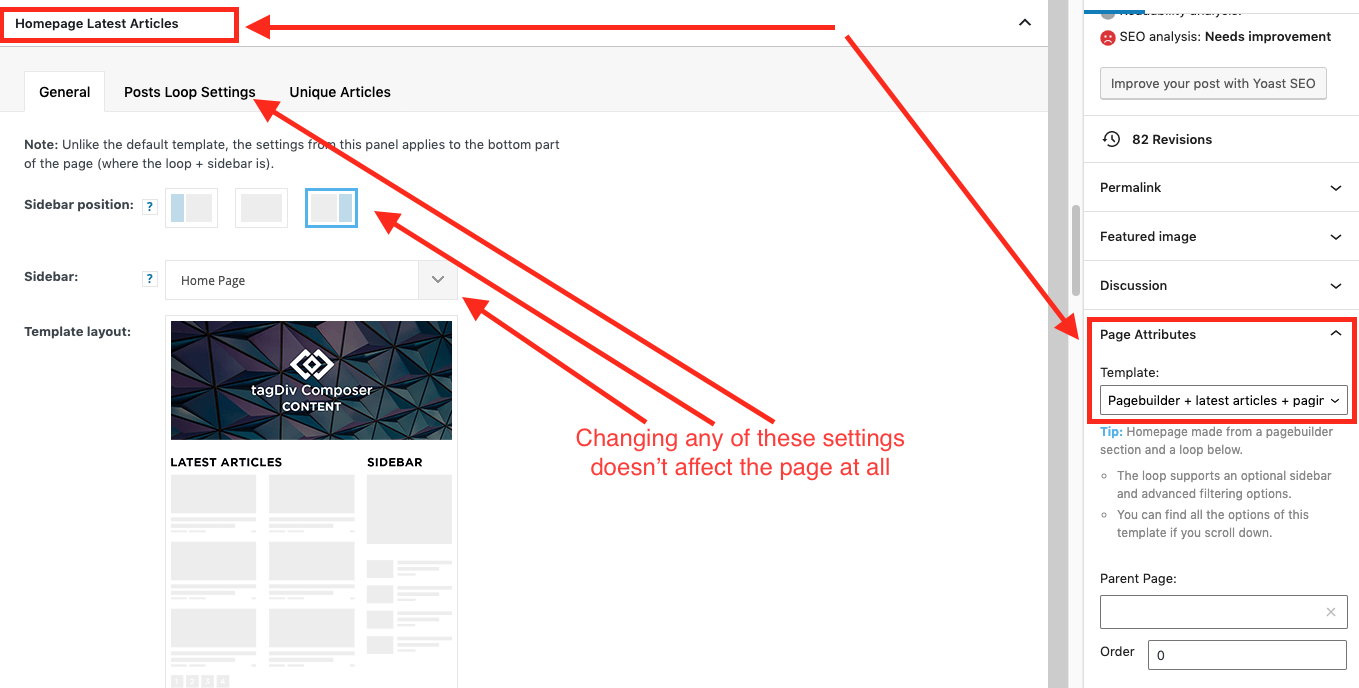
As a result, instead of two overlapping sidebars, we now have two duplicate sidebars stacked on top of each other:
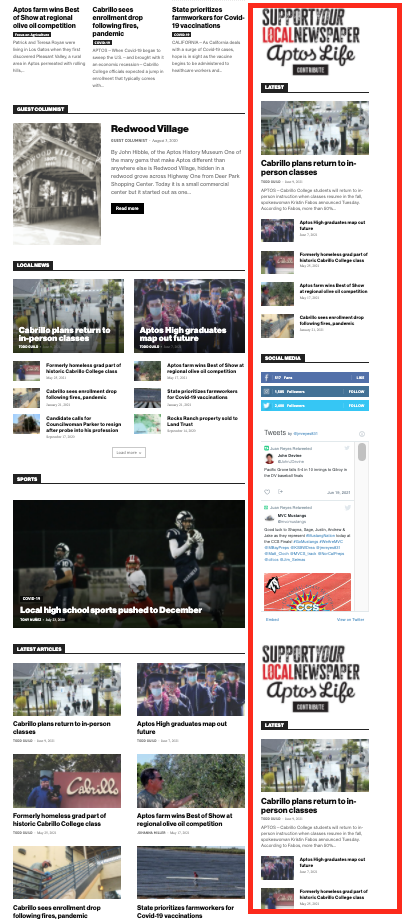
Is there any way to fix these issues? Ideally we would like to leave the page template set to default, with the overlapping sidebars eliminated.
We’ve already tried disabling all our plugins to check for conflicts. Here is some more info from the System Status panel:
Theme name Newspaper
Theme version 10.4
Theme database version 10.4
HTTP channel test wordpress
Installed demo Default – demo ID: default | install type: full
Theme Mobile Newspaper mobile version
php.ini configuration
Server software Apache/2.4.38 (Debian)
PHP Version 7.3.19-1~deb10u1
post_max_size 32M – You cannot upload images, themes and plugins that have a size bigger than this value. To see how you can change this please check our guide here.
max_execution_time 120
max_input_vars 3000
SUHOSIN installed false
PHP extensions
mbstring available
GD library available
WordPress and plugins
WP Home URL https://aptoslife.com
WP Site URL https://aptoslife.com
WP version 5.7.2
WP multisite enabled Yes
WP Language en_US
WP Memory Limit 1 GB/request
WP_DEBUG False
Caching plugin No caching plugin detected – for best performance we recommend using WP Super Cache
Bettina Hello!
Unfortunately, there you will find only homepage, header template and footer from that demo.
Thank you for understanding!

