
- NewsmagHomepage – How to build and set it
- NewspaperHomepage – How to build and set it
- NewspaperHow to edit modules for Flex Block X
- NewspaperGeneral Options that May Interfere with the Newspaper Theme
- NewspaperThe Newspaper Mobile Theme: Introduction
- NewspaperHow to Add a Logo in Newspaper
- NewspapertagDiv Shop
- NewspaperHow to Use tagDiv Cloud Library
- NewspaperDesign your Post Pages using the Cloud Library Templates
- NewspaperHeader Builder
- NewspapertagDiv Cloud Library Plugin
- NewsmagtagDiv Composer Tutorial
- TutorialsFrom WPBakery to tagDiv Composer
- NewspapertagDiv Composer Tutorial
- NewspaperNewspaper theme documentation
- NewspaperThe Mobile Theme
- NewsmagNewsmag documentation
- NewsmagMain menu
- NewsmagLogo & Favicon
- NewsmagPage templates
 Calin
Calin Hi,
The most easiest way will be to make a footer menu and set in it about us page and privacy policy.
If you are using a cloud footer, you’ll need to edit it from homepage using tagDiv Composer like this -> https://i.imgur.com/xtpUxjC.png -> https://i.imgur.com/H0Z1LOH.png if is a standard footer style -> https://i.imgur.com/TWqSkQf.png you need to do it like this -> https://i.imgur.com/ZdQ4Gi2.png
Also if you are using a footer page -> https://forum.tagdiv.com/footer-templates/you can edit it with tagDiv Composer -> https://i.imgur.com/aVvgwzU.png
Hope this will help you!
Thank you!
Calin Hi,
The most easiest way will be to make a footer menu and set in it about us page and privacy policy.
If you are using a cloud footer, you’ll need to edit it from homepage using tagDiv Composer like this -> https://i.imgur.com/xtpUxjC.png -> https://i.imgur.com/H0Z1LOH.png if is a standard footer style -> https://i.imgur.com/TWqSkQf.png you need to do it like this -> https://i.imgur.com/ZdQ4Gi2.png
Hope this will help you!
Thank you!
Calin Hi,
The most easiest way will be to make a footer menu and set in it about us page and privacy policy.
If you are using a cloud footer, you’ll need to edit it from homepage using tagDiv Composer like this -> https://i.imgur.com/xtpUxjC.png -> https://i.imgur.com/H0Z1LOH.png if is a standard footer style -> https://i.imgur.com/TWqSkQf.png you need to do it like this -> https://i.imgur.com/ZdQ4Gi2.png
Hope this will help you!
Thank you!
Calin Hi,
Cloud template scan be set in theme panel for the categories that make part, for example single post templates -> https://i.imgur.com/LRlqkwn.png category templates -> https://i.imgur.com/wxH3mMa.png also the rest of cloud template can be set here -> https://i.imgur.com/7gkXOzg.png
Also homepages are import as page and sections/blocks need to be import inside a page/cloud template with tagDiv Composer .
If there is still a problem, let me know, also please provide me more details and some screenshots.
Thank you!
 Camee
Camee Hi,
I adjusted the SEO title, meta info, and meta URL with Yoast, on my homepage and footer. However, the other pages (contact and about) also crashed.
I tried to de-activate Yoast and also restored to a version of my homepage before I installed Yoast but it’s still crashed.
I don’t need to make new pages as the website is already online, I need to change something in my current homepage so your help is much appreciated.
Thank you!
 gailclark80@yahoo.com
 Hi
I have change the featured image to 800×600, but on the homepage, it is display a 307×230 image, how to make it display a 320×240 image.
I have add this code to add_image_size( ‘custom-size’, 320, 240, true ); to functions.php.
the 320×240 image exists in the uploads folder
 gloriouswebtech
hi,
I got approved form google adsense, then i place it into my homepage and sidebar, post.
But still its not showing any ads. can you please help me.
Calin Hi,
If you are using a pro demo, the footer is a cloud template, then you’ll need to edit it from a page, for example, you can edit the homepage, click on edit with tagDiv Composer -> https://i.imgur.com/uweNRrc.jpg after that go down to the footer end edit it how you want (now you can customize the the whole web-page from fronted).
Thank you!
 TomaszM
Another theme update and something goes wrong. Last time after update I lost my homepage. Now, I lost my logo all over the page :/
Are you going to solve the problem?
There is an css problem:
img[data-spai] {
opacity: 0;
}
Please :/
Calin Hi,
If you are using a pro demo, the footer is a cloud template, then you’ll need to edit it from a page, for example, you can edit the homepage, click on edit with tagDiv Composer -> https://i.imgur.com/uweNRrc.jpg after that go down to the footer end edit it how you want (now you can customize the the whole web-page from fronted).
Thank you!
Calin Hi,
Please edit the homepage with tagDiv Composer and enable the sticky menu like this -> https://i.imgur.com/VoGdhkr.jpg if the problem persist, please make sure that you do not have a plugin conflict, please deactivate ALL plugins except tagDiv plugins, also if you are using child theme or cache plugin, deactivate them, clear all cache and try again.
Thank you!
CameeUnfortunately, I didn’t notice that when I installed Yoast SEO I was supposed to edit my homepage and footer with tagDiv composer. Instead I edited with ‘edit’. Now I can’t enter tagDiv composer any more within the pages that are already online. How can I solve this problem?
Thank you in advance!
 dcivera
When working on the homepage template, the “Single external shortcode” isn’t available. Is it normal and if yes, do we have another alternative to add a shortcode to the Homepage template?
Thanks in a advance
 topgunsalute238
The homepage is no longer appearing as normal after the latest update to newspaper theme.
Also, it shows that i need to install tag div composer but when i go to install it, it fails due to ” file already exists” but when i look in the plugin section i don’t see the plugin.
Calin Hi,
Thank you That section is referring to multi-purpose elements, like these headers or sub-footers -> https://i.imgur.com/bdYDKml.png -> https://i.imgur.com/upWHq5t.png using these elements you can display the extra elements from that section
Also now you can use cloud templates and you can set the element with tagDiv Composer where you like.
In order to change that image you’ll need to edit the homepage with tagDiv Composer, click on the row that hold the grid and check the css tab -> https://i.imgur.com/ZqaveHS.jpg
Thank you!
Calin Hi,
Make sure that you are using Yoast SEO.
Please make a test and change the homepage -> https://i.imgur.com/SFJtXOy.png -> https://i.imgur.com/tTTJQO9.jpg
Let me know the results!
Thank you!
 Vlad S
 Hello !
Please note that we don’t recommend you to use WP Bakery anymore since there can be conflicts between TagDiv Composer and WP Bakery, also WP Bakery can’t edit the tagDiv Composer templates. You can use cloud library and directly import a homepage template if you want: https://forum.tagdiv.com/homepage-how-to-build-and-set-it/
Please note that all the Cloud library templates are fully editable using tagDiv Composer.
Thank you !
Calin Hi,
So you want to change some text in the website, some of theme can be translate using the translate from theme pane -> https://i.imgur.com/HGf9nXZ.png -> https://i.imgur.com/RFhbuSh.png other elements from homepage can be edited using tagDiv Composer -> https://i.imgur.com/tXdphTB.png -> https://i.imgur.com/0WWHjfV.png some elements from sidebars can be edited from appearance> widgets -> https://i.imgur.com/aXszVVf.png
Hope this will help you!
Let me know the results!
 rsrahulmastermind
Hi I need your Help Unfortunately My Homepage Showing only words and Error after Updating my Them Its and Affiliate Niche Site please help and fixed it
 Neelesh
 I found one more problem with theme. Theme is creating unwanted extra pages look at screenshot page url https://www.hindinzone.com/page/39/ . That page has two blocks from homepage. I dont know why that unwanted page is generated. I found it on google search and many more pages like that.
https://ibb.co/wLHMqQS
 mcmoad
Hi, in my website I cam to the situation where I have to create two different sidebars, one for the homepage and another for the categories and posts, I created the homepage one using the “default newspaper” sidebar, and for the categories I created a new one from the theme panel option in the general categories, the problem is that the sidebar appears in the categories just right as I made it to be, but for the posts, it misses some widgets. Knowing that I did last time remove a sidebar that was working fine for categories and posts, and I created it the same way, also I couldn’t find any section which talks about the sidebar in the posts settings in theme panel, does the category sidebar apply automatically to the posts one? if not how to do that?
 Ruffo
Ruffo Calin,
my website don’t have directory: /blog is the same with @jaspalsingh
I think the theme is breaking the Yoast code and adding a canonical tag.
I already tried almost everything and I can’t solve it!
I reset the theme, delete demo, I installed the demo again. add the filter to function file: remove_action (‘wp_head’, ‘rel_canonical’, 100); and nothing works.
My static page name is: ‘Inicio” (home)
But I don’t have posts page: /Blog
Please look my image:
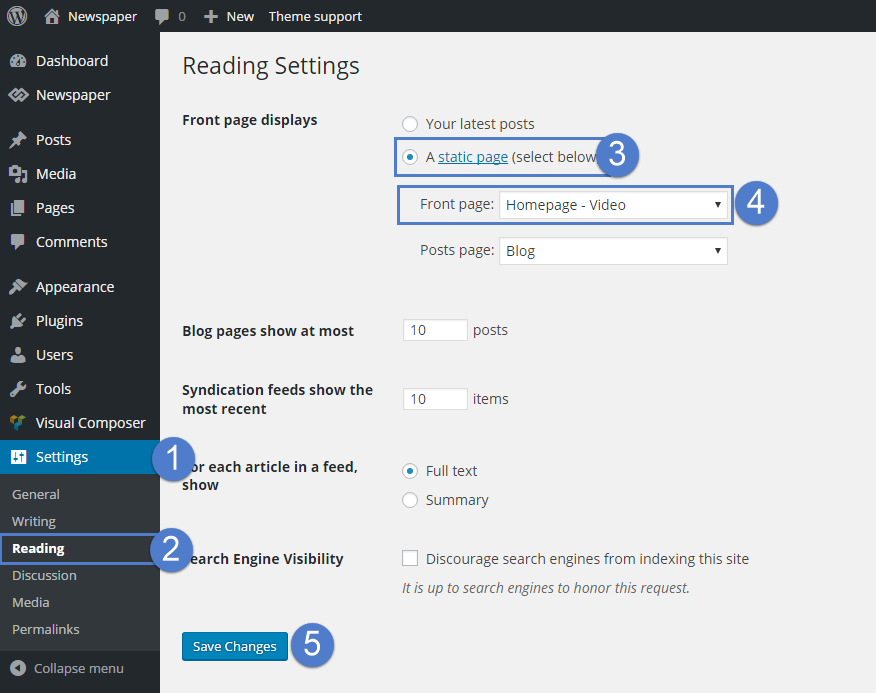
Could it be the issue you should fix? I can see that @jaspalsingh is not fixed the issue yet.
Thank you very much!
 ludyma
 Hello, Calin. Download the home page of sport from the cloud and when I try to change the header graphic I cannot, renaming it by ftp or in any way, I can’t find where to modify that parameter that the CSS brings as I show you, what can I do?
Homepage – Sports PRO

 progamma
Hello. Recently we can’t do any change on page in td composer. I need change banner and click on them but i see only base information and don’t see my banner code https://prnt.sc/smguws.
Also i’ll try to add new module (custom text module or ad box) but circle rotate infinity time https://prnt.sc/smgvnx.
I’ll try reinstall theme and plugins, but not worked.
Also i see message “The current content hasn’t been created by TagDiv Composer!”
Please help, i need urgently change banner 🙁
Thanks
 aneeislam
hi, my mobile theme homepage isn’t showing any picture and its showing just recent articles.
please tell me how to solve this



