
- NewspaperHomepage – How to build and set it
- NewspaperHow to edit modules for Flex Block X
- NewspaperGeneral Options that May Interfere with the Newspaper Theme
- NewspaperThe Newspaper Mobile Theme: Introduction
- NewspaperHow to Add a Logo in Newspaper
- NewspapertagDiv Shop
- NewspaperHow to Use tagDiv Cloud Library
- NewspaperDesign your Post Pages using the Cloud Library Templates
- NewspaperHeader Builder
- NewspapertagDiv Cloud Library Plugin
- NewspapertagDiv Composer Tutorial
- NewspaperNewspaper theme documentation
- NewspaperThe Mobile Theme
- NewspaperPage templates
- NewspaperTheme Colors Introduction
- NewspaperFooter Builder
- NewspaperMain Menu
- NewspaperPre-built Websites: Introduction
 chazlight1
Greetings,
I just installed the Newspaper theme and choose to upload the default demo content. However, the layout is off. The block grid at the top is showing 5 instead of 4 articles. Also, it’s like there is a sidebar missing as the first two news section are full width and the missing sidebar widgets show up lower down on the page. It seems this is only happening on the homepage.
Thank you!
 Catalin
 Hello webarts,
I have inspected your website and I saw that your homepage works as expected, without any problem. Also, I have inspected your source code and I have noticed that you have some errors through your console, as you can see here -> https://www.screencast.com/t/jdsGdQUBvqz7 Please remove all of the untested plugins, clear all the caches and check the results. If the problem is still there, you should make a new fresh install from scratch via FTP way, clear all the caches and check the results.
Thanks for the message!
 Bogdan B.
 Hello,
The problem only seems to show up on the homepage. Please re-create the homepage in the tagdiv composer. start with a brand new page and add elements to it in the tagdiv composer page builder. Do not copy elements in the back-end from other pages. Use the builder to create your homage. It will not support elements that were created with another page builder. Please re-create your homepage.
Thank you!
 Simion C.
 Hi,
You can install the demo you like, then gradually replace the content with your own. Start from the top for example, upload your own logo, set your own menu
– https://forum.tagdiv.com/logo-favicon/
– https://forum.tagdiv.com/main-menu/
– https://forum.tagdiv.com/mega-menu/
Edit the homepage with the tagDiv composer, remove/modify/add elements as you want
– https://forum.tagdiv.com/tagdiv-composer-tutorial/
– https://forum.tagdiv.com/block-settings-guide/
Each block and grid can be configured to display the posts you want, there are multiple filtering and sorting options available.
Please let us know if you have more questions or you need help with something.
Thanks
 curmi01
Hi guys,
how do you get the number pagination on the homepage ?
Thanks
 janviayurveda
Hi
I would like to make contact also as inline as other menu options. Also homepage opening in another window. I would like to see them in single page like other menu options.
Thank You
curmi01Hi Guys,
this quesiton might be basic however i am relatively new to this space.
I have a homepage with a set of articles and at the bottom i wish for the user to switch to page 2,3,4,5,etc with the exact same layout just the different posts.
How do you do this please?
Thanks
Isaac
curmi01Hi Guys,
this quesiton might be basic however i am relatively new to this space.
I have a homepage with a set of articles and at the bottom i wish for the user to switch to page 2,3,4,5,etc with the exact same layout just the different posts.
How do you do this please?
Thanks
Isaac
 virgboggie
 I am having this same problem again when trying to edit my homepage. I deleted and reinstalled the theme, but it hasn’t fixed the problem. I also tried creating a new homepage, but I get the same error message when I try to edit the new page. I am only using TagDiv Composer. Thanks.
 designr
Hello Simion, I hope you’re well.
I’m requesting for some help!
I have divided a row into 2 columns – 2/3 and 1/3. on the 1/3 row I have added block 9 element.I would like posts in this block to appear like a numbered list(with alternating shades of color)…I have attached an image that shows the current appearance and desired appearance (from bbc homepage).
This is the image–>https://ibb.co/gZsV9G
Can you please provide me with the changes I have to make to achieve this desired appearance
Thanks for your great support!
curmi01Hi Guys,
I have a homepage with a list of around 10 articles, when i have 11 i wish them to be on another page which will be a photocopy of the homepage and users can click on page 2 at the bottom. How could thsi be done please ?
Thanks
 bodyboardholidays
I am trying to insert an image in a wpbakery text box, which I can do, but for some reason the image is resized and not full width as desired. Inspecting the css it looks like an alternative width is being applied. It is a full width page with no sidebar. If I use the Single Image option is doesn’t have this restriction. The page is https://bodyboard-holidays.com/new-homepage/ and you can see the issue half way down the page, the watch our video image.
Simion C. Hi,
I thought you wanted to remove the page title from top, sorry if I misunderstood. The page can be set as homepage like this
– https://forum.tagdiv.com/homepage-how-to-build-and-set-it/
Thanks
 songkqx1c
 hi,
I can not cut back the default template, so I can not reach my goal … I just want to use this page template as my homepage.
 imanowil
Hi, I just installed Newspaper on my site and headed straight to edit my homepage with TD Composer. However, the dropdown widget of the plugin does not scroll down and hence renders many elements in it inaccessible. Help please!
 Shomi
ShomiHi,
Could you help me to activate the slider on the home page? This is written on my homepage: “rev_slider Missing shortcode. Activate plugin!”
Anyone can help me?
Thanks
 blithe
 In that thread, files are outdated. Also I am using multipurpose. I figured out. After this change; h1 on logo only show in homepage.
Change this file : wp-content/plugins/td-multi-purpose/header/tdm-header-menu-h1.php
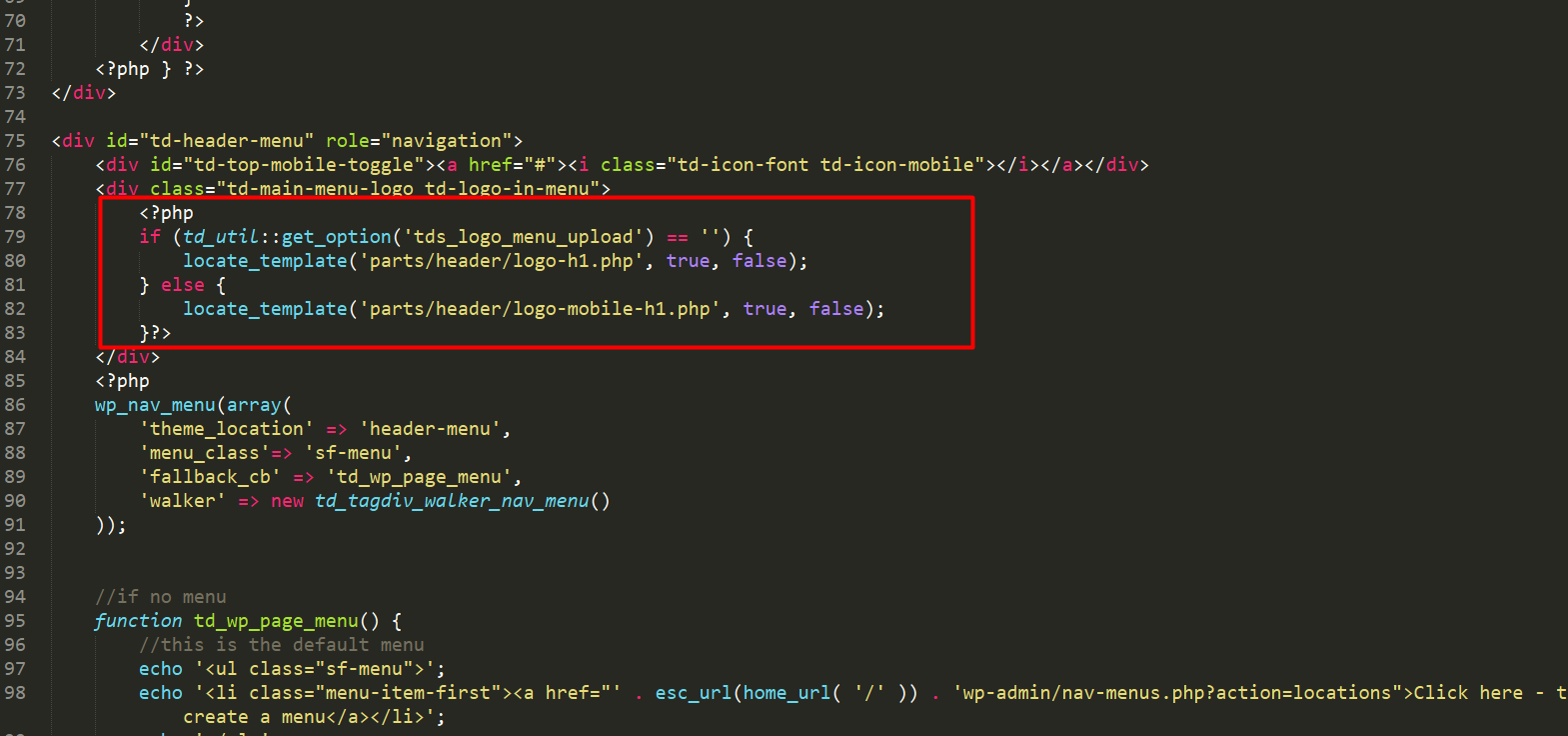
TO:
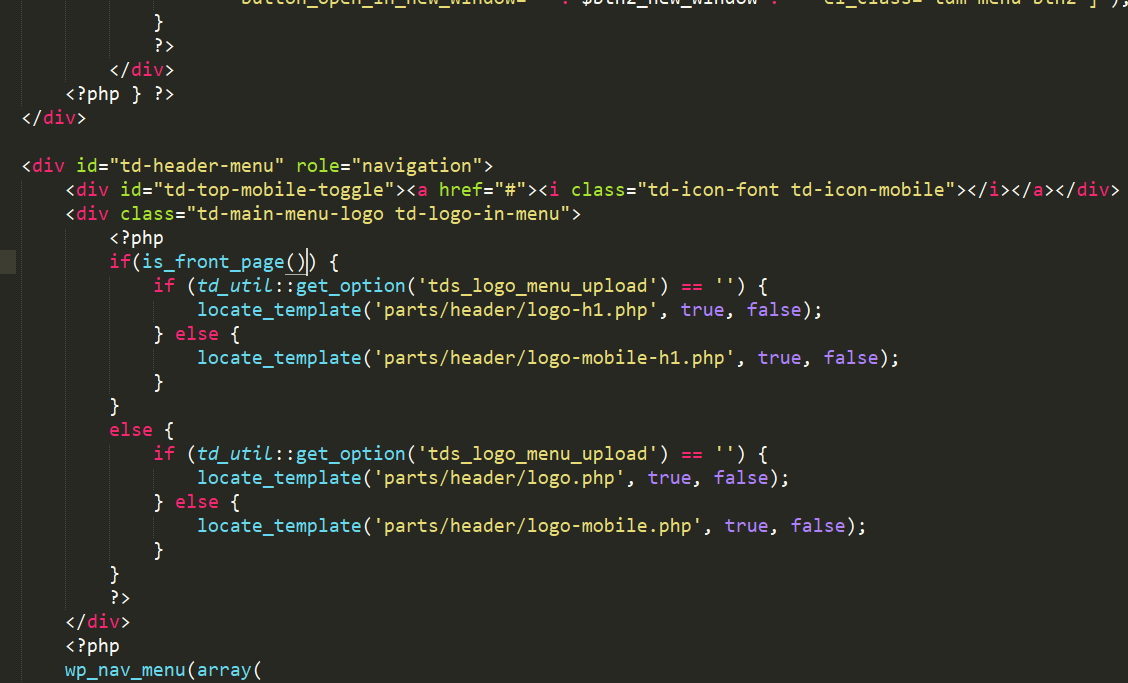
 PaulEide11
Hello,
I have installed and activated the Newspaper theme (without including theme content) and it is only showing code, rather than the theme or any design. My site is unpublished at this point. Please let me know what I have to do. Here is an example of the homepage:
[dt_blog_posts number=”8″ loading_effect=”fade_in” padding=”10″ category=”entertainment-blog,nfl-blog,hot-babes,other-sports-blog,nascar-blog,sports-interviews,nba-blog”]
Categories
[dt_banner image_id=”14591″ link=”http://themeforest.net/user/Dream-Theme/portfolio?ref=Dream-Theme” target_blank=”true” bg_color=”rgba(50,51,55,0.55)” border_width=”0″ outer_padding=”0″ inner_padding=”0″ min_height=”0″ bg_opacity=”30″][dt_gap height=”10″ /]
Music & Video
[/dt_banner]
[dt_banner image_id=”14534″ link=”http://themeforest.net/user/Dream-Theme/portfolio?ref=Dream-Theme” target_blank=”true” bg_color=”rgba(50,51,55,0.55)” border_width=”0″ outer_padding=”0″ inner_padding=”0″ min_height=”0″ bg_opacity=”30″][dt_gap height=”10″ /]
Art & Photo
[/dt_banner]
[dt_banner image_id=”14537″ link=”http://themeforest.net/user/Dream-Theme/portfolio?ref=Dream-Theme” target_blank=”true” bg_color=”rgba(50,51,55,0.55)” border_width=”0″ outer_padding=”0″ inner_padding=”0″ min_height=”0″ bg_opacity=”30″][dt_gap height=”10″ /]
Design
[/dt_banner]
[dt_banner image_id=”14503″ link=”http://themeforest.net/user/Dream-Theme/portfolio?ref=Dream-Theme” target_blank=”true” bg_color=”rgba(50,51,55,0.55)” border_width=”0″ outer_padding=”0″ inner_padding=”0″ min_height=”0″ bg_opacity=”30″][dt_gap height=”10″ /]
Lifestyle
[/dt_banner]
[dt_banner image_id=”14542″ link=”http://themeforest.net/user/Dream-Theme/portfolio?ref=Dream-Theme” target_blank=”true” bg_color=”rgba(50,51,55,0.55)” border_width=”0″ outer_padding=”0″ inner_padding=”0″ min_height=”0″ bg_opacity=”30″][dt_gap height=”10″ /]
Misc
[/dt_banner]
Thank you,
Paul
Simion C. Hi,
There is a setting to change the main menu text color
– https://www.screencast.com/t/fUDpgvIe
This setting will make the text as you wish, on the whole website. If you want to change the color only for the homepage it could be done with custom CSS. In this case please provide a link to your website and details about how you want it to be, and I will give you a more accurate solution.
Thanks
Catalin Hello curmi01,
Please keep in mind that our theme works only with certain thumbnails which are used only for Blocks from here -> https://forum.tagdiv.com/theme-thumbs/ If you want to create your own thumbnail for the homepage, you should do it yourself through the code or you should find such a plugin which allows you to create something like this. If you are not aware of the steps which are needed to take in this case, please consider hiring a freelancer/developer to help you because we can’t provide custom work at the moment, sorry!
Thanks.
Simion C. Hi,
In the article page the menu items will still link to the homepage
– https://www.screencast.com/t/xmdLW7yGmmn
They are not highlighted because you are not on the homepage, it is not the current page. Please review the menu structure and add the categories properly, as category items. They should not link to the home page
– https://www.screencast.com/t/JrluvagFvpn
Thanks
Simion C. Hi,
I cannot seem to pinpoint exactly where this is coming from, it is present in the post pages as well, but not on category or tag pages
– https://www.screencast.com/t/yt1z68X9
I could give you a code to hide it on the homepage however
– https://www.screencast.com/t/axKkqWHxn34l
.home .none {

display: none;

}
Enter it in Theme panel->Custom CSS if you would decide to use it.
Thanks
curmi01How to edit the szie of my thumbnails on the homepage as seen in the photo attached
 Cthulhus
Hello,
On the homepage, I would like to disable the default’s category tag link (I want to keep the tag as visual only) or make the link the same as its post? (the second solution is better)
here a photo of what I want to disable / or make it the same of the post :
http://www.noelshack.com/2018-03-1-1516052774-tag.jpg
Thanks!
curmi01Good Evening,
Is it possible to make the thumbnails photo larger on the homepage?
Thanks
Isaac

