- NewsmagHomepage – How to build and set it
- NewspaperHomepage – How to build and set it
- NewspaperHow to edit modules for Flex Block X
- NewspaperGeneral Options that May Interfere with the Newspaper Theme
- NewspaperThe Newspaper Mobile Theme: Introduction
- NewspaperHow to Add a Logo in Newspaper
- NewspapertagDiv Shop
- NewspaperHow to Use tagDiv Cloud Library
- NewspaperDesign your Post Pages using the Cloud Library Templates
- NewspaperHeader Builder
- NewspapertagDiv Cloud Library Plugin
- NewsmagtagDiv Composer Tutorial
- TutorialsFrom WPBakery to tagDiv Composer
- NewspapertagDiv Composer Tutorial
- NewspaperNewspaper theme documentation
- NewspaperThe Mobile Theme
- NewsmagNewsmag documentation
- NewsmagMain menu
- NewsmagLogo & Favicon
- NewsmagPage templates
 Catalin
 Hello fgmotta,
The travel demo uses the background image a bit different. It has it set on the row in the Visual Composer or TD Composer. You need to edit your homepage and access row settings: http://screencast.com/t/9udWgjVdz http://screencast.com/t/Z2VHdgzUTuV3
Thanks for your understanding!
 Optival
 Hi Simion,
My understanding is for WordPress – if one login as a super user, it can view anything at the homepage, etc. Everything is transparent to super user. But I am not experiencing this happening.
For clarity, I have sites created to validate those claims. Further, I have used other themes that display exactly as my claim is – that is, if you are a visitor, yes then, you are only visible to the public posts. But if you are a super user, you should have the rights to see all posts type, unless the default WordPress routing is changed.
 Gee95
Gee95Morning guys,
I’m a bit slow to move due to my site being widely popular around this time of year.
I’m currently on version 7.8 and want to move to 8.1 – But continue to use WPBakery Visual Composer, for now, until a later stage when I can convert all my pages e.g. homepage to the new TagDiv page builder.
How is this possible? Have you got a guide where I can quickly follow so my website will only be down for a few minutes?
Also, does upgrading change my website structure and Google crawling? As when i’ve changed themes in the past, it’s taken days for Google to detect the structure change and crawl and rank again.
Many thanks,
 steve83
Apologies for starting a new thread on this. I’m not getting anywhere with my previous thread and need to summarise everything in hope of a solution.
5 days ago I upgraded Newspaper theme to 8.1. All my pages were created with visual composer.
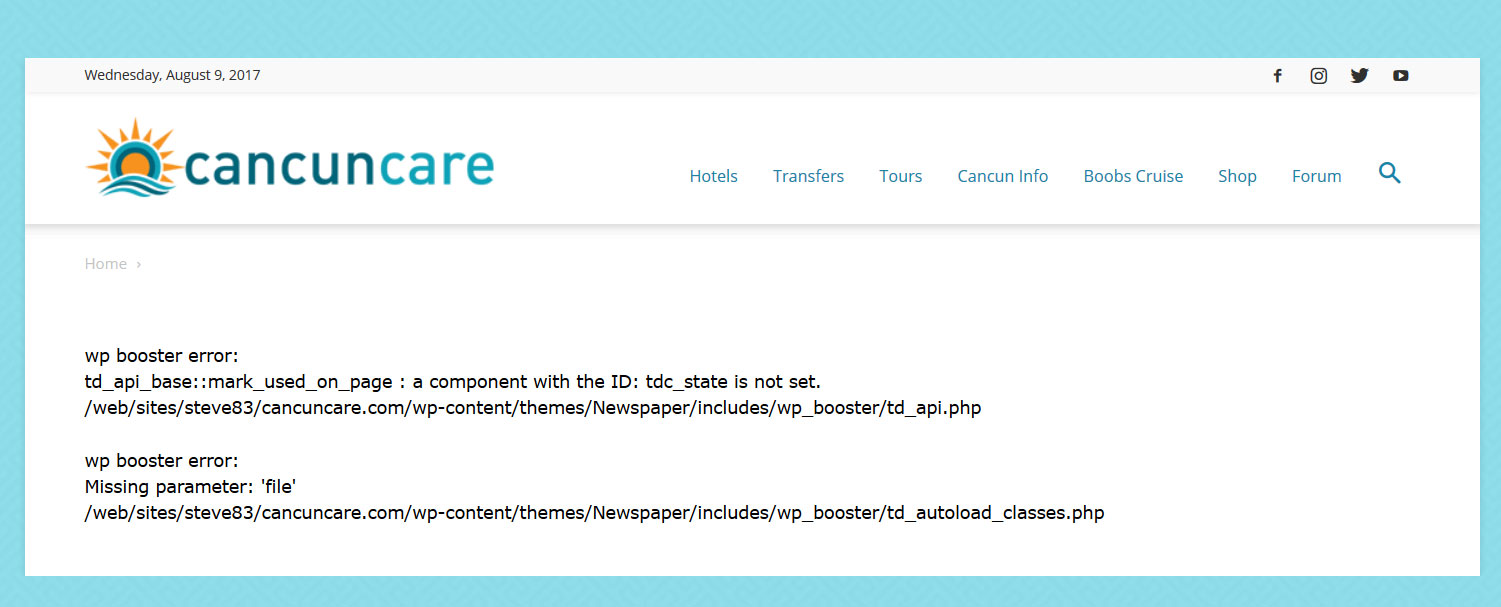
With tagdiv composer deactivated and visual composer activated my pages give the following error.
wp booster error:
td_api_base::mark_used_on_page : a component with the ID: tdc_state is not set.
/web/sites/steve83/cancuncare.com/wp-content/themes/Newspaper/includes/wp_booster/td_api.php

wp booster error:
Missing parameter: 'file'
/web/sites/steve83/cancuncare.com/wp-content/themes/Newspaper/includes/wp_booster/td_autoload_classes.php
(screenshot http://www.cancuncare.com/screenshot/homepage-with-vc.jpg)
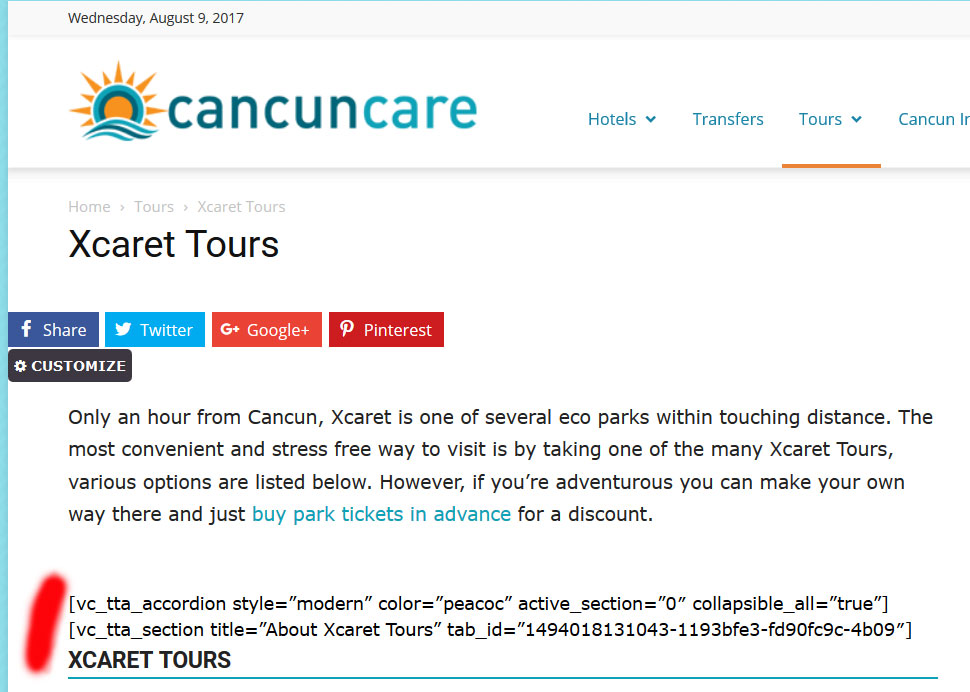
With tagdiv composer activated and visual composer deactivated many elements do not show at all, instead displaying the visual composer code.
(screenshot http://www.cancuncare.com/screenshot/page-with-tc.jpg)
The only way I have found to get the pages to show somewhat correctly is to install and activate both tagdiv composer and visual composer, which when I do so results in some page elements rendering incorrectly (images showing at an incorrect size and sidebars appearing below content). Re-making these pages from scratch results in the exact same problems. I understand having both tagdiv and visual composer enabled is not good. But disabling tagdiv results in the wp-booster error, and disabling visual composer results in elements not displaying.
I have been going round in circles for the last 5 days and am no further on than when I started. I really need a proper solution to this, the latest Newspaper update (8.1) broke my site and I need to get it fixed.
I am happy to provide wordpress login and ftp details if you could advise me on a secure way to do this.
 jjphmedia
Hey there,
I am currently using NewsPaper theme based on Gadgets demo and have run into a few issues.
1. The main navigation bar uses black colour as the hover colour even though it is set to orange in the theme panel.
2. WP Super Cache, when enabled completely removes the styling for the theme. All I’m left with is the html structure. I followed tagdiv instructions on how to configure the plugin but to no avail.
3. Co-author plus integration – I don’t know where to setup the plugin code for multiple author profiles and how to show two boxes (one for each author) in case of multiple authors for an article.
4. The font sizes are different for the grid layout and I don’t know where to change the style/size for each grid layout( I did try the theme fonts tab).
5. How do I add more share links to the default list that already exists for each post?
6. For the main homepage grid, how do I remove the white border separating the different tiles?
7. How do I show the ‘More Stories’ box that appears on the right side of Tech News demo when viewing an article?
Thank you for your support in advance. Please let me know how to give you backend access.
Sincerely,
Matt
 emceenetwork
I just installed the theme.
I tried to edit the homepage with the TagDiv Composer and immediately got this error:
Errors happened during tdcIframeData.init() -> bindViewsModelsWrappers()!
 schnapperin
Hi,
after updating to 8.1 I try to re-create my homepage with the tagDiv Composer with the following problems:
1) It doesn’t show my sidebar widget (it does display the sidebar on all post pages) on the pages and if I add sidebar widget it is displayed under the first post. How can I display a normal right sidebar?
2) Can I create two blocks on the pages?
Thanks
schnapperin
 GiacomoPisani
Hi there,
I have this problem with my homepage

I try to deactivate all my plugins… but nothing happened 🙁
Please can you help me?
 mitsus
Hi,
I installed Travel Demo, but I’ve a problem on homepage…please see image attached.
Can you help me to solve please?
Thanks in advance
 DaveS
DaveSHi guys,
I’d like to change the url of the logo (on desktop and mobile) on woocommerce pages (incl. cart and checkout pages). Is that possible? It’s a pretty clickable object and I don’t want to mislead visitors to think that they’ll land on the shop’s homepage when they click on it, but land on the site(magazine)’s home page instead.
Thanks
 dldr24
Hi,
I did some changes in homepage. But i cant see changes in other computers. After i create new hompage but i see old hompage still. Im using wp fastest cache plugin. I did try w3 total and wp super cache plugins too, its same… help please.
Catalin Hello Dannysmits,
If you want to sort your news posts from your Big Grid, notice that you can choose the sort order for this element from panel, if you will look at the Block Settings, according to our documentation here -> https://forum.tagdiv.com/block-settings-guide/ Also, you can use the Unique Articles for your homepage to avoid the duplicated posts. For more information about this case, please check our useful guide here -> https://forum.tagdiv.com/unique-articles/ or Offset feature, like this -> https://forum.tagdiv.com/offset-feature/
Hope this helps!
Thanks for the message!
OptivalHi,
At my homepage, I can only see public posts. I cannot see my private posts.
I re-created a menu>>private, I am still not able to see private posts.
Please advise.
 danielalonso
After updating to 8.1 from 8.0, my hompage shows the following:
array(7) { [“el_class”]=> string(0) “” [“el_id”]=> string(0) “” [“class”]=> string(28) “td_uid_29_598a5ba45093b_rand” [“css”]=> string(0) “” [“tdc_css”]=> string(564) “eyJhbGwiOnsibWFyZ2luLXRvcCI6ImF1dG8iLCJtYXJnaW4tYm90dG9tIjoiMjAiLCJib3JkZXItdG9wLXdpZHRoIjoiMiIsImJvcmRlci1yaWdodC13aWR0aCI6IjIiLCJib3JkZXItYm90dG9tLXdpZHRoIjoiMiIsImJvcmRlci1sZWZ0LXdpZHRoIjoiMiIsInBhZGRpbmctdG9wIjoiYXV0byIsInBhZGRpbmctYm90dG9tIjoiMCIsImJvcmRlci1jb2xvciI6IiM4ZjFiN2MiLCJib3JkZXItcmFkaXVzIjoiNSIsImJhY2tncm91bmQtY29sb3IiOiIjZTFiMWNiIn0sInBob25lIjp7InBhZGRpbmctcmlnaHQiOiIxMCIsInBhZGRpbmctbGVmdCI6IjEwIn0sInBob25lX21heF93aWR0aCI6NzY3LCJwb3J0cmFpdCI6eyJwYWRkaW5nLWJvdHRvbSI6IjAifSwicG9ydHJhaXRfbWF4X3dpZHRoIjoxMDE4LCJwb3J0cmFpdF9taW5fd2lkdGgiOjc2OH0=” [“tdc_css_class”]=> string(28) “td_uid_29_598a5ba45093b_rand” [“full_width”]=> string(0) “” }
wp booster error:
TD Composer Internal error: The system tried to use an att that does not exists! class_name: vc_row Att name: “tdc_css_class_style” The list with available atts is in tdc_composer_block::render
/var/www/vhosts/dream-alcala.com/httpdocs/wp-content/plugins/td-composer/includes/tdc_composer_block.php > get_att
When I downgrade to 8.0 everything is normal again.
Any help?
Daniel
 ipekg89
hi
under my slider i want to open 2 or 3 boxes and give them the about url, contact us url, and one of the other page.
But i couldnt do that.
If u could help me i will be appreciated.
Thanks, Ipek
Website url:http://7c8.160.myftpupload.com/
 Dannysmits
 Hi Bogdan,
Thank you. I had already read that. What I was looking for – but now have found out through trial and error – was that you have to set the homepage as a static page in order to make use of all TagDiv functionalities there. As a suggestion from my side – I don’t think this is always made clear enough in the available documentation and I think it would be a good idea to mention this somewhere.
As it is now – I’m running into multiple issues. The most important one is pertaining to the issue at hand. I am now getting the error message “Errors happened during tdcIframeData.init() -> bindViewsModelsWrappers()!” and thus cannot continue as TagDiv does not seem to work.
 MitchyBoy
Hi,
I am struggling to remove the latest articles from the bottom of my homepage. How do I do this? I would prefer to simply have the blocks that I have added myself.
Also, is it possible to have 5 blocks, each on top of each other? I would like to create a block for each of my website categories that displays the latest articles for each block.
My website is http://www.attractionboss.com
Thanks in advance!
Mitchell White
 SL2
SL2 Hi,
Thanks for your reply.
I updated the header colours, but it didn’t have any effect on these headers.
Would be really grateful if you could take a quick look.
Homepage is: http://www.onemanandhisshed.com
Many thanks!
 Rahim
RahimHi.
I am using newspaper 8 and visual composer 5.2 version.
Today I tried to edit my homepage elements and found that visual composer is showing the codes to me instead of visual stuff. https://image.ibb.co/h8oCSF/Error.jpg
What should I do to bring back the visual edit of this composer like before?
Regards.
 Sanafan
Hey Guys,
i bought the newspaper theme from themeforest which includes TagDiv Composer. So i tried to setup my homepage for about 2 weeks now but when i wanted to go on with my changes today, TagDiv Composer quit… it says “The current content page hasn’t been created by TagDiv Composer!”


Hope you can help me! Greetings from Germany!
 Paul
PaulMy site http://www.fcengland.com seems to have been hacked a couple of times with the homepage redirected to spam. My fault initially for allowing any users to register without screening; I’ve now changed this.
Since then, the site has been hacked again via what seems to be the header logo/image area as that’s where code is being pasted by whoever is doing it to replace the code for the normal header/logo.
Any advice to stop this happening? Wondering if anyone can see anything obvious in my code that is allowing this exploit?
thanks for your help.
Paul
 nfranc01
The images on my homepage at http://www.bramptonist.com are not loading. They load fine in individual posts and even in my sidebar, but for some reason not in the blocks on my homepage. I have tried turning off lazyload to fix the issue but this has not worked. Any suggestions?
SL2Hi,
Maybe I am doing something stupid, but I don’t seem to be able to get my Instagram feed pics to pull through to my homepage. There is only one pic pulling through.
I’ve deleted this pic from my Instagram account to see what this would do and it’s still the only pic coming through.
Would you be able to help at all with this?
homepage (see slider and footer): http://www.onemanandhisshed.com
instagram handle: @onemanshed
Many thanks,
 Luptern
 Hello!
Here you go http://upternative.testblog.co.uk/
if you scroll down to the middle of the homepage where the video playlist is, you’ll see it’s justa black square.
Thanks so much for looking!
 Simion C.
 Hi,
There is no option in the theme to modify the logo link. This will redirect to the homepage when clicked. Try making changes in this file if you would like to change this default behavior
– https://www.screencast.com/t/QNbFp72RCDh
Thanks