
- NewspaperHomepage – How to build and set it
- NewspaperHow to edit modules for Flex Block X
- NewspaperGeneral Options that May Interfere with the Newspaper Theme
- NewspaperThe Newspaper Mobile Theme: Introduction
- NewspaperHow to Add a Logo in Newspaper
- NewspapertagDiv Shop
- NewspaperHow to Use tagDiv Cloud Library
- NewspaperDesign your Post Pages using the Cloud Library Templates
- NewspaperHeader Builder
- NewspapertagDiv Cloud Library Plugin
- NewspapertagDiv Composer Tutorial
- NewspaperNewspaper theme documentation
- NewspaperThe Mobile Theme
- NewspaperPage templates
- NewspaperTheme Colors Introduction
- NewspaperFooter Builder
- NewspaperMain Menu
- NewspaperPre-built Websites: Introduction
 HeTo25
1. The thumbs in my TagDiv Image Galleries only show the top half of the images (screenshot below). How can I change the height of them? I need thumbs which have more height than width or are at least a square.
2. Im using the Big Grid 1 on my homepage –> same as your News Magazine demo. Is it possible to increase the height of the 4 small elements for mobiles (mobile theme/view)? I need them to be squares. I`ve already changed it for desktops.
Thanks
 portuga
Hi,
I was able to configure the menu so that each category had a different color. But I’m not able to set the color of the category when we go to the category page.
Homepage: https://cubogeek.pt/
“Filmes” page: https://cubogeek.pt/filmes/
Can you help me?
Tks
 pcservis
 13) I set it up, but it’s still 36 posts instead od 12
14) It does solve problem on sticky sidebar I use on posts, but I use different sidebars for homepage and I need solution for that too
15) No, I have only one category with subcategories and that’s fine, but I don’t want that double menu under main one. I can provide you with username and password on email if needed
16) Can I extend it to show all of my categories? Since I have 10 subcategories and there is enough space for all of them
17) How can I set all links to be in specific shade of green? I don’t see that option in theme menu
18) My top 7 days posts widget don’t work even I turned on http://image.prntscr.com/image/85c994d687564488a92ed4dd57983387.jpeg option and I don’t use caching plugin
 Simion C.
 Hi,
I see that there is a background color at the moment on the mobile responsive version – https://www.screencast.com/t/8PyvgHwopif You can have that background on the homepage as well, by removing the .single class from the code provided above and it should work. From what I understood you wanted it only for the posts, so just make the modifications to have it apply on the homepage too.
About the post title, the theme does not have a feature like that, but you could search for some plugins that have that functionality and try a few of them out.
Thanks
Simion C. Hi,
1. Unfortunately you must set a fetured image for each of your articles – https://www.screencast.com/t/ChFny9gAY You can not set a featured image for all your posts at once. More information here – https://forum.tagdiv.com/featured-image-or-video/
2. The Newspaper mobile theme is fully tested and expected to work properly if you choose to activate it – https://forum.tagdiv.com/the-mobile-theme/ As for the mega menu it is not supposed to work on mobile, it is a feature just for desktop and only drop-down menu style is available. It is the same for the responsive version of the theme, if you choose not to use the mobile theme plugin. It can be deactivated just like any other plugin, in the plugins section – https://www.screencast.com/t/lmibpuez
3. Please follow this guide to set your 7 days sort order for your posts – https://forum.tagdiv.com/7-days-post-sorting/ And make sure you have post views enabled in theme panel, because this sort order is based on page views.
4. The theme uses the default wordpress user roles and capabilities – https://codex.wordpress.org/Roles_and_Capabilities where you can create users and asign a role to them. You can set an author for each post in the post edit page – https://www.screencast.com/t/TsMBDbxZJ or in bulk – https://www.screencast.com/t/ybfu0yOgCx1 You could search for a plugin with these capabilities if you want.
5. You can create a page however you want using the Visual composer elements avilable – https://forum.tagdiv.com/how-to-use-visual-composer/ Maybe what you are looking for your page is a homepage post – https://demo.tagdiv.com/newspaper/homepage-one-top-post/
6. I do not understand what you mean by website default picture, users can share posts and the post image – https://forum.tagdiv.com/facebook-share/ Please provide more details if I am misunderstanding what you mean.
Thanks
 Bogdan B.
 Hello,
Unfortunately the mobile theme does not have any sorting option for it’s modules. If you want to implement an offset on the homepage, you can add this line of code:
'offset' => 3 like so: and change the number to your preferred offset number: https://www.screencast.com/t/8JQhIFC5
Thank you!
 tangy
tangy I am already using the header ad. I want to insert an additional 728 x 90 ad beneath the menu buttons, this ad should only be visible on the homepage and not in the internal pages. So I need to know the file which I have to edit to insert the ad code. Here is the site http://www.techshout.com/
Bogdan B. We suggest a redirect to the homepage on that link like so:
if (function_exists('get_header')) {

get_header();

}else{

header("Location: https://www.mysite.com ");

exit;

};
Thank you!
 Catalin
 Hello ohmichea,
Unfortunately, the theme doesn’t have the option to set a different banner ad for categories or pages. To achieve a similar result, you will need some customization in theme’s code. Please check these links where I’ve provided similar solutions: https://forum.tagdiv.com/topic/custom-ads-to-header-ads-section/ – https://forum.tagdiv.com/topic/different-ad-tags-for-the-category-templates-vs-the-homepage/
Hope this helps!
Thanks!
Catalin Hello romeodawg,
First of all, I will thank you for your interest in our theme. So, regarding on your first request, please notice that if you will press the Logo, you will be automatically redirected to the homepage.
To create a homepage, please notice that you have three way to do this. As you can see, the theme has three available templates, like this -> https://www.screencast.com/t/cRsFuwdb For more information about our page templates, please consult our documentation here -> https://forum.tagdiv.com/newsmag-page-templates/ The default sidebar is used for the latest articles template, like this -> https://www.screencast.com/t/IUllDQQg
If is not what you mean, please provide more details about what you want to achieve so I will be able to provide a more accurate response.
Thanks for the message!
 mdmahiuddin
Hi,
My Website http://www.banglaenews.com
Home page not coming properly as like default theme. I have attached picture. Can’t call post to there. How i can call post there to show. Need solution.
Attachment is here: http://prntscr.com/edsynu
Thanks.
tangyI would like to know which file I need to edit to insert an ad beneath the homepage menu? Thanks.
 ofekin
How to view post’s TAG on homepage post list. I have tried add <?php echo $this->get_the_tags();?> on td_module_16.php but it didn’t.
 paulbonerville
I just installed my site http://stgeorgegazette.com and it’s showing code all throughout my homepage, starting around the top with:
[vc_row][vc_column width=”1/1″]
How do I get this off there?
Also, the very top black menu it says, “Purchase a theme” – How do I remove that?
And lastly, it says Celcius at the top left, how do I make that F?
Thanks!
 clockmancy
how can i remove the latest news section above the footer in the main demo homepage?
 siriphon
How to remove author (all position) in homepage?
detail in photo >>> 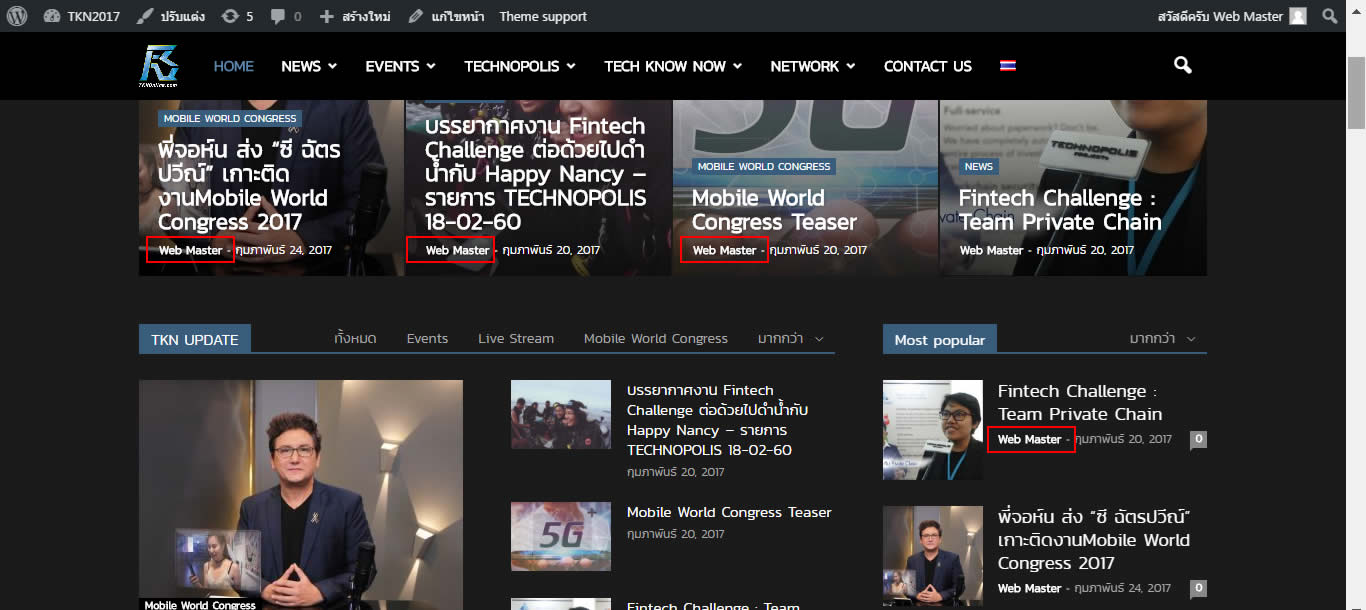
 romeodawg
 OK I found the problem – my home page was set to static and home and blog were set to the same page.
Now I’m back to some basic configuration issues.
If my posts are set to go to my homepage, how do I get back to the homepage when I click on a page in the menu? Is there not some default home icon or menu option that does that? Or do I have to manually create a menu item that links to the homepage?
Also, how do I configure my post settings when I haven’t created the page in pagebuilder? My posts are going to the homepage, but I don’t know how to adjust the posts so it doesn’t show the entire post. I also don’t know how to edit the default sidebar it’s throwing onto the homepage.
Maybe I have to create a homepage and blog page in this theme, and can’t use WP’s built-in home page blog posting?
romeodawgJust installed the theme and I have no idea why it’s so confusing – I’ve done so many WP sites but this theme is baffling. I’m trying to do an EXTREMELY BASIC BLOG – like posts and an about me page – that’s it.
When I create an About me page with a text blog, it’s dumping that text block onto my home page as well.
The home page is also throwing some empty category sections onto the bottom of the homepage as well.
No idea what I’m missing – I’m assuming it’s some kind of template issue, but I’m about to bail and jump to a simpler theme. Any suggestions?
It’s at paulhorne.com.
 newbietamvan
Hello, sir
I want to ask, why the favicon on my web does not appear when it was me setting at theme panel. Is it because I use SSL yes sir?
But strangely favicon appears only in wp-admin sir, does not appear on the homepage, articles, pages, etc.
I’ve also tried some of the favicon plugin at wordpress.org but just the same failed, sir? Please help.
Thanks
Screenshot: https://ibb.co/dsAhAa
Link: https://newbietamvan.com/
 ohmichea
Hello. I have ads on my homepage set with visual composer and under that I have latest articles with pagination. When I go to page 2, 3, 4, etc I was wondering how I can put an ad on the top (and bottom) of the page similar to what I have on the categories. http://tinypic.com/r/24w7jtg/9
Thanks
Bogdan B. Hello,
You cannot get the same look if you use a page you can edit in visual composer as the homepage. Right now you have just a list of your latest posts set up from the wordpress settings. Please use a static page here: https://www.screencast.com/t/AbIQFV8yI and then use this guide to set it up: https://forum.tagdiv.com/homepage-how-to-build-and-set-it/
Thank you!
 _pages
Hi, love the theme! But having a problem on my HOMEPAGE (I’m using one of the adding a single image or video above my posts without it taking over the entire space. In other words I want my side bar (starting with editor picks) to be raised to the very top, instead of the empty white space (above sidebar) shown at this link: http://makingmoneyshow.com/.
I have tried to remedy this several ways editing the backend (text and image shown) with no success . I was told to start this new discussion thread and provide screenshots to my backend so that you can see what is going on. Again, this is to add anything (text, image, video, trending now ticker, etc) above my posts…so that at the same time the side bar raises to the top without white space above it.
See screenshots links below:
http://makingmoneyshow.com/wp-content/uploads/2017/02/backend1.png
http://makingmoneyshow.com/wp-content/uploads/2017/02/backend2.png
http://makingmoneyshow.com/wp-content/uploads/2017/02/backend3.png (the homepage “post” configuration I chose)
Thanks!
 TheSyst3m
 Go to https://tech.luisetef.es/ and click over the lock in the right. User “” and password “”.
Then you will see the homepage with it!
-
This reply was modified 9 years by Bogdan B..
Bogdan B. Hello,
The category grid is not the same one as the homepage grid. The homepage will show 3 featured posts while the category page shows the first 3 posts from that category. There is no simple method to remove the top post from the mobile category pages. Sorry.
Thank you!
Bogdan B. Hello,
If you already created it on the homepage, it should also work on any other page as well. Simply copy the shortcode for it in classic mode and text mode. The code you provided is incomplete and will not work. Make sure you copy all of the element code.
Thank you!



