- NewspaperHomepage – How to build and set it
- NewspaperHow to edit modules for Flex Block X
- NewspaperGeneral Options that May Interfere with the Newspaper Theme
- NewspaperThe Newspaper Mobile Theme: Introduction
- NewspaperHow to Add a Logo in Newspaper
- NewspapertagDiv Shop
- NewspaperHow to Use tagDiv Cloud Library
- NewspaperDesign your Post Pages using the Cloud Library Templates
- NewspaperHeader Builder
- NewspapertagDiv Cloud Library Plugin
- NewspapertagDiv Composer Tutorial
- NewspaperNewspaper theme documentation
- NewspaperThe Mobile Theme
- NewspaperPage templates
- NewspaperTheme Colors Introduction
- NewspaperFooter Builder
- NewspaperMain Menu
- NewspaperPre-built Websites: Introduction
 newspatron
Hello! I installed bb press but i think the look is not as it is supposed to be. How can i improve a BBPress page?
I have implemented bbpress index shortcode [bbp-topic-index] one a very basic page.
The page url is
https://newspatron.com/forums/
Also on the home page i have posted the shortcode [bbp-register]. https://newspatron.com
Please let me know if the following objectives could be achieved.
1. I want to improve the look of the Forums page.
2. I want to use templates from the cloud library to construct a beautiful page where i can insert bbpress shortcodes.
[I tried however wasn’t able to do so, easily via importing the pages, sections and blocks and home pages.
Ideally i was looking to get started with a selected template and use the same for bbpress, by simply inserting a
shortcode].
3. On my posts i want to easily add the related forum for a reader to add comments via post forums. I am looking to display the topic forum on the post itself. Here is an example post
https://newspatron.com/mandakini-review/
[The above post has shortcode for registration inserted in the post template]
The above post has the shortcode [bbp-single-forum id=5366] in the individual post itself for users to interact.
Here is an example BB Press Forum, that I am ideally looking forward to matching up with the look of the newspaper theme and or the selected template/section/blocks or homepage template.
https://newspatron.com/topic/mandakini-review-7-reasons-why-its-a-chaotic-delight/#new-post
I tried accessing the following thread, however it seems to be blocked.
[https://bbpress.org/forums/topic/how-to-customize-bbpress-forum/]
In summary, please explain how various features of BB Press could be implemented on the Newspaper theme, particularly for the website Newspatron.com, that is a news website.
Thanks and Regards
 Anamaria
 Hello,
Please disable alos, the mobile theme plugin.
Using our theme, you can choose from 3 mobile versions
-> mobile responsive => https://www.screencast.com/t/oJ2ShOp47
-> mobile theme plugin => https://forum.tagdiv.com/the-mobile-theme/
-> mobile page => https://tagdiv.com/newspaper-10-3-7-update-brings-customizable-and-fast-mobile-pages/ The option that you need to use.
Suppose you created the mobile pages with tagDiv Composer. In that case, when you install the Mobile Theme plugin, your pages will be overwritten by the plugin (the mobile theme comes with its templates for page, post, category, etc, so your current templates from the desktop theme will get converted to the mobile theme layout, the page content is made without builders in mobile editor => https://www.screencast.com/t/xbgZG8kH also, the options that are provided to edit the mobile theme version are limited (this keeps the things simple)).
This is a video about Responsive Newspaper Theme, AMP & Mobile Theme, Mobile Pages & Templates -> https://www.youtube.com/watch?v=SpGkOnJeNZY.
So, the mobile responsive is what you see when that you select the viewport on phone => https://www.screencast.com/t/matV17hH, so some settings may apply for each viewport(where is the border blue), and others are not(where the border is black).
The mobile page has the mobile templates from Cloud Library => https://www.screencast.com/t/YCcZ8rL8
The Mobile responsive version of the theme and the mobile page editor can be edit with tagDiv Composer, the mobile theme plugin cannot.
For example, you can have the mobile theme plugin activated and use the mobile page/mobile responsive version for the homepage/pages, but for the categories pages/404 page, you can’t use the mobile page/mobile responsive version if you have the mobile theme plugin activated.
Thank you!
Anamaria Hello,
The options from the theme panel are for standard templates. If you have cloud templates, you must make all the changes using tagdiv Composer https://forum.tagdiv.com/tagdiv-composer-tutorial/ -> https://forum.tagdiv.com/how-use-tagdiv-cloud-library-templates/. Also, if the block is not from our theme, then to change the color, you need to use a custom code CSS.
Using our theme, you can choose from 3 mobile versions
-> mobile responsive => https://www.screencast.com/t/oJ2ShOp47
-> mobile theme plugin => https://forum.tagdiv.com/the-mobile-theme/
-> mobile page => https://tagdiv.com/newspaper-10-3-7-update-brings-customizable-and-fast-mobile-pages/ The option that you need to use.
Suppose you created the mobile pages with tagDiv Composer. In that case, when you install the Mobile Theme plugin, your pages will be overwritten by the plugin (the mobile theme comes with its templates for page, post, category, etc, so your current templates from the desktop theme will get converted to the mobile theme layout, the page content is made without builders in mobile editor => https://www.screencast.com/t/xbgZG8kH also, the options that are provided to edit the mobile theme version are limited (this keeps the things simple)).
This is a video about Responsive Newspaper Theme, AMP & Mobile Theme, Mobile Pages & Templates -> https://www.youtube.com/watch?v=SpGkOnJeNZY.
So, the mobile responsive is what you see when that you select the viewport on phone => https://www.screencast.com/t/matV17hH, so some settings may apply for each viewport(where is the border blue), and others are not(where the border is black).
The mobile page has the mobile templates from Cloud Library => https://www.screencast.com/t/YCcZ8rL8
The Mobile responsive version of the theme and the mobile page editor can be edit with tagDiv Composer, the mobile theme plugin cannot.
For example, you can have the mobile theme plugin activated and use the mobile page/mobile responsive version for the homepage/pages, but for the categories pages/404 page, you can’t use the mobile page/mobile responsive version if you have the mobile theme plugin activated.
Thank you!
 pwisker
Hi!
When I am on my mobile home page and I click on the search button or mobile menu at 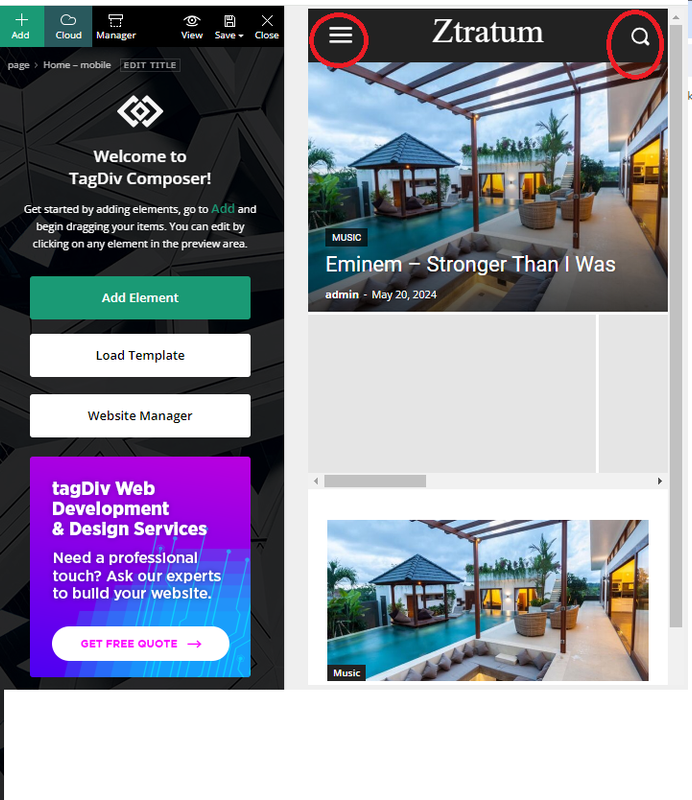
how/where can I change these pages:
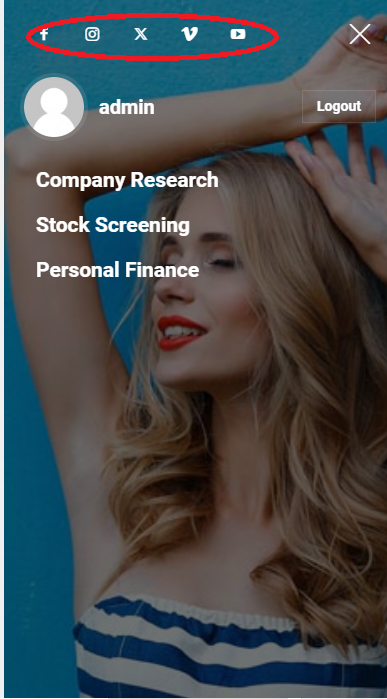
Mobile menu I want to remove the background image and some of the social buttons
and also at the mobile search page, how do I remove the background image: Mobile search
Thank you!
Patrick
 mauta
mautaHi, I want to ask why the little undo arrows at the bottom right of edit only appear for a few seconds while the page loads and then disappear.
Furthermore, the text with image shortcode creates an error (look image below) and on the homepage it is placed at bottom and the whole page looks messy.
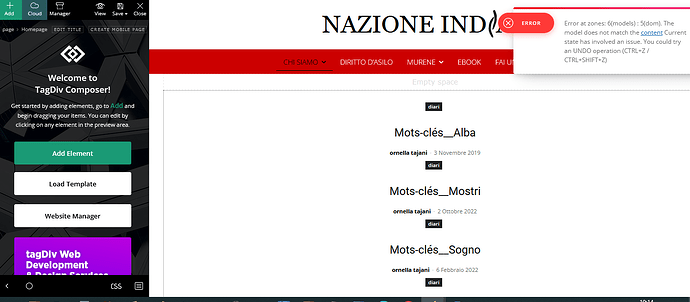
Since undo arrows doesn’t work I could only restore the homepage from wordpress page revisions. It’s really very inconvenient and problematic.
Thank you and best regards
 Southview92
I saw that you recommend rankmath here https://tagdiv.com/best-wordpress-plugins/ but when using rankmath all my pages and posts have dropped out of serps. they are indexed but not in serps. When i read a post by someone who said about this, they said that Rankmath is not compatible with rankmath. please see this post here https://support.rankmath.com/ticket/tagdiv-newspaper-meta-description-not-work-when-use-tagdiv-composer-for-homepage/
I have contacted rankmath about my problem where all my posts are being picked up and indexed but not appearing in serps. My reply from them was that you have not put the right code in for rankmath to pick up the cloudtemplates. so i am just wondering if this is true and also, if it is not true why are they blaming you.
And can you look at my site in2town.co.uk. When i put in the full title of my post so for example
Parents Want Lincolnshire MPs To Resign Over Knife Crime
https://www.in2town.co.uk/skegness-news/parents-want-lincolnshire-mps-to-resign-over-knife-crime/
the page does not come up in google. This page is unique and it is indexed but not appearing in serps. The page is using a cloudtemplate.
Rankmath has said the problem is down to you. My site is ten years old and now all my pages and posts which they are more than 1,400 of them have dropped out of serps since using rankmath and a cloudtemplate
 andrea.turco
 So how can I have the same sidebar in different templates? I.e. if I have a banner in the sidebar, I must change it for each template (homepage, single post, etc). I need a sidebar content that I can change once to take effect to all the website.
 jasondannelly
When I create a new page, it saves as a new individual page as it should BUT it also saves on the homepage template. My regular homepage appears but the new page appears at the bottom of the front page. What am I doing wrong?
 Bettina
 Hello @Ericky!
You can import any other header on each page and assign it manually. Please note that you can not assign a homepage template to a normal page. The homepage templates are available only for the home page set it as front page.
Thank you!
Bettina Hello @Ericky!
Edit the homepage with the tagdiv Composer and add the element called “Menu login”.
Thank you!
 pensini
22/05/2022 Following the last template update, my homepage is completely filled with lines of code. How can I get assistance as I still have three months of support. I cannot find the link to an online chat or support mail.
 stefanegirard
 Hi,
It is done.
– The main menu and the header are back.
– The grid on the Homepage is back.
– Title with Text, Call to action, Social icons blocl still modified
AN update for Newspaper; You are using version 12.6.5. Update to version 12.6.6.: Shall I update?
Still a message: our license of Newspaper Theme is not registered!
Shall I activate my theme again?
stefanegirard Hi
I installed again 12.6.5 but now I have a default header and default menu.
I tried to reactivate the header template but if I refresg the page ano effect.
I reactivated the footer template. It came back to normal.
All other templates are deactivated.
Some of my customisations – mainly titles – of Title with Text have changed
Color of the button of “Call to Action” is blue which is a default color in newspaper theme.
Same for “Social icons” : icons are blue.
On the Homepage (https://www.stefanegirard.fr/) a code appears : [td_block_big_grid_fl_2 sort= »modified_date » category_ids= »-1405″]
instead of the grid.
and above all I have this message in my back office:
UNREGISTERED
Your Newspaper Theme license is not registered yet
 nolandolce
The header logo is set to 100 pixels on mobile, both for the logo that appears on load, as well as for the logo that re-appears in it’s place on scroll. When inside designer, and looking at the mobile view, everything looks fine. However, on my mobile device, the landing page logo is 3x the size it should be. The second logo that replaces it on scroll is fine. Any ideas? This is not occurring on the homepage, just all other pages.
https://rareparenting.com/early-signs-of-a-neurological-disorder/
Thanks!
Anamaria Hello,
Please disable the mobile theme and amp plugins.
Using our theme, you can choose from 3 mobile versions
-> mobile responsive => https://www.screencast.com/t/oJ2ShOp47
-> mobile theme plugin => https://forum.tagdiv.com/the-mobile-theme/
-> mobile page => https://tagdiv.com/newspaper-10-3-7-update-brings-customizable-and-fast-mobile-pages/ The option that you need to use.
Suppose you created the mobile pages with tagDiv Composer. In that case, when you install the Mobile Theme plugin, your pages will be overwritten by the plugin (the mobile theme comes with its templates for page, post, category, etc, so your current templates from the desktop theme will get converted to the mobile theme layout, the page content is made without builders in mobile editor => https://www.screencast.com/t/xbgZG8kH also, the options that are provided to edit the mobile theme version are limited (this keeps the things simple)).
This is a video about Responsive Newspaper Theme, AMP & Mobile Theme, Mobile Pages & Templates -> https://www.youtube.com/watch?v=SpGkOnJeNZY.
So, the mobile responsive is what you see when that you select the viewport on phone => https://www.screencast.com/t/matV17hH, so some settings may apply for each viewport(where is the border blue), and others are not(where the border is black).
The mobile page has the mobile templates from Cloud Library => https://www.screencast.com/t/YCcZ8rL8
The Mobile responsive version of the theme and the mobile page editor can be edit with tagDiv Composer, the mobile theme plugin cannot.
For example, you can have the mobile theme plugin activated and use the mobile page/mobile responsive version for the homepage/pages, but for the categories pages/404 page, you can’t use the mobile page/mobile responsive version if you have the mobile theme plugin activated.
So, if you want to design the pages with tagDiv Composer, you can use the mobile page or mobile responsive version.
Thank you!
 Thomas
Hello
I really like the header of this new demo https://demo.tagdiv.com/newspaper_free_news_pro
I don’t understand how to achieve to have 2 rows.
So I want to import it and modify it with my infos and colors.
But when I go in the Pre-designed Templates – Cloud Library, I only find all the homepage Homepage – Free News template.
If I import it, I am afraid that it will rease all my template site.
It is correct?
If so how I can achieve to importe ONLY the header of this demo without destroy mine?
Regards
 jeevankumar0514
 Error: Ooops… Error 404
Sorry, but the page you are looking for doesn’t exist.
GO TO THE HOMEPAGE
Anamaria Hi,
Please check the console when you hit the save button and see if there is an error. With right-click -> inspect -> console -> select the error in the tab network -> preview, you can see the cause.
Please check this topic https://forum.tagdiv.com/topic/tagdiv-composer-does-not-save-only-content-of-homepage/
Thank you!
Anamaria Hello,
I recommend installing only design of the prebuilt website and after it will show your content https://forum.tagdiv.com/installing-demos/
– If you install with content, it will import demo posts, menus, logos, categories, the homepage, custom design where available, theme panel settings.
– If you install without content, it will import only the design and theme panel settings.
Thank you!
 PIF21
PIF21 I’m confused. I do only have one official homepage. I just created an unpublished draft page within “Pages” to design a new homepage–it is not published and not assigned in the theme panel. I won’t publish it until it’s completed. What is a “staging” and how do I build one?
The problem I’m trying to figure out is that I want the content on the new homepage stretched–it is currently boxed within the large margins of the current homepage template. When I load a new Tagdiv homepage template in my unpublished draft page, the margins of the old homepage settings constrict the new draft–the whole point of the new home page is to eliminate these margins. However to change the margins, I was told I need to go into the Theme Panel and change the “background boxed layout” and “stretch background” options. Unfortunately this changes the current published homepage, not just the draft I’m trying to work with. Is there anyway to create a new homepage without affecting the current homepage?–this seems to be a fundamental function.
I’m simply trying to create a new homepage on the backend without affecting my current published homepage so that I can ultimately publish the new homepage and remove the old one when I’m ready.
 mjaros
I updated to 12.6.6 as recommended by the system. A disaster.
Design of the homepage was completely gone. I was using a static page created in Tagdiv Composer. It seems that some of the old modules (I was using a regular blog module 20 – image on the left, text on the right) are no longer supported. The offer of new modules is poor.
Fonts changed. A silly subheadline was added to my logo (Discover the art of publishing – WTF?) I never used nor wanted a subheadline.
Worse still, clicking on an article (after I repaired the static home page) results in an error (some kind of booster error).
This all happened due to a routine update of the software!
Using the time machine and going back to 12.6.4 did not help!
I require that you guys immediately fix this issue. My website is down because of your poorly prepared and poorly communicated “upgrade”.
The website is at
https://www.jarosovi.cz/
I hate the new look of the homepage but I just had to cook something quickly to have the home page operational.
 lonelycat91
I got a problem: everytime new user click on my article link to website, It’ll automatically redirect to homepage. This issue happen only for the first time visit website or after clear browser data
Url: https://influence-news.com/campaign-for-4th-election-of-capital-provincial-municipal-district-and-khan-councils-kicks-off/
Anamaria Hi,
Please check the console when you hit the save button and see if there is an error. With right-click -> inspect -> console -> select the error in the tab network -> preview, you can see the cause.
Please check this topic https://forum.tagdiv.com/topic/tagdiv-composer-does-not-save-only-content-of-homepage/
Thank you!
 Yohanndev83
 Right, that the part I missing in the blue box, thank you.
Problem for me now is historical the Excerpt field is used for SEO purpose in head meta page. So I need a way to shrink it for displaying in elements on the homepage. Is there way to make a Hook to change the behavior without modified the TagDiv Composer plugin ? it will be nice
Bettina Hello!
Normally, you can have only one homepage. If you need any other page style, you can add a new page template, not a homepage template. They are different. I suggest you build a staging if you want to craft new homepage styles, or do not assign it in the theme panel. If you want to copy a style from your staging install, you can simply edit the template normally, copy the code style, and add it to a new page on your current website install.
Thank you!