
- NewsmagHomepage – How to build and set it
- NewspaperHomepage – How to build and set it
- NewspaperHow to edit modules for Flex Block X
- NewspaperGeneral Options that May Interfere with the Newspaper Theme
- NewspaperThe Newspaper Mobile Theme: Introduction
- NewspaperHow to Add a Logo in Newspaper
- NewspapertagDiv Shop
- NewspaperHow to Use tagDiv Cloud Library
- NewspaperDesign your Post Pages using the Cloud Library Templates
- NewspaperHeader Builder
- NewspapertagDiv Cloud Library Plugin
- NewsmagtagDiv Composer Tutorial
- TutorialsFrom WPBakery to tagDiv Composer
- NewspapertagDiv Composer Tutorial
- NewspaperNewspaper theme documentation
- NewspaperThe Mobile Theme
- NewsmagNewsmag documentation
- NewsmagMain menu
- NewsmagLogo & Favicon
- NewsmagPage templates
 Bogdan B.
 Hello,
The author box link should link to the author page, not the homepage. You seem to have a redirect in place so please either check for any redirect rules you might have set or try to disable all plugins except visual composer, clear cache and reset cdn files if you use it.
Thank you!
 footballcitizens
Hello.
I had a plugin named “Maintenance Mode And Coming Soon Page”. I have deactivated it and deleted it but it still shows the manteinance mode when someone tries to enter to the website. I only can see it if I login into WordPress.
It just happens with the homepage (www.footballcitizens.com). If I try with another page or post it works (http://www.footballcitizens.com/champions-league/)
I have cleared cache but it still doesn’t work.
Help please!
 Andrei L.
 Hi
@rida in order to have an image displayed on module you have to set a featured image for your posts in post editor: http://screencast.com/t/XjkIPaD3apt8 To disply recent posts on a page you can use theme’s blocks and choose in block’s filters latest post. For more details please check this link: https://forum.tagdiv.com/newsmag-block-settings-tutorial/ You can also use page builder+latest articles as page template: http://screencast.com/t/Cgwv9mQ2Go
Please refer to our documentation for more details about how to use Visual Composer and how to setup the homepage: https://forum.tagdiv.com/newsmag-homepage-how-to-build-and-set-it/ – https://forum.tagdiv.com/newsmag-page-templates/- https://forum.tagdiv.com/newsmag-how-to-use-visual-composer/ You can also check our youtube videos: https://www.youtube.com/watch?v=TUdVeZ1pbuc&list=PL6CsDkMaejhpWFcFNOIDfdp5nIT0NbUbj
Hope this helps!
Thanks!
 Incrosnatu
Hi! Whenever I click on the author box (to see my posts,comments) it redirects me to the homepage? is it a problem of the theme or there is something wrong?
my site: http://www.sociedelic.com
 tvib6
tvib6Hi,
I’m using Big Grid 3 on my homepage and the titles of posts are being cut off.
Is there a way to specify the number of characters shown? Or a way to tell the grid to put the post title over 2 lines?
Failing that, is there a way to specify different post title font sizes within the grid?
Many thanks
 Sasser
 Thanks for your patience. But concerning point 5. Now all links are underscored including all links on the front page /homepage: http://newsvoice.se/ Is it possible to only have the links within the posts to be underscored?
 tanapol4637
1.How to hide Categories, Author and Comment Count in homepage. Example : Screenshot_1 (In red Circle)
2.How to adjust speed menu.
When I move mouse from “Menu Circus” to “Menu More” It use about 0.5 Second for hide green color on “Menu Circus”.
I want to hide green color on “Menu Circus” immediately When I change menu.
Example : Screenshot_2 (In red Circle)
 johnnynexys
Hello guys, i have the newsmag on http://www.inkouskous.gr and unfortunately at homepage google ads is not showing (at posts its visible). I try the AdRotate Plugin as you suggested on the forum, but nothing changed. Adsense Plugin didn’t help also.
In some other forums are saying maybe its conflict with RevSlider or other plugin of the premium theme.
Any ideas?
Thanks
J
 gfm1978
On my website, http://www.allon.it I use a Slider on the homepage.
I have a strange problem: as you can see during the page loading the height of the slider changes!
I checked your demo on this page http://demo.tagdiv.com/newspaper/ios-slider/ and problem isn’t present.
Thanks in advance
P.S. I tried also to disable all the custom css in theme panel (even if there isn’t anything related to slider in that section) but the problem persists
Andrei L. HI
The theme display three posts from featured category on mobile theme. To remove those posts from mobile homepage just remove them from Featured category.
Thanks!
 dritanlekaAndrei L.
 Hi
I’ve checked your site and noticed that you have a very strong cache which may affect page’s content. The cache may come from from your server so try to contact you host provider and ask him if there is an cache on the server. The cache it’s very tricky, even if you deactivated the cache plugin some pages may still be delivered from cache. Try to enable WP Super Cache again and delete the cache a few times then test the site again. Note that WP Super cache is not fully compatible with V 4.6 of wordpress but you can use the fix from this topic as a temporary solution: https://forum.tagdiv.com/topic/mobile-theme-does-not-work-properly/
There is a big difference between mobile theme and the responsive theme. Basically the mobile theme load a simpler version of the page, fewer resources are requested and the page load faster. There is no support for shortcodes in mobile theme and when the server prepare the html it’s skipped a lot of php code from Visual Composer, the queries made to the database are fewer and the response time is smaller. Also page size is smaller on mobile when mobile theme plugin is active.
However the difference may be negligible if the site is not properly optimized. Our theme was developed to be fast but to hit a good score may be needed additional customization.
Check this topic for more details in page speed regard: https://forum.tagdiv.com/topic/website-memory-problem/ The thread is from Newsmag theme but the same applies for Newspaper.
For more details about mobile theme and how it work check this link: https://forum.tagdiv.com/the-mobile-theme/ Basically the mobile theme works like this:
– on homepage displays three posts from featured category fallowed by latest article list.
– on other pages displays only the content from mobile editor.
When mobile theme is deactivated you will have the same content displayed on any device, there is no need and additional setup for the page.
I hope this helps.
Thanks!
Andrei L tagDiv!
 Nano
NanoHello,
Since last 4-5 days , I am working on Newspaper theme for day and night and have done many modifications. But there are few parts of various demos that I do not know to imply. Since I am the creative unique layout for my home page so I don’t’ really want to import the full demo settings from any particular demo types.
Though for learning purpose I do have options to take the backup of my current homepage using “Visual editor classic mode” and then install any demo I want to use. But the real problem is- Installing new demo layout not only changed the Homepage layouts but it also changes various other settings like theme color, header , fonts etc.
I have already worked hours for other settings and hence I don’t want to loose any other settings. So, I want only “Classic mode codes” from all our demo layout styles. or If there is any other way to get the “classic mode” layouts for homepage like using google chrome “view page source options etc.
If it’s not possible to provide classic mode codes for all themes , please give me the codes for “http://demo.tagdiv.com/newspaper_blog_travel/ ” because I love the first front page slider on this page and I want to use it.
or if you can suggest any other method to achieve what I want to achieve, please let me know.
Thank you.
Bogdan B. Hello,
There are 2 ways to remove this grid. The first is the easiest. You simply need to remove any featured posts from your site. The grid will show any post that is added in the featured category. If you have no posts in it, there will be no more grid on the homepage. The second involves editing the theme files and removing the grid from the code: http://screencast.com/t/AyODqEzMGc8
Thank you!
NanoI have installed Newspaper theme very recently on my website tomatoheart.com and hence I have all the updated version of all themes and plugins. My Mobile plugin is active and I can see it’s settings under “Plugin settings”- “Mobile Theme”
I do have made some changes here like Search button colors or menu background colors but when I visit it on mobile – I only see the mobile responsive version of the desktop version, not the mobile plugin version.
A few days back, I did notice the mobile plugin versions ( with three featured and then latest articles) but it never remains permanent and now I can’t even see it.
Are there any things which I should enable or disable after installing and activating “Mobile Plugin” ? Since I am editing/modifying various things, hence I have disabled super cache and CloudFlare integration options, hence there should be no issues because of cache or cookies.
Also, please tell me what is the right way to use default default mobile responsive version of this theme rather than using mobile plugin version? Should I deactivate the plugin ? How much speed difference is there between mobile plugin version and mobile responsive version? If it’s very little or negligible , I would love to use the mobile responsive version with all visual composer elements.
3. Is there any way to design two different homepage design using Visual composer , one for mobile and other for desktop as we have options to do the same with other pages like Contact pages, about us page etc ( Mobile editor and desktop editor) ?
4. If the mobile plugin is disabled, still I have re-write – pages like ( about us, contact us etc) in mobile editor section of pages or it’s valid only in case , I have enabled mobile plugin?
Please help me to understand and correctly setup the mobile theme for my website. Thank you.
Andrei L. Hi @rida
You can use blocks to sort posts from each page. For example in page 1 you add block 1 and choose in filters category1; http://screencast.com/t/BzaQQ74DhD9e For page 2 you can do the same, just change the category: http://screencast.com/t/8PwvC4KCIz2 You can also use page-builder+latest as a page template and choose the category from post loop settings: http://screencast.com/t/F2b8jkN9LXy
For more details about how to use visual Composer and how to built pages please check these links: https://forum.tagdiv.com/newsmag-how-to-use-visual-composer/ – https://forum.tagdiv.com/newsmag-block-settings-tutorial/ – https://forum.tagdiv.com/newsmag-homepage-how-to-build-and-set-it/ – https://forum.tagdiv.com/newsmag-page-templates/
Hope this helps.
Thanks!
Andrei L. Hi
1. I assume that you’re referring at trending now block. If so it can be added on the page using Visual Composer page-builder: http://screencast.com/t/UGEUCjF0CkR For more details about how to use Visual Composer please check or documentation: https://forum.tagdiv.com/newsmag-how-to-use-visual-composer/ – https://forum.tagdiv.com/newsmag-homepage-how-to-build-and-set-it/
2. Please provide your site url so I can have a closer look and get back to you with a more accurate answer.
Thanks!
 muppins
Ad code:
<script type="text/javascript">

  ( function() {

    if (window.CHITIKA === undefined) { window.CHITIKA = { 'units' : [] }; };

    var unit = {"calltype":"async[2]","publisher":"chaoticways","width":300,"height":250,"sid":"Chitika Default"};

    var placement_id = window.CHITIKA.units.length;

    window.CHITIKA.units.push(unit);

    document.write('<div id="chitikaAdBlock-' + placement_id + '"></div>');

}());

</script>

<script type="text/javascript" src="//cdn.chitika.net/getads.js" async></script>
Size: 300×250
put in template 11 post type.
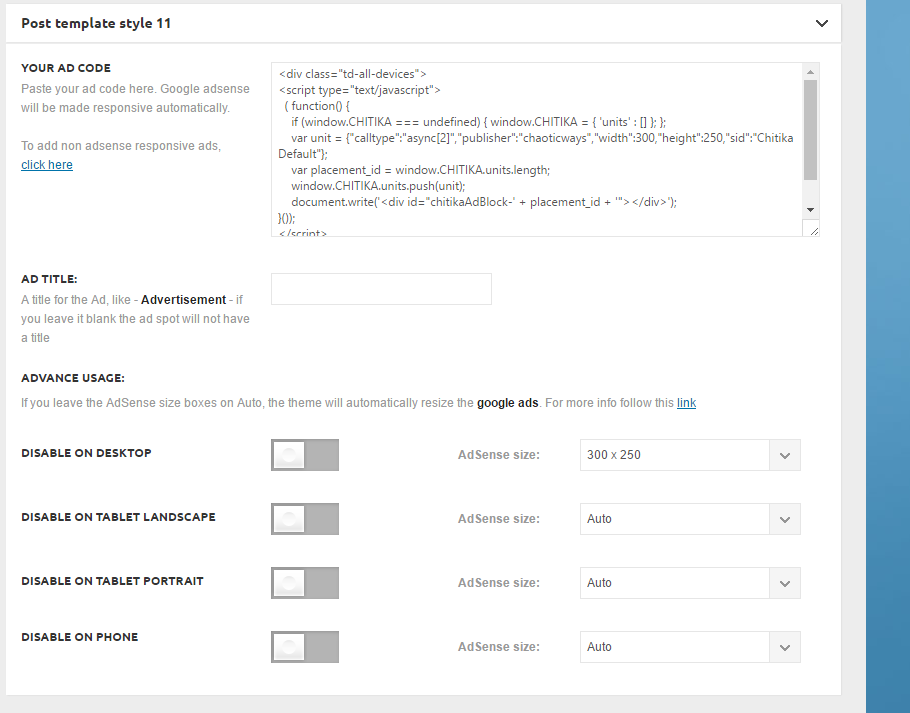
It’s not showing up on the top right next to the video:
http://ghesports.com/runescape-chaotic-ways-pk-video/
Nor is it showing on the homepage.
 kunzum
Please check http://indiaiscalling.travel/
You will notice an image at the top in the background showing some buildings. This is what came in the demo. How do I change to one of my own?
Ajay Jain
ajay@ajayjain.com
 dancebr
Hi
We have serious problems in change or editing the home page.
When I click to edit the page, it sdoes not load , does not open for editing.(only the home page, all other pages are ok.
My site: http://www.dancebr.net
Thanks
 Walter
Hi
I’m working in a website puerta19.com, and have an issue when I tried to use the Social Counter (homepage, side bar).
I did it following the tutorial (https://forum.tagdiv.com/tagdiv-social-counter-tutorial-2/) but I can’t get the actual fans from FB.
Could you help us?
Thanks in advance.
 sainthilaire
Hi i have some problem with mobile theme because it lost the style for example this http://www.sabanetasr.com/wp-content/uploads/2016/08/Screenshot_2016-08-30-16-06-45.png doesnt see like the correct homepage style. the correct is http://www.sabanetasr.com/wp-content/uploads/2016/08/14045424_1263535043687314_1765977916_o.jpg lost the style and an other problem is that views counter post takes to upgrade; for example desktop theme show that have 500 views and in the mobile thema only 172 Views.
 ntvweb
Hello,
I’m currently using a grid to layout the latest posts for a news website on the homepage. However I’ve been tasked with finding a way to add a breaking news banner to the thumbnail when a post is both in the latest news category AND in the breaking news category. I have the banner working great (see below), but I have no idea how to trigger the banner to show up..

I’d really like to be able to trigger this banner if the 1st post is in the breaking news category. Any idea how I can tell if the 1st post is in the category?
NanoHey,
SO I tried to use the available “Facebook Like” element under VC on the homepage but it only shows small “Like” button which is so small that it can’t be noticed by visitors. The other option to ask visitors to like our Page is using Social counter plugin but that doesn’t have inbuilt like button. I mean users have to first visit the page and then like the page.
So, I want some simple codes to use the “Facebook Button” something like this : https://i.imgur.com/jl5wOdd.jpg .
It’s the same ” like ” button but with BIG texts and colorful background asking visitors to like the page. It can be prominent for users.
We do have “Like button” codes and “box” elements. Can you help me in creating this ? Thank you.
 starlogic
I am getting this error on my site http://www.nigerianbride.com:
Fatal error: Call to undefined function vc_map_get_attributes() in /home3/waakmm0aaf7m/public_html/wp-content/themes/Newsmag/vc_templates/vc_row.php on line 32
All the inner pages seem to be working but the home page is not working. I disabled “WPBakery Visual Composer” in the plugins section and the homepage did manage to pop up but not in the normal structure. I meed help please.



