
 chriswp
Hi there
I have been using your theme for many years on several projects. I am worried that the speed issues are never addressed. My site 7.dk is slower than ever on mobile. It is hosted on Kinsta – supposedly one of the best hosts out there. It uses CDN, and I have optimized the site using Imagify for the images, WP Rocket for the caching and in general I don’t have many plugins installed.
What to do? Any suggestions?
 DeonvanHui
Hi – I get the following error under the header of my site – http://www.kormorant.co.za
Warning: Attempt to read property “post_content” on null in /usr/www/users/kormogrrya/wp-content/plugins/td-composer/legacy/common/wp_booster/td_menu.php on line 204
I uninstalled and reinstalled the plugin but still the same.
Thank you
Deon
 Bettina
 Hello Renato Goldoni!
Please uninstall the mobile theme plugin, and the responsive version should be available on your mobile version.
Thank you for your feedback!
 gorka
gorkaHi, I’ve tried to update the theme to the latest version. Everything is configured, and the license ok, appears as REGISTERED, but when I try to update from 12.1.1 to 12.2 from the ‘Install update’ button the following screen is an error one, showing the message ‘Sorry, you don’t have enough permissions to access to this page’ (I’m admin, of course)
May you help me to update it?
 travelopia123
 the update is not proper installing .
? Plugin could not be activated because it triggered a fatal error.
Warning: require_once(/home/841767.cloudwaysapps.com/jbcqeewryw/public_html/wp-content/themes/Newspaper/includes/wp_booster/td_api.php): failed to open stream: No such file or directory in /home/841767.cloudwaysapps.com/jbcqeewryw/public_html/wp-content/plugins/td-multi-purpose/styles/tds_api.php on line 33
Bettina Hello @BrinjalCode !
It seems that something in your server settings is blocking the process.
Make a test and deactivate ALL plugins except tagDiv ones, also if you are using a cache plugin, deactivate it, clear all cache and try again.
Examine some other potential interfering factors: https://forum.tagdiv.com/general-options-may-interfere-newspaper-theme/
If that problem is still there, then please execute these steps:
1. deactivate TagDiv Composer & Cloud Library
2. uninstall (delete) TagDiv Composer & Cloud Library
3. clear cache (if a cache plugin is present).
4. install TagDiv Composer & Cloud Library
5. activate TagDiv Composer & Cloud Library
6. clear cache (if a cache plugin is present).
Thank you!
travelopia123 the main issue is that there remains of the old version wich blocking proper fucnctions of the version 12 , i like to know how do i remove the traces of the version 11 , so to make a fresh install.
thanks
travelopia123hello dear friends
after te update from version 11 to 12 , the mobile version dont working right , also the website does not working properly , remains of the version 11 blocking the theme.
how do i remove any traces of the old version so to start a fresh istallation?
thank you very much.
Bettina Hello @diha!
Did you install Yoast or another SEO plugin? With Gutenberg, you can edit posts and pages.
Thank you!
 Anamaria
 Hello,
Please delete the tagdiv Composer plugin, install and activate it from newspaper -> Plugins -> https://i.imgur.com/gHZuNQm.png
Also, ensure that the error is not caused by a plugin that blocks the process of installing the plugin.
Thank you!
Anamaria Hi,
For Cloudflare we have only this guide https://forum.tagdiv.com/cloudflare-cdn/
There are many optimization guides provided by our users here in the forum, some made by us; you could check some of them
– https://forum.tagdiv.com/cache-plugin-install-and-configure/
– https://forum.tagdiv.com/how-to-make-the-site-faster/
– https://forum.tagdiv.com/topic/high-number-of-ajax-request/
– https://www.infophilic.com/get-almost-100-pagespeed-newspaper-theme/
– https://forum.tagdiv.com/topic/score-100100-pagespeed-with-newspaper-wordpress-theme/
– https://www.andraware.com/wp-rocket-for-newspaper-theme/
– https://spraythemes.com/newspaper-theme/how-to-speed-up-the-newspaper-wordpress-theme-using-wp-rocket/
– https://forum.tagdiv.com/topic/page-speed-guide-for-2023-beginners-and-advanced/
– https://forum.tagdiv.com/topic/newspaper-theme-speedify-your-website/
– https://forum.tagdiv.com/topic/tutorial-chriss-custom-optimizations-for-functions-php-etc/
– https://forum.tagdiv.com/cloudflare-cdn/
– https://forum.tagdiv.com/topic/theme-causing-high-cpu-usage-2/
– https://forum.tagdiv.com/topic/sql-querys-high-cpu/
– https://forum.tagdiv.com/topic/newspaper-theme-slow-to-respond/
– https://premium.wpmudev.org/blog/optimizing-your-wordpress-database-a-complete-guide/
– https://underconstructionpage.com/optimize-wordpress-database/
– https://crunchify.com/better-optimize-wordpress-database-all-in-one-guide/
Also, pagespeed is not covered by support -> https://forum.tagdiv.com/newspaper-theme-support/
Thank you!
Anamaria Hello,
Please let me know if you use Jetpack; if yes, please check this guide https://forum.tagdiv.com/general-options-may-interfere-newspaper-theme/.
Also, I saw that you have an issue, and the mobile version is displayed on the desktop -> https://i.imgur.com/hna3Qmt.jpg.
To solve this, please check if your cache plugin has an option for mobile version https://i.imgur.com/YkuXcG8.png – https://i.imgur.com/7WTiZN7.png.
The solution would be to use the recommended WP Super Cache plugin instead and activate these settings (especially the mobile device support): https://forum.tagdiv.com/cache-plugin-install-and-configure/
Thank you!
 diha
diha Hello Bettina. Thank you for your reply!
After checking, I installed the Gutenberg plug-in. But I’m a beginner, so I don’t know which file to modify.
Can you tell me? Thank you!
 reckonmind
 Hello @Bettina,
I did as guided by you. There is no change. As said earlier, I am able to install few other demo websites but specifically facing issue while installing “Travel Guide” demo.
There is something not correct. Kindly help. If you want, I can provide you the login details.
Bettina Hello @kantauganda!
From what I can see, you use a cloud demo. So, you should access the homepage on your frontend and create a mobile page from here: https://prnt.sc/zRRCL6C3lm5l
We have 3 options for mobile versions that you can use:
1. Responsive version: A responsive version of your website looks similar to the desktop version. TagDiv Composer is used to edit the page.Click on the mobile viewport: https://www.screencast.com/t/XDQJedlggSB. There, you can see your mobile version and edit or adjust the elements to look better.
2. Mobile pages: https://tagdiv.com/newspaper-10-3-7-update-brings-customizable-and-fast-mobile-pages
3. Mobile theme plugin: The Mobile Theme is a performance-optimized theme included in the main Newspaper theme that only loads on mobile devices. It comes with its own templates and designs for pages, posts, categories, etc., so your current templates from the desktop theme will get converted to the mobile theme layout. Please see https://forum.tagdiv.com/the-mobile-theme/ and https://forum.tagdiv.com/mobile-theme-introduction/ for more information.
A full explanation is here: https://www.youtube.com/watch?v=SpGkOnJeNZY
If you need to use the mobile version 1 or 2, then you need to uninstall the Mobile Theme plugin.
Thank you!
 moukdad
There has been a critical error on this website.
 Luca
LucaI tried to search but could not find anything , it is not difficult that I was wrong .
Anyway before installing useless plugins , I would like to know if it is possible to insert in the post template a disclaimer that appears automatically in the bottom of the post without having to rewrite it every time .
Let me know how to do it because I am a poor fool .
reckonmindHi, I am unable to install prebuilt demo as shown on https://demo.tagdiv.com/newspaper_travel/ however didnt find any issue in installing the “Default Pro Demo”. There is something wrong with the the design name “Travel Guide”. I am unable to install it. During the process a popup occurs saying
“tagDiv Importer detects that your server is not properly configured.
Don’t worry, the importer will continue to install the demo after you click the OK button.
Steps to verify:
– Please go to the SYSTEM STATUS tab and check if all parameters are green- Verify the permissions on your upload folder
– Contact our support via email contact@tagdiv.com (please provide your product license key)”
Kindly help!
 srzeyamlon
Hi,
I try to delete, delete cache and install again, but I can’t instal plugins:
https://prnt.sc/w09XeebpOB9d – this is screen with exact error codes. What I should do?
 LauraBV
I haven’t got the mobile site plugin installed currently (it meant lots of my pages didn’t display correctly so I uninstalled again). Where pages don’t show correctly, I’m creating a mobile version, which works well enough.
BUT – where I don’t have a specific mobile page created, the header logo switches to the generic Newsweek one on mobile, and I can’t find where this is stored in order to change it!
Can anyone help?
Example page – https://www.theblackmorevale.co.uk/2023/01/21/humble-catkins/ Perfect on desktop,and displays well but shows wrong logo on mobile.
 Calin
Calin Adding multiple authors to your articles
Content
In this tutorial we will show you how to implement multiple authors to your posts using the Co-Authors Plus plugin.
We will make the implementation in the child theme so it will be easier to manage on theme updates. You will need to install and activate the Co-Authors Plus plugin first.
Adding the multiple authors is a three step process.
- Step 1 – Adding the required functions in your child theme functions.php file.
We created 2 custom functions for the author and for the author box which we can then call on the post styles and not have to use the entire functions each time.
Add these functions in your Child theme functions.php file: https://pastebin.com/ciYrSZvQ These will create the custom implementation to add the co-author and the author box for each co-author in particular.
- Step 2 – Adding the single post templates to your child theme.
In your main child theme folder, you will need to create the following folder structure:
Newspaper-child/parts/single
Then, under the “single” folder add both the single-template and the loop-single files for each of the post styles you use on your articles.
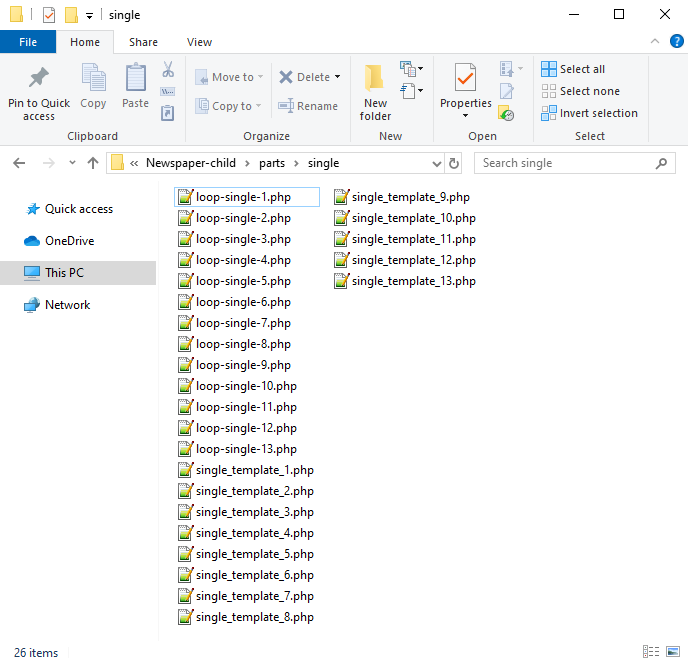
Now you will have to identify where the author is being called in each post style.
For styles 1, 5, 9 and 10 you will find the author code in the loop-single files while for styles 2, 3, 4, 6, 7, 8, 11, 12 and 13 the code is fount under the single_template files.
Edit the files corresponding to the style you want to apply the co-authors to and then call the functions added at step 1. Replace the default author and author box codes:
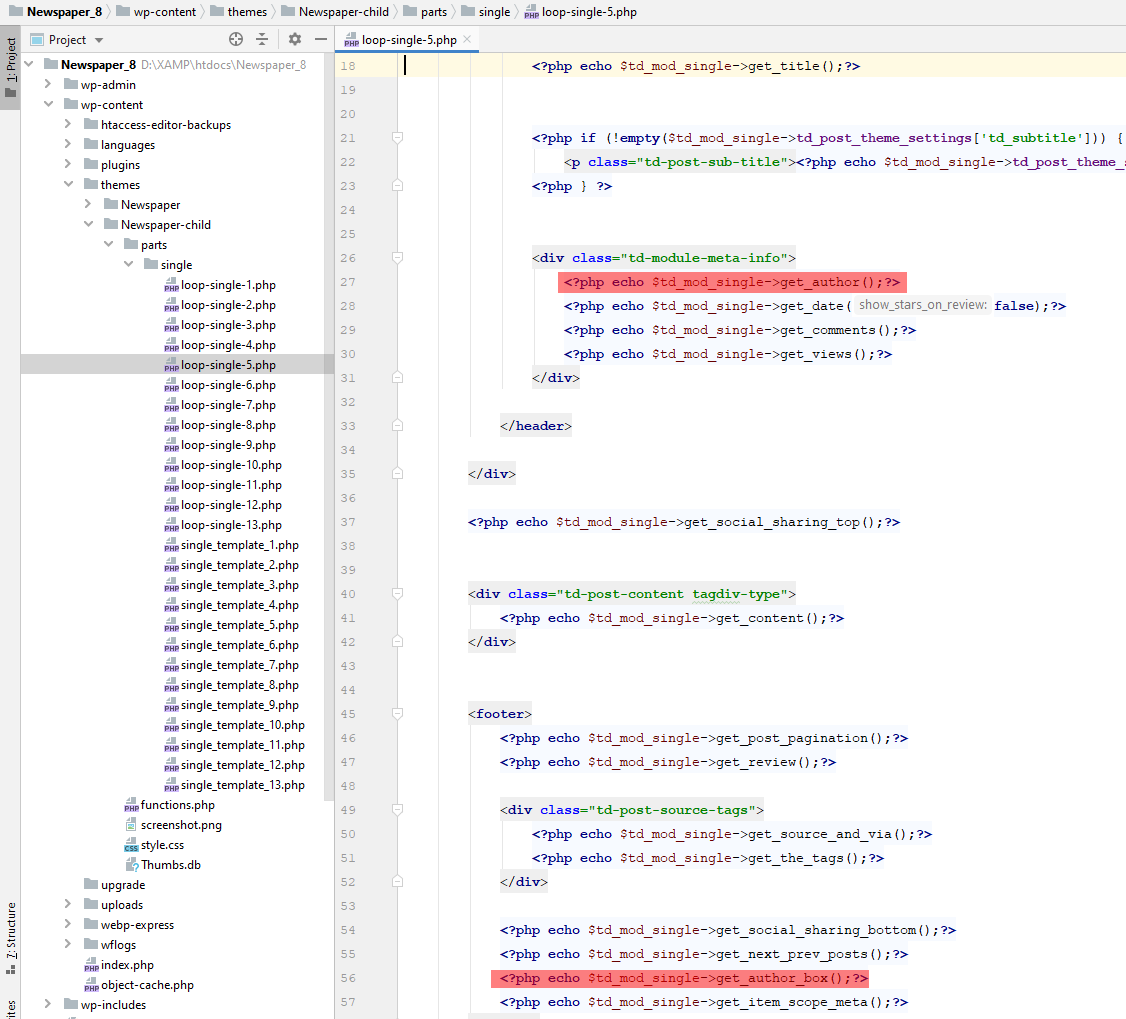
Replace the highlighted code with the following codes:
<?php echo td_get_post_coauthors();?>
and
<?php echo td_get_post_coauthors_box();?>
Maintain the codes position in the .php file though for proper results. \
- Step 3 – CSS styling
In order for the co-authors to position properly we also need a bit of CSS code to ensure proper styling so please add the following CSS code in the the theme panel under custom code-> custom CSS:
https://pastebin.com/dRaStewQ
Now you simply need to edit your post and add multiple authors using the plugin author field:
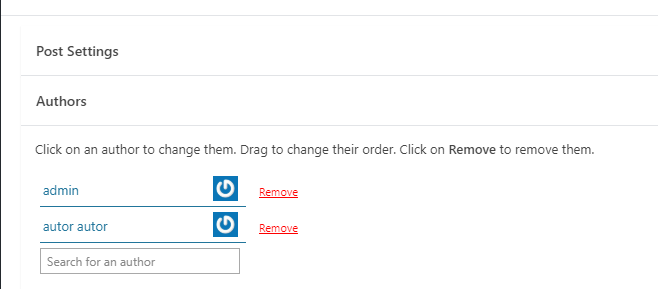
 shivamsdesk
After installing the theme on wordpress I cant use headers or footers as it asks me to choose from cloud template, and there it shows an error saying Envato key is missing, please register your theme using a valid key. Please reply asap, as this website is an assignment and I have to submit my assignment at the earliest.
 Hamid Fekhart
 Bonjour,
j’ai fait ce que vous avez demandé et ça ne marche toujours pas ! Je n’ai laissé que des extensions TagDiv et j’ai même changé de Thème pré-construit. Aussi, j’ai essayé sur un autre micro, histoire de vérifier si ce n’est pas l’affichage qui pose qui problème. Dites, je vous prie, et si je désinstalle le thème newspaper et le réinstalle ?
Merci de répondre, car là, je suis carrément bloqué.
Cordialement.
 sagoralibd
 Dear sir/mam,
I have installed newspaper theme on my xamp server. Sir/mam when i am uploading image in wordpress on xamp server images is not getting duplicate here but still settings are default. look : https://ibb.co/YQs30L7
Is there any solution that will show the images on the font page without duplicating them.
Because if an image creates 4 or more thumbnails, then 20 news are posted throughout the day, at least 30 images are uploaded. Accordingly if one Image 4×30 = 120 separate thumbnails are being generated which overloads the server and fills the storage.
-
This reply was modified 3 years by
sagoralibd.
 editorepgn
Hi. When sharing a post from our site to Twitter using the Share Buttons, the image (or card) does not display on the share. The share will display the post title, links and our @, but no image. We have the Yoast plugin and have the Twitter setting enabled and ‘Add Open Graph meta data’ on Facebook enabled. Facebook shares work properly with the image. All our meta tags, both twitter and og: appear to be correct.
We also have the plugins: WP to Buffer Pro, WP Fastest Cache, Really Simple SSL. We have tried deactivating one at a time, but did not solve the problem. We tried disabling our CDN, and checked our SSL via Qualys SSL Labs. When using the Twitter Validator, we receive the message: ERROR: Fetching the page failed because other errors.
We tried to disable the share buttons from the Theme Panel/Social/Social Share, but the buttons still appear on the post pages. We were going to install another share plugin just to test, but cannot get the Share buttons off the posts.
Any suggestions for other things to check.
website: https://epgn.com
Thank you.



