
- NewspaperThe Newspaper Mobile Theme: Introduction
- NewspaperThe Mobile Theme
- NewsmagMain menu
- NewspaperMain Menu
- NewspaperHow to Add a Logo in Newspaper
- NewspaperBig Grid Flex Settings
- NewspaperHeader Builder
- NewsmagIntroduction
- NewsmagLogo & Favicon
- NewsmagBackground introduction
- NewsmagTheme colors introduction
- TutorialsWhat is Ajax preloading?
- NewspaperFont Customization
- NewspaperTheme Colors Introduction
- NewspaperBackground Introduction
- NewspaperHow to Install Newspaper via FTP
- NewspaperHow to Install Newspaper via WordPress
 Calin
Calin Hi,
Please read this topic: -> https://forum.tagdiv.com/topic/mobile-menu-blue-text-change-clour/
Thank you.
 Simion C.
 Hi,
I believe those socials will be displayed regardless of the theme panel setting. There is no options to disable them specifically. You could remove them like this
– https://forum.tagdiv.com/topic/mobile-menu-23/
Sorry for any inconvenience. I will make a note of this and it will be considered to add an option to remove the socials from the mobile menu modal.
Thanks
Simion C. Hi,
So once you set a menu for the mobile theme in the theme panel mobile settings, it gets reset/removed? Does it happen after a period of time, or specific actions on your part?
I will make some tests on my side to see if it happens for me as well. You could check if there are enough resources, as mentioned in this guide
– https://forum.tagdiv.com/requirements-for-newspaper/
Thanks
 wimothy
 please can anyone help : http://www.sportevents.eu/epicseriestest2/
it worked yesterday. direct loading of the ajax filter selections, now it takes ages
also on mobiles the menu does not work untill the whole page is loaded and this takes also more then 1 minute
Calin Hi,
Please go in Newspaper>Theme panel>Background and look in Mobile menu/search background and remove the background image
https://www.screencast.com/t/eKKAOq9tbh4F
Thank you.
 Nextlink80
Hi,
https://imgur.com/a/1vew3iy
I tried the theme panel setting and deactivated the top bar menu, social icons, show sign in/join.
Even tried via the mobile theme plug in and deactivated the show sign in/join.
However this setting is not reflected correctly on mobile menu and it continues to display the social icons and sign in/join option.
How can i diasble this on mobile?
 omrakdeniz
 I mentioned the color change of blue
mobile menu
omrakdeniz andxtagdiv
I keep losing the mobile menu with td-mobile-plugin when I make changes in the menu. Re-saving the associated mobile menu in theme panel > mobile settings repairs that.
Just letting you know.
 williamloco
When I click on the hamburger menu at the top right,
rather than collapse and show the menu options, it makes my whole page zoom out a bit…
I then have to click on the home button, and then press on the menu button again, and then it works.
How can I fix this issue?
Thanks
 devy
devyI have recently performed a Lighthouse Audit on Google Chrome for my mobile site and it failed on a few issues in the Accessibility category. Please see the list below and advise how these can be fixed:
Buttons do not have an accessible name
<i class=”td-icon-search”></i>
Links do not have a discernible name
<i class=”td-icon-close-mobile”></i>
<i class=”td-icon-font td-icon-mobile”></i>
<i class=”td-icon-menu-right”></i>
 Catalin
 Hello,
You can use a different menu for mobile if you will use the mobile theme plugin which gave you an option for that. -> https://www.screencast.com/t/WWs22bud8wPC
Thanks for the message!
 Jack Phan
How can I change the contents of the Mobile Menu? In addition to the Main Menu, I have additional items I’d like to display. Or is it possible to set the Mobile Menu to an entirely different menu?
Simion C. Hi,
If you mean that the top menu does not appear on mobile, that would be the intended functionality. The top menu will not appear on mobile.
It could be made to appear with a code, only if the mobile theme plugin is not active. You could try this code for example
– https://forum.tagdiv.com/topic/tag-div-composer-doesnt-render-shortcodes/
If that doesn’t work properly, please provide a link to the website so I can try to modify the code.
Thanks
Catalin Hello,
1)I have checked your screenshots and I saw that you are using the RTL which is not tested with our theme and that’s why you bring some problems with the theme layout, sorry! Please notice that our theme has not been optimized for the RTL version and also, do not support this way, sorry! If you are disappointed about this case, we can provide a full refund, sorry!
3)Regarding page speed loading, please read my response from this topic from here -> https://forum.tagdiv.com/topic/website-loaing-slowly-need-better-pagespeed/
4)I have checked your website on mobile and the main menu button seems to work as expected.
5)Seems to work as expected -> https://www.screencast.com/t/mnMY0h90J
6)Regarding on lazy load, we will improve our theme in the next future updates.
Thanks.
Calin Hi,
I’ve inspect your mobile menu and is seems to work just fine https://www.screencast.com/t/fWt4aEddMfe ( you need to wait until the page is full load ), but you need to optimized your website.
There are some guides here in the forum regarding speed optimization, you could read them and try what is suggested
– https://forum.tagdiv.com/cache-plugin-install-and-configure/
– https://forum.tagdiv.com/how-to-make-the-site-faster/
– https://www.infophilic.com/get-almost-100-pagespeed-newspaper-theme/
– https://forum.tagdiv.com/topic/score-100100-pagespeed-with-newspaper-wordpress-theme/
– https://forum.tagdiv.com/topic/newspaper-theme-speedify-your-website/
– https://forum.tagdiv.com/topic/tutorial-chriss-custom-optimizations-for-functions-php-etc/
– https://forum.tagdiv.com/cloudflare-cdn/
Thank you for your understanding.
Calin Hi,
I’ve tested your mobile menu and it’s work as was expected https://www.screencast.com/t/AozzHqrUD
Also you have set a link on the first element from menu https://www.screencast.com/t/o9zOd2ut
Here is how you need to do:
https://www.screencast.com/t/k3M423uXt61
https://www.screencast.com/t/JGgiK2TDrGGE
https://www.screencast.com/t/xoGU9noxl5
Thank you for your understanding.
Calin Hi,
I’ve check the website and you have the menu in mobile https://www.screencast.com/t/VnkCdcAoEnH .
If you can not manage to activate the sticky menu you can send us an email at contact@tagdiv.com and provide admin login, as well as cPanel or FTP if possible. We will take a look. Include a link to this topic in the email.
Thank you.
-
This reply was modified 7 years by
 Calin.
 Guy Kedar
I get some issue with my top menu in web header… in mobile all fine
I no longer see it… I was try anything!
From going to the Theme panel and change headers layout, fonts, color and more… still not see the header…
also went to appearance menu tab to try to replace the menu, this not helps as well…
need some help with that.
thanks
 reddisl
Hello tagdiv !
1. How to remove latest articles in homepage? I’m using default demo, but I just want to delete latest article from front page but keep the same DEMO content!
2. As my website is in Arabic, and I didnt know that Newspaper doesnt support RTL, unfortunately among other errors there is this mistake in the theme.
== Below every post , there is “find related articles” , How can I fix this so that picture displays in left instead of appearing on right ( because they are hiding related articles titles ) this problem only appears when I navigate website with mobile.
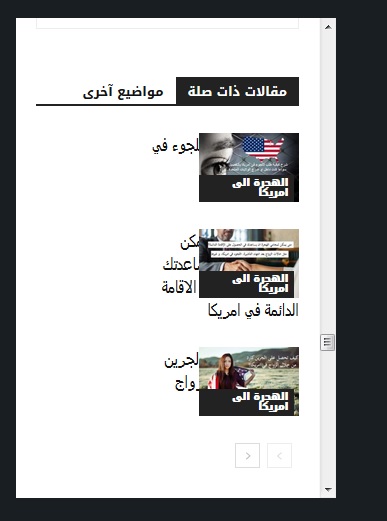
—- ————————————————————————–
I want to help NewsPaper in turning their theme into RTL support !
you might find this helpful! in the next update !
When website language turned to any RTL language , the menu is broken ! I used this CSS to fix it ! and PS Custom CSS in theme panel doesnt work at all!!!
#td-mobile-nav {
position:fixed;
}
.header-search-wrap {
display: none;
}
—– I hided search button because of an error in dispaly – it is mixed with menu button in the right! –
I will try my best to help TAGDIV !
 Vimal Raj
search box working perfectly but mobile menu not working.I uninstalled all plugins..there after the problem continue…help me to resolve that.my website https://www.applysoon.in
 mayer62
1) Hi, i asked help in this topic for logo.
https://forum.tagdiv.com/topic/change-logo-section-to-put-3-different-logos-side-by-side/
I did this modification for desktop: https://www.screencast.com/users/fabiotanas/folders/Default/media/4700775c-b380-4a81-baba-cca3c60c797d
result: https://www.screencast.com/users/fabiotanas/folders/Default/media/f39a650e-45dc-42e3-ab39-6158a90d0d78
this for mobile: https://www.screencast.com/users/fabiotanas/folders/Default/media/3f97f9f1-b39c-4443-9814-961f0745a7ee
result: https://www.screencast.com/users/fabiotanas/folders/Default/media/e8ee4f00-af4c-47bd-bd9f-5966d8955ab9
custom code: https://www.screencast.com/users/fabiotanas/folders/Default/media/eaae21b8-08a6-49d8-b3a3-da447ca03d9a
The layout its perfect but logos for mobile and ipads are blurry. How to do same thing with retina logos? where i have to put codes like i did for non retina logos? thx
2) when i press here (subcategory) button it goes in the subcategory page, i want that goes directly inside one article. is it possible?
https://www.screencast.com/users/fabiotanas/folders/Default/media/9491ca84-b40f-42fa-a9e7-cda09fad038d
3) when i choose theme colors in main menu id like to set the active color only, so i have to disable the hover color for normal menu and sticky too.how to?
4) id like to show a TOTAL views counter in the home page on the sidebar (under advertising) is it possible? thanks for all
reddislhello, I just bought this theme. It is amazing and easy to use, but I have been facing some real issues, which made me really unsatisfied and disappointed.
1. When I was uploading the default theme demo, it kept saying error connecting with server; however the demo was downloaded but in a weird way, as if it is broken.
A. The wide of the page is small then the demo
B. The Menu was totally broken, especially in mobile version!

thankfully, after spending 8H trying to fix this weird issue, I figure out the solution, which is this adding this custom CSS code.
#td-mobile-nav {
position:fixed;
}
The problem is why the hell, does this mobile-nav appears in desktop version? and it’s broken in mobile version.
Please I need the theme to be wider as the demo, and the menu work without this additional css.
—————————
2. Facebook counter is not working ! it is showing 0 followers!
Please fix this issue, I even uninstall and reinstall social counter from theme panel but facebook still not working.
—————————
3. The theme is far from being mobile friendly !!!! too many render blocking CSS and JS , I used TD booster but it said conflects with WP security plugin! and it is out of questions to delete this important plugin; so I used autoptimize plugin! he successfully combine CSS, but no JS are combined !!!!
Test in google test speed page, show 20% for mobile and 80% in desktop !!! huge difference !!
—————————
4. The menu in mobile is not working correctly until the whole page load !
5. when I activate TOP BAR, the mobile menu doesn’t work at all.
6. Lazy load is not working at all in mobile ! ( google test speed page ) show warning about lazy load in mobile.
—————————
I am tired, it is 02:14 A.M , I spend the past 11 Hours trying to figure out solutions! but I failed!
I need TAGDIV support !
Please help me, ^^
ps: my website is in Arabic, but that is not the reason for those issues anyway.
 muqdishonline
 I did everything I read to get my sticky menu. It did not work
can someone please help? also – mobile my option to the look the menu disappeared.
Thanks guys
mayer621) Hi, i asked help in this topic for logo.
https://forum.tagdiv.com/topic/change-logo-section-to-put-3-different-logos-side-by-side/
I did this modification for desktop: https://www.screencast.com/users/fabiotanas/folders/Default/media/4700775c-b380-4a81-baba-cca3c60c797d
result: https://www.screencast.com/users/fabiotanas/folders/Default/media/f39a650e-45dc-42e3-ab39-6158a90d0d78
this for mobile: https://www.screencast.com/users/fabiotanas/folders/Default/media/3f97f9f1-b39c-4443-9814-961f0745a7ee
result: https://www.screencast.com/users/fabiotanas/folders/Default/media/e8ee4f00-af4c-47bd-bd9f-5966d8955ab9
custom code: https://www.screencast.com/users/fabiotanas/folders/Default/media/eaae21b8-08a6-49d8-b3a3-da447ca03d9a
The layout its perfect but logos for mobile and ipads are blurry. How to do same thing with retina logos? where i have to put codes like i did for non retina logos? thx
2) when i press here (subcategory) button it goes in the subcategory page, i want that goes directly inside one article. is it possible?
https://www.screencast.com/users/fabiotanas/folders/Default/media/9491ca84-b40f-42fa-a9e7-cda09fad038d
3) when i choose theme colors in main menu id like to set the active color only, so i have to disable the hover color for normal menu and sticky too.how to?
4) id like to show a TOTAL views counter in the home page on the sidebar (under advertising) is it possible? thanks for all
