
- NewspaperThe Newspaper Mobile Theme: Introduction
- NewspaperThe Mobile Theme
- NewspaperModules Builder in Newspaper Theme
- NewspaperNewspaper theme documentation
- NewspaperTheme Colors Introduction
- NewspaperWhat’s Included in the Newspaper Theme Package
- NewspaperFilters and sorting for taxonomies
- NewspaperHow to Add a Logo in Newspaper
- NewspaperBig Grid Flex Settings
- NewspaperHeader Builder
- NewspapertagDiv AMP Plugin Tutorial
- NewspaperBest Of Forums
- NewspaperCache plugin – install and configure
- NewspaperFont Customization
- NewspaperBackground Introduction
- NewspaperHeader ads
- NewspaperPost template ads
- NewspaperCustom ad spots
- NewspaperMain Menu
- NewspaperHow to Install Newspaper via FTP
 Bettina
 Hello!
Edit the homepage with TagDiv Composer, access Website Manager click on Header -> Mobile Menu(you should be able to see your mobile version in Composer now), and set your correct header as Global template, hit the button save.
If the problem is still there, then check in the theme panel settings if you have set up the logo from your mobile version and remove it (Newspaper -> Theme panel -> Header -> Logo and favicon).
Thank you!
Bettina Hello!
One thing that you need to know before is that mobile pages which you use is not compatible with AMP at the moment.
Unfortunately, AMP is faster and works better only with Mobile Theme, because it is not compatible with cloud templates.
From my point of view, if you don’t use the Mobile Theme plugin, then there is no reason or benefit from AMP.
Check our documentation about this plugin here:
https://forum.tagdiv.com/tagdiv-amp-plugin-tutorial/
Thank you!
Bettina Hello!
From what I see, it seems that you have installed Mobile theme plugin. If you created the mobile pages with TagDiv Composer, then when you install Mobile Theme plugin, your pages will be overwritten by the plugin.
The Mobile Theme is a performance optimized theme included in the Newspaper main theme and it loads only for mobile devices. It comes with its own templates for page, post, category, etc so your current templates from the desktop theme will get converted to the mobile theme layout. For more details, please take a look here: https://forum.tagdiv.com/the-mobile-theme/
Better deactivate the plugin and see the results.
Thank you!
 devjaind123
My website is Techbenzy.com. I have purchased this theme for the website speed. But it shows that after installing this plugin, the mobile speed of website remain below 30%. How to increase mobile speed of website above 85%.
Website URL: https://techbenzy.com/
Bettina Hello!
First of all, please make sure you have a backup done and then you can update the theme and the TagDiv plugins also.
Please take a look for this advice before updating: https://forum.tagdiv.com/topic/action-required-please-read-how-to-update-to-the-newspaper-theme-v-10/
I recommend you to make a backup and update plugins and the theme via file transfer, so that you don’t face any error: https://forum.tagdiv.com/how-to-update-the-theme-2/
Mobile theme and AMP works great together and has a similar design, but if you do not want to use AMP, there is a setting to choose only mobile theme without AMP.
Unfortunately, this feature is available in Tagdiv Composer plugin, and you can not edit the mobile theme pages with this plugin. This feature works great on mobile pages: https://tagdiv.com/newspaper-10-3-7-update-brings-customizable-and-fast-mobile-pages/ and in a responsive version(a responsive version of your website is looking similar like on desktop, edit the page with TagDiv Composer, click on the mobile viewport: https://www.screencast.com/t/XDQJedlggSB ; there you can see your mobile version and you can edit the elements there.)
Thank you!
 simchris
 AMP is mainly useful if you’re looking for a simpler, pure mobile experience for your information; kind of like the WordPress default themes. The idea is to make page load faster in places with slow internet, slow mobile connections, etc. — there is no inherent ‘better’ reason to do AMP vs normal desktop responsive layouts, unless you have very slow server and are unable to pass Google Lighthouse mobile/desktop tests for best practices.
In our case we use Newsmag desktop theme for desktop, ipad, and mobile. We use the AMP plugin as fallback for Google to serve that simple version to those on slow connections. AMP is something Google invented to cache popular content in the cloud for slow phone connections. Really not intended to replace ‘normal’ pages, site layouts, and almost nobody actually doing that unless a simple blog.
SEO is about pagespeed, best practices, optimization for loading elements, and the like. You can test your site using the Chrome web browser by learning to use the ‘console’ to see if your site is horribly slow — in that case AMP might be worth looking into as default format to serve, but it is not ‘better’ for SEO than normal pages. Having both normal pages and AMP format pages also does not hurt SEO as Google knows one is the ‘canonical’ version and one is ‘alt’ version.
(( I don’t work here, just longtime user. ))
 lyon
lyonHello, We are using Newspaper Theme version 10.4 on our multisite network, with WordPress 5.7.2. Ever since updating to 10.4, we’ve had an issue that affects just two of our sites on the network, one of which is the main site. All the other sites have no issue.
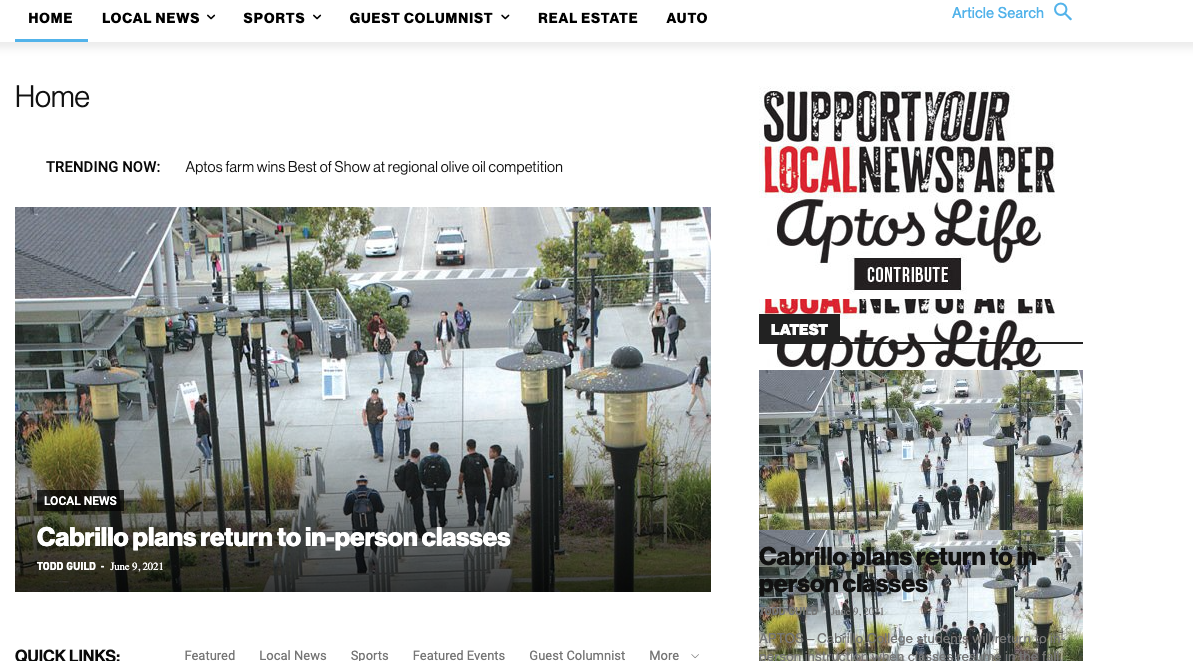
What happens is when we build a page with a sidebar in TD Composer, and leave the page template set to default, we are seeing a strange overlapping sidebar:
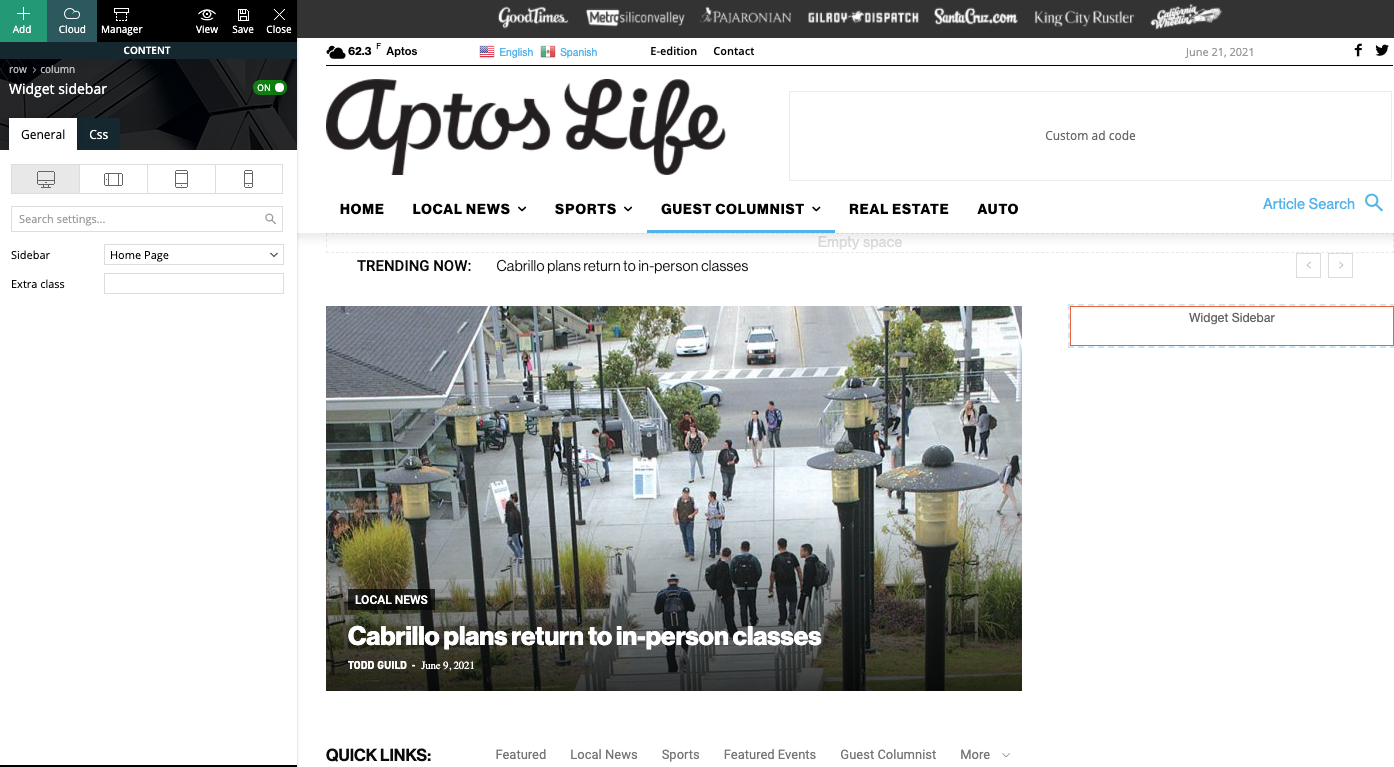
This is how we have the sidebar set in TD Composer:
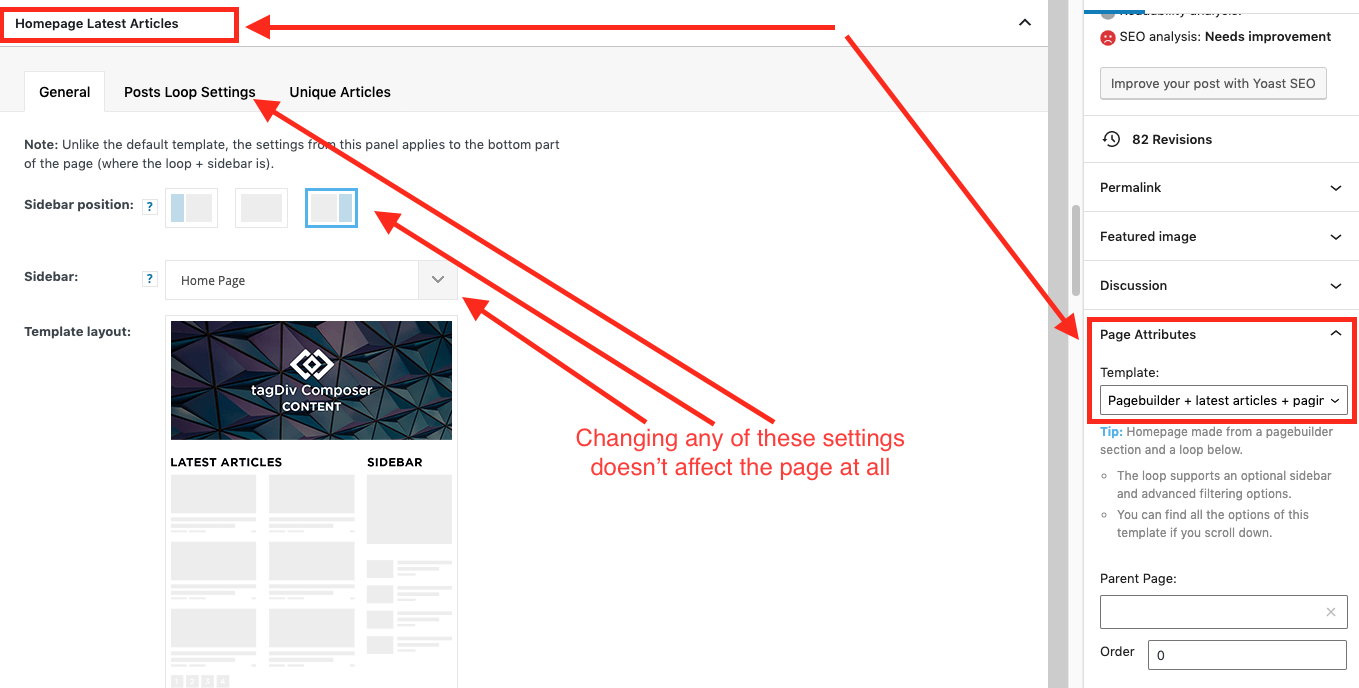
As a temporary workaround we can set the page template to Pagebuilder + latest articles + pagination, but this opens up a whole new set of problems. For example, if we try to change or hide the sidebar in the “Homepage latest articles” settings, no changes occur. Even something such as changing the title on the post loop won’t take affect.
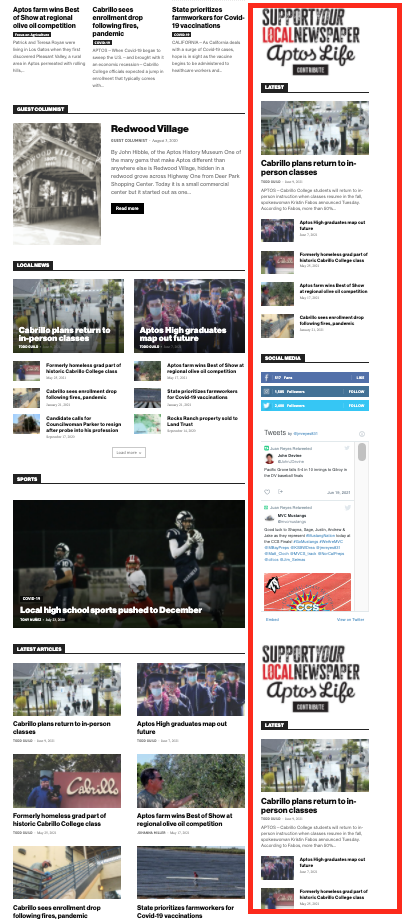
As a result, instead of two overlapping sidebars, we now have two duplicate sidebars stacked on top of each other:
Is there any way to fix these issues? Ideally we would like to leave the page template set to default, with the overlapping sidebars eliminated.
We’ve already tried disabling all our plugins to check for conflicts. Here is some more info from the System Status panel:
Theme name Newspaper
Theme version 10.4
Theme database version 10.4
HTTP channel test wordpress
Installed demo Default – demo ID: default | install type: full
Theme Mobile Newspaper mobile version
php.ini configuration
Server software Apache/2.4.38 (Debian)
PHP Version 7.3.19-1~deb10u1
post_max_size 32M – You cannot upload images, themes and plugins that have a size bigger than this value. To see how you can change this please check our guide here.
max_execution_time 120
max_input_vars 3000
SUHOSIN installed false
PHP extensions
mbstring available
GD library available
WordPress and plugins
WP Home URL https://aptoslife.com
WP Site URL https://aptoslife.com
WP version 5.7.2
WP multisite enabled Yes
WP Language en_US
WP Memory Limit 1 GB/request
WP_DEBUG False
Caching plugin No caching plugin detected – for best performance we recommend using WP Super Cache
 spervaiz
Hi!
I’m still trying to figure out why my website text is showing abnormally on mobile. I’ve attached a photo to show the weird font.
 cheryldimof
 I have active the regular AMP plugin that works with the mobile theme, the mobile theme plugin, Newspaper 11. However, the toggle which usually appears to turn AMP of and on on a per-post basis is now missing and reappears if I activate a different theme.
 T2N
T2NHello,
We have been trying hard to pass LCP and CLS. Updated the theme to 11 but it’s still the same. Can you take a look to see if there’s a bug in the mobile theme? Any suggestions welcome or do I need to change themes?
 t4fs
t4fsHello tagDiv community,
I recently purchased newspaper theme Version: 10.4, Now update 11 is available. I would like to know if I will update to 11, would I be able to see all customization that I did in default templates or they will get override and I need to make customizations again.
Another question is about the Mobile theme. Activating a mobile theme is equivalent to activating AMP on a website?. I don’t want to go AMP for now. But Mobile theme light version looks good.
Also, is autoload next post feature available on Mobile theme?
Thanks
 Ashraf-7492
I am using the latest newspaper theme with active mobile theme plugin and official amp.Whenever I turn on automatically redirect mobile visitor to amp, page loading successfully but menu icon does not respond on amp pages. How can I fix it.
 gamerock
 I had the same problem – squished mobile pages showing up on desktop. My solution was to remove all mobile themes. Does not seem like a reliable option.
Would love to hear if there’s a solution though.
 papp0us
Hello,
in the last few days when somebody visits a link to my site through the Facebook app (the page loads in the Facebook Mobile Browser) the page seems empty.
If you open the same page normally, via google, the site works just fine.
The problem is there, only when the amp Plugin and the tagDiv Mobile Theme is enabled. When i disable them and use a custom Mobile template it works just fine.
Any ideas?
 Peperonikuchen
Hi,
the theme is great, but i have problems with the infinite scroll on the mobil phone. There it is not working it is not loading next page?
https://www.vitaes.de/
https://www.corporel.de/
on my other sites , it works great? but they have the same plugins and config..?
So i need your help to fix it…
Thanks!
 dharma3d
Sometimes I have mobile theme showing on desktop. How to correct this?
 Anonymous
 The Mobile Theme is being neglected… some fixes (the CSS on the captions) were not fully implemented, some new functions (to disable the toTop button) were released only for desktop and mobile (but not for the Mobile Theme).
Also, the Theme is throwing some errors in the php log:
/themes/Newspaper/includes/wp-booster/wp-admin/tagdiv-view-header.php on line 26, for example.
Other than that, it is working well for me.
Anonymous Thanks for the info!
Please kindly ask for the developers to implement this in the Mobile Theme also.
Half-assed work is not good neither for us users, nor for TagDiv…
cheryldimofHi, I have a few posts where I need to toggle AMP off. I use the mobile theme for AMP (and have Newspaper 11 installed and the mobile theme updated to its current version). The AMP plugin (yes, this is the one by Automattic) usually inserts a toggle in screen options for the individual post to toggle AMP on or off for the single post. This is missing now. I switched to a base theme and it reappeared in post settings, so I am sure this is a theme issue. How can I get it back?
I do note that there is a toggle to switch the mobile theme itself off or on for the single post but this doesn’t disable AMP for the post.
Thanks
Cheryl
 oomhappy
Hi
I’m start to learning WordPress and theme Newsmag. Now, I’m found while I crate new page I have to writing content 2 area is main block editor panel and mobile editor panel. How to write as main block editor only and then show content on mobile also.
 Anamaria
 Hello,
Seems you created a mobile page, the header and footer are taken from the standard ones.
So if you want to use a responsive version, please remove the mobile page, set it on “No mobile page” => https://www.screencast.com/t/E5FO7ZBH and then the responsive version will load.
Also, if you want to use the mobile page you need to edit the mobile page, and in Manager (Website Manager) you need to import or the easy way is to convert the existent footer like this => https://www.screencast.com/t/HrjOBNayd
This is a video about Responsive Newspaper Theme, AMP & Mobile Theme, Mobile Pages & Templates -> https://www.youtube.com/watch?v=SpGkOnJeNZY
Also, please clear your cache.
Thank you!
Anamaria Hello,
That code is set in the theme files and can be rewritten using this code, select the port view on the phone, select the content zone and set the margin-left and right to -20 and set this code in width
calc(100% + 40px)
=> https://www.screencast.com/t/Ek89ppzTGldT You can use this method for both (mobile responsive version or mobile page)
Hope this helps you!
Thank you!
 flyingfinn
Hello and thank you for your support.
We try to use UK demo. We set up the page in desktop and we just want the responsive version for mobile view.
Though for a strange reason in mobile the header and footer are different.
Different background colours and different menu in footer.
Cab you help us understand why is this happening? Mobile theme is disabled. Thank you in advance
Mobile header:
Responsive header
Mobile footer
Responsive footer
devjaind123Hello sir,
My website is Techbenzy.com. My issue is if I visit my website or someone visit my website on mobile then the mobile logo of the website first appears at the right side of the theme. So What should I do.
Following are the image of it.
https://drive.google.com/file/d/1XGwfTKpdUIJAPDraXIUaoBo0xi4FHXEK/view?usp=sharing
 bookman53
I updated my website to Newspaper 11 today. Every page that I have tested has had greatly improved page speed CLS scores. I already had fast hosting, a cdn, and Wp Rocket running, but updating the theme made a massive difference on desktop and mobile.

This is a page with almost 2,600 words, 4 large images, and AdSense ads running.
I’ve gotten similar results on every page I’ve tested thus far.
I’m very well pleased with the results.
Good job, TagDiv!
