- NewspaperThe Newspaper Mobile Theme: Introduction
- NewspaperThe Mobile Theme
- NewspaperModules Builder in Newspaper Theme
- NewspaperNewspaper theme documentation
- NewspaperTheme Colors Introduction
- NewspaperWhat’s Included in the Newspaper Theme Package
- NewspaperFilters and sorting for taxonomies
- NewspaperHow to Add a Logo in Newspaper
- NewspaperBig Grid Flex Settings
- NewspaperHeader Builder
- NewspapertagDiv AMP Plugin Tutorial
- NewspaperBest Of Forums
- NewspaperCache plugin – install and configure
- NewspaperFont Customization
- NewspaperBackground Introduction
- NewspaperHeader ads
- NewspaperPost template ads
- NewspaperCustom ad spots
- NewspaperMain Menu
- NewspaperHow to Install Newspaper via FTP
 mehmetavsar27
 Mobile theme is fixed after changed the php version but the desktop makes problem could you please check this screenshot
 Anamaria
 Hello,
Usually, this happens with cache plugins. If the cache plugin does not have mobile support then the mobile theme version can be delivered instead.
The solution would be to use the recommended WP Super Cache plugin instead and activate these settings (especially the mobile device support): https://forum.tagdiv.com/cache-plugin-install-and-configure/
Also, please let me know what plugin for the cache you use now.
I hope this helps.
Thank you!
 sandeep15r
 So, if I deactivate both the AMP plugin and the Mobile theme plugin , will my website be responsive by default? Or I’ll have to do something.
 entertainmentfocus
 Hi Bettina,
I understand that we need to have the Google Site Kit plugin in order for us to be able to track authors in GA4. I don’t believe this is possible without.
In theory, should the Google Analytics tag pull through from the settings for the desktop theme, as I can’t see anywhere to add GA4 code in the Mobile Theme settings.
Thanks
Pip
 Bettina
 Hello @entertainmentfocus!
It could be a plugin conflict because we didn’t test this plugin with ours.
Can’t you use GA4 without the site kit plugin?
Similar topics regarding GA4 are here:
– https://forum.tagdiv.com/topic/how-to-find-and-add-call-to-action-google-analytics-tracking-code/
– https://forum.tagdiv.com/topic/track-ad-performance/
Please note that the mobile theme plugin is very limited and is not customizable with the TgaDiv Composer.
Thank you!
entertainmentfocusHi there,
I set up the mobile theme yesterday and realised that once it’s activated, we no longer get traffic tracking in our GA4 account from mobile devices. After deactivating it, the traffic is visible in our GA4 profile again.
We’re using Google Site Kit to add to the GA4 code to the site. Is there a way to get this working with the mobile theme?
Thanks
Pip
Bettina Hello Narendra!
To increase the page speed you can check these similar topics for more solutions:
– https://www.infophilic.com/get-almost-100-pagespeed-newspaper-theme/
– https://forum.tagdiv.com/topic/score-100100-pagespeed-with-newspaper-wordpress-theme/
– https://developers.google.com/speed/docs/insights/v5/about
– https://www.youtube.com/watch?v=tnkVapqhIHc
– https://www.xtechkr.com/optimize-newspaper-theme/
– Check those guides : https://web.dev/lcp/ – > https://www.sqlpac.com/en/documents/google-pagespeeds-lighthouse-6-new-features-lcp-cls.html -> > https://wp-rocket.me/google-core-web-vitals-wordpress/improve-cumulative-layout-shift
– https://forum.tagdiv.com/topic/to-high-cumulative-layout-shift-in-mobile-theme/
Please check the tutorials from those platforms gt metrix and Google Pagespeed Insights and I’m sure you can increase the page speed.
Please note that page speed or optimization is not covered by the support team: https://forum.tagdiv.com/newspaper-theme-support/
Thank you for understanding!
 nagi
nagiRespected Sir/Mam,
I am a developer at Mallemaala Entertainments, located in Hyderabad. We have a few requirements for our movie review website, 123telugu.com
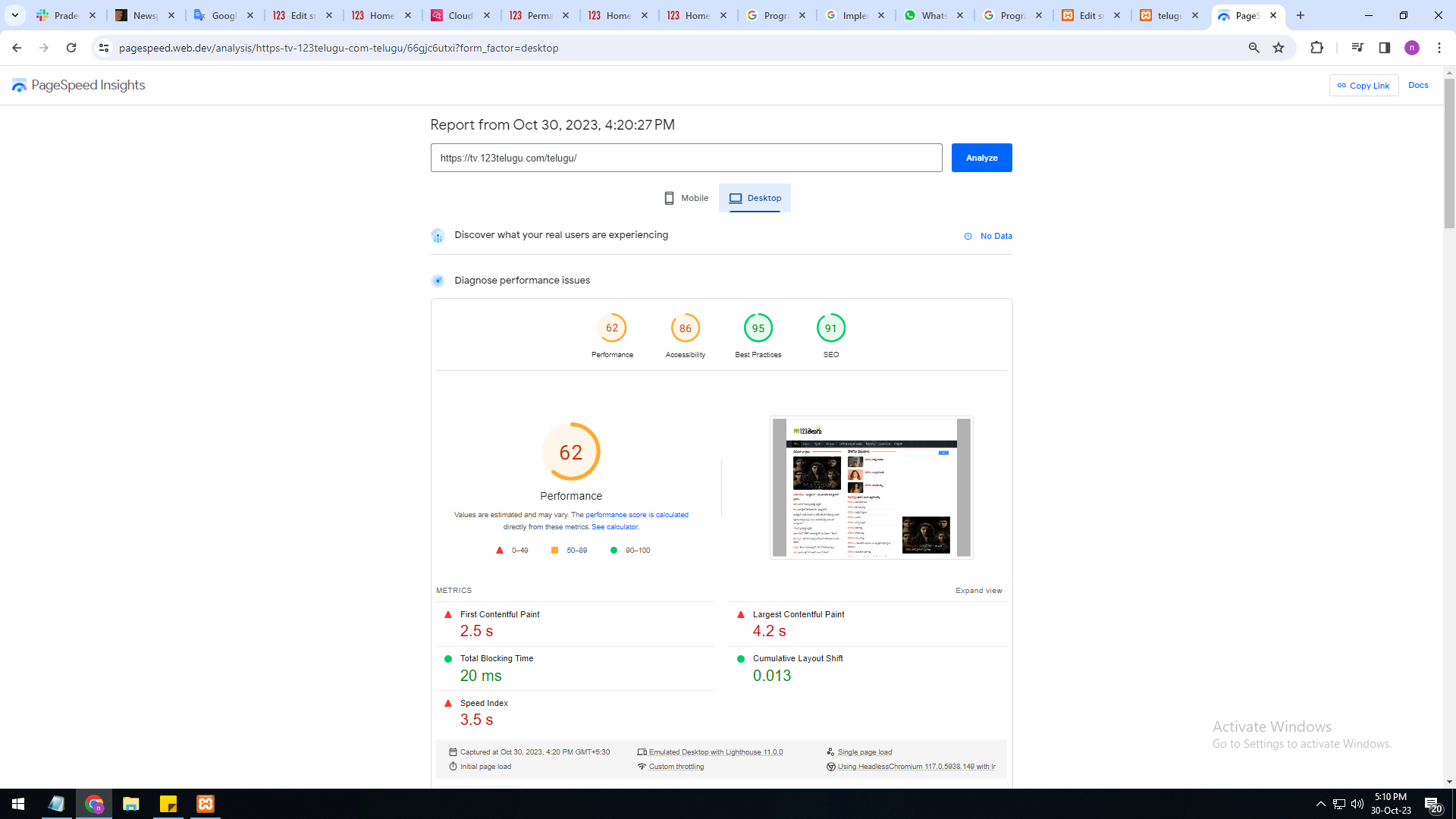
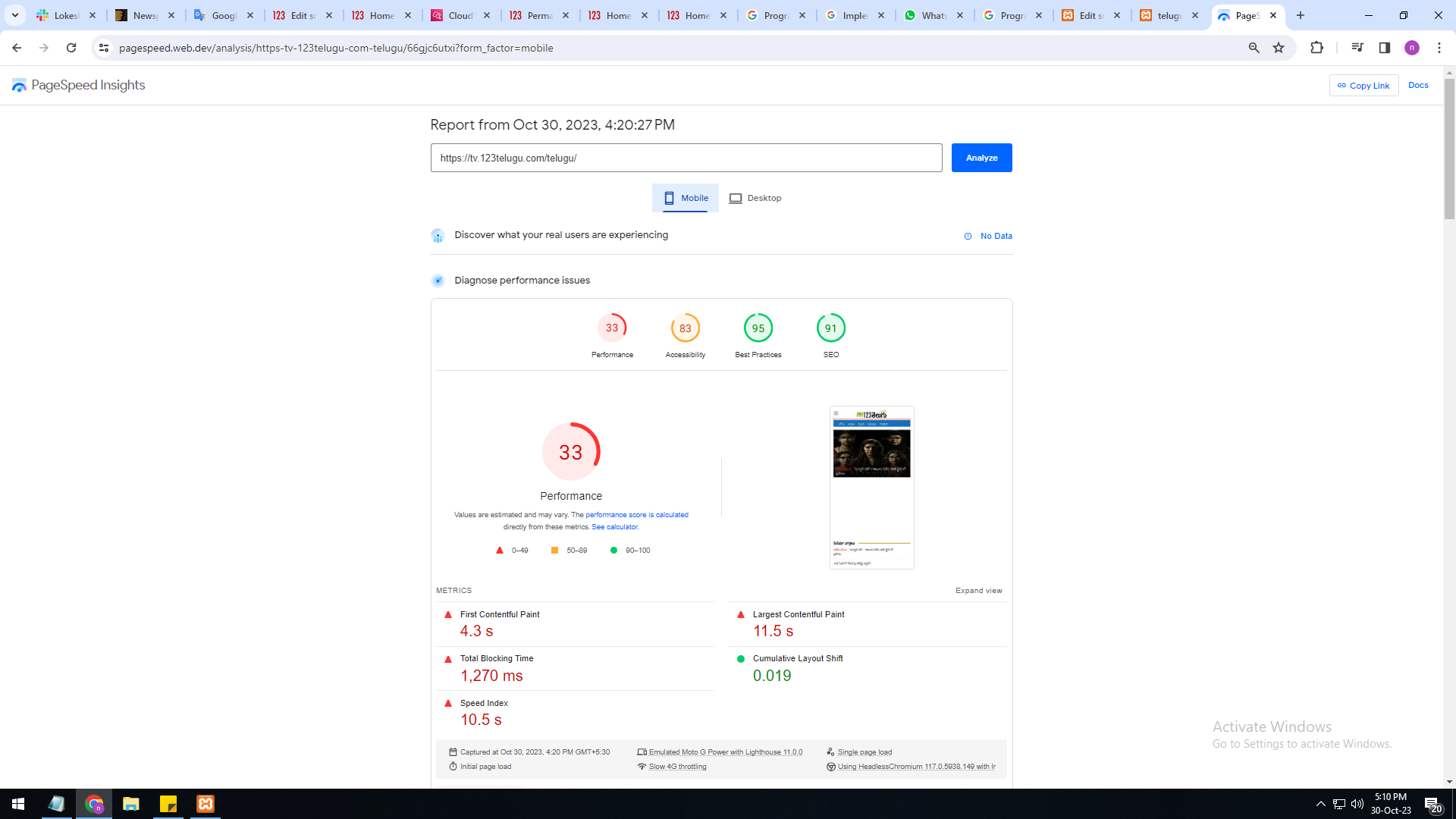
newspaper theme performance speed is very slow Please give
us some tips to increase website speed
mobile version is very slow 33%
system version is also very slow only 62%
I am sharing images URL links :
https://gallery.123telugu.com/images/theme_test/Basantham1.png
https://gallery.123telugu.com/images/theme_test/Basantham2.png
Thanking you,
Regards,
Narendra.
Bettina Hello @designrepublik !
Unfortunately, we do not fix the page speed issues on our demos.
Our developers are aware of this issue and try to synthesize the composer, which is big, and fix the major problems of the theme and speed.
A cache plugin doesn’t help much with page speed.
To increase the page speed you can check these similar topics for more solutions:
– https://www.infophilic.com/get-almost-100-pagespeed-newspaper-theme/
– https://forum.tagdiv.com/topic/score-100100-pagespeed-with-newspaper-wordpress-theme/
– https://developers.google.com/speed/docs/insights/v5/about
– https://www.youtube.com/watch?v=tnkVapqhIHc
– https://www.xtechkr.com/optimize-newspaper-theme/
– Check those guides : https://web.dev/lcp/ – > https://www.sqlpac.com/en/documents/google-pagespeeds-lighthouse-6-new-features-lcp-cls.html -> > https://wp-rocket.me/google-core-web-vitals-wordpress/improve-cumulative-layout-shift
– https://forum.tagdiv.com/topic/to-high-cumulative-layout-shift-in-mobile-theme/
Please check the tutorials from those platforms gt metrix and Google Pagespeed Insights and I’m sure you can increase the page speed.
Please note that page speed or optimization is not covered by the support team: https://forum.tagdiv.com/newspaper-theme-support/
Thank you for understanding!
Bettina Hello!
We have 3 options for mobile versions that you can use:
1. Responsive version: A responsive version of your website looks similar to the desktop version. TagDiv Composer is used to edit the page.Click on the mobile viewport: https://www.screencast.com/t/XDQJedlggSB. There, you can see your mobile version and edit or adjust the elements to look better.
2. Mobile pages: https://tagdiv.com/newspaper-10-3-7-update-brings-customizable-and-fast-mobile-pages
3. Mobile theme plugin: The Mobile Theme is a performance-optimized theme included in the main Newspaper theme that only loads on mobile devices. It comes with its own templates and designs for pages, posts, categories, etc., so your current templates from the desktop theme will get converted to the mobile theme layout. Please see https://forum.tagdiv.com/the-mobile-theme/ and https://forum.tagdiv.com/mobile-theme-introduction/ for more information.
A full explanation is here: https://www.youtube.com/watch?v=SpGkOnJeNZY
If you need to use mobile version 1 or 2, then you need to uninstall the Mobile Theme plugin and AMP.
Thank you!
Bettina Hello @otaku!
You can use the one from the recommended options. From my point of view, if you don’t use the Mobile Theme plugin, then there is no reason or benefit to AMP.
Thank you!
Bettina Hello Jonathan!
We have 3 options for mobile versions that you can use:
1. Responsive version: A responsive version of your website looks similar to the desktop version. TagDiv Composer is used to edit the page.Click on the mobile viewport: https://www.screencast.com/t/XDQJedlggSB. There, you can see your mobile version and edit or adjust the elements to look better.
2. Mobile pages: https://tagdiv.com/newspaper-10-3-7-update-brings-customizable-and-fast-mobile-pages
3. Mobile theme plugin: The Mobile Theme is a performance-optimized theme included in the main Newspaper theme that only loads on mobile devices. It comes with its own templates and designs for pages, posts, categories, etc., so your current templates from the desktop theme will get converted to the mobile theme layout. Please see https://forum.tagdiv.com/the-mobile-theme/ and https://forum.tagdiv.com/mobile-theme-introduction/ for more information.
A full explanation is here: https://www.youtube.com/watch?v=SpGkOnJeNZY
If you need to use mobile version 1 or 2, then you need to uninstall the Mobile Theme plugin and AMP.
Thank you!
Anamaria Hi,
If you don’t want to use mobile theme for pages and posts, then disable the plugin.
Thank you!
 jcewald
Here’s my site:
EVElectronicsEngineeering.com
And a video of what’s happening:
https://www.loom.com/share/acabcd19ea254ca7beeffd1d02d44f21
Basically I can’t get the mobile theme to work properly. It sometimes shows up with the wrong menu at the top, other times it doesn’t. I have a mobile home setup, but that doesn’t always work either?
jcewaldHi I am using the mobile theme, my site is evelectronicsengineering.com
When I make a post, or page, or anything it doesn’t want to show up with the mobile template that I made.
Sometimes in Gutenberg if I disable mobile theme that works… but I don’t want to have to do this for every single post.
Any ideas?
Anamaria Hi,
This mobile homepage is overwritten by the Mobile theme plugin, which is why the layout has changed. Edit the desktop version of your homepage with Gutenberg and disable the Mobile theme: https://prnt.sc/BZVdi5tHDCuP
Thank you!
 streaming2014
 Hello,
Can you solve this problem without (mobile theme plugin) ??
https://imgur.com/SN6R7Wb
streaming2014 Hello, Thanks for response.
Is there a solution without using (mobile theme plugin) ???
 Calin
Calin Hello,
The theme is responsive and it should adjust after each screen that it is used. Also, this is coming with a special plugin dedicate only for mobiles (mobile theme plugin) – https://i.imgur.com/LG8i8gL.png
Thank you!
streaming2014This error exists after checking the theme on Lighthouse Chrome
Content is not sized correctly for the viewport. The viewport size of 415px does not match the window size of 412px.
If the width of your app’s content doesn’t match the width of the viewport, your app might not be optimized for mobile screens.
 mortgageman
Hi I’m trying to change the colour of the bar above the header on mobile theme.
For example, my header is dark blue, but the space above it is white (on mobile device)
If you see the image, the header is red and the space above is all red, how can I edit this?

 meri
meri The website is https://www.coupdepoker.com/
At the moment I have cloud templates for the desktop version and the default mobile theme.
I’d like to customize the HP on mobile.
I do not want/need to customize other pages/posts etc.
meriHi,
I’d like to create a mobile cloud template for the HP only.
Is it possible? How can I make it work with the default mobile theme (for other pages/posts/archives…)?
Thanks
Anamaria Hi,
To add a menu, you need to select the viewport for phone select the hamburger menu and assign the menu -> https://i.imgur.com/0LEgkTh.pngTo change the font and color for the mobile menu please go to Theme Panel -> Theme Colors -> Mobile menu/mobile search => https://www.screencast.com/t/0CvSgXp9H to set a background image go in Theme Panel -> Background -> Mobile menu/mobile search => https://www.screencast.com/t/uvDejzbX to change the font from Theme Fonts => https://www.screencast.com/t/ANBQe7hQhJd
.
Thank you!
Bettina Hello @rockman008 !
We have 3 options for mobile versions that you can use:
1. Responsive version: A responsive version of your website looks similar to the desktop version. TagDiv Composer is used to edit the page.Click on the mobile viewport: https://www.screencast.com/t/XDQJedlggSB. There, you can see your mobile version and edit or adjust the elements to look better.
2. Mobile pages: https://tagdiv.com/newspaper-10-3-7-update-brings-customizable-and-fast-mobile-pages
3. Mobile theme plugin: The Mobile Theme is a performance-optimized theme included in the main Newspaper theme that only loads on mobile devices. It comes with its own templates and designs for pages, posts, categories, etc., so your current templates from the desktop theme will get converted to the mobile theme layout. Please see https://forum.tagdiv.com/the-mobile-theme/ and https://forum.tagdiv.com/mobile-theme-introduction/ for more information.
A full explanation is here: https://www.youtube.com/watch?v=SpGkOnJeNZY
If you need to use mobile version 1 or 2, then you need to uninstall the Mobile Theme plugin and AMP.
You can add the ad box element in the tagdiv Composer and add the code there in the mobile viewport. Read all about it here: https://forum.tagdiv.com/ads-adsense-overview/
Thank you!