- NewspaperThe Newspaper Mobile Theme: Introduction
- NewspaperThe Mobile Theme
- NewspaperModules Builder in Newspaper Theme
- NewspaperFilters and sorting for taxonomies
- NewspaperHow to Add a Logo in Newspaper
- NewspaperBig Grid Flex Settings
- NewspaperHeader Builder
- NewspapertagDiv AMP Plugin Tutorial
- NewspaperNewspaper theme documentation
- NewspaperBest Of Forums
- NewspaperCache plugin – install and configure
- NewspaperFont Customization
- NewspaperTheme Colors Introduction
- NewspaperBackground Introduction
- NewspaperHeader ads
- NewspaperPost template ads
- NewspaperCustom ad spots
- NewspaperMain Menu
- NewspaperHow to Install Newspaper via FTP
- NewspaperHow to Install Newspaper via WordPress
 frankiefop
 Hello and thank you for the support but the link didn’t have any details on how to fix the CLS issues.
Please, can you help with that?
Meanwhile, I don’t use Mobile Theme and I have the Urban Observer pre-website installed.
 Bettina
 Hello Waqar!
Unfortunately, we do not have any features like this for the mobile theme layout.
For customization and other services, you can contact our custom work team here: https://tagdiv.com/premium-customization-services/.
Thank you for understanding!
 Anamaria
 Hello,
You have the mobile theme plugin activated; please disable it.
Using our theme, you can choose from 3 mobile versions
-> mobile responsive => https://www.screencast.com/t/oJ2ShOp47
-> mobile theme plugin => https://forum.tagdiv.com/the-mobile-theme/
-> mobile page => https://tagdiv.com/newspaper-10-3-7-update-brings-customizable-and-fast-mobile-pages/ The option that you need to use.
Suppose you created the mobile pages with tagDiv Composer. In that case, when you install the Mobile Theme plugin, your pages will be overwritten by the plugin (the mobile theme comes with its templates for page, post, category, etc, so your current templates from the desktop theme will get converted to the mobile theme layout, the page content is made without builders in mobile editor => https://www.screencast.com/t/xbgZG8kH also, the options that are provided to edit the mobile theme version are limited (this keeps the things simple)).
This is a video about Responsive Newspaper Theme, AMP & Mobile Theme, Mobile Pages & Templates -> https://www.youtube.com/watch?v=SpGkOnJeNZY.
So, the mobile responsive is what you see when that you select the viewport on phone => https://www.screencast.com/t/matV17hH, so some settings may apply for each viewport(where is the border blue), and others are not(where the border is black).
The mobile page has the mobile templates from Cloud Library => https://www.screencast.com/t/YCcZ8rL8
The Mobile responsive version of the theme and the mobile page editor can be edit with tagDiv Composer, the mobile theme plugin cannot.
For example, you can have the mobile theme plugin activated and use the mobile page/mobile responsive version for the homepage/pages, but for the categories pages/404 page, you can’t use the mobile page/mobile responsive version if you have the mobile theme plugin activated.
So, if you want to design the pages with tagDiv Composer, you can use the mobile page or mobile responsive version.
Also, please check this topic https://forum.tagdiv.com/topic/amp-pages-not-working-well-with-this-theme/
Thank you!
 siciliamare
Dear Theme Developers,
I hope this message finds you well. I am currently using Newspaper Theme version 12.6.5 with the Town Talk demo installed. I’ve encountered an issue that I hope you can assist me with.
Recently, I noticed a bug related to the Ads section, specifically under Ads > Article Bottom Ads. The content displayed to visitors does not match the code I have inserted in the theme settings. This discrepancy only occurs in the desktop version; the Mobile Theme > Mobile Ads > ARTICLE BOTTOM AD section updates and displays correctly in real time without any issues.
This issue seems to suggest a bug in the theme or a conflict that prevents the Article Bottom Ads section from updating as intended on desktop views. It’s critical for our advertising strategy that the ads display correctly and can be updated promptly.
Could you please investigate this issue? Any guidance on resolving it would be greatly appreciated, as it directly impacts our site’s functionality and user experience.
Thank you in advance for your time and support. I look forward to your prompt response and a possible solution.
Best regards,
Barbara
Anamaria Hello,
You can remove the shadow from here https://i.imgur.com/6WvieSG.png
Please follow the video to see where you can find and build your sticky header on mobile and desktop too: https://www.screencast.com/t/l6v2Belt
You can use the global header.
Thank you!
Anamaria Hello,
I think that is the structure you made for the menu because here is the latest item from the menu: https://i.imgur.com/dW0BYaw.png. So, for mobile, I suggest remaking the menu and assigning it to display well.
Thank you!
Anamaria Hello,
1. You can upload the font to the theme panel under “custom fonts” by following the instructions at https://forum.tagdiv.com/font-customization/. After doing this, you should typically not experience this problem.
2. You have a cloud template, so you need to make the changes with tagdiv Composer and delete the logo from the theme panel. For mobile please edit with tagDiv Composer, select the viewport on phone, select the header logo and change it => https://i.imgur.com/cR7F0v4.png https://www.youtube.com/watch?v=HXQQygkCCJo -> https://forum.tagdiv.com/add-logo-newspaper/
3. Usually, the color and image are set on the row, so please edit with tagDiv Composer and select the row and go in the tab CSS https://i.imgur.com/UkgqKNM.jpg -> https://forum.tagdiv.com/topic/background-color-of-the-main-menu-be-changed/
Thank you!
frankiefopHello,
I recently installed Newspaper theme on my site, https://converseer.com, however, there is a lot of CLS happening on the site and I need to fix it – https://pagespeed.web.dev/analysis/https-converseer-com/cakysj730l?form_factor=mobile.
This link has a good video here that shows the CLS happening. https://www.debugbear.com/test/website-speed/3zGTB74A/overview?metric=cumulativeLayoutShift#video-recording.
Please, I need help resolving the CLS.
See screenshots via the links below:
 donvito0
Dear sir,
I bought your theme Newspaper 12, and i have a litlle problem.
Demo version of your mobile version on themeforest is not the same when i installe it on my website.
What can be a problem?
Articles are presented only as a list, no grid, no boxes, no nothing.
What can i do?
Thank you,
Regards
 peters1964
Hello,
1. i would like to set the fonts on the website and the following pages uniformly. Where exactly can I do this? I don’t want to use Google fonts because of the General Data Protection Regulation.
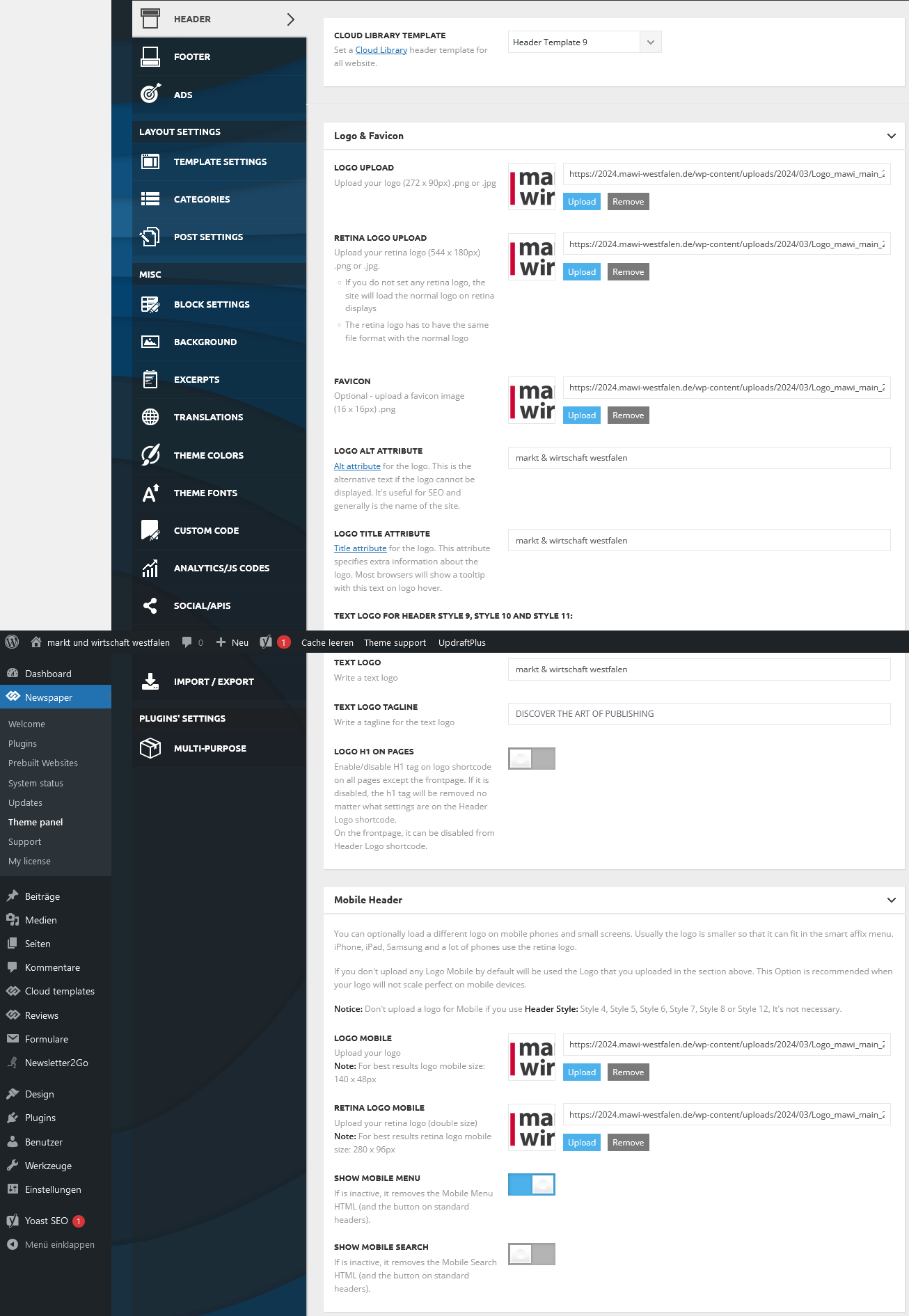
2. my logo on the website is not displayed in the header on my mobile phone. What do I need to change in the settings or do I need to install the mobile theme panel?
https://2024.mawi-westfalen.de/wp-content/uploads/2024/03/Screenshot-2024-03-17-at-17-26-00-Theme-panel-‹-markt-und-wirtschaft-westfalen-—-WordPress.png
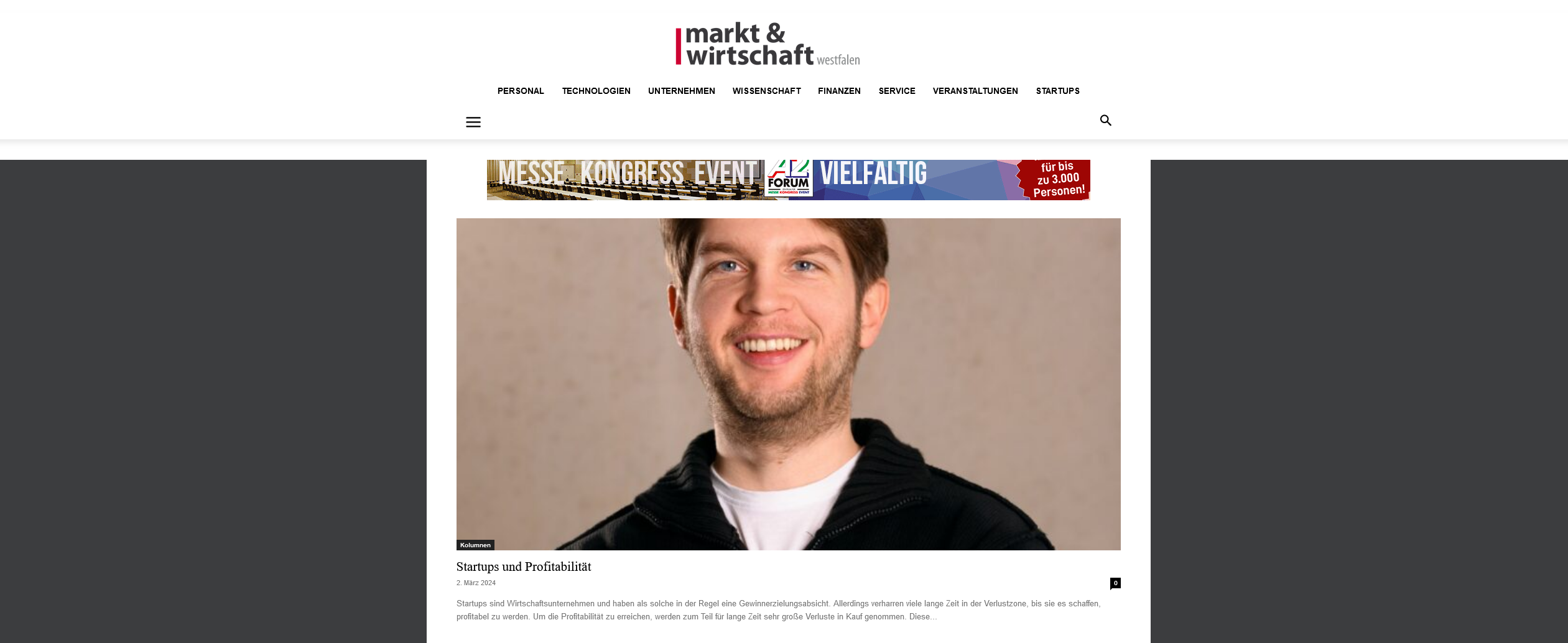
3. where can I set the background color for the header area?
https://2024.mawi-westfalen.de/wp-content/uploads/2024/03/Screenshot-2024-03-17-at-17-42-11-Home-markt-und-wirtschaft-westfalen-1.png
Thank you for your support.
Christiane
 f5guru
Hi Team
I see that modal popup does not work for Mobile theme, whilst its working for the main website using TagDiv.
Is there a workaround or suggestion on how to generate some popup alert which shows up in mobile theme without repeating it for the main website theme?
Regards
Waqar
 haipo
haipoHi Team,
I’m using the RTL template.
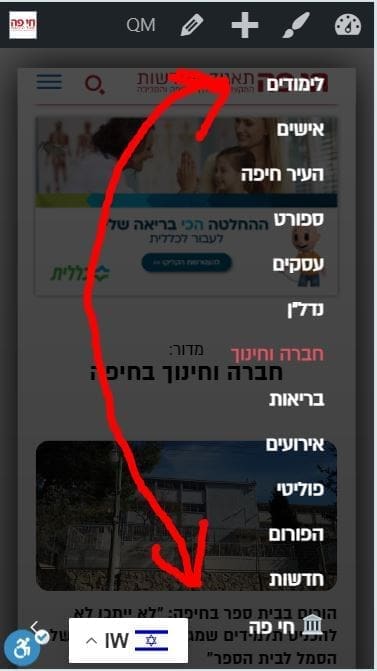
And I have an issue with the order the the menu is displayed in mobile.
It is displayed upside down (In the reverse order)
Can you fix it please?
–
–
Thanks,
Yaron
 jayflyer
I just started noticing this after the theme update yesterday.
below is what it says under inspect element. you can inspect yourself as well on my site jayflyer.com
<div class=”td-scroll-up td-hide-scroll-up-on-mob” data-style=”style1″><i class=”td-icon-menu-up”></i></div>
 Alex
Alex Hi @Anamaria,
We used WP Rocket before and had a conversation with WP Rocket support team. To date, Newspaper and WP Rocket do not properly work together.
The preload function is for single post featured image. This feature doesn’t seem to properly work with EWWW plugin. I will make a new thread when finish testing.
Our server is optimised, as well as the theme.
– This thread (which was not started by me) is about the poor INP poor performance. It is the theme’s elements that make it fail (buttons, popups, mobile menu, comment form fields etc). It fails on your main demo – mobile origin – Despite you used a mobile page for home page, INP fails throughout your whole demo website.
You should probably improve the theme, so it meets the required criteria in 2024. It currently does not.
 bob@mrrogersweborhood.com
 Also, tagdiv editor no longer shows the layout for landscape view for mobile devices.
bob@mrrogersweborhood.comokobserver.org
When activating tagDiv Mobile Theme plugin, AMP issues are found and plugin is deactivated.
Errors:
AMP compatibility issue(s) discovered with the following plugins:
Simple Google reCAPTCHA on 4 URLs
WooCommerce on 4 URLs
Hummingbird Pro on 4 URLs
tagDiv Composer on 1 URL
—
Screenshot: https://www.dropbox.com/scl/fi/qiqehek61irsqrvdqqv6d/Screenshot-2024-03-15-11.14.23.png?rlkey=8uuqqnitc2a26zq6x7lpyojo7&dl=0
 fm
fmHello,
We have installed the latest version of Newspaper today. Since then, the menu on our smartphone at https://www.Autogazette.de no longer works.
Our technician can’t find a reason.
I would be grateful for any tips.
 cerclealgerianiste
 Thank you for your answer, but the translation is already made in this translation menu, but this doesn’t appear correctly anyway.
The Web responsive version is correct and well translated but when we activate the mobile version, it appears not translated.
Is there any other menu we can specifically change for mobile version translation ?
Thanks a lot for your time
Regards,
cerclealgerianisteHi,
I have recently installed mobile theme on my website, but I cannot find how to translate some titles :
“Latest articles”
And in the footer :
“About us”
“contact us”
Could you please indicate me how to do this ?
Thanks a lot for such a great template !
Anamaria Hello @Alex
I checked your website and it seems that you run ads, to reduce the resources, I recommend using WP Rocket plugin to optimize the scripts https://i.imgur.com/CXm3M4A.png -> https://pagespeed.web.dev/analysis/https-www-fightmag-com/4cmtkp35p0?form_factor=mobile
Also, please enable this option for the single post featured image https://i.imgur.com/hKSRSOZ.png
Furthermore, we make modifications and optimizations, but this is not just about the theme and the server you have, what plugins you use, and what optimizations you have made.
Thank you!
Bettina Hello!
Try to deactivate the AMP and check if it works for you.
I’ve tested on my end and for mobile theme + amp it seems to be an issue at the moment.
Thank you for understanding!
Anamaria Hi,
Please edit with tagDiv Composer -> https://i.imgur.com/j8YvKks.png click on the block and remove the offset -> https://i.imgur.com/dJ0iFQu.png let that field empty.
Please enable this option for the single post featured image https://i.imgur.com/hKSRSOZ.png
Page speed optimization results are influenced by a large number of factors like your server performance, the number of external scripts loading on the website (ads, fonts, tracking codes, external resources, plugins), the size of the images, the number of elements on a specific page, caching solution, and many, many more.
Now, also, you have a good score for mobile https://i.imgur.com/Rs31PSB.png
There are many optimization guides provided by our users here in the forum, some made by us; you could check some of them
– https://www.infophilic.com/get-almost-100-pagespeed-newspaper-theme/
– https://forum.tagdiv.com/cache-plugin-install-and-configure/
– https://forum.tagdiv.com/how-to-make-the-site-faster/
– https://forum.tagdiv.com/topic/high-number-of-ajax-request/
– https://forum.tagdiv.com/topic/score-100100-pagespeed-with-newspaper-wordpress-theme/
– https://www.andraware.com/wp-rocket-for-newspaper-theme/
– https://forum.tagdiv.com/topic/page-speed-guide-for-2023-beginners-and-advanced/
– https://forum.tagdiv.com/topic/newspaper-theme-speedify-your-website/
– https://forum.tagdiv.com/topic/tutorial-chriss-custom-optimizations-for-functions-php-etc/
– https://forum.tagdiv.com/cloudflare-cdn/
– https://forum.tagdiv.com/topic/theme-causing-high-cpu-usage-2/
– https://forum.tagdiv.com/topic/sql-querys-high-cpu/
– https://forum.tagdiv.com/topic/newspaper-theme-slow-to-respond/
– https://premium.wpmudev.org/blog/optimizing-your-wordpress-database-a-complete-guide/
– https://underconstructionpage.com/optimize-wordpress-database/
– https://crunchify.com/better-optimize-wordpress-database-all-in-one-guide/
Thank you!
 muhammadumair
Dear Support Team,
I hope this message finds you well. We are currently encountering two critical issues with our website: https://www.techrepublish.com/ that are significantly impacting user experience: the category section posts are not displaying, and the mobile performance is unacceptably slow.
Category Section Posts Not Showing:

Users are unable to view posts within specific categories on our website. Despite efforts to troubleshoot on our end, including database query optimization and CMS updates, the issue persists. We suspect there may be a theme-related component causing this problem and would appreciate your expertise in resolving it promptly.
Mobile Performance Issue:

Our website’s performance on mobile devices has been notably sluggish, leading to increased bounce rates and decreased user engagement. This slowdown is detrimental to our site’s effectiveness and user satisfaction. We request your assistance in identifying and addressing any theme-related factors contributing to this performance degradation.
Given the critical nature of these issues, we urgently seek your support and expertise in resolving them. Any guidance, updates, or solutions you can provide would be immensely valuable in restoring the functionality and performance of our website.
If additional information or access to our website backend is required for troubleshooting purposes, please do not hesitate to reach out. Our team is fully committed to collaborating with you to achieve a swift and effective resolution.
Thank you for your prompt attention to these matters. We eagerly await your assistance and appreciate your dedication to ensuring the optimal functioning of our website.
Sincerely,
[Umair]
[umairahmadtechnew@gmail.com]
 ludyma
Hello, I have seen that the photos of (Featured image) in the mobile version look blurry, can you look and tell me why, please.
Alex Hi All,
INP was not only recently added, so Anamaria is incorrect. INP only recently became a mandatory factor.
INP has been available for a long time (at least 6 months) to test/see. Therefore the data was available to figure out what in Newspaper causes its poor score.
It is shame it was not fixed by March 2024, when INP became a mandatory factor.
Judging from poor INP on some of our websites, it can be caused by mobile menu, mobile search and modal pop-up blocks. There can of course be a number of other blocks/factors that cause it eg java driven items etc.
-
This reply was modified 2 years by
Alex.