
- NewspaperThe Newspaper Mobile Theme: Introduction
- NewspaperThe Mobile Theme
- NewspaperModules Builder in Newspaper Theme
- NewspaperFilters and sorting for taxonomies
- NewspaperHow to Add a Logo in Newspaper
- NewspaperBig Grid Flex Settings
- NewspaperHeader Builder
- NewspapertagDiv AMP Plugin Tutorial
- TutorialsFrom WPBakery to tagDiv Composer
- NewsmagSmart list ads
- NewspaperNewspaper theme documentation
- NewspaperBest Of Forums
- NewspaperCache plugin – install and configure
- NewsmagIntroduction
- NewsmagMain menu
- NewsmagLogo & Favicon
- NewsmagHeader ads
- NewsmagSmart sidebar
- NewsmagSharing buttons
- NewsmagCategory tag on modules/blocks
 Simion C.
 Hi,
That is required when using the mobile theme plugin, you will have to create a desktop page and a mobile page, for each page.
The same content will be displayed on mobile only when not using the mobile theme in general – https://i.imgur.com/2EwywJQ.png or excluding specific pages from the mobile theme like this – https://i.imgur.com/pNdQhv7.png
The mobile theme is optional. If want the same content for pages to be displayed on desktop and mobile, please deactivate it.
Please let us know if you have more questions.
Thank you!
 Petr Jaroň
Hi, when I click on my site on the mobile menu, the website in the lightbox is taken first.
The mobile menu will not be displayed until later, for example after 15 seconds.
Thank you for your help
 RPFlu
RPFluHello,
I was using Newspaper 7.2 and just updated to Newspaper 11.
I notice that the breadcrumb appears on the articles but does not appear on the pages.
I have also found that in Chrome my Home Page and a few other pages containing Grids (but not all of them) display the full width of the window on computer (like on a mobile) and the menu doesn’t take the color settings.
If you want to check on my website: http://www.romepratique.com
Best regards
 vikramsaiteja
 Hey ,
I have disabled my amp plugin , let me explain with an example I had an about us page which is being displayed normal on desktop, mobile . now I have installed mobile theme plugin and I have also created a new version of the same page for mobile . now when I view it in mobile except the title tag nothing is being displayed .
What should I do now ?
if I uninstalled my mobile theme plugin its getting displayed but my page speed is going down so is there an alternate option to fix this without uninstalling the mobile theme plugin .
Note that I have been using cloud template for the page
-
This reply was modified 5 years by
vikramsaiteja.
 kevinperry
Hi There, I am having a significant problem with my website https://tvblackbox.com.au/
If you use google to search for my website on a mobile device, google will open an outdated cached version of the mobile amp webpage which is approx 3 days old rather than the latest version.What could be causing this issue?
 qrssaw
You are about to add a corresponding script for the mobile version of the newspaper theme.
It’s a script that lowers the ad-sense anchor advertisement to the bottom, so can I know why?
https://pagead2.googlesyndication.com/pagead/js/adsbygoogle.js”>(adsbygoogle = window.adsbygoogle || []).push({ google_ad_client: “ca-pub-ㅌㅌㅌㅌㅌㅌ”, enable_page_level_ads: true, overlays: { bottom: true } });
 NataleMultiservizi
my sharing buttons are not shown on my site in mobile mode !!!i can’t solve the problem, can you take a look?
http://www.gomorraweb.com
 Bettina
 Hello!
I’ve checked your website and I can access your mobile menu, but you have just one category. You can set up another menu there.
Thank you!
 frullino2
 Hi, just open our fb page through fb smartphone app https://www.facebook.com/meteotoscana.it and simply click one of article posted. The fb mobile browser return a blank page.
Many thanks.
Stefano.
Bettina Hello!
Edit the homepage with TagDiv Composer, access Website Manager click on Header -> Mobile Menu(you should be able to see your mobile version in Composer now), and set your correct header as Global template, hit the button save.
If the problem is still there, then check in the theme panel settings if you have set up the logo from your mobile version and remove it (Newspaper -> Theme panel -> Header -> Logo and favicon).
Thank you!
Bettina Hello!
One thing that you need to know before is that mobile pages which you use is not compatible with AMP at the moment.
Unfortunately, AMP is faster and works better only with Mobile Theme, because it is not compatible with cloud templates.
From my point of view, if you don’t use the Mobile Theme plugin, then there is no reason or benefit from AMP.
Check our documentation about this plugin here:
https://forum.tagdiv.com/tagdiv-amp-plugin-tutorial/
Thank you!
Bettina Hello!
From what I see, it seems that you have installed Mobile theme plugin. If you created the mobile pages with TagDiv Composer, then when you install Mobile Theme plugin, your pages will be overwritten by the plugin.
The Mobile Theme is a performance optimized theme included in the Newspaper main theme and it loads only for mobile devices. It comes with its own templates for page, post, category, etc so your current templates from the desktop theme will get converted to the mobile theme layout. For more details, please take a look here: https://forum.tagdiv.com/the-mobile-theme/
Better deactivate the plugin and see the results.
Thank you!
 denya
denyaHello
In the records.
In the mobile version, when the image is enlarged, the image opens below the screen.
 devjaind123
My website is Techbenzy.com. I have purchased this theme for the website speed. But it shows that after installing this plugin, the mobile speed of website remain below 30%. How to increase mobile speed of website above 85%.
Website URL: https://techbenzy.com/
Bettina Hello!
Edit the homepage with TagDiv Composer, click on the mobile viewport: https://www.screencast.com/t/XDQJedlggSB ; there you can see your mobile version and you can edit the elements there.
Hope that helps you!
Thank you!
Bettina Hello!
First of all, please make sure you have a backup done and then you can update the theme and the TagDiv plugins also.
Please take a look for this advice before updating: https://forum.tagdiv.com/topic/action-required-please-read-how-to-update-to-the-newspaper-theme-v-10/
I recommend you to make a backup and update plugins and the theme via file transfer, so that you don’t face any error: https://forum.tagdiv.com/how-to-update-the-theme-2/
Mobile theme and AMP works great together and has a similar design, but if you do not want to use AMP, there is a setting to choose only mobile theme without AMP.
Unfortunately, this feature is available in Tagdiv Composer plugin, and you can not edit the mobile theme pages with this plugin. This feature works great on mobile pages: https://tagdiv.com/newspaper-10-3-7-update-brings-customizable-and-fast-mobile-pages/ and in a responsive version(a responsive version of your website is looking similar like on desktop, edit the page with TagDiv Composer, click on the mobile viewport: https://www.screencast.com/t/XDQJedlggSB ; there you can see your mobile version and you can edit the elements there.)
Thank you!
 simchris
 AMP is mainly useful if you’re looking for a simpler, pure mobile experience for your information; kind of like the WordPress default themes. The idea is to make page load faster in places with slow internet, slow mobile connections, etc. — there is no inherent ‘better’ reason to do AMP vs normal desktop responsive layouts, unless you have very slow server and are unable to pass Google Lighthouse mobile/desktop tests for best practices.
In our case we use Newsmag desktop theme for desktop, ipad, and mobile. We use the AMP plugin as fallback for Google to serve that simple version to those on slow connections. AMP is something Google invented to cache popular content in the cloud for slow phone connections. Really not intended to replace ‘normal’ pages, site layouts, and almost nobody actually doing that unless a simple blog.
SEO is about pagespeed, best practices, optimization for loading elements, and the like. You can test your site using the Chrome web browser by learning to use the ‘console’ to see if your site is horribly slow — in that case AMP might be worth looking into as default format to serve, but it is not ‘better’ for SEO than normal pages. Having both normal pages and AMP format pages also does not hurt SEO as Google knows one is the ‘canonical’ version and one is ‘alt’ version.
(( I don’t work here, just longtime user. ))
 Partha0000
The speed of my website has slowed down when updated the Newspaper11. Before the update my website’s Google speed was within 50 to 80 mobile and laptops. But since I updated, the speed of my website has been extremely weak. it is sometimes 15 to 40.
This is a problem with Newspaper11?
site link:- https://anysoll.com/
 lyon
lyonHello, We are using Newspaper Theme version 10.4 on our multisite network, with WordPress 5.7.2. Ever since updating to 10.4, we’ve had an issue that affects just two of our sites on the network, one of which is the main site. All the other sites have no issue.
What happens is when we build a page with a sidebar in TD Composer, and leave the page template set to default, we are seeing a strange overlapping sidebar:
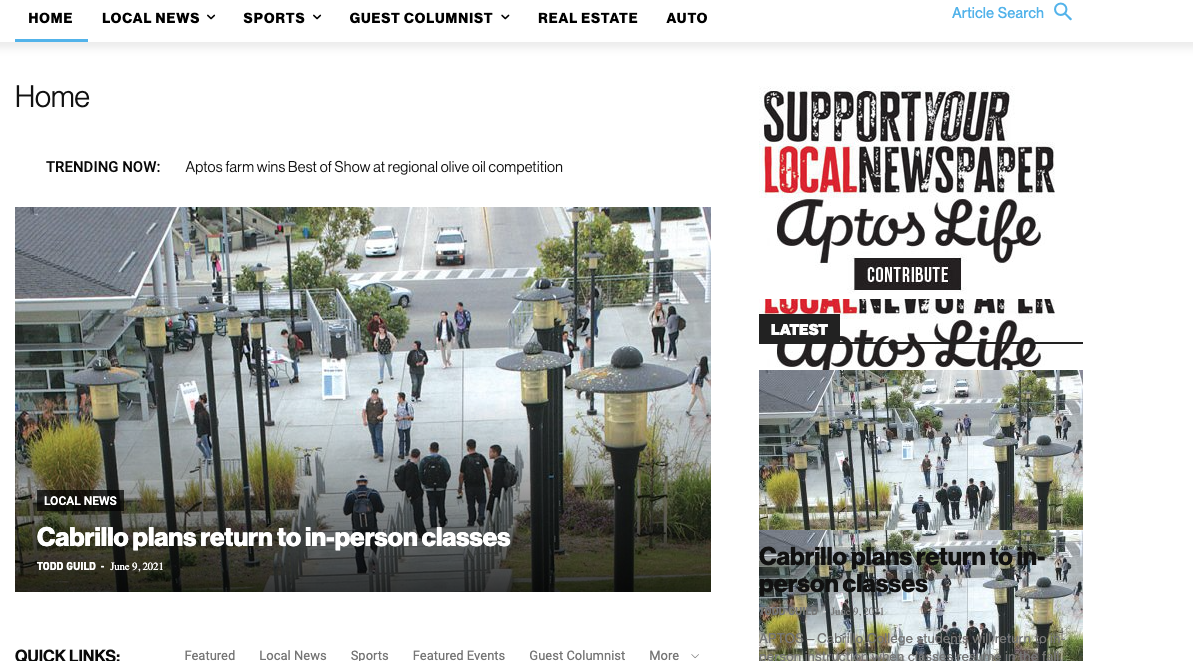
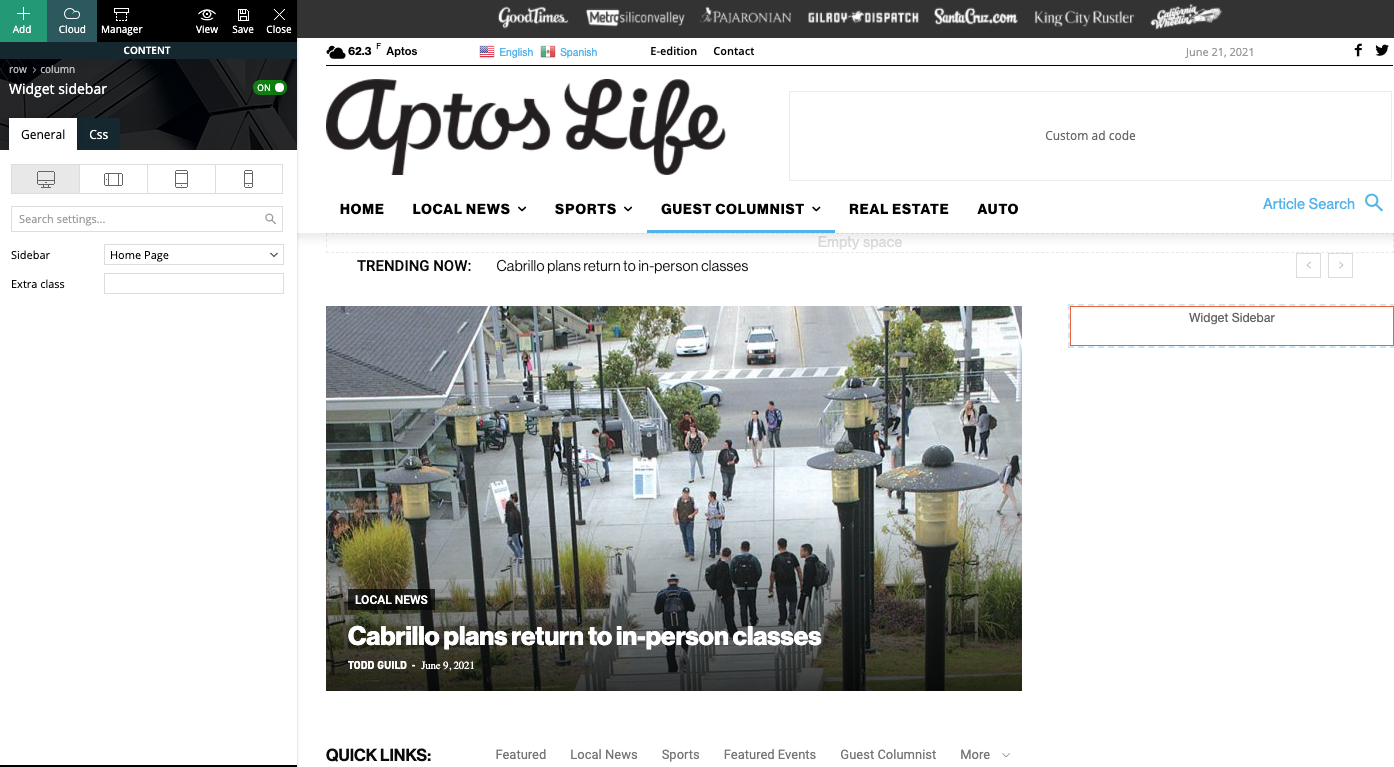
This is how we have the sidebar set in TD Composer:
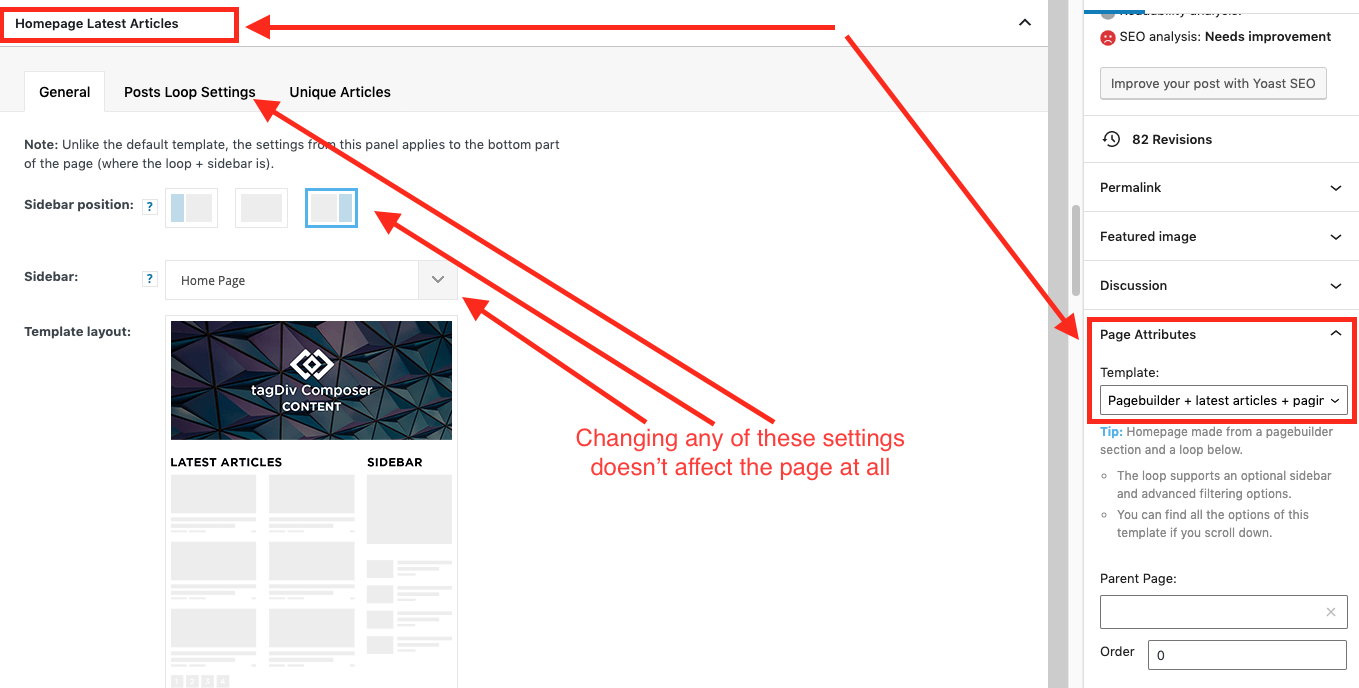
As a temporary workaround we can set the page template to Pagebuilder + latest articles + pagination, but this opens up a whole new set of problems. For example, if we try to change or hide the sidebar in the “Homepage latest articles” settings, no changes occur. Even something such as changing the title on the post loop won’t take affect.
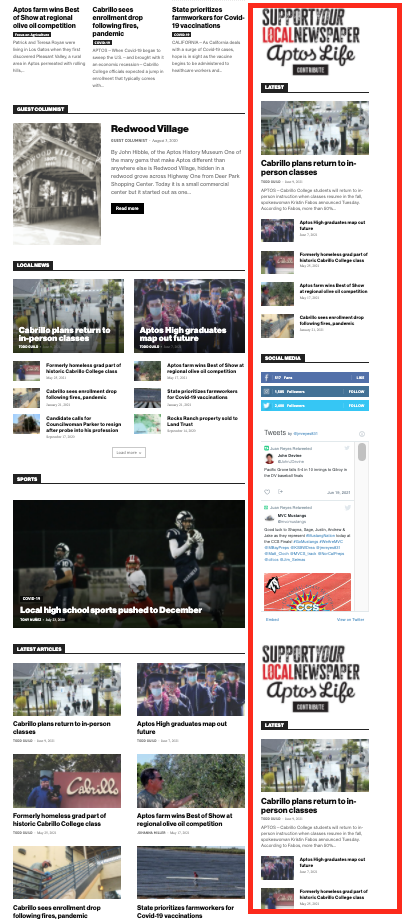
As a result, instead of two overlapping sidebars, we now have two duplicate sidebars stacked on top of each other:
Is there any way to fix these issues? Ideally we would like to leave the page template set to default, with the overlapping sidebars eliminated.
We’ve already tried disabling all our plugins to check for conflicts. Here is some more info from the System Status panel:
Theme name Newspaper
Theme version 10.4
Theme database version 10.4
HTTP channel test wordpress
Installed demo Default – demo ID: default | install type: full
Theme Mobile Newspaper mobile version
php.ini configuration
Server software Apache/2.4.38 (Debian)
PHP Version 7.3.19-1~deb10u1
post_max_size 32M – You cannot upload images, themes and plugins that have a size bigger than this value. To see how you can change this please check our guide here.
max_execution_time 120
max_input_vars 3000
SUHOSIN installed false
PHP extensions
mbstring available
GD library available
WordPress and plugins
WP Home URL https://aptoslife.com
WP Site URL https://aptoslife.com
WP version 5.7.2
WP multisite enabled Yes
WP Language en_US
WP Memory Limit 1 GB/request
WP_DEBUG False
Caching plugin No caching plugin detected – for best performance we recommend using WP Super Cache
 spervaiz
Hi!
I’m still trying to figure out why my website text is showing abnormally on mobile. I’ve attached a photo to show the weird font.
 cheryldimof
 I have active the regular AMP plugin that works with the mobile theme, the mobile theme plugin, Newspaper 11. However, the toggle which usually appears to turn AMP of and on on a per-post basis is now missing and reappears if I activate a different theme.
 Umut
Umut My page in menu is not seen on mobile.
Why is this ?
 Karokaryabi
 I see, when I follow the steps its shows the right header but when I open it up with my mobile phone, will see something different.
vikramsaitejaHey there ,
I have created two contact us pages one for desktop and other for mobile , Amp with same content , the page is correctly being displayed in desktop when it comes to mobile only the title tag is being displayed , I have used a premed template from cloud library to create this page . How could I resolve this to show the AMP page in mobile
 Kingoferrthang
Hi there,
I have installed the Newspaper on my site (https://richfamouspeople.com) but the mobile version doesn’t seem to work.
Can someone help me, please?


