- NewspaperThe Newspaper Mobile Theme: Introduction
- NewspaperThe Mobile Theme
- NewspaperModules Builder in Newspaper Theme
- NewspaperFilters and sorting for taxonomies
- NewspaperHow to Add a Logo in Newspaper
- NewspaperBig Grid Flex Settings
- NewspaperHeader Builder
- NewspapertagDiv AMP Plugin Tutorial
- NewspaperNewspaper theme documentation
- NewspaperBest Of Forums
- NewspaperCache plugin – install and configure
- NewspaperFont Customization
- NewspaperTheme Colors Introduction
- NewspaperBackground Introduction
- NewspaperHeader ads
- NewspaperPost template ads
- NewspaperCustom ad spots
- NewspaperMain Menu
- NewspaperHow to Install Newspaper via FTP
- NewspaperHow to Install Newspaper via WordPress
 hemant1994
 My blog link for both problem.
Please check these in both mobile and laptop
 FlemmingBeck
Hi’,
I’ve downloaded a blank header template. I’ve added a menu to the template (with the TD Composer).
The menu will show on the page, but it will not redirect me to the menu point I choose.
I’ve also added the same menu in the area for mobile – and that just works just fine.
What have I done wrong?
 Adeba
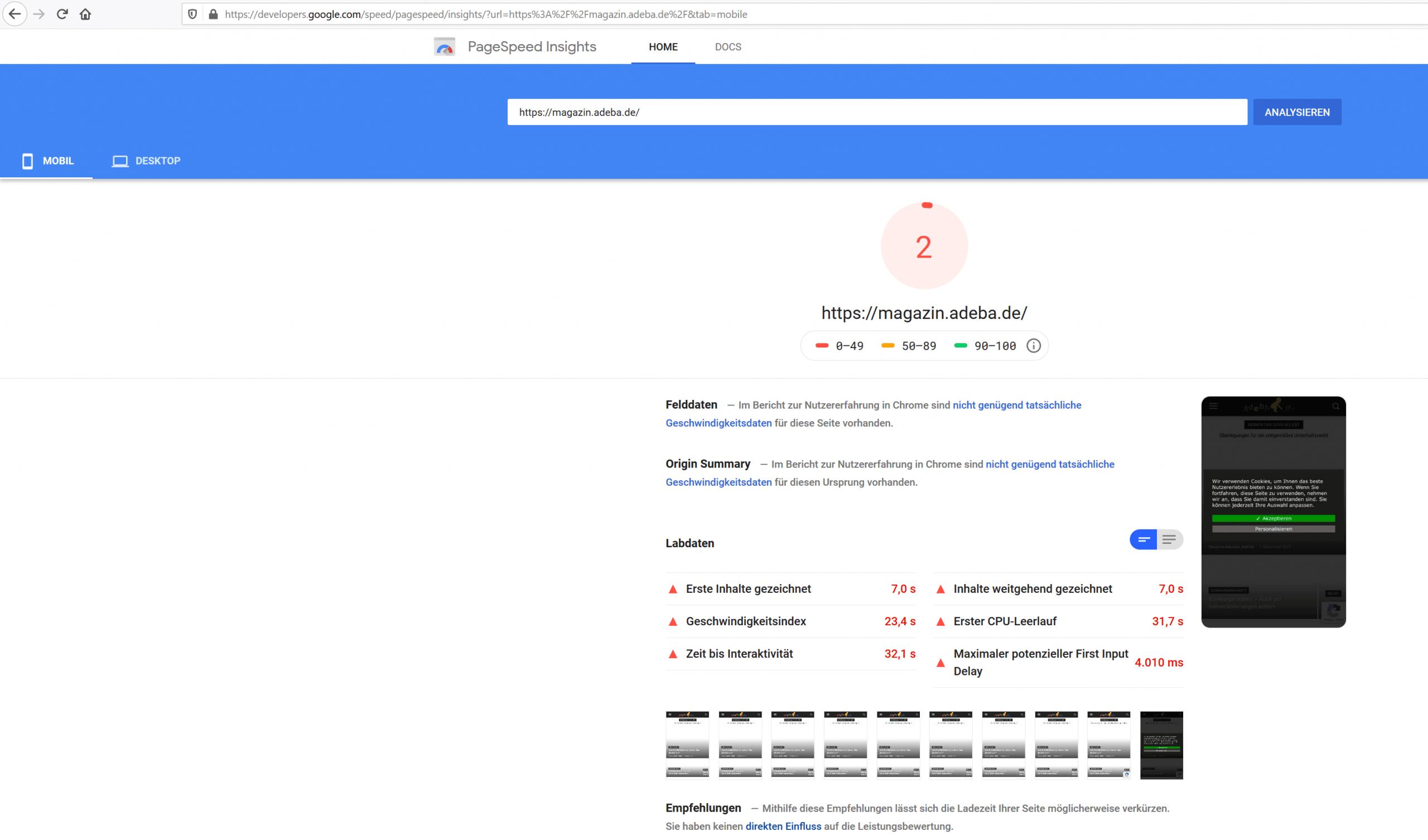
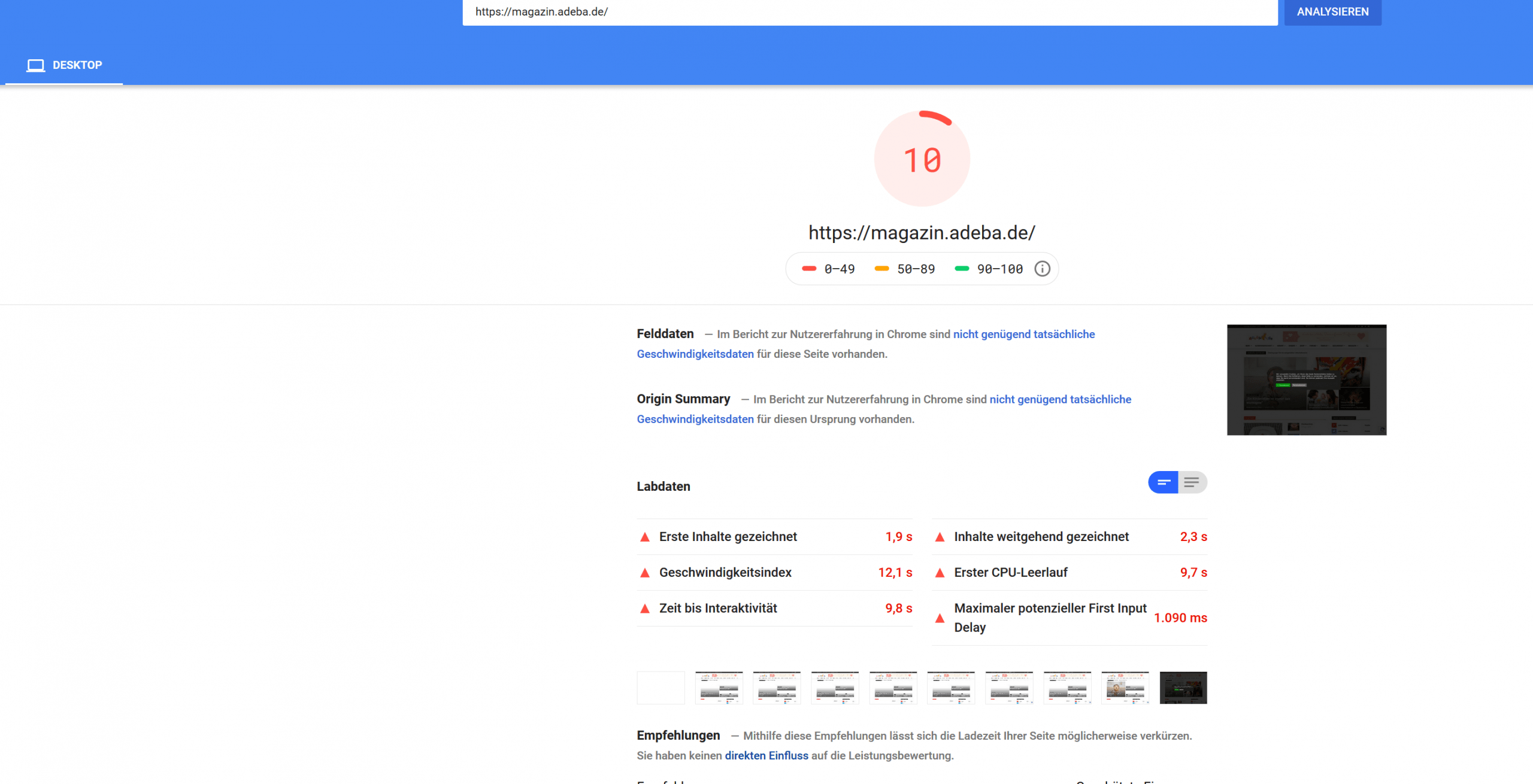
AdebaA new record on my website. After updating to the new design 10.2 and deinstalling Standad Pack I got a new negative speed record.
Sitespeed 2
https://developers.google.com/speed/pagespeed/insights/?url=https%3A%2F%2Fmagazin.adeba.de%2F&tab=mobile
https://magazin.adeba.de/wp-content/uploads/2019/12/2-scaled.png
Sitespeed 10
https://developers.google.com/speed/pagespeed/insights/?url=https%3A%2F%2Fmagazin.adeba.de%2F&tab=desktop
https://magazin.adeba.de/wp-content/uploads/2019/12/1adeba-scaled.png
Even an own server 🙁
So any help is welcome, because things are really getting interesting.
https://tagdiv.com/newspaper-10/
Blazing-Fast Websites
We’ve been working on the idea of making the Newspaper Theme light and fast for a long time. We’re now delighted to give you an excellent way to build a website that is optimized for fast loading speed out-of-the-box.
When you deactivate it, things are starting to get interesting, and your website tends to speed up by itself. ?
 learn4funs
I just inputted Amazon banner ads code on the header bar and top article and same things done on Mobile theme
option in and Amp but On computer and laptop Banner ads working fine but … in MObile, no ads shown. completely blank.
Please let me know how to show ads on my learn4funs.com site so that when any one visit though mobile can see the ads.
need helps
 Sumit
Sumit I did it all but the problem is in the mobile version.
hemant1994Sir, in mobile whenever a user visit my site….Adsense ad is showing right aligent…How to show this in center..
This is happening only with phone…
Please
 vv2005
Hello,
I am using Animal Themes Pro.
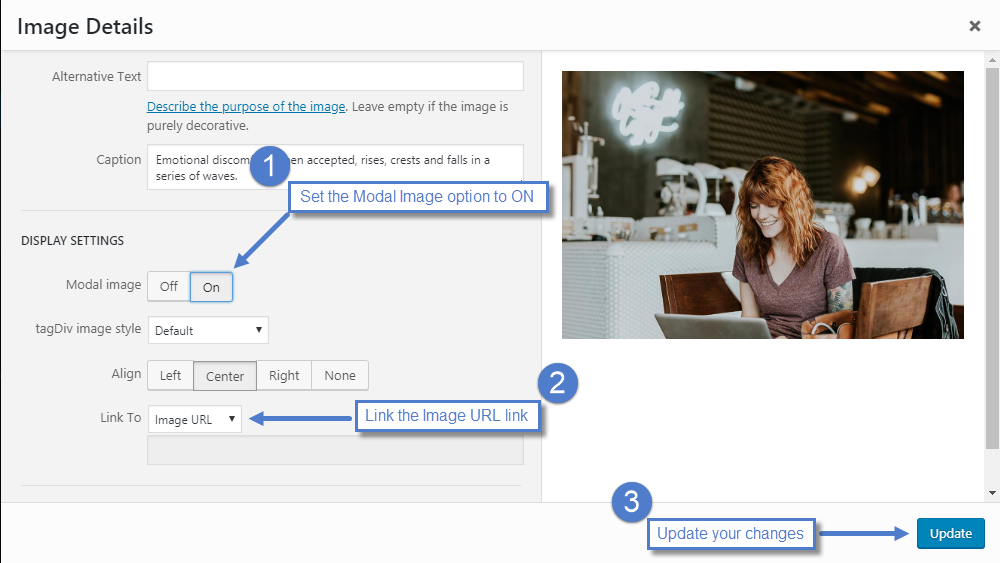
I have gone through this https://forum.tagdiv.com/modal-window/
and have tried editing like this https://forum.tagdiv.com/wp-content/uploads/2015/05/set_modal.png
But I don’t get those modal settings. Here is how mine looks https://prnt.sc/q4ivvo
I tried enabling sitewide modal images using Theme Panel->Post Settings->General Post Settings->General Modal Image(Enable)
It works now for all posts. But the zoom button isn’t working. The image opens in lightbox modal but cannot zoom. On mobile theme, modal image doesn’t work at all.
 chabotjeff
 Hi Sorry for a delayed response. I am trying to use a custom menu for mobile without using the mobile theme plug-in. You said we need to use the cloud template. I am currently using Newspaper Version 9.7.2 with default theme. Which cloud template would you suggest that looks similar to default theme?
Or, do I use a cloud library header template? Thank you.
-
This reply was modified 6 years by
chabotjeff.
 hamadani
The tables in my post appear on the desktop but they don’t appear on the phone, help please
 Samuele
Hello,
I would like to insert a new menu at the top left in the mobile version only.
I saw that I could insert a new menu, but the same also appears in the desktop version, in addition to the fact that I can not move it in the top bar.
How can I do that?
I attach the photos for more clarity.
thanks
https://www.dropbox.com/s/oe6xg40wsqxgm5r/1.png?dl=0
 thebaroneditor
After updating the theme, and plugins, the mobile homepage no longer works and shows shortcode. The homepage works on desktop, but the homepage doesnt work on mobile. What is causing this?mobi
 vphdlab
 SOLVED. Deactivated the mobile theme. Much easier, yes maybe a little more manual work. But over all easier to manage.
 be2name
Hello,
I’m just converting the standard default header to a tagdiv cloud template based header. With the standard template the ads (Google) where displayed correctly on any device (desktop and mobile). So this is no Google nor a banner delivery problem.
With the change to the cloud header, the ads are only shown in the mobile version, but also not perfectly. Although I even set fixed banner-sizes, the banner area collapses to 0 height and no banner is shown. In the mobile version I have the impression, that the title (“Anzeige”) makes the banner moving down. What do I have to do to make the banners displayed correctly?
Here are the banner settings:
https://prnt.sc/q3wl4v
The template in the composer (looks ok):
http://prnt.sc/q3wmgb
The Live-Output: No banner! (the word “Anzeige” moving down/banner-height:0):
https://prnt.sc/q3wvc7
Preview of the mobile view (looks ok):
http://prnt.sc/q3wszp
In the mobile view a banner is displayed, but moved down and not displayed correctly:
https://prnt.sc/q3wtwv
vphdlabHello tagdiv forum.
I’ve been designing af webpage for some weeks now, and I have a major issue with my settings not transfering proberly to mobile device.
When im wordpress and go to mobile device mode it looks very different, from when I am actually testing it on a iPhone.
Have anybody else experienced the same?
Its the footer, and some specifik columns on my front page thats now showing up.
See the images
 Calin
Calin Hi,
The WP Super cache have an option for mobile theme -> http://prntscr.com/q3tqlj -> https://forum.tagdiv.com/cache-plugin-install-and-configure/ in this way will prevent to load the cache from mobile on desktop or tablet.
Thank you!
 Northern Dispatch
Hello! We recently change our theme to NewsMag, except for the missing featured photo for our mobile version, everything is okay. Any help is appreciated.
 gumball44
 Hi,
I’m using WP fastest Cache premium, and I found the issue, the problem come from ” Mobile ThemeCreate cache for mobile theme “.
When I deactivate it, everything is ok.
Does WP super cache allow cache for mobile theme without making AMP deployed on tablets ? or Do we have to deactivate too with WP super chache ?
Kind regards
-
This reply was modified 6 years by
gumball44.
Calin Hi,
Unfortunately I can not check your website -> http://prntscr.com/q3pvww make sure that you do not have set mega menus in mobile theme menu.
Thank you!
Calin Hi,
Usually the mobile theme appear on tablet when you are using some cache plugin and cloudflare.
We recommend to use WP Super Cache -> https://forum.tagdiv.com/cache-plugin-install-and-configure/ and we recommend these configurations for cdn -> https://forum.tagdiv.com/cloudflare-cdn/
Thank you!
Calin Hi,
For this problem you can let the comments enable for all visitors -> http://prntscr.com/q3ocbr or you can replace in theme core the, if you are using single post templates from cloud, you’ll need to change this file -> https://www.screencast.com/t/Ydh9wo0VOK in my case is -> https://www.screencast.com/t/EEcuCDrhqF4i -> wp-content/plugins/td-cloud-library/parts/tdb-comments.php for default post styles the changes must be done in -> wp-content/plugins/td-standard-pack/Newspaper/comments.php -> http://prntscr.com/q3ogwb also if you are using mobile theme plugin -> http://prntscr.com/q3ohzc -> wp-content/plugins/td-composer/mobile/comments.php
Hope this will help you!
Thank you!
 abn
abn ya i did the same as the screenshot but in laptop version it will be the same as mobile version
 mni
mni Thank you, the code works!
Last question: when I paste a Facebook post or video, there is a large empty space in the mobile version! How to enslave it?
https://www.screencast.com/t/7JqbSyPm2Hmm
Mario
 shravan5921
Mobile theme is loading on desktop, using Nginx helper and redis object cache as caching plugins.
Tried clearing cache from both of these plugins, still with no help I’m asking here.
Could it be a plugin issue?
 blarrow
I cannot activate the plugin after updating it to the latest version. It throws an error as follows
Plugin could not be activated because it triggered a fatal error.
Fatal error: Cannot declare class Mobile_Detect, because the name is already in use in plugins/td-mobile-plugin/Mobile_Detect.php on line 28
 chicky365
Hi
I activated the mobile theme last night and added my main menu to it. When I test the menu on my phone, only the “Home” option is working, none of the other menu options do anything?