
- NewsmagUsing other ads
- NewspaperUsing Other Ads
- NewsmagSidebar ads
- NewspaperSidebar ads
- NewspaperIntroduction to CPT and ACF with Newspaper Theme
- NewspaperHow to edit modules for Flex Block X
- NewspaperHow to use the Posts List shortcode
- NewspaperCreate a frontend submission form
- NewspaperHow to Use the Tabbed Content shortcode
- NewspaperWooCommerce: Happy “Add to Favorites!”
- NewspaperHow to generate Facebook App ID
- NewspaperLink Tracker
- NewspaperFlex Block Settings Guide
- NewspaperGeneral Options that May Interfere with the Newspaper Theme
- NewspaperSocial Icons
- NewspaperPosts Loop Element
- NewspaperSet a Background for Category Page
- NewspaperThe Newspaper Mobile Theme: Introduction
- NewspaperHow to Add a Logo in Newspaper
- NewspapertagDiv Shop
 Calimero
 thank you!
I did as you told me, but the color in the top has not changed. Another question, how can I display the date and time in the slide? see drawing
http://www.cataniaoggi.com/_/wp-content/uploads/2013/12/home.jpg
-
This reply was modified 12 years by
Calimero.
 gekonstudio
Hi.
I would like to have Facebook like & share, send button on top and bottom page. Similar of this.

But now is Newspaper template cropping Facebook button on page.
Of course page is cropping any others social plugin. See pics.


Any idea?
Thanks.
 simchris
 Hi, Radu
and so, I now say “d’oh” (per Homer Simpson).
That page should definitely be a sticky under a new topic
General Support: Page Speed (locked from posts by others perhaps?)
Otherwise you’re going to keep getting posts from folks over and over on this topic, primarily from non-developers, but also from folks just wanting the basic “tips.”
I think the async option in the 2.1 will help with ads, and also the option to use web safe fonts (e.g., Georgia, Arial/Helvetica, Trebuchet for body fonts) would help too.
Keep up the great work 🙂
CalimeroExcuse me, I ask 4 favors.
1) to change the color theme style.css way, the goods, Partial says exactly where to insert the code?
02) pages in the post, I want to add author name, time of insertion, modification time, it tells me where I can enter the command and where can I find the command?
view link http://www.cataniaoggi.com/_/wp-content/uploads/2013/12/data.jpg
03) in the home, as seen in the large slide, the title is cut the rest is changed with dots, how can I avoid this?
view link http://www.cataniaoggi.com/_/wp-content/uploads/2013/12/home-titolo.jpg
04) when I insert a post in a category, there ‘the possibility’ like delays the child category
05) how can i delete, view link
http://www.cataniaoggi.com/_/wp-content/uploads/2013/12/delete.jpg
thanks for what you can ‘help me,
the site cataniaoggi.com
 zelatech
 another question.. for example now i have adsense code in the “middle third paragraph”…
how to insert my custom code in the same middle third position?
 Radu
RaduHello all,
I will periodically write here a new thread where we can discuss what will be implemented in the next versions. In addition to the small fixes and improvements we have some very big updates that will come in the long run.
Please know that we are working full time and we dedicate all of our attention to this theme and to the support.
We are now working on this:
– fix the sticky posts – on the homepage loop since update 1.7 they are missing.
– the new adsense code
– text color for menu option
We are also investigating and we want to implement if it’s possible this:
– color themes on each category (the theme will change it’s entire color theme when you are on one category or on posts from one category)
– a system that will remove duplicate posts everywhere – in response to this thread
Research:
In the long run we are working on a new panel system. It’s still in the early stages of design but we finished the requirements and a basic framework to work on:
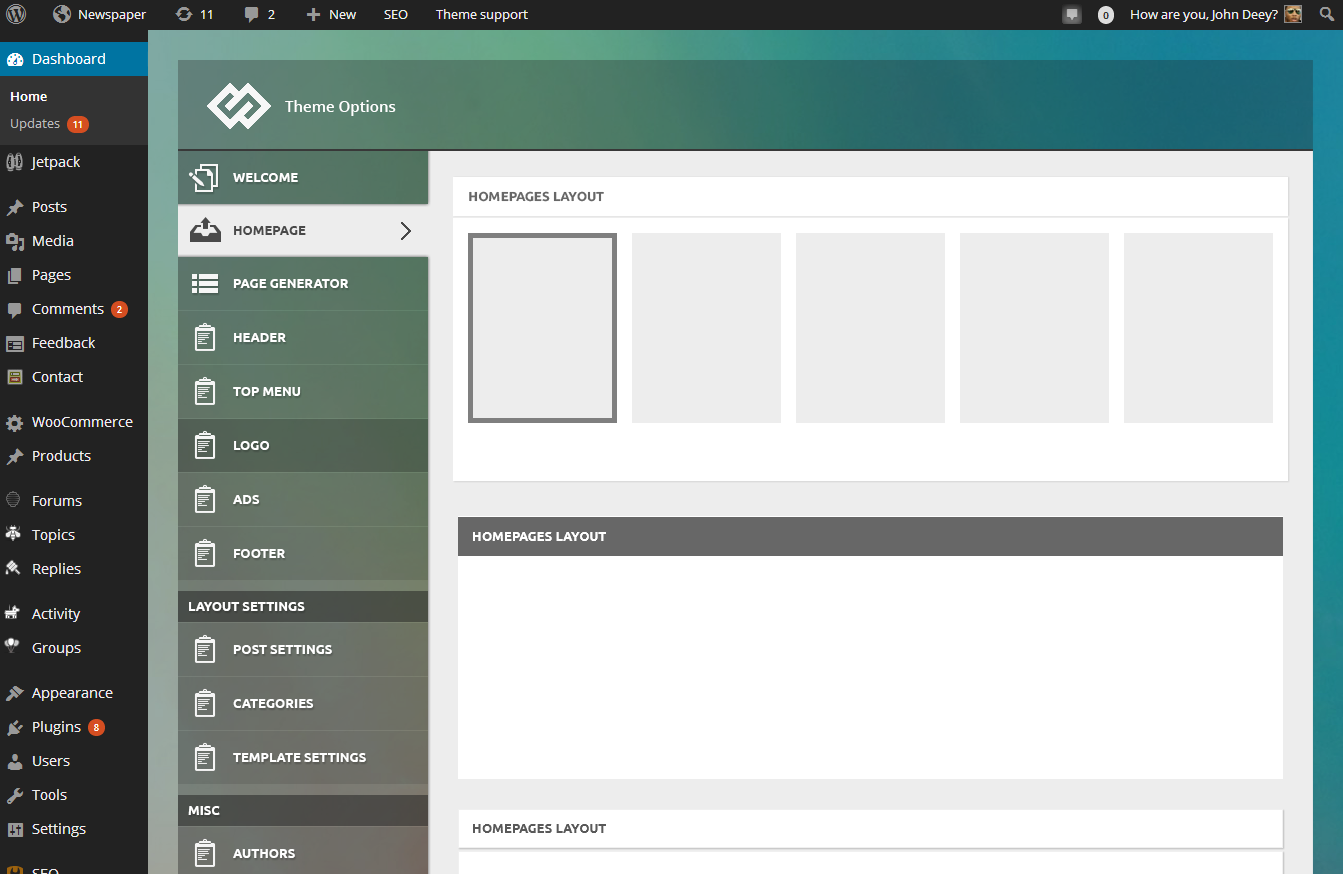
We will use this panel on all of our products from now on and it’s designed to work also with Newspaper. This panel will take us at least a month to be finish and it order to make it compatible with the Newspaper theme I think we have to redo the ads section of the theme and the category settings section but all the other settings should be easily be moved to the new one.
Besides this we also do some interesting stuff to push the limits of wordpress themes 🙂 stay tuned.
 webpaid
The sidebar ad and inline post ad are not displaying anymore. They used to but after adding more ads for the responsive options and other devices they stopped showing.
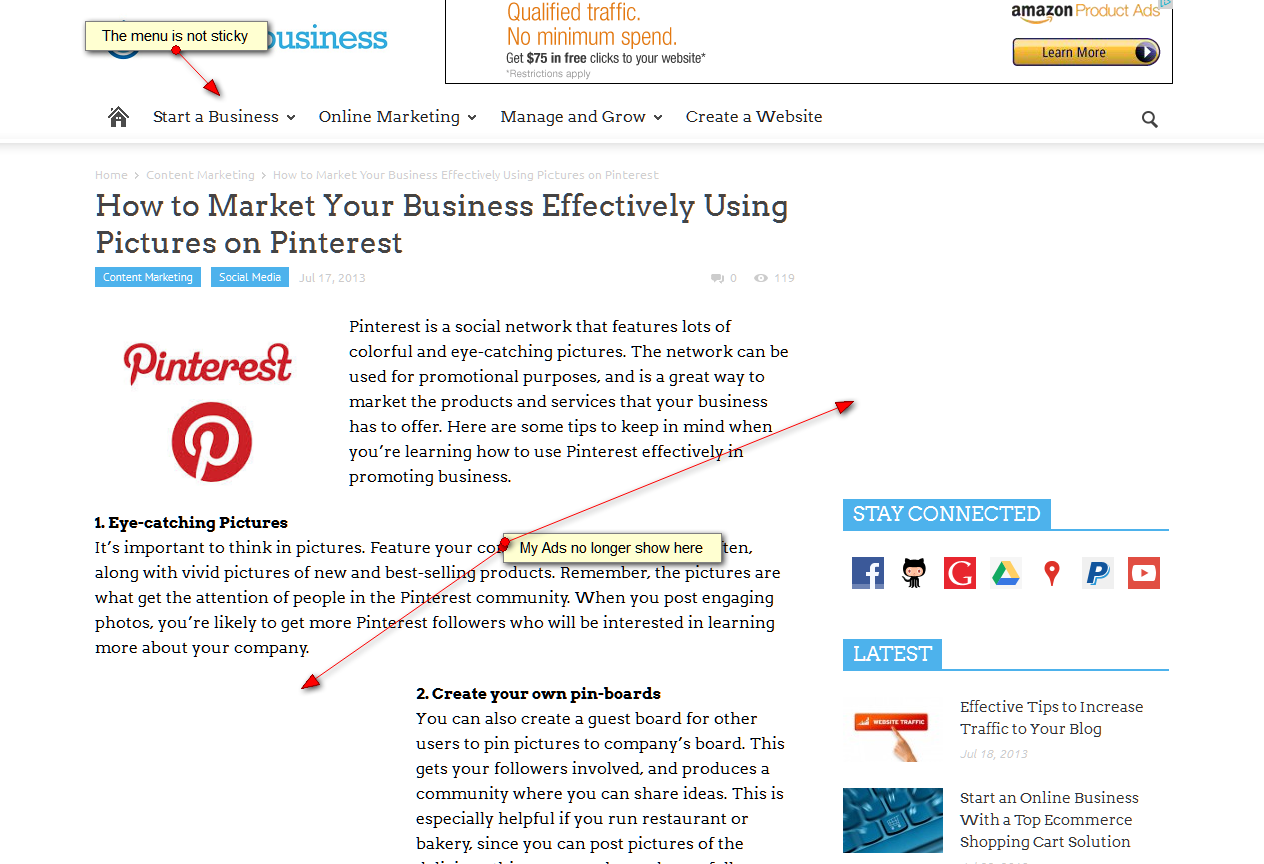
link to screencap:
http://easycaptures.com/fs/uploaded/832/0599636491.png
Also, have 2 other issues. Menu not sticky (where is this option) and homepage slider background image not displaying.
Radu Hello,
the banner that you are using here is not made in the adsense panel of the theme: http://screencast.com/t/qpkTvv5nrIn please make it like the others and it will work. It appears on portrait tablets: http://screencast.com/t/BkmdMDsvv and in the rest is hidden.
Radu from tagDiv
 dcarrero
Hello,
I use Google DFP for my ads, and i need to add code in header and other code for banners. Can make this?
Regards.
http://carrero.es
simchris Just for a point of reference on our test site under development, with 1.7.2, and no caching or tagdiv/optimizer plugin enabled. This is neither a complaint, nor solution, just an indicator of another look at “speed” on a “typical” review article page online, based in U.S.
Test article page
http://ga-ga.com/785/discwatcher-watching-films-at-home-spring-2013-a-good-day-to-die-hard/
Google Page Speed = 96 / YSlow 73* (desktop; not showing mobile results)
Page load time: 6.46s
Total page size: 2.19MB
Total number of requests: 106
*NOTE: huge number of “errors” due to GOOGLE ads/cookies/etc. with embedded YouTube video and two AdSense ads (top/right) and social media crap. Unrelated to theme.
PAGE HAS: 3 large images in article; two content blocks right side with 3 thumbnails each (6 images) and the 2 related content items below story. Total 11 images plus gravatar, and 2 logos.
14 images, 2 ads, youtube video; Google Page Speed “96” — not too shabby!
Main issues have to do with Google elements, and social media stuff. One javascript file could be compressed; YSlow hates the @style load of CSS via child theme (sigh). Images could be slightly more compressed (option to set compression level via functions file?).
For those looking at Google Page Speed vs “load time” or “payload” … ALWAYS test your “page speed” with AdSense stuff removed or you will always get upset with any WP site ranking/rating/testing. In our case, the above “96” with Google Page Speed is pretty amazing, frankly. 6 second load time, not so much (anything over 4 sec would be considered “bad” these days), but caching plugin and CDN may help with that immensely. Yslow pretty much “demands” a CDN for top speed ranking.
Our goal is 3 sec. max time for a page like that (avg 2.6 sec would be acceptable based on how some of our other sites work) and if/when I get to that, I’ll share our method of optimization, if anybody will want to know.
— PLUGINS:
* all jetpack OFF
* WP-Optimize (speed up your DB by optimizing it!)
* Akismet with site license
* Limit Login Attempts (a must!)
* Regenerate thumbnails
* WordPress SEO by Yoast
* bare minimum tagdiv provided plugins (e.g., animated GIF resize)
-
This reply was modified 12 years by
simchris.
simchris Just heads up to folks worrying about page speed, one great resource you may already be aware of is my friends at GT in Canada who built a neat testing tool years back, here: http://gtmetrix.com/
Paste in any page URL from your site, such as a post page, and it will tell your speed scores with Google PageSpeed and Yahoo Yslow – but also give you suggestions on various things you can fix; particularly useful is looking at number of calls for some plugins that “dial out” for avatars, social media, etc.
Keeping in mind that most WP themes may have too many calls to CSS files, and some plugins add more, which they shouldn’t (I’ve got one called ‘external links’ right now, and not using any of the CSS in the plugin, but he still loads another style sheet, not needed – having to bug him to remove that …) …
Anyway… it’s a good reference to some of the issues folks run into prior to optimization. YOu can create free account, then run a scan, and then when you tweak, you can come back and rerun test, and see improvements over time.
It’s more useful than running Google Page Speed insights, as it actually provides tips and exmaples on how to actually address each issue, along with explanations – which Google does in a roundabout or confusing way or not at all (meaning Google penalizes your page speed for their own AdSense content … which is hilarious … “you should fix this” – and it’s their content that needs fix!).
I’ve spent 3 months optimizing our main business site (not using WordPress) which has been an adventure; now starting on the WordPress stuff.
I can tell you from experience that Radu and co are doing an amazing job with optimization within the confines of the WordPress setup which inherently has numerous flaws for SEO, like the method for CSS redirect used in the child themes (WP core devs keep using a method not recommended by the rest of the universe … for example).
So, there is a *lot* going on with WP, which *no* theme maker can fully address, only tweak and you need to research common problems and workarounds for *ALL* WP based installs when concerned with Page Speed.
For instance, I do *NOT* use JetPack myself as it “phones home” all over the place and slows things down. SO, every little spinning widget and flashing light and cannon blasting all slow down the page. If you want the most speed with WP, you need to have the simplest layout possible, ala Newspaper, for this kind of site, and then optimize the heck out of all your images, minimize anything that calls out to other sites (like FB comments box), certain JetPack things, and anything that doesn’t run in async with javascript, and avoid plugins which add more CSS style sheets and can’t inherent code, or properly write custom CSS into the head INLINE, not as yet another external style sheet!
Just some suggestions, somebody may find useful as a WP user since 2005, and webdev since 1994.
 sunkast
 I’ve got the custom block and module working. But I’ve run into another issue. I’m displaying sub categories and using the Load More button to load posts using Ajax. Except that when ajax loads more posts it’s not displaying them in the 4 column layout I’ve programmed into the custom block and module. I assume there is another file I have to modify to output the correct ajax?
Also, by any chance, will the Teaser Grid component of Visual Composer ever be supported?
Thanks for all of your help.
 dalandau
 For 45 dollars I believe it is not only the developers task to help but the users should help each other also if they can.
But yes the developers should be there and be the foundations of the support.
I am still hoping they will help me with my problem its been 4 days
https://forum.tagdiv.com/topic/featured-video-and-dailymotion/
PS: I believe your theme is only blue because you have the caching on, if you want the caching on you have to edit in the css file, they have answered this in one of the forum threads. They said they will fix it
https://forum.tagdiv.com/topic/theme-speed/#post-1265
https://forum.tagdiv.com/topic/theme-speed/#post-1348
 pantera
Hi All
I’ve seen a strange behaviour: one of my post doesn’t show the inline google ads. It’s strange, only THAT post. The others works well
This is the post
http://www.scriveresuivetri.it/come-funziona-uno-studio-di-registrazione/
You can see also the others, they are all ok, with proper google ads that shows at the 4th paragraph.
Can you please help in some way? Thanks in advance
Giovanni
 mmcmsp
 It’s clear it’s a spammer.
Two things I wish you guys had in here:
– a better search under each forum
– a link for us, users, to see all our topics
The search is so important because right now we can search only from the frontpage of the Support page and it searches all your themes and plugins forum. I only want to search for info from the topic I’ve purchased.
I had lots of questions about theme configuration and possible hacks ang gave up on posting because it was urgent and you guys take a while to respond. Answers could be in here in other topics but your search is frustrating!
Also for me to see all my threads I have to go back to my email and click on the link…. it’s not nice.
If you guys want to check on my blog, looks so nice, makeupgeek.com.br
Thanks.
 tvsullivan
simchris w3C cache does implement many of the tricks for optimizing your site. Note you can also do some of that yourself using your htaccess file and make sure you optimize the heck out of your featured images (mine are about 16-24kb max for 700×406). There are quite a few great articles out there on implementing some of the W3C stuff without using the plugin, if you only want to test bits of that. Also setting up an Amazon CDN (S3+cloudfront) and hosting your JS/CSS and fonts there will also speed up your site. You can’t entirely rely on the “theme” to manage your site optimization, as a bunch of that is related to hosting, optimization of images, and minimizing using plugins and fancy jetpack stuff (basically anything that calls out to another site slows yours …). Putting more than two ads on the page from AdSense really slows it down, using anything connected to facebook or twitter “on the page” slows it down. Etc.
Radu Hello,
thanks for reporting this. We will try to fix our ads on IE8. On IE9 the site behaves like on the other browsers and it looks ok.
Until we come up with a patch you can hide the ads like on ie8 using the .ie8 class for example:
.ie8 .post {display:none;}
-
This reply was modified 12 years by Radu.
 mofiki
I have noticed that in IE 8 anyway that the width of the themes pages shorten and cause ads and other wider items to hang over the wrapper. Any thoughts on this? I don’t usually use IE but it was brought to my attention. All is fine in IE 10 but anything older seems to change the overall width of the site.
 thomaspe
 Concerning ads: Another idea.
At least in germany we do have to add some notice to ads being such.
Maybe you could offer a css solution to mark ads as ads in the ads options.
 tnieonline
Our site indulge.newindianexpress.com seems to have problems in loading in Android, iOS devices. It loads well in Dolphin browser in Android, but fails to load properly in other browser/devices.
Kindly get back to us immediately.
Thank you.
mofikiThe load time of the Newspaper Theme seems to be very slow compared to other themes. I love the theme and will be using it although I need to get the load time down before it can be beneficial else Google will likely not rank well. Before Newspaper theme load time was 1.28 seconds and after the theme was changed to Newspaper its at over 3 seconds.
My question is, does anyone have advice on speed improvements as well as consolidation of the 14 or so CSS stylesheets that load each time the page loads (caching plugins aside since Bots will likely not be effected)?
By the way I love the theme, great work!



