- NewsmagUsing other ads
- NewspaperUsing Other Ads
- NewsmagSidebar ads
- NewspaperSidebar ads
- NewspaperIntroduction to CPT and ACF with Newspaper Theme
- NewspaperHow to edit modules for Flex Block X
- NewspaperHow to use the Posts List shortcode
- NewspaperCreate a frontend submission form
- NewspaperHow to Use the Tabbed Content shortcode
- NewspaperWooCommerce: Happy “Add to Favorites!”
- NewspaperHow to generate Facebook App ID
- NewspaperLink Tracker
- NewspaperFlex Block Settings Guide
- NewspaperGeneral Options that May Interfere with the Newspaper Theme
- NewspaperSocial Icons
- NewspaperPosts Loop Element
- NewspaperSet a Background for Category Page
- NewspaperThe Newspaper Mobile Theme: Introduction
- NewspaperHow to Add a Logo in Newspaper
- NewspapertagDiv Shop
 ssergei
I created a non Google Adsense in article ad, just an image with a link. It shows in “Standard – default” post template but it does not show in “Single Post Template – Default PRO”. What can I do to make the ad show in both templates?
 igor_id
Hello.
Faced the problem of lost paragraphs in the mobile theme editor. The page on desktops is displayed correctly, but on mobile devices, when viewing the page, paragraphs are absolutely absent, while they are visually present in the mobile editor. If I switch the view mode of the mobile editor from the visual tab to the text tab and explicitly add the </br> code, save the changes, the paragraphs appear and the page starts to look right on mobile devices. But it is not possible to solve the problem in this way, because any reverse switch from the text tab to the visual tab leads to the fact that </br> are lost. And most importantly, I would like to work not through crutches. The most amazing thing is that on my site there is another page that works correctly and in it the paragraphs that are displayed in the mobile editor are exactly the same when viewed on a mobile device. I could not find a fundamental difference comparing these two pages. Installed latest theme and wordpress updates.
The page of my site in question:
Thanks in advance for your help
Regards
 Bettina
 Hello!
The tagdiv Composer is the main plugin for this theme and it has a lot of customizations. For example, if you have a lot of elements on a page, then it could load a little bit slower. Our developers are working a lot to improve the page speed in every update.
Some factors which you need to take into account are:
External factors: server speed, if you are using CDN or not, the external resources loaded by your website like ads, fonts, tracking scripts like Facebook Pixel, Google Analytics, Twitter analytics, Hotjar and so on.
Internal factors: the number of elements on the page, image size, image formats, if you are using mobile optimized layouts, console errors, if you are using the Standard Pack plugin on not, if you are using PRO demo or a standard one.
Please check the tutorials from those platforms gt metrix and Google Pagespeed Insights and I’m sure you can increase the page speed.
Please note that the page speed is not covered by the support team: https://forum.tagdiv.com/newspaper-theme-support/
Also, check this useful guide: https://www.xtechkr.com/optimize-newspaper-theme/
Other useful tips here: https://forum.tagdiv.com/topic/%e2%9a%a0-very-slow-image-load-help-needed/
Hope that helps you!
Thank you!
Bettina Hello!
I’m sorry to hear about that, but our developers are working a lot to improve the page speed in every update. Make sure you use the latest update of the theme and plugins.
Some factors which you need to take into account are:
External factors: server speed, if you are using CDN or not, the external resources loaded by your website like ads, fonts, tracking scripts like Facebook Pixel, Google Analytics, Twitter analytics, Hotjar and so on.
Internal factors: the number of elements on the page, image size, image formats, if you are using mobile optimized layouts, console errors, if you are using the Standard Pack plugin on not, if you are using PRO demo or a standard one.
Please check the tutorials from those platforms gt metrix and Google Pagespeed Insights and I’m sure you can increase the page speed.
Please note that the page speed is not covered by the support team: https://forum.tagdiv.com/newspaper-theme-support/
Also, check this useful guide: https://www.xtechkr.com/optimize-newspaper-theme/
Other useful tips here: https://forum.tagdiv.com/topic/%e2%9a%a0-very-slow-image-load-help-needed/
Hope that helps you!
Thank you!
 Mclongx
Dear TagDiv,
I have two questions to seek your help:
1) Can I edit the links of the “menu login”( https://www.gowiselife.com/wp-content/uploads/2022/04/Screen-Shot-2022-04-24-at-5.06.59-PM.png ) , the icon and login settings on the upright corner?
The reason for editing the links is that I found the “menu login” direct all clicks to the pages belong to Metropolitan PRO’s Login/Register – metropolitan_pro pages, etc. What I need is to direct all member related pages to Ultimate Member’s user pages. But I can’t find a way to edit those links.
I could remove this “menu login”, but I do like the design of this login setting, it is one the reason I choose Metropolitan PRO theme. I really do not want to replace it by another menu there.
2)Can we edit the mobile menu in Metropolitan PRO?
The mobile menu page is the page appears when users touch the menu icon on the homepage in a mobile phone, the page in my site looks like this: https://www.gowiselife.com/wp-content/uploads/2022/04/IMG_7047.jpg
So far, I can only change the background image and turn on/off the “Sign in / Join”. I hope I can edit the links for those two words(for user logins) , and to redirect them to UM users pages.
Could you help me out?
Thanks!
 demontek
 thanks for the video, but still doesn’t help me do this
heading
image and exceprt (side by side like in this example)
i even checked out all the 500 + Pre-designed Templates – tagDiv Cloud Library
All your demos have
heading
image
excerpt
https://cloud.tagdiv.com/wp-content/uploads/2018/08/bl31-sm-2.jpg
not
heading (on own line)
image and excerpt (side by side).
can u whip up 1 demo like this in your block section
and i won’t bother you again 😉
 OCLarry
I know you don’t support the GeoDirectory plug-in, but I have seen multiple examples where it is used. In specific, this one in your showcase:
https://www.siemreap.net/directory/
The theme is Newspaper. It looks the Directory landing page was built in TagDiv Composer like this (and which I am trying to have my web guy replicate):
Below the header row and breadcrumbs…
Top row is expanded to cover 100%. Within the row is a slider with local images displaying in background.
Within that row is an inner row – container with three rows inside it
Row 1 – td text with title
Row 2 – another row with a search form — (in this case, it is GeoDirectory Advanced Search so it only searches the Directory places database, not the entire site database)
Row 3 – Below that another text with tile row with a horizontal list of most popular categories
Then below that, we have another row (not extended) with a sidebar
and inside that are multiple category rows (each a horizontal list of 3 columns)
The main Nav menu would connect with this landing page as a custom link
Then the Row 3 list of category links could also be custom links (in this case to the top 3 posts in a GeoDirectory archive pages.
I know you don’t support the GeoDirectory part but does the TagDiv construction sound correct to you?
The site I am trying to build is AccessLosAl.com and I’m trying to get the Directory landing page to look like this:

Thank you for any help.
 Calin
Calin Hi psychic04,
For this you’ll need to set the ads code between some special tags, like it is suggested in this guide -> https://forum.tagdiv.com/using-other-ads-non-adsense-ads/ then the ad box will display different ads per view port.
I hope this will help you!
 GeorgeBayliss
Hi all,
Can someone please explain how Google AdSense works with this theme? From my understanding, Google AdSense automatically places ads on your sites in the best locations, but the theme I am using already has the ad spots built into the theme, so I want the ads to go there rather than in the other places. I can see in theme panel there are sections for AdSense codes for each Ad, but where do I get these codes from on Google AdSense? – Are there any good tutorials out there to watch?
Second thing is that I have seen lots of people talking about the Google SiteKit plugin – is this still recommended for this theme?
Thanks in advance for the support.
 Leganes Activo
Hi!
I would need apply shorcodes in header. Y tested with adbox header, adbox custom ad, raw html, column text (html) and it does not work for me.
I need use a shorcode of Restrict Content Pro that it works in another parts of my website to hide adsense for pay suscribers
I hope I can use it
Thanks
Regards
 speakeasy
Hello,
On our articles page, we have an infinite scroll where one article leads into another.
The only problem as you can tell from the screenshot ( ) is that our header logo is being replicated at the top of every single post page.
This is only happening on the mobile version.
Can you help us?
Best,
Ari
 RECORD EUROPA
 Hi, I’ll give you an example.
As I said the category filter is ‘single – related from tags’, ‘filter by tag slug’ is in this case ‘video-p’ and there are some categories that are excluded (but apparently they do not interfere with the results obtained).
I created a single template for a type of post (programs).
In this template, there is a sidebar that displays all the videos related to this program. For this, the videos have in common with the program the tag with the ‘name of the program’ and another ‘video-p’ (exclusive to program videos).
So the filtering is done this way, whatever the program with this template, it presents videos that have the same tags (program name) through the ‘single – related from tags’ + ‘filter by tag slug’ is in this case ‘ video-p’. And in version 11.4.2 it works, see the following image (program ‘Reis’, video ‘Reis’):
https://miramar352649001.wpcomstaging.com/wp-content/uploads/2022/04/v1142-1.png
For reference, in this same version (11.4.2), if we remove the filter by tag slug, all the latest published posts appear (see next image):
https://miramar352649001.wpcomstaging.com/wp-content/uploads/2022/04/v1142-2.png
After the update to 11.4.3, the filter no longer works, see next image (conditions are the same as in the first image):
https://miramar352649001.wpcomstaging.com/wp-content/uploads/2022/04/v1143-1.png
As a reference, if you then remove the ‘video-p’ tag, there are no changes to the posts that appear (they are the same as the last posts published), which shows that it is not working in this case.
https://miramar352649001.wpcomstaging.com/wp-content/uploads/2022/04/v1143-2.png
If you need more information or access to staging, please let us know.
Thank you,
Best regards,
Samuel Pereira
 ludyma
 Hello, every time there is no update there is no information about where it is done and how it is done, person bother you with these issues but it would be advisable to make small tutorials of improvements and new functionalizades or tualize the ones that are already, so that users Let’s know how maximum the subject.
You could inform me about these.
- new: Added Facebook Login functionality;
- new: Option to set margin for Single Content Ads;
- new: Option to disable the sticky menu on the Mobile Theme;
- new: Added the option to show only the form on the Header Live Search shortcode;
- new: Added the option to show the “Exclusive” label on posts from Flex Big Grids and live search shortcodes;
- new: Manage License System – Easily assign your key to a specific domain to access all the theme features. The new system allows you to manage multiple license keys on multiple domains;
- new: Option to import Homepage and Pages from Cloud templates interface;
 Good Day
 Hi,
1) I had deselected the ad spot from the dropdown. But the ads does not work.
– My website: http://www.adventurecounts.com
– Here are three ad boxes on the homepage in total.
I also have other questions as below:
2) Can I change the background color of newsletter block?
– https://prnt.sc/NbZWUC_qLI1J
3) The CSS settings of elements across four devices affect each others.
That is, the footer on desktop version should be like this: https://prnt.sc/Jm5l7_rJTzIG
After I completed the design of mobile version: https://prnt.sc/RfnvBI2piIe5
The footer of the desktop became: https://prnt.sc/8x3xGD2jKQ1k
May I know how to design the respective device layout safely?
4) May I know is there the Undo function in tagDiv composer? I did not find the button as the website claimed. I found Undo is only for some specific settings? https://tagdiv.com/embrace-the-undo-and-redo-buttons/
Thank you
 coldmani
 No it is not opening normal in your device also: https://i.imgur.com/WSr5r8z.png
You can see the ad is not full at bottom, the buttons of ad are hidden.
If you click the link again from youtube and you scroll it will do the same for the other ads too. It is cutting the bottom of the ad, recheck it please.
 msakande
 Dear,
I have serious problem with my website about the mobile version.
I create mobile version of homepage, single, category,…
But when I browse the website in a mobile device I get another version, not the good mobile version I created.
– Good version of mobile I create
https://www.owonews.info/wp-content/uploads/2022/04/mobile-page.png
https://www.owonews.info/wp-content/uploads/2022/04/mobile-page-ok.png
– Bad mobile version I get when I browse the website with mobile device
https://www.owonews.info/wp-content/uploads/2022/04/bad-mobile-version.png
– Theme panel mobile setting
https://www.owonews.info/wp-content/uploads/2022/04/Mobile-selected.png
Note: I don’t want AMP, just the mobile version I created.

 tgarmon032071
I am the server and site admin. I was working on it yesterday night with no issues. My composer window loads fine, I can navigate through the composer sidebar fine, but selecting a differenet category to populate yields no results in the page menu. Even still, changes do not save. The circle keeps turning and turning. So, I went on to other task with no issues, unitl I tried to modify the css code in the Appearance>customise section, upon attempting to save, I got the “You need a higher level of permission. Sorry, you are not allowed to customize this site.”
Now I have no issues managing any other area of the site design, only when it is in this area. I have disabled plugins that have worked fine for years. The site is fully updated and running php 7.4.
Our server uses is hosted on Godaddy, but we use DNS on Cloudlfare, which also has some caching of certain files and a firewall. But that was already in place before the problem occurred. I have the debug running and nothing so far. I had wordfence running on the site, but i disabled it. Also disabled profile press. Our site has DNS through Cloudflare, which includes firewall protection. Please help.
coldmaniHi, lately i bought your theme and i am running ads on my site. The issue is that when someone visits my site from youtube, the ads gets broken like this: https://i.imgur.com/m1cgbYe.png
Every other visitor does not have this issue, it happens just for visitors what comes from youtube. I tried some things to fix it but didnt work. Can you please let me know why this is happening?
 ionutm
 Hello,
I could use your support with some issues on my mobile pages. My website has most of its pages built using tagDiv Composer (and not the responsive version), but I’ve noticed the following behavior when these pages are accessed, namely:
– when a visitor accesses them, they are displayed in the responsive version (which has some design issues)
– when a user accesses them (so after login), they show up as they were designed with tagDiv Composer
Something like this 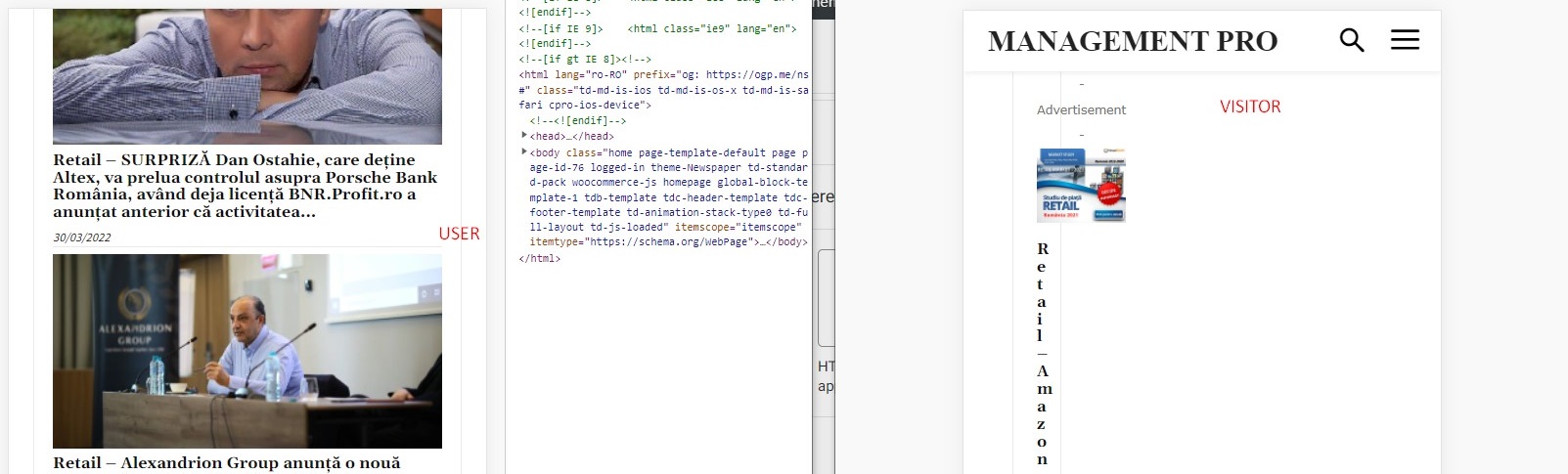
After some debugging, I’ve tracked down these issues to be related to the Wordfence plugin, which is set up in learning mode; the problem is that if I disable Wordfence, I’m losing other page settings like sticky menu setting, login menu setting, colors, etc.
Could you help me further debug it or recommend a solution? I can provide admin login if needed.
Best,
Ionut
-
This reply was modified 4 years by
ionutm.
Calin Hi,
Our theme provide the possibility to set the ads using the theme builder tagDiv Composer, so it is possible that the developer to used the frontend to set the other two sidebars.
This documentation is the old one -> https://forum.tagdiv.com/sidebar-ads/ that it is apply on standard templates (for those the ads are also set in appearance > widgets ).
For frontend are used cloud templates and ad box elements for ads.
Thank you!
 Ckyd
CkydA developer set up my site, then left town. And I’m trying to recover.
I have three sidebar ads, all pointing to my own products. The developer set up two of them. I set up the other at Newspaper, Theme Panel, Ads, Sidebar Ad. But I can find no indication about where the other two were set up. How do I find the ad codes for the two other ads that are displayed in my sidebar? I need to remove them.
Thanks!
Charley
 Anamaria
 Hello,
The image ads are added in demos, so to remove them you need to edit with tagDiv Composer, select the element Ad Box and with right-click, you can delete it => https://www.screencast.com/t/2GfCVx9BCAw7 or with drag & drop place it into the deleting red zone from the bottom right of the page.
The ad box has 3 sections for ads: using theme panel ads -> https://i.imgur.com/KFa9ibl.png, using images/banners -> https://i.imgur.com/MfAPTaE.png and custom code -> https://i.imgur.com/2rh8SuD.png save it and will appear on the post (you can set a shortcode like a shortcode from adrotate plugin or other plugins)
Thank you!
 troller
Hi,
I suddenly have some issues regarding the “Load More” Buttons below a list of posts… in other words:
I display 5 latest posts on the homepage, below I show the “Load More” option button. After I click on it, I only see the spinning “wheel” and nothing loads anymore.
Is it because I use a caching plugin? If so, do I have to exclude anything from being cached?
Thanks a lot
Anamaria Hello,
To add ads in the sidebar you can use the ad box element.
The ad box has 3 sections for ads: using theme panel ads -> https://i.imgur.com/KFa9ibl.png, using images/banners -> https://i.imgur.com/MfAPTaE.png and custom code -> https://i.imgur.com/2rh8SuD.png save it and will appear on the post (you can set a shortcode like a shortcode from adrotate plugin or other plugins)
Thank you!
 muslimperspectives
Hi I just purchased the Newspaper theme and have started to use the TD Composer to build my templates. So far everything was going well up until I started to build the home page.
I built a portion of the home page, only to find that whatever I put onto the home page also appears on every other page on the website. Furthermore, if I try to edit another page such as “About” or “Contact Me” using the TD Composer then it pre-loads the content that I put on the home page, onto those pages too instead of giving me a blank canvas to work with.
The home page content also appears on top of my categories pages and my singular post pages.
I deactivated TD Composer and Reactivated with no success. I have litespeed cache installed and have been clearing the database but no luck there either.
Here is a link to my site: https://www.muslimperspectives.com/