- NewsmagUsing other ads
- NewspaperUsing Other Ads
- NewsmagSidebar ads
- NewspaperSidebar ads
- NewspaperIntroduction to CPT and ACF with Newspaper Theme
- NewspaperHow to edit modules for Flex Block X
- NewspaperHow to use the Posts List shortcode
- NewspaperCreate a frontend submission form
- NewspaperHow to Use the Tabbed Content shortcode
- NewspaperWooCommerce: Happy “Add to Favorites!”
- NewspaperHow to generate Facebook App ID
- NewspaperLink Tracker
- NewspaperFlex Block Settings Guide
- NewspaperGeneral Options that May Interfere with the Newspaper Theme
- NewspaperSocial Icons
- NewspaperPosts Loop Element
- NewspaperSet a Background for Category Page
- NewspaperThe Newspaper Mobile Theme: Introduction
- NewspaperHow to Add a Logo in Newspaper
- NewspapertagDiv Shop
 Anamaria
 Hello,
Please try to select another viewport https://i.imgur.com/e0ind4q.png and try to remove the ads as I said on this topic https://forum.tagdiv.com/topic/theme-publicity-with-link-to-themeforest/
Thank you!
 Bettina
 Hello!
1. I can not see any black line at the top on the homepage in your website. Did you mean the sticky header or the top bar menu?
2. This demo uses the responsive version for mobile. A responsive version of your website is looking similar like on desktop, edit the page with TagDiv Composer, click on the mobile viewport: https://www.screencast.com/t/XDQJedlggSB ; there you can see your mobile version and you can edit the elements there.
Yes, you can import other templates and use mobile pages which are fully customizable and could be so different than desktop version, so you should build and assign them to each desktop page you need. If you do not build for every page, then for the rest of the pages you’ll have the responsive version of your desktop automatically. For more information about mobile pages, please check our article here: https://tagdiv.com/newspaper-10-3-7-update-brings-customizable-and-fast-mobile-pages/
OR if you do not want to build every page style, but you need different style too, then you can install the Mobile theme plugin. The Mobile Theme is a performance optimized theme included in the Newspaper main theme and it loads only for mobile devices. It comes with its own templates/design for page, post, category, etc so your current templates from the desktop theme will get converted to the mobile theme layout. For more details, please take a look here: https://forum.tagdiv.com/the-mobile-theme/ and https://forum.tagdiv.com/mobile-theme-introduction/
You can use which one is suitable for your needs.
Thank you!
Anamaria Hello,
The ad is set in the Ad box and is an image, and you can remove it, edit with tagDiv Composer, select the Ad box element and with right-click you can delete it => https://www.screencast.com/t/2GfCVx9BCAw7 or with drag & drop place it into the deleting red zone from the bottom right of the page.
The ad box has 3 sections for ads: using theme panel ads -> https://i.imgur.com/KFa9ibl.png, using images/banners -> https://i.imgur.com/MfAPTaE.png and custom code -> https://i.imgur.com/2rh8SuD.png save it and will appear on the post (you can set a shortcode like a shortcode from adrotate plugin or other plugins)
Thank you!
 urichb
In several places, if not all over the site, advertisements are displayed that will not be removed. They are from the newspapper theme, I attach a screenshot. On the other hand, very happy with the theme. http://www.lapachorosa.com/wp-content/uploads/2021/12/reclama4.jpg
urichbIn several places, if not all over the site, advertisements are displayed that will not be removed. They are from the newspapper theme, I attach a screenshot. On the other hand, very happy with the theme. http://www.lapachorosa.com/wp-content/uploads/2021/12/reclama4.jpg
 vgergo
Hi there,
I’m using your template to build a really simple site. Everything works fine except one small issue on post pages.
My post pages are simple, using the same setup site-wide. 1 row for the article with related posts under it, and a sidebar. That works fine.
When i scoll down to the end of a single article (and reach the end of the related posts), it loads another article. The whole setup, article+related+the sidebar again. If i scroll even more down usually it loads another 2-3 times. I coudn’t find any reason or solution, and if im in editing mode it also works fine.
Help me out here pls 🙂
 mastaliyev
 Dear Bettina
thank you very much for such detailed answer.
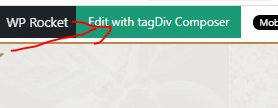
i try to add cloud menu there, but can’t find way to call that tagdiv tools. because there is no page edit button like in other pages (see below what button i mean). https://banker.az/wp-content/uploads/2021/12/Capture-1.png
 eddycom
 Thank you, Anamaria,
Done! Only the “HEADER” remain the same, and in header I’ve just one for all pages/posts with Logo and Ads 728×90 px, and menù. Can help me please to change also header in some posts?
I have done the header for all website from Cloud template. If I change header in the duplicate page this change is reflected on all pages. i.e. if I delete the advertising at the top of the duplicated page and set as a favorite in some posts, the Ads also disappears from the other posts. Thanks
 mjkc
mjkc Leave that my website is only showing ads in home page, and it’s not showing in other pages and it’s frustrating I had bee checking this for a long time
This is the error it showing –
adsbygoogle.js?client=ca-pub-xxxxxxxxx:228 AdSense head tag doesn’t support data-deferred attribute.
 muktipolice
How do you make the automatic pop-up appear at the bottom?
 kimstipguide
Hello
category sidebar ‘Stay on op – Ge the daily news in your inbox’
Can you make the link be ‘#’?
in other words,
I want to block the link first.
Here is an image of the question content.
https://kimstipguide.com/wp-content/uploads/2021/12/21-12-02.jpg
thank you
 ajeetsh07
Dear Team,
I want to Same Page on Desktop & Mobile Version
Our Website Desktop Version is ok https://www.financegab.com/ but when I open on Mobile Version then I think its redirecting another page.
Desktop Version
https://www.financegab.com/wp-content/uploads/2021/12/Desktop-Version.jpg
Mobile Version
https://www.financegab.com/wp-content/uploads/2021/12/Mobile-Version.jpeg
Kindly Check & Resolve ASAP.
 gonmarsa
I’ve been trying to add some code to the site and regardless of what it is, once I click “save” it stays processing until I reload the page, I don’t know if this is related to another issue I’m having, once I add a picture, upload it and then click insert into post it doesn’t do it, I have to do that manually.
Help is appreciate it! thanks
Anamaria Hello,
Once a user has entered an email address, it will have access to that content, but currently, this implementation is done using a cookies browser, if it will connect from another browser, it must enter the email address again, but if it is the same address it will appear only once in Leads-Emails.
Thank you!
 will@county10.com
https://county10.com
The header and footer cannot be edited or saved.
We have followed the instructions from other threads regarding opening the homepage Page then using the edit in tagDiv Composer button, then going to Manager, clicking on the name of the template under “Choose header template” which then displays the template and allows editing it but not saving it. This goes for the header and footer.
We get the “This type of header is not editable with tagDiv composer. Please use a cloud template!” message when we simply hover over the header or footer. When viewing the Cloud Template library, the footer does not display the option to edit in tagDiv Composer directly.
We can arrange access to the site via Temporary Login if this helps your team diagnose and fix the issue.
All plug-ins and WordPress are up to date. All elements on the system status page are green boxes.
Thank you for your help in this matter.
PT from HP
Bettina Hello Daniel!
Let me explain you which options of mobile versions are:
1. Responsive version: A responsive version of your website is looking similar like on desktop, edit the page with TagDiv Composer, click on the mobile viewport: https://www.screencast.com/t/XDQJedlggSB ; there you can see your mobile version and you can edit the elements there.
2. Mobile pages: https://tagdiv.com/newspaper-10-3-7-update-brings-customizable-and-fast-mobile-pages/
3. Mobile theme plugin: The Mobile Theme is a performance optimized theme included in the Newspaper main theme and it loads only for mobile devices. It comes with its own templates for page, post, category, etc so your current templates from the desktop theme will get converted to the mobile theme layout. For more details, please take a look here: https://forum.tagdiv.com/the-mobile-theme/ ; https://forum.tagdiv.com/mobile-theme-introduction/
A full explanation you can find here: https://www.youtube.com/watch?v=SpGkOnJeNZY
If you do not need Mobile Theme layout, then you can uninstall it and use other mobile version.
Hope that helps you!
Thank you!
 Chris Baird
 Having this issue also – using a third party plugin – the other ads work -but the background takeover ads dont.
-
This reply was modified 4 years by
Chris Baird. Reason: to get notified
 janamtrup
Hello
Ive seen its normal now for newspapers around the world to run News Feeds, lets say for one day or one subject, where they update all short news, and the last one just on top, every postst shows author, date. time (or have listen or other features), but its still just one page. Next day, there might be a new page. SO visiters really only need to open one page to see and reads lots of posts.
Would NEWSPAPER offer this feature ?
For understanding, let me show you a page, that has this great feature, there is even a timeline and on the sidepanel it shows whwre you are in the content.
https://www.dr.dk/nyheder
AMTRUP
 Satheeshraj
 I have modified the files in the below path to not show ads in 404 pages and few other pages.
1) plugins / td-composer / mobile – ( header.php / footer.php )
2) td-standard-pack – Newspaper – parts – header – ads.php
3) td-standard-pack – Newspaper – parts – footer- td_footer_template_5.php
 IanGJ
IanGJ Hi, there are previous threads on this issue. And Calin has in theory provided a solution to fixing it.
I can’t seem to link through to help you but have a look at the other threads
Good luck
 sm21nz
 IanGJ – rare man of reason and tip of my hat to you. You are right on the money around some of the words used on this and other threads. I’ll also reiterate that I don’t have a problem with technical bugs nor do I have a problem with fighting piracy. My problem is that these cowboys hid a function in their code that has the ability to take over my site whenever they want and display whatever they want. That is unacceptable. Why would anyone in their right mind allow such a malware code on their site that’s absolutely ideal for any black hatter to attack? Why does tagDiv have to engage in such stratospherically over-the-top measures when they suspect a license isn’t valid, especially at their very first sniff of a license anomaly?
We mustn’t accept or approve of any xenophobic and such language; on that we agree. A**holes, c**ts and w**kers exist in all languages, nations, shapes and sizes. They may be fulltime s**tbags or part-timers, but the fact that they are d**kheads with disgusting business practises, like our friends at tagDiv, has nothing to do with where they’re from, who they love or which fictional character they idolise.
 allanh
 Relax, bro! this is how you fix it: You login into you envato account, go to downloads, download the licence and purchase … pdf or text, then you login into your website dashboard, go to newspaper / system status / reset key / then activate key … you enter the purchase code from the licence and purchase pdf and then save! Easy as pie!
This method worked for you, but did not work for many other people (including me).
-
This reply was modified 4 years by
allanh.
 Anonymous
hi
i don’t really get logic of this template system. can you please help me.
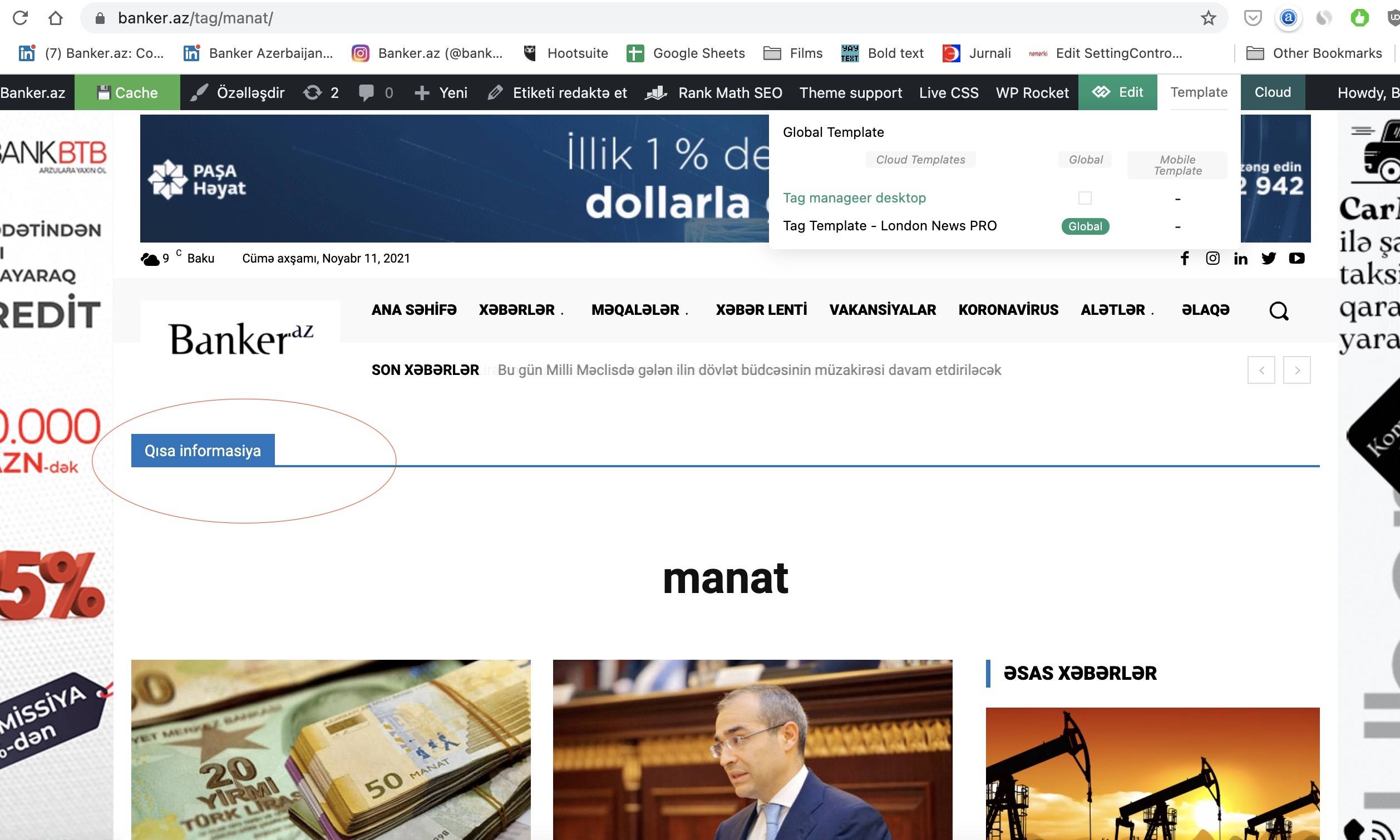
i want to create page for Tags. i create that and add element there. but that elements appears in other category pages also. i suppose i don’t create it correctly. what i’m doing wrong? for example here in this image i added title element there, but it appears in other pages also. there you also can see templates i created.
https://banker.az/wp-content/uploads/2021/11/Screen-Shot-2021-11-11-at-09.49.44.jpg
 BasamTahoor
Greetings,
Hope everyone is fine. I edited the Newspaper 11.3.1 themes for my WordPress website. I used one of the cloud templates for the post design. While editing the template everything is fine and showing well. After I publish it and select the template as a template for the posts from the themes panel, the template is not working well. I have shared the screenshots and details below. Please review it and anyone has any clue about how to solve it, please share it with me.
How the template should be according to the design (screenshots): How it should be screenshots
How the template is right now (screenshots): How it is right now screenshots
1. In the template that I have designed, the posts should have two columns which in the first column the image and the text appears and the second column, the related posts will appear in sticky mode. But after I chose it as a post template it only has one column and the second column goes down on top of other items.
2. The sticky ads I have chosen on the right column is appearing over the whole page.
3. The other posts which I have added under the single post template are coming over each other
4. The post is being repeated if you scroll down. It never ends.
Anonymoushi
in previous version of template i was able to add inline advertising which appears inside of the article. Now i can’t do this from Theme Panel>Ads . when i put there it’s not appearing in website. How can i add banner inside the article? May be directly from file or any other option? I’m not programmer ))