- NewsmagUsing other ads
- NewspaperUsing Other Ads
- NewsmagSidebar ads
- NewspaperSidebar ads
- NewspaperIntroduction to CPT and ACF with Newspaper Theme
- NewspaperHow to edit modules for Flex Block X
- NewspaperHow to use the Posts List shortcode
- NewspaperCreate a frontend submission form
- NewspaperHow to Use the Tabbed Content shortcode
- NewspaperWooCommerce: Happy “Add to Favorites!”
- NewspaperHow to generate Facebook App ID
- NewspaperLink Tracker
- NewspaperFlex Block Settings Guide
- NewspaperGeneral Options that May Interfere with the Newspaper Theme
- NewspaperSocial Icons
- NewspaperPosts Loop Element
- NewspaperSet a Background for Category Page
- NewspaperThe Newspaper Mobile Theme: Introduction
- NewspaperHow to Add a Logo in Newspaper
- NewspapertagDiv Shop
 dde
dde Will you be able to provide custom css to achieve this?
“To not give option of mobile menu until the page loads completely in mobile”
or
“To get this mobile menu loaded no matter the page is loaded or not”
I see other people using newspaper theme has beautiful mobile menu
 Anamaria
 Hello,
You can use a code like this where you can add the link and image https://pastebin.com/hQsseeZM
https://forum.tagdiv.com/using-other-ads-non-adsense-ads/
Thank you!
 Redlemon
 Hi Bettina,
We are talking about two very different problems here. One is the theme appearing to be unregistered. The second is (was) that the theme completely broke the output on the front page. The former is still there – the theme appears to be unregistered still. The latter we addressed like explained previously. Allow me to point out that some theme settings were completely erased in the process of switching between child -> parent -> child themes; settings like the header, the logo, the default post template, the custom ads 1, 2, 3, 4, and more.
To be completely transparent with you, I am very hesitant in touching the update buttons again any time soon. This is not the first time I am experiencing unexpected output caused by updating Newspaper. If you search on previous tickets of mine (you could search history for my email associated with this account) you could verify this. Living with Newspaper has been anything but easy and trouble-free.
I attempted to re-activate the theme, but the wheel kept spinning, and spinning, and spinning. It was at least 5 minutes of spinning until I realized it was not going anywhere, and I had to cancel.
This is an alive installation, and every time something like this happens it never goes unnoticed. We honestly hope there will never be a “next time” in the months to come. The activation code is available, and we would rather resolve this without having to go through a similar experience another time.
Thanks.
 stular9
Hi,
I have a problem with ads implemented via theme panel and TagDiv Composer. I want an ad in a sidebar and on my homepage. It used to work just fine when I had ads from AdSense and Ezoic, but now I’m on some other (local) network and the ads are not showing.
I put their code in the code that is provided by Newspaper (THIS ONE: <div class=”td-all-devices”>
<!– Your NON AdSense code here – this ad will show on all devices –>
</div>), but the ads are still not showing.
What is the problem? Is that a theme problem or an ad network problem?
For the record, ads in the post placed via AdInserter plugin work just fine.
Thanks!
 Bettina
 Hello!
I provide the same response, because someone required “how the ads of the mobile theme should be configured” and this is the only way you can apply the ads there.
Other ads should be configured with a plugin called Ad Inserter plugin. Also, there are auto ads, etc. That’s why we need more details in order to help you efficiently.
There are a lot of cases, that’s why I specified “case”.
We have 3 options for the mobile version, not only Mobile Theme plugin.
If a case required more investigation, then how can I describe this more clear? Sometimes a case is different then how you described in a topic.
Thank you for your understanding!
Anamaria Hello,
Please let me know what version you use for mobile.
Also, where you set the code for ads and some more details, a link to your website.
https://forum.tagdiv.com/ads-adsense-overview/
https://forum.tagdiv.com/using-other-ads-non-adsense-ads/
Thank you!
 qwenmn
Hi,
I want to hide the sidebar when the size of the screen is small, I notice that the option is only available for elements such as ads. But not for other elements such as Flex Box.
The reason I’m not using the mobile theme is because I want infinite scroll for my mobile visits.
Is there a way I can hide side bar items when the screen is small without mobile theme or AMP?
 Anthony-Developer
 Sorry I think there’s been a misunderstanding, my ads already create a new tab when clicked, its that when you tab back to the website and click on a different ad, the new tab is replaced with the other ad’s link instead of creating another new tab.
This can be circumvented by the user holding CTRL people click on the ads to creating a new tab from each ad, but I want every ad to create a new tab instead of the ad creating a new tab once and when clicking on another ad it will replace that new tab. I’ll try to illustrate below.
-
This reply was modified 4 years by
Anthony-Developer.
 Rohnman9
Hi,
When I enable inline ads 1,2,3 they appear underneath each other at the top of my article, how can I custom place them throughout my article? Also am I bound to 3 or can I add more?
Regards
Rohnman
Anthony-DeveloperHi, my website logantimes.com.au is using Newspaper X, On the homepage I have a bunch of ads that leads to different websites, all my ads are set to “Open URL in new window” and set to “nofollow”. When a user clicks on one of the ads it opens a new tab to that ad, thats good, however if tabbed back to LoganTimes, and if the user clicks on another different ad instead of opening another new tab, it replaces the first tab. How do I stop it from replacing the first ad’s new tab and create another new tab?
 rahulroushan
 It works that way. Thanks! Tagdiv support should take note.
btw I want to use Mobile theme only for AMP, but now I’m facing an issue where ‘/?amp’ at the end of the URL gives proper mobile theme, but ‘/amp/’ sends a ‘transitional’ copy of the desktop version built from cloud library. Not sure if you had a similar issue, but trying my luck again.
Anyway, I’d repeat that Tagdiv should take note. There are at least 4-5 threads highlighting the same issue, but it wasn’t resolved in any of those. They should figure out why it works when network enabled but fails to work when enabled sub-site wise.
Earlier, I had asked my host earlier why it was not working and they had this to say about the error:
The issue is occurring as the site is requesting for the file -> ‘tagdiv-deploy-mode.php’ inside the directory -> wp-content/themes/themes/Newspaper/ but the directory wp-content has only one subdirectory with the name themes and there are no other sub-directories inside the themes folder with the name -> themes. The additional directory path requesting for the file inside -> wp-content/themes/themes/Newspaper/ instead of wp-content/themes/Newspaper/ is causing the issue.
 Djidjopub
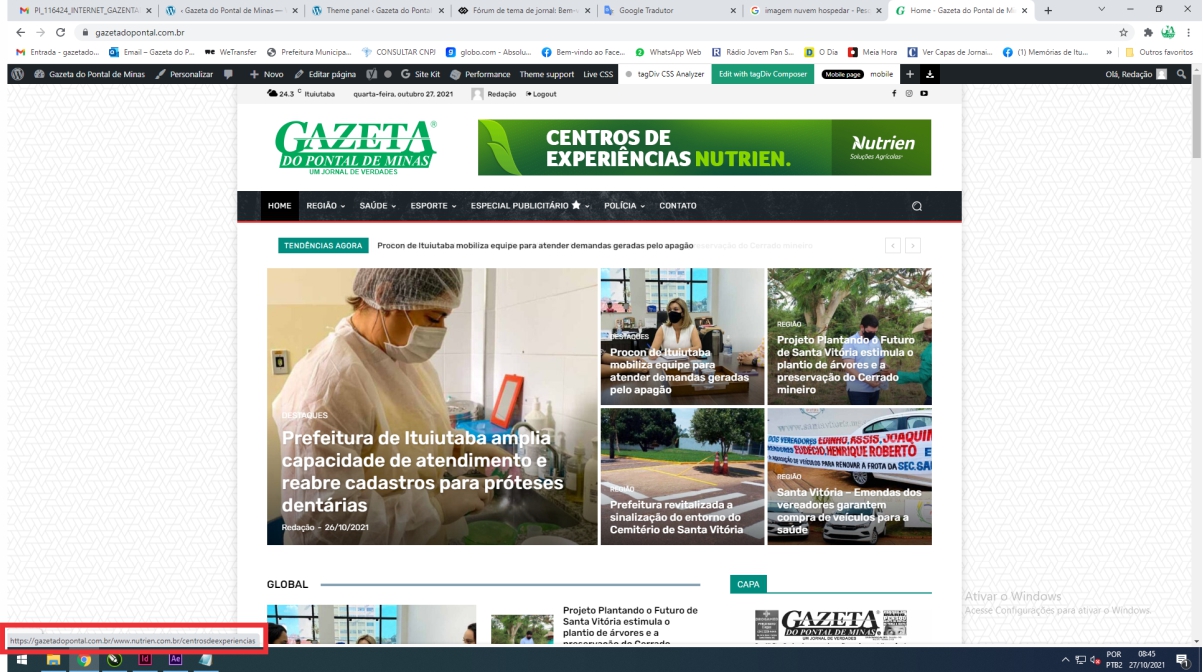
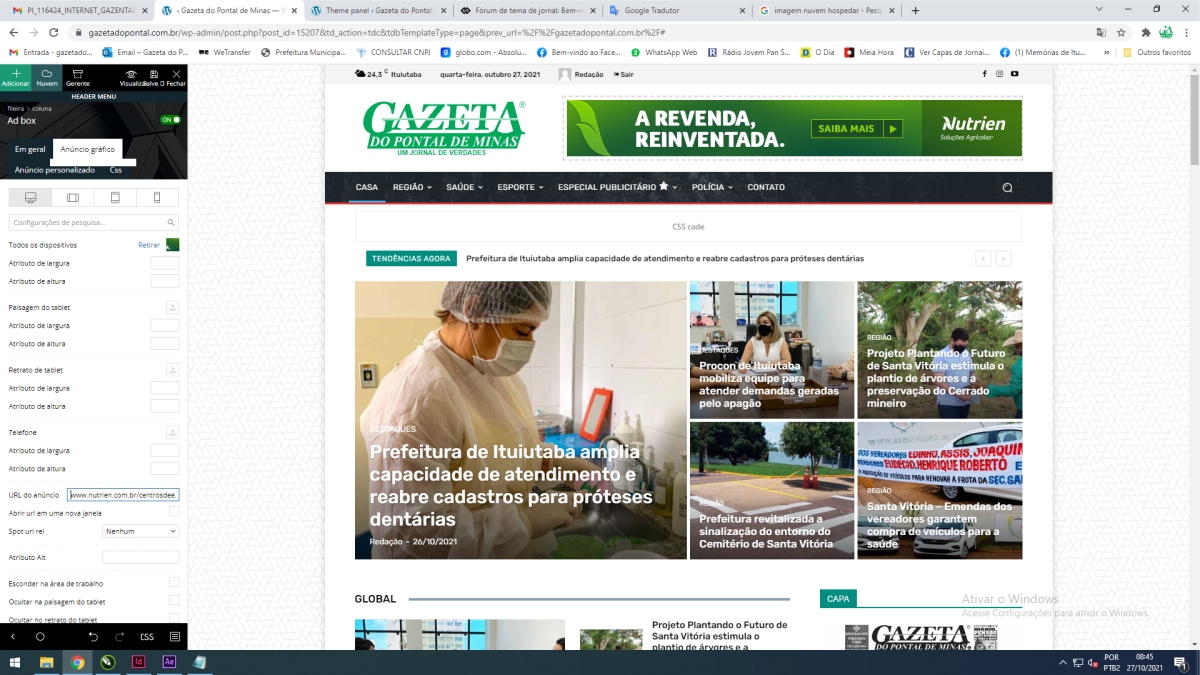
 Na imagem https://gazetadopontal.com.br/wp-content/uploads/2021/10/0002-1.jpg, Lá embaixo de vermelho, Está com 2 links, um do meu site e outro do cliente. Quero deixar apenas do cliente. Não estou conseguindo. Quando deixo só a do cliente.
In the image https://gazetadopontal.com.br/wp-content/uploads/2021/10/0002-1.jpg, Underneath in red, It has 2 links, one from my site and the other from the client. I just want to leave the client. I’m not getting. When I leave only the client’s.
DjidjopubtagDiv Composer! > When I insert a link, it continues the website link plus the other link. Footer advert with 2 links
https://gazetadopontal.com.br/wp-content/uploads/2021/10/0001.jpg
https://gazetadopontal.com.br/wp-content/uploads/2021/10/0002-1.jpg
tagDiv Composer quando coloco o anúncio e link aparece a do meu site e depois a do cliente. Como resolver? Deixando apenas a do cliente?
DjidjopubtagDiv Composer! > When I insert a link, it continues the website link plus the other link. Footer advert with 2 links
https://gazetadopontal.com.br/wp-content/uploads/2021/10/0001.jpg
https://gazetadopontal.com.br/wp-content/uploads/2021/10/0002-1.jpg
 Big5
Big5Hi,
My Home page of the Parenting template is only showing the same 4 articles in every module (section). When someone visits our Home page they the same 4 articles all over the page. In addition, the Category links don’t adhere to the specific Category that I designate for each article. For instance, if you click on the Java category link, articles from every other category shows up but not a Java post. I hope you can help rectify this problem as soon as possible. I have attached images to show the problems.
Thanks


 smga
smga Thanks for the answer
But that won’t work.
In my case, the post displays announcements of publications under the tag of the singer and at the same time from the category of song cards. example: https://delodillamusic.com/enrasta.html
This is double filtering and only applies to an individual artist.

If there are no other ways, then you have to either make 120 templates or make these posts pages – pages allow you to work with them through the tag div composer.
 conidis
 Hello,
I checked everything and it seems I am “green” in all requirements. All versions are the latest
I am just trying to edit the content of a simple text widget using tagDiv composer. When I press on “Edit Content” the popup loads endlessly and I get a 403 error in the console.
I can edit the text from WordPress default editor, but not from tagDiv. All other tagDiv elements seem to work except the text editing
Please see image:
https://ibb.co/znwVV7Y
 chrisebejermt
Good Evening,
We are currently developing the following website – https://www.horizon.mt. The team would like to run Google Ads on our website.
The Google Ads Script for Article Top Ad, Article Inline 1-3 Ad, have been added to the appropriate sections in the Single Post Content Ads Tab. The Paragraph settings for the Inline Ad is set to 4, 8 and 12. Not all posts have more than 12 paragraphs, so we are ending up with a number of posts having more than one Advert at the bottom of the article. The team is unhappy with this setup as we think that it will look unprofessional having more than one advert showing in the same location
See this link -> https://www.horizon.mt/2021/07/16/the-french-air-force-buys-another-nine-pc-21
Is there a way or a setting that shows the advert only if the paragraph count exceeds the value inputted? In the link above Advert 3 will not be displayed.
Thanks & Regards
 marcosrodrigues1983
 Hello Bettina,
I have these 2 elements, one of them is “BIG GRID” and the other is “AD BOX”.
AD BOX
I wish they could have an “AUTO SLIDE” because I have two ADS and a single space.
Print inicial page in My project
https://www.screencast.com/t/5osqdHUFi3
BIG GRID
I would like my news to stay not limited to only 4 per page, I would like the page to be doing “AUTO SLIDE”, like the site below.
https://www.waves.com.br/
Also note that it is possible to manually navigate the “BIG GRID” both left and right.
Anamaria Hello,
I investigated again and seems you have set the code for ads twice https://i.imgur.com/x95Ov9B.png
Please check if you don’t have set the same code in another place.
Thank you!
 Photoboy
I have been using the Ad Inserter Pro (recommended by google for ads) to try and put ads and other text into all my 5000 posts automatically and for some reason it fails by all the methods I have tried. the ads appear in the tag div preview but not on the site: thesteepletimes.com
Here you can see the preview: https://www.dropbox.com/s/6szmy1dm99pat6e/Screenshot%202021-10-22%20at%2008.50.55.png?dl=0
and here is the published site with no ad:
https://www.dropbox.com/s/m4n9fenzel48kvo/Screenshot%202021-10-22%20at%2008.52.34.png?dl=0
can’t figure this out?
 gneves
I have a Megamenu on my website that has Parent Categories with sub-categories under them. When I edit any of the Website/category/*Parent or sub category* link pages, the changes that I make are made to every page that is in the /website/category/* schema.
Example: I edit the layout of MyWebsite/category/sports and it will change the layout and content that is pulled into MyWebsite/category/education as well as every other category.
 http://3.236.184.246/wp-content/uploads/2021/10/2021-10-21-10-14-3.236.184.246.png
 http://3.236.184.246/wp-content/uploads/2021/10/2021-10-21-10-15-3.236.184.246.png
 Bubbabee
My In content Adverts not showing on Smart Lists Post 2.
I have already added the ads in the Theme panel.
i do not want to use Smart Lists 6 to 8.
The ads show on non smart lists posts.
Can someone please tell me if Ads work with the other Smart lists.
Regards
Olubunmi
 marclaude
Dear tagDiv Team,
An Advertising Platform wrote me that the Newspaper template re-writes the browser Native API and it is really not recommended. Furthermore, it doesn’t allow an ADV script to work properly.
They wrote me the following, sending me also a screenshot:
“Publisher is re-writing the browser Native API (green line in screenshot) and it is really not recommended.
Toproll ad unit (and others) are based on browser Native API to listen to events on scroll and so on, in order to display the ad unit. The function the publisher is re-writing is not working well and seems to be not well interpreted by browser.
Solution would be for the publisher to follow good practices and not re-write the Native API while scoping the “polyfill” used in the code.”
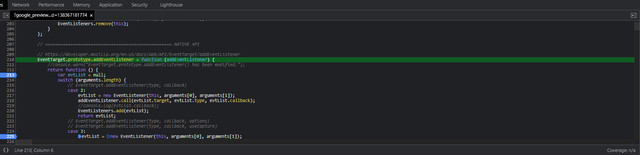
Can you try to let me understand better this matter, if it is an issue and if it can be fixed?
Thank you and Best Regards,
Marco
Anamaria Hello,
I saw you use templates from Theme Panel, for example for categories => https://i.imgur.com/KxoDDu6.png, please import a template for categories, posts, to be able to edit the layout/design with tagDiv Composer.
Also, how to set the ads please check these articles
-> https://forum.tagdiv.com/ads-adsense-overview/
-> https://forum.tagdiv.com/using-other-ads-non-adsense-ads/
-> https://forum.tagdiv.com/topic/desktop-differs-from-mobile-version/ -> https://i.imgur.com/Lbzpxip.png
Thank you!