- NewsmagUsing other ads
- NewspaperUsing Other Ads
- NewsmagSidebar ads
- NewspaperSidebar ads
- NewspaperIntroduction to CPT and ACF with Newspaper Theme
- NewspaperHow to edit modules for Flex Block X
- NewspaperHow to use the Posts List shortcode
- NewspaperCreate a frontend submission form
- NewspaperHow to Use the Tabbed Content shortcode
- NewspaperWooCommerce: Happy “Add to Favorites!”
- NewspaperHow to generate Facebook App ID
- NewspaperLink Tracker
- NewspaperFlex Block Settings Guide
- NewspaperGeneral Options that May Interfere with the Newspaper Theme
- NewspaperSocial Icons
- NewspaperPosts Loop Element
- NewspaperSet a Background for Category Page
- NewspaperThe Newspaper Mobile Theme: Introduction
- NewspaperHow to Add a Logo in Newspaper
- NewspapertagDiv Shop
 Vlad S
 Hello !
I’m not sure I fully understand but at the moment you have an add being displayed on mobile. For responsive you will have to edit the code as you can see here in order to be displayed on all devices: https://forum.tagdiv.com/using-other-ads-non-adsense-ads/
Let us know the result !
Thank you !
 menatimes
With the theme, when you open an article and scroll all the way down, a load icon appears and another article loads. I don’t want that to happen. I want only the article that is clicked on to be displayed. By scrooling all the way down, I don’t want another article to appear. How can I turn off this function?
 bibendus
For a couple of hours I have been experiencing major problems on the Newspaper:
– the site no longer loads the header managed by Cloud Templates correctly and in the articles it releases me this error:
Warning: Invalid argument supplied for foreach () in /home/XXXX.XX/public_html/wp-content/plugins/td-composer/legacy/common/wp_booster/td_util.php on line 842
– On the other hand, the TagDivComposer no longer opens any page, not even an empty one, it remains waiting. From console I have this error:
js_files_for_wrapper.min.js? ver = c784b8db3e66cd68082f3ff7aa2d70e6: 13 Uncaught DOMException: Failed to execute ‘atob’ on ‘Window’: The string to be decoded is not correctly encoded.
at Object.b64DecodeUnicode (https: //XXX.XX/wp-content/plugins/td-composer/assets/js/js_files_for_wrapper.min.js? ver = c784b8db3e66cd68082f3ff7aa2d70e6: 13: 109)
at https: //XXX.XX/wp-content/plugins/td-composer/assets/js/js_files_for_wrapper.min.js? ver = c784b8db3e66cd68082f3ff7aa2d70e6: 40: 125
at https: //XXX.XX/wp-content/plugins/td-composer/assets/js/js_files_for_wrapper.min.js? ver = c784b8db3e66cd68082f3ff7aa2d70e6: 41: 96
I tried to insert the <IfModule mod_substitute.c> on htaccess
SubstituteMaxLineLength 10M
</IfModule>
but with poor results.
Has anyone been there? Do you know if it’s a hosting problem or a bug? I haven’t tried to reactivate a backup yet …
 mjb
mjbwhen the user scroll down reading a post, at the end of the post, after the comment section, the page automatically load another post, and at the end of the 2nd post, it loads again the 3rd post.
How to stop the post from automatically load another post?
 footballshirt11
Please check my website why my website is all error!!!
https://www.thinkaboutwealth.com
all status requirement is pass

*** use other themes have no problem.
 Bettina
 Hello!
The Mobile Theme is a performance optimized theme included in the Newspaper main theme and it loads only for mobile devices. It comes with it’s own templates for page, post, category, etc so your current templates from the desktop theme will get converted to the mobile theme layout. For more details, please take a look here: https://forum.tagdiv.com/the-mobile-theme/
Please note that customization is not covered by the support team: https://forum.tagdiv.com/newspaper-theme-support/
For customization and other services you can contact our custom work team here: https://tagdiv.com/premium-customization-services/
Thank you!
 vanlifeeats
Hey,
Probably something I am missing. How do I stop my articles showing multiple articles one after then next on a single article page?
You get to the bottom and it shows the loading icon and another article loads up.
Like I said, probably my bad for missing the obvious.
Thanks
Bettina Hello!
Please follow our guide from here: https://forum.tagdiv.com/using-other-ads-non-adsense-ads/
Hope that helps you!
Thank you!
 sejpost
I keep getting the following error every time I try to modify the “single post” page template:
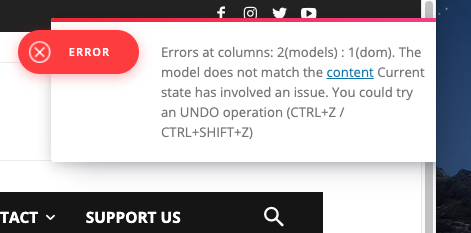
I see that many others are experiencing this issue. I’ve sent an email to contact@tagdiv.com with all the admin login info. Please help ASAP as we need to put in banner ads inline and cannot access the area at all to do this.
Thanks.
 usc-shift
 Thanks for the answer, Calin. At this stage, I tried to get at least recognition of the problem. There are a lot of assurances in the topic of selling, about the best SEO practices, and about speed (I will not sprinkle screenshots, you already know), but at the moment this is far from reality.
At the very least, I wanted to hear that you know about the problem. And that in the next release we will do this and that, for example.
I can provide your developers with the script that cuts out all unnecessary css on the basis of the сoverage, but I need much more time to correctly connect a clean css file, because of javascrit with which I am not very friendly.
I’m just trying to convey that this is very important now and this is a problem. I understand that the support does not cover this, but I do not understand the formal replies that we are doing well with this. Few of those who bought your template make a website for their mother on it. It is necessary to promote the site and display ads on it, which, by the way, will even more affect the site speed indicators, so I (and I think other buyers) would like to understand that updates are taking into account the situation and priorities of the clients, and not the personal goals of the developers (nothing personally).
In the end, it is the clients pay for the entire work of the support team and developers.
You can of course deceive them, or you can listen to them and gets better every day, here is your decision which is more profitable for you.
 Robert Turner
 Hi Vlad
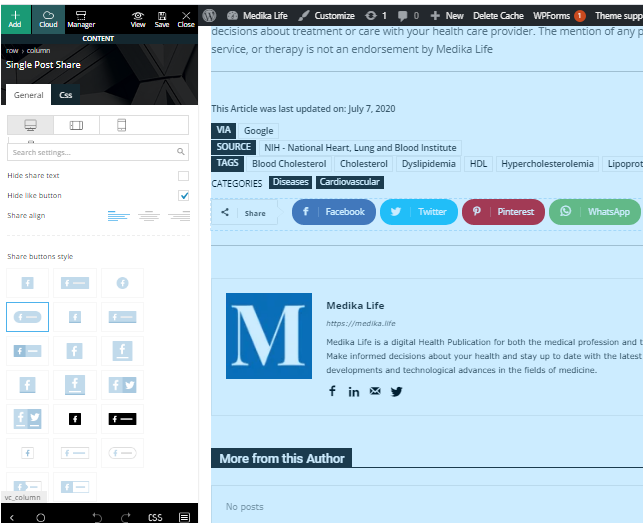
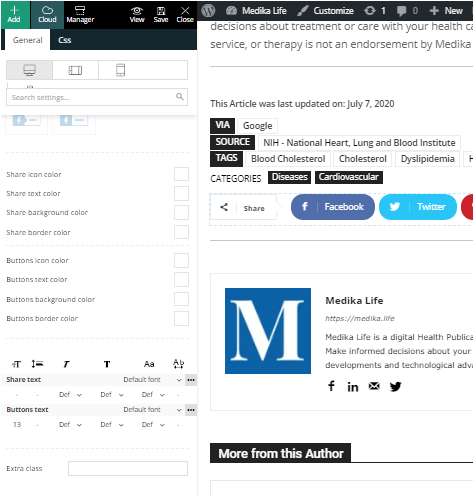
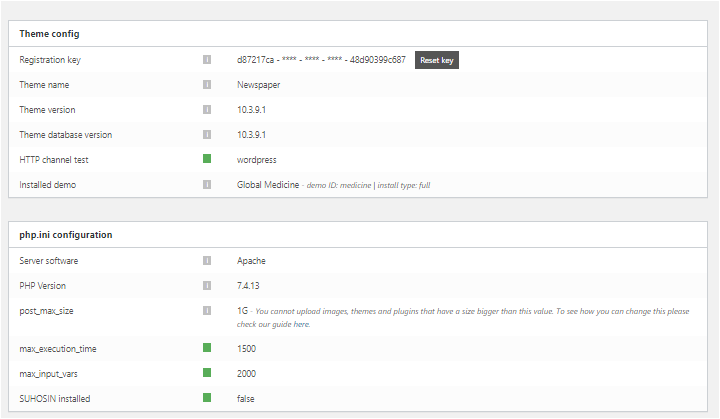
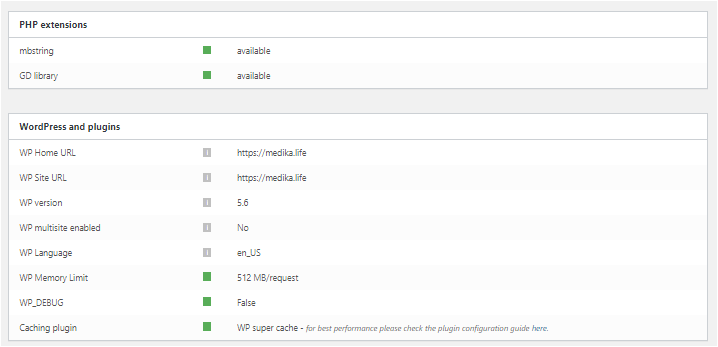
As you can see from the post above we have ALREADY tried all those solutions before contacting you. Here are the screenshots you requested, also included are the options the SocialPost share buttons now offer us on Composer. Perhaps that may offer a little more insight. You’ll notice how the section to add social media accounts has now evaporated from the options box. We are stuck with the four SM icons it defaults to,
These are in four separate files, sorry no other way of sharing them.
https://medika.life/wp-content/uploads/2020/12/SinglePostShare1.png
https://medika.life/wp-content/uploads/2020/12/SinglePostShare2.png
https://medika.life/wp-content/uploads/2020/12/Status-1.png
https://medika.life/wp-content/uploads/2020/12/Status-2.png
 Simion C.
 Hi,
The article bottom ad, as the other article ads, is part of the content of the post, it is inserted in the post.
The author box is not part of the content, it is a different element, and it can be displayed anywhere around the post content, like at the top, below it, in the sidebar. But it cannot be displayed inside the post content.
There may be solutions, like for example in a cloud post template, by not using the actual article bottom ad spot, and using an ad box at the end of the post https://prnt.sc/w2dxdg and the author box above it https://prnt.sc/w2dyng
In the cloud templates library there are quite a few designs for posts, maybe you can find one that you like there, and use it https://cloud.tagdiv.com/#/load/Single
Let us know.
Thank you!
Bettina Hello!
All about ads in our theme you can find here https://forum.tagdiv.com/ads-adsense-overview/ Also there is described custom ad spots (https://forum.tagdiv.com/custom-ad-spots/) and non Adsense spots (https://forum.tagdiv.com/using-other-ads-non-adsense-ads/)
Hope that helps you!
Thank you!
Robert TurnerDear Tagdiv
Could you please provide a definitive answer on when this issue will be resolved? We run a big site on the Medical theme and use the standard plugin. Suggesting we change to a pro theme on a live site isn’t a solution unless you are offering to redo pages and pages of different templates we have built.
Our page loads speed nearly trebled after installing 10.3.8 and the new update hasn’t resolved this. It is costing us on Google and I am certain that most of your other customers are facing a similar situation. We now experience page loads of up to 13s on some pages.
If you have an alternative workaround in the meantime that is actually practical, please share it and I don’t mean caching and minifying scripts. It doesn’t impact the issue. Alternatively, I’d like a definitive answer on how long this will take to resolve. Obviously, if you continue selling this product as is, you are selling a defective product to the public, as it will seriously compromise any website that uses your older templates. Lightweight and speedy is all that counts today.
I would also recommend strongly that you send out a notification to all your customers about the issue, rather than leaving them running about in the dark trying to figure out why their sites are suddenly so resource intensive and slow to load.
I look forward to your response.
Regards
Robert Turner, Medika.life
Bettina Hello!
First you need to look if the setup of your ads are not disable to show on any device.
Added code should be visible in every default post template.
Check this also: https://forum.tagdiv.com/using-other-ads-non-adsense-ads/.
Let us know about your results!
Thank you!
 fkvs
fkvs If the cloud library is that much light weight and faster, wouldn’t it be an option to simply make all layouts available through cloud library, to avoid us using the version which pretty much slows down heavily? From what I’ve seen, not all elements from some themes, for example SayWhat theme, are available in the library?
Also any other tip what I could do to avoid the bad performance with standard pack? I’m running it on a 32GB RAM, E5-1650v3 CPU ( 6 cores / 21 threads ), 2x240GB SSD + RAID-1 server with dedicated up/down line, so I think it’s fair to say it should be more than enough ressource wise.
 Calin
Calin Hi,
1. Please let me know how you do it and provide a screen and a link to your sidebar to see how this is look.
2. If the ads are displaying on incognito is possible to have an extension for adblocker, please try with other browsers and see if on those is working.
Thank you!
Calin Hi alvecrisservices, if this image is a banner, then you can use a custom html to display it only for some port devices https://forum.tagdiv.com/using-other-ads-non-adsense-ads/ but if is an image set with tagDiv Composer then you can select it and on view port that you want to hide it set it like this -> https://i.imgur.com/UALUvrL.png also you can add a new image that will be display on mobile but hide for the rest of devices.
Hope this will help you!
 headline
What’s up guys. I found a solution for the document.write() errors in Lighthouse/Gtmetrix site audits. I’ve done basic cross-platform testing [Firefox, Chrome, Microsoft Edge] and it cuts the mustard. For HEADLINE’s index (which optimizes through Td Composer, WP Rocket, Rank Math, and Asset CleanUp–I double-set the code:
1. At the top of HEADLINE’s head tag [sitewide] in the plugin “Headers and Footers Scripts” [Position 1].
2. At the top of the HTML tag in TagDiv’s theme panel [custom code][custom HTML].
I chose to double-set the {code-fix} because the Document.write() call is originating from Newspaper scripts and I don’t manage HEADLINE’s custom HTML there. I prefetch Google DNS Requests with WP Rocket and save custom HTML in “Headers and Footers Scripts.” The latter being hands-down the absolute best plugin to organize tags/add custom scripts and overwrite other plugins. I tested a number of {code-fix} arrangements and found that when I only set the {code-fix} in “Headers and Footers Scripts” that some of the Document.write(s) can slip through the cracks. Alternatively, if I only set the {code-fix} in the TagDiv theme panel, Wp Rocket’s Google DNS Requests override the custom HTML. So hierarchically, “Headers and Footers Scripts” can reposition the TagDiv custom HTML to take first-bite at the Document.write(s) while still allowing WP Rocket to prefetch the Google DNS.
I re-audited HEADLINE (with Lighthouse and GTMetrix) after optimizing the {code-fix} placement and HEADLINE’s speed/optimization scores shot way up–which actually makes sense if you think about what document.write() is really doing. Code calls for document.write() are telling the parser to rewrite the page mid-read, which can lead to bottlenecks and pose security concerns, especially when compared to security-heavy iframes or other delayable embeds.
Also, it’s worth noting that the document.write() code fix I’m using on HEADLINE is not exactly best-practices. In a perfect world, digital ads would natively load asynchronously. But until Newspaper and other themes drop support for document.write() altogether, AdjacentHTML will have to do.
If you guys want to check out a heavily-customized Newspaper site, head over to HEADLINE.dev. I’ve built a fully-responsive 4-screen Newspaper page, as well as a totally custom Amp site for mobile and desktop. Every single desktop page has a custom Amp version. I even built a one-of-a-kind Bootstrap form (Amp-compatible, Formidable Forms-based) called Funder by HEADLINE. I’ll be writing a series of articles, like this one, about how to optimize/extend the Newspaper theme.
I’d also like to mention that I am not a professional WordPress developer. There are all kinds of kinks I’m still working out with HEADLINE, but I feel so fortunate to be a part of the Newspaper community, and the TagDiv team is absolutely world-class! Take care guys.
Aaron Martinez
headline.dev
(script-tag)
document.write=function(s){
var scripts = document.getElementsByTagName(‘script’);
var lastScript = scripts[scripts.length-1];
lastScript.insertAdjacentHTML(“beforebegin”, s);
}
(script-tag-close)
 bob@mrrogersweborhood.com
It seems less expensive to buy a new version of Newspaper theme rather than just extending support for 6 months. I’m trying to register with the new key, but it keeps making me set up a new tagdiv account. I already have one and have now bought 5 licenses.
I am unable to complete the theme registration. Here’s the receipt:
Newspaper
Regular License
12 months support (expires on 05 Dec 2021)
—
Hi MrRogersWeborhood,
Thanks for buying with us. Below is a summary of your recent purchase. You can download your purchased item at your Downloads page and view your invoice(s) on your statement here.
Your order: My downloads
Item by tagDiv
Newspaper
Newspaper
Regular License
12 months support (expires on 05 Dec 2021)
 stringbenderb5
 I looked at the article. My theme does not have the “Update” like it appears in the article you sent. Please see screenshot – https://cloudninemagazine.com/wp-content/uploads/2020/12/a.png
Our programmer said that when WordPress updates to 5.6, it will break the current 10.3 Newspaper Theme that we are using. This theme needs to be converted to 10.3.2, which it does not appear to be a way other than buying a new theme.
Is there another way?
 besmelejack
I have a few issues with the theme. I install demos without any problems, but the changes I made are not active as I want. Let’s say there is the latest topics widget on the right of the main page, and the popular topics widget on the right in the single page. This is what should have been no problem until now. But when I install the demo, everything happens the same for me. The widget on the home page and the widget on the single page are the same. In other words, if there is a recent topics widget on the main page, there is also a recent topics widget on the single page. Normally the demo is also different. This is the first problem.
The second problem is that the codes I add are not active in any way. Let’s say I put the Adsense similar topics ad code under similar content, but it does not appear, it is not active. Or, I put the code for automatic ads or vignette ads are not active in any way. Or I put the code of the SSS Schema plugin, it does not appear in any way, it is not active.
What do you think these problems are about?
 Isotypo
Hi,
I’m implementing non adsense ads in the theme panel, as you explain here. It works so far and the ad is displayed perfectly. I miss something though… Where can I add a link to the add?. I have only seen that option if you upload directly an image ad through the tag divi composer, but not when selecting an specific ad spot. Any idea?
Thanks.
María
 Devankur shakya
When I am placing the script tag in the <head> section the code is not accessible by google AdSense, Mailchimp, or any other tool. When I disable the tagDiv Composer plugin, everything works fine. The code fetching goes instant and my website gets verified by the tool. And when I enable the plugin it’s back to not authenticating again.
Calin Hi thebox,
1. Yes, the theme is compatible with WOML, this is the plugin that we indicate to use, you can check in this topic some more details about how you can use the theme with this plugin: -> https://forum.tagdiv.com/topic/logo-link-4/
2. Yes, you can translate/change the ads without extra plugin, when you translate the templates you can change the ads.
3. With this server, you should handle the visitors without any problems.
If you have other questions, or you need help with something, let us know!
Thank you!