- NewsmagUsing other ads
- NewspaperUsing Other Ads
- NewsmagSidebar ads
- NewspaperSidebar ads
- NewspaperIntroduction to CPT and ACF with Newspaper Theme
- NewspaperHow to edit modules for Flex Block X
- NewspaperHow to use the Posts List shortcode
- NewspaperCreate a frontend submission form
- NewspaperHow to Use the Tabbed Content shortcode
- NewspaperWooCommerce: Happy “Add to Favorites!”
- NewspaperHow to generate Facebook App ID
- NewspaperLink Tracker
- NewspaperFlex Block Settings Guide
- NewspaperGeneral Options that May Interfere with the Newspaper Theme
- NewspaperSocial Icons
- NewspaperPosts Loop Element
- NewspaperSet a Background for Category Page
- NewspaperThe Newspaper Mobile Theme: Introduction
- NewspaperHow to Add a Logo in Newspaper
- NewspapertagDiv Shop
 bookman53
I am using (cloud) category template 1 for all of my category pages. Pagination is not working on either the main template or the mobile version. I am not using the mobile plugin. I just created mobile templates.
No matter what number I set “Limit post number” to, that is less than the total number of posts that are in a particular category, the pagination numbers/navigation will appear at the bottom of the category pages. However, every category page except the first one is blank other than the template parts such as ads, header, etc.. There are post excerpts, etc. displayed except on the first page.
The only way around this is to set the WordPress limit in Settings>Reading to some high number. In that case, if I set Settings>Reading to a high number (like 100) and set Limit Post Number in the Post Loop settings to blank, there will be no pagination and all posts in a category will display on the category page. That is unacceptable when categories have a high number of posts.
How can I get the category pages to properly display all posts when using pagination so that if I set the Limit Post Number to 6, the remaining posts above that number will show on page 2, page 3, etc. of the category results?
Thank you.
 antonmh
Hello
My site is using the Coronavirus Medicine PRO demo.
I am having issues with my categories page and experiencing the error message “Errors at columns elements..’, as shown here:

I have gone through your instructions in the documentation for resolving this issue but it has not made any difference. Also I am not using any other plugins apart from yours and have not added any shortcodes to my site.
I also set up the demo again clean on another WP installation. The error message also appears on this when I try to edit a category page, having not made any changes to the demo.
Because my site is in development mode, I have emailed a login to you, so please can you take a look.
Also, my categories in my setup are not being pulled into the category layout page correctly. For example, when I click the ‘UK News’ category, it just pulls in posts from my category called ‘Pipe Jacking’. The same happens with all the categories, pulling in posts from the ‘Pipe Jacking’ category. Again if you take a look by navigating a category you will see. I don’t know why this is happening?
Please let me know, and many thanks in advance for your help 🙂
Antonmh
 aassi
aassiHi people from TagDiv,
I hope this message finds you well.
And here I am with another weird request.
I’m inserting ads from a plugin (no issues with the plugin) but I’m having a hard time to set a different “ad layout format”.
This is what I have now: https://prnt.sc/vs3ez7 (pretty standard)
This is what I’m trying to do: https://prnt.sc/vs3f4m
Before you ask: yes, the ads are already set for horizontal insertion (multiple columns x 1 row).
But I guess there’s something related to my wrong config of “Display” in CSS (Should I set to inline?) or Row Stretch.
In other words, my current config is this: https://prnt.sc/vs3h13 but the ad injection is pushing the ads downwards, not sideways.
Thanks in advance for the always outstanding support.
All the best.
 thebox
Hi,
we’ve just bought the Newspaper wordpress theme and we would use the theme to publish the online magazine of a tourist resort.
The key requirements are:
– multilingual: italian will be the main language and the the magazine will be translated in english and german as well.
– advertising: there will be some banner ads in the magazine. Not Google ADSense but ads sold directly by the resort. Banners will be designed and produced by a graphic design shop.
Because this is our first online magazine project, we would really appreciate your advice on these issues:
1- Is the theme completely ready for easy translation of content? We plan to use WPML and a non-technical person will input the translations.
Is that OK or do you suggest another plugin/solution/workflow for fast and easy content translation?
2- Can the ads be translated? Pages in a given language should show a version of the ad(s) translated for that language.
Do you recommend a specific and compatible additional plugin to manage multilingual ads or are the built-in features included in the theme sufficient?
3- we expect 100-200 users per day, that would become 500-1000 in peak periods (3-4 months/year). We plan to host the solution on a dedicated VPS having 4vCores abd 8GB RAM.
Do you have any suggestions regarding the VPS?
Do you recommend any caching solution, at server level or wordpress plugin for good performance with that workload?
Any other suggestion would be very appreciated.
Many thanks
 r1kay
r1kay Hi Calin,
Thanks! What kind of function could I use to determine what Cloud template is used for a certain post?
For example: We use 2 single post templates created with the Tagdiv Cloud Composer. Lets call them Template_cars and Template_all_other_posts. We have an ad network that has special ads for content about Cars and we want to show them only on the Cars posts. The ad network requires us to insert their header tags only on the Car posts in the <head>. On all other posts we need to insert other header tags in the <head>.
My idea was to add some php code to the header.php which achieves the following:
If post uses Template_cars –> insert these header tags, if post uses Template_all_other_posts –> insert other header tags.
Thanks!
 tamosukas
 hello Calin thanks for answer,
but then what will be on mobile theme I using amp wersion.
And what to do with https://prnt.sc/vnr9ol
on theme panel ads section, do I must to put code or no, because I do not find any clier info, where what must to be setup.
I understand that are 2 places where I can add code one is in wp phanel theme -ads other on tagdiv composer, but then what will be wit amp ads. it is little mix for me.
 bucurestiamenajari
 Good evening,
I tried as you showed me, I saved it, but unfortunately it shows me the same text.
Do you have any idea how I could solve this problem? Is there another way to remove this text?
https://www.total-design.ro/wp-content/uploads/2020/11/2020-11-20-2-1024×576.png
https://www.total-design.ro/wp-content/uploads/2020/11/2020-11-20-1-1024×576.png
bucurestiamenajari Good evening,
I tried as you showed me, I saved it, but unfortunately it shows me the same text.
Do you have any idea how I could solve this problem? Is there another way to remove this text?
https://www.total-design.ro/wp-content/uploads/2020/11/2020-11-20-2-1024×576.png
https://www.total-design.ro/wp-content/uploads/2020/11/2020-11-20-1-1024×576.png
 siva
sivai have 2 ads (ad by unit) placed in my site which is using newspaper theme. one ad is placed in sidebar and other one is placed in page. ads were rendering properly and suddenly stopped working. i only see the place holders but no ads. i did verify good analytics and adSense configurations and the script in the site, all look good. what could be the reason for this issue. I am using Newspaper v10.3.8, PHP v7.2.34, WP 5.5.3. seeking your support.
 danna
danna Hey,
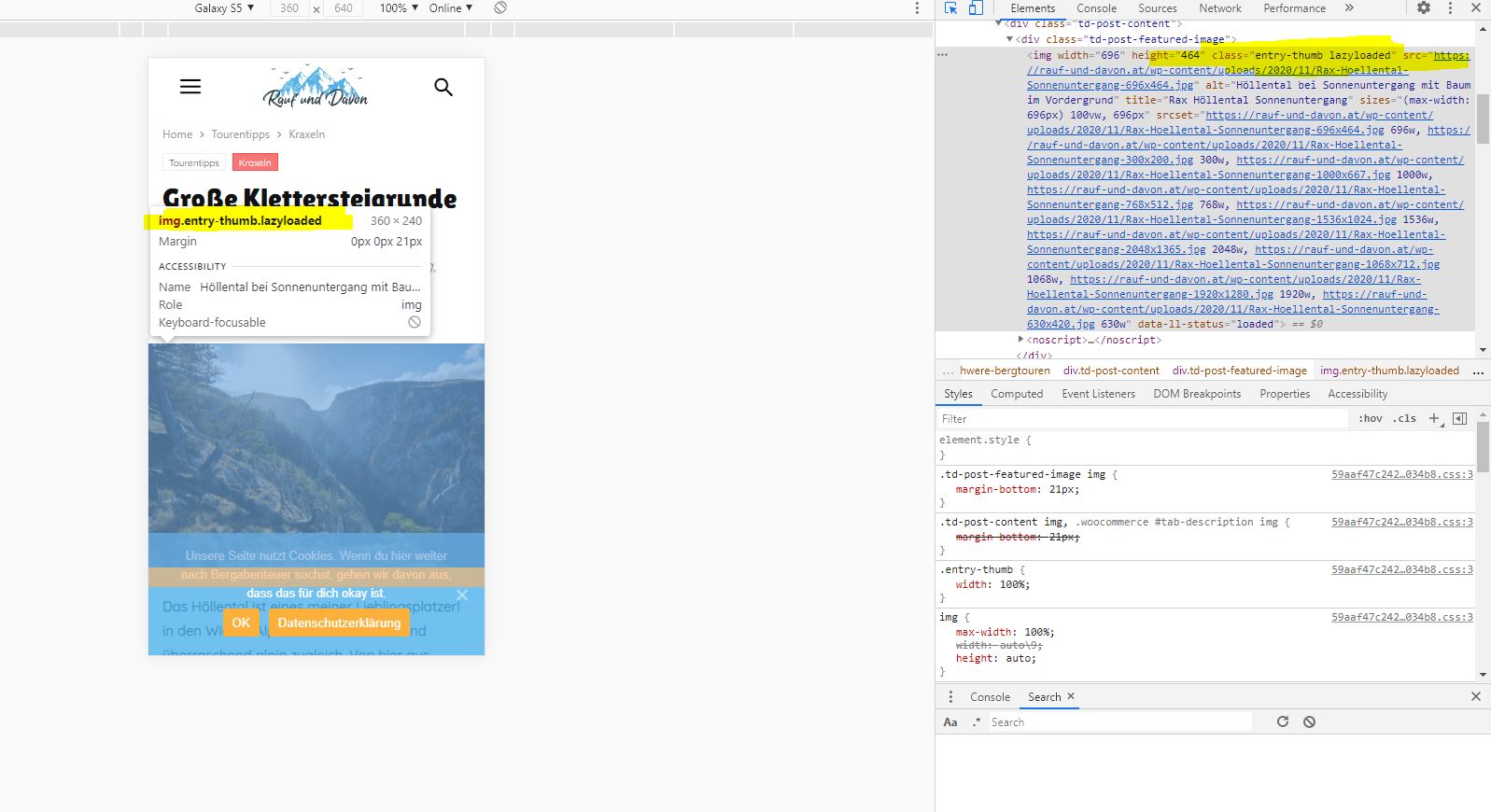
thanks for getting back. I tried it but sadly it didn’t work (as you can see on the screenshot below. Just to be sure (doesn’t know if that made any sense 😀 ) i tried the following combinations as well:
$attributes[] = 'class="td-post-featured-image img"';

    $attributes[] = 'class="td-post-featured-image.img"';

    $attributes[] = 'class="img.td-post-featured-image"';

    $attributes[] = 'class="td-post-featured-image"';

    $attributes[] = 'class=".td-post-featured-image img"';
The only one that worked was – as mentioned above – the class “entry-thumb”. But as i wrote: that excluded the thumbnails as well. Any other idea what i could try?
All the best and thanks,
Daniel
 Raman
RamanIn a post page, when you add blocks to the sidebar widget, the images do not stretch. For example, I know in other themes, like Jannah and stuff, the featured images stretch to fill the container, which looks more professional and neat.
Here it doesn’t, or I do not know the settings.
can anyone assist?
this is the image:

 nathan.justice
I’m trying to make other post templates behave like this post: https://www.nationalcioreview.com/featured/creating-an-it-revolution/
Notice the sidebar ads/widgets and the continuous scrolling when you reach the bottom of the article.
When I try to use any other post template, it does not have a sidebar and does not continue to scroll. I’m specifically trying to use Template Style 1.
 bribiz
Hi,
We are using the newspaper theme for our site and we have decided to disable the AMP version for most of the pages as we were having issues with some coding. However, when choosing a menu in the composer for the mobile version, this settings only show up in a few pages but not in all the pages that have been saved.
I have attached a few pictures as examples of what is going on.
Picture 1 is how the sticky menu should look on mobile, pictures 2 and 3 are how it actually shows up, not sticky menu and when opening, no menu at all.
This is only happening for a few pages, as for other categories on the site I have set the same settings and it is working. We would appreciate some help with this issue as we need to get the mobile site sorted as soon as possible to live.
Regards,
Ruben
https://thepanafrican.s3.eu-west-2.amazonaws.com/wp-content/uploads/2020/11/10121008/Screenshot-2020-11-10-at-12.03.50-1.png
 Calin
Calin Hi,
Normal there should be no problems for banners if you are using the code as in this guide -> https://forum.tagdiv.com/using-other-ads-non-adsense-ads/
Please provide a link where I can inspect this problem.
Thank you!
 Les
LesHi how do I change the colour of the top bar from Black to another colour I am using newspaper 7.2
https://gomoweb.com.au/tempsite/wp-content/uploads/2020/11/topbar-newspaper-7.2.png
 ericb
ericbOn my website, skiracing.com, when i’m trying to add new images or replace images in an image block I get a syntax error. The full error is:
jquery.js?ver=1.12.4-wp:2 Uncaught Error: Syntax error, unrecognized expression: [caption id="attachment_68887" align="aligncenter" width="696"] SOELDEN,AUSTRIA,17.OCT.20 - ALPINE SKIING - FIS World Cup season opening, Rettenbachferner, giant slalom, ladies. Image shows Nina O Brien (USA). Photo: GEPA pictures/ Christian Walgram[/caption]
at Function.ea.error (jquery.js?ver=1.12.4-wp:2)
at ea.tokenize (jquery.js?ver=1.12.4-wp:2)
at ea.select (jquery.js?ver=1.12.4-wp:2)
at Function.ea [as find] (jquery.js?ver=1.12.4-wp:2)
at n.fn.init.find (jquery.js?ver=1.12.4-wp:2)
at new n.fn.init (jquery.js?ver=1.12.4-wp:2)
at n.fn.init.n [as constructor] (jquery.js?ver=1.12.4-wp:2)
at new n.fn.init (jquery.js?ver=1.12.4-wp:2)
at n (jquery.js?ver=1.12.4-wp:2)
at Object.window.send_to_editor (js_files_for_wrapper.min.js?ver=1a221c8450bc290d78da968c
I just updated to version 10.3.7 of the Newspaper theme thinking that would help and I’m still getting the error. I also just ran all plugin updates and still no luck
Any ideas on how I can fix this? The same error comes up whenever I try to add or replace any other images in other tagdiv blocks, not just the image box in the example I gave. This issue has been reoccurring for the last few weeks now.
Thanks
 flaztheme
Hello,
I have problem, my video background not showing on header. I have tried on another server it’s the same, video background not showing, like on this http://alqudwah.flazhost.com. I don’t know why?
I have put my video youtube ID like this:

This is my website:
https://alqudwah.id.
My website working on Server:
Operating System: CentOS Linux 7 (Core)
OS Name: cpe:/o:centos:centos:7
Linux 3.10.0-1127.13.1.el7.x86_64
Architecture: x86-64
Management: cPanel
Web Server: Litespeed
I really need your help? Please help?
 loslunes
Hello I’m using a magazine pro post template, I have copied Google Adsense code in the composer but no ads shown. See attached images (first in firefox, second in edge). Any idea about what is happening? Maybe I’m using the wrong adsense code for an inline ad? The other ads, the one I have putted adding an adbox, header and footer ads works fine.
https://ibb.co/g3BCs2G (composer)
https://ibb.co/W35fSsD
https://ibb.co/Xkvc6kX
Now I have my site without this code, if you need to see any article to see html code or something just say me and I will put the code again. Many thanks.
 Vlad S
 Hello !
Are you running Google Auto Ads ? If that is the case then you cannot do anything about it it. The code will show where google thinks it is the most visible.
For other options you can go in Theme panel – Mobile Theme – Mobile ads.
Thank you !
 jjtwizzle
 That’s another site i need ads rolling on
jjtwizzle I’m trying to add the adsense code that allows adsense to choose where to place the ads.
When I place this code in the header, or anywhere, it only works on mobile.
I can try the ad slots but this is not what I want. Ads are not displaying correctly and it is not a problem I’ve had with any other theme.
The theme is great except for the ad issues. But obviously ads are important.
Help is appreciated. Thanks!
Vlad S Hello !
There you have the ads, are you runing an ad block ? Or please try from another device.
We have tested your website from multiple devices and browsers and all look good. This is how wee see it on firefox: https://www.screencast.com/t/o6eJvFfudf3
Thank you !
Calin Hi,
You can create a menu that has a dropdown like this -> https://www.wpbeginner.com/wp-tutorials/how-to-create-a-dropdown-menu-in-wordpress-beginners-guide/ example -> just add more menus elements here -> https://i.imgur.com/6ZgXESv.png
Another method for that can be use for a similar result is the option that can be set using tagDiv Composer, select the menu and set a fix width, then select the drop menu in more -> https://i.imgur.com/FVKKjqf.png
Personally I recommend the first option.
Hope this will help you!
Thank you!
Calin I see that you find from where comes this text where to set the ads.
If you have other questions, let us know!
Have a nice day!
Calin Hi!
I’m sorry that you are facing issues using Newspaper Theme. The page loading speed for both mobile and desktop depends on many factors and you can’t compare an empty theme like Twenty Twenty with a fully functional, features loaded theme like Newspaper that helps you create a website in a few hours.
We know that you requested us to optimize the page loading speed and our development team refused your invitation as your website is slowed down by the ads loading on your website. I’m sorry, we really wanted to help you, but we can’t optimize the ads as on each page load, the speed tests are waiting for the ads to get fully loaded. So, if in a specific moment, the ads server takes 10 sec to deliver the ads, your page results will display 10 sec delay added to the rest loading time.
The other recommendation was to use the Mobile theme, and now (after the last update) optimize the pages for mobile. You can find more about the new optimization for mobile in this article – https://tagdiv.com/newspaper-10-3-7-update-brings-customizable-and-fast-mobile-pages/ .
We are not deceiving customers. We are building a long term collaboration with our customers. You can see on our demos what page loading speed score can a website loaded with content can have. ca However, page loading speed can depend on many factors, and each website is unique from this point of view.
Let me explain some of these factors and maybe they give you some starting points for optimizing your website.
External factors: server speed, if you are using CDN or not, the external resources loaded by your website like ads, fonts, tracking scripts like Facebook Pixel, Google Analytics, Twitter analytics, Hotjar and so on.
Internal factors: the number of elements on the page, image size, image formats, if you are using mobile optimized layouts, console errors, if you are using the Standard Pack plugin on not, if you are using PRO demo or a standard one.
We can’t not provide a solution for you here, right now as we do not know what are the conditions on your website. You can make the following tests:
1. Activate tagdiv Composer and Standard Pack, install a standard demo and check the page loading speed, then disable the Standard Pack and activate the cloud template and install a pro demo. You’ll see that the speed will improve significantly. Also, you should consider creating the mobile optimized pages for each of your pages to improve the speed on the small screen devices.
2. Test your website in a page speed test la GTMetrix or Google Pagespeed Insights and check the loading time on the ads, fonts and tracking scripts – if there is something there that slows your website down, take action.
Our developers are constantly working on improving Newspaper Theme performance. If you need our help, please send us an email at bogdan@tagdiv.com, we’ll evaluate your client’s website and see if there is something we can do to assist you.
Thank you for your understanding!