
- NewspaperUsing Other Ads
- NewspaperSidebar ads
- NewspaperIntroduction to CPT and ACF with Newspaper Theme
- NewspaperHow to edit modules for Flex Block X
- NewspaperHow to use the Posts List shortcode
- NewspaperCreate a frontend submission form
- NewspaperHow to Use the Tabbed Content shortcode
- NewspaperWooCommerce: Happy “Add to Favorites!”
- NewspaperHow to generate Facebook App ID
- NewspaperLink Tracker
- NewspaperFlex Block Settings Guide
- NewspaperGeneral Options that May Interfere with the Newspaper Theme
- NewspaperSocial Icons
- NewspaperPosts Loop Element
- NewspaperSet a Background for Category Page
- NewspaperThe Newspaper Mobile Theme: Introduction
- NewspaperHow to Add a Logo in Newspaper
- NewspapertagDiv Shop
- NewspaperAutoptimize Plugin – install and configuration
- NewspaperHow to Use tagDiv Cloud Library
 gadget-freakz
 Thanks for helping. It’s valid now because I removed the code, otherwise it’s faulty again. this is my code when auto-ads are on, and google gave the error about a script that we didn’t use.
EDITED !
 UsmanSwift
 I removed other codes and have put these amp manual ads codes….
https://www.screencast.com/t/hZzlKo6y
But, still not working….
 Calin
Calin Hi,
Only one code is need to be set in theme panel, the other one is a standard code and is already add in our theme -> http://prntscr.com/pkwtzh also the code need to be set only in AMP ads -> http://prntscr.com/pkwum2
Thank you!
 TeXLOgDiV
We have decided to migrate our entire site from Drupal to WordPress. (since lot of problems).
We have around 25000+ articles.
Our various sections are as follows:
News – This section has text content, text with images and/or videos.
Guides – Same as News, but it also has multi-page section for same article.
Reviews – Same as Guides
Downloads Section – This section displays various download items like software/apks/etc.
We also display unique article with multiple things like Download size, OS, Development company link etc. in readable format + the content info with/without images.
Video – We provide unique content + videos on this page, we upload to our youtube channel and then link back here and/or our unique content with other channel videos.
I am not a huge graphic designer/coder but CONTENT MANAGER (with 20+ years experience in this industry).
We are at present only more interested to migrate all our existing content from Drupal to WordPress. (Named as Phase 1, been already working since last 2 and half months on same)
Phase 2 will have some business integrations (better ROI) and little theme related work
For Phase 3 we will require unique skills from this company as well for major custom work..
I will appreciate to get some insights for our requirements, and will be glad to meet the members of this new community 🙂
Regards,
Calin Hi,
Yes, our theme support giff format.
You can insert this giff as a banner after our documentation for ads -> https://forum.tagdiv.com/using-other-ads-non-adsense-ads/
Thank you!
 MikeKhero
Hello community:
I need some help with the configuration of a scroll menu in my web page; I am using the header template 36, but, when I scroll to down, appears a scroll menu with another configuration, and I don´t find the place where I can configure it; Can anybody help me?
Thanks for the help!
I attached some pictures.
This is the menu that appears when I scroll to down the main page:

This is the main menu: 
Calin Hi,
Only the the code that appear on this screenshot https://prnt.sc/ov400l need to be set for amp auto ads, the other one is already set in our theme.
-> https://forum.tagdiv.com/tagdiv-amp-plugin-tutorial/
Thank you!
 marcusbae
 Hello Vlad!
I do not think it was not clear!
The code being from Taboola is a detail as it could be from Adsense or any other.
My point is: regardless of the ad we put there, it will be UP on the author, comments, etc. If I put an image there, it will be on top too.
What I would like to know is where, within the site’s HTML code, I could place the ad code I want, but let it get DOWN on the author, comments, and so on. You see?
 arivibez
 I seriously feel there is something conflicting with adsense display on the theme. Every other blog adsense shows, mine always blank
 howtomoney
Hi~!
When loading all page headers
Load another header.
And it appears normally.
Question picture attached.
http://carloansinfor.com/wp-content/uploads/2019/10/headers.jpg
 Sibi Paul
Hello,
My Previous Blog Site is Using MTS Theme.
There I Have Used a Custom CSS Code in Some Posts.
That’s a Button ( For Downloads, Subscribe, and URLs )
for Ex: Look at this post – https://www.fastunlocker.in/unlock-samsung-galaxy-a20-sim-network-unlock-pin-puk.html
at the bottom of this article, you can see a button ” Get Samsung Unlock Code ”
That is a Code I Added Manually… I’m not using this Kind of Buttons in Every Post, But Only a few Cornerstone Contents I have to use…
The Code Behind this Button is Here.
<p style=”text-align: center;”>
<a class=”button” style=”color: #ffffff;”
href=”https://www.fastunlocker.com/get/samsung-unlock-code/”
target=”_blank” rel=”noopener noreferrer”>
<b>Get Samsung Unlock Code
</b>
</p>
( Due to Code Error, I changed the codes into few lines – so remove those white space )
So, My Question is…
Once I added the same code in My Another Site, There News Paper Theme is Powered 🙂
That Button NOT Appear 🙂
I know it’s Because of Different Architecture…
That is not My Question…
My Actual Question is…
Can I Use This Kind of Manual Customized Buttons to Deal with Links – Using a Code Like Above..?
My Need is – Just use Similar Button in My Posts Without using Third-Party Plugins.
My Site Having a lot of Plugin, I’m looking to reduce the usage of Plugins.
NewsPaper Theme Installed Site Has a New Post – https://www.fastunlocker.com/huawei-frp-unlock-key/
When I added the above code in this post, No button is Appear to View…
Kindly help me.
Note: IF No Custom Codes Going to Work, Then I’ll Try using some Plugin, if so… Suggest me a Good Plugin, which is 100% Compatible with Newspaper Theme.
Requirements: Button Should be Customizable with Colors, Shadow, Font Size and Color, etc…
 cantoute
 Hi,
I now have google hitting me 50k /day on this type of urls
“https://www.welovetennis.fr/us-open/https :/www.welovetennis.fr/atp/atp-zhuhai”
Would be nice if had a look at the source of the page
https://www.welovetennis.fr/us-open/
and tell me if this does come from your theme or is it I should look elswere
To me it looks like I didn’t pick the right choice for the header (I based myself on cloud template model 3) and I would be better off using the “builtin” headers
I’m considering switching to Style 5
would that take all this json/js out of the way ?
to me it seems i’ll stay with the problem
the problem is to have href= or src= anywhere in the page (even in js comments it gets picked up) as the crawler scan the text without analyzing it’s structure to hunt for url.
Same happens with anything having //some.form/of/url
Now I have google crawling like crazy 100k pages / day on things we don’t want… getting really hard on the server… and we’ve got better things to ask google crawler to look for…
I have no issue giving you an access if that could help. But perhaps first if you could confirm that it’s the theme and no other plugin would be helpful.
Thanks
suggestions
“brake” anything like src= href= into ‘hr’ + ‘ef’ + ‘=’
or use a global var $hf=’href=’ $sc=’src=’ $ht=’http://’
or easy just all encode base64…
this can limit the problem at low cost (and won’t solve it completely) is the <![CDATA[
<script>
//<![CDATA[
…
<div class=\”td-module-image\”>\r\n <div class=\”td-module-thumb\”>edit<\/a><img width=\”218\” height=\”150\” class=\”entry-thumb\” src=\”https:\/\/www2.welovetennis.fr\/wp-content\/uploads\/2019\/09\/Tsitsipas1959-218×150.jpg\” srcset=\”https:\/\/www2.welovetennis.fr\/wp-content\/uploads\/2019\/09\/Tsitsipas1959-218×150.jpg 218w, https:\/\/www2.we
…
// ]]>
</script>
 teatroecritica
Hi,
in the new version of newspaper (9.8) I cannot modify any of the theme file that I used to customize before.
For example in header.php I hade some simple line for set up an ads banner before the site title.
In the file loop-single-5.php (that now no longer exists) I added some very important disclamer lines that I wanted let appear after any article, etc…
How can I solve these issues?
thanx
 camilob1
hi i installed the theme and then i import the the Animals Magazine Pro i always use wp-bakery for this type of templates i already use this theme whit other and work just fine, but whit this o wp-bakery i got those codes i tried everthing i need to change a lot of things about the design but i can do nothing 
 CLEM5ON
I’ve read some others have said it may be robots.txt file blocking access for Google BUT all three times I’ve applied the code, it says ‘code found’ but after their review I’m hit with “Site down or unavailable”.
http://www.ClemsonSportsNetwork.com
You can see it’s not down. Looking for expert theme advice here before contacting Google.
Thanks in advance,
CSN
 nM
nM Hi,
screenshots/videos aren’t possible (NDA) but they aren’t necessary, either – it’s pretty simple:
We have a staging site where all work (coding, configuration, content creation,…) is done. On a frequent basis this staging site gets migrated to the production environment with a simple file and folder copy and a database move – the database runs through a search and replace script where everything related to the staging url is replaced with the production url.
Everything is replaced correctly except the settings from the theme panel, e.g.:
– Custom font files: set in the theme panel (http://staging.tld/wp-content/uploads/2019/09/mycustomwebfont.woff)
– Logo: set under LOGO UPLOAD in the theme panel (http://staging.tld/wp-content/uploads/myCustomLogo.jpg)
All the urls that are set in the theme options panel aren’t replaced (with https://production.tld/…) in the database search and replace step. So, once again, the question: where are these urls stored in the database and why aren’t they replaced?
Exporting and importing the theme options is not an option as there is no backend access on production site at all. There has to be another way to replace these urls like all the other WordPress urls in the database.
Looking forward to your reply!
Calin Hello,
If I’m correctly the image disappear only in tagDiv Composer editor, in the page should display just fine -> https://www.screencast.com/t/F0UOO05NAp also you can use this code for pace an advertisement with a banner -> https://forum.tagdiv.com/using-other-ads-non-adsense-ads/
Only the blocks have this option, the grids was build with a different structure.
You can add the ajax filter only with custom work.
Thank you for your understanding!
 Vlad S
 Hello !
Unfortunately this option is not available. You can create another single post template without the adbox and add it on the pages where you do not want your ads to show up.
Thank you !
 purnimabanik
Hi,
Actually I am a bit confused about implementing AMP Auto Ads. Please help me in resolving the issue. I have implemented the AMP+Mobile Theme. And after that, I wanted the Auto ADS of Adsense. For this, I even pasted the Body Part of the AMP Code in the field given. Even after doing this I am not getting the anchor ads from the bottom of the screen as other AMP Pages show (landed through organic searches). I badly need to implement this, since I want to increase the revenue which suffered a lot after switching to AMP+Mobile theme.
Please Suggest the Solution elaborately.
Thanks
Purnima
 aleabuamer
Hi
When I visit my homepage the first time, it loads slowly… then, it depends of what page, is loading slow or not
I download whole the web page and I see a file of 1144 MB (base.js). It’s JavaScript.
How can I do it loading faster?
Thx for all
Another Question:
When I see a post, below there are related posts and another posts from author: Can I hide the second button (posts from author) without using css?
thx
 pattydavid
In TagDiv editor, when I try to edit a text block I added to my page, the WP Editor (visual) is blank and I can only see text in the html tab (text). The wysiwyg section just shows a long string of letters and numbers. However, when I save the page, it looks fine in a browser referencing my site (not in admin view). Could this have anything to do with the fact that I’m not using Gutenberg (I reverted to classic view)?
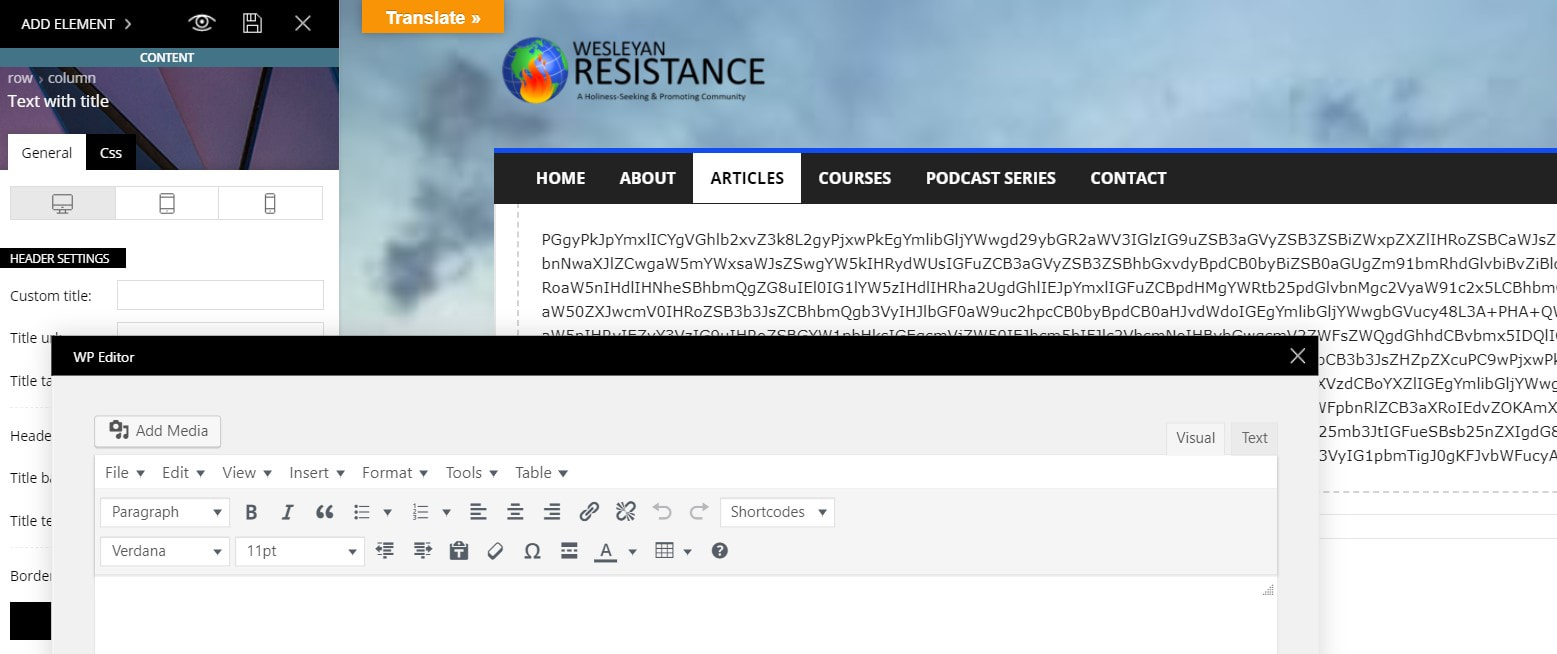
Overall, I love the typographic control of elements, but I’m just having a very hard time getting my existing WP site up and running in my new theme. I’ll keep working on it, but I may need to revert to a backup of my site if there are too many elements I can’t get to work (like the slider revolution, which still won’t work even though I’ve installed the plugin — there are two superimposed sets of headlines on the initial image, and the other images in the slider populate the entire page so that nothing else is readable).
Thanks for any help you can offer.
 Aludecor1
 Thanks for your reply. I have checked now it was because of that mobile theme. When mobile theme is active it hides the ticker, ads and a few other things from the page.
 melcu
melcuHello guys,
Is there any possibility to import a header menu from another template? Something like this one: https://cybercity.ro/wp-content/uploads/2019/09/MenuSS.png
I mention i use ChurchMag template.
If i try to do it from wp i get a very ugly one 🙂
 MrShawnTierney
I understand you can disable Ads on certain devices (https://forum.tagdiv.com/using-other-ads-non-adsense-ads/) but would like to suggest a global setting to disable all Ads for certain roles or groups, like SupportersLevel1, BackersLevel2, etc.
 GregorS
 Thanks for your instructions, I’ll take a look and let you know how it goes.
What I’m trying to do is implement a AdRotate ads in Header instead of Theme native ones, I’ve tried and succeeded using a workaround:
– Imported Header Template 1 (Magazine theme) via Cloud Template
– deleted Ad Element
– replaced it with sidebar Element
– and inserted AdRotate Widget in it’s place (instead of PHP code)
It actually worked and displayed ads properly.
But here is the issue with this new (imported) header – and my sec. Question
I now have two headers – one for homepage (this new imported one – Template 1) and other one for inside pages (the theme default one). I have removed ad element from both – so that does not impact this test (and deactivated unsupported plugin).
They are behaving differently when loading – please check this video (tagDiv Speed Booster and WP Super Cache are turned off).
You can see it in this video – LINK (.MVK)
Do you know why is there this “gap bottom” under menu when header from template 1 loads? The other one loads just fine.



