
- NewspaperUsing Other Ads
- NewspaperSidebar ads
- NewspaperIntroduction to CPT and ACF with Newspaper Theme
- NewspaperHow to edit modules for Flex Block X
- NewspaperHow to use the Posts List shortcode
- NewspaperCreate a frontend submission form
- NewspaperHow to Use the Tabbed Content shortcode
- NewspaperWooCommerce: Happy “Add to Favorites!”
- NewspaperHow to generate Facebook App ID
- NewspaperLink Tracker
- NewspaperFlex Block Settings Guide
- NewspaperGeneral Options that May Interfere with the Newspaper Theme
- NewspaperSocial Icons
- NewspaperPosts Loop Element
- NewspaperSet a Background for Category Page
- NewspaperThe Newspaper Mobile Theme: Introduction
- NewspaperHow to Add a Logo in Newspaper
- NewspapertagDiv Shop
- NewspaperAutoptimize Plugin – install and configuration
- NewspaperHow to Use tagDiv Cloud Library
 Calin
Calin Hi,
Yes, you can combine AdSense with banners if you want, or other types of ads.
Our theme provides an element (ad box) that holds the ads script and banners, but this is simple, if you need a complex one, you’ll need to use a dedicated plugin, maybe Advanced Ads or AdRotate.
Thank you!
 robertorubio
 Thank you for the reply. You’re correct, the AdSense account has not been approved. So I will wait until approval is complete and get back to you if I have any other concerns.
 wneary
Hello, I am back for my second site with a tagDiv theme! https://thecascadian.com/ Love Forest Beat. But I have questions.
1. Our developer says that the orange settings here are not that important. Is he correct? I think he must be wrong, but I wanted to doublecheck https://drive.google.com/file/d/1ZEM6JXzHbGsy5s5gz3QVRUPdEsv8kch6/view?usp=sharing What happens if we do not update them?
2. Yesterday I activated the plugin Advanced Ads Pro and we got a critical WordPress error. Is there a known compatibility issue between Advanced Ads and the theme?
3. Most seriously, we have been repeatedly getting this error. A lot. People calling up our site, and people calling up the back end on WordPress. I am told this is known thing where GoDaddy and Cloudflare blame each other. Do you have any insight into why we might be seeing this error with our site? It seems to have been worse before our developer updated the PHP. https://drive.google.com/file/d/1qlcs-z0cwmkmsXsOpnICt_9VIDbd3kmu/view?usp=sharing
Thank you for any insights!
 mikeshecky
 UPDATE: Sorta…
unable to edit any templates (e.g., post or category templates). When I attempt to open a template for editing, the Composer editor either fails to load, displays a blank screen, or encounters an error, preventing any modifications.
Crucially, the TagDiv Composer seems to work for editing regular pages and posts. I’m guessing the problem is specifically localized to the template editing functionality?
I’ve already done many troubleshooting steps, including:
WordPress & Theme/Composer Versions:
– My WordPress core is up-to-date. 6.8.3
– Dashboard says WP, Themes and Plugins are all up to date. but on the Newspaper updates page it shows I need to update to 12.7.3
– Newspaper theme currently updated to 12.6.9, can’t upto to 12.7.3
Theme Reinstallation Attempts:
– I’ve tried a significant process to ensure theme integrity: I manually downloadeed 12.7.3 from ThemeForest and then performed a fresh, clean update to the current latest version of the Newspaper theme and its associated plugins. This was done to rule out any corrupted files. It wont et me update though, it doesnt complete it.
Site Restore:
– I performed a full site restore from a recent working backup, but the template editing issue persists.
Caching Management:
– I have thoroughly cleared all levels of caching: my WordPress caching plugins (e.g., [mention specific plugin if you use one]), server-side cache via my hosting provider, CDN cache (Cloudflare, etc.), and my browser cache (including incognito mode).
PHP Environment Configuration:
– I have verified my server’s PHP version (currently running 8.3.22)
– I have also manually increased critical PHP limits in my php.ini and wp-config.php, including:
– memory_limit 1024M
– post_max_size 1024M
– upload_max_filesize 1024M
– max_execution_time 600
– max_input_vars 5000
WordPress Core Diagnostics:
– I’ve checked the WordPress Site Health tool, and it reports no issues
– I’ve re-saved permalinks from the WordPress settings.
– I’ve tested editing in different browsers, ccomputers and incognito/private windows.
Plugin Conflicts:
– While pages/posts edit fine, I have also systematically deactivated non-TagDiv plugins that might interact with editors or custom content types to check for conflicts, but the template editing issue remained.
My leading hypothesis is that the problem may be tied to a version mismatch or conflict? My current system is detecting Newspaper Theme 12.6.9, while it seems certain theme components or template assets might have been created or are expecting an environment compatible with Newspaper Theme 12.7.3? This discrepancy appears to specifically affect the way TagDiv Library interacts with or loads template files, as all other Composer functionalities for pages and posts appear to be working correctly.
Could you please provide guidance on this specific issue? I can provide screenshots, access to the browser console, or temporary admin access if needed.
Thank you for your urgent attention to this matter.
-
This reply was modified 10 months by
mikeshecky.
 steffi83
Hi, I have a problem on the results page after using the “search” function.
Both the plugin and the template are up to date, and this behavior is new.
From the homepage: click on the magnifying glass “search” icon, and you can try typing something like “Bhutan” and pressing Enter.
When the search results page loads, these two error lines appear:
Warning: Illegal offset type in /home/mhd-01/www.trolleygirl.it/htdocs/wp-content/plugins/td-composer/legacy/common/wp_booster/td_util.php on line 1196
Warning: Illegal offset type in /home/mhd-01/www.trolleygirl.it/htdocs/wp-content/plugins/td-composer/legacy/common/wp_booster/td_util.php on line 1196
I found the corresponding file, but I don’t know what I need to modify.
I emailed the Sql support, but they told me that the errors clearly refer to the **td-composer** plugin. We don’t know whether this might be due to an incompatibility with other plugins, with the active PHP version, or with the theme you are using in WordPress.
In any case, the **td-composer** plugin is not working properly.
Could you please help me?
Thank you,
Stefania
 jobothan
 Thank you – I will do the suggested, but this is just one optimization of a million I have done talking to you guys and the webhotel provider. It’s still slow AF. And it’s frustrating.
Tbh I dont want a “very fast website” – I want to have a site that loads within a reasonable time – not 20-30 seconds.
And whereas optimizing, turning of cronjobs, using caches etc etc may help, it’s STILL SLOW AF! The explanation CANNOT be that Newspaper is heavy and provider is slow… bc NO user should put up with this CRAZY slowness – and all the bad excuses.
Please try to help me for real? Or I’ll have to use mountains of time migrating it to another solution… many people are contributing to the content and both them and readers are getting annoyed with this.
Is the MAG theme able to run faster? Is the real excuse that newspaper is a dead end?
HELP!
 fabinhoalmeida
 Hello.
We are partners with the Teads ad network. Their ad units display parallax formats, and from the feedback I received from support, they’ve already identified the same issue with other partners using WordPress with Newspaper. However, I once tried to display Adsense/Adx banners in Parallax using the Newspaper theme, and the layout appears broken within the iframe, just like Teads. I think if there’s a solution, it should benefit both cases. I’m counting on your support. Thank you.
 ROY.wu
 Thanks for your answer
This is the homepage situation after I upgraded the theme
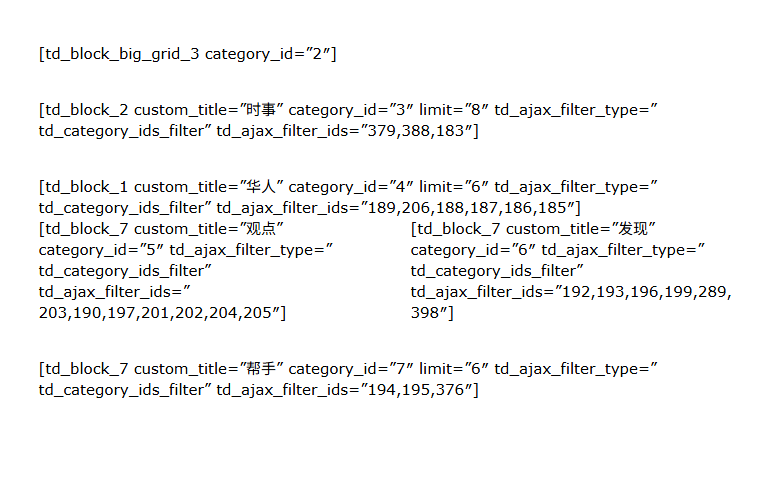
Your answer has solved my problem.
But the article you recommended also illustrates that continuing to use standard plug-ins will slow down the website.
So can I only use tagDiv Cloud Library to redesign the website? I don’t have this kind of experience and I just want to keep it. Are there any more good ways to import and export?
There is another problem:

 Simion C.
 Hi,
That is pretty unusual. I know it can happen sometimes, usually due to code in the htaccess https://www.siteground.com/kb/website-downloading-index/ and other causes https://theguidex.com/wordpress-download-file-instead-of-opening-in-browser/ But not due to using the AMP plugin. I don’t think I’ve seen a case where the AMP plugin would cause such an issue.
If I check your website now, the homepage loads correctly on mobile https://prnt.sc/hrqZdSQr_uW- No AMP. But as you said, it may not for visitors that accessed the website when the issue was happening.
You could try this code in the functions file or load it with a code snippet plugin https://pastebin.com/8CAVb8BH It sets a few meta tags for the homepage which should instruct the browser to not use a stored version of the page. Leave the code there for a day or two, then remove it. And please be sure to clear all the caches, from the website and from the hosting if there is any.
Thanks.
Simion C. Hi,
Actually we had a few other reports concerning this file wp-content/plugins/td-composer/legacy/common/common.php
Its a security module called CPGuard which flags a part of the code from that file from the composer. It’s a false positive however, we checked those cases and the code in the file was as it should be. The solution was to whitelist the file or path https://opsshield.com/help/cpguard/whitelist-files/ We will however check more to see if we can modify the code in the file so it doesn’t trigger security rules.
I’m not sure about WPBakery however. You could install the latest version for it https://cdn.tagdiv.com/wp-content/uploads/2025/10/js-composer-8.6.1.zip Seems they made security improvements in a recent update https://kb.wpbakery.com/docs/preface/release-notes/
Thanks.
 VideotexGlobal
 I tried to watch the video under documentation but it gives a message that the video is private. Where is the best documentation to learn how to populated the home page with dynamic content and setup tower ads in the sidebar? Also info on how the tagDIV editor works so I can get my client up to speed.
Also, in my email reply can you recommend a plugin or other maintenance plugin option to display the holding page but still be able to preview the sites and select templates.
Thanks.
 stemalo
I added an adbox on homepage as told, did paste in there the custom code from google but it’s not showing up.
Calin Hi,
I see, it appears that the auto ads have the maim-um position and the css can not overlap it, so I thin the solution her will be to Here are the simple disable Auto Ads in the header section using your AdSense account:
Log in to your Google AdSense account.
– Go to Ads-> By site.
– Find your website and click Edit.
– A live preview of your site will open.
– In the preview, click on the header area.
– A small menu will appear, select Exclude area.
– Repeat if you want to block other sections.
– Click Apply to site (top right) to save changes.
 yoginaga
 Finally I found the mistake the problem is only your theme side. Because now I install the generatepress theme in same site now the ads are showing perfectly. Then another well adsense worked site I install the newspaper theme for checking purpose but in that site ads are showing is decreased gradually then i install the generatepress theme is shown perfectly. So the problem is only from your side only
Calin Hello,
1. What you see is the sticky menu, which can be disabled using tagDiv Composer, checking the manager and disabling it https://forum.tagdiv.com/header-manager/ – https://i.imgur.com/ZXBFvVT.png. Do the same for both the desktop and mobile versions.
2. This situation appears because the header from desktop is using a different code nad the mobile header othere code, so those can be different, so what you can do is to use tagDiv Composer to edit the mobile header, edit the homepage, selct the mobile viewport and add a new row under the mobile header (make sure it’s under the header not content) an ad box element https://i.imgur.com/Oz1Ev58.png https://i.imgur.com/dxujNzQ.png
3. You need to have created a menu as in this guide https://forum.tagdiv.com/main-menu/, then use tagDiv Composer, edit the homepage and select the mobile viewport, then select the mobile menu and choose the created menu – https://i.imgur.com/MvNUaM8.png – https://i.imgur.com/KjMQiem.png – https://i.imgur.com/vFflmzh.png
Thank you!
 Game Press
Hi Everyone,
I have a big problem with mobile my mobile theme on site https://gamepress.cz/
I created my own mobile site design, but it doesn’t load, interestingly, I have another site https://mobilepress.cz/ created that works exactly as set up. Both are on the same hosting and with the same plan. Both also have the same plugins and settings.
Can you advise what is wrong and why the site is not displaying as it should?
I am attaching images with descriptions below.


 Marcellino
Hello, I’m using Newspaper theme and “Free News” prebuilt site. I’m trying to set the filter category for Flex Box 1 at the top of the page
I’ve set for the article as Primary category: “Ultim’ora” (id:72)

I set as category filter for the Flex Box 1: “Politica” (id: 72)

As you may see by second image, it shows always “No posts”. If I set “All categories” and sort by latest, in the box it shows an article that came with the template (the only one I left, as I removed all the others) but doesn’t show my first article
Please, can you help me? Thanks in advance
stemaloIt’s pretty easy to setup ads in back-end, but on front-end these ads are not appearing. Of course the ads are active at google adsense.
 Rase.Admin
 Hi John,
your problem has a solution already, as Calin wrote in some other posts. Just install the newest version of plugin from https://cdn.tagdiv.com/wp-content/uploads/2025/07/td-cloud-library.zip
PS. I am not an expert, I just reposted the advice from Calin.
Regards,
Milan
Calin Hi,
It will need to use tagDiv Composer, edit the page or cloud template, and select the ad box to set your ad code or banner in. You can check more about the settings ads in our theme by checking those guides:
– https://forum.tagdiv.com/article-ads/
– https://forum.tagdiv.com/using-other-ads-non-adsense-ads/
Thank you!
 franfar
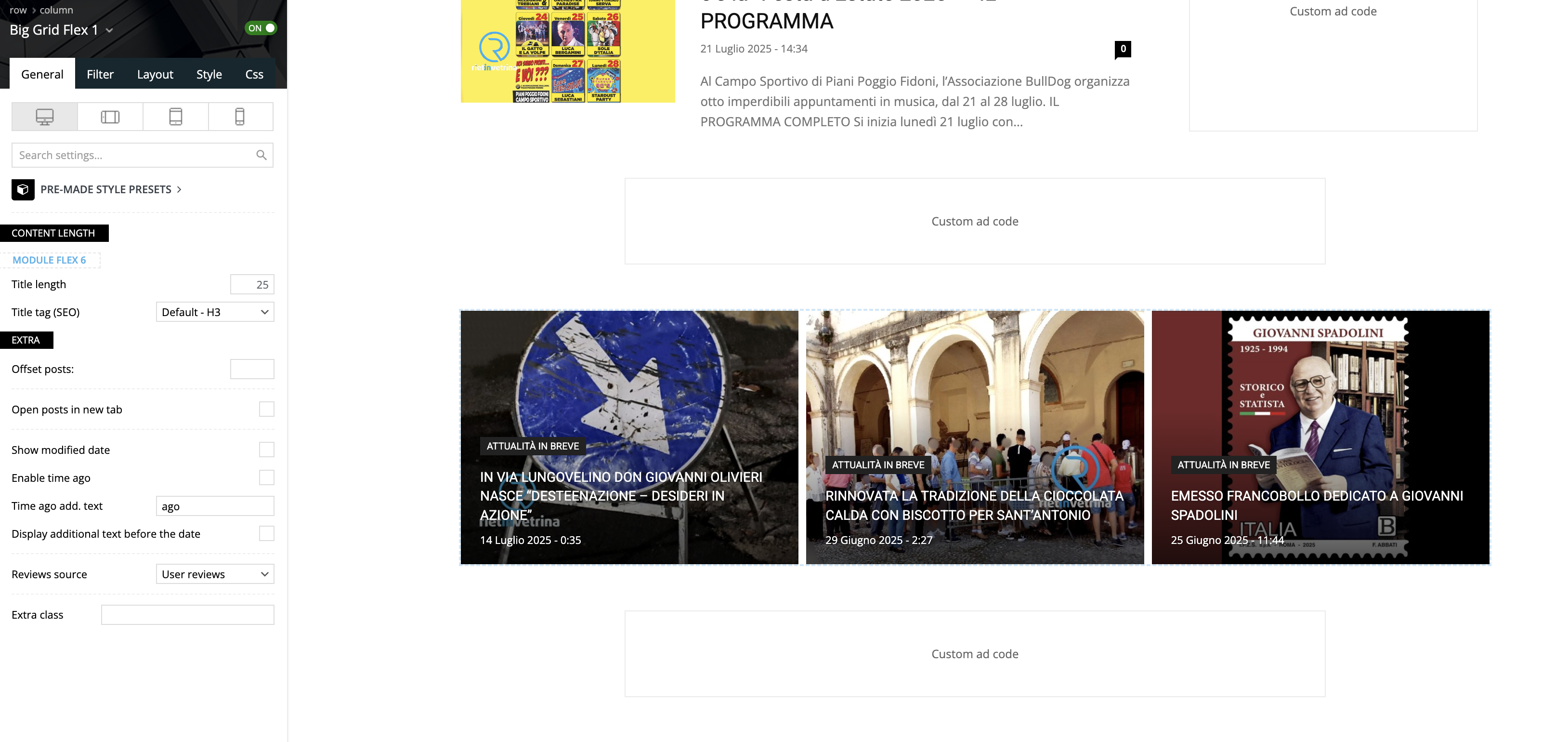
Good morning, using the Big Grid Flex 1 on the homepage of a website we noticed that, on the builder preview it’s all ok, but navigating normally, the third column is not inline with the other 2, but goes on a second row.
Please take a look to these screenshots:
– builder preview
– website view
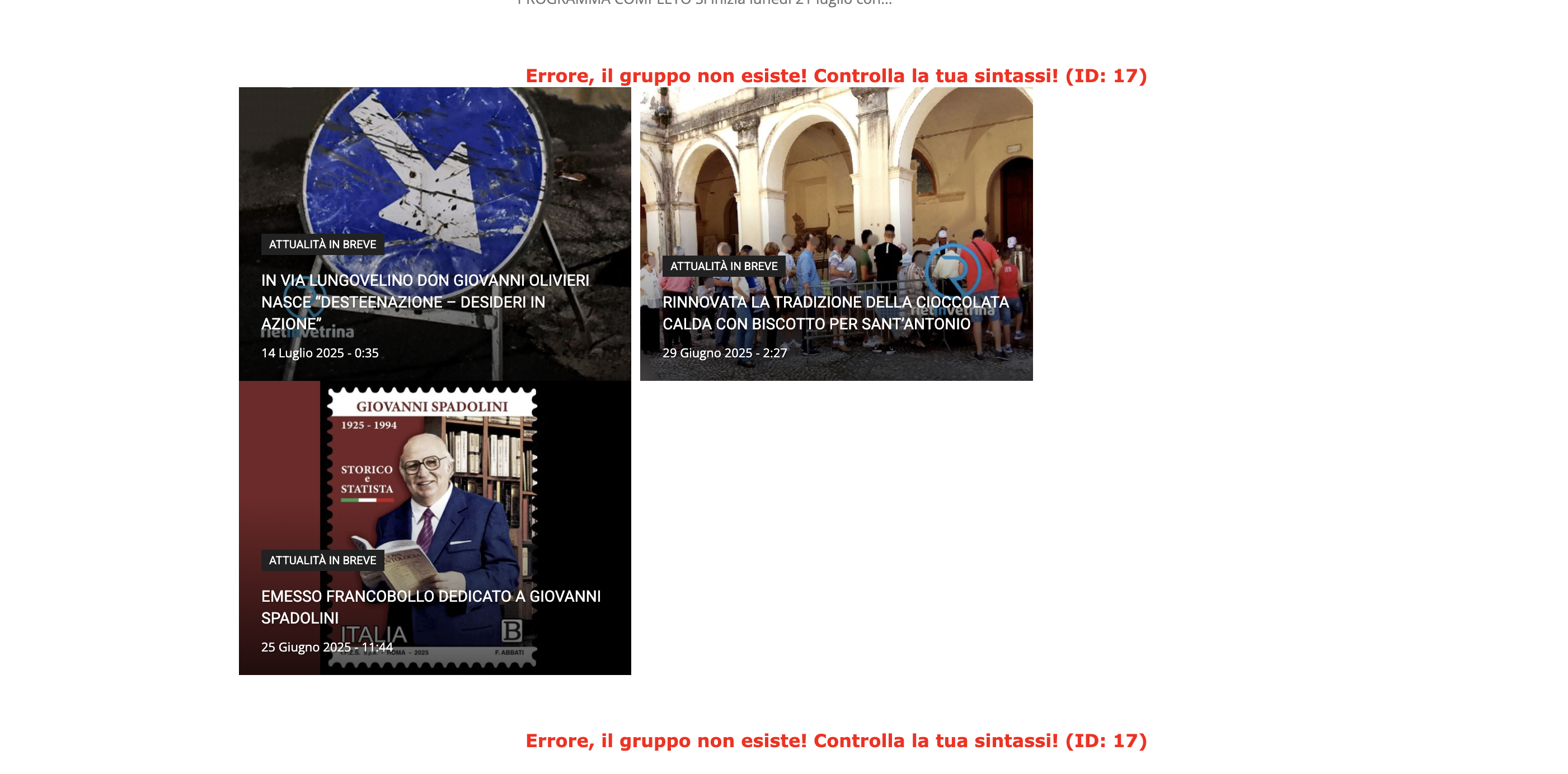
We tested on Safari and Chrome, using 2 different computers and deleting cache.
The website is reachable only by admin.
Can you please help?
Thank you!
 gleloudas
Hello, we have send an email to support on 20&22/7 for this topic can you check it?
You have had credentails for admin if needed from another recent ticket.
Short info:
we would like to remove background images:
https://www.kynigesia.gr/wp-content/uploads/2025/07/kyn-background-radial-gradient-desktop-1.svg
https://www.kynigesia.gr/wp-content/uploads/2025/07/kyn-background-radial-gradient-desktop-2.svg
https://www.kynigesia.gr/wp-content/uploads/2025/07/kyn-background-radial-gradient-mobile-1.svg
https://www.kynigesia.gr/wp-content/uploads/2025/07/kyn-background-radial-gradient-mobile-2.svg
and replace them with this css class (already available). this css is not possible to achieve with tagdiv of course.
.redbg3{background: #9B2A2A;
background: linear-gradient(90deg,rgba(155, 42, 42, 1) 0%, rgba(221, 51, 51, 1) 50%, rgba(105, 29, 29, 1) 93%)!important;}
Full info on email.
Thank you.
 marlonk
 Hi, i’m logged in all the time as a administrator. My Google Maps API is correct because i use it on the other website and it works well there.
My access is denied when i try to search for any address and have info that “This page cannot load Google Maps correctly.”

 sanjeevk765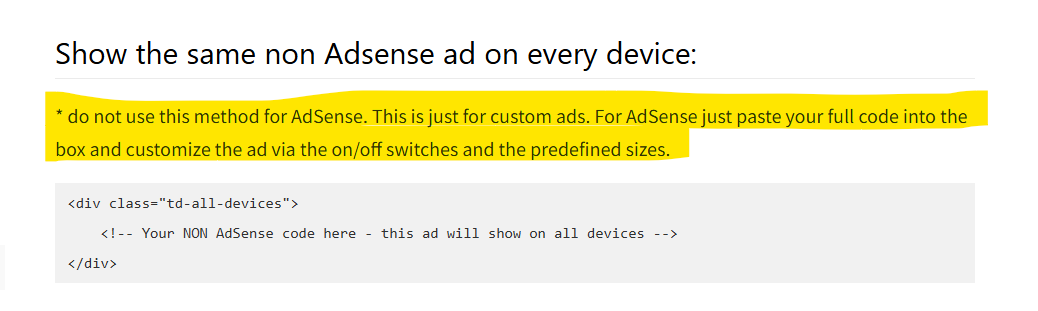
https://forum.tagdiv.com/using-other-ads-non-adsense-ads/
Documentation is not fully updated. There are 3 more places where sentences saying the same thing on the same page. Please update it thoroughly. I attached an example screenshot.
thankyou
sanjeevk765I just found that there is confusing documentation and information doesn’t match with documentation. I attached the screenshot too.
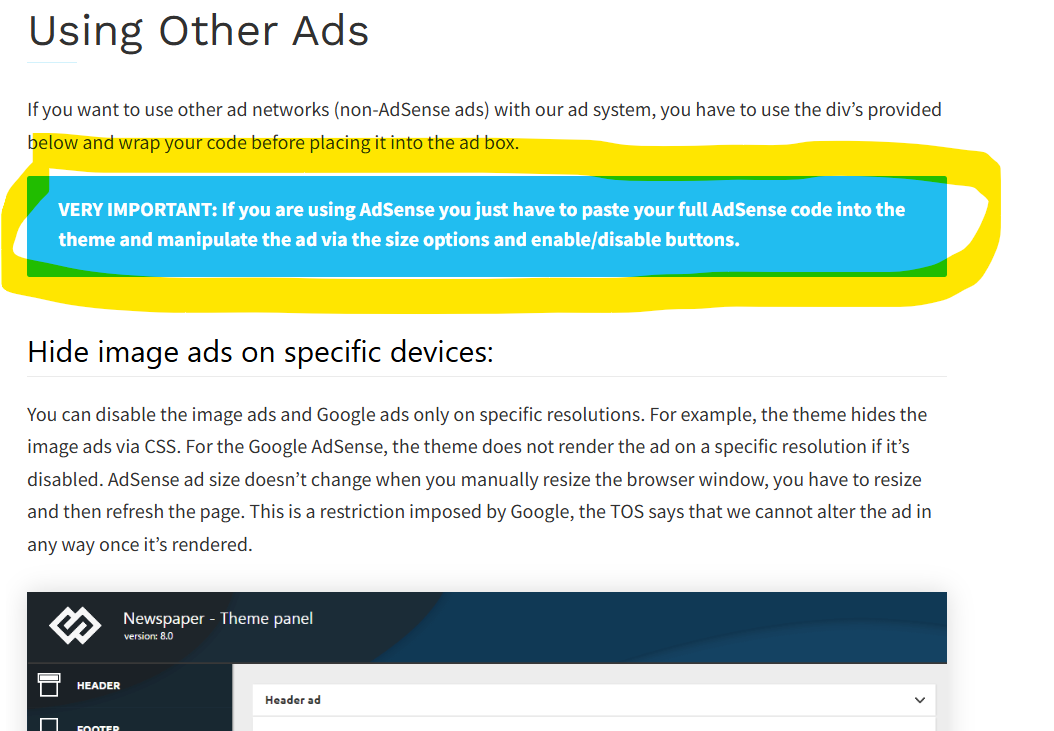
On: https://forum.tagdiv.com/using-other-ads-non-adsense-ads/ It’s written that “If you are using AdSense you just have to paste your full AdSense code into the theme and manipulate the ad via the size options and enable/disable buttons.”
But
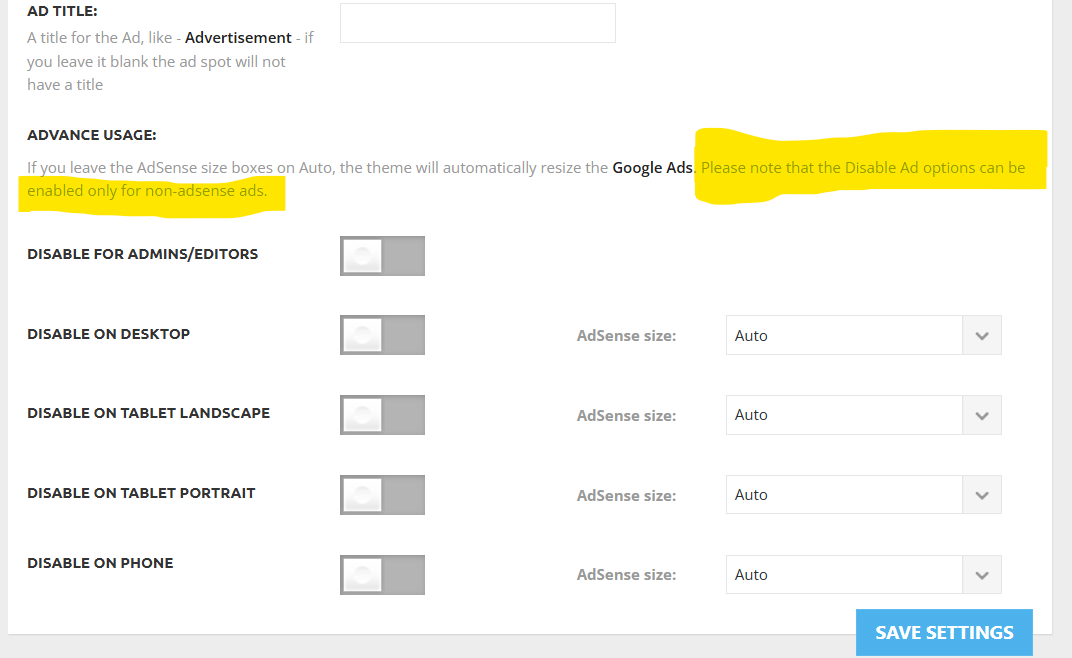
In the theme panel it’s written “Please note that the Disable Ad options can be enabled only for non-adsense ads.”
Then why in the documentation page it’s written for AdSense we can use enable/disable buttons. So please tell me is documentation outdated and which statement is correct.



