
- NewsmagUsing other ads
- NewspaperUsing Other Ads
- NewsmagSidebar ads
- NewspaperSidebar ads
- NewspaperIntroduction to CPT and ACF with Newspaper Theme
- NewspaperHow to edit modules for Flex Block X
- NewspaperHow to use the Posts List shortcode
- NewspaperCreate a frontend submission form
- NewspaperHow to Use the Tabbed Content shortcode
- NewspaperWooCommerce: Happy “Add to Favorites!”
- NewspaperHow to generate Facebook App ID
- NewspaperLink Tracker
- NewspaperFlex Block Settings Guide
- NewspaperGeneral Options that May Interfere with the Newspaper Theme
- NewspaperSocial Icons
- NewspaperPosts Loop Element
- NewspaperSet a Background for Category Page
- NewspaperThe Newspaper Mobile Theme: Introduction
- NewspaperHow to Add a Logo in Newspaper
- NewspapertagDiv Shop
 BrettD
 Calin, this is a giant hole in the otherwise extensive TagDiv documentation. So, if I tell my graphic designer who is ready to go to work to generate 728×90 and 300×250 custom image ads that will work?
 Simion C.
 Hi,
As far as I know the old dedicated AMP plugin can still be used. The current solution is however the official AMP plugin, this can be used with the mobile theme. Adsense ads can be used with the AMP+mobile theme. Or even if you don’t use the mobile theme and just the AMP plugin, for example like mentioned here
– https://isabelcastillo.com/google-adsense-wordpress-amp
The previous td-amp plugin was based on the official AMP plugin, I believe version 0.7.2 was used. Now as the latest up to date AMP plugin can be used, things should be better in my opinion (I am no expert in the matter), not worse.
I found some other possible explanations for revenue drops
– https://crunchify.com/google-adsense-revenue-drops-after-moving-wordpress-site-over-to-https-ssl/
– https://www.adpushup.com/blog/whats-causing-the-sudden-drop-in-your-adsense-earnings-ctr-and-rpm/
– https://blog.ezoic.com/why-are-ad-earnings-dropping/
Also the Adsense troubleshooter – https://support.google.com/adsense/answer/6333955?hl=en
Thanks
 doctorresidual
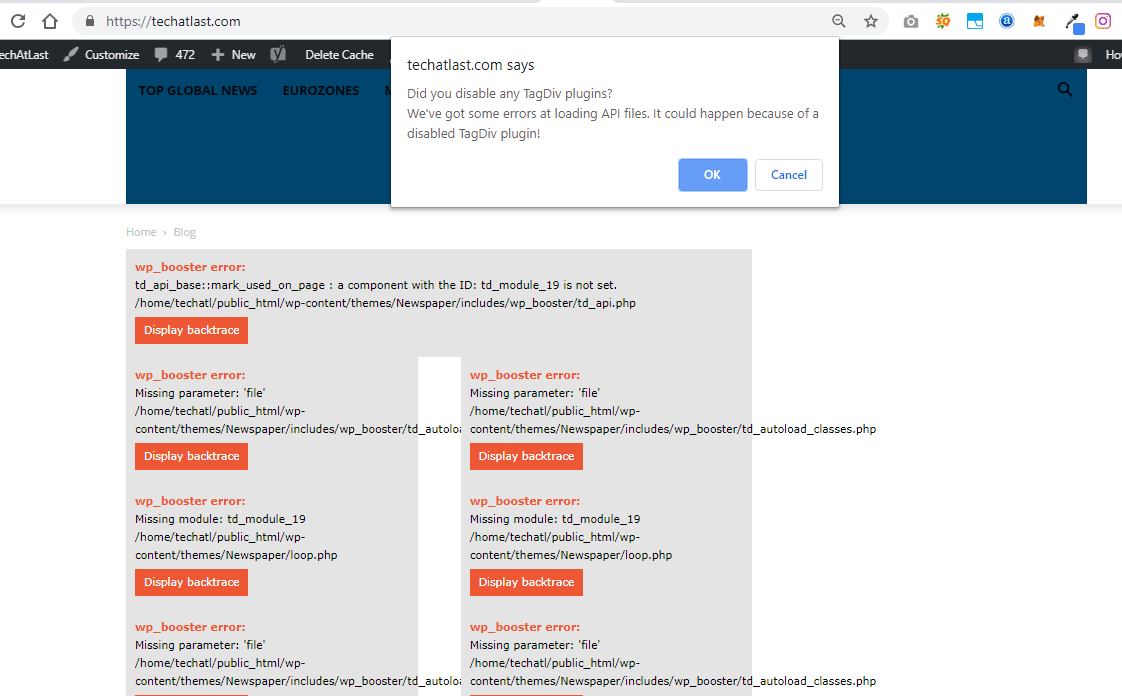
I have been on my site since morning having issue installing the updated version of TD composer plugin.
It has crashed my website.
It has affected hundreds of other websites too.
Kindly fix this plugin.

 PFN365
Hi,
When my writers are saving their post, it goes to a blank white screen. The post saves, but they are led to the white screen. Also, some are having issues previewing the post as it leads to a white screen. I just installed this theme the other day. Website: http://www.profootballnetwork.com.
Here are the plugins I have active:
AMP
Bluehost
Classic Editor
Google Analytics for WP
Internal Link Building
Jetpack by WordPress.com
Members
Open external links in a new window
Publish to Apple News
Really Simple SSL
TablePress
tagDIV Composer
tagDIV Mobile Theme
tagDiv Social Counter
Yoast SEO Premium
 shubhamsharma7979
 No Need to use any other ads plugin …
after login dashboard go to Newspaper>>theme panal>>ads>>Header ad>> ” paste your ad code in header ads
shubhamsharma7979 One more issue facing after updating goto post to other related post showing only ads not post show please check your official facebook page i sended recorder video of problem
 Bogdan B.
 Hello,
Please select the center position for your ad: https://www.screencast.com/t/jKbNM2BLVssw
And if you do not use a standard adsense ads, also use the non adsense div’s from this guide: https://forum.tagdiv.com/using-other-ads-non-adsense-ads/
Thank you!
 sergiu_r
Hello,
After the update to Newspaper 9.7 I have only one problem, a SEO related one.
For the homepage I modified the file “td_block_template_1” to make the Block title h2 (
instead of h4). With old versions of the theme, this worked, but after the update to Newspaper 9.7 whatever I do I can not change the Block title h4 in h2.

Is there another way I can do that? Should another file be modified in the new update?
Thank you!
 bguthleben
Hi support. We are having an emergency issue of site shutdown.
https://frenchmorning.com
Kinsta hosting is saying the problem is the theme making to many SQL calls.
We have given you access with another issue we are having with mobile ads and the theme.
https://forum.tagdiv.com/topic/inline-article-ad-not-showing/
Here is info from Kinsta hosting on the issue with new relic
https://docs.google.com/document/d/1VsU0g6tmEk0SzYNGN6kP26I3hNCvG2qxfAZrlEoCw_o/edit?usp=sharing
 mclanfranconi
Hi guys.
From the 9.6 update i get a dropdown in adsense (From 1000k month to U$D 600 or less month). In some articles (desktop) the widget block appear… in another don´nt. Sometimes in mobile appear white block without nothing. This problems start with that version. It´s only a comment. For me is strange. I update the theme and all the adsense problems start. (I create the block in 2017, 2 years with same code, but no problems until now) Thanks.
Bogdan B. Unfortunately as per the new envato requirements, https://help.author.envato.com/hc/en-us/articles/360000472383-WordPress-Theme-Requirements we had to move all of the theme functionality to a plugin. We chose tagDiv composer as it was a required theme plugin and most users already benefit from it’s features. It was the best choice to move the functionality to. unfortunately, having more than 1 page builder can have downsides indeed as in most cases there are elements that conflict with each other. Wpbakery is going obsolete as even the developer stopped investing in it so we decided it was time to work with our own page builder instead. What you can do is revert back to the previous version of the theme for the time being (you cna download the previous version from here: http://cdn.tagdiv.com/wp-content/uploads/2019/04/Newspaper-tf.zip) and we strongly recommend moving over to tagdiv composer as all of the theme functionality will be added through the tagDiv composer from here on. You can make the move slowly on a separate install so you do not affect your live website. You can create a testing environment and create the pages there over time and replacing the ones on your live site once you are done for minimum impact on the front-end. You will then be able to use the tagdiv composer instead of VC and benefit from all the functionality of the composer and cloud library plugins.
Thank you for understanding
 Smanchi
 Thats not i mean, i show with example images

We have done that before 9.7 update and other websites gets our authors posts from there… Now it’s lost…
We did that before 9.7 but now as code changes we need your support…
We used
$buffy .= '<div class="td-authors-url">';

$last_article = $wpdb->get_row($wpdb->prepare("SELECT * FROM $wpdb->posts WHERE post_author = %d AND post_status = 'publish' AND post_type = 'post' ORDER BY post_date DESC LIMIT 1", $td_author->ID), ARRAY_A);

$buffy .= '' . $last_article['post_title'] .'';

$buffy .= '</div>';
before 9.7 to set that…
-
This reply was modified 7 years by
Smanchi.
 TomChen25
Hello,
I have an issue with Google Adsense in the way they present the ads. I’m trying to change the sizes of the ads but maybe I can limit the header of the theme and then they can insert these ads.
This is the header – https://prnt.sc/ne19hf
Here’s the header with the huge adsesnse – https://prnt.sc/ne19w7
Let me know if I can limit the header for ads in a certain size (728×90).
Another issue that I have -I would like to customize the sidebar on my site after the YouTube section, however, in the tagDiv composer, I don’t have any control over this section.
Appreciate your help,
 Calin
Calin Hi,
When you’ll be updating to the Newspaper 9.7 version, you’ll need to activate the tagDiv Composer to keep the Newspaper theme functionality you’ve previously used.
Otherwise, you will have basic WordPress functionality, complying with Envato WordPress Requirements – https://help.author.envato.com/hc/en-us/articles/360000472383-WordPress-Theme-Requirements
Please read this guide to learn about the new functionality of the new update: – https://tagdiv.com/updating-the-core-of-tagdiv-themes/
If you should need the provisos version of the theme ( v9.6.1 ) you can get it from here -> http://cdn.tagdiv.com/wp-content/uploads/2019/04/Newspaper-tf.zip
Thank you!
 simplicity
 Well, no I can’t, I’m not a theme support 🙂
I gave them and others insights how to solve a problem they’re facing with after upgrade.
Just open your header template file found here
/wp-content/plugins/td-composer/legacy/Newspaper/parts/header/header-style-*.php, locate a line
require_once(‘header/ads.php’);
and replace it with
require_once(‘ads.php’);
simplicity Hi,
The problem is in bad path to ads.php
/wp-content/plugins/td-composer/legacy/Newspaper/parts/header/
Some of the header-style-*.php files have a path header/ads.php instead of just ads.php
After correcting this path everythign worked like a charm.
I just checked my templates, but the problem could be persistent in other templates too.
Hope it helps.
bguthleben Hi Calin,
An update to this..
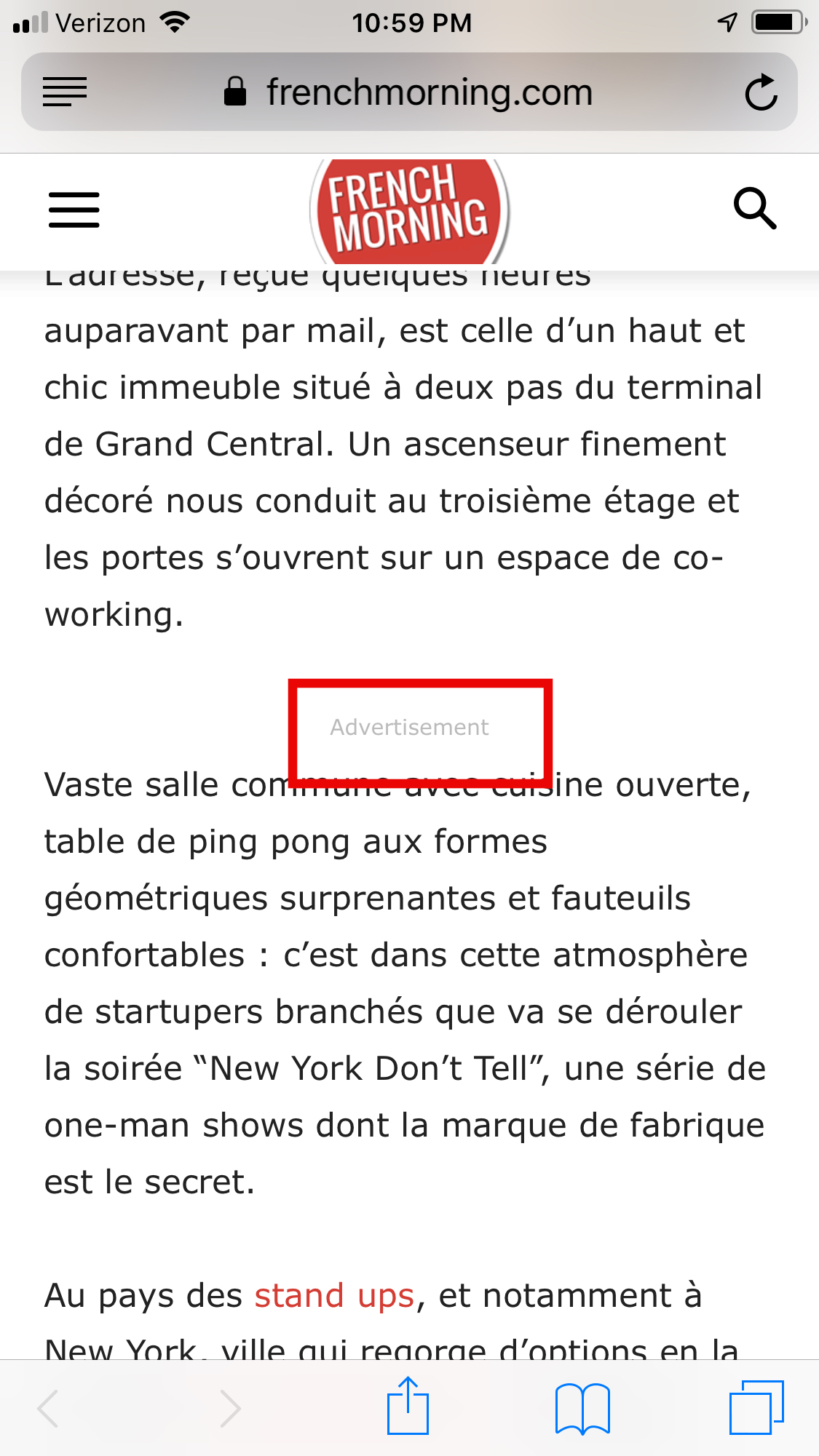
Nothing we put in the Article inline ad mobile on one site will show.
The ads we are testing will show in all the other sites in the multisite and all other ad sections on sites.
We are using shortcodes from Advanced ads but also just pasting Google Ad code directly into the Article Inline ad.
It seems that the codes are not making it to the article posts. Just the header if we put one.
-
This reply was modified 7 years by
bguthleben.
-
This reply was modified 7 years by
CalinThe Newspaper theme update brings a change for the theme implementation.
When you’ll be updating to the Newspaper 9.7 version, you’ll need to activate the tagDiv Composer to keep the Newspaper theme functionality you’ve previously used.
Otherwise, you will have basic WordPress functionality, complying with Envato WordPress Requirements – https://help.author.envato.com/hc/en-us/articles/360000472383-WordPress-Theme-Requirements
Please read this article we wrote on the new update https://tagdiv.com/updating-the-core-of-tagdiv-themes/ to learn what it changes and what you must do in order to keep the functionality intact.
If you should need the provisos version of the theme ( v9.6.1 ) you can get it from here -> http://cdn.tagdiv.com/wp-content/uploads/2019/04/Newspaper-tf.zip
Thank you!
 Mark Gilbert
 Hello Calin
I have now placed code for Article Top Ad – I didn’t do it at first because I didn’t want any ad to appear while testing.
<div class=”td-all-devices”>
</div>
Can you take a look and see why it doesn’t appear? The same code works fine for Article Inline Ad. And all my other ad positions work fine – see sidebar and leaderboard – https://jazzjournal.co.uk/2019/04/17/harold-land-four-classic-albums/
Thanks
Mark
mclanfranconi Thanks Catalin… this fix the problem with te aligment…
But still different users have problem with Adsense size. In mobile only working 480×30.
All the other sizes, only show 300×250 ads.
Any idea? This happend until version 9.6 of Newspaper.
 alifewithfaith
Has anyone with years of Newspaper theme usage ever done a check to see which post formats produce the most amount of AdSense views?
It would appear that “Smart List 6, 7, or 8” would be the best options for displaying AdSense ads. However, this leaves me with a few questions:
- In this article about Smart Lists, we learn about how to make the smart lists. Rock on, right? However, once the Gutenberries are turned on, how do we then insert the smart list breaks that are necessary once the TinyMCE editor is no longer available as seen in THIS image?
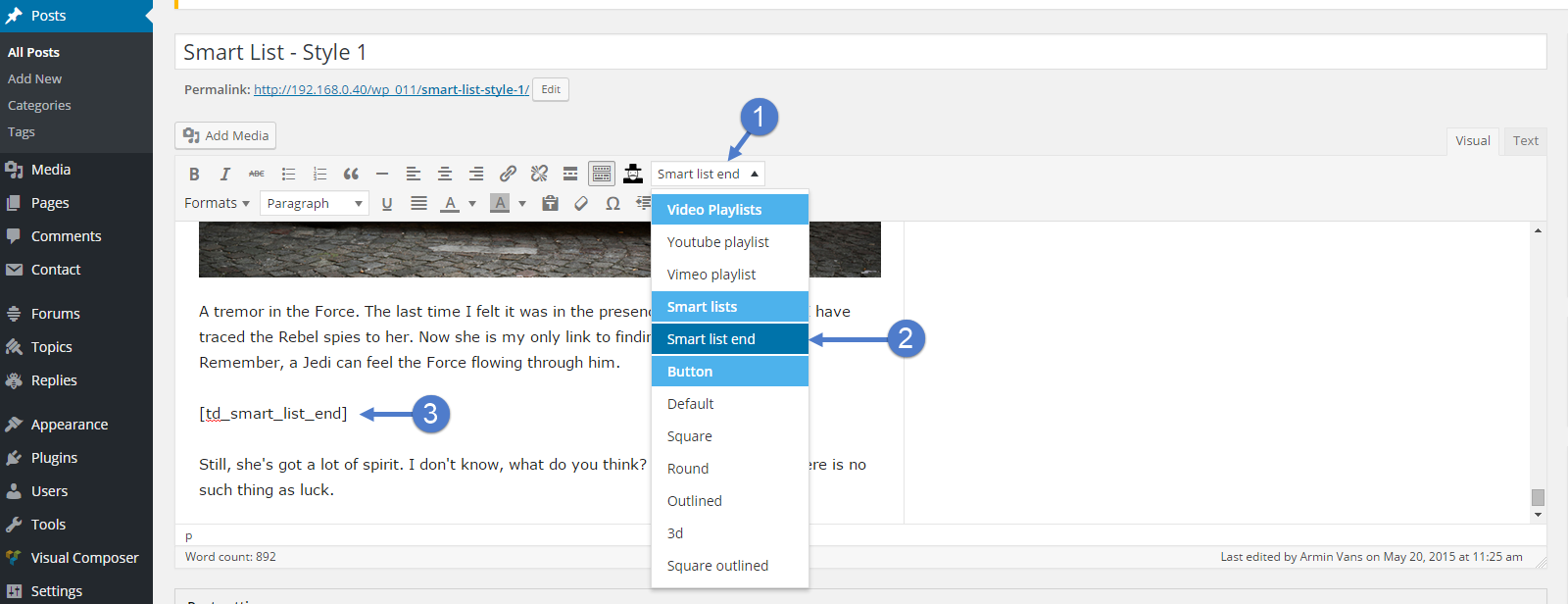
- Has anyone else ran into the problem where a few of these Smart List options are simply appearing as duplicates? There’s 6 boxes which appear to be “blank”, so are there options which I’m missing? Here’s a screenshot of what I am seeing:

- I’m a fan of reading docs, but I’m never immune to understanding that I might be missing something. However… This theme had all sorts of awesome shortcodes that were promoted and featured when I bought the theme. Obviously, access to those shortcodes is gone after the Gutenberries came along. I’ve already made about 50+ articles with the Gutenberries editor. So, how does one access those “shortcode” only features in a post-Gutenberries WordPress site?
Thanks for the help!
P.S. Other than the questions listed above, does anyone have any tips or best practices from folks who have been using this theme for at least a couple of years?
 Catalin
 Hi,
Please check the following useful documentation for a proper configuration of your ads. Check here -> https://forum.tagdiv.com/header-ads-adsense/ -> https://forum.tagdiv.com/using-other-ads-non-adsense-ads/
Thank you!
Calin Hi,
Our theme was designed to work with adsense by default. If you use any other ad system you need to use this method to do it: https://forum.tagdiv.com/using-other-ads/
Please check our documentation for using ads -> https://www.screencast.com/t/HF9jjtknUCX -> https://forum.tagdiv.com/using-other-ads-non-adsense-ads/
Thank you for your understanding!
mclanfranconiHello i have one problem since the versión 9.6 of newspaper.
Until i update the theme, my adsense ads in mobile work bad.
I have this size in the theme panel (For example the header)
– Desktop = 700*90
– Mobile = 320*50
Buy, in mobile version only show ads 350*350. The theme is not recizing the ads.
Y try in AUTO and happend the same. Desktop working fine, mobile only show 300*300 ads.
You can check it in http://www.marianocabrera.com
I attach and image to show the situation: https://ibb.co/vY32fHy
PD: Another thing. As you can see in the image, the 300*300 is not centered.
 crazydiver
 Hello Bogdan,
Thank you for the heads up regarding wp rocket. For now, I’ll guess I’ll stick with wp supercache but I seem to have problems using it with cloudflare.
Wp Super cache only works with cloudflare if I have cache page http headers with page content enabled.
Autoptimize on the other hand seems to break my site so I guess I have to tweak it some more.
Thanks. If you have any suggestions, I’m all ears!
