
- NewspaperDesign your Post Pages using the Cloud Library Templates
- NewspaperDesign your post pages using the Default Templates
- NewspaperPage templates
- NewspaperCreate a form contact page
- NewspaperCloud Library Templates
- NewspaperCloud Library – Category Templates
- NewspaperHomepage – How to build and set it
- NewspaperPost templates
- NewspaperDefault post templates
- NewspaperCategory templates
- NewspaperPost template ads
- NewspaperSingle External Shortcode and External Shortcode
- NewspaperWP Rocket and Newspaper Theme: Optimization Guide
- NewspaperSearch setup for custom post type
- NewspapertagDiv Composer – Website Manager
- NewspaperBookmark – Save For Later
- NewspaperFlex Block Builder and Flex Loop Builder
- NewspaperModules Builder in Newspaper Theme
- NewspaperIntroduction to CPT and ACF with Newspaper Theme
- NewspaperCreate a frontend submission form
 Calin
Calin Hi,
To set a page to full width (or a cloud template), you’ll need to edit it with tagDiv Composer like this -> https://i.imgur.com/i5IUJ9E.jpg add or select a row and stretch it after your needs -> https://i.imgur.com/WKYebPX.jpg -> https://i.imgur.com/TO1BZ3M.png -> https://i.imgur.com/Yq8UCv3.jpg
If you want to make the layout full-width, then to change the website width, you need to make sure that you don’t have set a background color/image in the Theme Panel, because this makes your website boxed. Make sure this option is disabled => https://www.screencast.com/t/ejiNPCBF
Thank you!
Calin Hi,
It will be necessary to use the tagDiv Composer to edit the page/template, then select the ad box element, and, using right-click, remove it.
 dmforum
Hi,
Can you please let me know how I can create a different design of the categories list in the category page. I tried adding it via the cloud templates but I am unable to find the filter to filter it to the specific category. Also, I’ll like to hide the date for a category or it’s posts.
 ferhatakbas
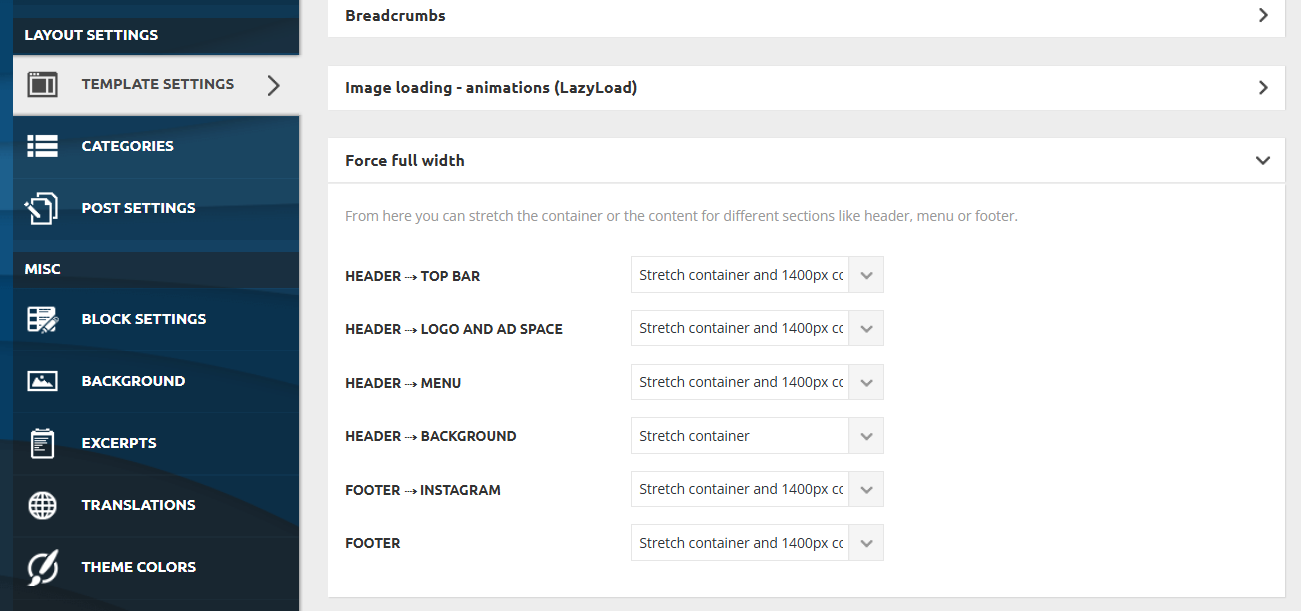
How i can change width of the article area size ?
i cant see on template settings page
 nicolinoc
 Good morning
Yes, you understood correctly. I assigned several pages to a theme other than the Global one. I now know that the template inserted for individual articles overrides the Global one, but since I’m not familiar with computer systems, I was asking for your help on how to restore all those pages. There are many of them, and they have been changed. Thank you.
Calin Hi,
There are no categories in pages. If you want to create a page similar to a category, you can do so, but it won’t behave the same as a category template. A category template can be used for all categories that use that template. A page configured similarly to a category will display only the categories set on the page.
The category base can be changed or removed if needed, the most popular method as far as I know is with the Yoast SEO plugin
– https://kb.yoast.com/kb/how-to-remove-the-categories-prefix/
– https://www.wpbeginner.com/wp-tutorials/how-to-change-the-category-base-prefix-in-wordpress/
You could try these if you want to change/remove the category base from the URL. Note that if you remove the /category/ from the URL, you will probably have to create redirects from the old URLs to the new ones – https://www.blogstand.com/change-category-base-prefix-wordpress/ -> https://jonnyjordan.com/blog/how-to-remove-category-from-your-urls-in-wordpress/
Thank you!
 cyberhrc
Hi
Ive used your ready block and somehow there is always your add for theme but i cannot find where
https://imgur.com/a/zVhooN8 –> edit screen & live screen [ below i have my own google ad code ]
Also, i am trying to make right boxes [ weather for example ] as sticky but nothing happens. Tried on row and column, smart sidebar is enabled, tried with adding class from your documentation
And last, i am planing redesign. So i made new homepage, added blocks etc. Now i plan to add new mobile home page. Than last thing to do is to make archive pages and category pages. What is ideal way to do it? Loading from cloud or can i save my own template?
Calin Hi,
This can be done only on the Newspaper theme using the mobile page template -> https://forum.tagdiv.com/topic/litespeed-plugins/
When using this, ensure you use a cache plugin that supports separate mobile and desktop caches.
Thank you!
Calin Hi,
Ok, so I just rechecked using the browser as in your video, and the mobile menu seems to be working correctly on the entire website, except the posts. When you are on a post, it no longer works.
From what I see on the source page on any page the module for menu is loaded in the page – https://prnt.sc/ub-jGK0hdFxY but not on posts https://prnt.sc/LKgcSkaIIZn5 so one possibility is to have a different header on the single post template, another possibility is to have something in the single post template that is blocking the mobile modla to load.
Calin Hi,
The duplicator is the best when is coming to moving the webiste exact as it is on staging, but if you want to move only some pages or cloud templates, then you can use the copy and paste method
For the copy-paste method, go to Newspaper > Cloud Templates on the main domain. For example, if you want to copy a header, edit it, hover over the three dots, and click Edit: https://i.imgur.com/FUHR4iN.png
If you only need the Cloud Templates and want to import everything related to them, the best solution is to use the WordPress Import/Export tool and export only the Cloud Templates.
Thank you!
Calin Hi Barbareto,
For this, you can use the Mobile page template. Here are the three available solutions for the mobile version:
1. Responsive Desktop Version – The default responsive layout that adjusts to mobile screens using tagDiv Composer – https://i.imgur.com/apZQZ0o.png
2. Mobile Page/Template – A custom mobile layout that can be created using the tagDiv Composer.
3. tagDiv Mobile Theme Plugin – A separate mobile theme that provides a dedicated mobile experience but is limited in edits and changes.
Note: When the tagDiv Mobile Theme Plugin is activated, it takes priority and will be displayed on mobile devices. If it’s not active, the system will check for a mobile page/template built with tagDiv Composer. If neither of these is in use, the responsive desktop version will be shown by default.
Thank you!
Calin Hello,
Here are the three available solutions for the mobile version:
1. Responsive Desktop Version – The default responsive layout that adjusts to mobile screens using tagDiv Composer – https://i.imgur.com/apZQZ0o.png
2. Mobile Page/Template – A custom mobile layout that can be created using the tagDiv Composer.
3. tagDiv Mobile Theme Plugin – A separate mobile theme that provides a dedicated mobile experience but is limited in edits and changes.
Note: When the tagDiv Mobile Theme Plugin is activated, it takes priority and will be displayed on mobile devices. If it’s not active, the system will check for a mobile page/template built with tagDiv Composer. If neither of these is in use, the responsive desktop version will be shown by default.
Also, the tagDiv Mobile theme is the only one that can be used for AMP. Unfortunately, the options for editing the layout are only a few. Also, pages need to be remade using the mobile editor only:
– https://forum.tagdiv.com/mobile-theme-introduction/
– https://forum.tagdiv.com/the-mobile-theme/
– https://forum.tagdiv.com/tagdiv-amp-plugin-tutorial/
Thank you!
 Barbareto
 How do I create a mobile design that’s independent of the desktop browser design without using the default mobile theme?
Next, in the WordPress settings – reading – static pages – homepage, I set it to “home.” For the post page, should I leave it blank or use a mobile template?
Or, what should I use as the homepage in WordPress: the original page or the mobile template?
 vic-2
vic-2Hello,
we need migrate changes from stage to live site.
Our status is:
1. We cloned live site to stage with Duplicator Pro (without wp-uploads and firewall, etc.), then re-linked wp-uploads content to stage (because huge files etc.), not symlinks but .htaccess forward
2. On stage we applied anothe template layout as is on live.
3. We customised some on frontpage and another (customisation still in progress) via builder
4. We need do some changes on Post/Blog page and some another changes
5. After all changes we need apply all to live site, without modifying content on live
How we can do this? Was not possible via theme settings export/import only, I think. We need clone some code from stage to live (modified via builder)
Pls give us best way for solve this issue, step by step …
Thanks
 Elad2026
Subject: Post published in Dashboard but not appearing on the live website – ashkelonnow.co.il
Message:
Hello tagDiv Support Team,
I am using the Newspaper PRO theme for my news website and I am facing an issue where new posts are not appearing on the live site after being published.
Site Details:
Domain: https://ashkelonnow.co.il
Contact Email: 247elad@gmail.com
Hosting: Hostinger (hPanel)
The Issue: I have successfully published a post via the WordPress dashboard, but it does not show up on the homepage or the category pages when viewing the site as a visitor.
Steps I have already taken:
Cache Clearing: I have cleared the cache via Hostinger hPanel (“Purge Cache”) and used the LiteSpeed Cache “Purge All” tool.
LiteSpeed Settings: My LiteSpeed settings are configured to “Auto Purge” all pages, including the Front Page, upon publishing/updating a post.
Theme Settings: I am using the TagDiv Composer for my layout. I have checked the “Flex Block” filters to ensure no specific categories are blocking the new post.
Could you please assist me in identifying why the live site is not updating? Is there a specific setting within the TagDiv Cloud Library templates or Theme Panel that I might have missed?
Thank you for your help, Elad
 damirvujinovic
Hello, I installed prebuilt template “default pro”. Everything went fine, but I can’t find where I can change headings on frontpage. Headings of categories like “Lifestyle news”, “Don’t miss”, “Make it modern” etc. Screenshot in the attachment.
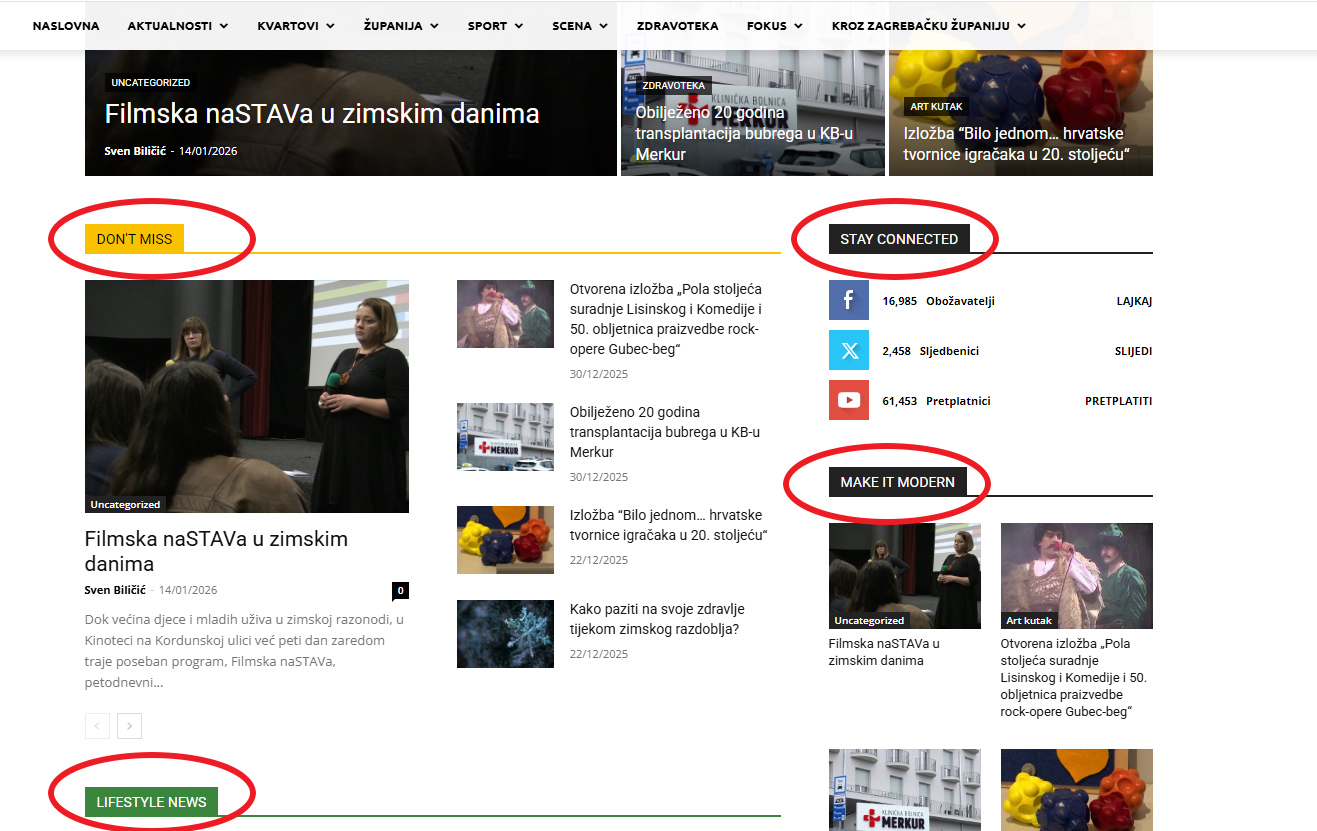
Calin Hi,
This can be done by using the tagdiv Composer and the social icon element, which provides the option to add a link and an icon for an extra social. This element can be set using tagDiv Composer on all cloud templates (header, footer, posts …) and pages – https://prnt.sc/AgINguyn82Oo – https://prnt.sc/XE412qXOwOeI
Calin Hi,
It appears that right now the mentioned page is not available – https://prnt.sc/Yt9TjE7ISBoS
Now, if the “features” is an element set on the template, use tagDiv Composer to edit the template and go to that section, then use the right click on it and select the delete option.
If the review section looks like this – https://prnt.sc/0SquHh7D7UoX then edit it with tagDiv Composer, go to the review section, select the element and add any text to the notification text https://prnt.sc/UAkwg2d3akAl save the changes, afterthat the text can be removed and the problem should be resolved – https://prnt.sc/o65esmaskrIw
Calin Hi,
Strange, normally, the category description is an element that should not be displayed on pages. It’s possible that it was copied from a cloud category template. Category elements should be used only on category templates.
For pages, you should use the Text with Title element instead. Pages are individually edited with tagDiv Composer, so you can set different text for each one. On the other hand, in a category template, the text set in the template is used across all categories that use it, which is why category-specific elements are required to render the content correctly.
If I understand correctly, you’re saying that when you place the element lower on the page it works, but when you place it at the top of the page or template, the issue appears. If that’s the case, it may be caused by another element on the page that is interfering in one way or another.
Thank you!
 unmongolia
 jQuery.Deferred exception: Cannot read properties of undefined (reading ‘getShortcodeFromData’) TypeError: Cannot read properties of undefined (reading ‘getShortcodeFromData’)
at Object.saveHeaderState (http://54.255.186.58/wp-content/plugins/td-composer/assets/js/js_files_for_wrapper.min.js?ver=9c5a7338c90cbd82cb580e34cffb127f:28:388)
at Object.init (http://54.255.186.58/wp-content/plugins/td-composer/assets/js/js_files_for_wrapper.min.js?ver=9c5a7338c90cbd82cb580e34cffb127f:23:279)
at http://54.255.186.58/wp-admin/post.php?post_id=186&td_action=tdc&tdbTemplateType=page&prev_url=%2F%2F54.255.186.58%2Fwp-admin%2Fedit.php%3Fpost_type%3Dpage:802:44
at c (http://54.255.186.58/wp-admin/load-scripts.php?c=0&load%5Bchunk_0%5D=jquery-core,jquery-migrate,utils,wp-hooks&ver=6.9:2:25304)
at fireWith (http://54.255.186.58/wp-admin/load-scripts.php?c=0&load%5Bchunk_0%5D=jquery-core,jquery-migrate,utils,wp-hooks&ver=6.9:2:26053)
at e (http://54.255.186.58/wp-admin/load-scripts.php?c=0&load%5Bchunk_0%5D=jquery-core,jquery-migrate,utils,wp-hooks&ver=6.9:2:27300)
at t (http://54.255.186.58/wp-admin/load-scripts.php?c=0&load%5Bchunk_0%5D=jquery-core,jquery-migrate,utils,wp-hooks&ver=6.9:2:27330) undefined
ce.Deferred.exceptionHook @ load-scripts.php?c=0&load%5Bchunk_0%5D=jquery-core,jquery-migrate,utils,wp-hooks&ver=6.9:2Understand this warning
unmongolia Santy
Santy I have a layout where I use Category Description to display custom text for categories, and it works correctly on category pages.
However, I have an issue with the top menu:
some menu items are normal pages, not categories. When I open those pages, an empty text block appears, as if they were categories, showing the default placeholder text (like “lorem ipsum”).
The problem is that:
If I delete the category description text on one page, it is deleted on all categories and pages.
If I add text using Text with Title or Inline Text in the template, that text appears on all categories, pages, and posts.
The Category Description seems to be shared globally across archives/pages when the same template is used.
I cannot set different texts for pages and categories without affecting posts or other pages.
What I want is:
Categories → show their own category description text
Pages in the top menu (not categories) → show different custom text or no category text
It seems the problem has been fixed by lowering the category text a bit; if it’s lowered just above the entries, it behaves correctly. Just in case that helps.
Thanks
Calin Ok, so you have now under cloud templates > modules that module, right? If so, edit the page/ template taht display taht message, select the element (will be a flex block builder) and set the module that you just got from the cloud. ou can get allthe details in our guide – https://forum.tagdiv.com/flex-block-builder-flex-loop-builder/
Calin Hi,
Just let me know if I understand correctly. You want to have some dynamic text based on category, right? If is so, then on pages just use a text element since the pages ar individual and will not be a problem, but onthe category template you need to use a different element, maybe the category description element, set it on the template using tagDiv Composer and after that just set a description for each category in part using the WordPress option.
https://i.imgur.com/p1KHjBI.png – https://i.imgur.com/y4b19I0.png
Thank you!
 Mark Gilbert
 It seems that either you haven’t read what I said or have misunderstood it. Yes, this is a featured image, but placed within Single Post Content. There is no featured image element in the template.
If you actually look at the page, you will see this: https://jazzjournal.co.uk/2026/01/24/jj-01-66-owning-up/?
The mystery is that such a featured image appears perfectly well in previous articles using the SAME TEMPLATE, such as this:
https://jazzjournal.co.uk/2025/12/27/reviewed-sun-ra-and-his-myth-science-arkestra-anne-paceo/
So the question, again, is why have captions stopped appearing in new articles using the same template?
Thanks
MG



