
- NewspaperWP Rocket and Newspaper Theme: Optimization Guide
- TutorialsDefault Block Settings Guide
- TutorialsOffset Feature
 djzah71
 Search is working, never mind. I just opened up the page, saved it and tried and it works. Of course it doesn’t match the cloud template which should show in the results the image to the left but at least I have results. 🙂
Thank You
 Mucha K
Help!!! I have uploaded a different Newspaper template and when I try and edit the front page using TAGDIV Composer all I get is a white screen. I have removed WP Bakery and still I cannot edit my front page. I have read that a page that was created using another composer can not be edited by TAGDIV Composer, if this is true then how can I transition? But first I need to jump the hurdle that is the white screen so I can start editing. Please help. Note that all my plugins are up to date including AMP.
 deepakk
Hi,
My website is https://www.navbihartimes.com.
When I try editing a prebuilt cloud template, I get the following error page:
This site can’t be reached The webpage at https://www.navbihartimes.com/wp-admin/post.php?post_id=88&td_action=tdc&tdbTemplateType=404&prev_url=%2F%2Fwww.navbihartimes.com%2Fwp-admin%2Fedit.php%3Fpost_type%3Dtdb_templates might be temporarily down or it may have moved permanently to a new web address.
ERR_HTTP2_PROTOCOL_ERROR
Kindly help me address this.
Thanks and regards
Deepak
 anseilen
Good evening from Japan.
I bought the theme yesterday, and I am very satisfied with the quality.
By the way, when I created a site using the Magazine PRO template, when I scroll down on the post page, a new post is loaded.
How can I stop this so that when I scroll down on the submission page, a different page does not appear?
 Anamaria
 Hello,
The tagDiv Composer is a builder and it can be used for building pages and cloud templates, but not for creating posts. For this, you’ll need to use the Gutenberg or classic editor.
Using tagDiv Composer, you can build/edit the single post template (the layout of the posts).
Here is a video that will show you how to use the builder to create a website from scratch https://www.youtube.com/watch?v=SoGQ0d5kIBg to do this you’ll need to already have the posts.
Also, on our channel https://www.youtube.com/channel/UCOT1RiNysIPCTPSnVZskwtQ, you can find more videos that can help you and documentation https://forum.tagdiv.com/newspaper-theme-documentation/ and you can ask us here on the forum or email if you have any questions.
I hope this will help you!
Thank you!
Anamaria Hello,
Our theme is a frontend theme for most of the elements and changes, you’ll need to use the tagDiv Composer to edit the pages and templates for posts/categories, etc => https://i.imgur.com/I3OUYxr.jpg -> https://i.imgur.com/mMrEufY.jpg
Please check this video about how can create a website from scratch https://www.youtube.com/watch?v=SoGQ0d5kIBg with tagDiv Composer.
The footer template does not have the button to be edited with the tagDiv Composer in the backend. Please check this guide:https://forum.tagdiv.com/footer-templates/
You can edit with tagDiv Composer the footer template can be edited only from the frontend if it is assigned, edit a page/post template with tagDiv Composer and go down to the footer => https://www.screencast.com/t/rpfNhfyrF
Also, on our channel https://www.youtube.com/channel/UCOT1RiNysIPCTPSnVZskwtQ, you can find more videos that can help you and documentation https://forum.tagdiv.com/newspaper-theme-documentation/ and you can ask us here on the forum or email if you have any questions.
Thank you!
 Calin
Calin Hi SAMYTHEBIGJUICY,
Yes, I was referring to some cache plugins, cache on host or cloudflare.
The WP Super cache plugins is the one that we tested with our theme and we made a guide for it, but you can use other cache plugins, all that needs is to find the right settings.
About the ads, it is possible to have some ads left on some pages or cloud templates, on those were are display, use tagDiv Composer and replace/remove them-> https://forum.tagdiv.com/ads-adsense-overview/ also this is still compatible and can be downloaded https://i.imgur.com/akfvnKC.png
Thank you!
Calin Hi AK Rayhan,
Our theme as a special filed that will set the code between the
Our theme has 3 header files, on in theme, one in tagDiv Composer (wp-content/plugins/td-composer/legacy/Newspaper/header.php) and one in tagDiv Standard Pack (wp-content/plugins/td-standard-pack/Newspaper/header.php), now if the standard pack is enable and you do not use a cloud template then you’ll use the file from standard pack, if this plugin is disable or you use a cloud header from tagDiv Cloud Library then it will be used the file from composer, if both of these are disable will be display the one from theme (wp-content/themes/Newspaper/header.php).
I hope this will help you!
Thank you!
 stephenetta
hi,
i would like to add google ad manager tags with custom php (that echo page id and tags) within a header template AFTER the doctype is declared, but the “Google Analytics and JavaScript Codes” section doesn’t seem to work inside the loop.
could you please advise how i can add? via template? via child header?
thanks!
any tips?
 ikaris
Hi,
I am facing issues importing templates from the Cloud Library. I am trying to import Cloud Templates. I pressed the ‘add new’ button and chose my template.
The issue is, that I am seeing the page in which it says the template is “Installing” and the bar is not moving at all. It essence, the import is not taking at all. I’ve been waiting for a long time. What’s the issue and how to solve?
 thepremedicallatina
Hello,
I have created a category cloud template with my Newspaper theme to avoid editing every single category’s page. However, when I click on different categories to test whether the template works, it shows a default page instead of the customized template.
Is there any way around this?
 knthdgd
Hi!
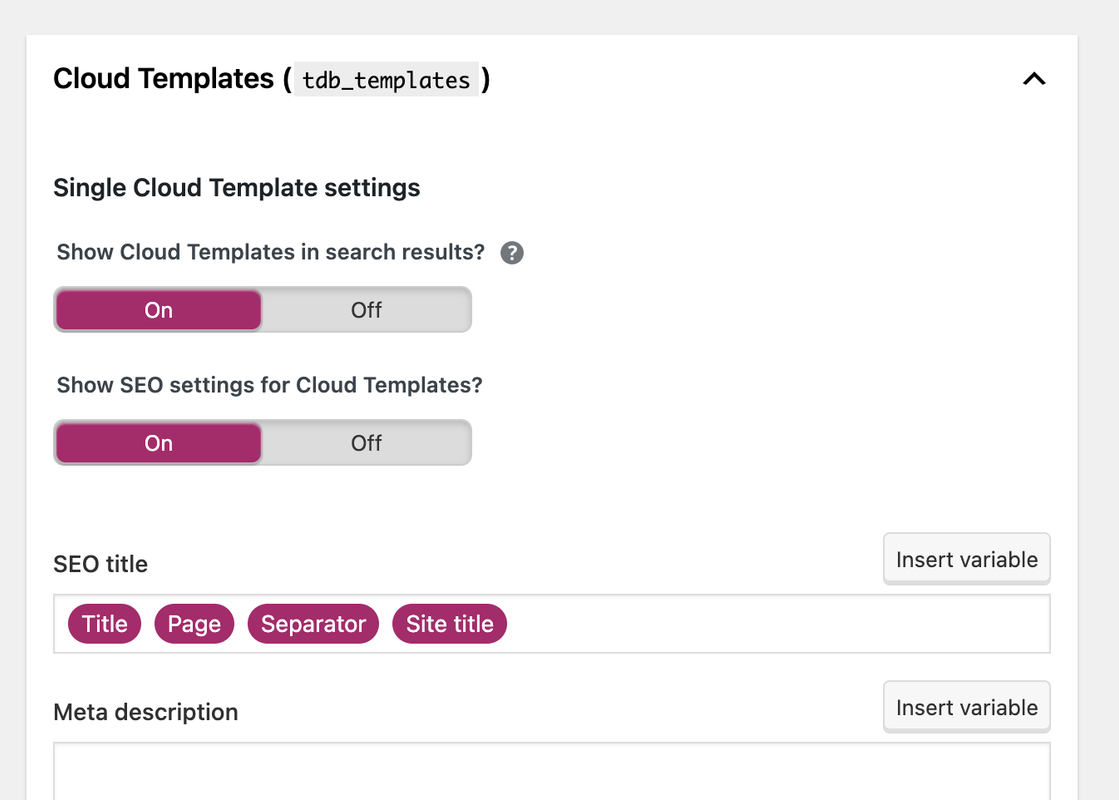
I just installed Yoast SEO plugin.
Do we agree that I should set “Show Cloud Templates in search results” to “Off”?
Because I do not want Google to index templates? This should not interfere with my real posts, pages and archives using the templates, correct?
 iwebuserstudio
Hello,
I installed single post page template(Single Post Template – Magazine PRO) from cloud template
However the background disappear when it installed in my WP.
demo :
https://tinyurl.com/y2ybzgca
after install in my WP
https://tinyurl.com/y6djdno4
Would you tell me how to set it back >
Calin Hi yeahthatskosher,
1. This situation appears because the cloud header that you are using is set as an overlay on content. Please edit the homepage using tagDiv Composer, select an element from header and click on the header -> https://i.imgur.com/vfLelhI.png then change the display option on default -> https://i.imgur.com/7dOQpHA.png
2. In page’s template is the wordpress editor, is only “default” when tagDiv Standard pack is not installed (because is no need for other settings, now those can be done with tagDiv Composer).
A page to be editable with tagDiv Composer this must be made from the start with the theme builder.
If when you edit the page and you can not edit the content, then most probably that content was set is the wordpress editor, That text should be set in tagDiv Composer in a column text or a text with title.
I hope this will help you!
Happy New Year!
Anamaria Hello,
You can import shop page/templates from tagDiv Cloud Library.
Also, please make sure you have the tagDiv Shop plugin activated https://forum.tagdiv.com/tagdiv-shop/
Also, please provide more details about what you want to achieve with screenshots/video.
Thank you!
 blackoutstudiod
Hello, I am trying to customize the author archive pages but when I choose a cloud template, I get an error when loading author page. Can you assist me?
See screenshot

 CHeat
CHeatGood Day Sir/Ma’am,
RE: Breadcrumbs: Root>Page [Need more… Root/Home>Grand>Parent>Child]
I’ve read many TagDiv docs attempting to find an option and/or tweak. However, many docs are dated articles for old/legacy versions of the themes. Such as, my current theme doesn’t have the Breadcrumb option referenced within the Template Settings secion.
We currently running TagDiv/Newspaper v.11.4
Per one of the TagDiv articles, I downloaded a breadcrumb section from the TagDiv Cloud:
SECTIONS: Breadcrumbs – News – Vintage Choppers Store
It works; however, there is really no options to tweak (i.e. navigation path) the add-on.
All we get is Root/Home and whatever the distant page (i.e. below).
Page: https://www.right360.social/politics/country/united-states/congress/house/democrats/
The breadcrumb is simply: Right360 > Democrats
1. Alot of context is lost; is it House Democrats or Senate Democrats.
2. User experience isn’t really improved… it displays the current page and always the root.
Would like to expand the breadcrumb to something like:
Root/Home > Grand > Parent > Child
I’d like to minimize our plugin footprint…
I know Yoast provides some of this functionality; however, I also read some TagDiv Theme conflict posts.
Thoughts/Suggestions?
R/, Chad
 yeahthatskosher
I am currently editing pages for my site yeahthatskosher.com here (https://yeahthatskoshercom.bigscoots-staging.com/).
I am seeing two issues:
1) All pages and posts are defaulting so that the main content of the page, particularly the title and whatever is near the top of the content is buried underneath the header and menus. While I was able to manually override this for posts, I was unable to do so for pages.
2) There seems to be no tagdiv template for pages for my site. In the tagdiv editor, I do not have any way to edit the content layout as I do for posts, thus I can’t fix the issue. Also, there’s no way to choose my page’s template is the wordpress editor, only “default”.
Please assist.
 remsta
 Thank you, I will try that today.
I am also having problems with woo commerce, is there anyway to just get a basic set woocommerce pages automatically created? When I previously installed woocommerce it automatically created a ‘account’, ‘checkout’, ‘store’ page etc. with your theme it creates no pages at all…..
In addition how do actually use the pages, cloud pages do not appear as pages and when I create a store page and say cloud templates not all of them show….
Thank you
 Adrian568
Hello,
I have a problem with adding articles. I’m using Single Post Template – Default PRO. When I add several articles in one category, when I open one of the added entries, all articles from a given category are displayed one under the other. This happens on the computer. A single article is displayed on the phone.
It looks like this: Photo – article – article author – slider with similar articles – comments. Scrolling down further, everything repeats itself with the other articles in the given category.
How to set that only one article is displayed on one page?
 Mediaguy2021
 I just received an error message from the site. I am using
WordPress version 5.8.2
Current theme: Newspaper (version 11.4)
Current plugin: PopularFX Website Templates (version 1.2.1)
**Error Log***
An error of type E_ERROR was caused in line 139 of the file
Call to undefined function popularfx_get_current_theme_slug()
Error message: Uncaught Error:
Call to undefined function popularfx_get_current_theme_slug() in
popularfx_page_footer()
-
This reply was modified 4 years by
Mediaguy2021.
 c386
c386Hi,
Is there a way to reproduce the related articles and more from author box that appears on the bottom of regular pages?
I’ve created my own template for certain single posts, using the blank cloud template, and have managed to replicate everything I need other than the related articles.
 Bettina
 Hello @mulcas!
Yes, that’s true, it’s frustrating. We hope to fix this as soon as possible, so this feature can be very helpful.
For example, if you have the same template for all your categories, then you need to modify the font in page title just once, so the changes will be applied on all your categories.
Thank you for understanding!
Bettina Hello @m!
I recommend you to have the latest version of the PHP, WordPress, theme and plugins(11.4).
The Standard Pack plugin is an old one with old features with default templates. We do not recommend it anymore. We encourage you to use the cloud templates.
Documentation here:
– https://forum.tagdiv.com/cloud-library-templates/
– https://forum.tagdiv.com/design-post-pages-using-cloud-library-templates/
– https://forum.tagdiv.com/cloud-library-category-templates/
Check also our video tutorials here: https://www.youtube.com/c/tagdivThemes/videos
Also, some tips here:
– https://wpartisan.me/tutorials/wordpress-database-queries-speed-sql_calc_found_rows
– https://css-tricks.com/finding-and-fixing-slow-wordpress-database-queries/
– https://wordpress.org/support/topic/slow-database-queries-from-mariadb-slow-query-log/
– https://www.rackaid.com/blog/wordpress-slow-speed-up/
Maybe your hosting provider can provide some advice as well.
Thank you!
Bettina Hello @stephanwhelan!
If you’ll use Mobile theme plugin, then you can not edit the pages with TagDiv Composer.
You have only some settings for this layout, which you can find in Theme panel -> Mobile Theme. The same thing for AMP plugin too. It comes with its own templates/design for page, post, category, etc so your current templates from the desktop theme will get converted to the mobile theme layout. For more details, please take a look here: https://forum.tagdiv.com/the-mobile-theme/ and https://forum.tagdiv.com/mobile-theme-introduction/
Thank you!



