
- NewspaperDesign your Post Pages using the Cloud Library Templates
- NewspaperDesign your post pages using the Default Templates
- NewsmagPage templates
- NewspaperPage templates
- NewspaperCreate a form contact page
- NewspaperCloud Library Templates
- NewspaperCloud Library – Category Templates
- NewsmagCategory templates
- NewsmagFooter templates
- NewsmagDefault post templates
- NewsmagPost templates
- NewsmagHomepage – How to build and set it
- NewspaperHomepage – How to build and set it
- NewspaperPost templates
- NewspaperDefault post templates
- NewspaperCategory templates
- NewspaperPost template ads
- Apitd_api_single_template::update_key
- Apitd_api_single_template::update
- Apitd_api_single_template::add
 vikassainibsnl
I have placed ad codes in the ad spaces at the right of the posts but ads are not appearing where as same codes are working in the main homepage. What is the issue with post template settings.
 Calin
Calin Hello,
The zones refer to the header/content/footer zone.
Most of the time, the problem is from a shortcode that is not compatible with our theme; therefore, after you set it with tagDiv Composer and save the page, the next time you try to edit it, you’ll get that error. The simplest and fastest way to resolve it is to use a page/template revision – https://wordpress.com/support/page-post-revisions/
Also, please check our guide from here at point 5 -> https://forum.tagdiv.com/tagdiv-composer-not-working/ also after trying the steps from our guide you do not get any good results, you can send us an email at contact@tagdiv.com and provide wp-admin login, as well as cPanel and credentials. We will take a look. Include a link to this topic in the email.
Thank you!
 iancollins
This relates to this site https://airtekbroadcast.com/ for which i have purchased a new subscription (actually reallocated it). I have a cloud header template set as default and all page headers set to global. The menus look correct. I have a Solutions item on the menu and i have a “Main” menu setup with x6 sub items. From the home page I can see the Solutions drop down showing all six items. When I click any sub item it takes me to a page like this https://airtekbroadcast.com/solutions/state-radio-remote-stations/ which is correct. However, the page title on that page is not visible suggesting that it is not pointing to my page. I have checked the slugs are correct. Oh and from that page, only one item is visible in the Solutions menu drop down. It appears that you only get the full set of items when at the home page. There is one exception. From the home page if you select Solutions – Private Commercial Stations, when that page renders you can see all items. Please can you help?
Calin Hi,
For this, you need to use tagDiv Composer and edit all page and cloud templates to set them to the width you liek. For this, each row must be stretched – https://forum.tagdiv.com/tagdiv-composer-tutorial/ https://i.imgur.com/jqr86aY.png
Thank you!
Calin Hi,
If you see only code, is because a demo from the theme has been installed and one of the theme plugins (tagDiv Composer, tagdiv Cloud Library) are disabled now.
The pages and cloud template scan be edited using tagDiv Composer, which is the theme builder and can be used to edit/create pages and templates (not articles)
vikassainibsnl How to apply post template to all the posts in a single shot instead of doing individually to east post page.
Calin Hi,
What you did was not saving the cloud header instead, you saved a section from the header as an element in the TagDiv Composer. You can access this from the TagDiv elements panel; it should appear after the last elements in the Composer (in the left sidebar).
If you want to have more cloud headers, you can import them from the Cloud Library or duplicate an existing cloud header. These will then be displayed in the header manager. Also, you can set a global header to apply across all pages and templates on your website, and only change it if you need a different header for a specific page.
https://forum.tagdiv.com/header-manager/
Thank you!
Calin Hi,
It will need to use tagDiv Composer, edit the page or cloud template, and select the ad box to set your ad code or banner in. You can check more about the settings ads in our theme by checking those guides:
– https://forum.tagdiv.com/article-ads/
– https://forum.tagdiv.com/using-other-ads-non-adsense-ads/
Thank you!
 Seb
SebBonjour,
J’ai installé le template Old Fashioned sur mon site. J’ai personnalisé et travaillé sur le thème pour le personnaliser.
Je suis surpris car lorsque je suis arrivé aux articles de blog, je vois qu’il ne m’est pas proposé de “cloud template”. Je n’ai également pas de template pour la page 404, la page auteur, etc… Est-ce un bug ?
Sinon, comment puis-je faire pour personnaliser les pages concernées ? Exemple, sur les articles de blog, apparait toujours une publicité pour une newsletter qui ne mène à rien. Comment faire pour la retirer ?
Merci à vous.
Calin Hi,
If you like a section from your website and you want to reuse it on other pages or templates, you can use the right click on that element/row and you can save it in tagdiv Composer as a new element – https://i.imgur.com/zo723Dh.png
Also, templates can be saved and used as individual or global, for example, a cloud header can be set globally, from 3 places, theme panel https://i.imgur.com/go50ftC.png or cloud templates https://i.imgur.com/8QLfPOu.png or when you are on a page or template from manager https://i.imgur.com/tE96Hgr.png to set a header individualy it can be done from tagDiv Composer using the manager and slecting the text of the cloud header, this will become green https://i.imgur.com/ZKHlyR2.png
I hope this will help you!
Thank you!
 GulfAiMagazine
I imported a cloud header and customized it. How can it saved as a reusable and importable header template on other pages of the site? Can other sections of the page also be saved as reusable templates like in Elementor or divi?
 pinxuan
Hi, I’m using WordPress with the Newspaper theme, and I’m currently building my website using TagDiv Composer.
I encountered a problem when trying to set a different header image for each category page (e.g., Health Tips, Recipes, etc.). I’ve tried using Edit with TagDiv Composer on the Category Template (Cloud Template – Nomad), but:
1. When I select a new image via the row or column background settings, save, and refresh — the image either doesn’t appear or reverts to the default one (a mountain photo).
2. I want each category page to show a different header image, but all pages still display the same global image, except for one that somehow stayed different — I can’t figure out how.
3. I don’t know how to apply individual background images per category without touching code (I’m not a developer).
Here is one of the category pages for reference:
🔗 https://nong70life.com/category/camellia-oil-wellness/
I would really appreciate your guidance on how to fix this — or if there’s a better way to assign different images per category. Thank you so much!
Warm regards,
Enid
 Arturooooooo
Hello Team,
I am having issues applying category templates to my pages using tagDiv Composer on my website https://www.anglertest.de
As a starting point I used the aniglobe category template renamed it to koedertest-category and adjusted it to my needs but the changes are not beeing applied.
1) There is no way for me to switch the category in the composer to preview it in the composer
2) When visiting a category the “edit in tagDiv Composer” button is not visible
3) Not a single category template is ever beeing applied to categories. I have set the template as global without success. Changing the template on-the-fly from the frontend did not work. Setting the template from the theme panel category settings did not work either.
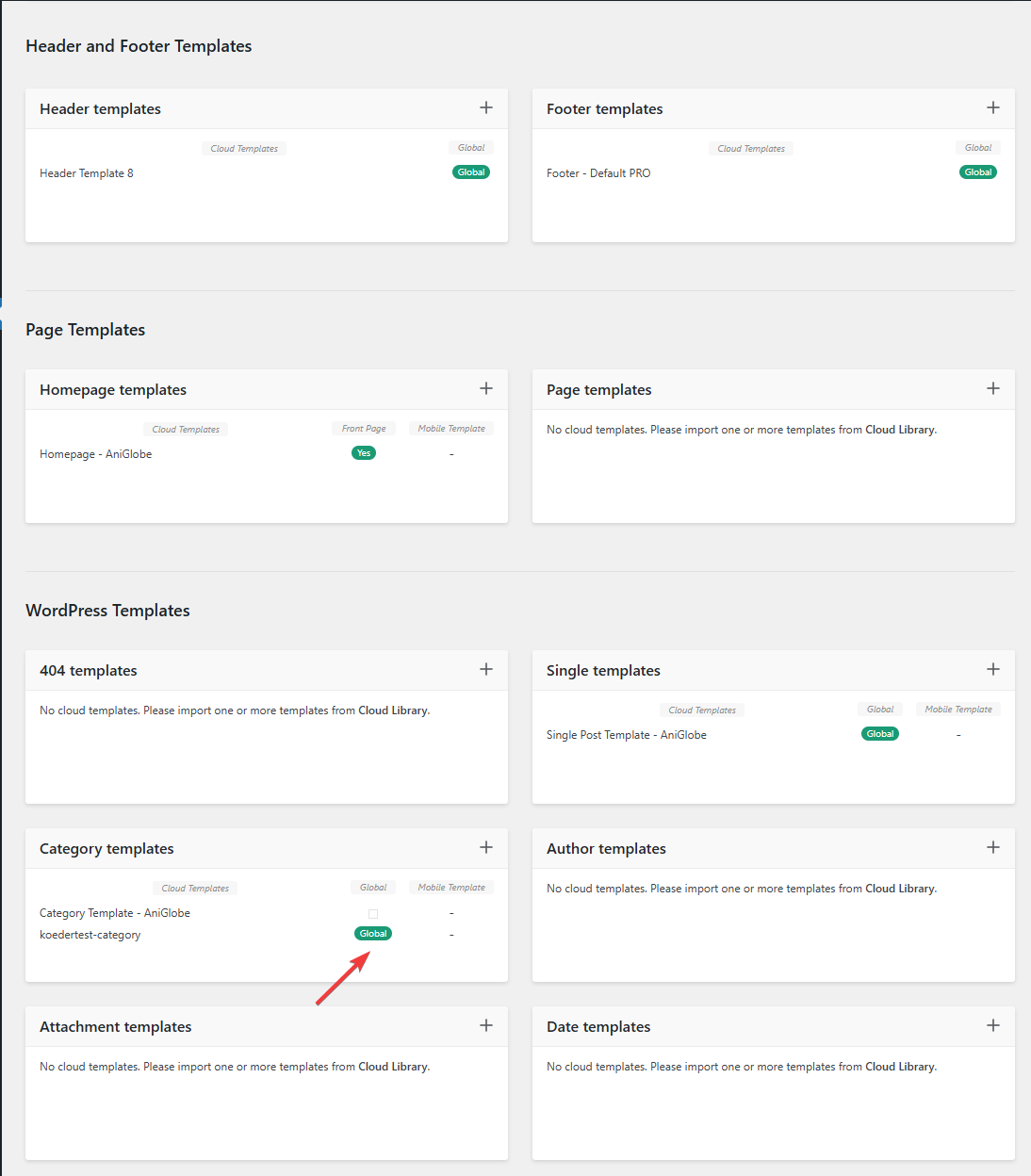
In this picture you can see that my template should be assigned globally
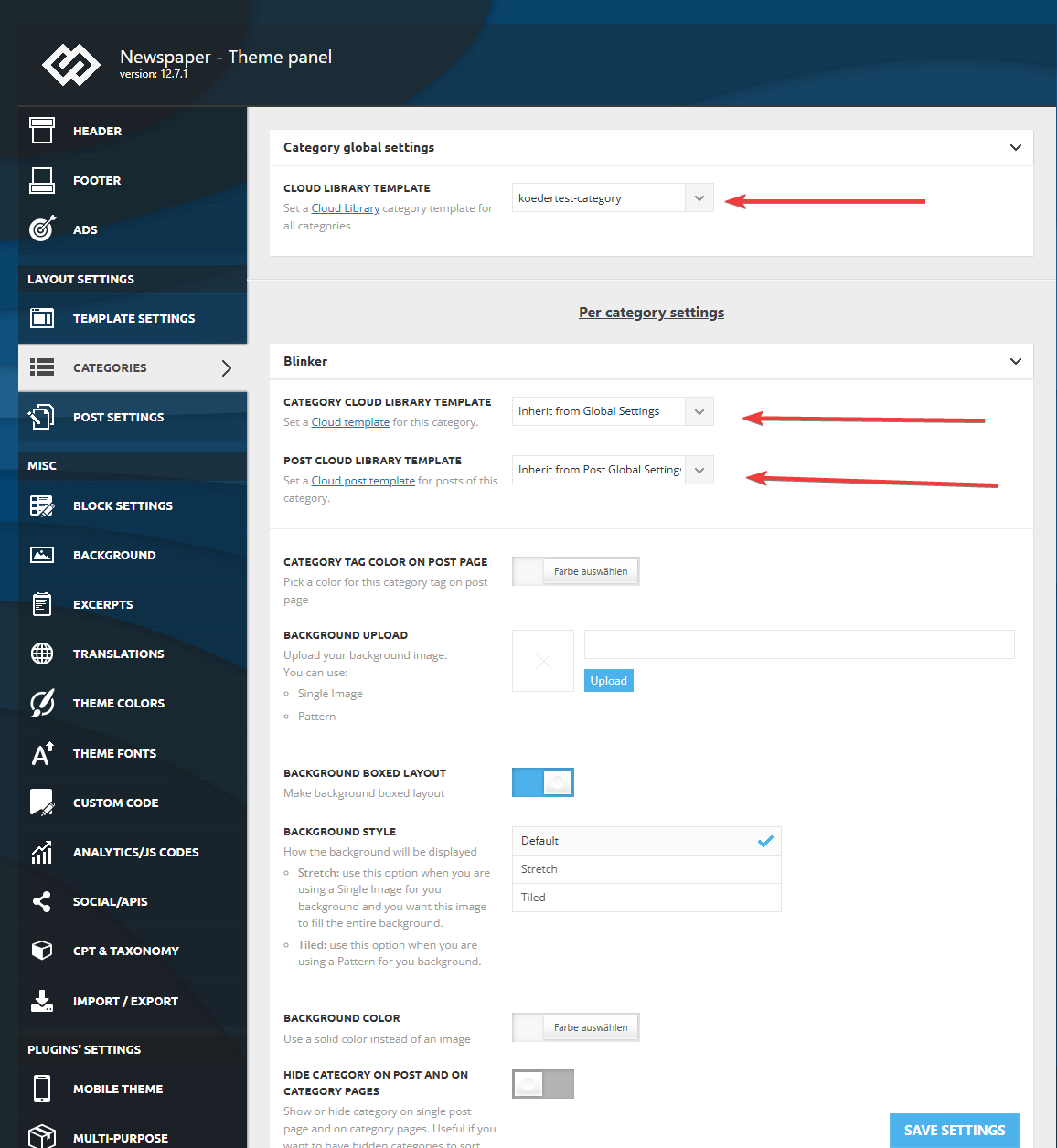
I made sure that in the theme panel under categories that the same template is globally set and checked every category underneath to inherit from global settings.
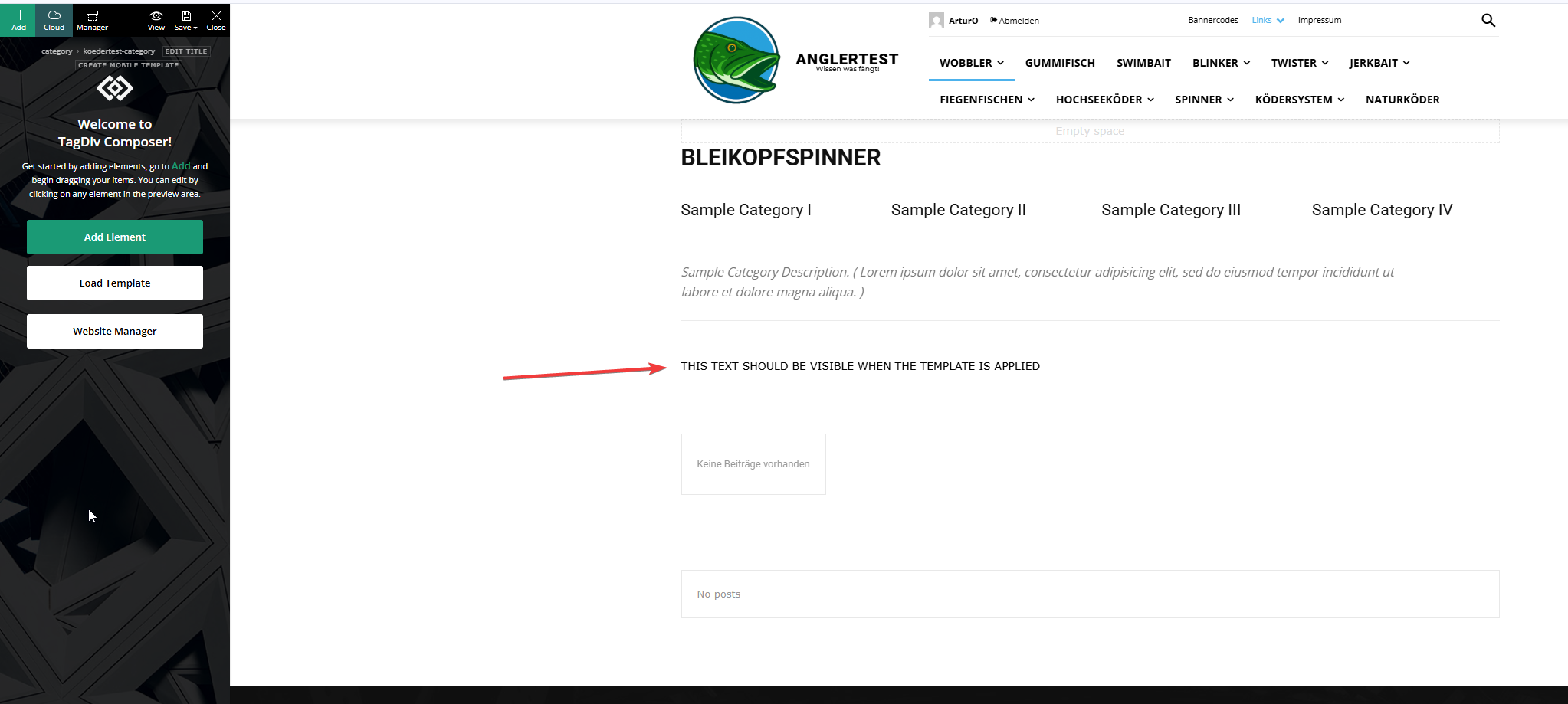
This is the actual template and I added an html block to verify if the template was assigned.
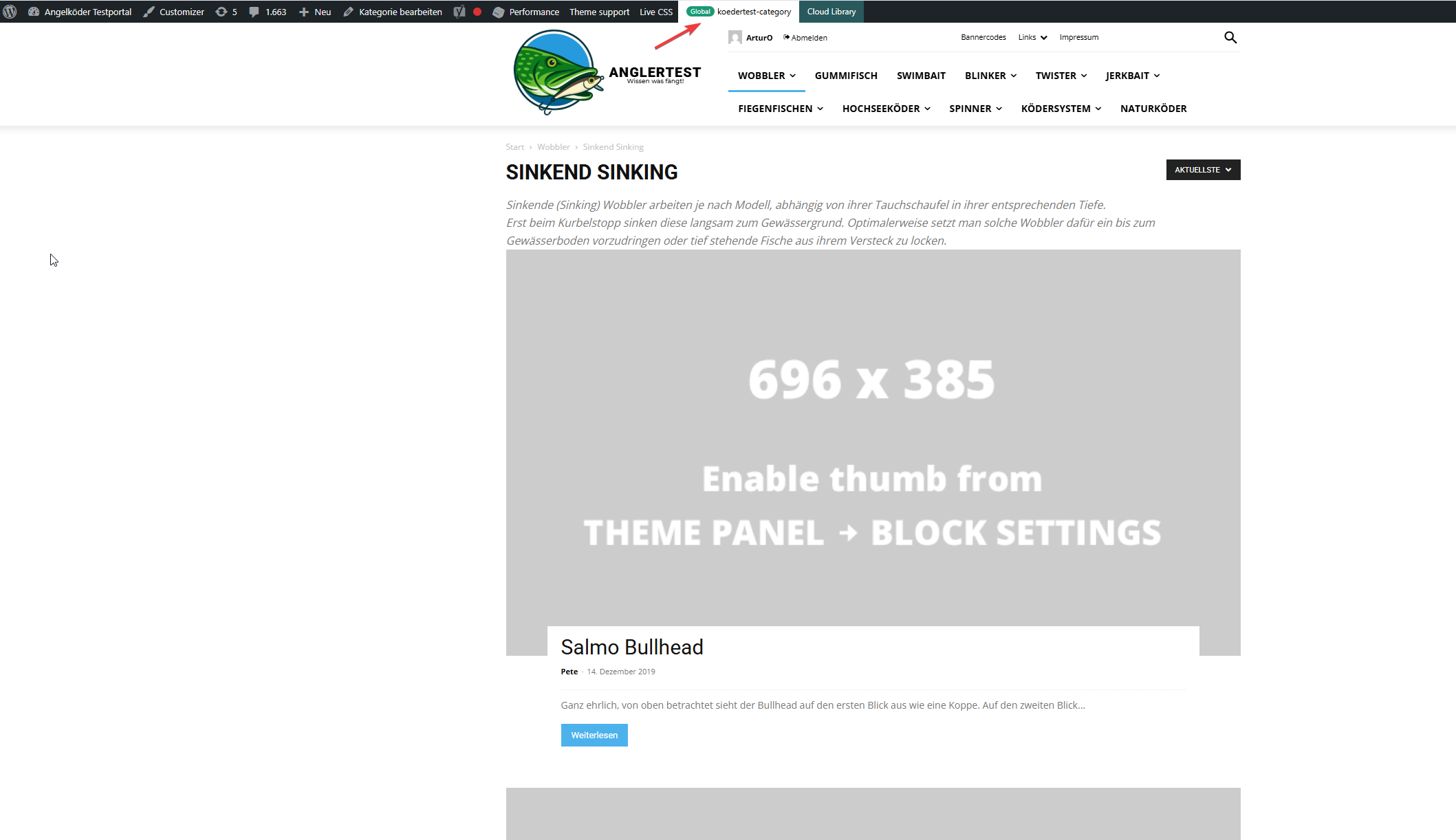
In this picture you can see that the template for the “wobbler” category looks completely different.
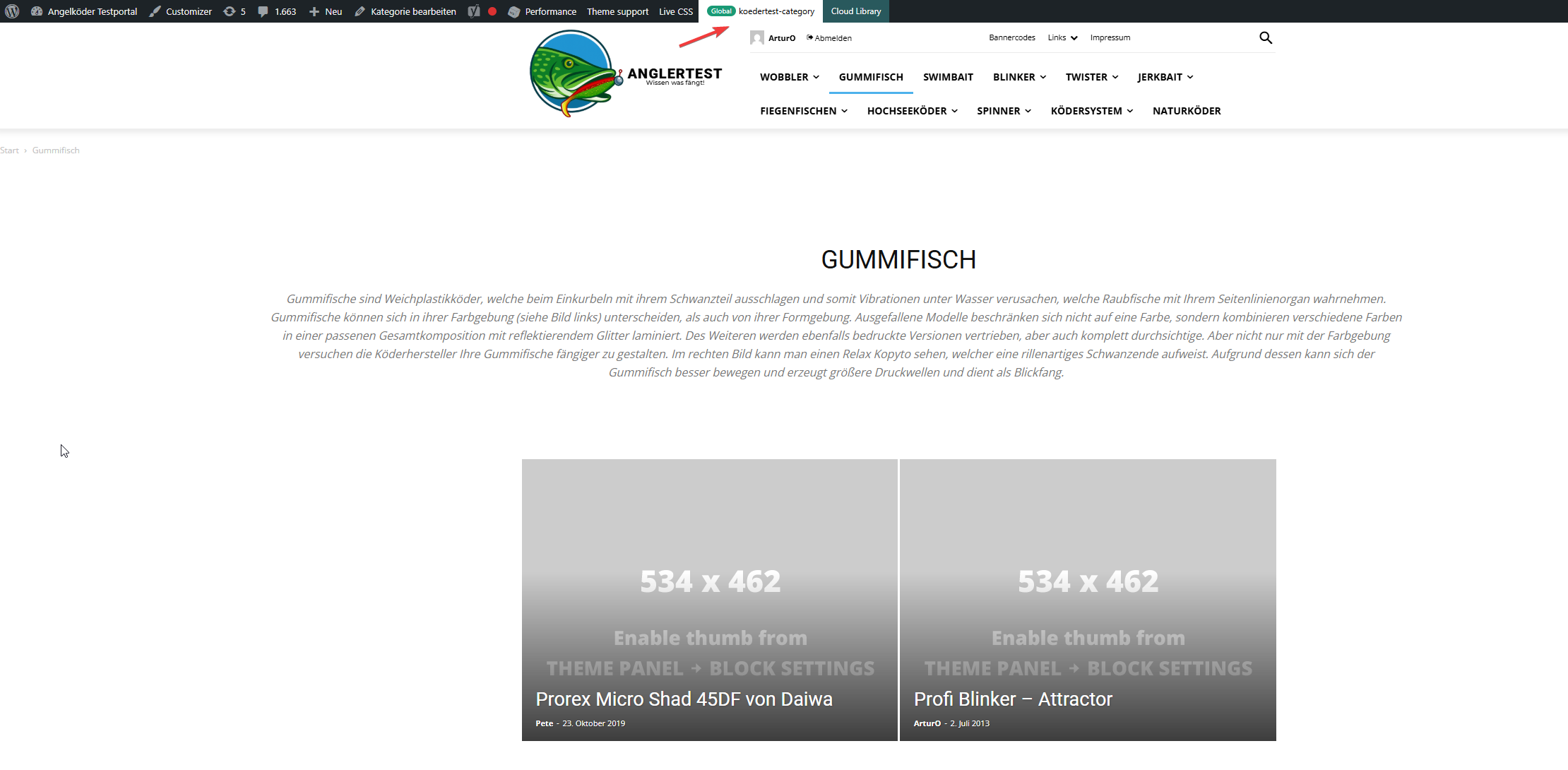
Strange enough, the template for the “gummifisch” category looks slightly different with the same theme applied (see arrow up top), the text I inserted to check was nowhere to be found (not even in source code)
In the very beginning I installed the aniglobe templates intially without demo content, but changed up the templates one-by-one. I did not find any option to disable or uninstall the prebuild website.
In my endless tries with different configurations I was not able to aplly the template, but I found something interesting which might explain the bugs I encounter.
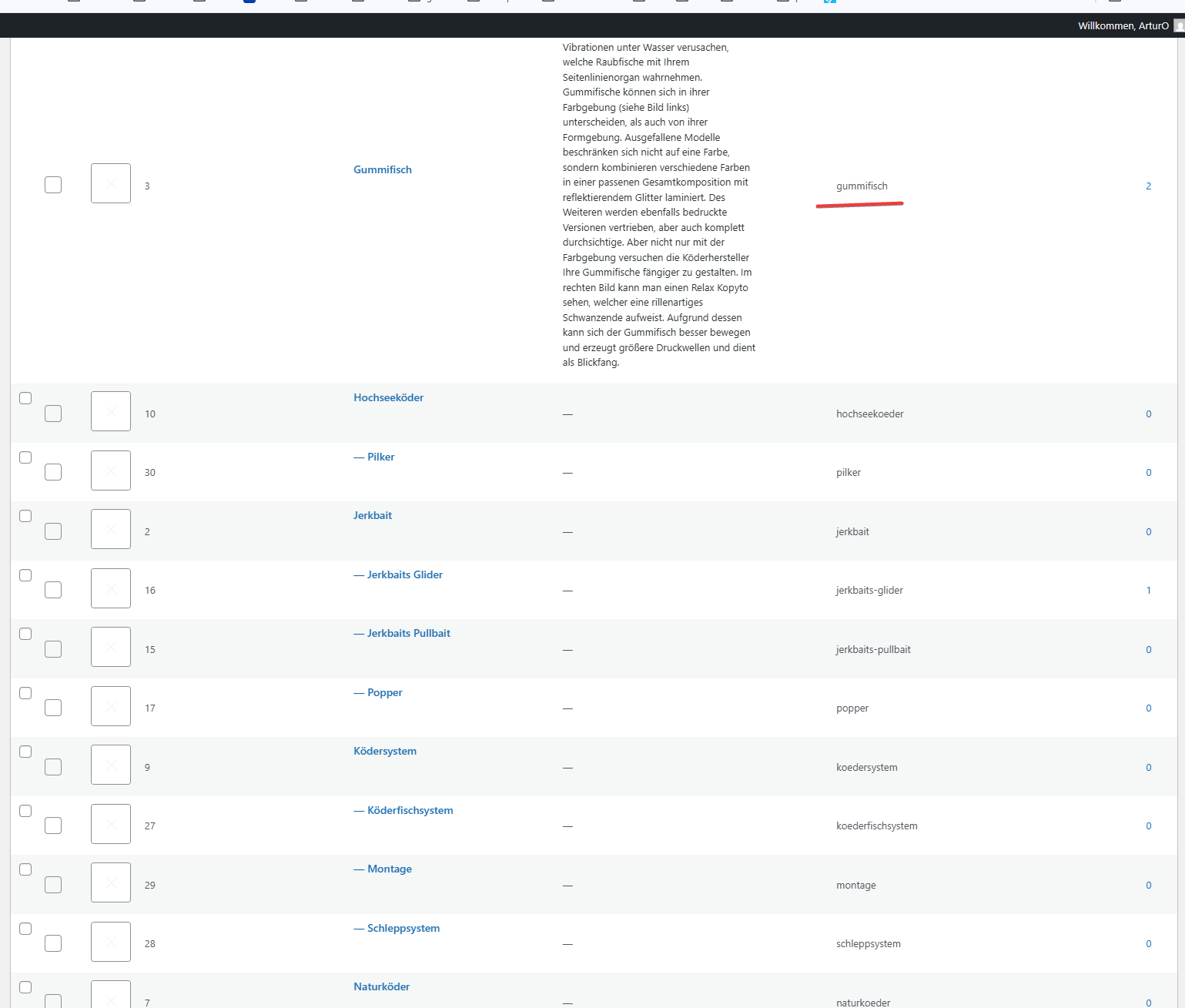
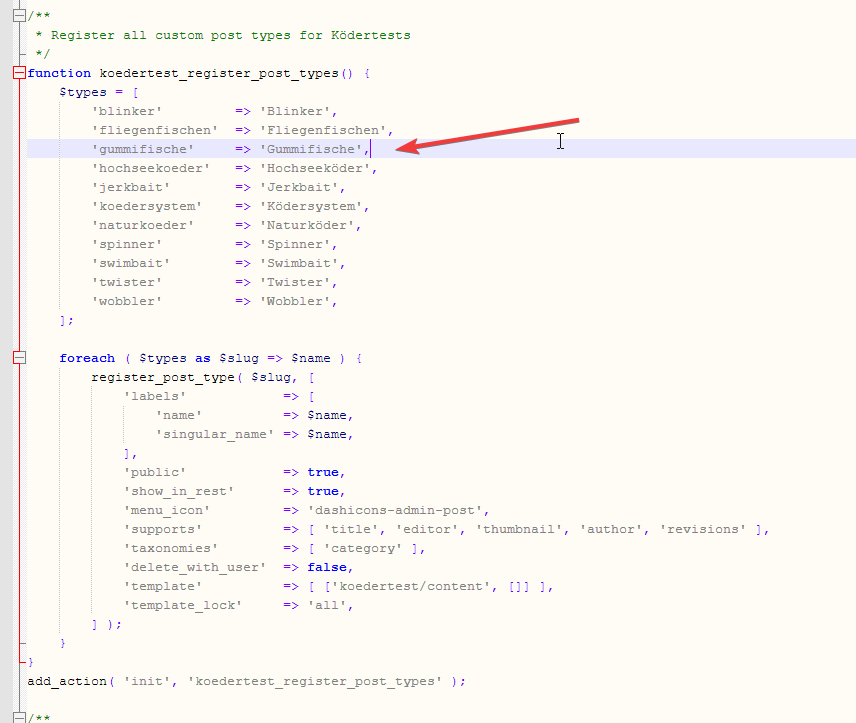
In those pictures you can see the categories I use and the post_types I register. The post_types are using those categories and I make sure that every post of those post_types has at least one category assigned. All post_types share the same categories (native category from wordpress).
The permalink structure is setup like /%category%/%postname%.html for every post_type. Category basis is set to “angelkoeder”.
Every category is named after a post_type. Nested categories are not named after post_types.
The only exception is the category “gummifisch” where post_type “gummifische” articles are categorized under. I might have missed the “e” when I set this up in 2013.
Somehow this category looks different as you can see in the above screenshot.
Furthermore I discovered that, when I change the template in the theme panel to “no template” (but do not save those settings) it reveals the settings I made previously with “Module 14” as article display view. You can see in the screenshot above for the “wobbler” category that this is the applied design even though the bar on top suggests my custom “kodertest-category” template is supposed to be applied.
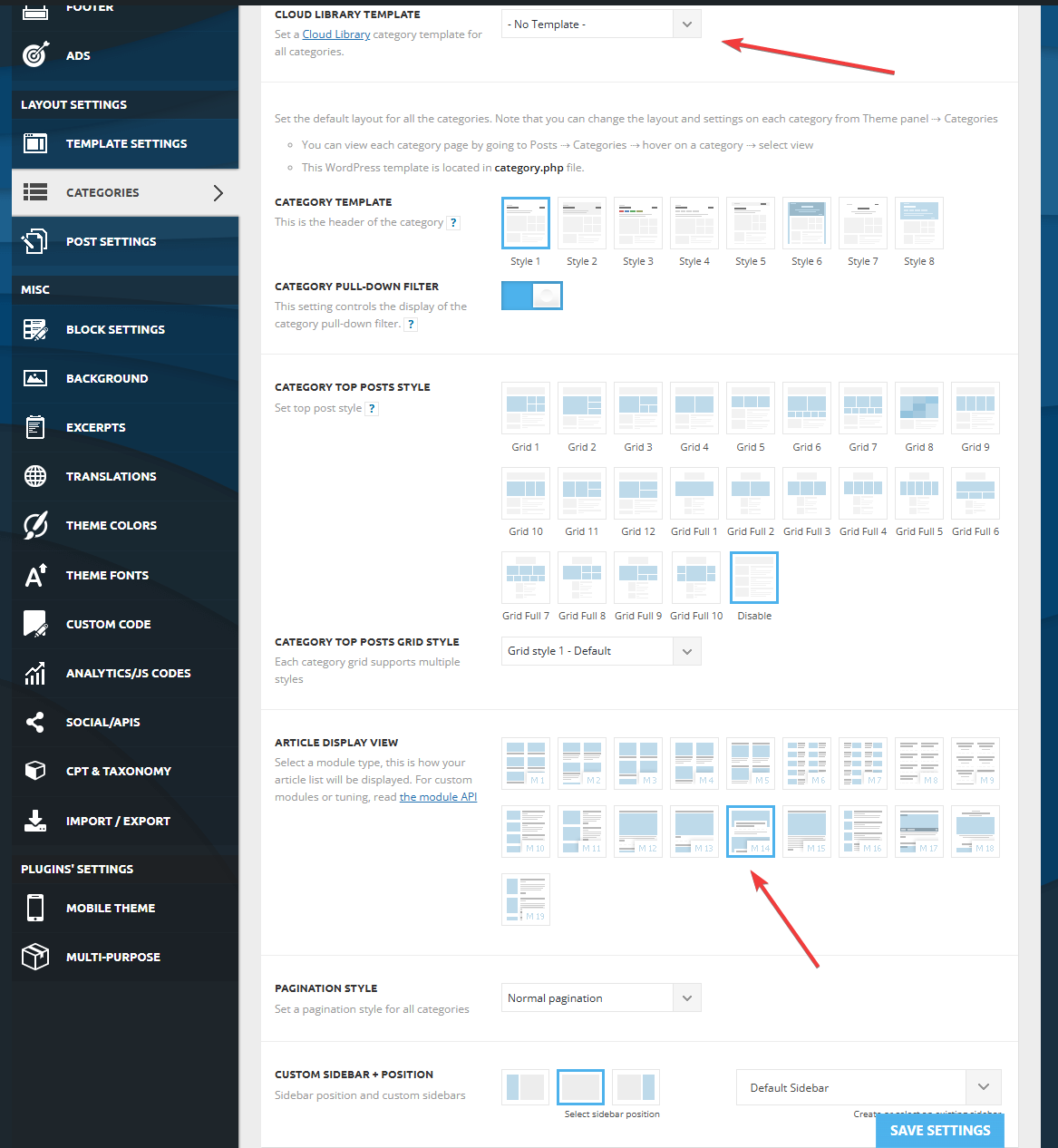
Any help is highly appreciated. If needed I can provide further screenshots.
Thank you for your help.
Calin Hi,
By default, the H1 is set on logo, if it is a cloudyou can use tagDiv Composer to disabnle the h1 (it is need to be done on all logo elements from bith mobile and desktop viewport) https://i.imgur.com/0BjZdOj.png, but when you get on an article the h1 will be set on article title, for pages to remove the h1 from logo you’ll need to set the page template on pagebuilder + page title -> https://i.imgur.com/ElmwJQR.png then the H1 will be set on page title. The H1 is an important element for SEO and it should be present on the page.
Thank you!
 Crw19
Crw19 I have the EWWW image optimizer installed. I have regenerated the thumbnails and the issue is still there. It’s not just in the post template page – it’s also on the home page of the mobile, the thumbnails are all over the place and look incorrectly sized.
 Aldis
Aldis Hi Calin,
Perhaps you did not understand the essence of the questions. We do not publish articles in draft or draft form ourselves. We have created AI automation on the n8n platform, which itself creates professional, good articles on topics that are not written by others using artificial intelligence modules and then the AI agent automatically places the article on our page under drafts. So, everything is going correctly for us on Elementor pages and the automated placement of articles is happening without errors, but only the title appears in your theme and the rest of the article is not accepted from the AI agent. A possible problem is that when working with your theme you have to choose a single post template, etc. We need to find a solution so that your theme accepts articles created by our AI agent.
Calin Hi,
1. With the Newspaper builder theme, you can create pages and cloud templates, but you can not create templates for pages. You create a page how you like it and if you want to use that one as a template you just duplicate the page and change in it the elements you want to be changed.
2. The “Single Post Author” element is used on post templates and this will be used as template element for authors on single post template https://i.imgur.com/BhZHHbJ.png https://i.imgur.com/ZfSV6nD.png
3. The colors can be changed using tagDiv Composer check the Manager and global colors – https://i.imgur.com/lwb7sNv.png
Thank you!
 jjgoi
jjgoiHi,
I recently bought the Newspaper template and used the Forest Beat theme and found the experience to be so extremely difficult-to-use and cumbersome.
It doesn’t come with a page template – which is fine – but clearly there’s no way for me to even create a tagdiv template at all that my non-post pages can use. A hacky way I did was to import any random template into “Page”, and copy-pasted the Base64-encoded source.
I went through your knowledgebase and there doesn’t seem to be any way to figure out how this can be used?
1. How do you even add your own template such that it can be used by pages? I only just need a simple page layout but seems to be an impossible task.
2. If I want to customise the “Single Post Author” component on a page, I noted the default Forest Beat overrides font-size as 16px, somehow I cannot replicate that via the tagDiv composer?
3. I wanted to change the theme colours of Forest Beat, from the theme colours tab, I can only change the primary accent and a bunch of other colours, but I cannot find these:
--light-green-forest-beat – where can I modify this?
The entire tbd-global-colors block (via view-source) is:
--mm-custom-color-4:#C2A25D;--mm-custom-color-5:#F7F9F9;--mm-custom-color-1:#053426;--mm-custom-color-2:#B79259;--mm-custom-color-3:#79847E;--accent-color:#fff;--accent-forest-beat:#5c6b28;--dark-green-forest-beat:#1D2110;--white-forest-beat:#FFFFFF;--transparent-white-forest-beat:rgba(255,255,255,0.25);--transparent-white-2-forest-beat:rgba(255,255,255,0.6);--transparent-white-3-forest-beat:rgba(255,255,255,0.7);--transparent-dark-green-forest-beat:rgba(29,33,16,0.8);--transparent-dark-green-2-forest-beat:rgba(29,33,16,0.25);--light-green-forest-beat:#F3F7EE;--transparent-dark-green-3-forest-beat:rgba(29,33,16,0.65)
Is the experience intended to be like that?
 daveslc
 Ok, thanks. But…with the attachment page templates, Tagdiv uses the description field. But it’s the caption field that needs to be displayed (this is the default for WP but you are using something else). We are using one of your cloud based attachment page templates.
[tdb_attachment_description]
Is there: [tdb_attachment_caption]?
Calin Hi,
It seems there may be a misunderstanding here. Perhaps you’ve previously used a different theme that handled things a certain way, and now you’re expecting all themes to behave similarly. If that’s the case, I’m sorry to disappoint you.
As I mentioned before, when you install a demo, only the content and layout specific to that demo are included. For example, if you want to set up a shop, you’ll need to configure it manually using tagDiv Composer and tagDiv Shop (please make sure the plugin is installed, as I mentioned earlier).
Once the necessary plugin is active, you can use tagDiv Composer to build your shop pages. There are also pre-designed templates available, which you can easily import from the Cloud Library:
https://demo.tagdiv.com/select_demo/newspaper-prebuilt-websites/?demo-type=shop
To clarify again: when you add new functionality like a shop that wasn’t part of the originally installed demo, the layout for those new features won’t exist by default. You’ll need to create or import the layout manually.
Thank you!
 Qplus Account
 But in your plugin documentation, you mention that all major plugins like bbPress and WooCommerce have been tested for compatibility. I understand that some plugin-specific styles may differ, and that’s acceptable.
However, basic styling elements like font family, font size, and button styles are not being applied at all. If I choose a template, the default pages — including plugin pages — should inherit the selected template’s fonts, font sizes, and layout. But that’s not happening, and that’s what concerns me.
Honestly, this feels quite unethical, especially considering the premium price paid for the theme.
Calin Hello,
When you install a demo, only the pages, the templates and elements included in that specific demo will use its layout and design. If you create new pages or add additional features, such as a shop (using WooCommerce), forum pages, or other content, these will not automatically have a template applied, as they are considered custom additions.
However, there’s no need to worry! The theme allows you to fully customize templates to achieve the layout you want. You can do this using tagDiv Composer along with Cloud Templates.
For creating and customizing shop pages specifically, you’ll need to install the tagDiv Shop plugin. You can do this by going to Newspaper > Plugins in your WordPress dashboard. Once installed, you’ll be able to create and edit shop templates using the theme builder.
Thank you for your understanding!
 olejohan
 Hi again Calin
Maybe you misunderstand me.
Do you have a mail where I can send you screenshots?
I am creating the page in WordPress editor (and on the bottom you choose the Post template: (I assume that are how you would like the page to be setup (page layout))
And I assume you then should able able to edit it, independently without it then affect all other posts, including demos?
The strange thing are that all post was correct, I have been working on the site for about two weeks and all was ok, until suddenly every post was the same.
I assume if it was template affected, it would change all post in the same moment, not weeks later 🙂
I want to leave the side as it is (if you want to look at it) – if not I will reinstall it, staring over again, uploading the posts from xml file – so I not lost much (I hope), still it would be interessting to know why it actually happened.
website: http://www.pomeranian.dk
-
This reply was modified 1 year by
 Calin.
Calin Hi,
I believe there’s a misunderstanding. tagDiv Composer is a page builder—you can use it to create pages and cloud templates. In your case, you can create templates for articles, but not the articles themselves. What it allows is customizing the layout and elements that your articles will use.
Once the template is ready, you’ll use the WordPress editor to actually create and write the articles. https://i.imgur.com/WA5GrgO.png https://forum.tagdiv.com/design-post-pages-using-cloud-library-templates/
Qplus AccountI purchased the Newspaper theme and imported the Beauty PRO template. The post pages are working fine and have the correct layout. However, other pages like Terms and Conditions, WooCommerce pages, bbPress forum pages, and other plugin-generated pages are not inheriting the template styles.
They should be using the same theme styles, right? But they’re not. I tried manually setting the font family, line height, and font size from the Theme Panel, but I’m not sure if I’m using the correct values.
I emailed contact@tagdiv.com regarding this, but I haven’t received any response. I’m not sure what to do at this point. When I checked their demo site, the shop page had a completely different layout from mine.
I’m not someone who knows coding. If they expect us to do everything manually, then what’s the point of purchasing this theme at such a high cost, especially if they don’t provide proper styling support?



